Sponsored

Do "we" know how the reverse camera feed is trigger?

airline tech

Well-Known Member
Joined
Aug 24, 2022
Threads
28
Messages
4,448
Reaction score
8,500
Location
Midwest - KS
Vehicle(s)
2022 Ranger Lariat-Super Crew, Cactus Gray
Occupation
Aircraft Tech
As I'm not quite sure about adding aftermarket camera, I think your issue is the shielded wire, you may need to get some for it.

Youtube has some videos on splicing shielded wire, note the video I found shows a twisted pair of inner core wires, twisted pair is not on the camera, the only thing that comes to mind that has twisted pair on the ranger is for ABS, but the principle is the same as the shield goes

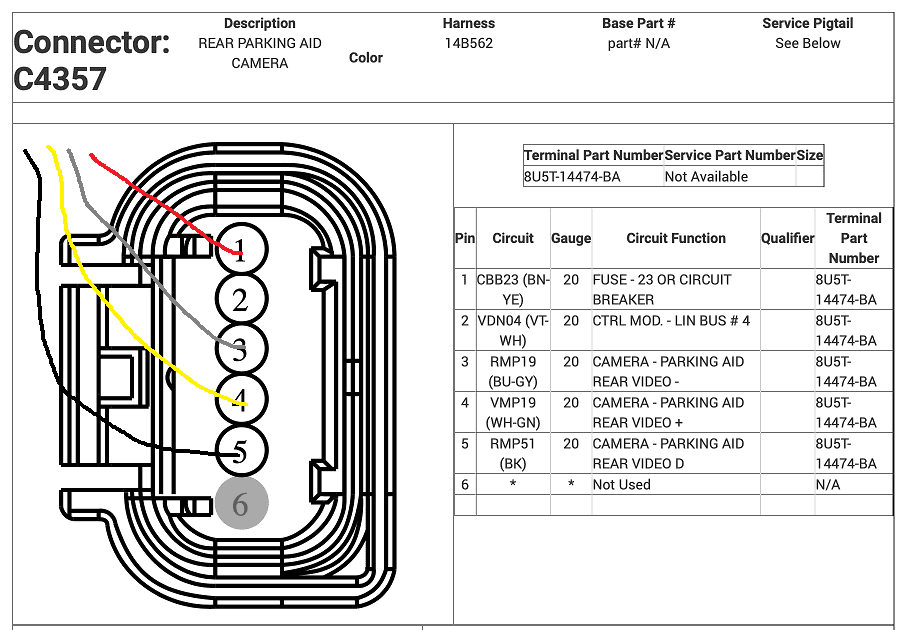
Wire (Pin) 1 = Power in from DC/DC Converter

Wire (Pin) 2 = Trigger Signal from BCM, that Gear is in Reverse,

Basically wire's 3-4-5, are in a separate wire sleeve - Think Co-Ax as a mental picture
Wires 3 & 4 are inner core wires, braded strand is considered wire #5 and is grounded usually on one end only, both ends will distort video
Wire 3 = Video (-)/ Wire 4 = Video (+) / Wire 5 = Braded Shield - Ground

I have only dealt with shielded wire on aircraft, so no modifications to the factory wiring, just repairs. so not sure how it will affect adding in aftermarket camera

This should clear the video feed up, its distorted due to electrical interference, similar to grainy distorted cable TV, due to bad crimped coax connector
Sponsored
 
OP
OP
Canuckian

Canuckian

Well-Known Member
Joined
Jan 10, 2022
Threads
3
Messages
134
Reaction score
356
Location
Canada
Vehicle(s)
2022 Ranger Crew Cab Lariat Blackout
This is the best I've been able to do on this aftermarket camera anyone have any ideas?

Was that triggered just by providing power to the camera?

Looks like choice of camera might be a problem if that is you aftermarket camera.
 
OP
OP
Canuckian

Canuckian

Well-Known Member
Joined
Jan 10, 2022
Threads
3
Messages
134
Reaction score
356
Location
Canada
Vehicle(s)
2022 Ranger Crew Cab Lariat Blackout
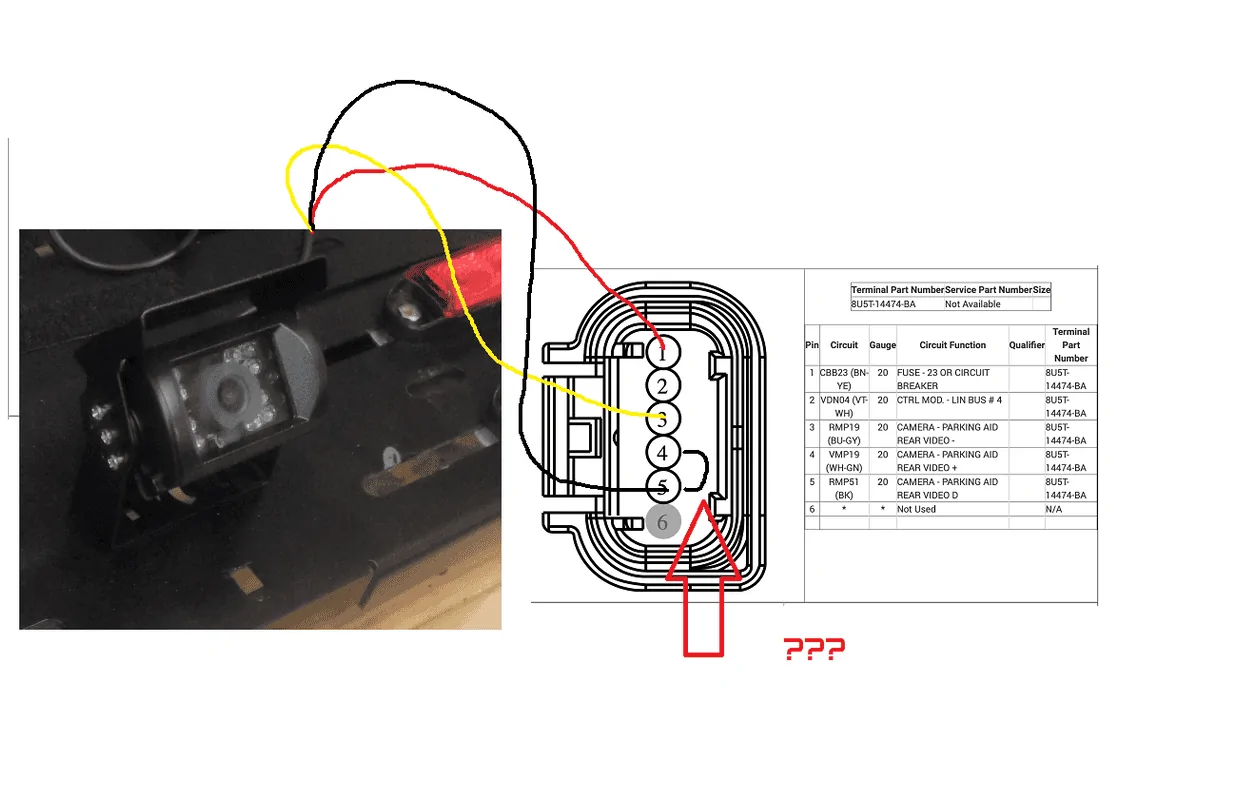
3 pin camera I am also working on the assumption the 2 pins I am forgoing are for guidelines and sensors which I don't need. Factory wiring diagram is clear as mud. I located what appears to be data signal in #3 (as #2 / #4 give no video at all when tested.
#1 is power and #5 appears to be ground.
See, I was thinking about using a camera with a standard RCA connector and splitting it behind the dash with a power relay to trigger it, rather than splicing off the original harness. It’s more wiring, but less issue with identifying pins etc..
 
Last edited:
OP
OP
Canuckian

Canuckian

Well-Known Member
Joined
Jan 10, 2022
Threads
3
Messages
134
Reaction score
356
Location
Canada
Vehicle(s)
2022 Ranger Crew Cab Lariat Blackout
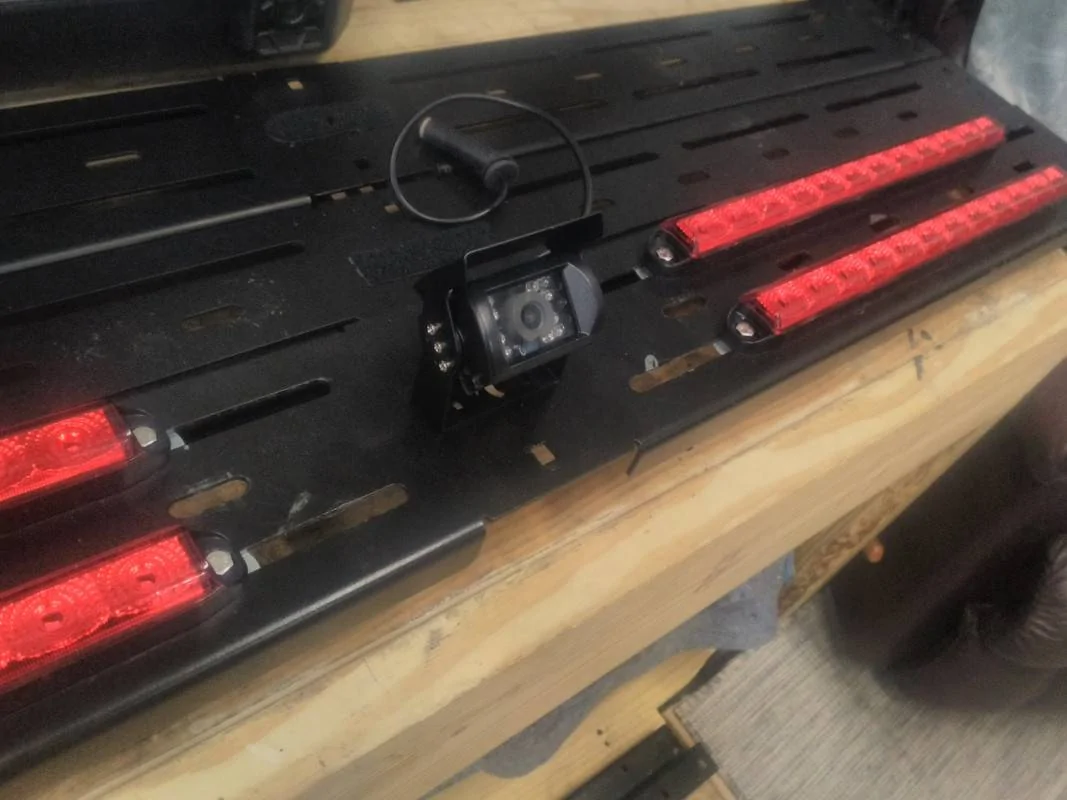
It came with a standard 4 pin head connector, I cut it off to access the internal wiring so I could wire it to the factory system.

I'm still not having much luck, same weird screen when engaging backup camera. It is still a mystery what the unsed wire for the BUS LIN is for (though I know it speaks to the BCM).

I tried swapping both ground type wires (which resulted in a total loss of picture). Same result swapping the yellow wire to the LIN bus connection (yea I was shooting in the dark on this) At least a scrambled picture tells me I am on the right path with below config. I dunno in the end this camera may just not work with the Ford system, but it was worth a try.

test 2.png


I guess I just need to research a better housing for the factory camera instead of the giant junction box I am using now.
I think the problem is that the video feed inputs at the back of the sync unit by RCA connector (from another posters pic during head unit swap) which has its own pos and neg. So there is a pos and neg for camera power, and and rca pos and neg.
 

OFC Ranger

Well-Known Member
First Name
Jack
Joined
Aug 3, 2020
Threads
297
Messages
5,019
Reaction score
13,925
Location
Georgia
Vehicle(s)
ZR2
As I'm not quite sure about adding aftermarket camera, I think your issue is the shielded wire, you may need to get some for it.

Youtube has some videos on splicing shielded wire, note the video I found shows a twisted pair of inner core wires, twisted pair is not on the camera, the only thing that comes to mind that has twisted pair on the ranger is for ABS, but the principle is the same as the shield goes

Wire (Pin) 1 = Power in from DC/DC Converter

Wire (Pin) 2 = Trigger Signal from BCM, that Gear is in Reverse,

Basically wire's 3-4-5, are in a separate wire sleeve - Think Co-Ax as a mental picture
Wires 3 & 4 are inner core wires, braded strand is considered wire #5 and is grounded usually on one end only, both ends will distort video
Wire 3 = Video (-)/ Wire 4 = Video (+) / Wire 5 = Braded Shield - Ground

I have only dealt with shielded wire on aircraft, so no modifications to the factory wiring, just repairs. so not sure how it will affect adding in aftermarket camera

This should clear the video feed up, its distorted due to electrical interference, similar to grainy distorted cable TV, due to bad crimped coax connector
Well what I did was peel back about 1" of sleeve to expose they extreme thin shielding while leaving other 3 wire insulation in tact. I then got a fresh wire stripped it back and wrapped twisted it around exposed shielding. I then taped it back into a bundle. That is how I created the 4th physical wire connection. As redneck as that is shouldnt lt technically have worked?


OFC Ranger

Well-Known Member
First Name
Jack
Joined
Aug 3, 2020
Threads
297
Messages
5,019
Reaction score
13,925
Location
Georgia
Vehicle(s)
ZR2
Was that triggered just by providing power to the camera?

Looks like choice of camera might be a problem if that is you aftermarket camera.
Whatever the trigger is it is down the line somewhere. All I can say is I believe #1 is the trigger as it's a power line to a fuse.

I still want to know why the BUS LIN (#2) interacts with camera system, can't find any detailed info.
 
Last edited:

airline tech

Well-Known Member
Joined
Aug 24, 2022
Threads
28
Messages
4,448
Reaction score
8,500
Location
Midwest - KS
Vehicle(s)
2022 Ranger Lariat-Super Crew, Cactus Gray
Occupation
Aircraft Tech
Scratch my above post's and let's start over, the attachment I posted on the rear camera diagram is vague and it does not show the detailed info, so I'm adding these, it is a little clearer.
The Data Bus is what is making it confusing, and also note the splice #301 on the power dist, the diagram for the rear camera circuit, shows the splice but not connected. I have not dealt with a CAN vehicle before and the data busses intermix all over the place, I think if you pay attention to the VDB04 and VDB05, these buses directly relate to the Camera (for clarification only) I need to dig deeper but it appears that once it passes through a connector and involves another system it changes the VBD #, even though it's the same wire. I think anyways that is how the communication side of the buss appears to work. To allow all the modules to communicate with each other and know the position of switches, PCM info etc

Hope these will help figuring it out, the Power Dist does clear it up better as far as power is concerned

Read the Camera Ops-PDF it explains somewhat better, though not perfect

Note: In the diagrams

LIN = Local Interconnect Network

NCA= Wire Unseen (Inside shielded cable)
 

Attachments

Last edited:

daczone

Well-Known Member
First Name
Dave
Joined
Dec 22, 2020
Threads
34
Messages
404
Reaction score
646
Location
Oregon
Vehicle(s)
2020 Ranger
Reading so far (rear camera ops) it would seem like, while not ideal, for the camera to visually work that bus lin connector is completely unneeded as all I want is a visual on the back with the camera. But my guess is the Ford engineers wouldn't make it that easy on me...
I know this is a late post.

Looks like you need a Differential-to-composite video adapter.

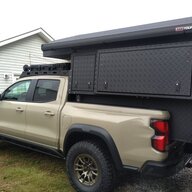
I'm reading this because I am looking at feeding my factory camera into a rear camera mirror for my canopy (topper) install. I'd still like to see what's behind me, instead of what my dog is doing.
 

jblc

Well-Known Member
First Name
JB
Joined
Nov 15, 2020
Threads
75
Messages
749
Reaction score
644
Location
USA
Vehicle(s)
2021 XLT FX2 supercab
So, just to ask explicitly the backup camera is a differential (non-grounded / floating) output?
 
OP
OP
Canuckian

Canuckian

Well-Known Member
Joined
Jan 10, 2022
Threads
3
Messages
134
Reaction score
356
Location
Canada
Vehicle(s)
2022 Ranger Crew Cab Lariat Blackout
So, just to ask explicitly the backup camera is a differential (non-grounded / floating) output?
My understanding is that ultimately it ends up as a video RCA connector at the back of the dash display. Haven’t confirmed that yet but planning to soon.
 

daczone

Well-Known Member
First Name
Dave
Joined
Dec 22, 2020
Threads
34
Messages
404
Reaction score
646
Location
Oregon
Vehicle(s)
2020 Ranger
So, just to ask explicitly the backup camera is a differential (non-grounded / floating) output?
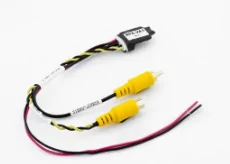
According to the wiring, Yes. I have ordered a pair of PAC RPA-VA1 Video adapters for myself and a friend. Want to put the rear camera into a mirror to use with a canopy (topper). I want to leave the factory backup camera in the dash, but use a digital mirror for full time use (using a 4k mirror dash cam from Amazon). The PAC RPA-VA1 is listed as:
  • Converts differential video signal to a single-ended composite video signal
  • Improves display of OE camera on the aftermarket radio
  • Reduces/eliminates video noise
  • Two-wire power connection for simple installation
  • Great for Ford and Chrysler vehicles and many more
  • Twisted pair wiring construction on input RCA makes it easy to hard-wire into the vehicle if needed (Cut off RCA where indicated in image)
And I realize I will cut the RCA ends off and directly wire it.

1674233373542.webp
 
OP
OP
Canuckian

Canuckian

Well-Known Member
Joined
Jan 10, 2022
Threads
3
Messages
134
Reaction score
356
Location
Canada
Vehicle(s)
2022 Ranger Crew Cab Lariat Blackout
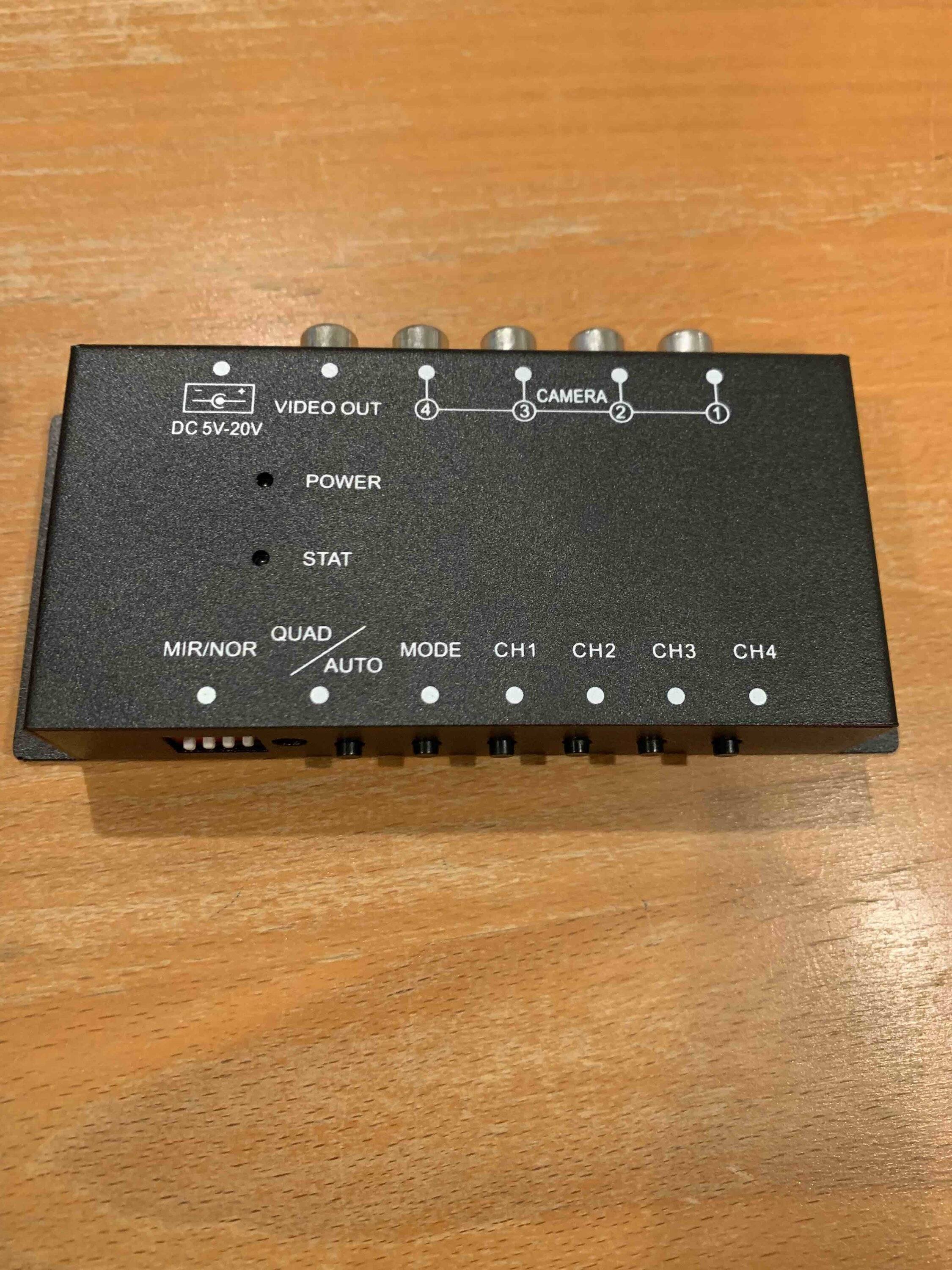
My strategy is that I picked up a simple 4 channel RCA video box off amazon that lets you select any of 4 inputs, or view multiples in split screen or quad view. Was hoping we would collectively find a simple trigger, like that powering the camera sends signal down the RCA and triggers the presentation the the video feed on the dash screen. Looking unlikely, so I may default to a separate screen for front, side and high position rear view cameras.

IMG_5281.jpg
 

canyonslicker

Well-Known Member
First Name
Andy
Joined
Jun 13, 2021
Threads
43
Messages
1,437
Reaction score
5,294
Location
California
Vehicle(s)
2021 Ranger Lariat
Occupation
65 YO Juvenile Delinquent
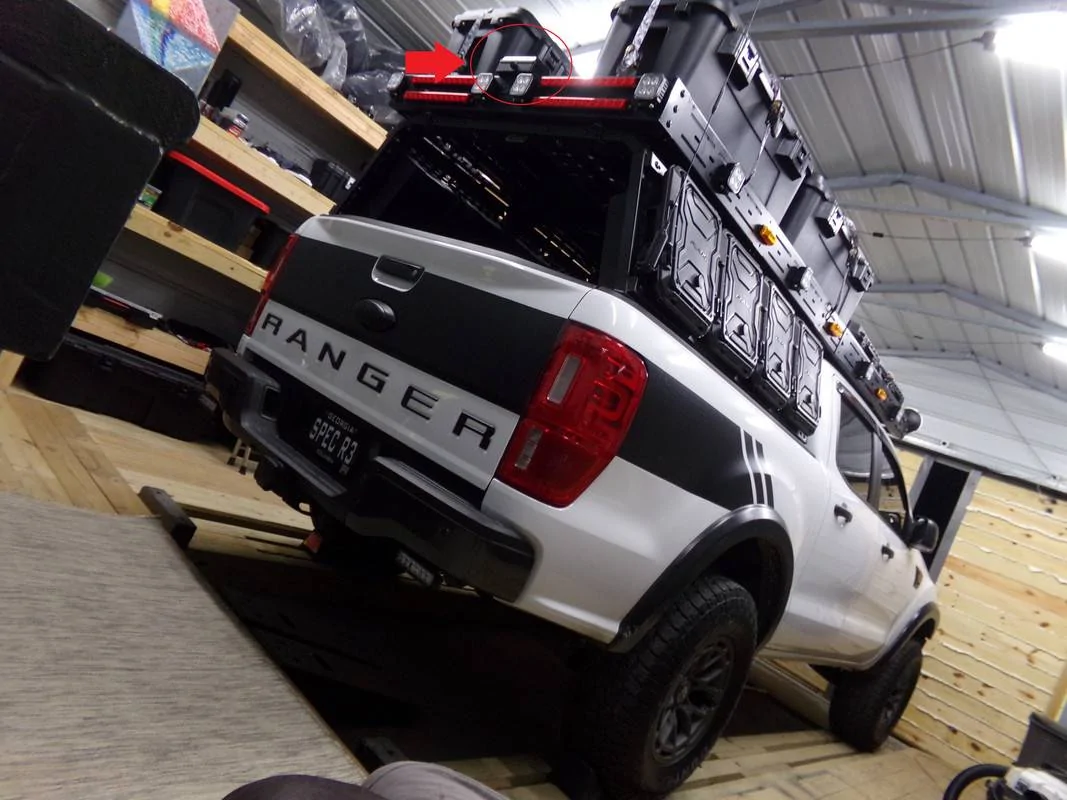
Ok the simple of it this; here is my current setup. I relocated my factory camera to the top of my rack. As the camera was not designed for external use, I basically used a trailer junction box to make a housing for it. I am assuming that is why I was tagged in the OP.

However this task was a simple snipping of the harness and extending it, re-using all 5 connections.

100-0143.jpg


In a nutshell, it works fine, but I would like a cleaner install/look. So I bought an aftermarket camera making sure it used the same formatting as factory camera (ie; not PALS).

img-20221104-180720-jpg.jpg


What you see in the video is the camera working (sort of), but clearly the quality is all screwed up AND its in black and white.

The other thing I have no tried doing yet is also running a negative line to #4

Screen-Shot-2019-11-01-at-2-53-00-PM.png


What I would also like to know is what does the "D" stand for on #5

I guess depending how complex Ford's system is it may require all 5 lines of use, but in general a camera should only need 3 connections, power, ground, and data. I could be working off the completely wrong assumption other lines are dedicated for parking software or such.
I believe the D on pin 5 is “delayed”. You can set the rear camera turn off to be delayed for something like 10-20 seconds.
 

OFC Ranger

Well-Known Member
First Name
Jack
Joined
Aug 3, 2020
Threads
297
Messages
5,019
Reaction score
13,925
Location
Georgia
Vehicle(s)
ZR2
I gave up on integrating an after market camera because I was only willing to go as far as the rear harness to get it operating. I am sure I could get it working further if I was willing to go all the way to the head unit and convert something there.

But I'm not.

Down the road I will simply design a project box that better fits the factory camera more cleanly, or just go with a whole separate third party system.

In a nut shell, there is more at play than just wiring a third party camera to the factory rear harness. It doesn't work, the best I could get was a video with extremely bad quality.
Sponsored


Top