Sponsored

Do "we" know how the reverse camera feed is trigger?

Canuckian

Well-Known Member
Joined
Jan 10, 2022
Threads
3
Messages
134
Reaction score
356
Location
Canada
Vehicle(s)
2022 Ranger Crew Cab Lariat Blackout
Does the Ranger5G community possess this knowledge? I am thinking specifically about how the rear camera is triggered to show on the SYNC screen. I have this ill formed impression that it is the power to the camera that is controlled by the reverse selector or one of the modules and that when powered SYNC defaults to the camera feed. Not sure where I got that impression. Maybe in @OFC Ranger's posts when he was looking at relocating the rear camera?

My reason for asking is because if this was the case it might open the way for an improvised custom multi-camera system without the need for a system like the Rostra box that has been discontinued.
Sponsored
 

OFC Ranger

Well-Known Member
First Name
Jack
Joined
Aug 3, 2020
Threads
297
Messages
5,019
Reaction score
13,925
Location
Georgia
Vehicle(s)
ZR2
Does the Ranger5G community possess this knowledge? I am thinking specifically about how the rear camera is triggered to show on the SYNC screen. I have this ill formed impression that it is the power to the camera that is controlled by the reverse selector or one of the modules and that when powered SYNC defaults to the camera feed. Not sure where I got that impression. Maybe in @OFC Ranger's posts when he was looking at relocating the rear camera?

My reason for asking is because if this was the case it might open the way for an improvised custom multi-camera system without the need for a system like the Rostra box that has been discontinued.
From my understanding the trigger mechanism occurs when the truck is placed in reverse via power. The question is what power line in the reverse system triggers it? Reverse lights? BCM queue to power? Some other power line? No clue. It could be any number of things that triggers that power line.

Funny you made this thread, I am about to try rigging a 4 pin camera to this system (technically I only need 3 lines; power, ground, data as I don't need the sensor/assist lines, which I assuming making up the other 2 lines in the 5 pin system ford uses). Its a simple test, it will either work or not work. If my simple 1 camera swap works, your idea for something more elaborate should work too, but getting a multi-camera system to work on SYNC vs its own monitor sounds like a monster project to tackle.

img_20221104_180720-jpg.webp
 
OP
OP
Canuckian

Canuckian

Well-Known Member
Joined
Jan 10, 2022
Threads
3
Messages
134
Reaction score
356
Location
Canada
Vehicle(s)
2022 Ranger Crew Cab Lariat Blackout
My thinking is that if the power is the controlling mechanism, all SYNC knows is that it is connect to an RCA feed. If that RCA feed was split to multiple cameras, but a selector switch was controlling which camera is powered, the SYNC system would not need to be modified. Whether the speed limiter in SYNC is also controlled by power, or within the sync system is a potential confounding factor.

Would be interesting to know if powering the reverse camera when the truck is not in reverse, would sync display the video?
 

OFC Ranger

Well-Known Member
First Name
Jack
Joined
Aug 3, 2020
Threads
297
Messages
5,019
Reaction score
13,925
Location
Georgia
Vehicle(s)
ZR2
My thinking is that if the power is the controlling mechanism, all SYNC knows is that it is connect to an RCA feed. If that RCA feed was split to multiple cameras, but a selector switch was controlling which camera is powered, the SYNC system would not need to be modified. Whether the speed limiter in SYNC is also controlled by power, or within the sync system is a potential confounding factor.

Would be interesting to know if powering the reverse camera when the truck is not in reverse, would sync display the video?
I can easily test that for you later this week. Right now my rack/platform is torn down for some maintenance and fresh paint, my target is to get it back together by the end this weekend.

Actually I may be able to do it tomorrow as the 5 pin harness I made is sitting wide open in the bed of my truck right now. I'll run a line to my ignition on tap and that should answer that... (not sure about speed limiter tho). Maybe I can drive around the block.


OP
OP
Canuckian

Canuckian

Well-Known Member
Joined
Jan 10, 2022
Threads
3
Messages
134
Reaction score
356
Location
Canada
Vehicle(s)
2022 Ranger Crew Cab Lariat Blackout
Cool. Alternatively I will try it one of these weekends when my home renovations are done.
 

airline tech

Well-Known Member
Joined
Aug 24, 2022
Threads
28
Messages
4,448
Reaction score
8,507
Location
Midwest - KS
Vehicle(s)
2022 Ranger Lariat-Super Crew, Cactus Gray
Occupation
Aircraft Tech
Trigger is BCM - Pin #37 with a quick look at Diagram, have to dig deeper as to how BCM gets info that truck is in reverse

EDIT:

The Reverse signal comes from the CAN Bus Data Lines (VCB-04 and VCB-05.
Trans Ranger Selector - Sends signal to PCM
PCM sends signal via Data Lines to BCM and APIM
 

Attachments

Last edited:

jblc

Well-Known Member
First Name
JB
Joined
Nov 15, 2020
Threads
75
Messages
749
Reaction score
644
Location
USA
Vehicle(s)
2021 XLT FX2 supercab
No idea what's being shown :D
What's the setup? What are you changing? Are you manually turning on the camera somehow?
 

OFC Ranger

Well-Known Member
First Name
Jack
Joined
Aug 3, 2020
Threads
297
Messages
5,019
Reaction score
13,925
Location
Georgia
Vehicle(s)
ZR2
No idea what's being shown :D
What's the setup? What are you changing? Are you manually turning on the camera somehow?
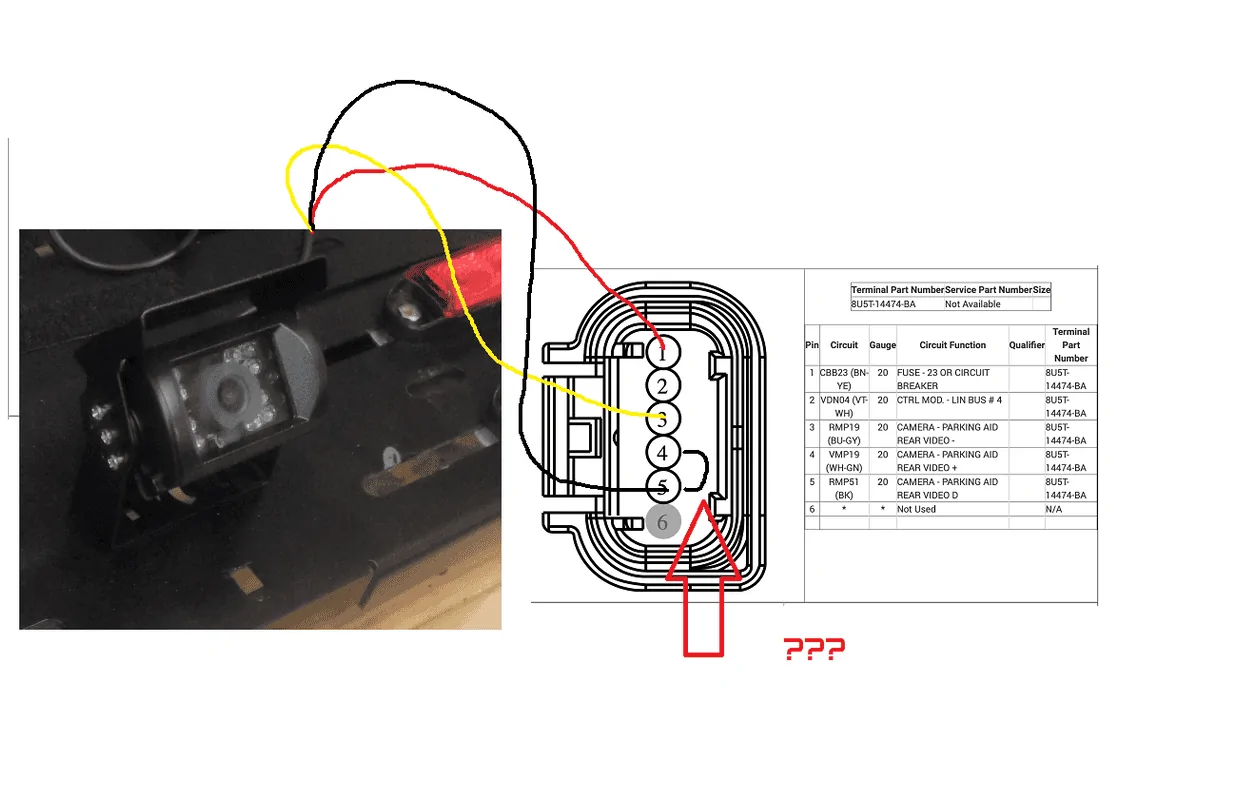
3 pin camera I am also working on the assumption the 2 pins I am forgoing are for guidelines and sensors which I don't need. Factory wiring diagram is clear as mud. I located what appears to be data signal in #3 (as #2 / #4 give no video at all when tested.
#1 is power and #5 appears to be ground.
 
Last edited:

jblc

Well-Known Member
First Name
JB
Joined
Nov 15, 2020
Threads
75
Messages
749
Reaction score
644
Location
USA
Vehicle(s)
2021 XLT FX2 supercab
3 pin camera I am also working on the assumption the 2 pins I am forgoing are for guidelines and sensors which I don't need. Factory wiring diagram is clear as mud. I located what appears to be data signal in #3 (as #2 / #4 give no video at all when tested.
#1 is power and #6 appears to be ground.
Thanks. I'm not sure I follow though. What are you trying to do in this test, and what's the test setup? What is the video showing...is this a normal connection, or are you connecting somewhere else? Are you turning it on in a special way? You mentioned pinouts, but how does that relate to your video? Etc.

We might be able to give feedback if what you're doing and showing is clarified :)
 

OFC Ranger

Well-Known Member
First Name
Jack
Joined
Aug 3, 2020
Threads
297
Messages
5,019
Reaction score
13,925
Location
Georgia
Vehicle(s)
ZR2
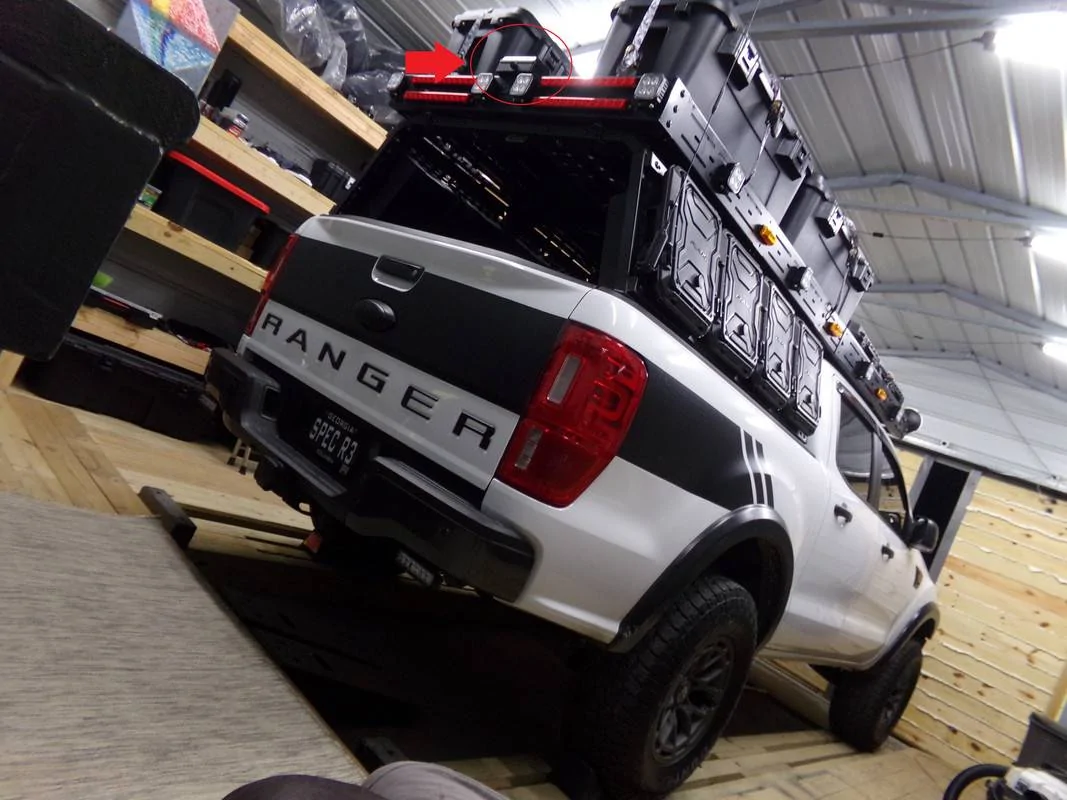
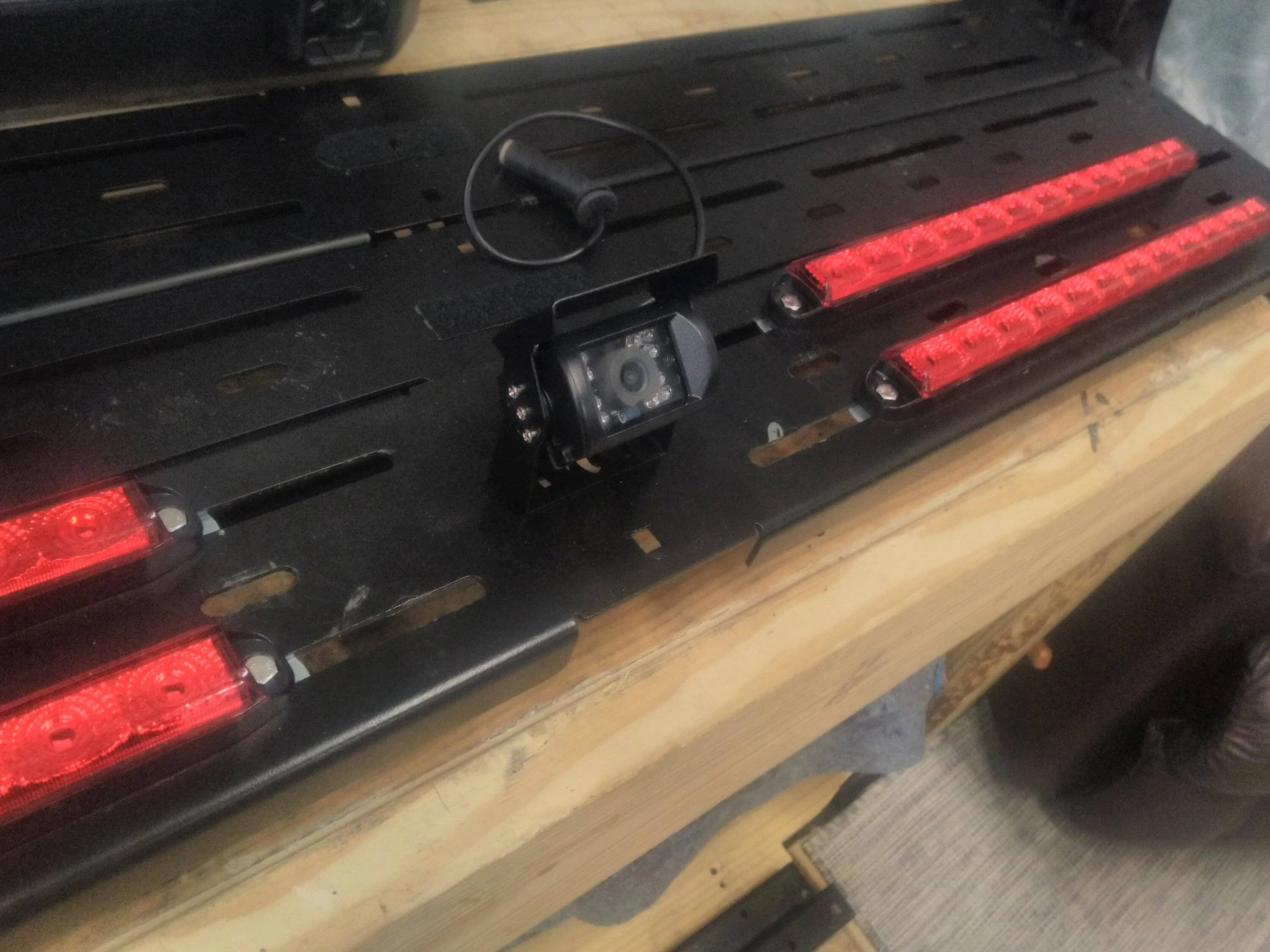
Ok the simple of it this; here is my current setup. I relocated my factory camera to the top of my rack. As the camera was not designed for external use, I basically used a trailer junction box to make a housing for it. I am assuming that is why I was tagged in the OP.

However this task was a simple snipping of the harness and extending it, re-using all 5 connections.

100-0143.jpg


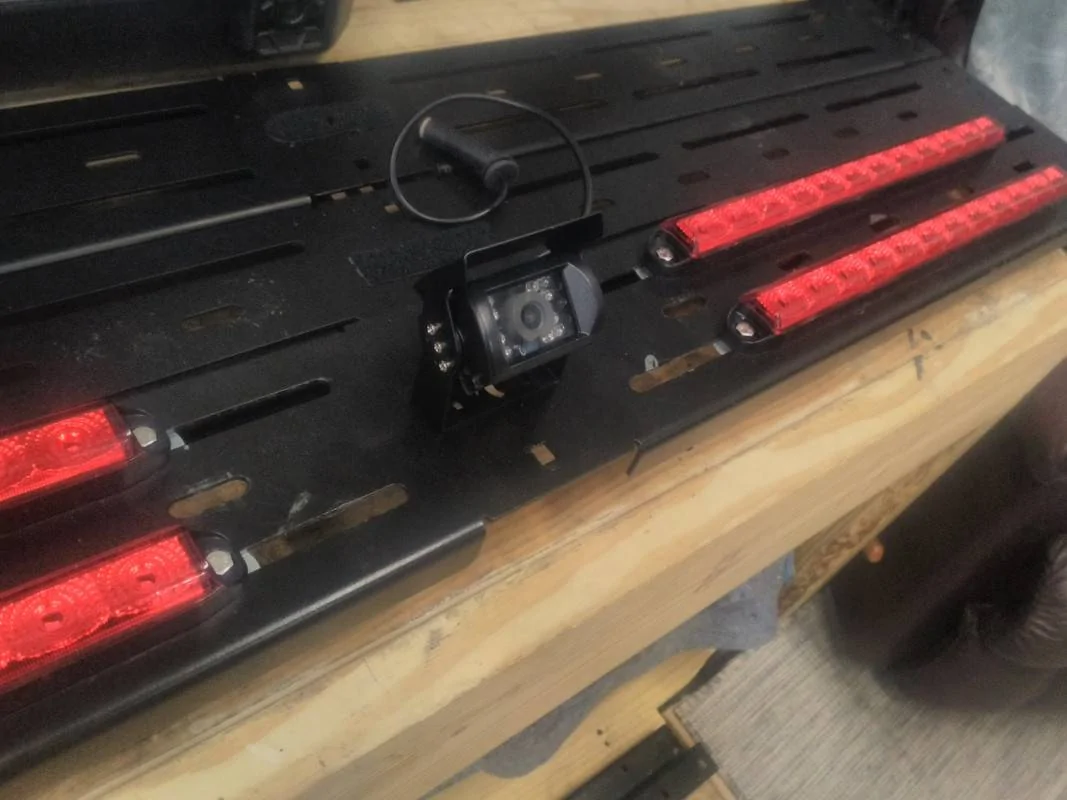
In a nutshell, it works fine, but I would like a cleaner install/look. So I bought an aftermarket camera making sure it used the same formatting as factory camera (ie; not PALS).

img-20221104-180720-jpg.jpg


What you see in the video is the camera working (sort of), but clearly the quality is all screwed up AND its in black and white.

The other thing I have no tried doing yet is also running a negative line to #4

Screen-Shot-2019-11-01-at-2-53-00-PM.png


What I would also like to know is what does the "D" stand for on #5

I guess depending how complex Ford's system is it may require all 5 lines of use, but in general a camera should only need 3 connections, power, ground, and data. I could be working off the completely wrong assumption other lines are dedicated for parking software or such.
 
Last edited:

Gord

New Member
First Name
Eric
Joined
Sep 13, 2022
Threads
0
Messages
2
Reaction score
1
Location
Scottsdale, AZ
Vehicle(s)
2022 Supercab
Occupation
Engineer
Ok doing some more research, may be on to something, there is a fourth connection, but its the shielding. The shielding ground "connection" is not the same as a power ground. I guess I'll piddle with it some more tomorrow.
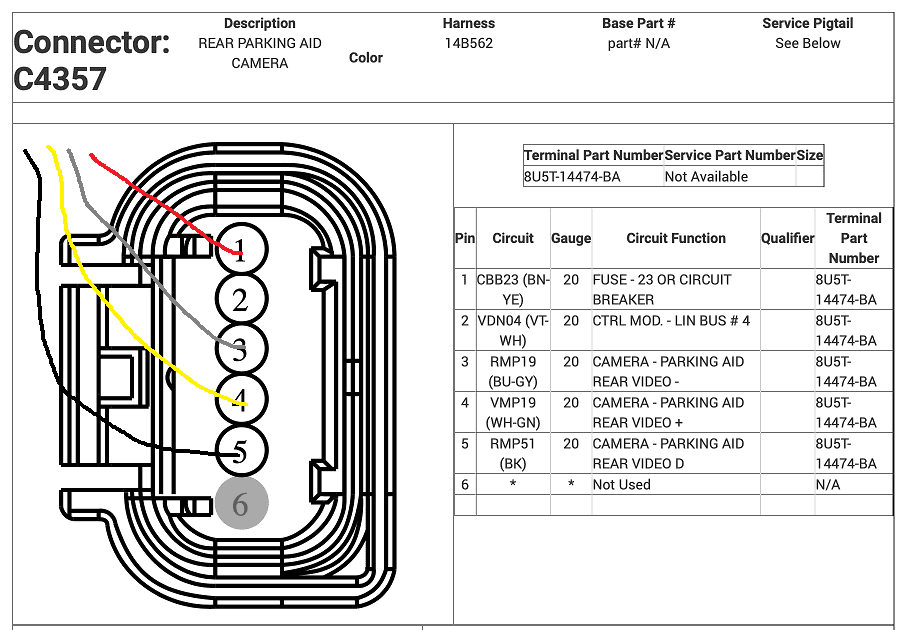
The signal names for pins 4 and 5, with - and + at the ends of the names, suggest that the signal is sent as a differential pair with the signal on one line and the inverse of it on the other. This improves noise immunity at the receiver since taking the difference of the two lines will recover the signal but reject any noise or interference that is common to both lines. It is possible that one of those may be connected to the shield, but that would be unusual. Usually the shield is connected to ground, and usually only at the transmit end of the line.

Was there not a wire connected to pin 4?
 

OFC Ranger

Well-Known Member
First Name
Jack
Joined
Aug 3, 2020
Threads
297
Messages
5,019
Reaction score
13,925
Location
Georgia
Vehicle(s)
ZR2
The signal names for pins 4 and 5, with - and + at the ends of the names, suggest that the signal is sent as a differential pair with the signal on one line and the inverse of it on the other. This improves noise immunity at the receiver since taking the difference of the two lines will recover the signal but reject any noise or interference that is common to both lines. It is possible that one of those may be connected to the shield, but that would be unusual. Usually the shield is connected to ground, and usually only at the transmit end of the line.

Was there not a wire connected to pin 4?
It came with a standard 4 pin head connector, I cut it off to access the internal wiring so I could wire it to the factory system.

I'm still not having much luck, same weird screen when engaging backup camera. It is still a mystery what the unsed wire for the BUS LIN is for (though I know it speaks to the BCM).

I tried swapping both ground type wires (which resulted in a total loss of picture). Same result swapping the yellow wire to the LIN bus connection (yea I was shooting in the dark on this) At least a scrambled picture tells me I am on the right path with below config. I dunno in the end this camera may just not work with the Ford system, but it was worth a try.

test 2.png


I guess I just need to research a better housing for the factory camera instead of the giant junction box I am using now.
Sponsored


Top