Sponsored

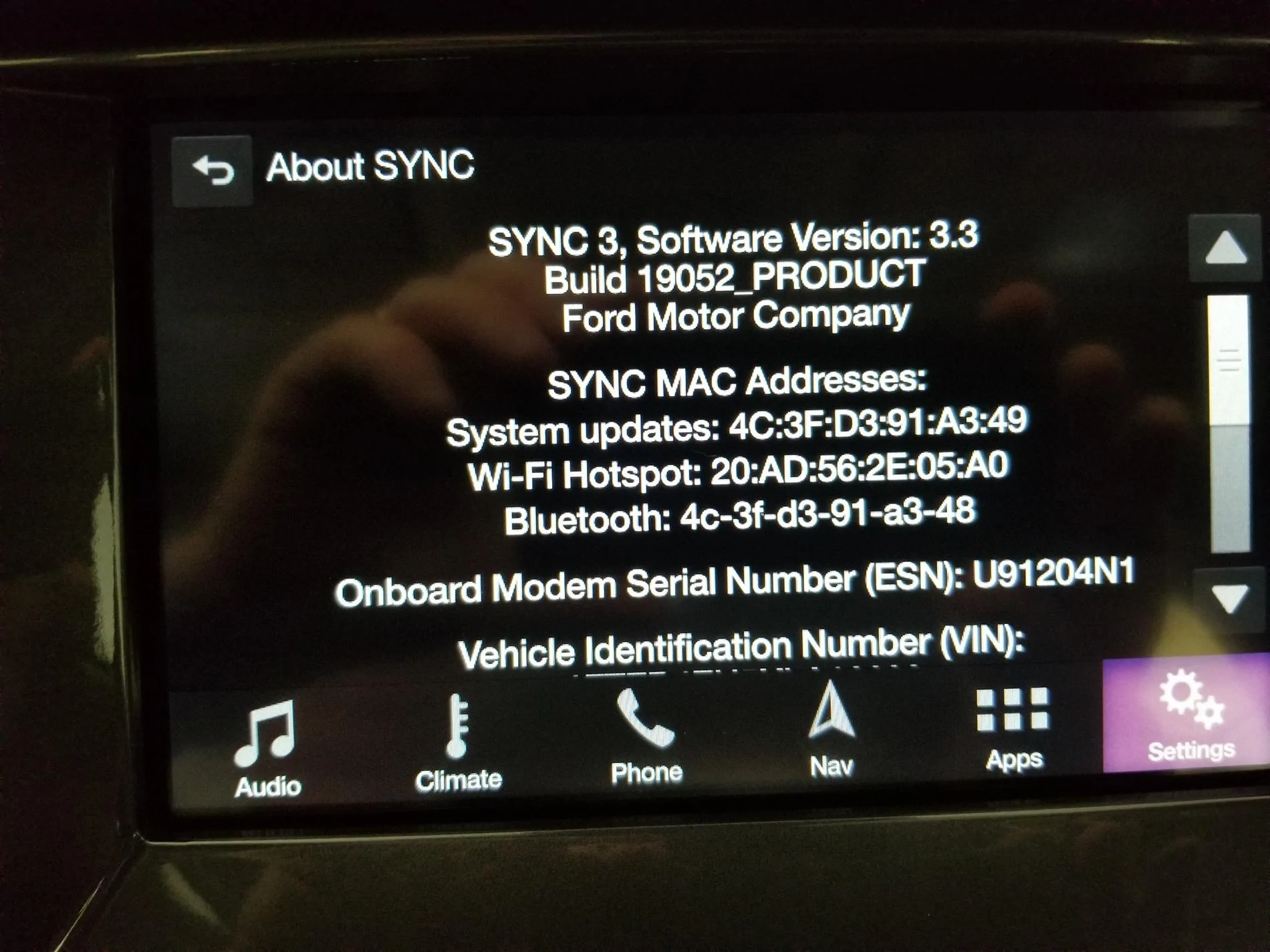
Sync 3 v3.3 Update Available - 4U5T-14G381-AN

SandBaja

Well-Known Member
First Name
Larry
Joined
Jun 15, 2019
Threads
9
Messages
196
Reaction score
307
Location
San Diego
Vehicle(s)
2019 Silver FX4, 501A pkg, fully optioned,2012 Rubicon, 2017 Cherokee, 2018 Volt
Occupation
Almost retired
Hi John,

Arrrrrg! Will try again tomorrow...On my second Scotch on the Rocks now....not time to mess with being behind the wheel.

Best.
Phil Schilke
Ranger Vehicle Engineering
Ford Motor Co. Retired
Phil, recheck before restarting. The instructions state to turn off for several minutes for it to finish. I shut the truck off then restarted right away and it did not show the update. I left it overnight and on restart the next day it showed the update, without doing it a second time.
.
upload_2019-7-2_21-39-15.webp
Sponsored


P. A. Schilke

Well-Known Member
First Name
Phil
Joined
Apr 3, 2019
Threads
149
Messages
7,083
Reaction score
37,188
Location
GV Arizona
Vehicle(s)
2019 Ranger FX4 Lariat 4x4, 2020 Lincoln Nautilus, 2005 Alfa Motorhome
Occupation
Engineer Retired
Vehicle Showcase
1
Hi Larry,

Yep...I remember reading this now that you reminded me...Will check tomorrow! Thanks!

best,
Phil Schilke,
Ranger Vehicle Engineering
Ford Motor Co. Retired
 

Johnpenn

Well-Known Member
First Name
John
Joined
Mar 31, 2019
Threads
1
Messages
248
Reaction score
126
Location
Rockwood TN
Vehicle(s)
2019 Ranger Lariat FX4, 2004 Corvette, 2005 Ranger Edge
Occupation
Retired Quality and EHS Manager
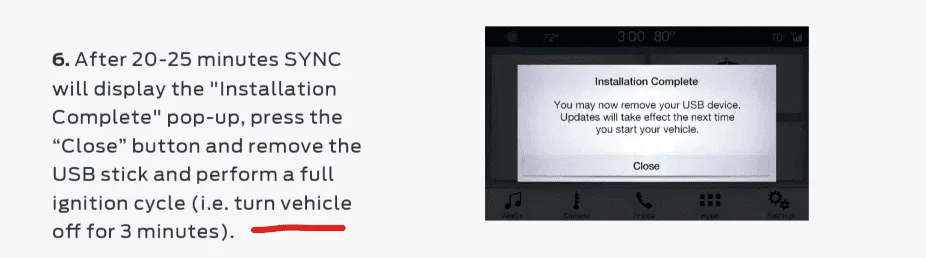
I successfully did the 19052 update tonight using the USB method (could not get it to work over WiFi). Note - that after the USB install said "completed" and the truck was turned off and started again about 10 seconds later - the version number did not change to 19052. I went back to the truck and started it up about 20 minutes later and it appeared to complete the install and bingo...at 19052!

Will be interesting to see if "automatic updates" will now work over WiFi
Maybe waiting would have worked for me too but I got impatient.
 

Johnpenn

Well-Known Member
First Name
John
Joined
Mar 31, 2019
Threads
1
Messages
248
Reaction score
126
Location
Rockwood TN
Vehicle(s)
2019 Ranger Lariat FX4, 2004 Corvette, 2005 Ranger Edge
Occupation
Retired Quality and EHS Manager
Unfortunately, Phil, this is the direction software development is going. Software is going to a "rapid development/just in time" model where software ships if if "works" (and I use that term VERY loosely). When bugs are found updates are done and updated over the air. QA on software is not anything like it used to be. The flip side is that things have gotten WAY more complex than they were 10-15 years ago, so being able to update easily is a good thing. Security is much improved over what it was 10-15 years ago as well. Back then, security was more of an afterthought.

With that said, I think Ford could still improve on the Sync update experience. It isn't what I'd call seamless.

Good luck - hopefully the next attempt will be successful. I updated and now have the occasional stuttering voice issue.
I didn't notice any changes or improvements with 19052 except now I have the stuttering NAV voice. Waiting to see if that gets fixed and wifi update works next time too.


Lunchbox88

Well-Known Member
First Name
Logan
Joined
Jun 21, 2019
Threads
3
Messages
335
Reaction score
303
Location
Missouri, USA
Vehicle(s)
2019 Ranger SuperCrew FX4
Phil, recheck before restarting. The instructions state to turn off for several minutes for it to finish. I shut the truck off then restarted right away and it did not show the update. I left it overnight and on restart the next day it showed the update, without doing it a second time.
.
upload_2019-7-2_21-39-15.webp
Did this last night and had the same experience. Shut it off for less than a minute and it was the old firmware. Then I let it sit off for ~3mins and when I booted it back up I got an update complete.
 

UofMEngineer

Well-Known Member
Joined
Apr 19, 2019
Threads
1
Messages
516
Reaction score
334
Location
Michigan
Vehicle(s)
20' Escape Hybrid,18' Fusion Hybrid
Did this last night and had the same experience. Shut it off for less than a minute and it was the old firmware. Then I let it sit off for ~3mins and when I booted it back up I got an update complete.
If you do a quick off/on, it'll be a warm boot so the new data won't take. That's why they have you wait ~3 minutes to give everything time to fully shut down. Just FYI.
 

UofMEngineer

Well-Known Member
Joined
Apr 19, 2019
Threads
1
Messages
516
Reaction score
334
Location
Michigan
Vehicle(s)
20' Escape Hybrid,18' Fusion Hybrid
I didn't notice any changes or improvements with 19052 except now I have the stuttering NAV voice.
Next update would probably be to v3.4, so it should be quite a bit better. I rarely run into this anymore with v.3.4.
 

P. A. Schilke

Well-Known Member
First Name
Phil
Joined
Apr 3, 2019
Threads
149
Messages
7,083
Reaction score
37,188
Location
GV Arizona
Vehicle(s)
2019 Ranger FX4 Lariat 4x4, 2020 Lincoln Nautilus, 2005 Alfa Motorhome
Occupation
Engineer Retired
Vehicle Showcase
1
Next update would probably be to v3.4, so it should be quite a bit better. I rarely run into this anymore with v.3.4.
How do I get 3.4V....does not seem available on the owners website....???

Best.
Phil Schilke
Ranger Vehicle Engineering
Ford Motor Co. Retired
 

P. A. Schilke

Well-Known Member
First Name
Phil
Joined
Apr 3, 2019
Threads
149
Messages
7,083
Reaction score
37,188
Location
GV Arizona
Vehicle(s)
2019 Ranger FX4 Lariat 4x4, 2020 Lincoln Nautilus, 2005 Alfa Motorhome
Occupation
Engineer Retired
Vehicle Showcase
1
Hi Folks,

Just got around to checking my USB update today and much to my surprise and delight, I am at 19052 today...no need to redo the update process!

Best,
Phil Schilke
Ranger Vehicle Engineering
Ford Motor Co. Retired
 

UofMEngineer

Well-Known Member
Joined
Apr 19, 2019
Threads
1
Messages
516
Reaction score
334
Location
Michigan
Vehicle(s)
20' Escape Hybrid,18' Fusion Hybrid
How do I get 3.4V....does not seem available on the owners website....???

Best.
Phil Schilke
Ranger Vehicle Engineering
Ford Motor Co. Retired
An update hasn't been released to the customer fleet for it as of yet. The initial release of v3.4 is what's shipping now in Explorer/Aviator.
 

RedlandRanger

Moderator
First Name
Rob
Joined
Nov 14, 2018
Threads
42
Messages
5,115
Reaction score
11,114
Location
Oregon
Vehicle(s)
2019 Ford Ranger Lariat FX4, 1973 Mercury Capri
Vehicle Showcase
1
It is the left most button on lower three rocker buttons on the right hand side of the wheel. Press the left rocker up for next. This is if you have the Lariat 501A package I believe. That is what I had to do.
 

P. A. Schilke

Well-Known Member
First Name
Phil
Joined
Apr 3, 2019
Threads
149
Messages
7,083
Reaction score
37,188
Location
GV Arizona
Vehicle(s)
2019 Ranger FX4 Lariat 4x4, 2020 Lincoln Nautilus, 2005 Alfa Motorhome
Occupation
Engineer Retired
Vehicle Showcase
1
An update hasn't been released to the customer fleet for it as of yet. The initial release of v3.4 is what's shipping now in Explorer/Aviator.
Hi Rob,

Thanks...I may not be worried about updating as the 19052 V3.3 seems to have fixed the annoying pop up screen and I also disabled Auto Updates. WiFi is pretty good here at the house but the Ranger could not receive auto updates via WiFi.... Assuming we get v3.4, will have to see what is contained in this update.. Bug fixes are important as improved functionality, but depends on what the functionality improvements..

best,
Phil Schilke
Ranger Vehicle Engineering
Ford Motor Co. Retired
 

Johnpenn

Well-Known Member
First Name
John
Joined
Mar 31, 2019
Threads
1
Messages
248
Reaction score
126
Location
Rockwood TN
Vehicle(s)
2019 Ranger Lariat FX4, 2004 Corvette, 2005 Ranger Edge
Occupation
Retired Quality and EHS Manager
Hi Rob,

Thanks...I may not be worried about updating as the 19052 V3.3 seems to have fixed the annoying pop up screen and I also disabled Auto Updates. WiFi is pretty good here at the house but the Ranger could not receive auto updates via WiFi.... Assuming we get v3.4, will have to see what is contained in this update.. Bug fixes are important as improved functionality, but depends on what the functionality improvements..

best,
Phil Schilke
Ranger Vehicle Engineering
Ford Motor Co. Retired
If Ford is anything like Microsoft, new features/improvements and bug fixes often create new bugs; And, the cycle continues forever LOL.
 

joeb427

Well-Known Member
First Name
Joe
Joined
Feb 11, 2019
Threads
45
Messages
1,111
Reaction score
1,642
Location
Fort Mill/Indian Land area South Carolina
Vehicle(s)
'19 Lariat Sport and 19 Lincoln MKC Reserve
Occupation
Retired
Vehicle Showcase
1
I tried using the auto update with the truck in my garage connected to my wifi and all I got was a looking for update spinning thing for a while so I downloaded the update to a USB drive.
I then plugged the USB in with the truck running and it said it's updating.
I watched this video and at 1:18 seconds it said the truck can be turned off and it still will update. I tried that and a half hour later I started the truck and in a couple of minutes the download complete window came up. I removed the USB and checked the update number and it updated to 19052.
Did I get lucky? I don't know but it did update. I'm not good at this tech stuff.

Video
https://www.google.com/search?newwi.....35i39i285j35i39j0i131.DGQBkpBTKrY#kpvalbx=1


eu1YDp0.webp
Sponsored

 
Last edited:


Top