Sponsored

Just updated to Sync 3.4 on my Ranger 2019

Mandelbloom

Well-Known Member
First Name
Adam
Joined
Apr 21, 2020
Threads
3
Messages
48
Reaction score
30
Location
North Carolina
Vehicle(s)
2019 Ranger XLT
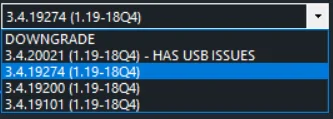
Great bow just need to decide if I should so 20021 or the previous version says 20021 has “usb issues “
Sponsored
 

SubVet

Well-Known Member
First Name
Tom
Joined
Feb 15, 2019
Threads
61
Messages
1,171
Reaction score
2,749
Location
Myrtle Beach
Vehicle(s)
2019 Ranger Lariat - 2020 Honda Ridgeline RTL-E
Occupation
Retired
Vehicle Showcase
1
As I understand it even though this tool automates the process to "safely" upgrade to Sync 3.4 using "Ford approved links" for the software update if you have a 2019 Ford Ranger the "official Sync supported version" is still 3.3.

I was able to update via the manual method back in February, and then I upgraded the app level to the current Build 20021 on March 28.

I am a long time software tech guy (30+ years), so when I told my wife I was tired of waiting and I was going to "hack" our new truck she "knew" If I broke it I could fix it.

Truth be told, it was not a "hack", it was understanding how the Ford Sync software update process worked and then getting access to the correct compatible files and creating the USB key to execute the update process.

The new Ford Sync Update tools automated process removes the requirement that one needs to be a tech person. Following the steps in the tool enables any 2019 Ford Ranger owner a "safe" way to update from Sync 3.2 or 3.3 to Sync 3.4.

I have read others in different threads that ran into a few issues with their Sync 3.3 to 3.4 updates for various reasons, and several went back to their Ford dealers and the dealer reset their Sync software back to 3.3 The dealers were shaking their heads in disbelief, but the reset was done at no charge, and no one mentioned their warranty was voided.

While you mentioned the "scheduled" official release for Sync 3.4 is now July, they have been saying next month or next quarter since January.

So, as in all things in life, no risk, no reward, the choice is yours...
I'm one of those who had to use forscan to bring back the climate and heated seats on the screen. But I've got 3.4 everything is working I'm not going to mess with it.
 

Nick Barber

Well-Known Member
First Name
Nick
Joined
Jun 29, 2019
Threads
5
Messages
116
Reaction score
130
Location
Richland, WA
Vehicle(s)
2019 Lariat, FX4, White Platinum, Chrome, Tow
Occupation
Program Manager
Vehicle Showcase
1
Great bow just need to decide if I should so 20021 or the previous version says 20021 has “usb issues “
So which version is most reliable at this point in time?

Cyanversions.webp
 

Texas Scout

Well-Known Member
First Name
Pablo
Joined
Oct 22, 2019
Threads
0
Messages
48
Reaction score
44
Location
Merritt Island
Vehicle(s)
2019 Ford Ranger Lariat, White Platinum
I'm one of those who had to use forscan to bring back the climate and heated seats on the screen. But I've got 3.4 everything is working I'm not going to mess with it.
In my first attempt back in February I also had to purchase FORScan along with the OBDII adapter to reset my climate controls, but I never had the heated seats icons on the display on Sync 3.3
I truly do not know the root cause of the loss of the climate control icons, but I have suspected it had something to do with UofMEngineer's post 112627 stating there was no need to reformat on 3.2+, and the first step on the Cyanlabs two usb update process was to reformat/reset via usb key 1, and then update via usb key 2.

The folks in this forum that were able to update sucessfully without losing the climate control icons and heated seats SKIPPED the step one reformat usb key, and executed only the step two usb software usb update key. Still, pure speculation on my part after reviewing many posts on this topic found in many other topics on this forum.
 
Last edited:

Texas Scout

Well-Known Member
First Name
Pablo
Joined
Oct 22, 2019
Threads
0
Messages
48
Reaction score
44
Location
Merritt Island
Vehicle(s)
2019 Ford Ranger Lariat, White Platinum
So which version is most reliable at this point in time?

Cyanversions.webp
Disclaimer for CyanLab.net.png

so, fully understanding the disclaimer, and I would also say your choice, but based on my manual method I updated the "APP" software 2 times after my first update to 3.4

My original update took me to 3.4.19101, 1st APP update took me to 19274, 2nd APP update took me to my current level of 20021.

Based on other info on the Cyanlab.net website If I was starting over I would choose a selection below the 3.4.19274, either the 19101 or the 19200.

Editing this post to say based on the success of Nick Barber (and others who posted earlier) who updated from Sync 3.3 directly to Sync 3.4 Build 20021 using the FordSync update tool without any issues there is no reason to upgrade to a version less that 20021.

The details below no longer apply but will remain for reference:

In order to use the reformat tool you must be on versions below 3.4.19274. Ford blocked the reformat tool on 19274 or above.

So, If you choose 19101 or 19200, do the update and all goes well, you could still use the FordSync tool to run a "new" upgrade from the updated version to a higher version. As stated, the tool cannot be used again if you are already at or above 19274.

The manual process to upgrade to a higher level without the tool is very simple, but choosing an option below 19274 keeps the option of creating a new USB key to upgrade to a higher version using the tool.

my 2 cents
 
Last edited:


Mandelbloom

Well-Known Member
First Name
Adam
Joined
Apr 21, 2020
Threads
3
Messages
48
Reaction score
30
Location
North Carolina
Vehicle(s)
2019 Ranger XLT
Ok I updated to 19200z had to do a master reset to get my XM channels .. but seems good now . I did lose my climate option .
 

Mandelbloom

Well-Known Member
First Name
Adam
Joined
Apr 21, 2020
Threads
3
Messages
48
Reaction score
30
Location
North Carolina
Vehicle(s)
2019 Ranger XLT
Sounds good , I sorta thing it being gone is intentional for example my wife’s Ford Escape came with 3.4 and has no climate option . I can live without it , that said I am technical and like to tinker so I will get an ODBII adapter . Any recommendations on the best one for my ford ranger and fordscan ?
 

Geoff

Well-Known Member
Joined
Oct 17, 2018
Threads
5
Messages
705
Reaction score
497
Location
NYS
Vehicle(s)
'19 Ranger 1943 Willys Jeep
Occupation
Retired Engineer
Sounds good , I sorta thing it being gone is intentional for example my wife’s Ford Escape came with 3.4 and has no climate option . I can live without it , that said I am technical and like to tinker so I will get an ODBII adapter . Any recommendations on the best one for my ford ranger and fordscan ?
Get the one "made for" Forscan. It's an OBDLink EX....it's is a USB (wired) device and the CAN switch is internal so no switch changes are necessary.
 

Texas Scout

Well-Known Member
First Name
Pablo
Joined
Oct 22, 2019
Threads
0
Messages
48
Reaction score
44
Location
Merritt Island
Vehicle(s)
2019 Ford Ranger Lariat, White Platinum
Edit the autoinstall.lst on an existing usb update stick as follows:

[SYNCGen3.0_ALL]
Item1 = 5U5T-14G391-CK
Open1 = SyncMyRide\5U5T-14G391-CK_1571088381000.TAR.GZ
Options = AutoInstall

Download and place the 3.4 compatible voice pack in the SyncMyRide folder:
5U5T-14G391-CK

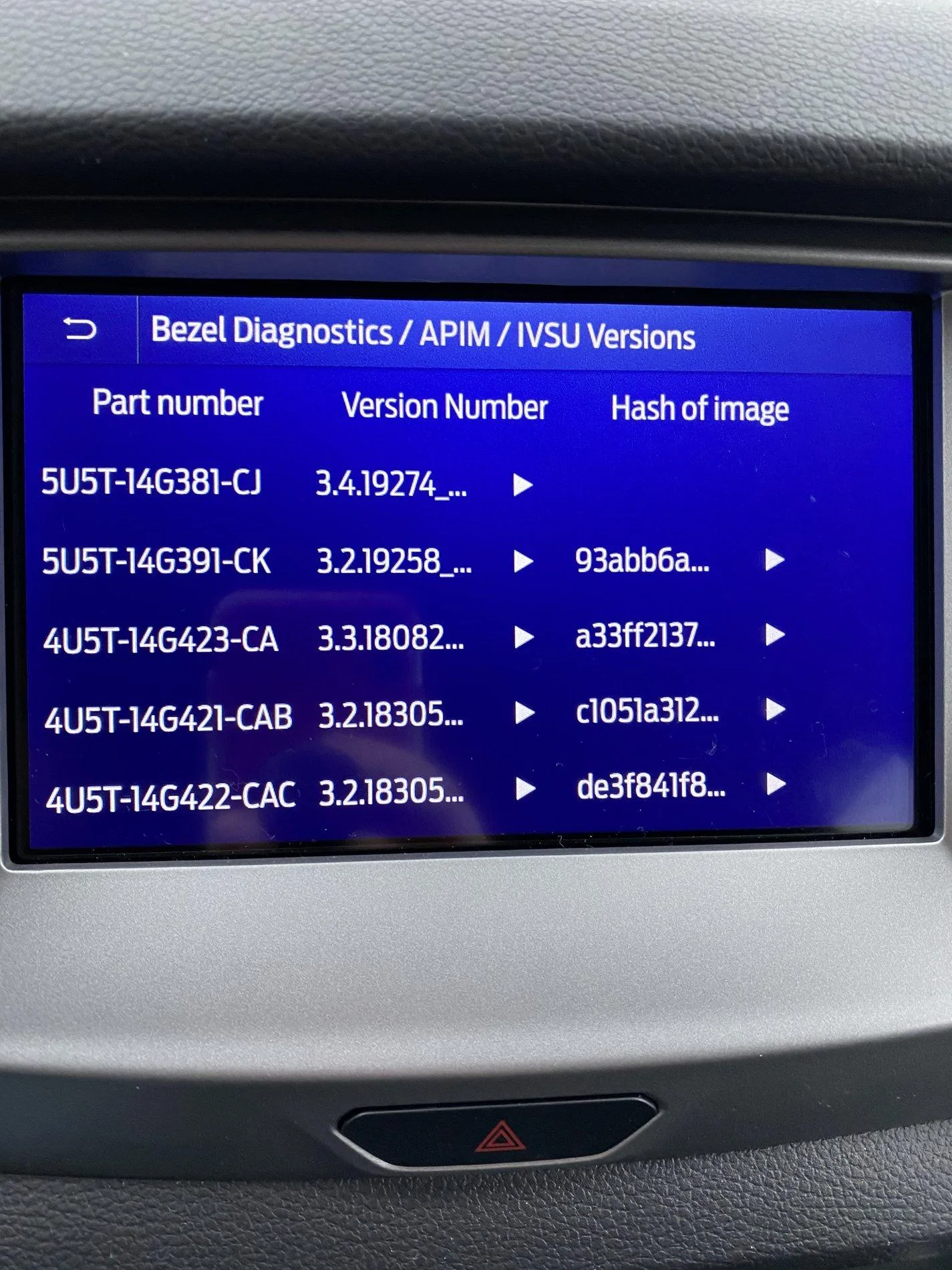
You can see the current version of your sync3 packages as follows:

Press the "skip forward" button on the steering wheel and the "skip forward" button on the center console at the same time and hold them until you hear an obnoxiously loud beep. Don't worry, this is diagnostics menu and the beeping is for testing your speakers. Press end audio test and in the menu go to APIM-> IVSU Versions and grab me that screen.

Pictured is what you should have for a fully functional 3.4

IMG_0538.webp
In a post dated Feb 1 in this forum kadettje documented what the edited autoexec.lst file for the update of a single Sync software module should contain. He was updating the voice data pack module to the correct compatible module because the cyanlab.net tool at the time downloaded a Sync App module (381) with an incompatible voice data pack module(391).

The Sync App module has a "paired" compatible voice data pack module, and if the compatible voice pack module is not installed the voice navigation commands will not work.

As stated, edit the Autoexec.lst file on an existing usb update stick to identify the software module file to be updated, then place the software module file in the SyncMyRide folder on the stick.

Do not extract any TAR.GZ files.

This method does NOT do a reformat, and is the recommended manual method if your Sync App software is already at Sync 3.2 or higher.
 
Last edited:

Nick Barber

Well-Known Member
First Name
Nick
Joined
Jun 29, 2019
Threads
5
Messages
116
Reaction score
130
Location
Richland, WA
Vehicle(s)
2019 Lariat, FX4, White Platinum, Chrome, Tow
Occupation
Program Manager
Vehicle Showcase
1
Yesterday I updated to 20021 using the Cyanlab tool and the climate controls + heated seats, xm stations were all there. Not seeing any issues so far.
 

Texas Scout

Well-Known Member
First Name
Pablo
Joined
Oct 22, 2019
Threads
0
Messages
48
Reaction score
44
Location
Merritt Island
Vehicle(s)
2019 Ford Ranger Lariat, White Platinum
Yes, that is the correct one.

Actually, with the update you just performed one of the hidden "bonus" features was the update of the Sync Navigation Maps to the latest NA 1.19 maps.

While my Sync App module is currently at Sync 3.4 20021 Build, my maps are still at the NA 1.18 version.

The good news is after you "fix" your "lost" Climate controls, you can use either the manual method to update from Sync 3.4 19200 or still use the FordSync update tool with a "new" USB update key to upgrade to 20021.

I will be creating a post similar to kadettje's Feb 1 that will show what the autoexec.lst file needs to look like and the steps for the files for the manual method.
 
Last edited:

Texas Scout

Well-Known Member
First Name
Pablo
Joined
Oct 22, 2019
Threads
0
Messages
48
Reaction score
44
Location
Merritt Island
Vehicle(s)
2019 Ford Ranger Lariat, White Platinum
Yesterday I updated to 20021 using the Cyanlab tool and the climate controls + heated seats, xm stations were all there. Not seeing any issues so far.
Wow, that is great news! So, good to know the tool does actually work without the side effects. Curious what was different where you were able to execute the update without the earlier issues!

The only thing that comes to mind right away is you updated from your Sync 3.3 version directly to Sync 3.4 Build 20021. btw, you also should have the NA 1.19 maps.

Now I am thinking it is "NOT" the use of the reformat tool, but a problem upgrading from Sync 3.3 to a build level below 20021 using the reformat tool.

Of course, any future updates for your Sync will require the manual method unless the Cyanlab tool is updated for future Sync updates.

I am in the process of building a USB upgrade key to downgrade below my current Sync 3.4 20021 to be able to use the FordSync upgrade tool to upgrade me back to Sync 3.4 20021 with the NA 1.19 maps!

Thanks for the feedback, of course that's why we are here!
 

Geoff

Well-Known Member
Joined
Oct 17, 2018
Threads
5
Messages
705
Reaction score
497
Location
NYS
Vehicle(s)
'19 Ranger 1943 Willys Jeep
Occupation
Retired Engineer


Top