
Sponsored
Just updated to Sync 3.4 on my Ranger 2019

kadettje
Member
- Joined
- Mar 22, 2019
- Threads
- 2
- Messages
- 24
- Reaction score
- 17
- Location
- Minneapolis, MN
- Vehicle(s)
- 2019 Ford Ranger
- Thread starter
- #32
any voice commands that are new to 3.4 that I can try. I haven’t been able to crash my system. Everything works including reading out text messages. What’s a new command?Newer than that. See sig below.
It's likely that a good number of things will work. Anything that hasn't really been touched between versions should still operate the same even with the mismatch, radio for example should be fine. The problem is where there have been changes that you could run into issues (and we're talking 25-30+ builds between what you need and what you likely have). If you're still on a v3.3 voice package, there's quite a bit that has changed since. You're missing bug fixes, introducing new bugs (due to the mismatch) etc. If you parked next to a 20MY v3.4 vehicle, same core apps version (19274), you'd have a different UX. You said you use voice, so one obvious item is all prompting changes wouldn't be reflected on your vehicle. All commands specific to v3.4 will not work. Any functionality added in v3.4, will not work. If you sub to SXM, you'd see a command advertised on screen for pro/college sports games that will not work. If it runs into an issue it can't handle, then the voice session will abruptly end. Thus why you need an updated 391, as will come with the Ford v3.2/3.3 -> v3.4 update when it becomes available. Hopefully that helps it make more sense.
UofMEngineer
Well-Known Member
The system as a whole wouldn't crash, but individual components related to voice could/would. Hopefully those would be fairly transparent and self recover if they did happen, but that's totally unknown in an improper setup. The more obvious issue would be the session just stopping abruptly due to errors. TTS-wise, it depends how old your voice package is. It may not contain some fixes, like the street name pronunciation item for example. You'll likely see sample commands on screen that don't work. "Commands" and "Show Music by <X>" for USB media for example. "Reply to <Sender>" won't work. All of the new natural variants for USB, AM, FM, etc. (Turn on The Highway, Switch to Channel 2...) won't work. The "Turn on the <X> Game" won't work for Sirius. There are some Nav prompts that won't exist, so you may not get any prompt at all at certain steps depending on the map data you have. It'd be worse if you had 19Q1 data (not out yet) and a severely outdated voice package. I'd be curious to see what happens if you try to use Nav keyboard entry on the screen while driving. The dialog it should try to kick off for voice won't exist.any voice commands that are new to 3.4 that I can try. I haven’t been able to crash my system. Everything works including reading out text messages. What’s a new command?
kadettje
Member
- Joined
- Mar 22, 2019
- Threads
- 2
- Messages
- 24
- Reaction score
- 17
- Location
- Minneapolis, MN
- Vehicle(s)
- 2019 Ford Ranger
- Thread starter
- #34
Thank you so much for your insightful responses. All makes sense now. Any insight when the official 3.2/3.3 -> 3.4 update will be released? That official update will have the update voice pack? What was the purpose of the dealer released 3.4.19274 update when it did not contain voice packs?The system as a whole wouldn't crash, but individual components related to voice could/would. Hopefully those would be fairly transparent and self recover if they did happen, but that's totally unknown in an improper setup. The more obvious issue would be the session just stopping abruptly due to errors. TTS-wise, it depends how old your voice package is. It may not contain some fixes, like the street name pronunciation item for example. You'll likely see sample commands on screen that don't work. "Commands" and "Show Music by <X>" for USB media for example. "Reply to <Sender>" won't work. All of the new natural variants for USB, AM, FM, etc. (Turn on The Highway, Switch to Channel 2...) won't work. The "Turn on the <X> Game" won't work for Sirius. There are some Nav prompts that won't exist, so you may not get any prompt at all at certain steps depending on the map data you have. It'd be worse if you had 19Q1 data (not out yet) and a severely outdated voice package. I'd be curious to see what happens if you try to use Nav keyboard entry on the screen while driving. The dialog it should try to kick off for voice won't exist.

UofMEngineer
Well-Known Member
Not sure on exact timeline. Couple months is my guess at this point. Any candidate release would have to go through the ringer for all update methods, plus the standard testing before it'd be released. I'll update when I know they're going out. Yes, the official update will have all of the required components. Not sure which build number it will be yet, something 200xx most likely. The dealer software shouldn't miss any of these packages. I heard of sporadic instances of it missing the voice package back when 3.4.19200 rolled out as a dealer update, but I think they got that fixed. It seemed fairly rare.Thank you so much for your insightful responses. All makes sense now. Any insight when the official 3.2/3.3 -> 3.4 update will be released? That official update will have the update voice pack? What was the purpose of the dealer released 3.4.19274 update when it did not contain voice packs?
kadettje
Member
- Joined
- Mar 22, 2019
- Threads
- 2
- Messages
- 24
- Reaction score
- 17
- Location
- Minneapolis, MN
- Vehicle(s)
- 2019 Ford Ranger
- Thread starter
- #37
Has anyone seen a link to the 5U5T-14G391-CK voice file. This is supposedly the voice package that pairs with 3.4.19274. I've looked low and high all the way to Russia but cannot find it. It looks like most of these files can be downloaded from a Ford sync3 repository but you'd need to exact build number. I'd like to put a package together that allows for the 2019 ranger to be updated to 3.4 for us early adopter.

Gizmokid2005
Well-Known Member
- Joined
- Dec 1, 2019
- Threads
- 13
- Messages
- 1,279
- Reaction score
- 1,875
- Location
- GA
- Website
- gizmokid2005.com
- Vehicle(s)
- 2019 Ford Ranger XLT 4X4 SCrew
- Occupation
- SQL Developer
- Vehicle Showcase
- 1
I wondered if anyone else had gotten the notification. I got it in Ford Pass on Friday and still don't show an update online either. Glad the info has mostly been ironed out in here. I'll just sit tight until it comes officially.

ryyck
Well-Known Member
- Joined
- Sep 1, 2019
- Threads
- 14
- Messages
- 403
- Reaction score
- 512
- Location
- Charlotte NC
- Vehicle(s)
- 2019 Ford Ranger
I just went through the same thing. Nothing is available.I got the same "SYNC 3 update - transform your commute" message on My Ford Pass on my phone today. As others have done, I got on my laptop and no update is available. I then called Ford customer service on the 800 number. I had to find and give them my VIN (real convenient) and they also said that no update is available.
What a sh!tshow!!!
kadettje
Member
- Joined
- Mar 22, 2019
- Threads
- 2
- Messages
- 24
- Reaction score
- 17
- Location
- Minneapolis, MN
- Vehicle(s)
- 2019 Ford Ranger
- Thread starter
- #40
I found the file in question and can report that the 3.4 voice enhancements now work: https://ffclub.ru/topic/418797/jump_1980/Has anyone seen a link to the 5U5T-14G391-CK voice file. This is supposedly the voice package that pairs with 3.4.19274. I've looked low and high all the way to Russia but cannot find it. It looks like most of these files can be downloaded from a Ford sync3 repository but you'd need to exact build number. I'd like to put a package together that allows for the 2019 ranger to be updated to 3.4 for us early adopter.
There are two non-critical issues:
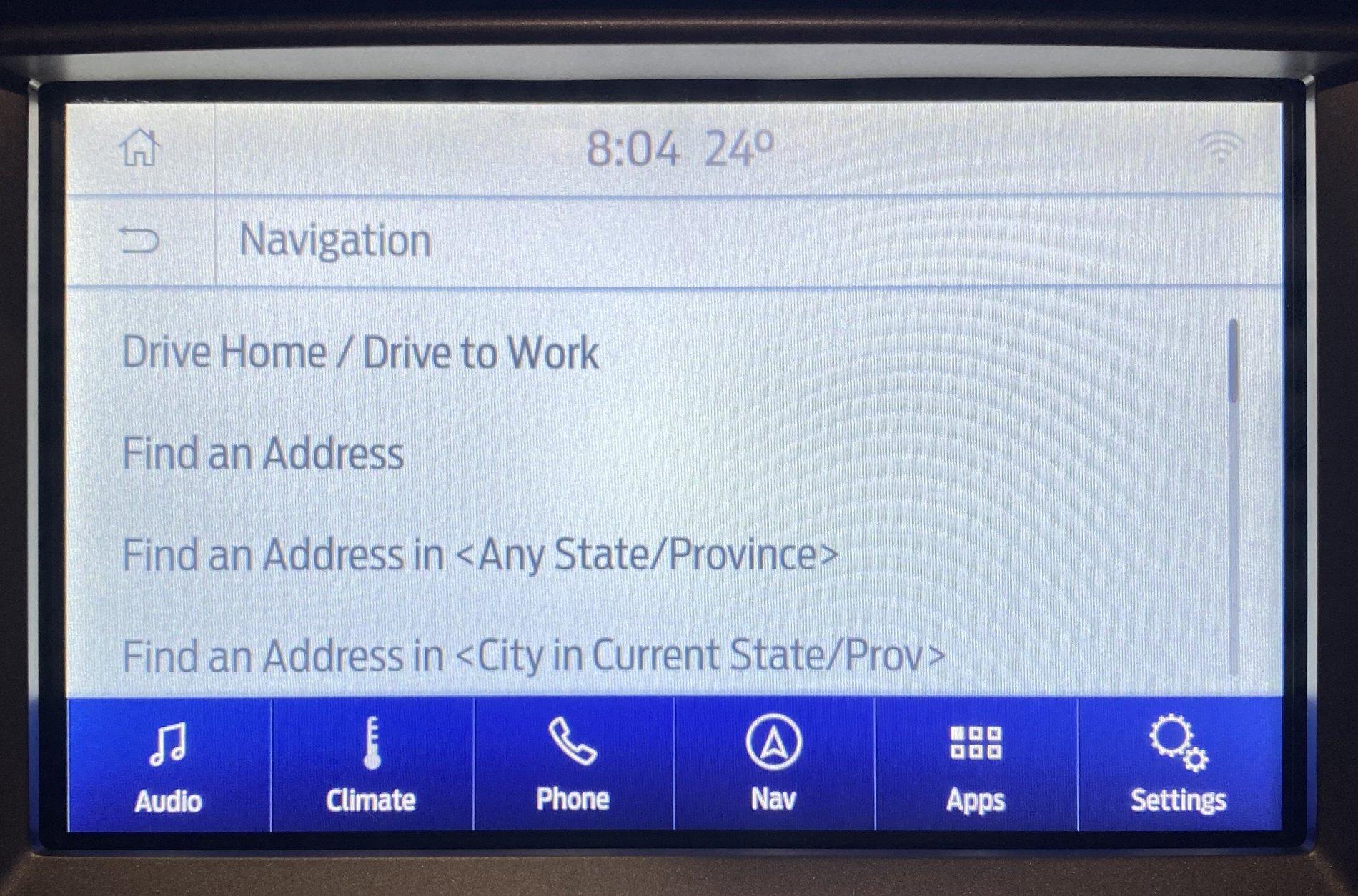
- What doesn't work is navigation main menu commands like Take me <home/ to work>, Find an Address, etc. Actual turn by turn voice does work. Just the main navigation menu commands are bust.
- I'm also noticing voice command stuttering. I didn't notice stuttering prior to applying this voice pack. It may have been present before and I didn't test it long enough to notice. This time it was very noticeable.
UofMEngineer
Well-Known Member
All that should work. Is it ALL nav commands? Can you get to the Nav sub menu? Do you see them on screen? For stuttering, that also shouldn't be happening. It's possible for a sporadic interruption in normal use, but it shouldn't be common. Try running a master reset to clear it out. The reason it'd skip is some file system operation bogging it down.There are two non-critical issues:
- What doesn't work is navigation main menu commands like Take me <home/ to work>, Find an Address, etc. Actual turn by turn voice does work. Just the main navigation menu commands are bust.
- I'm also noticing voice command stuttering. I didn't notice stuttering prior to applying this voice pack. It may have been present before and I didn't test it long enough to notice. This time it was very noticeable.
kadettje
Member
- Joined
- Mar 22, 2019
- Threads
- 2
- Messages
- 24
- Reaction score
- 17
- Location
- Minneapolis, MN
- Vehicle(s)
- 2019 Ford Ranger
- Thread starter
- #42
I can see the list of nav commands on screen. When I call for one the unit just reverts to what was on screen and nothing happens. Interestingly enough I did find one nav command that does work: Show 3D. It speaks back to me and switches the map to 3D. Just this one works so far. All of my testing is after a master reset. Will monitor if stutter is gone. None of this is a big deal for me.All that should work. Is it ALL nav commands? Can you get to the Nav sub menu? Do you see them on screen? For stuttering, that also shouldn't be happening. It's possible for a sporadic interruption in normal use, but it shouldn't be common. Try running a master reset to clear it out. The reason it'd skip is some file system operation bogging it down.
UofMEngineer
Well-Known Member
Usually that indicates either a configuration problem or some issue with the language not matching the nav data. Shoot me a PM with a screengrab of the IVSU Versions diag screen.I can see the list of nav commands on screen. When I call for one the unit just reverts to what was on screen and nothing happens. Interestingly enough I did find one nav command that does work: Show 3D. It speaks back to me and switches the map to 3D. Just this one works so far. All of my testing is after a master reset. Will monitor if stutter is gone. None of this is a big deal for me.

Markandrews17
Member
I tried to check for an update on the official Ford Sync page but I keep getting this error.
"You must be authenticated to use this feature."
Anyone know why it's doing this or have a solution?
Thanks
M.
"You must be authenticated to use this feature."
Anyone know why it's doing this or have a solution?
Thanks
M.
kadettje
Member
- Joined
- Mar 22, 2019
- Threads
- 2
- Messages
- 24
- Reaction score
- 17
- Location
- Minneapolis, MN
- Vehicle(s)
- 2019 Ford Ranger
- Thread starter
- #45
You need to create an account and have your VIN linked.I tried to check for an update on the official Ford Sync page but I keep getting this error.
"You must be authenticated to use this feature."
Anyone know why it's doing this or have a solution?
Thanks
M.
Sponsored
Similar threads


- Replies
- 7
- Views
- 1,984


