Sponsored

Sync3 Issues

jss81258

Well-Known Member
First Name
James
Joined
Jul 5, 2020
Threads
1
Messages
169
Reaction score
253
Location
Texas
Vehicle(s)
2020 Ford Ranger Lariat 4x4, 2004 Chevrolet Corvette Z06
Occupation
Fixed equipment inspector
I guess I should note that when I upgraded to 23088, I still chose keep my maps. I did not deselect any options presented. So it should have installed Gracenotes, Voices and Apps.
Sponsored

 

_N8_

Well-Known Member
Joined
Mar 9, 2020
Threads
2
Messages
45
Reaction score
53
Location
Lancaster, PA
Vehicle(s)
2019 Ford Ranger XLT Sport
I think that's the same error I was getting. The part where it says to download and try again is why I fought it for 2 days. I thought it was a problem with the files on the USB, or a problem with the USB itself. So many downloads and several different USB devices later, I finally read Cyanlabs forums. Hope it works for you.
Success. Thanks. I'll test it out this weekend. Sure seems snappier out of the gate.

ffa8193cf3f21b5e46a7b9afc6abe885dce9d272-1.jpg
 

samsd

Well-Known Member
First Name
Dan
Joined
May 2, 2019
Threads
0
Messages
351
Reaction score
1,499
Location
62401
Vehicle(s)
2019 Ranger Lariat 4x4 HPR, 2016 Town and Country, 2004 Road King Custom
Occupation
Retired
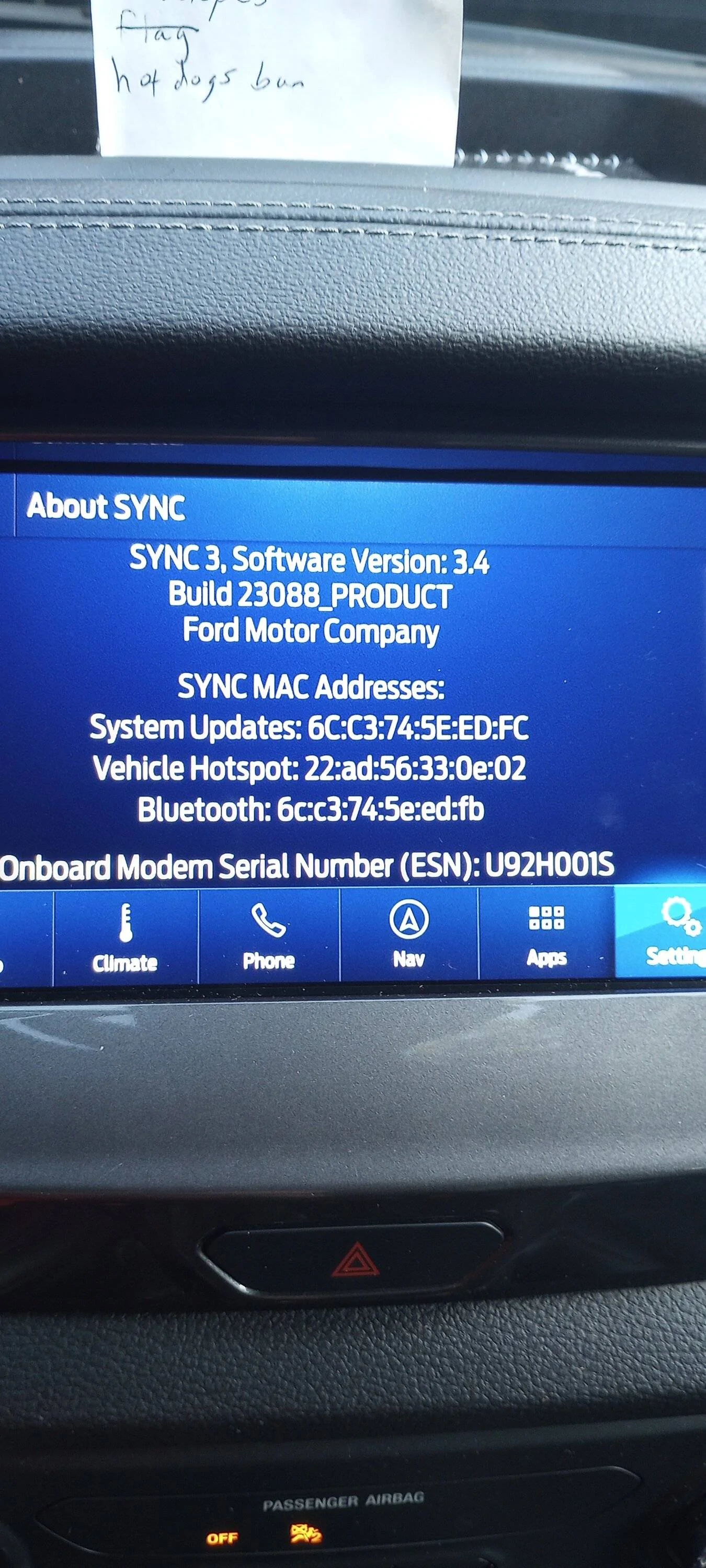
I was getting the same error message but after several attempts at a master reset I was able to do a reset and install 23088 sucessfully. So far my screen is staying in dark mode and the radio is not reverting back to whatever AM or FM station I was listening to prior to XM. So, if I was listening to XM it comes on to XM at startup now but does go to the ID screen.
I do wonder what factor a weak cell signal plays in all this reset stuff as I was in town taking a class and went out to my truck on break and was able to do the reset.
PS, disregard my shopping list, if I don't have a visual on my dash, I forget what I went to town for and wind up at the tavern.

SYNC.jpg
 

OregonRanger

Active Member
First Name
Bob
Joined
Dec 29, 2019
Threads
5
Messages
43
Reaction score
74
Location
Oregon
Vehicle(s)
2019 Ford Ranger Lariat FX4
Occupation
MAK Grills
I think that's the same error I was getting. The part where it says to download and try again is why I fought it for 2 days. I thought it was a problem with the files on the USB, or a problem with the USB itself. So many downloads and several different USB devices later, I finally read Cyanlabs forums. Hope it works for you.
what is the master reset your talking about doing twice in a row?



Voltune

Well-Known Member
Joined
Sep 12, 2019
Threads
7
Messages
47
Reaction score
22
Location
Washington State USA
Vehicle(s)
Ranger 2019 XLT 4x4 Supercab (302A)
I see that some folks were able to find and install 3.4.23088. Where is this version?

I am still running 3.4.21194. The Ford.com site only shows 3.4.22251 being available.
 

Dgc333

Well-Known Member
First Name
Dave
Joined
Aug 24, 2021
Threads
17
Messages
1,742
Reaction score
4,112
Location
Massachusetts
Vehicle(s)
21 Ranger Lariat
Occupation
Engineer
Thanks! How does Cyanlabs obtain the latest versions that aren’t available from Ford?
I would venture a guess they are boot legged or are actually official releases that have not be released for the Ranger yet.
 

samsd

Well-Known Member
First Name
Dan
Joined
May 2, 2019
Threads
0
Messages
351
Reaction score
1,499
Location
62401
Vehicle(s)
2019 Ranger Lariat 4x4 HPR, 2016 Town and Country, 2004 Road King Custom
Occupation
Retired
I am still running 3.4.21194. The Ford.com site only shows 3.4.22251 being available.
[/QUOTE]

If you are not having any problems with Sync with your current version, I would not update. My Sync was problem free untill I loaded 22251. I loaded 23088 and seems to have solved all problems then the screen background changing returned so I am thinking about loading previous version. Cyanlabs has them.
 

jss81258

Well-Known Member
First Name
James
Joined
Jul 5, 2020
Threads
1
Messages
169
Reaction score
253
Location
Texas
Vehicle(s)
2020 Ford Ranger Lariat 4x4, 2004 Chevrolet Corvette Z06
Occupation
Fixed equipment inspector
what is the master reset your talking about doing twice in a row?
Settings>General

Scroll to the bottom of the page.

This function does not revert software, but does remove settings, disconnects XM, disconnects phones. You get the picture. I suppose this is usually to remove your personal information if you sell the truck.

One master reset will do as described above, but I couldn't update the software. I always got error messages.

On Cyanlabs forums, they found that 2 master resets in a row will then allow a software upgrade without errors. I found this to work.

Again, the first master reset took a really long time. The second went fairly quickly. And I was able to upgrade the software without errors.

Hope this is clear enough and good luck.
 

jss81258

Well-Known Member
First Name
James
Joined
Jul 5, 2020
Threads
1
Messages
169
Reaction score
253
Location
Texas
Vehicle(s)
2020 Ford Ranger Lariat 4x4, 2004 Chevrolet Corvette Z06
Occupation
Fixed equipment inspector
I would venture a guess they are boot legged or are actually official releases that have not be released for the Ranger yet.
I doubt they are bootlegged. I'd bet Cyanlabs is the developer. I'd guess there'd be lawsuits otherwise.

I've been running 23088 for a couple of days now without any issues but as others have said, if what you have is working, I wouldn't upgrade. I guess I had mine set on automatic updates but didn't realize it. Otherwise, I would have left mine alone.

It is interesting that in the Cyanlabs updater app, 22251's comments are that it ain't good (not verbatim).


Top