Sponsored

Sync3 Issues

JoedOH

Well-Known Member
First Name
joe
Joined
Apr 21, 2019
Threads
13
Messages
152
Reaction score
178
Location
ohio
Vehicle(s)
2019 Ranger
Hey Joe...another tech guy here. I had most of the same issues until I went over Cyanlabs and downloaded a few versions of the Sync3 APIM software. Dealer was useless wanting throw a 3rd APIM into it...and as it's now out of warranty....$1000 for the part. Like you, I recognized it is a software issue. I fired up the laptop and loaded the MOST RECENT build into my APIM and my gremlins are all gone. Please note that if you're on 3.4 version already, the Ford update site will NOT allow you to update to a newer build for some ungodly reason. They think that you're just fine. My build is working like a champ.

As far as I know, the only other way to update a 3.4 build to a newer build is using FDRS. I have FDRS but haven't used that function.....yet. I'm guessing the log file issue has been corrected as I'm not experiencing memory issues at this point.

Hopefully, mine stays working well.
I knew they were nuts wanting to put another APIM into the vehicle. I'm going to try what you did. Thanks for the heads up.
Sponsored


VegasP11

Well-Known Member
First Name
Ian
Joined
Dec 20, 2019
Threads
5
Messages
241
Reaction score
717
Location
Kansas
Vehicle(s)
2019 Lariat FX4
So, on 4th of July my Sync was working perfectly again. The next day back to showing no radio ID until I change the source. This morning it was working perfectly until I went out for lunch. This is really driving me nuts.
 

OregonRanger

Active Member
First Name
Bob
Joined
Dec 29, 2019
Threads
5
Messages
43
Reaction score
74
Location
Oregon
Vehicle(s)
2019 Ford Ranger Lariat FX4
Occupation
MAK Grills
A buddy was telling me that the new Jeeps have a separate battery for the auto start/stop and when you disable that feature the battery eventually dies causing problems similar to what we are experiencing. Does the ranger have this second battery too? Does anyone having these issues have the auto start/stop not disabled?
 

AzScorpion

Moderator
First Name
Dave
Joined
Jul 25, 2019
Threads
335
Messages
26,221
Reaction score
132,006
Location
Back Home In AZ!
Vehicle(s)
2023 Ford Ranger Tremor
Occupation
Retired...Full Time Slacker
A buddy was telling me that the new Jeeps have a separate battery for the auto start/stop and when you disable that feature the battery eventually dies causing problems similar to what we are experiencing. Does the ranger have this second battery too? Does anyone having these issues have the auto start/stop not disabled?
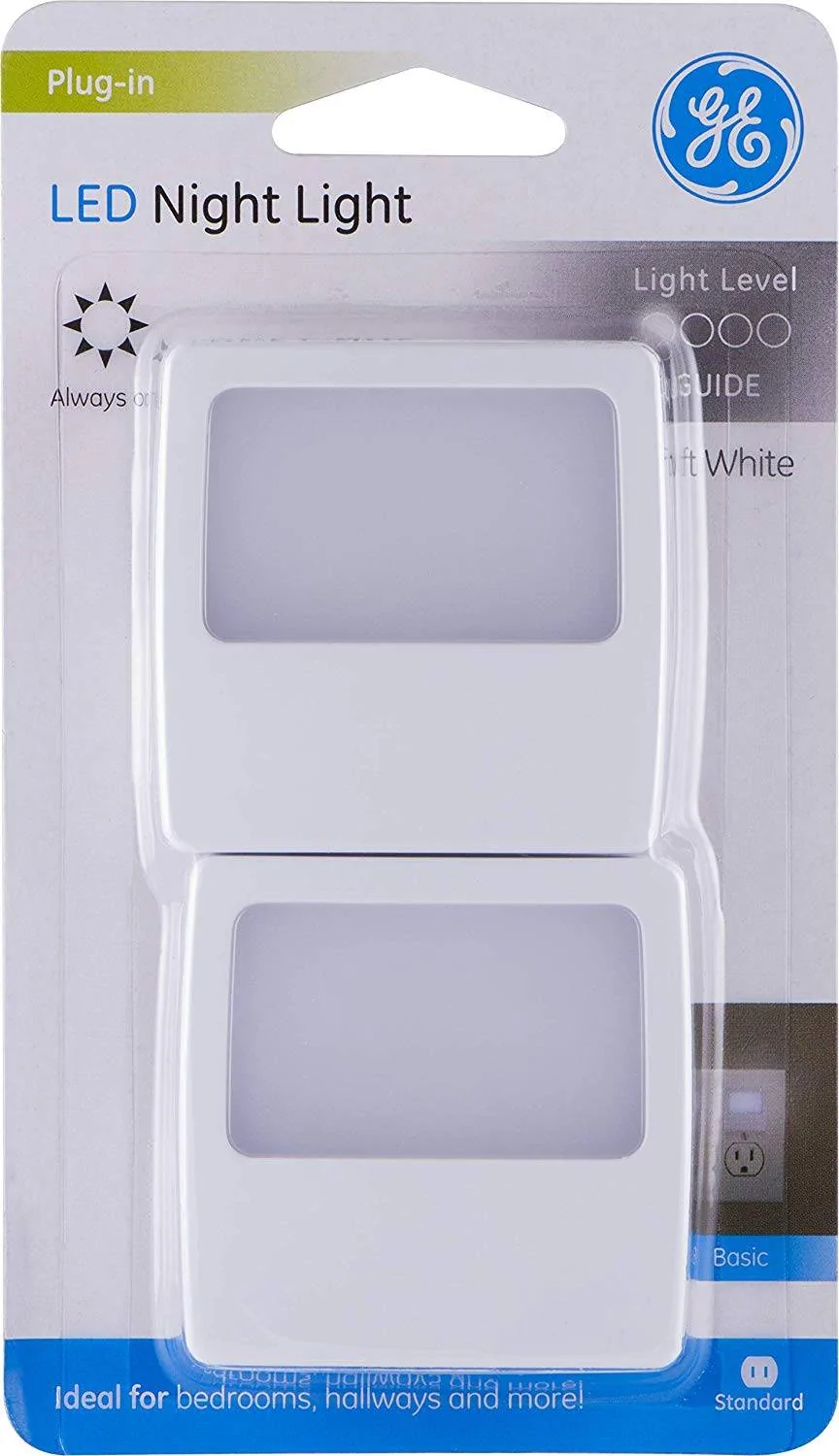
The Ranger doesn't have a second battery for ASS. I had a Jeep which had the second battery and there's a way to bypass it but it was a huge PITA to do. Just stick a cheap LED nightlight in the 110v plug behind the console and that'll disable it.

Night Light.webp


OregonRanger

Active Member
First Name
Bob
Joined
Dec 29, 2019
Threads
5
Messages
43
Reaction score
74
Location
Oregon
Vehicle(s)
2019 Ford Ranger Lariat FX4
Occupation
MAK Grills
The Ranger doesn't have a second battery for ASS. I had a Jeep which had the second battery and there's a way to bypass it but it was a huge PITA to do. Just stick a cheap LED nightlight in the 110v plug behind the console and that'll disable it.

Night Light.jpg

OK, it was worth a try. I have a USB with the sinc 3.4, would reloading that and turning off auto updates revert this back to solve the issues?
 

AzScorpion

Moderator
First Name
Dave
Joined
Jul 25, 2019
Threads
335
Messages
26,221
Reaction score
132,006
Location
Back Home In AZ!
Vehicle(s)
2023 Ford Ranger Tremor
Occupation
Retired...Full Time Slacker
OK, it was worth a try. I have a USB with the sinc 3.4, would reloading that and turning off auto updates revert this back to solve the issues?
I honestly don't know and maybe someone else will come along who does. So far mine seems to be working fine and on my '19 I never updated it until earlier this year because I knew I'd have problems. lol Which I did.
 

alcohenusa

Well-Known Member
First Name
Alan
Joined
Jul 22, 2020
Threads
12
Messages
478
Reaction score
727
Location
CO
Vehicle(s)
2020 Ranger Lariat 4x4
Occupation
Retired
OK, it was worth a try. I have a USB with the sinc 3.4, would reloading that and turning off auto updates revert this back to solve the issues?
What version Sync 3 is currently installed and what version is your USB?

Do you have Navigation?
 

Big Blue

Well-Known Member
First Name
Lee
Joined
May 5, 2020
Threads
16
Messages
3,927
Reaction score
9,352
Location
Wisconsin
Vehicle(s)
2019 Ford Ranger XLT FX4 Supercrew lighting blue
Occupation
Retired mechanical designer
Hey Joe...another tech guy here. I had most of the same issues until I went over Cyanlabs and downloaded a few versions of the Sync3 APIM software. Dealer was useless wanting throw a 3rd APIM into it...and as it's now out of warranty....$1000 for the part. Like you, I recognized it is a software issue. I fired up the laptop and loaded the MOST RECENT build into my APIM and my gremlins are all gone. Please note that if you're on 3.4 version already, the Ford update site will NOT allow you to update to a newer build for some ungodly reason. They think that you're just fine. My build is working like a champ.

As far as I know, the only other way to update a 3.4 build to a newer build is using FDRS. I have FDRS but haven't used that function.....yet. I'm guessing the log file issue has been corrected as I'm not experiencing memory issues at this point.

Hopefully, mine stays working well.
The only way I update my 2019 is using the Cyan Labs app. I think mine might have updated OTA once. Have run multiple 3.4 builds without issue. Currently on build 3.4.23088, which I believe is the latest, no NAV. I do occasionally have it default to an FM radio station. Never quite sure if it's the truck or my wife. ;) I do not use XM and actually deleted it from my source list with Forscan. I mostly listen to my 5000+ songs on my USB drive. I have it set to randomize. If a track comes on I'm not in the mood for, the next track button solves that.
 

JoedOH

Well-Known Member
First Name
joe
Joined
Apr 21, 2019
Threads
13
Messages
152
Reaction score
178
Location
ohio
Vehicle(s)
2019 Ranger
My truck is going in Wednesday to the dealer. I have very little faith in them correcting this problem. There are times when I just get a black screen now. I hate to say it but my vehicle has been troublesome and I'm getting tired of repairs.

In the last year it was transmission problems, heater box giving passenger ac and driver hot air. And now it's the Sync-3.
 

OregonRanger

Active Member
First Name
Bob
Joined
Dec 29, 2019
Threads
5
Messages
43
Reaction score
74
Location
Oregon
Vehicle(s)
2019 Ford Ranger Lariat FX4
Occupation
MAK Grills
What version Sync 3 is currently installed and what version is your USB?

Do you have Navigation?
Looks like my thumb drive is just a maps update (NA2.21).
my truck sync version is V3.4, Build 22251.

Anyone try the master reset in the general tools? not sure what all you would lose.
 

OregonRanger

Active Member
First Name
Bob
Joined
Dec 29, 2019
Threads
5
Messages
43
Reaction score
74
Location
Oregon
Vehicle(s)
2019 Ford Ranger Lariat FX4
Occupation
MAK Grills
I’m doing a Cyanlabs update as I write this. My SYNC the last few days has been a crap shoot. Can always roll it back if it makes it worse!
if its not too complicated maybe you could make a step by step and how to update with cyanlabs for the rest of us non tech guys ;)
 

alcohenusa

Well-Known Member
First Name
Alan
Joined
Jul 22, 2020
Threads
12
Messages
478
Reaction score
727
Location
CO
Vehicle(s)
2020 Ranger Lariat 4x4
Occupation
Retired
Looks like my thumb drive is just a maps update (NA2.21).
my truck sync version is V3.4, Build 22251.

Anyone try the master reset in the general tools? not sure what all you would lose.
With Master Reset, the system will be set back to all factory options but retain the current software version. You will lose all your customized settings such as paired phones, Nav favorites, etc.

You can try the Cyan Labs process as suggested. They have the Ford updates before Ford releases them to the public. So, you can get a newer version there or wait for Ford to release it. Just be aware that Ford does not support the Cyan Labs process. As long as you follow the process, then it should be fine. As always, any issues after an update may require a Master Reset anyway. (I have not yet tried the Cyan Labs process myself.)
 

Trigganometry

Well-Known Member
First Name
Rick
Joined
Dec 4, 2020
Threads
153
Messages
5,833
Reaction score
25,359
Location
Massachusetts
Vehicle(s)
20 XLT scab 301A/tow 4X4 magnetic w/sport blackout
Occupation
Engineering
if its not too complicated maybe you could make a step by step and how to update with cyanlabs for the rest of us non tech guys ;)
First need a windows PC and an empty USB stick. 8GB to 32GB depending on region and if you have navigation.

Take photos of your Rangers version screen in the Sync app in the truck. If by chance anything did go wrong you can get the version you have now and just reload it.

Their website is cayanlabs.net. They’re pretty clear on the instructions and the process. Just read through it and start the process. Takes about 30 to 45 minutes from downloading and then making a USB update system.

I want up one version, after a restart and key on again seems to be a little better for boot up speed and navigation of the screen. Time will tell for me ?
Sponsored


Top