Sponsored

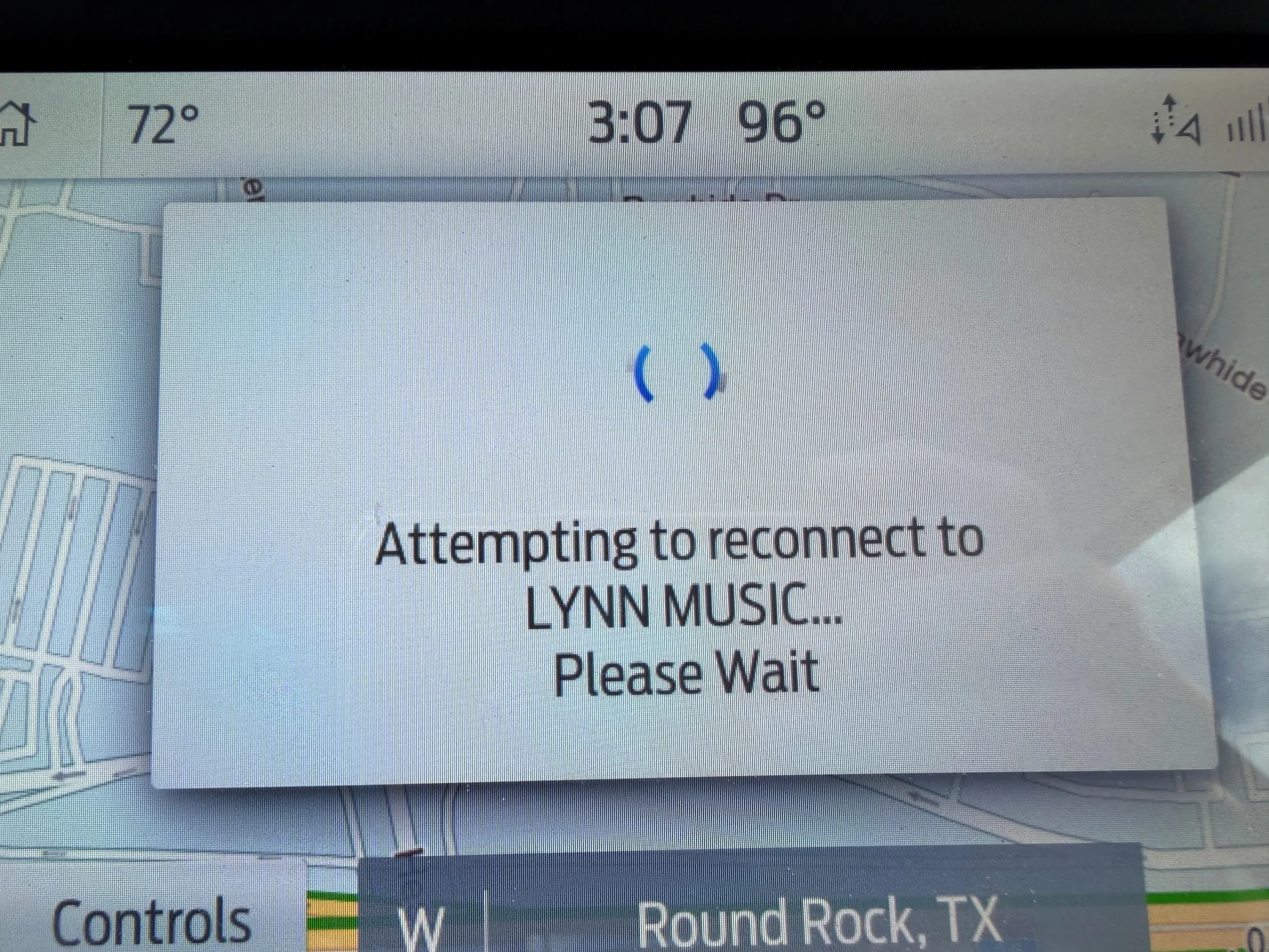
Sync attempting to reconnect to my USB device

les101ca

Member
Joined
Sep 5, 2023
Threads
3
Messages
21
Reaction score
45
Location
Texas
Vehicle(s)
2023 Ranger Lariat Tremor
Occupation
Retired
When I listen to music on my USB device I keep getting this message. It plays for awhile then this message pops up. If I quickly turn the audio off then back on the music starts playing. It will play for awhile (maybe 2, sometimes up to 5 songs) then the message pops back up. I have performed several soft Sync resets. I haven't tried, nor am I inclined to try, a master reset. If it matters the USB is 2.0 32G in size. I can go back to the start of any song that it cuts out on it will play through, so it isn't any issue with the particular MP3 song file. It happens whether I have my iPhone connected running Apple Play, or my iPhone is connected via standard Sync.

It is very annoying having it cut out and having to turn audio off then on multiple times. Any help will be appreciated. And "yes" I have the latest Sync level running in my truck.
Sync_error.webp
Sponsored


RangerBill

Well-Known Member
First Name
Bob
Joined
Jun 8, 2022
Threads
3
Messages
1,761
Reaction score
2,376
Location
PA
Vehicle(s)
2019 Ford Ranger Lariat Super Crew FX4
Occupation
retired
When I listen to music on my USB device I keep getting this message. It plays for awhile then this message pops up. If I quickly turn the audio off then back on the music starts playing. It will play for awhile (maybe 2, sometimes up to 5 songs) then the message pops back up. I have performed several soft Sync resets. I haven't tried, nor am I inclined to try, a master reset. If it matters the USB is 2.0 32G in size. I can go back to the start of any song that it cuts out on it will play through, so it isn't any issue with the particular MP3 song file. It happens whether I have my iPhone connected running Apple Play, or my iPhone is connected via standard Sync.

It is very annoying having it cut out and having to turn audio off then on multiple times. Any help will be appreciated. And "yes" I have the latest Sync level running in my truck.
Sync_error.webp
Try a new data high quality USB cable between the phone and the truck.
 

alcohenusa

Well-Known Member
First Name
Alan
Joined
Jul 22, 2020
Threads
12
Messages
482
Reaction score
731
Location
CO
Vehicle(s)
2020 Ranger Lariat 4x4
Occupation
Retired
When I listen to music on my USB device I keep getting this message. It plays for awhile then this message pops up. If I quickly turn the audio off then back on the music starts playing. It will play for awhile (maybe 2, sometimes up to 5 songs) then the message pops back up. I have performed several soft Sync resets. I haven't tried, nor am I inclined to try, a master reset. If it matters the USB is 2.0 32G in size. I can go back to the start of any song that it cuts out on it will play through, so it isn't any issue with the particular MP3 song file. It happens whether I have my iPhone connected running Apple Play, or my iPhone is connected via standard Sync.

It is very annoying having it cut out and having to turn audio off then on multiple times. Any help will be appreciated. And "yes" I have the latest Sync level running in my truck.
Sync_error.webp
Does this happen on both USB ports? If so, I would try to let the hardware reset by either pulling the appropriate fuses or disconnecting the battery for a short time. If you do disconnect the battery, you’ll need to reset the auto down/up on the driver door window.
 

Frenchy

Well-Known Member
First Name
Chris
Joined
Mar 15, 2020
Threads
168
Messages
7,614
Reaction score
10,874
Location
Elizabeth, Colorado
Vehicle(s)
2012 Nissan Frontier, 1994 F150 XL, 2022 Ford Transit
Occupation
Field Service Technician
Seems about right. Keeps happening on my 2022 Transit at work. I would first get a new cable as it could be faulty. If that doesn't fix it, do a reset of things


OP
OP
les101ca

les101ca

Member
Joined
Sep 5, 2023
Threads
3
Messages
21
Reaction score
45
Location
Texas
Vehicle(s)
2023 Ranger Lariat Tremor
Occupation
Retired
Does this happen on both USB ports? If so, I would try to let the hardware reset by either pulling the appropriate fuses or disconnecting the battery for a short time. If you do disconnect the battery, you’ll need to reset the auto down/up on the driver door window.

I have only used the right side USB port. The left side port either has my iPhone connected, or nothing connected. The error happens in either situation. I'll try the fuse reset and see if that helps.
 

alcohenusa

Well-Known Member
First Name
Alan
Joined
Jul 22, 2020
Threads
12
Messages
482
Reaction score
731
Location
CO
Vehicle(s)
2020 Ranger Lariat 4x4
Occupation
Retired
I have only used the right side USB port. The left side port either has my iPhone connected, or nothing connected. The error happens in either situation. I'll try the fuse reset and see if that helps.
If that doesn’t help, check out the thread that @Superspirit mentioned.
 

Grandaccess

Well-Known Member
First Name
Robert
Joined
Jul 8, 2023
Threads
6
Messages
1,147
Reaction score
2,628
Location
Binghamton, N.Y
Vehicle(s)
2021 Ford Ranger XLT FX4
Occupation
Computer Consultant
I was scratching my head right up till I read Iphone ....
I would try a new high quality cable before you run out and buy a samsung?
 
OP
OP
les101ca

les101ca

Member
Joined
Sep 5, 2023
Threads
3
Messages
21
Reaction score
45
Location
Texas
Vehicle(s)
2023 Ranger Lariat Tremor
Occupation
Retired
I was scratching my head right up till I read Iphone ....
I would try a new high quality cable before you run out and buy a samsung?
It happens even if I do not connect my iPhone, or the cable. I just did the fuse pull. I’ll try driving today or tomorrow long enough to see if that helped. And the cable I do use is an “official” Apple cable. The cable issue bit me once on my computer, so lesson learned there.
 
OP
OP
les101ca

les101ca

Member
Joined
Sep 5, 2023
Threads
3
Messages
21
Reaction score
45
Location
Texas
Vehicle(s)
2023 Ranger Lariat Tremor
Occupation
Retired
Today was the first day I was able to take a long enough drive to see if anything changed. After performing the fuse pull (#31) I drove to my destination with my iPhone connected via an Apple data cable in the left USB port, and on the way back without any cable attached. The error message did not reappear - so yeah. My music USB was in the right USB port. Hopefully the fuse pull reset whatever was causing my troubles and it won't reappear.
Sponsored


Top