Sponsored

How do I troubleshoot bms battery monitor in 2020 ranger

mikeamick

Active Member
First Name
Mike
Joined
Apr 16, 2024
Threads
4
Messages
29
Reaction score
20
Location
San Diego
Vehicle(s)
2020 ford ranger xlt extended cab
Occupation
Retired Locomotive engineer
I am/was getting a bms code. Bought a new bms and getting same code.

Just to be clear, I am talking about that little box on the neg battery terminal.

There are two wires coming from it. One going to the + and the other going to somewhere I can't see.

Tried to use my scanner to do a reset on the bms and it reports back that there was none found.

B11DB 08-48 is the code, which is prob saying it can't see it.


tia
Sponsored

 

airline tech

Well-Known Member
Joined
Aug 24, 2022
Threads
28
Messages
4,499
Reaction score
8,592
Location
Midwest - KS
Vehicle(s)
2022 Ranger Lariat-Super Crew, Cactus Gray
Occupation
Aircraft Tech
Has the Battery & Charging system been checked? and is working properly?

If yes:

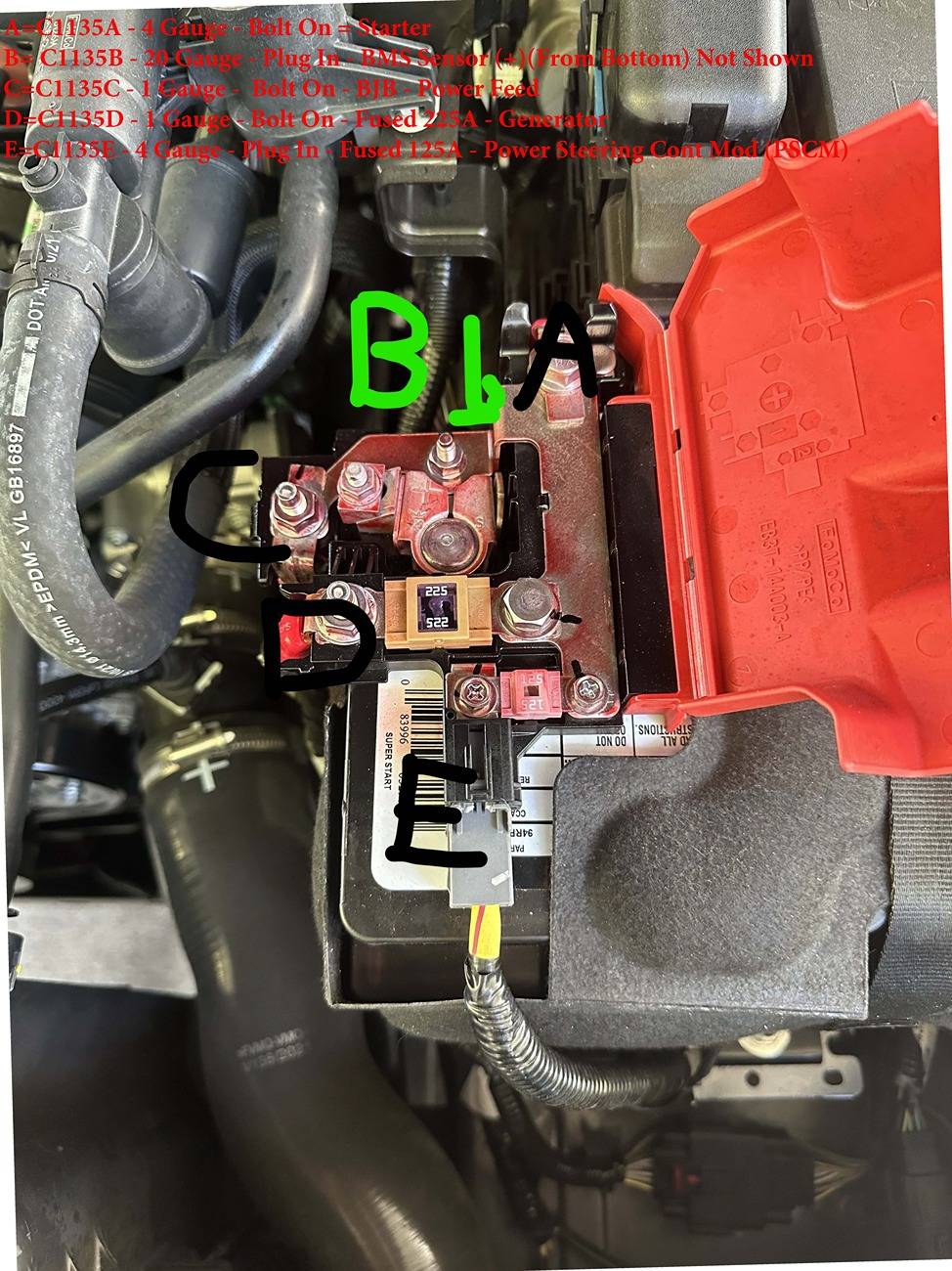
Check the connector - running over to the (bottom) side of the BMFL (+) side of the battery.

This is the (+) pick up for the sensor

Meter- Pin# 2 of the BMS Sensor - Pin #2 to Grd - This should match Battery Voltage
If is does not - then the wire between the BMS Sensor & Positive Terminal is bad or the connector is dirty.

If this checks good:

Meter: Check for Voltage Reading - On Both sides of the (225-Amp) fuse, Reading should match

If checks good:

Clear the code - and if returns
Do a BCM - Self Test (Reset) and then try to do a (BMS - Reset) - with a scan tool there should be a tab to perform this function.

If all above (No Help)
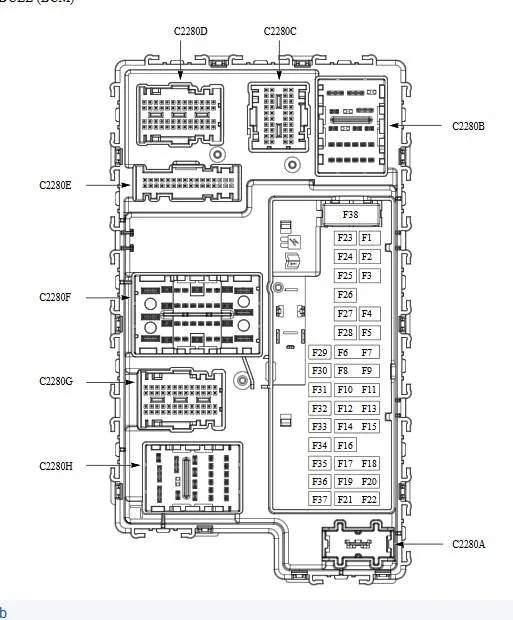
Pull & Reset (BCM) Connector C2280C, the (LIN) Circuit data wire is Pin# 4 (White Wire) this is where the BMS Sensor wire (Pin #1) routes to.
and with the C2280C disconnected, take an extra step to check wire integrity

Meter Check: Ohms Scale
With Both the BMS Sensor Connector & C2280C (Disconnected)
Meter Both ends of the wire - should be 3 Ohms or less
If test leads are not long enough to reach between the test points.
Then with (BOTH) connectors disconnected, BMS sensor Pin #1 - Jump to Ground
and then - Meter Pin #4 C2280C (Red Lead) and Ground (Black Lead)
Results should be close to (3-Ohms) or less, but keep in mind that with this setup you have to take into account you are adding resistance to your results (jumper) to ground, so ensure you have a good connection at the jumper to the ground point.

Note: Not pictured but the (BMS) Sensor Pin #2 runs over to the (Pos) BMFL and connects below the (B) Connection

Batt Fuse Link Labled.jpg


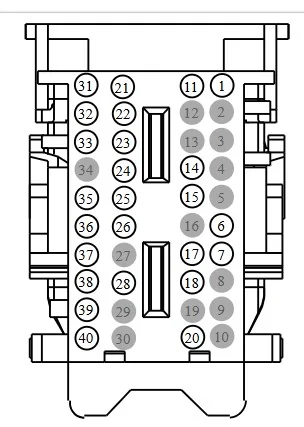
Pin #4 = Top Left Row - (4th from the Top) C2280C

BCM Fuse Panel.webp


C2280C - Pinout, from the connector removed and facing you

C2280C.webp
 

airline tech

Well-Known Member
Joined
Aug 24, 2022
Threads
28
Messages
4,499
Reaction score
8,592
Location
Midwest - KS
Vehicle(s)
2022 Ranger Lariat-Super Crew, Cactus Gray
Occupation
Aircraft Tech
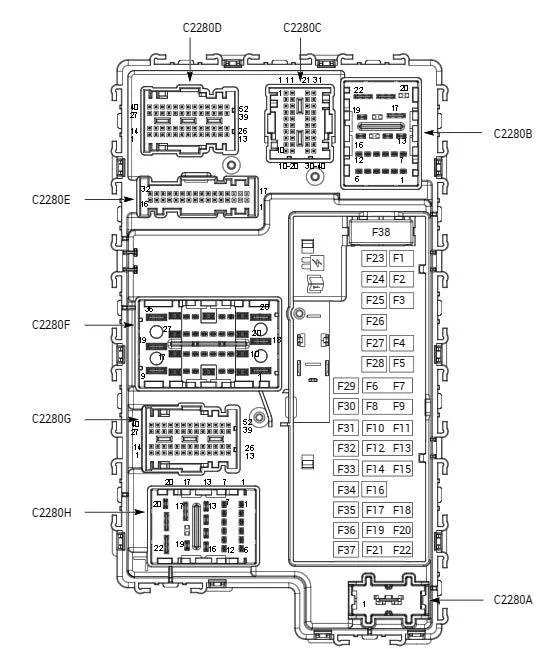
Been wanting to do this, so finally did this to assist in wire pinouts on the BCM connectors.
Use the numbers as a guide for the (Pinout Order)

BCM Connector Pinouts.webp
 

Retirednavy2010

Well-Known Member
First Name
Eric
Joined
Feb 4, 2024
Threads
12
Messages
143
Reaction score
295
Location
Jax Florida
Vehicle(s)
2019 Ranger Supercab XLT FX4
Occupation
Retired
Has the Battery & Charging system been checked? and is working properly?

If yes:

Check the connector - running over to the (bottom) side of the BMFL (+) side of the battery.

This is the (+) pick up for the sensor

Meter- Pin# 2 of the BMS Sensor - Pin #2 to Grd - This should match Battery Voltage
If is does not - then the wire between the BMS Sensor & Positive Terminal is bad or the connector is dirty.

If this checks good:

Meter: Check for Voltage Reading - On Both sides of the (225-Amp) fuse, Reading should match

If checks good:

Clear the code - and if returns
Do a BCM - Self Test (Reset) and then try to do a (BMS - Reset) - with a scan tool there should be a tab to perform this function.

If all above (No Help)
Pull & Reset (BCM) Connector C2280C, the (LIN) Circuit data wire is Pin# 4 (White Wire) this is where the BMS Sensor wire (Pin #1) routes to.
and with the C2280C disconnected, take an extra step to check wire integrity

Meter Check: Ohms Scale
With Both the BMS Sensor Connector & C2280C (Disconnected)
Meter Both ends of the wire - should be 3 Ohms or less
If test leads are not long enough to reach between the test points.
Then with (BOTH) connectors disconnected, BMS sensor Pin #1 - Jump to Ground
and then - Meter Pin #4 C2280C (Red Lead) and Ground (Black Lead)
Results should be close to (3-Ohms) or less, but keep in mind that with this setup you have to take into account you are adding resistance to your results (jumper) to ground, so ensure you have a good connection at the jumper to the ground point.

Note: Not pictured but the (BMS) Sensor Pin #2 runs over to the (Pos) BMFL and connects below the (B) Connection

Batt Fuse Link Labled.jpg


Pin #4 = Top Left Row - (4th from the Top) C2280C

BCM Fuse Panel.jpeg


C2280C - Pinout, from the connector removed and facing you

C2280C.jpeg
New vehicles are nice but what I would give for a 1967 f100 Ranger's simplicity and good looks.

1967-ford-f100.jpeg
 
OP
OP

mikeamick

Active Member
First Name
Mike
Joined
Apr 16, 2024
Threads
4
Messages
29
Reaction score
20
Location
San Diego
Vehicle(s)
2020 ford ranger xlt extended cab
Occupation
Retired Locomotive engineer
Has the Battery & Charging system been checked? and is working properly?

If yes:

Check the connector - running over to the (bottom) side of the BMFL (+) side of the battery.

This is the (+) pick up for the sensor

Meter- Pin# 2 of the BMS Sensor - Pin #2 to Grd - This should match Battery Voltage
If is does not - then the wire between the BMS Sensor & Positive Terminal is bad or the connector is dirty.

If this checks good:

Meter: Check for Voltage Reading - On Both sides of the (225-Amp) fuse, Reading should match

If checks good:

Clear the code - and if returns
Do a BCM - Self Test (Reset) and then try to do a (BMS - Reset) - with a scan tool there should be a tab to perform this function.

If all above (No Help)
Pull & Reset (BCM) Connector C2280C, the (LIN) Circuit data wire is Pin# 4 (White Wire) this is where the BMS Sensor wire (Pin #1) routes to.
and with the C2280C disconnected, take an extra step to check wire integrity

Meter Check: Ohms Scale
With Both the BMS Sensor Connector & C2280C (Disconnected)
Meter Both ends of the wire - should be 3 Ohms or less
If test leads are not long enough to reach between the test points.
Then with (BOTH) connectors disconnected, BMS sensor Pin #1 - Jump to Ground
and then - Meter Pin #4 C2280C (Red Lead) and Ground (Black Lead)
Results should be close to (3-Ohms) or less, but keep in mind that with this setup you have to take into account you are adding resistance to your results (jumper) to ground, so ensure you have a good connection at the jumper to the ground point.

Note: Not pictured but the (BMS) Sensor Pin #2 runs over to the (Pos) BMFL and connects below the (B) Connection

Batt Fuse Link Labled.jpg


Pin #4 = Top Left Row - (4th from the Top) C2280C

BCM Fuse Panel.jpeg


C2280C - Pinout, from the connector removed and facing you

C2280C.jpeg
Dog gonit, I must not have clicked the option to get an email when someone replied, and you are the exact person I was hoping to see it. So now, let me study your suggestions and get back to you.
Thanks Airline Tech


Rp930

Well-Known Member
First Name
Rick
Joined
Nov 19, 2018
Threads
20
Messages
1,800
Reaction score
3,521
Location
Denver
Vehicle(s)
‘19 Ford Ranger Lariat, ‘23 Macan,’21 Shelby GT500
Occupation
Retired
Not to hijack this but I’ve been trying to find the latest part number for the BMS sensor. It looks like it has superseded several times. The above checks connections but what if the sensor has failed or they changed parameters. There must be some reason behind the supersessions.
 
OP
OP

mikeamick

Active Member
First Name
Mike
Joined
Apr 16, 2024
Threads
4
Messages
29
Reaction score
20
Location
San Diego
Vehicle(s)
2020 ford ranger xlt extended cab
Occupation
Retired Locomotive engineer
OP
OP

mikeamick

Active Member
First Name
Mike
Joined
Apr 16, 2024
Threads
4
Messages
29
Reaction score
20
Location
San Diego
Vehicle(s)
2020 ford ranger xlt extended cab
Occupation
Retired Locomotive engineer
Been wanting to do this, so finally did this to assist in wire pinouts on the BCM connectors.
Use the numbers as a guide for the (Pinout Order)

BCM Connector Pinouts.jpg
Ok, I did all the checking at the battery and everything seemed ok, so before getting into the BCM, I ran forscan on it and was able to detect and reset the error. But your help as always is invaluable.
 

Sross975

Active Member
First Name
Scott
Joined
Apr 2, 2024
Threads
2
Messages
26
Reaction score
41
Location
South Texas
Vehicle(s)
2020 Ranger FX4
Has the Battery & Charging system been checked? and is working properly?

If yes:

Check the connector - running over to the (bottom) side of the BMFL (+) side of the battery.

This is the (+) pick up for the sensor

Meter- Pin# 2 of the BMS Sensor - Pin #2 to Grd - This should match Battery Voltage
If is does not - then the wire between the BMS Sensor & Positive Terminal is bad or the connector is dirty.

If this checks good:

Meter: Check for Voltage Reading - On Both sides of the (225-Amp) fuse, Reading should match

If checks good:

Clear the code - and if returns
Do a BCM - Self Test (Reset) and then try to do a (BMS - Reset) - with a scan tool there should be a tab to perform this function.

If all above (No Help)
Pull & Reset (BCM) Connector C2280C, the (LIN) Circuit data wire is Pin# 4 (White Wire) this is where the BMS Sensor wire (Pin #1) routes to.
and with the C2280C disconnected, take an extra step to check wire integrity

Meter Check: Ohms Scale
With Both the BMS Sensor Connector & C2280C (Disconnected)
Meter Both ends of the wire - should be 3 Ohms or less
If test leads are not long enough to reach between the test points.
Then with (BOTH) connectors disconnected, BMS sensor Pin #1 - Jump to Ground
and then - Meter Pin #4 C2280C (Red Lead) and Ground (Black Lead)
Results should be close to (3-Ohms) or less, but keep in mind that with this setup you have to take into account you are adding resistance to your results (jumper) to ground, so ensure you have a good connection at the jumper to the ground point.

Note: Not pictured but the (BMS) Sensor Pin #2 runs over to the (Pos) BMFL and connects below the (B) Connection

Batt Fuse Link Labled.jpg


Pin #4 = Top Left Row - (4th from the Top) C2280C

BCM Fuse Panel.webp


C2280C - Pinout, from the connector removed and facing you

C2280C.webp
what is the next step after this? Replace BMS sensor?

backstory: I was driving the truck and the hood ajar indicator kept flickering on and off. Pull over and the hood is securely latched, but I open the hood and slam it a few times thinking I may have jostled the sensor a bit.

next day, driving and everything seems fine, but when I park and lock the truck, there is no horn honk. After some time in the grocery store, I come out and start driving again, and no visible issues, but when I get home I try the horn. Pressing the horn causes the hood ajar indicator to come on and stay on as long as I hold the horn. It turns off when I let go. I assume a bad ground so I go on a search and lo and behold, the ground behind the drivers headlight, towards the passenger side (there are 2) is very loose. I tighten it down, but it doesn’t fix the horn issue.

next day, I figure the short damaged the horn system. So I pull the fuse: good. I pull the relay and switch it with the trailer one right next to it: still no change. I remove the horn unit and check it: all good. During this, I had the negative battery terminal off and on as needed for testing. Go eat dinner, come back to put everything together, and magically the horn starts working again.

next day I go to drive, and the issue comes back up. I go to check the ground and it got loose again. I pull it out completely, clean the threads, scuff up the body, and add some loctite to the ground. This did not fix the horn/hood ajar issue. So I drive it for a few days, reset the BCM a few times (my battery is a month old anyway) and still nothing works.

tonight, I stumble on this thread and follow the above tests. Everything checks out fine.

I did find the that BMS sensor wire that goes the the positive terminal was a little loose. If that’s the cause, do I just need to drive it to get it to reset?

I also have scanned with forscan throughout this fiasco, and have only gotten codes that I believe are false because I had my headlights on. When I have headlights off and run the BCM diag on forscan, it comes back with no codes.

any thoughts before I try replacing the BMS sensor?
 

RangerBill

Well-Known Member
First Name
Bob
Joined
Jun 8, 2022
Threads
3
Messages
1,661
Reaction score
2,221
Location
PA
Vehicle(s)
2019 Ford Ranger Lariat Super Crew FX4
Occupation
retired
what is the next step after this? Replace BMS sensor?

backstory: I was driving the truck and the hood ajar indicator kept flickering on and off. Pull over and the hood is securely latched, but I open the hood and slam it a few times thinking I may have jostled the sensor a bit.

next day, driving and everything seems fine, but when I park and lock the truck, there is no horn honk. After some time in the grocery store, I come out and start driving again, and no visible issues, but when I get home I try the horn. Pressing the horn causes the hood ajar indicator to come on and stay on as long as I hold the horn. It turns off when I let go. I assume a bad ground so I go on a search and lo and behold, the ground behind the drivers headlight, towards the passenger side (there are 2) is very loose. I tighten it down, but it doesn’t fix the horn issue.

next day, I figure the short damaged the horn system. So I pull the fuse: good. I pull the relay and switch it with the trailer one right next to it: still no change. I remove the horn unit and check it: all good. During this, I had the negative battery terminal off and on as needed for testing. Go eat dinner, come back to put everything together, and magically the horn starts working again.

next day I go to drive, and the issue comes back up. I go to check the ground and it got loose again. I pull it out completely, clean the threads, scuff up the body, and add some loctite to the ground. This did not fix the horn/hood ajar issue. So I drive it for a few days, reset the BCM a few times (my battery is a month old anyway) and still nothing works.

tonight, I stumble on this thread and follow the above tests. Everything checks out fine.

I did find the that BMS sensor wire that goes the the positive terminal was a little loose. If that’s the cause, do I just need to drive it to get it to reset?

I also have scanned with forscan throughout this fiasco, and have only gotten codes that I believe are false because I had my headlights on. When I have headlights off and run the BCM diag on forscan, it comes back with no codes.

any thoughts before I try replacing the BMS sensor?
There is a fairly large connector behind the driver's side headlight and below the battery tray that has been reported to cause issues if it is not seated completely. Make sure that it is fully seated and latched. Also, there are two grounding screws near that connector. Make sure that they are clean and tight.
 
Last edited:

Sross975

Active Member
First Name
Scott
Joined
Apr 2, 2024
Threads
2
Messages
26
Reaction score
41
Location
South Texas
Vehicle(s)
2020 Ranger FX4
Thank you Bill! You were close enough to get me a resolution! I went through all the connectors behind the headlight and added motor craft dialectic grease to each one. Except for the one you were talking about, because I could not get it to separate without risking it breaking. While I thought up ways to get it apart, I added dialectic grease to other connectors underneath the truck, and found that the main connector for my taillight wiring section was loose. This is the same style and size connector as the one I couldn’t break free. Tightened it up and I’m good to go! Thanks again!
Sponsored


Top