Sponsored

Front USB ports intermittent not working

RangerBill

Well-Known Member
First Name
Bob
Joined
Jun 8, 2022
Threads
3
Messages
1,601
Reaction score
2,122
Location
PA
Vehicle(s)
2019 Ford Ranger Lariat Super Crew FX4
Occupation
retired
Thumb drive straight to truck port. I know the connections are good on the back of the hub as I replaced it this afternoon made sure they were in correctly.
Did you say that you replaced the USB hub with a new one? If so, it may need to be programmed. Do you have Forscan to read any DTC codes?
Sponsored


Superspirit

Well-Known Member
First Name
Joe
Joined
Jun 18, 2022
Threads
11
Messages
834
Reaction score
1,641
Location
earth
Vehicle(s)
22 ranger
I do have forscan. Dealer says new hub is plug and play. No programming.
 

Superspirit

Well-Known Member
First Name
Joe
Joined
Jun 18, 2022
Threads
11
Messages
834
Reaction score
1,641
Location
earth
Vehicle(s)
22 ranger
Going to get forscan out and check for that. I've had no indicator lights to send me that direction but it won't hurt to check tomorrow.
Thank you for your help hopefully I can get this figured out before I sell it and go back to Chevrolet. 34k and 9 trips to the dealer for warranty repairs.
 

RangerBill

Well-Known Member
First Name
Bob
Joined
Jun 8, 2022
Threads
3
Messages
1,601
Reaction score
2,122
Location
PA
Vehicle(s)
2019 Ford Ranger Lariat Super Crew FX4
Occupation
retired
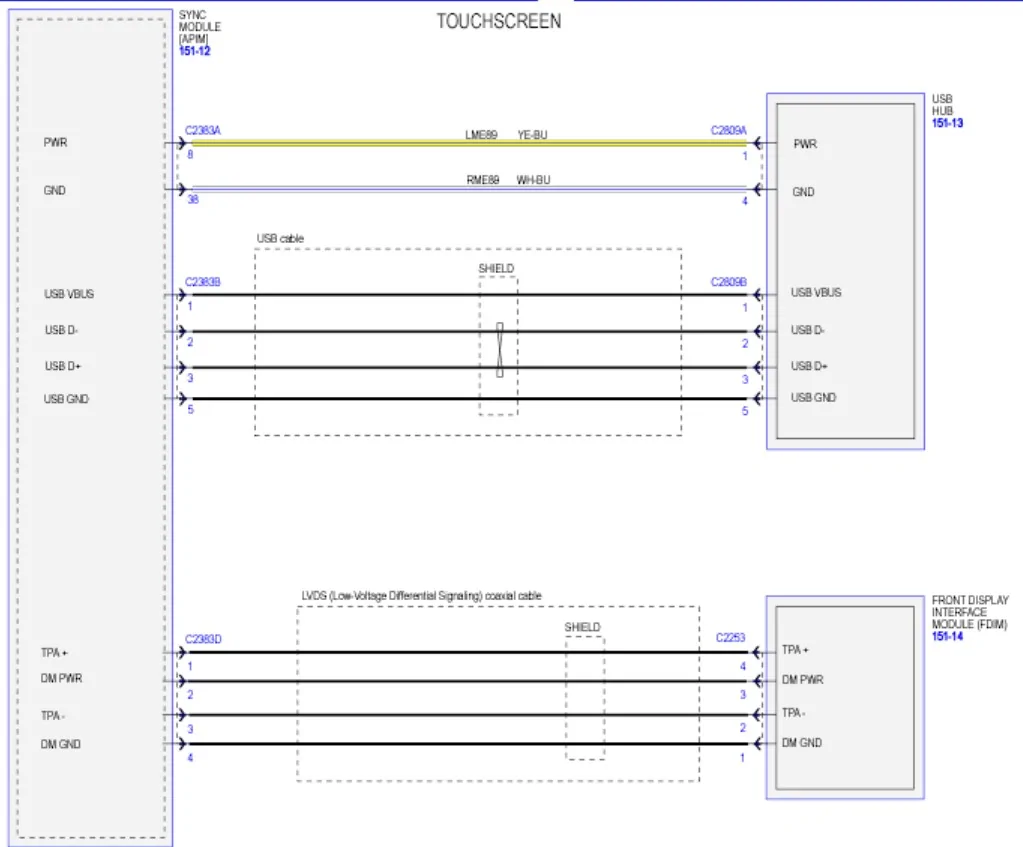
Here is the diagram of the front hub. Check the wiring between the APIM and the USB Hub. If wiring is ok and hub is new, it would seem to be a bad APIM Sync module.


Screenshot 2025-12-10 233441.webp


Superspirit

Well-Known Member
First Name
Joe
Joined
Jun 18, 2022
Threads
11
Messages
834
Reaction score
1,641
Location
earth
Vehicle(s)
22 ranger
Thank you for that diagram. That will help tremendously tomorrow.
 

RangerBill

Well-Known Member
First Name
Bob
Joined
Jun 8, 2022
Threads
3
Messages
1,601
Reaction score
2,122
Location
PA
Vehicle(s)
2019 Ford Ranger Lariat Super Crew FX4
Occupation
retired
Thank you for that diagram. That will help tremendously tomorrow.
Make sure that C2383A and C2383B connectors are securely plugged into the APIM (Sync) module as shown in the diagram. Perhaps one of them came loose when installing the new hub.
 

airline tech

Well-Known Member
Joined
Aug 24, 2022
Threads
28
Messages
4,448
Reaction score
8,500
Location
Midwest - KS
Vehicle(s)
2022 Ranger Lariat-Super Crew, Cactus Gray
Occupation
Aircraft Tech
Going to get forscan out and check for that. I've had no indicator lights to send me that direction but it won't hurt to check tomorrow.
Thank you for your help hopefully I can get this figured out before I sell it and go back to Chevrolet. 34k and 9 trips to the dealer for warranty repairs.
Is the Sync Version Up to Date (Vs 23188)? if not it needs updated all prior versions are problematic.
Is it ONLY the USB Stick (Audio) that is faulting?

Try a (APIM) self-test (Reset) and also check for any codes
Try Pulling Fuse #31 -for 5-Minutes

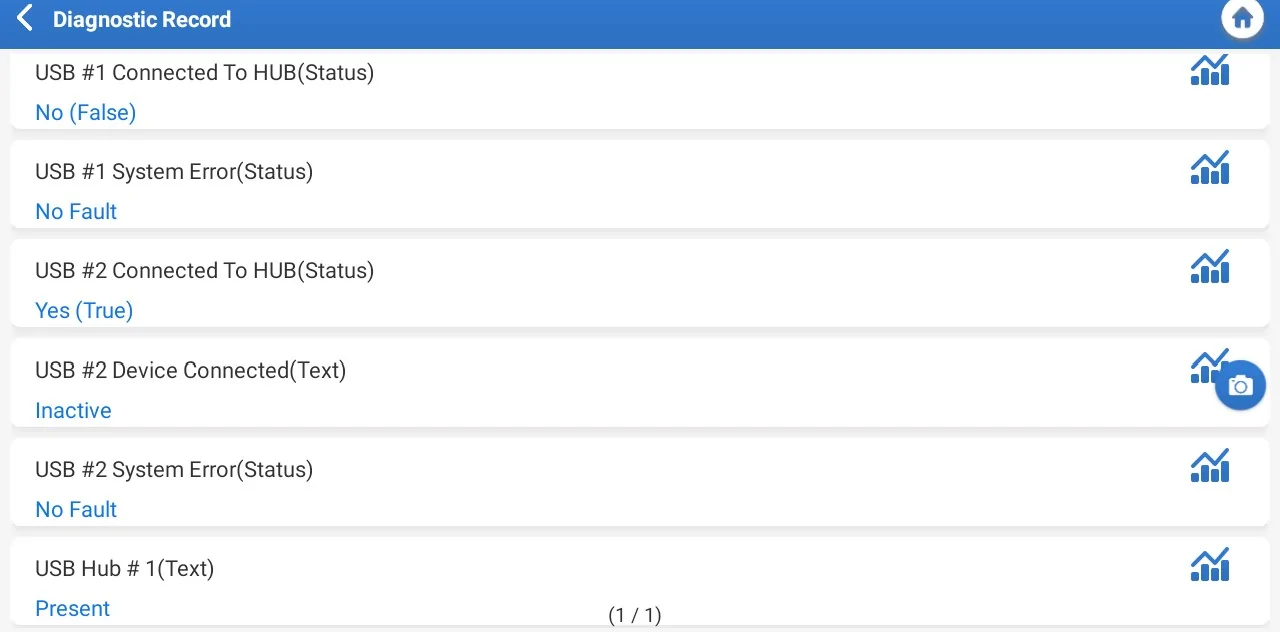
If you have a scan tool capable - check these Live Data PIDs

Check that Yes (True) displays when the USB is connected in each port and you do not have any error status displayed.

Pay attention to:
Do the Hub (Lights) go out when it faults? or do they stay lit?
Noting that: - (Determines if HUB Power Issue or USB Issue)
C2809A = Hub Power & Ground - Powers the HUB & Lights
C2809B = USB Cable (APIM to HUB) - Data & Charge

USB Test Final.webp
 

Superspirit

Well-Known Member
First Name
Joe
Joined
Jun 18, 2022
Threads
11
Messages
834
Reaction score
1,641
Location
earth
Vehicle(s)
22 ranger
Sync is up to date, lights stay lit. Going to check codes and see if I can check data with forscan.
Thanks for the help guys!
 

Superspirit

Well-Known Member
First Name
Joe
Joined
Jun 18, 2022
Threads
11
Messages
834
Reaction score
1,641
Location
earth
Vehicle(s)
22 ranger
Can't force myself to work on the truck today. Going to tackle it in the morning if I feel up to it. I do have a question does the apim have to be programmed if it needs replaced? as I have a feeling that's what's going bad. Today it sees the usb and starts playing when selected through the screen sources menu. But it will tell me on the screen usb detected, but if I give it a voice command it responds no usb available, but if I hit sources it's there and it will play when selected other times usb is not detected.
This truck is turning into a nightmare.
 

RangerBill

Well-Known Member
First Name
Bob
Joined
Jun 8, 2022
Threads
3
Messages
1,601
Reaction score
2,122
Location
PA
Vehicle(s)
2019 Ford Ranger Lariat Super Crew FX4
Occupation
retired
Can't force myself to work on the truck today. Going to tackle it in the morning if I feel up to it. I do have a question does the apim have to be programmed if it needs replaced? as I have a feeling that's what's going bad. Today it sees the usb and starts playing when selected through the screen sources menu. But it will tell me on the screen usb detected, but if I give it a voice command it responds no usb available, but if I hit sources it's there and it will play when selected other times usb is not detected.
This truck is turning into a nightmare.
Have you pulled the fuse F31 for the APIM as suggested earlier? Also, in the Sync menus, try a hardware reset.
 

airline tech

Well-Known Member
Joined
Aug 24, 2022
Threads
28
Messages
4,448
Reaction score
8,500
Location
Midwest - KS
Vehicle(s)
2022 Ranger Lariat-Super Crew, Cactus Gray
Occupation
Aircraft Tech
How is the USB Formatted?
FAT32 or exFAT? or NTSC
How is the Music Formatted?
MP3 or?

Have you tried - Varied Commands to (OPEN) the USB
  • After pressing the voice button, wait for the beep and say clearly:
    • "USB"
    • "USB stick"
    • "USB drive"
    • "Source USB"
    • "Play USB"
I am sorry, but I have never really used the - (Voice Command) Feature, as I never dug into how to get it to work without fumbling around.

Have you ever had the Voice Command (Work) for USB Music Access?
 

Superspirit

Well-Known Member
First Name
Joe
Joined
Jun 18, 2022
Threads
11
Messages
834
Reaction score
1,641
Location
earth
Vehicle(s)
22 ranger
@airline tech . Yes I've used the voice command since I bought the truck new. I believe the Usb is exfat and the files are in flac. I do know it is compatible a I've listened to it for over 3 years, in the truck. I made these for all 3 of our vehicles they work great. Hit the voice command and tell it to play any song album or artist it's been great. Till this started happening I've had the truck since the day it came off the transport. I have tried the reset and it made no change. I've pulled several fuses but not positive I've pulled 31. And I've had the battery disconnected for almost a full day to install a new amp as the pervious one went bad. Going to pull the acm tomorrow so will double check all the apim connections then. But as I had it out the other day I'm positive it's plugged in correctly. This started before I went in to change the amp. And it hasnt changed with anything I've done yet.
 
Last edited:

airline tech

Well-Known Member
Joined
Aug 24, 2022
Threads
28
Messages
4,448
Reaction score
8,500
Location
Midwest - KS
Vehicle(s)
2022 Ranger Lariat-Super Crew, Cactus Gray
Occupation
Aircraft Tech
I am sort of in the same boat:
I can pay my (Media) via an OLD Iphone vs 3G (No Service) just used as a Ipod.
Works great, if using manual selection to (open) it.
But Voice Control - Not Working for it - I think this is why, when I first got the truck I just left it alone and never revisited on how to get it to work.
I normally just let it play (Alphabetical Order) by Song Name and just let it roll through A-Z.
But (NOW) I am determined to figure it out and get the (Voice) to work.
I did find a (Touch Tab) that is viewable:
When the USB is selected and playing - (hit the settings) tab
This brings up a (Tab) on the bottom row - Media Device? - sorry I forgot how it was named.
Hit that tab - and it brings up a message about (reindexing) the USB.
Remove (USB) and when reinserted - Sync will reindex the files.
For me - No Help at this point,
But I logged into ITunes (Yes, I still have not imported) to Apple Music (YET) and renamed my device (USB-Ipod) as it was (Ipone-Ipod), hopefully renaming it will help.
So, its (In-Work)

I will say that as far as (USB) connectivity, I have never had an issue.

One note, I just noted:
For my (Error) I was not doing quick presses on the (Voice Button) I was doing LONG presses.
Long Presses - Activates the (Ipone)
Short Presses - Activates the Sync (Voice)
So that may be MY issue - (Note to Self - Read the Manual) :giggle:


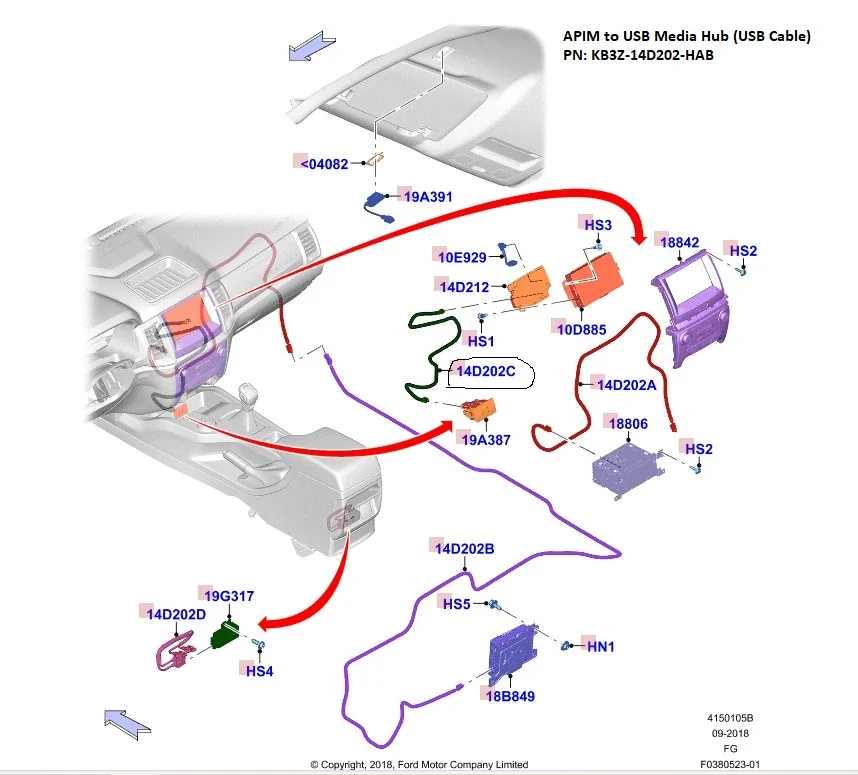
For your issue - if it is not resolved by (Re-Indexing) the USB, before I would replace the APIM, I would try a new (USB-Cable) between the APIM & Hub


Sync Parts.webp
 

Motorpsychology

Well-Known Member
First Name
Chris
Joined
Nov 13, 2019
Threads
21
Messages
3,290
Reaction score
11,487
Location
Prescott, WI
Vehicle(s)
2021 Ranger STX SuperCab 4X4 Carbonized grey; 2025 Mazda CX-90 Platinum Quartz
Occupation
Vagabond
For your issue - if it is not resolved by (Re-Indexing) the USB, before I would replace the APIM, I would try a new (USB-Cable) between the APIM & Hub
10-4 on a new cable. This will cure the majority of connection problems. Also, go to settings and check for updates,
Many of the cheapie cables you see by the checkout counter won't handle the amount of data transfer from nav or music apps, and may charge slowly or not at all.
If you have an Apple device, be sure the cable you use is Apple MFI certified.
https://www.amazon.com/Lightning-Charger-Certified-Compatible-iPhone14/dp/B0B6C6QGJL/ref=sr_1_2?crid=1YHBI2Z5ONCJO&dib=eyJ2IjoiMSJ9.QX6XjWFP4Ok31RuPILL5hMWc-0mbgHUtRz0M2hJv_i5F9krbTHZ5iO0XDit1FCRzAUxDIzk4wGcaNGg8nRnHp0If1-ZaeBWfvZ2pxCyl_rmVI85chjP-JD01vRH7Gg8A4AfI8nVZGYsG-NVaDRSqXhVSD2x0BaZ1FC0Ukz9Ww3SXFZvZzWcLyMo-8gZnJTVSO9QoAjTTT6Fb5ASt4FDXaKERPwTUQ-JuMZ9S8KG1iI8.sEFqWRFPiUH9O2kizakzgEfi3kjWhZzuAqsilJiXj74&dib_tag=se&keywords=apple+usb+type-a+to+lightning+cable+for+iphone+14/13/12/11/pro/mini&nsdOptOutParam=true&qid=1765549995&sprefix=apple+usb+type+a+to+lightning+cable+for+iphone+14/13/12/11/pro/mini,aps,153&sr=8-2&th=1
Sponsored


Top