Sponsored

2019 software update

Arly

Well-Known Member
First Name
Arlyn
Joined
Sep 29, 2020
Threads
8
Messages
1,138
Reaction score
6,663
Location
Houghton MI
Vehicle(s)
2019 Ranger XLT super cab (dog space)
Occupation
trails maintenance
Been tring to update this "no longer new" trucks software. Seems it takes hours and hours even when we have a good Wi-Fi signal here so we gave up. The only annoyanc is the "need wi-fi to update" comes on all the time its started. Should we just give up? Not a happy customer if this is only way to update it. I was told this by the dealership.
Sponsored

 

mtbikernate

Well-Known Member
Joined
Apr 13, 2020
Threads
11
Messages
1,174
Reaction score
2,636
Location
NC
Vehicle(s)
2019 Ranger XLT 4x4
in the electronics section of the forum, there are some threads detailing how to download the file to a computer (and the places to do it), put it on a thumb drive, and load it into the truck that way. still takes a minute, but it's faster than trying to download over wifi
 
OP
OP
Arly

Arly

Well-Known Member
First Name
Arlyn
Joined
Sep 29, 2020
Threads
8
Messages
1,138
Reaction score
6,663
Location
Houghton MI
Vehicle(s)
2019 Ranger XLT super cab (dog space)
Occupation
trails maintenance
in the electronics section of the forum, there are some threads detailing how to download the file to a computer (and the places to do it), put it on a thumb drive, and load it into the truck that way. still takes a minute, but it's faster than trying to download over wifi
So what the dealership told me, was incorrect?
 
OP
OP
Arly

Arly

Well-Known Member
First Name
Arlyn
Joined
Sep 29, 2020
Threads
8
Messages
1,138
Reaction score
6,663
Location
Houghton MI
Vehicle(s)
2019 Ranger XLT super cab (dog space)
Occupation
trails maintenance
I searched the electronics portion with "updating software" and got no results.


Big Blue

Well-Known Member
First Name
Lee
Joined
May 5, 2020
Threads
16
Messages
3,927
Reaction score
9,352
Location
Wisconsin
Vehicle(s)
2019 Ford Ranger XLT FX4 Supercrew lighting blue
Occupation
Retired mechanical designer
I'm assuming the software you want to update is for the SYNC system. Thats the only one I know that we can do. Do yourself a favor and forget about updating over WIFI.

On your computer go out to Cyan Labs and download their SYNC Updater program. It will walk you through downloading the latest update to a USB drive. Go out plug it into the truck and go for a drive. If you don't have NAV it will only take 15-20 minutes, if you have NAV it may take longer than an hour. The program will tell you how big of drive you need, I think it is like 32 mb.

I gave up.on using the factory updayes long ago.
 

Tom_C

Well-Known Member
First Name
Tom
Joined
Apr 17, 2021
Threads
35
Messages
1,972
Reaction score
4,389
Location
Virginia, USA
Vehicle(s)
2020 Ranger Lariat SuperCab FX4
Occupation
System Admin, Retired
Yeah, I've only updated by downloading to a USB stick. In order to connect to wifi I have to pull out of the detached garage to get a signal, so I just do it manually. Much easier.
 

mtbikernate

Well-Known Member
Joined
Apr 13, 2020
Threads
11
Messages
1,174
Reaction score
2,636
Location
NC
Vehicle(s)
2019 Ranger XLT 4x4
So what the dealership told me, was incorrect?
maybe if you told us what your dealership said....

going usb is the fastest method. Wifi can work, but there are things to deal with...and it's slow. I've only ever used the usb method.
 
OP
OP
Arly

Arly

Well-Known Member
First Name
Arlyn
Joined
Sep 29, 2020
Threads
8
Messages
1,138
Reaction score
6,663
Location
Houghton MI
Vehicle(s)
2019 Ranger XLT super cab (dog space)
Occupation
trails maintenance
maybe if you told us what your dealership said....

going usb is the fastest method. Wifi can work, but there are things to deal with...and it's slow. I've only ever used the usb method.
Dealer QUOTE " it must be undated via Wi-fi"
 

JesseS

Well-Known Member
First Name
Jesse
Joined
May 26, 2021
Threads
19
Messages
1,755
Reaction score
4,824
Location
NorCal (Roseville)
Vehicle(s)
2021 Ranger XLT FX4, Jayco 26' Class A
Occupation
Retired, work is a four letter word.
The Cyan Labs app is the only way to go, select your update, point it to your usb drive, and it formats and loads the update for you. All you have to do is plug the USB drive into a front port and either go for a drive, or in my case just turn the ignition on and let it update. (I am on a 2A charger)
 

Big Blue

Well-Known Member
First Name
Lee
Joined
May 5, 2020
Threads
16
Messages
3,927
Reaction score
9,352
Location
Wisconsin
Vehicle(s)
2019 Ford Ranger XLT FX4 Supercrew lighting blue
Occupation
Retired mechanical designer
Dealer QUOTE " it must be undated via Wi-fi"
Your dealer is dumb like most. As many have said do it with the USB drive.
 

pboggini

Well-Known Member
First Name
Pete
Joined
Nov 30, 2018
Threads
12
Messages
235
Reaction score
253
Location
San Jose, CA
Vehicle(s)
2019 Lightning Blue XL Ranger 4x2 Supercrew.
Took mine to the local dealer when I needed to get the heater box replaced due to the warping issue back in December. As luck would have it, the night before Fordpass told me I had a Sync update. I asked the dealer to do that too. When I picked it up he said "well, we tried to update it but the Ford Servers kept crashing". I think that's mechanic for "the WiFi sucked and we couldn't do it".

I then did the update using USB. My only advice is to follow the instructions Ford gives including using "The Unarchiver" software if using a Mac to unzip the zip file since it seems the zip file isn't a standard zip file it's got backslashes "\" instead of slashes "/" in the file name paths. Near as I can tell, it's because someone decided to use Powershell (and an older version of it) to create the zip file instead of the hundreds of normal ways one can create a normal zip file, sigh.

Basically, I followed this:

https://www.globalowneraem.ford.com...a/en-ca/documents/Update+Your+SYNC_Mac_v3.pdf

and I was easily able to update my Sync3 software.
 

Capt Jon

Well-Known Member
First Name
Jonathan
Joined
Nov 5, 2019
Threads
1
Messages
93
Reaction score
186
Location
St Augustine, FL
Vehicle(s)
2019 Ford Ranger
I log on to the Ford Owner Website, where all the information on your vehicle is maintained. If there is an update you can find it there and download it. The instructions on how are provided. The only thing is if when you did the last update and it doesn't update in your system you need to verify the update you installed against what is shown as the last update.
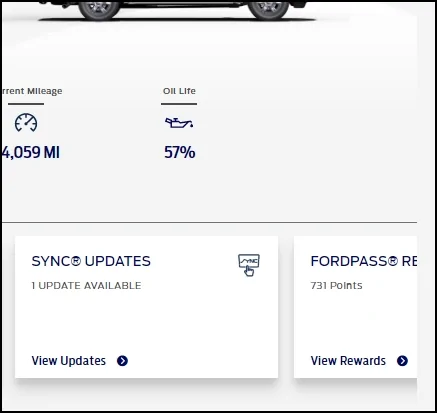
A sync.webp
Sponsored


Top