Sponsored

Restraints Indicator Lamp Warning, Radio and Climate Physical Buttons (FCIM) not working, No Outside Temperature, No Start/Stop Either

RangerLife

Member
First Name
Anthony
Joined
Jan 8, 2024
Threads
0
Messages
22
Reaction score
8
Location
USA
Vehicle(s)
2020 Ford Ranger
Once you get it all back and installed, we need to check.

1. Power & Ground at the FCIM connector
2. The Can Bus Wiring

There is (1) more connector C422 we can try to (Clean & Reseat)
and one more possible source (avenue) to get the FCIM to power.
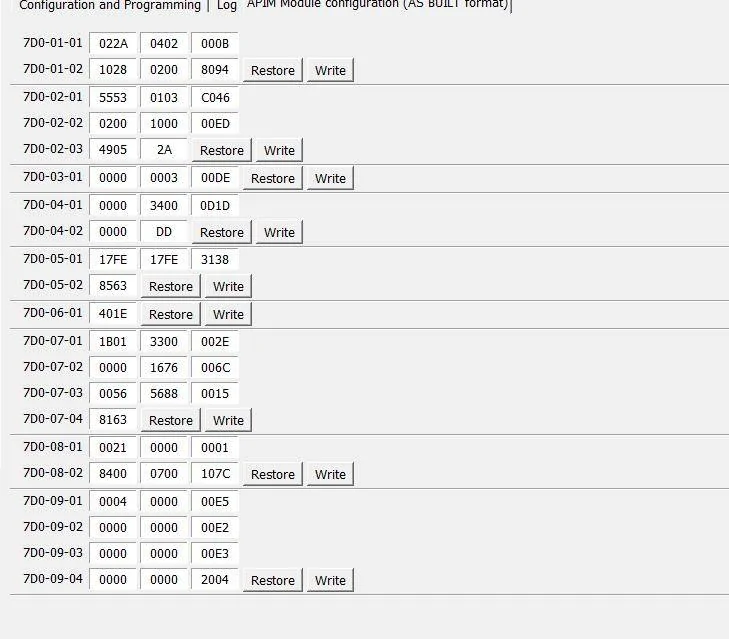
With the APIM being programmed by 4D Tech and it is needing the As-Built files to match the added FCIM - it is possible Ford wiped that programming back to stock and MAY be the reason for the FCIM not powering as the APIM may be set incorrectly - Note there is not a VIN# in the APIM but the settings may have been changed.

Since you are able to communicate to the APIM.
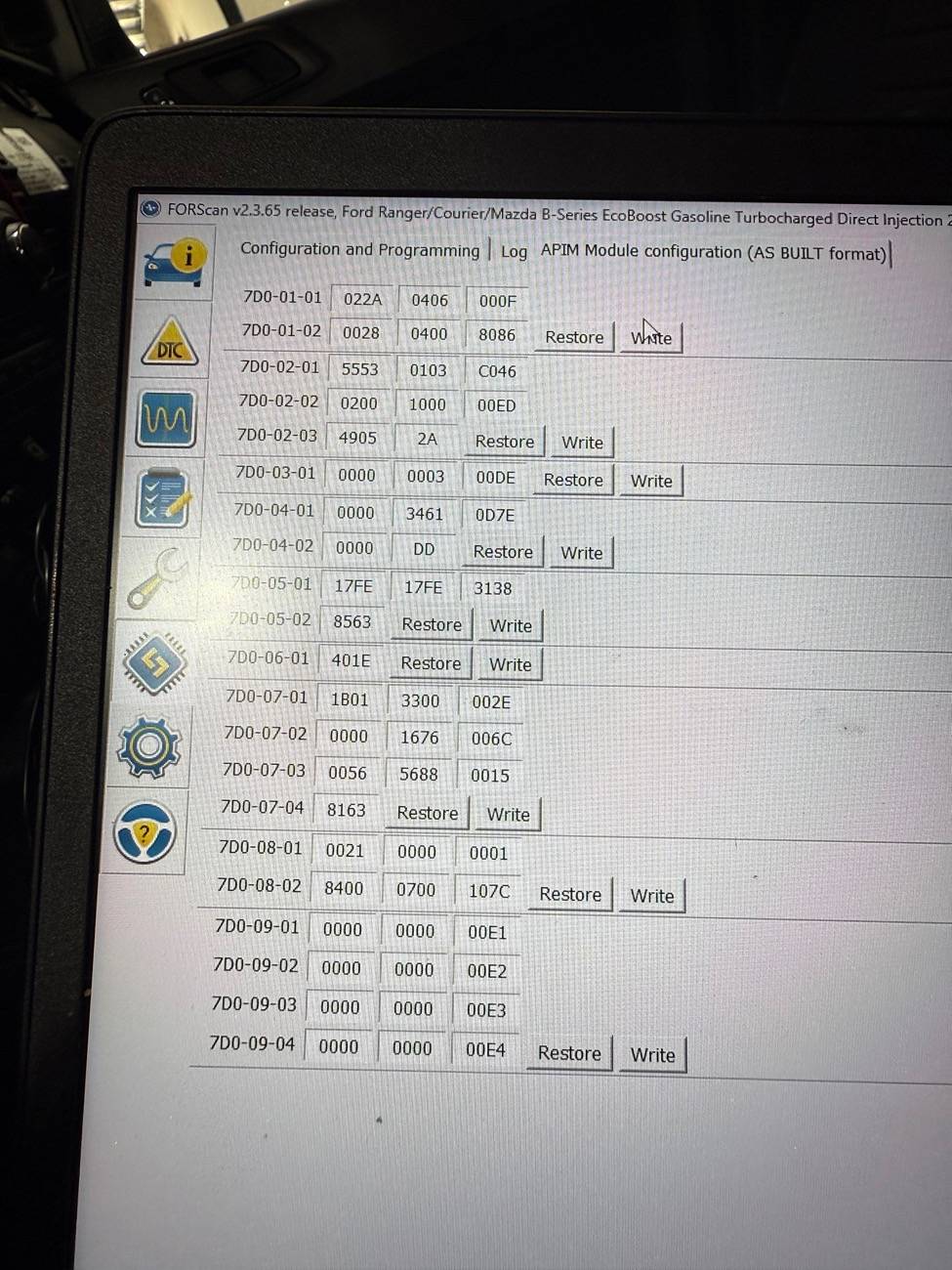
Post the APIM As-Built data you have so I can see if anything stands out as incorrect.
I am thinking outside the box here as a possible issue.

C422 Connector Location

Pins: 31 - 32 - 33 and 34 are the MS-Can bus wires that feed the Tail Lamps and then back up to the C211 connector which you already reseated.
You do not have BLIS, but you do have the TRM (Trailer Module) that uses the can bus data feed.
You are able to communicate to the TRM, but it is also reporting a (Config Not Complete) Msg

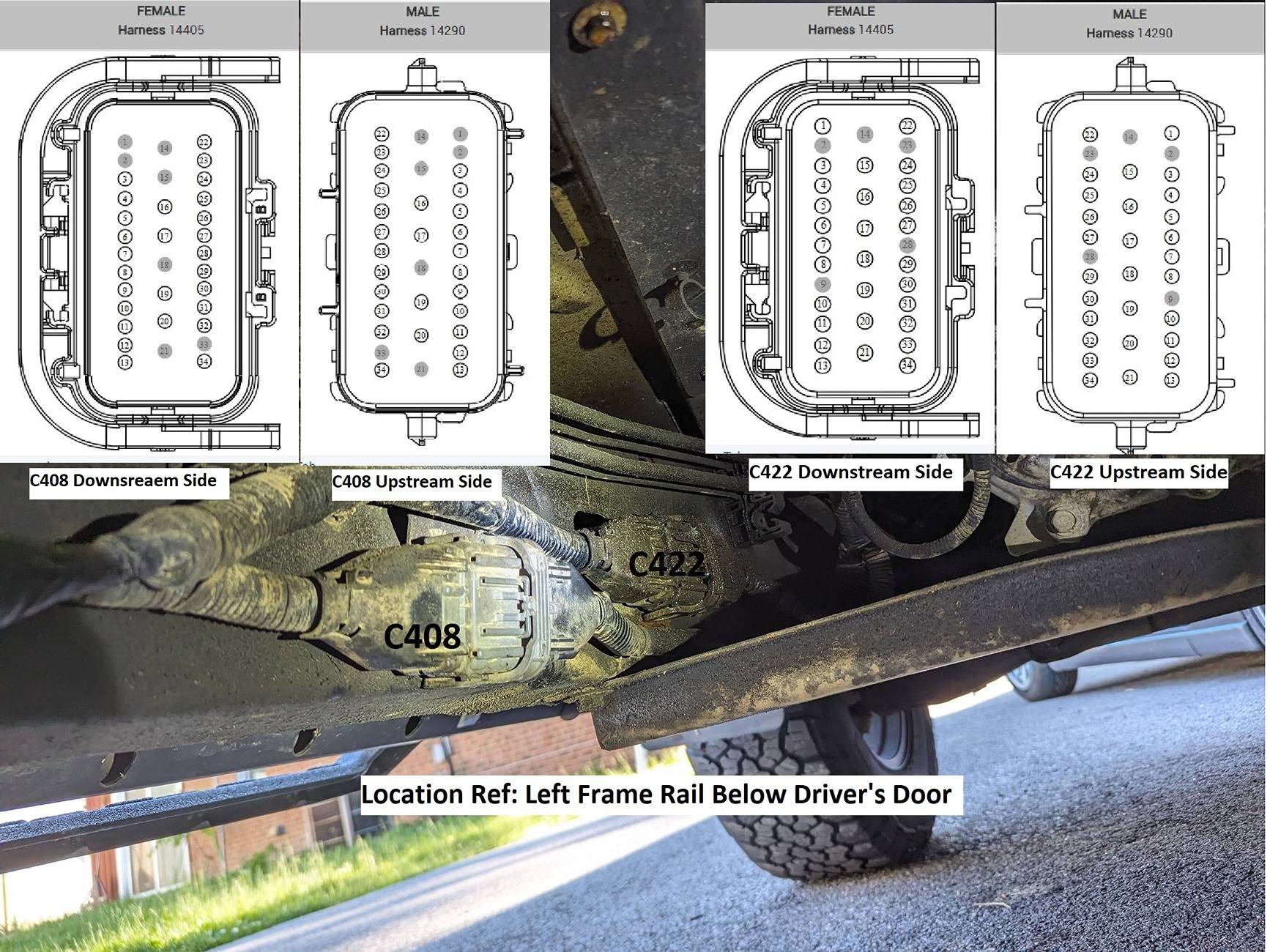
C408-C422 Detailed Location.jpg
Finally got it back and installed; here are the codes it is throwing in general:

(OK) [12:31:02.252] Disconnected
(WARN) [12:31:05.480] Checking FTDI #1:223230240103...
(OK) [12:31:06.120] Connection to adapter has been established: FTDI #1:223230240103
(OK) [12:31:06.120] Adapter: OBDLink EX r2.7.1 STN2232 v5.9.5 (ELM327 v1.4b)
(OK) [12:31:06.195] Connection to vehicle has been established
(OK) [12:31:06.395] Vehicle: Ford Ranger/Courier/Mazda B-Series EcoBoost Gasoline Turbocharged Direct Injection 2.3L 2020 ( 2020 MY ), VIN: 1FT*********66391
(OK) [12:31:08.392] Found module: PCM - Powertrain Control Module
(WARN) [12:31:16.351] DTCs in PCM: U0164:00-2F
(OK) [12:31:16.507] Found module: OBDII - On Board Diagnostic II
(OK) [12:31:17.158] Found module: APIM - Accessory Protocol Interface Module
(WARN) [12:31:17.325] DTCs in APIM: U0256:00-0A
(OK) [12:31:17.616] Found module: DCDC - DC to DC Converter Control Module
(OK) [12:31:19.480] Found module: BdyCM - Body Control Module
(WARN) [12:31:22.717] DTCs in BdyCM: B1323:11-48, U3006:16-08, U3007:16-08, U3013:16-08, U3014:16-08, B115E:08-08, U0256:87-0A
(OK) [12:31:23.013] Found module: BECMB - Battery Energy Control Module B
(OK) [12:31:26.781] Found module: FCIM - Front Controls Interface Module
(WARN) [12:31:26.802] Module FCIM has no DTC function
(OK) [12:31:27.698] Found module: ATCM - All Terrain Control Module
(OK) [12:31:28.097] Found module: TRM - Trailer Module
(WARN) [12:31:28.157] DTCs in TRM: U2100:00-2F
(OK) [12:31:30.368] Found module: OCS - Occupant Classification System Module
(OK) [12:31:31.293] Found module: ABS - Antilock braking system
(WARN) [12:31:31.952] DTCs in ABS: U3003:16-08, C101A:16-08
(OK) [12:31:34.259] Found module: TCU - Telematic Control Unit Module
(OK) [12:31:34.853] Found module: RTM - Radio Transceiver Module
(OK) [12:31:36.569] Found module: RCM - Restraint Control Module
(WARN) [12:31:36.808] DTCs in RCM: U0557:82-0A
(OK) [12:31:37.896] Found module: PSCM - Power Steering Control Module
(OK) [12:31:38.456] Found module: ACM - Audio Control Module
(WARN) [12:31:38.576] DTCs in ACM: U0256:00-0A
(OK) [12:31:38.707] Found module: SCCM - Steering Column Control Module
(OK) [12:31:39.060] Found module: IPC - Instrument Panel Control Module
(WARN) [12:31:39.260] DTCs in IPC: U0104:00-08, U0439:82-08, U0557:00-0A, U0557:82-0A, P0460:13-08
(OK) [12:31:39.544] Found module: GWM - Gateway Module A
(OK) [12:31:40.023] Found module: IPMA - Image Processing Module A

Here is the APIM as built file:
1746549749947-dx.webp
Sponsored


airline tech

Well-Known Member
Joined
Aug 24, 2022
Threads
28
Messages
4,467
Reaction score
8,542
Location
Midwest - KS
Vehicle(s)
2022 Ranger Lariat-Super Crew, Cactus Gray
Occupation
Aircraft Tech
I do not see anything that stands out in the APIM, but one thing that is odd and it keeps showing up and that is the code for the TRM.

Its more of a shot in the dark, but it may be possible that if the TRM is not programmed it may be blocking the passthrough communication on the data bus.

That code means that its not communicating or its not programmed with the As-Built

All TRM's are the same across all trims.

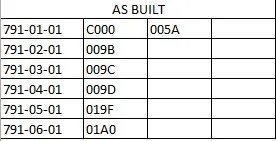
Should match the below settings.

TRM.jpeg


If you can view this and alter if not set, then this confirms that you can communicate on the Can Bus up to the TRM and we only need to T/Shoot the Can Bus Wiring between the TRM & FCIM.
If we can confirm the wiring is good, then the most logical is the FCIM itself.
 

RangerLife

Member
First Name
Anthony
Joined
Jan 8, 2024
Threads
0
Messages
22
Reaction score
8
Location
USA
Vehicle(s)
2020 Ford Ranger
I do not see anything that stands out in the APIM, but one thing that is odd and it keeps showing up and that is the code for the TRM.

Its more of a shot in the dark, but it may be possible that if the TRM is not programmed it may be blocking the passthrough communication on the data bus.

That code means that its not communicating or its not programmed with the As-Built

All TRM's are the same across all trims.

Should match the below settings.

TRM.jpeg


If you can view this and alter if not set, then this confirms that you can communicate on the Can Bus up to the TRM and we only need to T/Shoot the Can Bus Wiring between the TRM & FCIM.
If we can confirm the wiring is good, then the most logical is the FCIM itself.
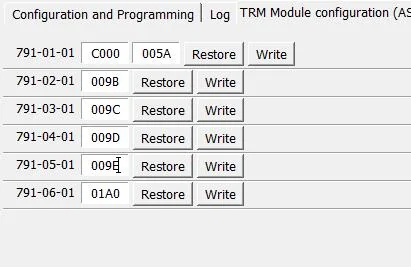
So my TRM showed differently:
1746735231128-80.webp

So I should update 791-05-01 to "019F' instead? Is there something I should look for to change if it works?
 

airline tech

Well-Known Member
Joined
Aug 24, 2022
Threads
28
Messages
4,467
Reaction score
8,542
Location
Midwest - KS
Vehicle(s)
2022 Ranger Lariat-Super Crew, Cactus Gray
Occupation
Aircraft Tech
So my TRM showed differently:
1746735231128-80.webp

So I should update 791-05-01 to "019F' instead? Is there something I should look for to change if it works?
Leave it as is - I did some digging and found some TRM's with that (009E)
 

airline tech

Well-Known Member
Joined
Aug 24, 2022
Threads
28
Messages
4,467
Reaction score
8,542
Location
Midwest - KS
Vehicle(s)
2022 Ranger Lariat-Super Crew, Cactus Gray
Occupation
Aircraft Tech
Since it appears that the FCIM is getting power to it, as the Forscan Run shows it sees the module, but the DTC (Message) is telling us that its not communicating. (Data Bus)
I would also clear all the codes again after all modules were reconnected, so you have a fresh set of codes to look at.

I know FDRS has the software (Data Network) that may be able to Force a data message to it to turn it on. (Power it up)

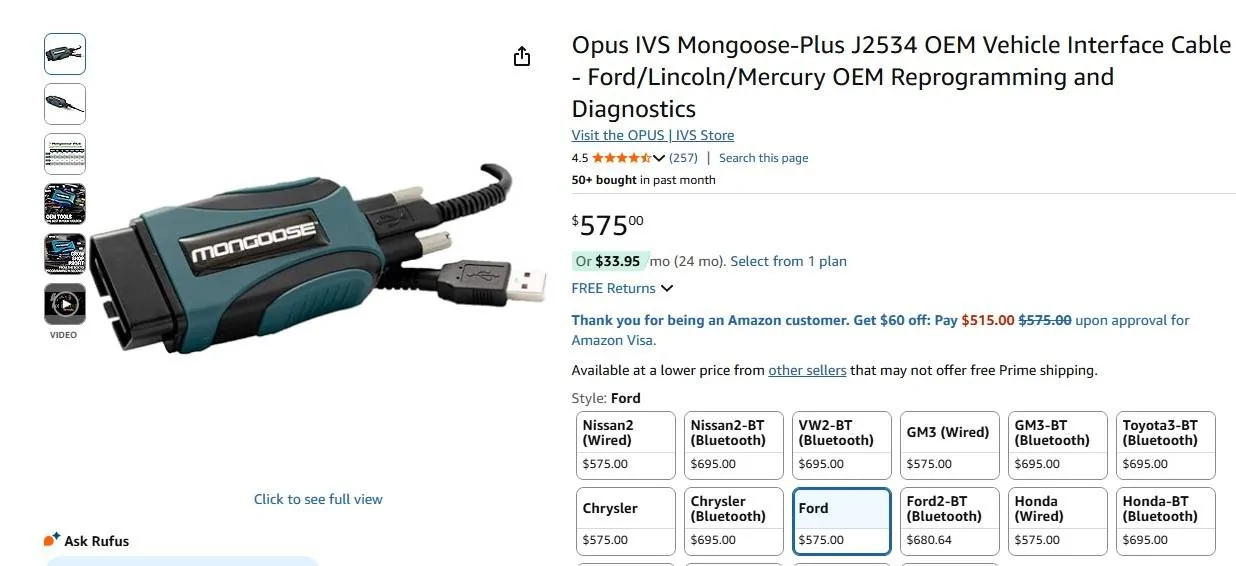
The Good news is that you can get 2-Day use ($50.00) of FDRS the bad is that you must have a approved cable (J2534 Passthrough) compliant to actually connect such as this being the cheapest available or use a cable like my Topdon scanner has (it works with FDRS)

I only played with FDRS out of curiosity just to see what it can do over my scan tools.
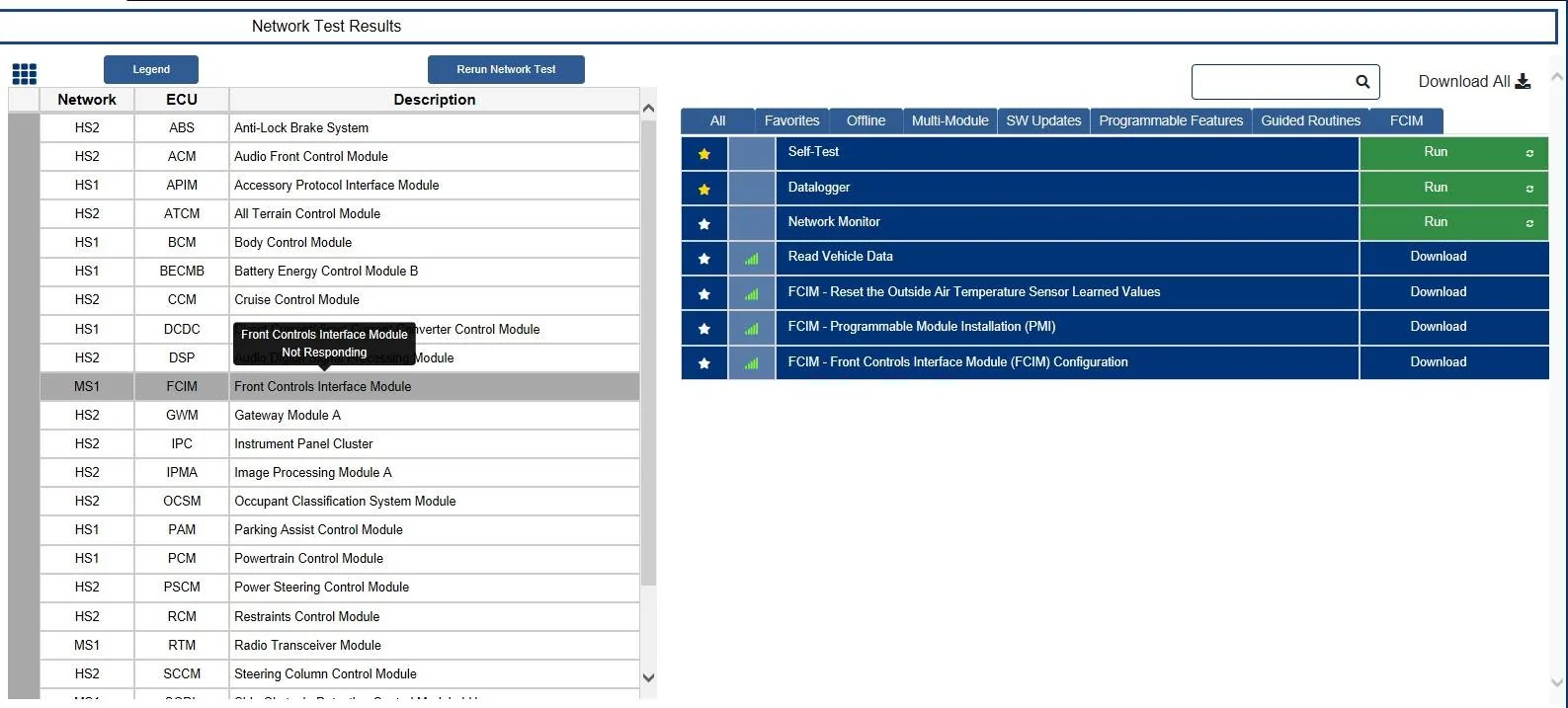
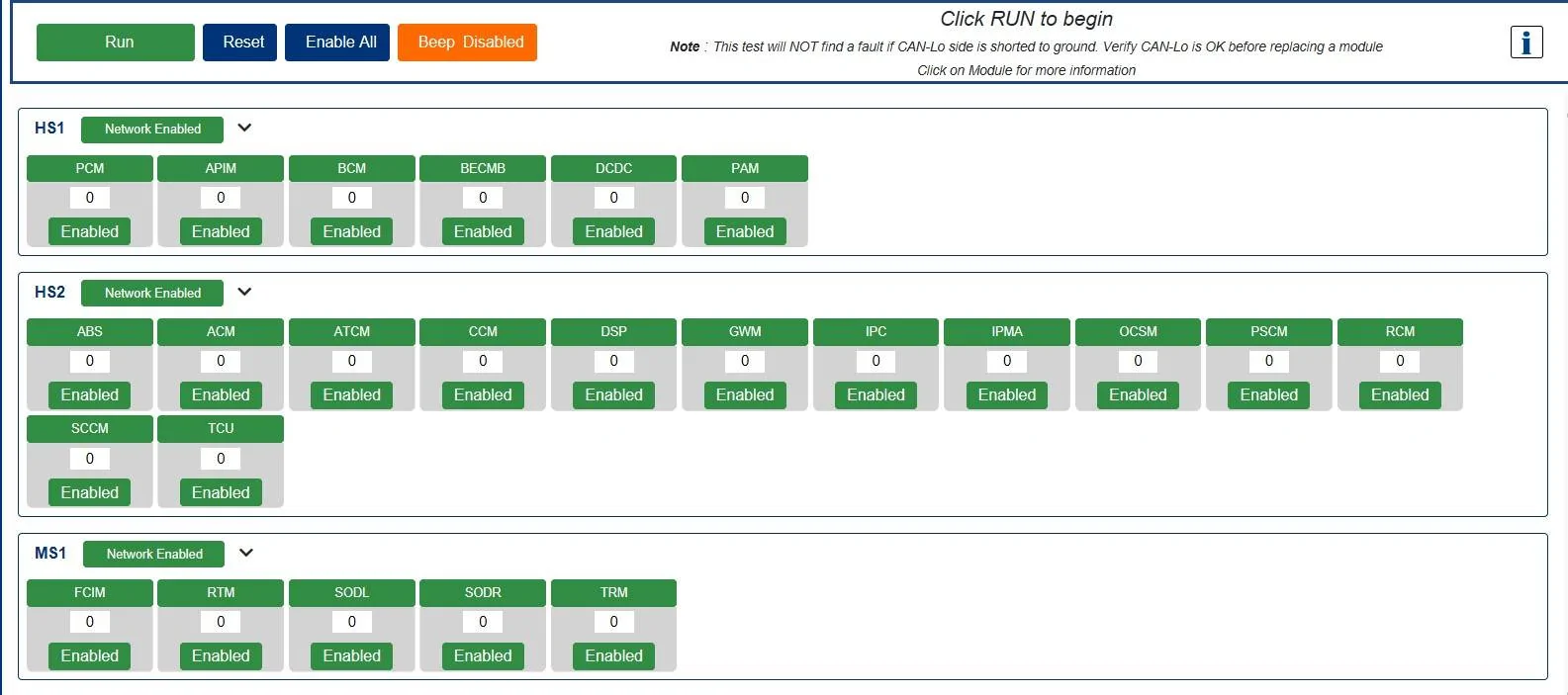
This is a screenshot of my truck running FDRS, I did not dive into this to actually see what the Data Logger can do.
I am assuming that you can at least see (view) the data message code or view the pulses on the data bus (for Ignition Switch Position) and this feature tool will possibly help in seeing what is actually happening on the bus, Forscan will not go this deep.

So, the fist things to check (verify) is are the wires good up to the FCIM and is the (Internal) resistor in the FCIM (Good)
If both of those are good then its most likely the VIN# Mismatch that is blocking it from powering up.

I cannot find any documentation on how to force power on the FCIM, that is controlled by the Can Bus without possible damage to the FCIM or Can Bus, so we need to at least eliminate things that we can do - Wire Checks and Resistor Circuit Check.


So if we revisit post #39 and do some wire checks to verify wiring is good and the Terminating Resistor is good in both the Gateway & FCIM

Repost of (Post #39)

To check the (MS-Can) bus circuit we need to understand that for the MS-Can it has 2 terminating resistors (One on each end of the circuit)
One is in the GWM and the other is in the FCIM
So: Disconnect the Battery

Disconnect the connector on the (GWM) this is the connector on the back side of the OBD-2 Port
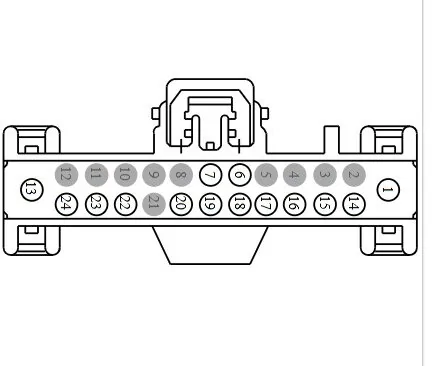
and we need to Ohm C2431 (Pins 22 & 23)
This is testing the MS-Can circuit and should be reading 108-132 Ohms, each end of the circuit has a 120 Ohm resister - so when the circuit is (Intact) GWM & FCIM connected = 60 Ohms resistance in the circuit.
Any module on the circuit (internally) faulted can pull down the resistance and affect the circuit.
With your (Scan) reports - I see the TRM has a issue of (Not Updating) but it is reporting on the bus.
The TRM is the silver-colored box just forward of the C211 connector, it is mounted under (behind) the TCU.
I would try disconnecting the TRM and then try clearing the codes and see if the FCIM will awaken.

PLUS: I would try - Creating a NEW profile when you load Forscan as this will force a (New Scan) for installed modules to see if the FCIM will populate in the Scan (run) as when you get to the small pop-up when you hook up - it asks you - Load New Profile or use Existing Profile that you named.
If you use existing - it is only going to load the modules it picked up when the (Existing) profile was loaded.
This is (one-drawback) of Forscan vs a Scan Tool, if the module was not picked up with the initial scan it will not pick up that module unless you force a new scan for modules, vs a Scan Tool will scan all available modules.

C2431 - Pins 22 & 23 - are the MS-Can bus wires that feed the circuit and ends at the FCIM, so with the FCIM connected. Reading should be 108 to 132 Ohms
This is 120 Ohms with a (+/-) variance of 12 Ohms.

c2431-jpeg.jpg


To Test the (wire) itself - without the (FCIM) resistor
Dis-Connect the FCIM connector & the GWM Connector
and:
Meter:
C2431 - Pin 22 to C2402A - Pin 18
C3431 - Pin 23 to C2402A - Pin 17
Should be 3 Ohms or less

So, to test the (Resistor) in the GWM (Opposite of the FCIM Test above)
Then connect the GWM connector and with the FCIM disconnected
Probe C2402A: Pins 17 & 18, this backwards checks the other resistor in the circuit The GWM (end)

And with both connectors installed - if you were to back-probe into the circuit on either connector (with them connected) the reading should be around 60 Ohms

If all the checks for power & Can Bus are good, then we can confirm that it is a (data transmission) issue (VIN #) that is blocking it from powering up.
as the MS-Can bus will be confirmed good and power good - up to the FCIM

Note: There is (1) connector between the TRM & FCIM and that is C211, I have a hunch that the issue is between the TRM & FCIM (either module or wiring in between them)
This is why it may be a possibility that the TRM (as its tied into the lighting circuit) mainly the parking lights (to be specific) may be taking down the circuit- down stream circuit issue from front end damage.
You have the TRM always reporting its not programmed and I think its due to the Can Bus issue you have.
So disconnecting the TRM would be a good way to eliminate it as a cause if the FCIM comes back online with it disconnected.

So just doing the above checks will give some insight on where to go.
If the resistance checks do not pass, then we can use the results to determine where to go next.


Ref: FDRS Screenshots

Note:
Read Vehicle Data - would possibly show the VIN # , if FDRS will connect to it.
The Data Logger & Network Monitor may also help in forcing communication to the FCIM
At this point I am going to tap @MY23RANGER or @MrBusses on the shoulder and see if they can shed some guidance on what FDRS can do for you in this situation as they would be more familiar with FDRS functionality than I have.

To catch you two up to speed, he has a (4-D Tech) upgraded SYNC & FCIM, had a deer hit accident and it required the Driver's Headlamp replacement, somehow now the FCIM will not power (via MS-Can) and his FCIM is dead and climate screen is greyed out.
I am attempting to help T-Shoot the issue, as it may be possible the VIN # was wiped out of the FCIM.
His dealer will not T-Shoot due to (Non-OE) modules installed.
This is where I am (LOST) if this was the case - Will that stop the FCIM from (Data) bus communication (FCIM-Rejecting) the (ISP-R) data transmission, I can provide the wiring check portion of this but I am lost on how to (Force) a data transmission to get it to power, with the most recent (Forscan) log he posted, tells me the module is getting power to it, it just lost the ability for MS-Can to signal the internal switch to turn it on.

The Point I need help with is - We have a constant power source:
Is that power source a constant ground?
Or
Is it a switched ground? from the (ISP-R) signal?
and can you use that Power & Ground to force the FCIM to power? without damaging the FCIM or the Data Bus (Terminating Resistors)

Sorry, but this part of the Can Bus is where I am lost, and I am thinking that the Power & Ground are constant on the PCB and the data transmission closes the power supply circuit (Internally) via micro relay pulse from the (ISP-R) signal.

Hopefully one of you can shed some guidance for me in understanding this circuit control.

Plus with FDRS and a dead module such as the FCIM can one of the following (force power) to the FCIM if it will not load up (in the module) load via Forscan.

I guess the most important question is the (VIN#) can it cause it not to power up or will it throw another code?
As this would also shed some light on (Possibly) getting an (salvage yard) FCIM and plugging it in , and then use Forscan to Program the (current truck VIN # to it) or will it block the communication?


I understand PMI = Download installed module (As-Built) and reload that to the new module.
and
Configuration = Download (As-Built) data from the servers and then load to the new module
however this case is slightly different (Non-OE) modules to get around and the As-Built will not match.
So in this scenario- is it possible to load the (OE) data then use Forscan to alter the settings on a (non-OE) module, as it is now the FCIM for a 8in screen and dual climate vs the 4 in screen version of the FCIM.

Data Logger.jpeg


Network Test.jpeg


Ref: You need a cable like this that will allow FDRS to authorize it as a valid and compatible communication cable.
To my knowledge this is the cheapest (non-Cloned) cable available other than High End scan tool cables.

Mongoose Plus.jpeg
 
Last edited:


RangerLife

Member
First Name
Anthony
Joined
Jan 8, 2024
Threads
0
Messages
22
Reaction score
8
Location
USA
Vehicle(s)
2020 Ford Ranger
Since it appears that the FCIM is getting power to it, as the Forscan Run shows it sees the module, but the DTC (Message) is telling us that its not communicating. (Data Bus)
I would also clear all the codes again after all modules were reconnected, so you have a fresh set of codes to look at.

I know FDRS has the software (Data Network) that may be able to Force a data message to it to turn it on. (Power it up)

The Good news is that you can get 2-Day use ($50.00) of FDRS the bad is that you must have a approved cable (J2534 Passthrough) compliant to actually connect such as this being the cheapest available or use a cable like my Topdon scanner has (it works with FDRS)

I only played with FDRS out of curiosity just to see what it can do over my scan tools.
This is a screenshot of my truck running FDRS, I did not dive into this to actually see what the Data Logger can do.
I am assuming that you can at least see (view) the data message code or view the pulses on the data bus (for Ignition Switch Position) and this feature tool will possibly help in seeing what is actually happening on the bus, Forscan will not go this deep.

So, the fist things to check (verify) is are the wires good up to the FCIM and is the (Internal) resistor in the FCIM (Good)
If both of those are good then its most likely the VIN# Mismatch that is blocking it from powering up.

I cannot find any documentation on how to force power on the FCIM, that is controlled by the Can Bus without possible damage to the FCIM or Can Bus, so we need to at least eliminate things that we can do - Wire Checks and Resistor Circuit Check.


So if we revisit post #39 and do some wire checks to verify wiring is good and the Terminating Resistor is good in both the Gateway & FCIM

Repost of (Post #39)

To check the (MS-Can) bus circuit we need to understand that for the MS-Can it has 2 terminating resistors (One on each end of the circuit)
One is in the GWM and the other is in the FCIM
So: Disconnect the Battery

Disconnect the connector on the (GWM) this is the connector on the back side of the OBD-2 Port
and we need to Ohm C2431 (Pins 22 & 23)
This is testing the MS-Can circuit and should be reading 108-132 Ohms, each end of the circuit has a 120 Ohm resister - so when the circuit is (Intact) GWM & FCIM connected = 60 Ohms resistance in the circuit.
Any module on the circuit (internally) faulted can pull down the resistance and affect the circuit.
With your (Scan) reports - I see the TRM has a issue of (Not Updating) but it is reporting on the bus.
The TRM is the silver-colored box just forward of the C211 connector, it is mounted under (behind) the TCU.
I would try disconnecting the TRM and then try clearing the codes and see if the FCIM will awaken.

PLUS: I would try - Creating a NEW profile when you load Forscan as this will force a (New Scan) for installed modules to see if the FCIM will populate in the Scan (run) as when you get to the small pop-up when you hook up - it asks you - Load New Profile or use Existing Profile that you named.
If you use existing - it is only going to load the modules it picked up when the (Existing) profile was loaded.
This is (one-drawback) of Forscan vs a Scan Tool, if the module was not picked up with the initial scan it will not pick up that module unless you force a new scan for modules, vs a Scan Tool will scan all available modules.

C2431 - Pins 22 & 23 - are the MS-Can bus wires that feed the circuit and ends at the FCIM, so with the FCIM connected. Reading should be 108 to 132 Ohms
This is 120 Ohms with a (+/-) variance of 12 Ohms.

c2431-jpeg.jpg


To Test the (wire) itself - without the (FCIM) resistor
Dis-Connect the FCIM connector & the GWM Connector
and:
Meter:
C2431 - Pin 22 to C2402A - Pin 18
C3431 - Pin 23 to C2402A - Pin 17
Should be 3 Ohms or less

So, to test the (Resistor) in the GWM (Opposite of the FCIM Test above)
Then connect the GWM connector and with the FCIM disconnected
Probe C2402A: Pins 17 & 18, this backwards checks the other resistor in the circuit The GWM (end)

And with both connectors installed - if you were to back-probe into the circuit on either connector (with them connected) the reading should be around 60 Ohms

If all the checks for power & Can Bus are good, then we can confirm that it is a (data transmission) issue (VIN #) that is blocking it from powering up.
as the MS-Can bus will be confirmed good and power good - up to the FCIM

Note: There is (1) connector between the TRM & FCIM and that is C211, I have a hunch that the issue is between the TRM & FCIM (either module or wiring in between them)
This is why it may be a possibility that the TRM (as its tied into the lighting circuit) mainly the parking lights (to be specific) may be taking down the circuit- down stream circuit issue from front end damage.
You have the TRM always reporting its not programmed and I think its due to the Can Bus issue you have.
So disconnecting the TRM would be a good way to eliminate it as a cause if the FCIM comes back online with it disconnected.

So just doing the above checks will give some insight on where to go.
If the resistance checks do not pass, then we can use the results to determine where to go next.


Ref: FDRS Screenshots

Note:
Read Vehicle Data - would possibly show the VIN # , if FDRS will connect to it.
The Data Logger & Network Monitor may also help in forcing communication to the FCIM
At this point I am going to tap @MY23RANGER or @MrBusses on the shoulder and see if they can shed some guidance on what FDRS can do for you in this situation as they would be more familiar with FDRS functionality than I have.

To catch you two up to speed, he has a (4-D Tech) upgraded SYNC & FCIM, had a deer hit accident and it required the Driver's Headlamp replacement, somehow now the FCIM will not power (via MS-Can) and his FCIM is dead and climate screen is greyed out.
I am attempting to help T-Shoot the issue, as it may be possible the VIN # was wiped out of the FCIM.
His dealer will not T-Shoot due to (Non-OE) modules installed.
This is where I am (LOST) if this was the case - Will that stop the FCIM from (Data) bus communication (FCIM-Rejecting) the (ISP-R) data transmission, I can provide the wiring check portion of this but I am lost on how to (Force) a data transmission to get it to power, with the most recent (Forscan) log he posted, tells me the module is getting power to it, it just lost the ability for MS-Can to signal the internal switch to turn it on.

The Point I need help with is - We have a constant power source:
Is that power source a constant ground?
Or
Is it a switched ground? from the (ISP-R) signal?
and can you use that Power & Ground to force the FCIM to power? without damaging the FCIM or the Data Bus (Terminating Resistors)

Sorry, but this part of the Can Bus is where I am lost, and I am thinking that the Power & Ground are constant on the PCB and the data transmission closes the power supply circuit (Internally) via micro relay pulse from the (ISP-R) signal.

Hopefully one of you can shed some guidance for me in understanding this circuit control.

Plus with FDRS and a dead module such as the FCIM can one of the following (force power) to the FCIM if it will not load up (in the module) load via Forscan.

I guess the most important question is the (VIN#) can it cause it not to power up or will it throw another code?
As this would also shed some light on (Possibly) getting an (salvage yard) FCIM and plugging it in , and then use Forscan to Program the (current truck VIN # to it) or will it block the communication?


I understand PMI = Download installed module (As-Built) and reload that to the new module.
and
Configuration = Download (As-Built) data from the servers and then load to the new module
however this case is slightly different (Non-OE) modules to get around and the As-Built will not match.
So in this scenario- is it possible to load the (OE) data then use Forscan to alter the settings on a (non-OE) module, as it is now the FCIM for a 8in screen and dual climate vs the 4 in screen version of the FCIM.

Data Logger.jpeg


Network Test.jpeg


Ref: You need a cable like this that will allow FDRS to authorize it as a valid and compatible communication cable.
To my knowledge this is the cheapest (non-Cloned) cable available other than High End scan tool cables.

Mongoose Plus.jpeg
So the insurance company approved a new APIM, however when I installed and reran ForScan, the as-built file had all completely different codes (then the screenshot I shared on page 3 of this thread) and now my on-screen climate controls no longer show (still no outside temperature, and the FCIM has power since the emergency signal indicator works, but no response from the radio/climate control buttons, we got the replacement one from Infotainment.com VIN assigned, any other suggestions or does this indicate it’s an FCIM issue?
IMG_0922.jpeg
 

airline tech

Well-Known Member
Joined
Aug 24, 2022
Threads
28
Messages
4,467
Reaction score
8,542
Location
Midwest - KS
Vehicle(s)
2022 Ranger Lariat-Super Crew, Cactus Gray
Occupation
Aircraft Tech
It appears they programed the APIM to your VIN# to match the (OE) APIM, so basically it is set the same as the one you had originally installed before the (4D-Tech) APIM.
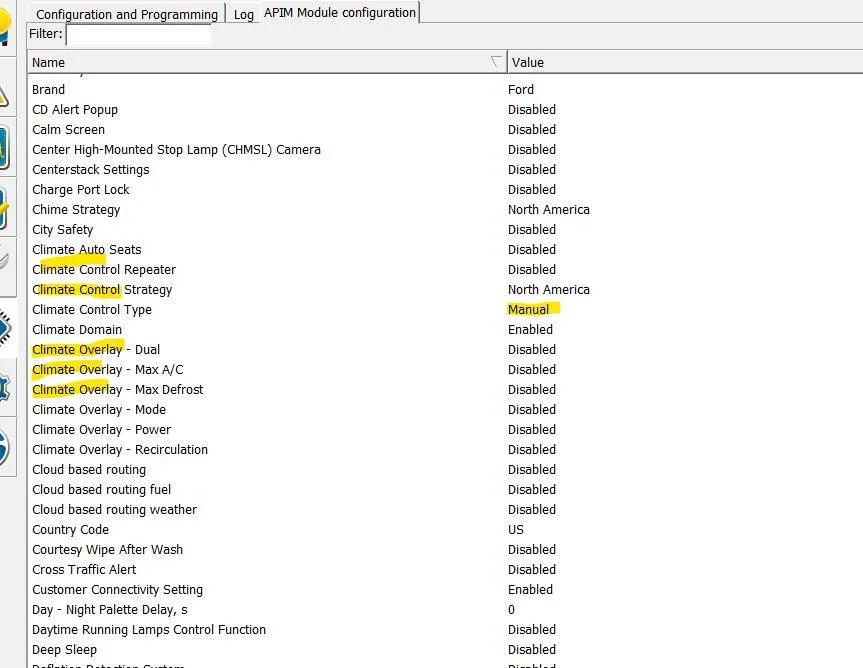
I can see why the Climate Repeaters are not working as they are all turned off in the (New) APIM.

I suggest you go here:

- FordServiceInfo.Com

Input you VIN# and download the (As-Built) Files that were all set when it was built.

Save the File as a PDF - for easier viewing

I think you will find that the (NEW) APIM is going to match the (Downloaded) As-Built Files.

Note: Using the above website, you can go to any online Ranger for sale and obtain the VIN# and then type that VIN# in and run a As-Built file on that one, this gives you a side by side compare for any truck vs yours.

I use either the F-150 (Forscan) spreadsheet or Cyan Labs (As-Built) file database for a breakdown of all the (Hex-Data)

AsBuilt Databases - CyanLabs

A NOTE of CAUTION: about this site

Lets use APIM (Sync 3) as a example

Click on (View Database)
a pop-up window will open up
DO NOT CLICK DOWNLOAD OR OPEN
(This is a ad-based-Pop-Up)
Click (Close or the upper RH (X) to close the window
after you do that - the data base will open up and display the info you want

I made the mistake and only made it (1) Time and that I clicked download, it downloaded a (Browser Add-On) and I spend 2 hours removing all the (adware)

But you can use the information to see what all the (Hex-Data) lines actually mean

So, I am confused as to why the APIM was replaced when the issue is with the FCIM. I did not see any issues with what you posted.
Has any wiring checks been done to confirm the (CAN) wiring is good and the Term Resister is also good.

The wiring checks will confirm if it is internal to the FCIM or bad wiring (not getting the CAN Bus signal)

As I have previously stated, I know it takes the (ISP-R) to turn the FCIM On, if the Can Bus wiring is bad feeding the FCIM its not going to receive than info.
another factor for this data transmission is the (Terminating Resistors) on each end of the circuit, if either is bad - it will affect that data transmission for (ISP-R)

With the TRM reporting that it is not programmed (as well) leads me to believe its a data transmission issue. (CAN Bus)

My only (Unknown) is - Will a VIN# mismatch cause the FCIM to reject the (ISP-R) signal to power up and block it, or will it allow a power up and throw a code for VIN# mismatch / invalid data?

So most likely the FCIM itself is bad and the above (Unknown) question comes into play for how a replacement FCIM (from a salvage) yard will work.
Will it power up to allow you to program the (As-Built) files (VIN#) to match your truck or will it be the same as you have not (Not power up)

Again, the Wiring Checks MUST be completed to confirm what is actually happening, once that is done and if all checks are good, then replace the FCIM and reinstall the APIM that 4D-Tech provided or reprogram the (As-Built) files to the NEW APIM that the (4D-Tech) APIM has.

As, when you do a side by side compare, you will note that the (NEW) APIM has all the climate control settings to (Single) - (Manual)- and repeaters turned (OFF)
But with it installed and you run a (NEW) Profile with Forscan, does it pick up the FCIM on the module load or is it the same as before?
 
Last edited:

airline tech

Well-Known Member
Joined
Aug 24, 2022
Threads
28
Messages
4,467
Reaction score
8,542
Location
Midwest - KS
Vehicle(s)
2022 Ranger Lariat-Super Crew, Cactus Gray
Occupation
Aircraft Tech
I think I should be cleare,
With the new APIM installed and you run a new profile with Forscan , will it now pick up the FCiM?
Plus
Did any other physical buttons come back to working on the FCIM other than now your Hazzard Switch works?

if the FCIM came back to full functionality and the only issue you have now is no climate display on the screen (repeater) then it’s just a matter of reprogramming the new APIM.
 

RangerLife

Member
First Name
Anthony
Joined
Jan 8, 2024
Threads
0
Messages
22
Reaction score
8
Location
USA
Vehicle(s)
2020 Ford Ranger
I think I should be cleare,
With the new APIM installed and you run a new profile with Forscan , will it now pick up the FCiM?
Plus
Did any other physical buttons come back to working on the FCIM other than now your Hazzard Switch works?

if the FCIM came back to full functionality and the only issue you have now is no climate display on the screen (repeater) then it’s just a matter of reprogramming the new APIM.
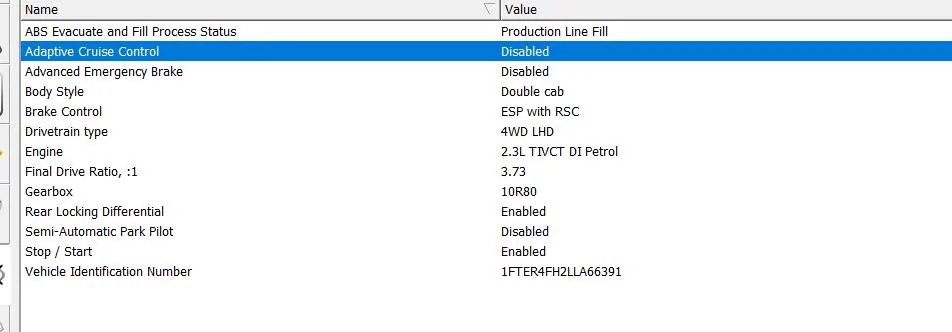
Got it, I am waiting to hear back from Infotainment on how to handle the APIM portion; I still have no HVAC control at all nor outside temperature, was just looking around and noticed this data related to climate control and it seems to be all disabled, is that supposed be that way?
I have cleared the profile and re-ran forscan and i still get "FCIM has no DTC Function"
1747861321506-t8.webp
1747861545771-sl.webp
 

Cabose-1

Well-Known Member
First Name
Eli
Joined
Jan 19, 2021
Threads
9
Messages
1,982
Reaction score
7,473
Location
Texas
Vehicle(s)
2024 Ranger XLT, 4x2, Advance Tow, E-Locker
Occupation
Student
Dog gonnit @airline tech where do you get all this info?!?!?! I have b1330 9a on my ac/dc inverter 2024 ranger, brand new, well....5k in now, and could not diagnose why my inverter is not working, and absolutely do not want to go through the bulls@#$% of the f@&*%$# dealer. I am going to install my own inverter using my own plugs in the bed and cab.

But impressive, your knowledge always amazes me. Just wish i had all the hardware to diagnose my own problems. Snapon has a really good diagnostic tool. Well at least 15 years ago they did.
 

RangerLife

Member
First Name
Anthony
Joined
Jan 8, 2024
Threads
0
Messages
22
Reaction score
8
Location
USA
Vehicle(s)
2020 Ford Ranger
I think I should be cleare,
With the new APIM installed and you run a new profile with Forscan , will it now pick up the FCiM?
Plus
Did any other physical buttons come back to working on the FCIM other than now your Hazzard Switch works?

if the FCIM came back to full functionality and the only issue you have now is no climate display on the screen (repeater) then it’s just a matter of reprogramming the new APIM.
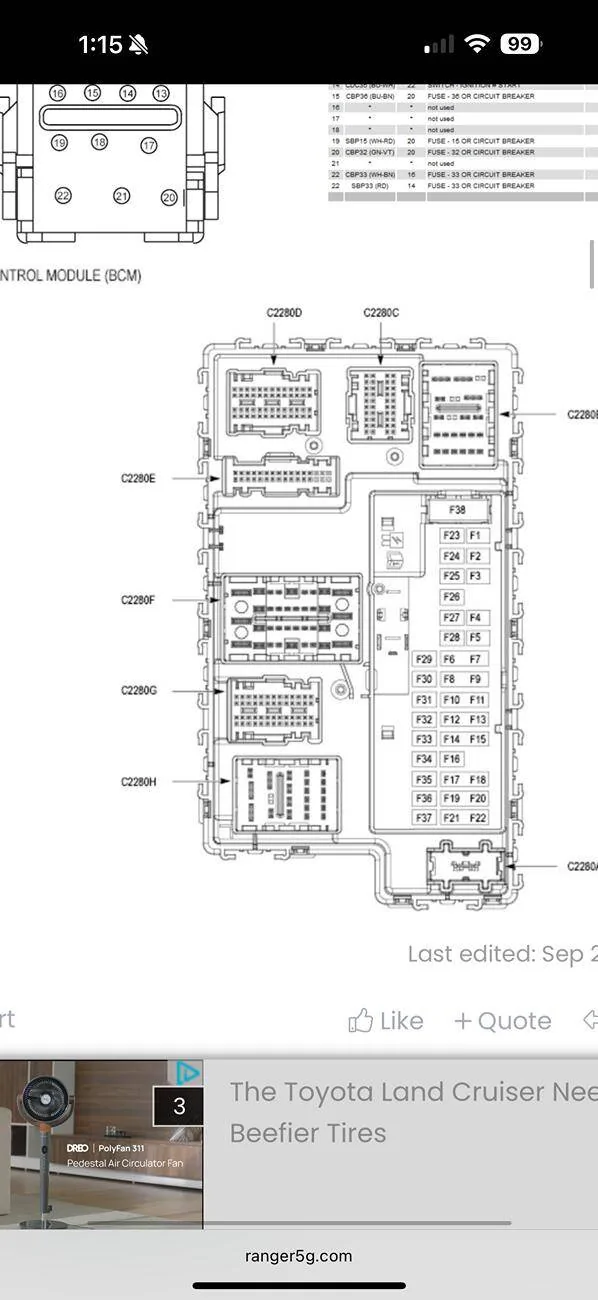
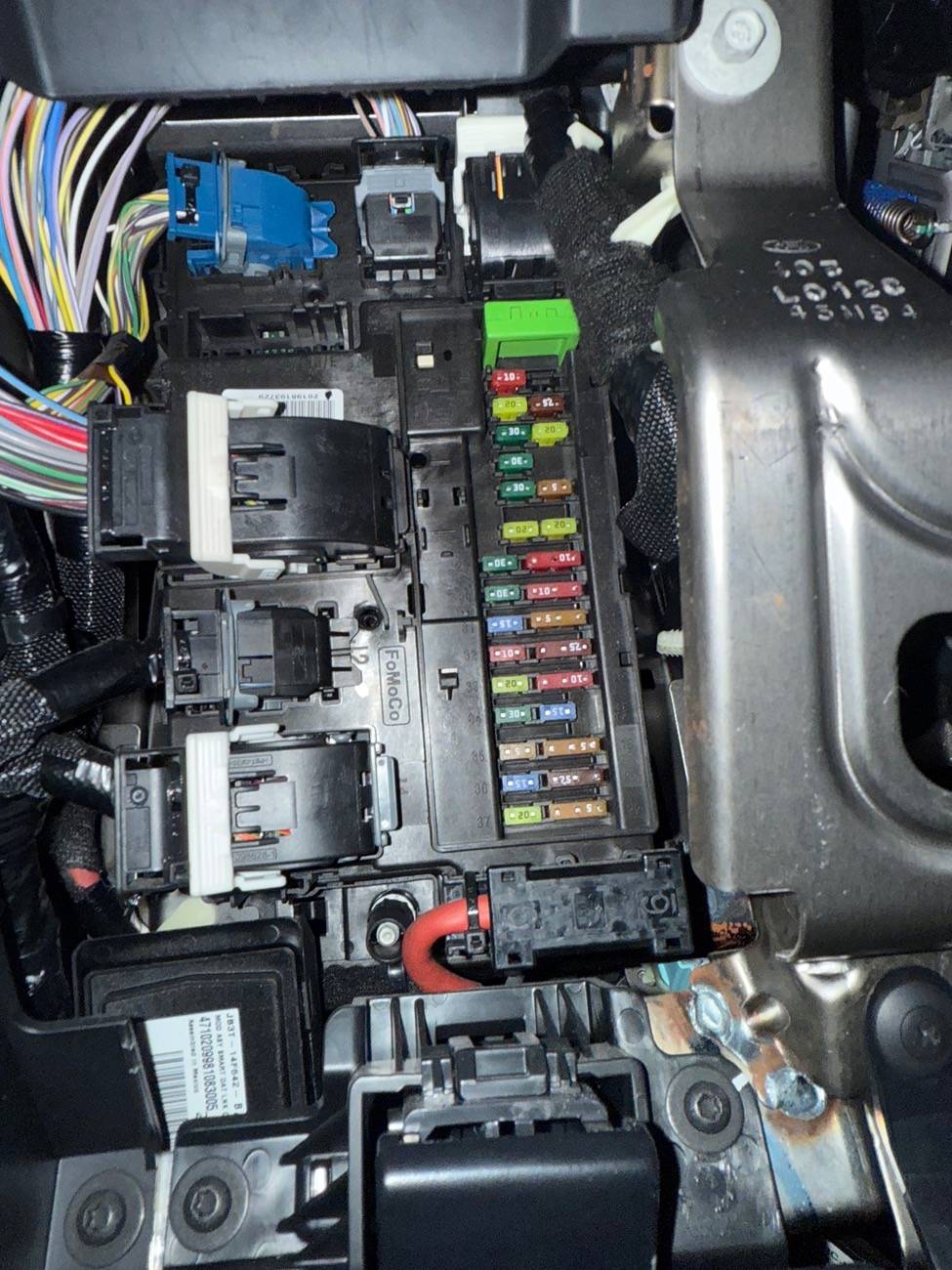
Hey, so I think I may have found the issue, but wanting to check with you before I go down this rabbit hole, in my passenger compartment fuse box, I do not have a connected plugged into the J4/2280E BCM inlet, when I was looking up pictures of other 2020 ford rangers fuse boxes, it looks like something should be plugged into there?

IMG_0986.jpg


IMG_0970.jpeg
 

RangerBill

Well-Known Member
First Name
Bob
Joined
Jun 8, 2022
Threads
3
Messages
1,613
Reaction score
2,144
Location
PA
Vehicle(s)
2019 Ford Ranger Lariat Super Crew FX4
Occupation
retired
Hey, so I think I may have found the issue, but wanting to check with you before I go down this rabbit hole, in my passenger compartment fuse box, I do not have a connected plugged into the J4/2280E BCM inlet, when I was looking up pictures of other 2020 ford rangers fuse boxes, it looks like something should be plugged into there?

IMG_0986.webp


IMG_0970.jpeg
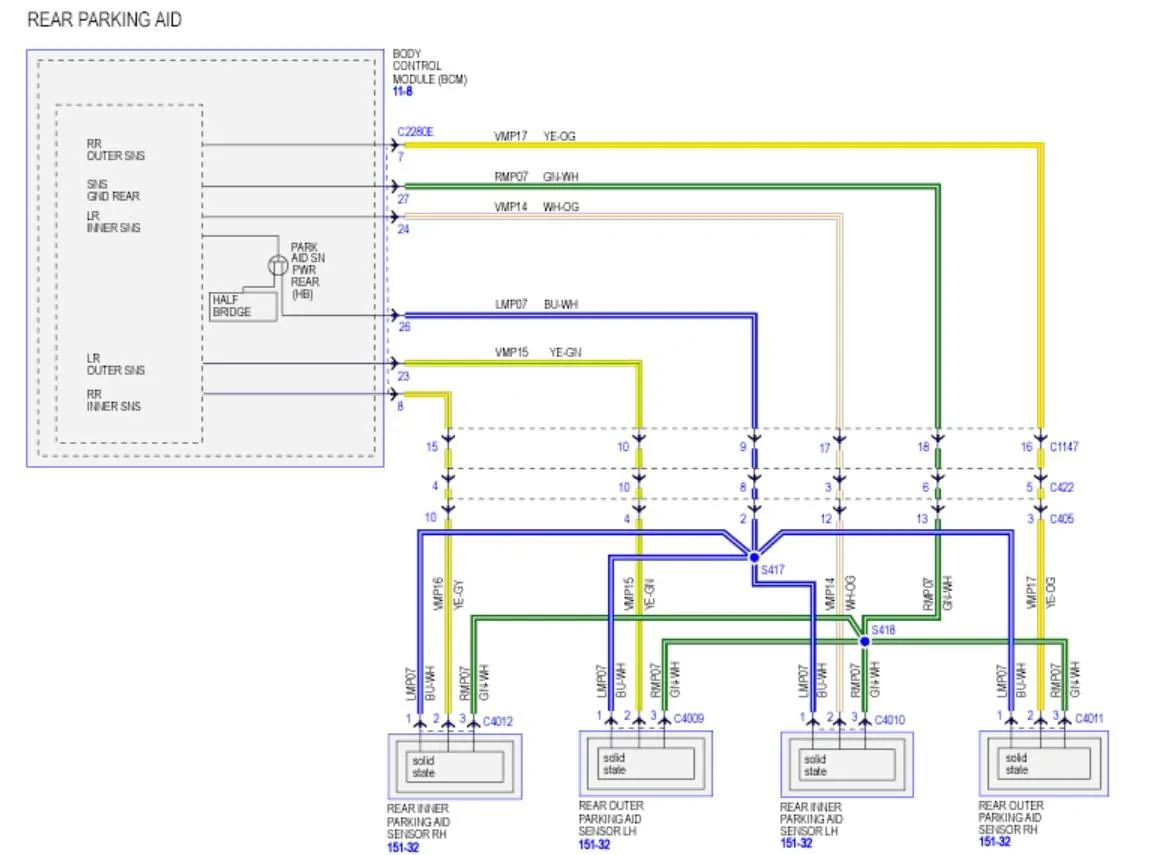
Connector C2280E has all the wiring to your rear parking aid sensors. Do you have the sensors in your rear bumper? If not, then there will not be anything plugged into that connector, unless you have keyless entry sensors on the doors.

Screenshot 2025-05-24 134916.jpg
 
Last edited:

RangerLife

Member
First Name
Anthony
Joined
Jan 8, 2024
Threads
0
Messages
22
Reaction score
8
Location
USA
Vehicle(s)
2020 Ford Ranger
Connector C2280E has all the wiring to your rear parking aid sensors. Do you have the sensors in your rear bumper? If not, then there will not be anything plugged into that connector, unless you have keyless entry sensors on the doors.

Screenshot 2025-05-24 134916.jpg
Got it, so if I don’t have rear parking sensors (I do have a rear camera) there wouldn’t be a connector?
Also I went through the list of things that were replaced electrical wise and the list shows “Wire harness engine compartment 4WD”, was replaced. Could there have been an issue with replacement of that, that could result in issues with the FCIM/HVAC?

I also didn’t mention this before I don’t think, but I replaced the battery last month, and the even with the truck shut off, the battery has drained and now I have to have it connected to a charger. So I’m not sure if that provides some additional potential issue of something else that is what is then resulting in the HVAC/FCIM issues?
 

RangerBill

Well-Known Member
First Name
Bob
Joined
Jun 8, 2022
Threads
3
Messages
1,613
Reaction score
2,144
Location
PA
Vehicle(s)
2019 Ford Ranger Lariat Super Crew FX4
Occupation
retired
Got it, so if I don’t have rear parking sensors (I do have a rear camera) there wouldn’t be a connector?
Also I went through the list of things that were replaced electrical wise and the list shows “Wire harness engine compartment 4WD”, was replaced. Could there have been an issue with replacement of that, that could result in issues with the FCIM/HVAC?

I also didn’t mention this before I don’t think, but I replaced the battery last month, and the even with the truck shut off, the battery has drained and now I have to have it connected to a charger. So I’m not sure if that provides some additional potential issue of something else that is what is then resulting in the HVAC/FCIM issues?
The only other use for that connector is for the four dour handle sensors for keyless entry, if you have it. If you don't have any of those options, then the connector would not be there. The battery drain may be normal if you are not driving it regularly, or only using it for short trips.
 

RangerLife

Member
First Name
Anthony
Joined
Jan 8, 2024
Threads
0
Messages
22
Reaction score
8
Location
USA
Vehicle(s)
2020 Ford Ranger
The only other use for that connector is for the four dour handle sensors for keyless entry, if you have it. If you don't have any of those options, then the connector would not be there. The battery drain may be normal if you are not driving it regularly, or only using it for short trips.
I appreciate it, could there have been something with the Engine Compartment wire harness being replaced?
Sponsored


Top