Sponsored

Back up camera annoyance

Sasktechy

Member
First Name
Gord
Joined
Nov 23, 2021
Threads
2
Messages
17
Reaction score
57
Location
Hudson Bay, SK, Canada
Vehicle(s)
2019 Ranger XLT FX4
Occupation
Retired
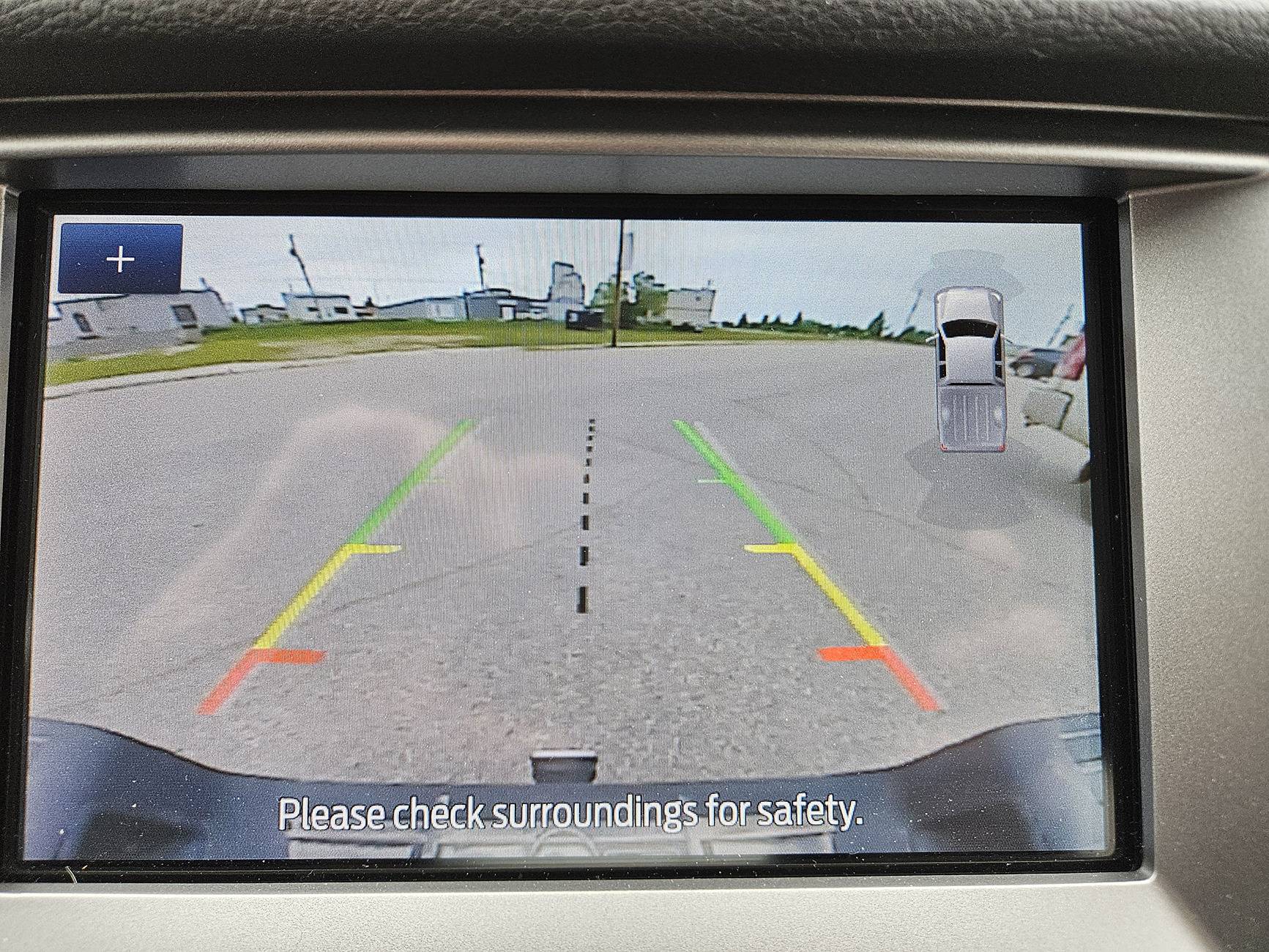
Likely not too many people that this is an issue to, but it is to me. As I live in a small rural town, we have lots of angle parking. When I go to back out of an angle parking spot, the small image of the truck is right, smack dab where I want to look for oncoming traffic! Does anyone know if there is a way to get rid of that image of the vehicle......or move it elsewhere on the screen?
Backup image.jpg
Sponsored


Big Blue

Well-Known Member
First Name
Lee
Joined
May 5, 2020
Threads
16
Messages
3,927
Reaction score
9,352
Location
Wisconsin
Vehicle(s)
2019 Ford Ranger XLT FX4 Supercrew lighting blue
Occupation
Retired mechanical designer
Likely not too many people that this is an issue to, but it is to me. As I live in a small rural town, we have lots of angle parking. When I go to back out of an angle parking spot, the small image of the truck is right, smack dab where I want to look for oncoming traffic! Does anyone know if there is a way to get rid of that image of the vehicle......or move it elsewhere on the screen?
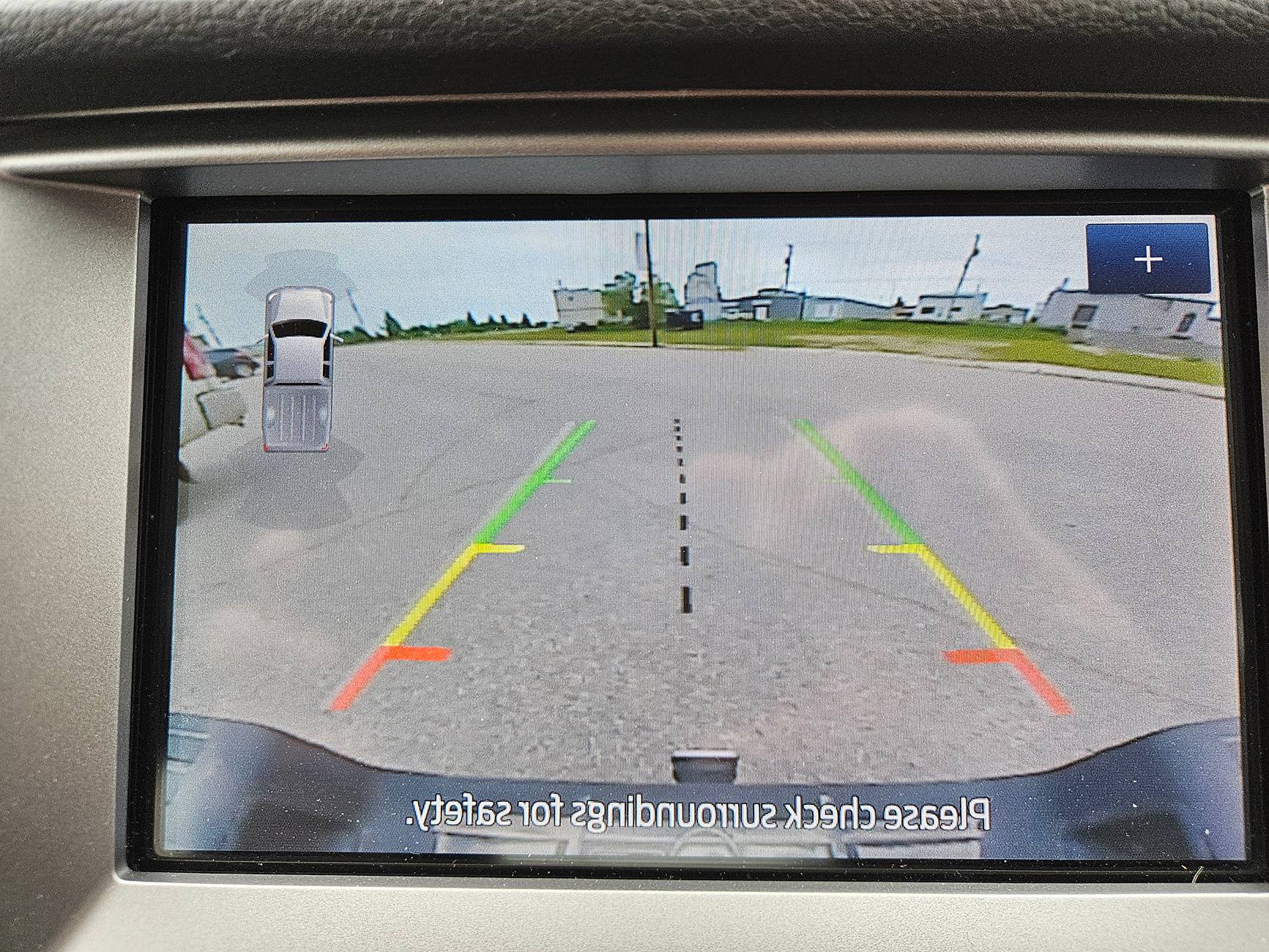
Backup image.jpg
⁷why is your image flipped? Mine has the truck on the truck k on the right side and the zoom plus symbol on the left. Also the text is backwards .
 
OP
OP

Sasktechy

Member
First Name
Gord
Joined
Nov 23, 2021
Threads
2
Messages
17
Reaction score
57
Location
Hudson Bay, SK, Canada
Vehicle(s)
2019 Ranger XLT FX4
Occupation
Retired
⁷why is your image flipped? Mine has the truck on the truck k on the right side and the zoom plus symbol on the left. Also the text is backwards .
Cell phone cameras often flip the image depending on whether you are using the front or rear camera on the phone. However, the image I posted is correct as far as direction I was backing and the placement of the images. If I flip it so the text is correct the image shows I am pulling out in the wrong direction...... hope that makes sense.

Backup image.jpg
 

mtbikernate

Well-Known Member
Joined
Apr 13, 2020
Threads
11
Messages
1,174
Reaction score
2,636
Location
NC
Vehicle(s)
2019 Ranger XLT 4x4
If I flip it so the text is correct the image shows I am pulling out in the wrong direction
No matter the image direction, you're backing up with oncoming traffic coming from the area covered up by the perimeter sensor truck, correct?

yeah, I've had the same frustration from time to time. and I'm not really sure there's a solution. I like the perimeter sensor display, but no matter where you put it, it's going to be blocking something. It's on the dash display, sure, but the expectation is that while you're backing up, putting it on the center console screen makes it more accessible while reversing.
 

NotBudule2

Well-Known Member
First Name
Robert
Joined
Jul 8, 2024
Threads
9
Messages
1,024
Reaction score
4,286
Location
WV
Vehicle(s)
21 Ranger
Occupation
Retired
I hate that too , also hate that it sucks with the tailgate down while backing , I'm thinking ? of trying a license plate camera if it would plug right in (which is unlikely)...


airline tech

Well-Known Member
Joined
Aug 24, 2022
Threads
28
Messages
4,448
Reaction score
8,500
Location
Midwest - KS
Vehicle(s)
2022 Ranger Lariat-Super Crew, Cactus Gray
Occupation
Aircraft Tech
OK, this is going to be a TRY IT, solution as I do not know if the APIM will let this setting change without faults.

As Built Data: APIM
7DO-02-01 - 5553-0103-C046
Change - xxxx-xx03-xxxx to xxxx-xx00-xxxx

This removes the truck Icon from the display (03=Truck) - (00=None)

I do not see any way to move its location (only change the Icon or remove it)

Without hooking up IDK if Forscan has anything via the quick menus to change it, so this may require manual change (write)

00=None
01=Sedan – PDC Car
02=Convertible/Coupe
03=Pickup Truck – PDC Truck
04=SUV/CUV
05=Large Commercial Van - PDC Large Commercial Van
06=Hatchback
07=Wagon
08=Small Commuter Van - PDC Large Commercial Van
09=EcoSport – PDC EcoSport
0A=Fiesta – PDC Fiesta
0B=Focus – PDC Focus
0C=U611 (Aviator)
0D=U625 (Explorer)
0E=CX482 (Escape/Kuga)
0F=CX483 (Corsair)
10=CX430 (Bronco/Maverick)
 

theprinceofsnj

Well-Known Member
First Name
Richard
Joined
Sep 5, 2020
Threads
2
Messages
257
Reaction score
772
Location
Clayton NJ
Vehicle(s)
2019 Ford RangerXL 1959 Edsel Villager 9 passenger
Occupation
Retired
I've never seen this on mine. Either mine was set at 00 or that was not available on the XL.
 

AzScorpion

Moderator
First Name
Dave
Joined
Jul 25, 2019
Threads
335
Messages
26,225
Reaction score
132,019
Location
Back Home In AZ!
Vehicle(s)
2023 Ford Ranger Tremor
Occupation
Retired...Full Time Slacker
It is there if you have the reverse sensors, if you have them and it still isnt there, perhaps Reverse Assist is turned off.
I've never noticed this either and I'll have to check mine (for the image) when we go out later today. I don't use my rear camera much as I always use my side mirrors. The only time I use my rear camera is when the sensors start beeping and I look to see how close I'm getting to the object.
 

ranger7424

Well-Known Member
First Name
Allen
Joined
Dec 16, 2021
Threads
0
Messages
73
Reaction score
213
Location
Arizona
Vehicle(s)
2021 Ford Ranger XLT Sport 4x4
I've never noticed this either and I'll have to check mine (for the image) when we go out later today. I don't use my rear camera much as I always use my side mirrors. The only time I use my rear camera is when the sensors start beeping and I look to see how close I'm getting to the object.
Same, I learned to drive in a time when back up cameras and sensors didn't exist, I still rely on my windows and swivel neck for reversing.
 

theprinceofsnj

Well-Known Member
First Name
Richard
Joined
Sep 5, 2020
Threads
2
Messages
257
Reaction score
772
Location
Clayton NJ
Vehicle(s)
2019 Ford RangerXL 1959 Edsel Villager 9 passenger
Occupation
Retired
It is there if you have the reverse sensors, if you have them and it still isnt there, perhaps Reverse Assist is turned off.
I don't know if I have Reverse Assist. I do have the back- up camera, unless that is what Ford calls it.
 

AzScorpion

Moderator
First Name
Dave
Joined
Jul 25, 2019
Threads
335
Messages
26,225
Reaction score
132,019
Location
Back Home In AZ!
Vehicle(s)
2023 Ford Ranger Tremor
Occupation
Retired...Full Time Slacker
Same, I learned to drive in a time when back up cameras and sensors didn't exist, I still rely on my windows and swivel neck for reversing.
Same here. Then add no power steering in some of my older cars and it was a real challenge backing into tight spaces. lol
 

airline tech

Well-Known Member
Joined
Aug 24, 2022
Threads
28
Messages
4,448
Reaction score
8,500
Location
Midwest - KS
Vehicle(s)
2022 Ranger Lariat-Super Crew, Cactus Gray
Occupation
Aircraft Tech
Well, POOP, I have never tripped the switch off when in reverse.
But if you cycle the (Parking Aid) switch to off, the icon disappears.
However, it works just like the ASS switch, at power cycle (next engine start) it will enable itself.

So, this may work for you, when in an angled parking spot - IDK, this is easier than a complete disable of the icon.

I never touch any of those switches on the console except for the Tow Mode switch, I like to occasionally cycle it for functionality, same with 4W Hi & Lo, to keep the transfer case from locking up or the motor.
I do the same for the parking brake, cycle the cable to prevent sticking.
Sponsored


Top