Sponsored

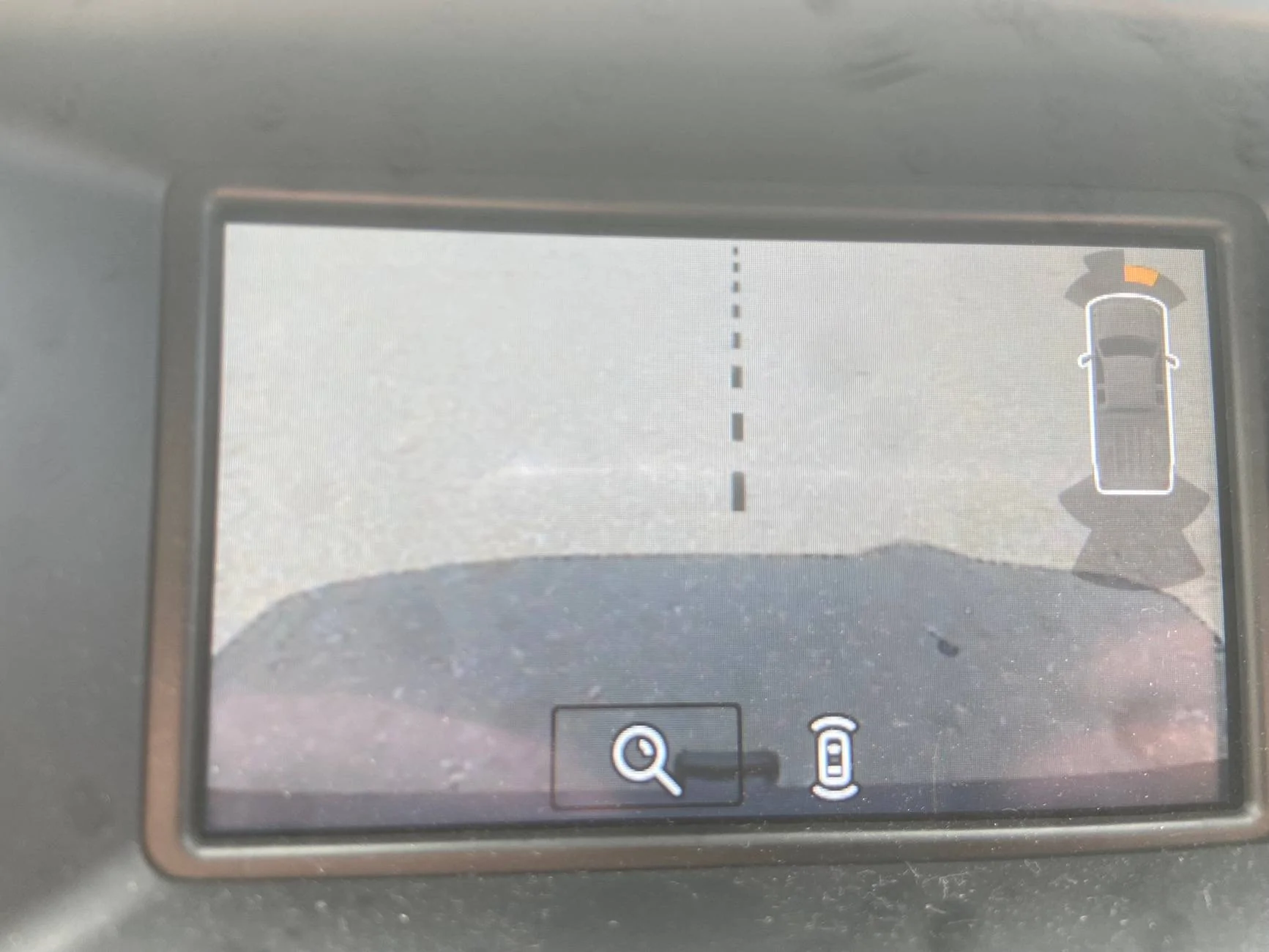
Back up camera annoyance

DukeCanBuildit

Well-Known Member
First Name
Duke
Joined
Jul 27, 2020
Threads
66
Messages
9,611
Reaction score
45,999
Location
Kitchener, Ontario
Vehicle(s)
2019 XLT SuperCab - FTW!
Occupation
Retired (P/T) Caregiver (F/T)
Vehicle Showcase
1
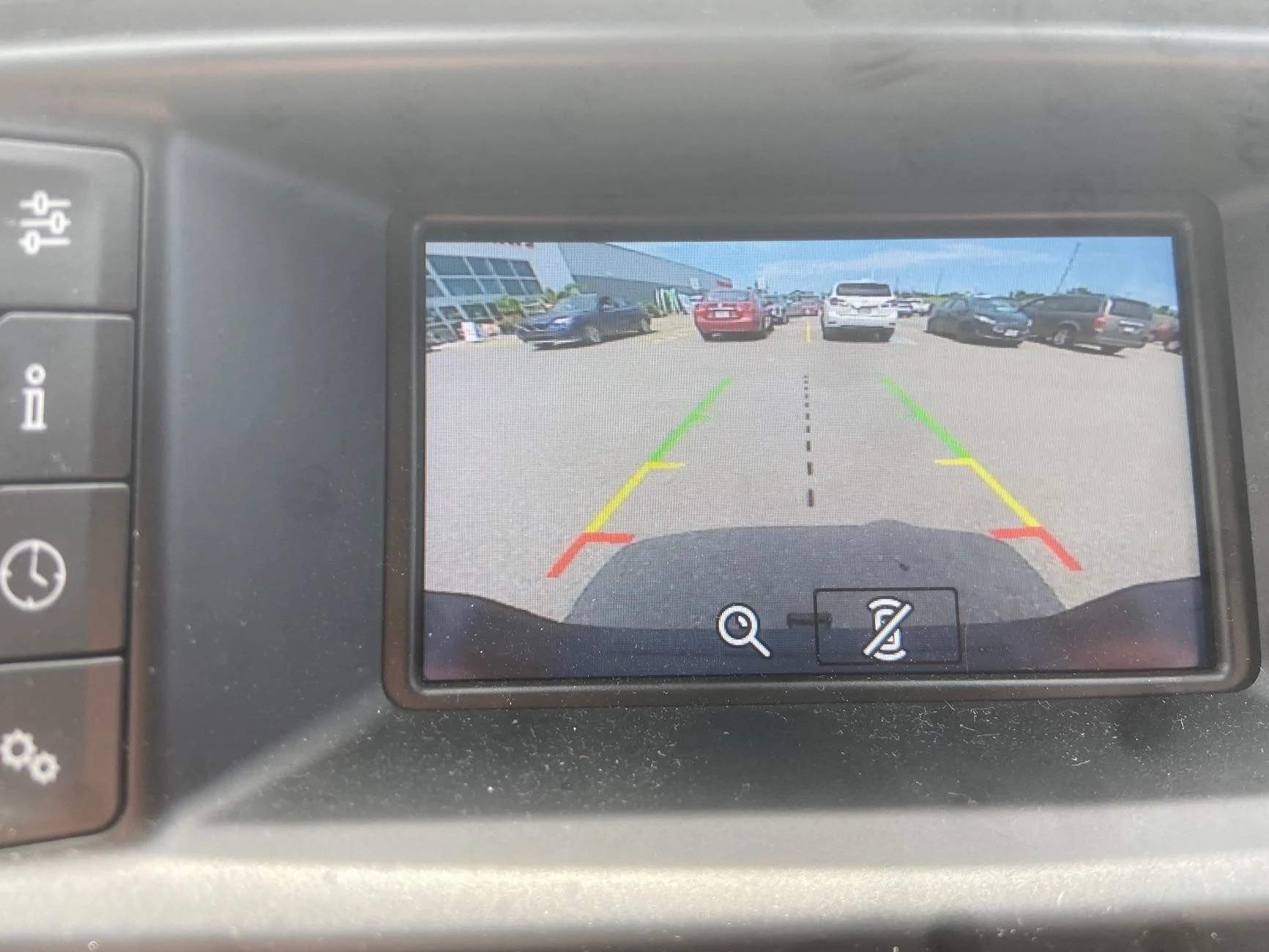
I can toggle it off on my 4” screen…

IMG_4745.webp


IMG_4746.webp


I can also toggle from regular view to close up on the hitch receiver…

IMG_4747.webp


I would think the same is available with a tech pkg.
Sponsored
 

DukeCanBuildit

Well-Known Member
First Name
Duke
Joined
Jul 27, 2020
Threads
66
Messages
9,611
Reaction score
45,999
Location
Kitchener, Ontario
Vehicle(s)
2019 XLT SuperCab - FTW!
Occupation
Retired (P/T) Caregiver (F/T)
Vehicle Showcase
1
That’s a touchscreen - have you tried pressing on the truck image to see if it toggles it off?

Pressing that “+” symbol likely zooms to your hitch receiver.

And if it doesn’t, that’s Ford taking strike three, looking.
 

P-38Ranger

Well-Known Member
First Name
Mike
Joined
May 23, 2022
Threads
11
Messages
210
Reaction score
472
Location
San Diego
Vehicle(s)
2022 Ranger Lariat
Occupation
Retired
I have dislike the icon blocking the view since I've owned it. Now I have some ideas to try.
This the power and problem with software, and software that has to work in multiple countries. This should be tied to left drive or right drive, but it is not. Anyone know if they fixed it on the 6G?
 

HeatXfer

Well-Known Member
First Name
Chris
Joined
Jan 15, 2024
Threads
6
Messages
279
Reaction score
689
Location
Nor Cal
Vehicle(s)
2019 Ford Ranger XLT SuperCrew
Occupation
Retired Pipefitter & commercial HVACR Tech
I was just complaining to myself about this today! If I can't move it, I'll definitely delete it!
 
OP
OP

Sasktechy

Member
First Name
Gord
Joined
Nov 23, 2021
Threads
2
Messages
17
Reaction score
57
Location
Hudson Bay, SK, Canada
Vehicle(s)
2019 Ranger XLT FX4
Occupation
Retired
OK, this is going to be a TRY IT, solution as I do not know if the APIM will let this setting change without faults.

As Built Data: APIM
7DO-02-01 - 5553-0103-C046
Change - xxxx-xx03-xxxx to xxxx-xx00-xxxx

This removes the truck Icon from the display (03=Truck) - (00=None)

I do not see any way to move its location (only change the Icon or remove it)

Without hooking up IDK if Forscan has anything via the quick menus to change it, so this may require manual change (write)

00=None
01=Sedan – PDC Car
02=Convertible/Coupe
03=Pickup Truck – PDC Truck
04=SUV/CUV
05=Large Commercial Van - PDC Large Commercial Van
06=Hatchback
07=Wagon
08=Small Commuter Van - PDC Large Commercial Van
09=EcoSport – PDC EcoSport
0A=Fiesta – PDC Fiesta
0B=Focus – PDC Focus
0C=U611 (Aviator)
0D=U625 (Explorer)
0E=CX482 (Escape/Kuga)
0F=CX483 (Corsair)
10=CX430 (Bronco/Maverick)
Thanks for the info, will give that a try when I get time. I would be fine if the image of the truck was totally gone! Appreciate it.


DukeCanBuildit

Well-Known Member
First Name
Duke
Joined
Jul 27, 2020
Threads
66
Messages
9,611
Reaction score
45,999
Location
Kitchener, Ontario
Vehicle(s)
2019 XLT SuperCab - FTW!
Occupation
Retired (P/T) Caregiver (F/T)
Vehicle Showcase
1
Thanks for the info, will give that a try when I get time. I would be fine if the image of the truck was totally gone! Appreciate it.
Did you try touching the image on the screen? I’ll bet you a Twoonie it toggles it on and off.
 
OP
OP

Sasktechy

Member
First Name
Gord
Joined
Nov 23, 2021
Threads
2
Messages
17
Reaction score
57
Location
Hudson Bay, SK, Canada
Vehicle(s)
2019 Ranger XLT FX4
Occupation
Retired
Did you try touching the image on the screen? I’ll bet you a Twoonie it toggles it on and off.
As it is a touchscreen I did try that, as well as dragging it to the other side. However I will definitely try again. Maybe longer touch or ?
 

AzScorpion

Moderator
First Name
Dave
Joined
Jul 25, 2019
Threads
335
Messages
26,222
Reaction score
132,009
Location
Back Home In AZ!
Vehicle(s)
2023 Ford Ranger Tremor
Occupation
Retired...Full Time Slacker
Did you try touching the image on the screen? I’ll bet you a Twoonie it toggles it on and off.
I really never noticed this until this thread. lol So today I tried touching it (short and long presses) and it doesn't do a thing. But thanks to this thread I know see it every time I put it in reverse now. :devil:
 

DukeCanBuildit

Well-Known Member
First Name
Duke
Joined
Jul 27, 2020
Threads
66
Messages
9,611
Reaction score
45,999
Location
Kitchener, Ontario
Vehicle(s)
2019 XLT SuperCab - FTW!
Occupation
Retired (P/T) Caregiver (F/T)
Vehicle Showcase
1
As it is a touchscreen I did try that, as well as dragging it to the other side. However I will definitely try again. Maybe longer touch or ?
I really never noticed this until this thread. lol So today I tried touching it (short and long presses) and it doesn't do a thing. But thanks to this thread I know see it every time I put it in reverse now. :devil:
Weird - my low-tech screen allows me to toggle it on and off using my infotainment buttons (arrows and the OK button). You would think the expensive higher tech option would allow it somehow. Does the “+” symbol do anything when you press it?

On my small screen, I use left and right arrows to “highlight“ which feature is active and will be changed by pressing the OK button. You can see the box around the image when it’s active. They are the same arrows used to switch radio stations or songs in a playlist ( < and > ). The screen defaults to the zoom being active when the truck is put in reverse. In the original picture posted, that “+” sign appears to be the active feature. Do your infotainment screens have similar < and > buttons? Maybe you need to “highlight” the image using arrow buttons to make it the active feature that can be changed?
 

AzScorpion

Moderator
First Name
Dave
Joined
Jul 25, 2019
Threads
335
Messages
26,222
Reaction score
132,009
Location
Back Home In AZ!
Vehicle(s)
2023 Ford Ranger Tremor
Occupation
Retired...Full Time Slacker
Weird - my low-tech screen allows me to toggle it on and off using my infotainment buttons (arrows and the OK button). You would think the expensive higher tech option would allow it somehow. Does the “+” symbol do anything when you press it?

On my small screen, I use left and right arrows to “highlight“ which feature is active and will be changed by pressing the OK button. You can see the box around the image when it’s active. They are the same arrows used to switch radio stations or songs in a playlist ( < and > ). The screen defaults to the zoom being active when the truck is put in reverse. In the original picture posted, that “+” sign appears to be the active feature. Do your infotainment screens have similar < and > buttons? Maybe you need to “highlight” the image using arrow buttons to make it the active feature that can be changed?
I only tried touching on the the screen. I never thought about using the infotainment buttons and I'll have to try doing that next time I go out and see if that works from there.
 

AzScorpion

Moderator
First Name
Dave
Joined
Jul 25, 2019
Threads
335
Messages
26,222
Reaction score
132,009
Location
Back Home In AZ!
Vehicle(s)
2023 Ford Ranger Tremor
Occupation
Retired...Full Time Slacker
Weird - my low-tech screen allows me to toggle it on and off using my infotainment buttons (arrows and the OK button). You would think the expensive higher tech option would allow it somehow. Does the “+” symbol do anything when you press it?

On my small screen, I use left and right arrows to “highlight“ which feature is active and will be changed by pressing the OK button. You can see the box around the image when it’s active. They are the same arrows used to switch radio stations or songs in a playlist ( < and > ). The screen defaults to the zoom being active when the truck is put in reverse. In the original picture posted, that “+” sign appears to be the active feature. Do your infotainment screens have similar < and > buttons? Maybe you need to “highlight” the image using arrow buttons to make it the active feature that can be changed?
I only tried touching on the the screen. I never thought about using the infotainment buttons and I'll have to try doing that next time I go out and see if that works from there.
So I couldn't wait until tomorrow and just went outside and tried this. The + button will get rid of it but once you put it into P and then back into R the truck comes back on the screen. Toggling the arrows only changes the radio stations.
 
OP
OP

Sasktechy

Member
First Name
Gord
Joined
Nov 23, 2021
Threads
2
Messages
17
Reaction score
57
Location
Hudson Bay, SK, Canada
Vehicle(s)
2019 Ranger XLT FX4
Occupation
Retired
I only tried touching on the the screen. I never thought about using the infotainment buttons and I'll have to try doing that next time I go out and see if that works from there.
I also tried it.....good news/bad news. The + button does take it away. But comes back each time you put it in reverse. Still..... better than nothing. Thanks!
 

Bob902

Well-Known Member
First Name
Bob
Joined
May 6, 2021
Threads
12
Messages
3,738
Reaction score
20,715
Location
St. Louis
Vehicle(s)
2021 Ranger XLT
Occupation
RETIRED!!!!
Same here. Then add no power steering in some of my older cars and it was a real challenge backing into tight spaces. lol
And a clutch pedal?
 

AzScorpion

Moderator
First Name
Dave
Joined
Jul 25, 2019
Threads
335
Messages
26,222
Reaction score
132,009
Location
Back Home In AZ!
Vehicle(s)
2023 Ford Ranger Tremor
Occupation
Retired...Full Time Slacker


Top