Sponsored

Back-Up Camera/BLIS Issue

OP
OP
MiataBro11

MiataBro11

Well-Known Member
First Name
Ethan
Joined
Feb 4, 2020
Threads
2
Messages
51
Reaction score
20
Location
Cleveland, OH
Vehicle(s)
2021 Tremor / 1994 Mazda Miata Racecar
Occupation
Research Lab Tech
If your left-hand front and rear parking lamps work, you have power to the Body Control Module to power the license plate lights, as they are all powered from the "hot at all times" power feed.

If you don't have a bulb connected to provide a load to the wire that you are testing for voltage, the BCM might cut power to it, so you may not be able to measure a voltage. I am not sure of this though.

I was wondering if BLIS will work if the rear camera is not working. They may be tied together in the programming so all three (two BLIS modules and rear camera) have to function together. Again, I am not sure of this.

Have you checked the tail gate wiring plug for proper connection as this supplies connections to the rear camera.
Yes I pulled the connector and it was clean and dry inside. Also what's weird to me is that the rear parking sensors work totally fine and they seem to be in the same harness as the BLIS/taillights and the backup cam.

I also got my new camera in but that didn't make any difference. I know @airline tech said you had to do some sort of LIN module change (I think) with Forscan, but I didn't see any options related to the backup cam inside the BCM module config in Forscan.
Sponsored


 

RangerBill

Well-Known Member
First Name
Bob
Joined
Jun 8, 2022
Threads
3
Messages
1,600
Reaction score
2,121
Location
PA
Vehicle(s)
2019 Ford Ranger Lariat Super Crew FX4
Occupation
retired
Yes I pulled the connector and it was clean and dry inside. Also what's weird to me is that the rear parking sensors work totally fine and they seem to be in the same harness as the BLIS/taillights and the backup cam.

I also got my new camera in but that didn't make any difference. I know @airline tech said you had to do some sort of LIN module change (I think) with Forscan, but I didn't see any options related to the backup cam inside the BCM module config in Forscan.
Do your backup lights work when in reverse?
 

airline tech

Well-Known Member
Joined
Aug 24, 2022
Threads
28
Messages
4,447
Reaction score
8,498
Location
Midwest - KS
Vehicle(s)
2022 Ranger Lariat-Super Crew, Cactus Gray
Occupation
Aircraft Tech
The fuse that powers that circuit is Fuse 62 - Its on the bottom side of the BJB (Engine Bay)
That Fuse Supplies:
LF Turn & Mirror
LF & LR Park Lights
LR Turn Signal
CHMSL - Brake Lights
CHMSL - Cargo Lights
License Plate Lights
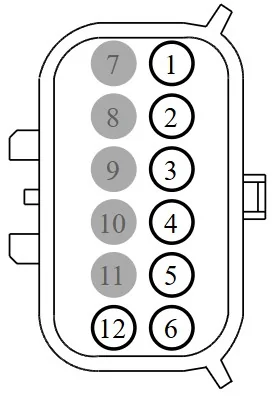
You should be getting power on (Pin #2) at the Plate Lights (Key On / Lights On)
However, the BCM has an internal protection circuit (FET) that will shut down the circuit if it sees a short, so most likely that has tripped.

You can try clearing all the codes and see if you gain voltage back.
You can also try doing a BCM - Self Test, but with that test it will be looking for a (load - Resistance) of the bulbs on the License Plate Light - Circuit and the fault code may return, until the connectors are replaced with bulbs installed.

But however, if this is the only code that pops back up, your Camera and BLIS should return.
If you still get all the codes back, then you may try at least disconnecting the connector from the brake controller that feeds back to the CHMSL
And see if that helps
 

airline tech

Well-Known Member
Joined
Aug 24, 2022
Threads
28
Messages
4,447
Reaction score
8,498
Location
Midwest - KS
Vehicle(s)
2022 Ranger Lariat-Super Crew, Cactus Gray
Occupation
Aircraft Tech
I have not had Forscan hooked up in a while:
But the (Line) is on one of the main screens

Something - Worded Like

New LIN Module Initialization

It may not take (if you find it) until the BLIS issue is resolved, but worth a try.
 

airline tech

Well-Known Member
Joined
Aug 24, 2022
Threads
28
Messages
4,447
Reaction score
8,498
Location
Midwest - KS
Vehicle(s)
2022 Ranger Lariat-Super Crew, Cactus Gray
Occupation
Aircraft Tech
I would have to hook up to Find where Forscan put the - Line, I thought it was on the main page, possibly with Read Codes / Clear Codes / Service Functions (with the ABS Bleed)
It may be in the BCM or APIM as well.
I have another Scanner - Autel that has its own Tab for it, I know I have seen it in Forscan just do not remember exactly what specific screen.


OP
OP
MiataBro11

MiataBro11

Well-Known Member
First Name
Ethan
Joined
Feb 4, 2020
Threads
2
Messages
51
Reaction score
20
Location
Cleveland, OH
Vehicle(s)
2021 Tremor / 1994 Mazda Miata Racecar
Occupation
Research Lab Tech
Do your backup lights work when in reverse?
Yes

The fuse that powers that circuit is Fuse 62 - Its on the bottom side of the BJB (Engine Bay)
That Fuse Supplies:
LF Turn & Mirror
LF & LR Park Lights
LR Turn Signal
CHMSL - Brake Lights
CHMSL - Cargo Lights
License Plate Lights
You should be getting power on (Pin #2) at the Plate Lights (Key On / Lights On)
However, the BCM has an internal protection circuit (FET) that will shut down the circuit if it sees a short, so most likely that has tripped.

You can try clearing all the codes and see if you gain voltage back.
You can also try doing a BCM - Self Test, but with that test it will be looking for a (load - Resistance) of the bulbs on the License Plate Light - Circuit and the fault code may return, until the connectors are replaced with bulbs installed.

But however, if this is the only code that pops back up, your Camera and BLIS should return.
If you still get all the codes back, then you may try at least disconnecting the connector from the brake controller that feeds back to the CHMSL
And see if that helps
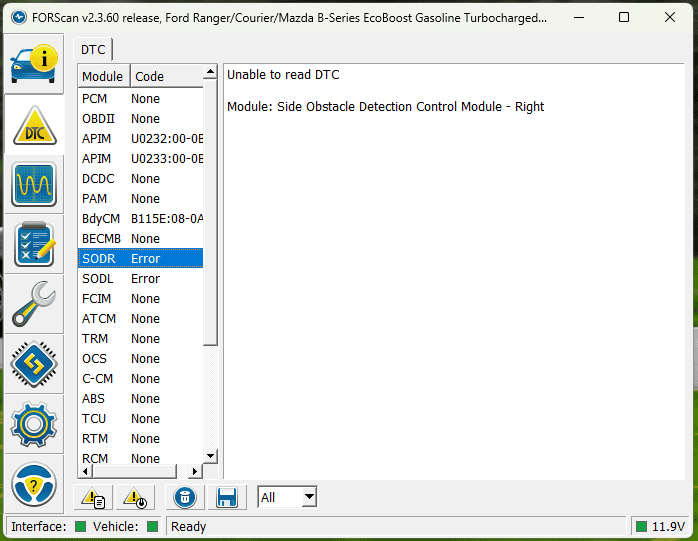
CHMSL brake lights and cargo lights are working so I will assume that fuse is fine. I did clear the codes but I am still getting the same thing where it cant even read the SODL and SODR modules which seem to be the root of the other codes. Disconnecting the brake controller didn't seem to make any difference.
Screenshot 2024-06-01 190954.png

I have not had Forscan hooked up in a while:
But the (Line) is on one of the main screens

Something - Worded Like

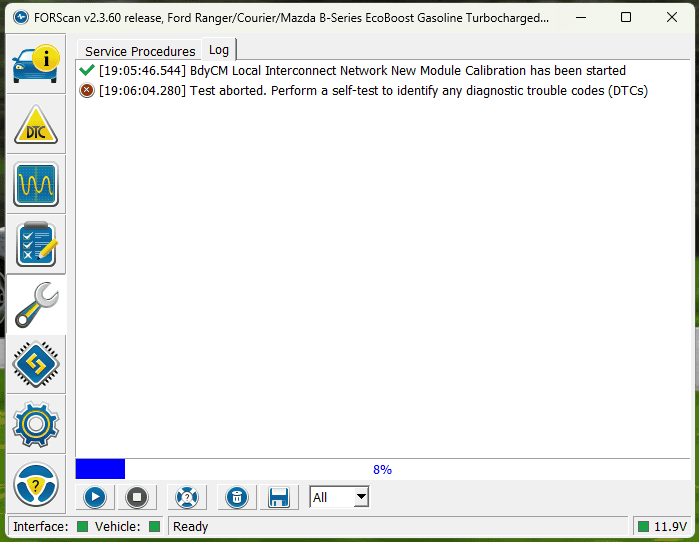
New LIN Module Initialization

It may not take (if you find it) until the BLIS issue is resolved, but worth a try.
I found it, it was just spelled out as Local Interconnect Network so I missed it the first time I looked through. Issue is since I have current DTCs related to one of those modules it just errors out.
Screenshot 2024-06-01 190624.png
 

RangerBill

Well-Known Member
First Name
Bob
Joined
Jun 8, 2022
Threads
3
Messages
1,600
Reaction score
2,121
Location
PA
Vehicle(s)
2019 Ford Ranger Lariat Super Crew FX4
Occupation
retired
Have you checked with a meter if there is power on the BN-YE colored wires to the rear camera and the BLIS modules? This is the common power feed to all three modules.

Also, check for a good ground connection on the camera BK wire. The BLIS modules have two grounds, a BK and a BK-WH on each. I would use the meter on resistance scale to check for a low ohm reading from each of those grounds to another ground point on the truck.
 
OP
OP
MiataBro11

MiataBro11

Well-Known Member
First Name
Ethan
Joined
Feb 4, 2020
Threads
2
Messages
51
Reaction score
20
Location
Cleveland, OH
Vehicle(s)
2021 Tremor / 1994 Mazda Miata Racecar
Occupation
Research Lab Tech
Have you checked with a meter if there is power on the BN-YE colored wires to the rear camera and the BLIS modules? This is the common power feed to all three modules.

Also, check for a good ground connection on the camera BK wire. The BLIS modules have two grounds, a BK and a BK-WH on each. I would use the meter on resistance scale to check for a low ohm reading from each of those grounds to another ground point on the truck.
Gotcha, sounds like a good thing to check next. I will report back.
 

airline tech

Well-Known Member
Joined
Aug 24, 2022
Threads
28
Messages
4,447
Reaction score
8,498
Location
Midwest - KS
Vehicle(s)
2022 Ranger Lariat-Super Crew, Cactus Gray
Occupation
Aircraft Tech
Just to confirm:
If you use the 4WD Switch and select different ranges, does it work?

If you press the (switch) on the end of the (Turn Signal Stalk) does the Lane Keeping Screen show on the IPC?

If you try to set up and use (cruise Control) - Will it let you?

These are (3) items that are on the power feed circuit along with the BLIS & Camera

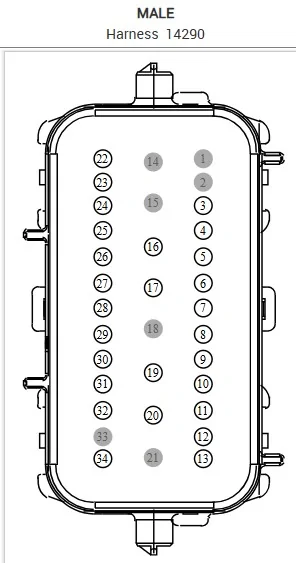
If the above are working then you have power to them, and that part of the circuit is good, before we dig deep into this and checking for power at the Rear Camera & BLIS Modules, we need to know if we are at least getting power down to the C408 connector.
Pin #26 on that connector feeds the BLIS & Rear Camera, depending on the results of this voltage check determines what way (upstream or downstream) we need to go.

If no power here, then we need to determine where the break in the wire circuit is.
If you get power here, then we know power is good up to this point and we need to find the short or broken wire that is taking out the circuit going back.

Check Pin #26 for Power, I am unsure which (male or female) runs forward
Should be (Brown / Yellow) if you can see any wire (insulation color)


C408 Male.webp


Other Things to try other than Voltage Checks
PCM - Self Test
BCM Self Test
IPC Self Test
APIM - Self Test
SODR / SODL - Self Tests
DC/DC Convertor - Self Test
Disconnect the Battery for about 15 Minutes

Rear Camera Related:
C1001:01 - Vision Sys Camera, Gen Electric Failure (Rear Camera)
B115-E - Camera Mod Bus Signal - MSG Failure (Missing Signal on the LIN Circuit) (Rear Camera)
U0401-86 - PCM receiving invalid data from the Lane Keeping System

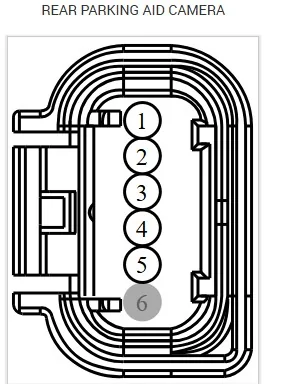
So, at the rear camera connector

Ignition On:
Check for power at Pin #1 (Pos Lead) to Pin and (Neg Lead) to Body Ground - Should Have Battery Voltage.

Ignition Off:
Check Pin #5 to Body Ground - Should be - 3-Ohms or Less

Rear Cam Connector.webp


SODL / SODR Related Codes:
U0232 / U0233

These are for - Lost Communication with the SODL / SODR Modules and lead to a Communications Network Test
I do not remember if Forscan has this function, but the SODL & SODR Self-Test, should reset the modules.
I believe the reason for these codes is the BLIS is not getting power or a bad ground, which shares the ground with the Plate Lights.

So, at the LR & RR Taillamp Connectors:

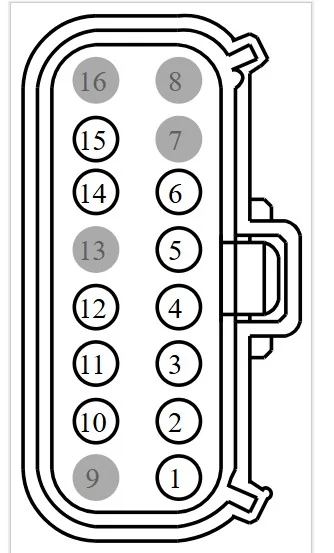
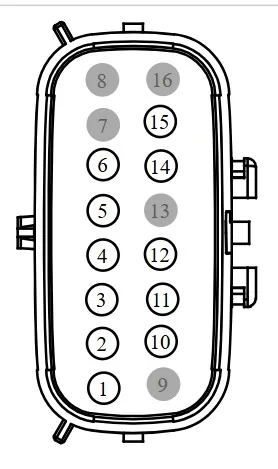
Key On:
Check for Power at Pin #12 (Pos Lead - Pin 12) and Neg Lead - Body Ground, should have Battery Voltage
Then check Between Pin #12 and Pin #10 - Left Side uses Pin #10 (for BLIS Ground)
Pin #12 and Pins 9 and 10 - Right Sides uses Pins 9 & 10 for BLIS Ground
I have not determined the reason for the 2 separate grounds as of yet on the RH side.

If you get power when going from Pin #12 to body ground, then this will confirm a ground issue if not then it's a power feed issue.

To bring in the possibility that one of the BLIS modules is shorted, it may be beneficial to disconnect both taillamp assemblies before doing this voltage check, so you have an isolated circuit from the BLIS Modules themselves.

Taillamp Connector.webp


Shared Ground: G401 for the BLIS & Plate Lights

When you did the continuity check for the Plate Lights what the Ohm Reading, should be 3 Ohms or Less.
Do the same for the Taillamp Connectors.
Key Off:
LH - Pin #10 to Body Grd - 3 Ohms of Less and Pin #10 to G401 Bolt - 3 Ohms or less
Repeat for RH - Side to include Pin #9


So, in this process of t-shoot, on the off chance that one or both of the BLIS modules are shorted and causing the circuit power loss.

So, you might try leaving both taillamps disconnected and try to communicate with the Rear Camera
or
Disconnect LH or RH and see if you can get communication to the opposite BLIS and Rear Camera.

Plus, just a FYI on each Taillamp assy, you will the the BLIS Module, however you do not see the connector for the BLIS (Its internal) you have to pull the BLIS module off the taillamp to get to it.
I would look at those connectors as well.
 

airline tech

Well-Known Member
Joined
Aug 24, 2022
Threads
28
Messages
4,447
Reaction score
8,498
Location
Midwest - KS
Vehicle(s)
2022 Ranger Lariat-Super Crew, Cactus Gray
Occupation
Aircraft Tech
I did some more digging and cannot find a definitive answer regarding the Grounds at the Taillamp Assemblies.

LH has 2 - Pin 1 and 9 - Pin 1 uses Ground Point G123 - Pin 9 uses G401
RH has 3 - Pin 1 and 9 & 10 - Pin 1 uses G123 and Pins 9 & 10 use G401

What's unclear is that which Ground Point the BLIS part of the light assembly is used for BLIS, what I can tell it is actually using G123 for it

But I did get a chance to go out to my truck and check and I have a slight correction>

BLIS Power Back to Front - Taillamps going forward.

At the Taillamp Assemblies - C4471 & C4472

Next Connectors are: Located on the Frame, just below the Taillamp Assemblies,
One on each side of the truck as they exit down below the tailgate.
Left - C4483
Right - C4484

Pin #12 is the Pin to check for power - Meter Pin 12 to Body Ground

I do know if you had opened and checked these or not, sorry I missed these, as I thought they were for (Without BLIS) option, but I was wrong on that point.

C4483 & C4484

C4483.jpeg


The Right-side crosses over to the Left and then runs forward with in the main harness

Harness Run:

The first harness split off - running up to the Fuel Tank is C410 (16-Pon) connector - (For Ref Only)
as seen in the video

The next connector and on the inside of the frame = C408 (34 Pin Connector)
Pin #26 in this connector is the Power Feed wire to check for Voltage

The connector fwd. of this one is C422 (34 Pin Connector) - (For Ref Only)

So, Check for voltage at C408 Pin 26
If good disconnect the connectors C4483 & C44084 at the same time

Check for voltage on pin 12 at both connectors
If good

Then move to the Taillamp Connectors - disconnect both at the same time
Pin 12 to Body Grd

If good on both to this point, then either one of the BLIS Modules is shorted or the internal wiring of the taillamp is shorted.

To isolate which side, connect either the Left or Right Taillamp connector and see which side causes the power loss, by checking for power on pin 12 at the opposite taillamp assy.

If you are not getting power at any point, post where you are not getting it for further diagnostics.

Again, sorry I did not catch the extra connectors in the run
 
OP
OP
MiataBro11

MiataBro11

Well-Known Member
First Name
Ethan
Joined
Feb 4, 2020
Threads
2
Messages
51
Reaction score
20
Location
Cleveland, OH
Vehicle(s)
2021 Tremor / 1994 Mazda Miata Racecar
Occupation
Research Lab Tech
@airline tech no need to be sorry at all! You have been such a great help so far I really appreciate it! The 4wd switch, lane keep assist, and cruise all work fine. It's been raining here today which is why I haven't been out pulling connections but it has slowed down to a drizzle finally so I will try to go out in a little bit and start checking voltages. I will let you know what I find.
 
OP
OP
MiataBro11

MiataBro11

Well-Known Member
First Name
Ethan
Joined
Feb 4, 2020
Threads
2
Messages
51
Reaction score
20
Location
Cleveland, OH
Vehicle(s)
2021 Tremor / 1994 Mazda Miata Racecar
Occupation
Research Lab Tech
Have you checked with a meter if there is power on the BN-YE colored wires to the rear camera and the BLIS modules? This is the common power feed to all three modules.

Also, check for a good ground connection on the camera BK wire. The BLIS modules have two grounds, a BK and a BK-WH on each. I would use the meter on resistance scale to check for a low ohm reading from each of those grounds to another ground point on the truck.
I checked all of these, more details below.

Just to confirm:
If you use the 4WD Switch and select different ranges, does it work?

If you press the (switch) on the end of the (Turn Signal Stalk) does the Lane Keeping Screen show on the IPC?

If you try to set up and use (cruise Control) - Will it let you?

These are (3) items that are on the power feed circuit along with the BLIS & Camera
All 3 work.
If the above are working then you have power to them, and that part of the circuit is good, before we dig deep into this and checking for power at the Rear Camera & BLIS Modules, we need to know if we are at least getting power down to the C408 connector.
Pin #26 on that connector feeds the BLIS & Rear Camera, depending on the results of this voltage check determines what way (upstream or downstream) we need to go.

If no power here, then we need to determine where the break in the wire circuit is.
If you get power here, then we know power is good up to this point and we need to find the short or broken wire that is taking out the circuit going back.

Check Pin #26 for Power, I am unsure which (male or female) runs forward
Should be (Brown / Yellow) if you can see any wire (insulation color)
C408 pin#26 has 12v

Other Things to try other than Voltage Checks
PCM - Self Test
BCM Self Test
IPC Self Test
APIM - Self Test
SODR / SODL - Self Tests
DC/DC Convertor - Self Test
Disconnect the Battery for about 15 Minutes
I did not try any more of the self tests, but if you think they are worthwhile after this info then I gladly will.

So, at the rear camera connector

Ignition On:
Check for power at Pin #1 (Pos Lead) to Pin and (Neg Lead) to Body Ground - Should Have Battery Voltage.

Ignition Off:
Check Pin #5 to Body Ground - Should be - 3-Ohms or Less
Pin#1 only had 0.9v. Not ideal.
Pin#5 had ~0.1 Ohms to ground so I would call that good.

SODL / SODR Related Codes:
U0232 / U0233

These are for - Lost Communication with the SODL / SODR Modules and lead to a Communications Network Test
I do not remember if Forscan has this function, but the SODL & SODR Self-Test, should reset the modules.
I believe the reason for these codes is the BLIS is not getting power or a bad ground, which shares the ground with the Plate Lights.
I will see if Forscan has this function.

So, at the LR & RR Taillamp Connectors:

Key On:
Check for Power at Pin #12 (Pos Lead - Pin 12) and Neg Lead - Body Ground, should have Battery Voltage
Then check Between Pin #12 and Pin #10 - Left Side uses Pin #10 (for BLIS Ground)
Pin #12 and Pins 9 and 10 - Right Sides uses Pins 9 & 10 for BLIS Ground
I have not determined the reason for the 2 separate grounds as of yet on the RH side.

If you get power when going from Pin #12 to body ground, then this will confirm a ground issue if not then it's a power feed issue.

To bring in the possibility that one of the BLIS modules is shorted, it may be beneficial to disconnect both taillamp assemblies before doing this voltage check, so you have an isolated circuit from the BLIS Modules themselves.
LH pin#12 to body ground while RH tail light plugged in: 3.6v
LH pin#12 to body ground while RH tail light UNplugged: 10v
LH pin#12 to pin#10 matches results above, 3.6v or 10v
As a note my LH plug has a pin 9 also just like the right side, same color wire (green) also but it did not have ground continuity so I did not jump #12 to #9 on the LH side. Just not sure what pin#9 on the LH side does then.

RH pin#12 to body ground while LH tail light plugged in: 7v
RH pin#12 to body ground while LH tail light UNplugged: 10v
RH pin#12 to pin#10 and pin#9 matches results above, 7v or 10v

Shared Ground: G401 for the BLIS & Plate Lights

When you did the continuity check for the Plate Lights what the Ohm Reading, should be 3 Ohms or Less.
Do the same for the Taillamp Connectors.
Key Off:
LH - Pin #10 to Body Grd - 3 Ohms of Less and Pin #10 to G401 Bolt - 3 Ohms or less
Repeat for RH - Side to include Pin #9
Plate lights were sub 1 Ohm to ground.
LH pin#10 sub 1 Ohm to ground.
RH pin#10 and pin#9 sub 1 Ohm to ground.
I did not check them to the G401 bolt as I ran out of daylight to pull the left rear fender liner to get to it. This is on my list to do tomorrow.

So, in this process of t-shoot, on the off chance that one or both of the BLIS modules are shorted and causing the circuit power loss.

So, you might try leaving both taillamps disconnected and try to communicate with the Rear Camera
or
Disconnect LH or RH and see if you can get communication to the opposite BLIS and Rear Camera.
Blue screen from the camera with any combination of taillights plugged or unplugged.
SODL and SODR errors in Forscan for both regardless of if I disconnected one or the other, I could not communicate with either.

Plus, just a FYI on each Taillamp assy, you will the the BLIS Module, however you do not see the connector for the BLIS (Its internal) you have to pull the BLIS module off the taillamp to get to it.
I would look at those connectors as well.
Also on the list for tomorrow if we dont think of anything else.


I did some more digging and cannot find a definitive answer regarding the Grounds at the Taillamp Assemblies.

LH has 2 - Pin 1 and 9 - Pin 1 uses Ground Point G123 - Pin 9 uses G401
RH has 3 - Pin 1 and 9 & 10 - Pin 1 uses G123 and Pins 9 & 10 use G401

What's unclear is that which Ground Point the BLIS part of the light assembly is used for BLIS, what I can tell it is actually using G123 for it

But I did get a chance to go out to my truck and check and I have a slight correction>

BLIS Power Back to Front - Taillamps going forward.

At the Taillamp Assemblies - C4471 & C4472

Next Connectors are: Located on the Frame, just below the Taillamp Assemblies,
One on each side of the truck as they exit down below the tailgate.
Left - C4483
Right - C4484

Pin #12 is the Pin to check for power - Meter Pin 12 to Body Ground

I do know if you had opened and checked these or not, sorry I missed these, as I thought they were for (Without BLIS) option, but I was wrong on that point.
I had not opened them prior. I did now and both were clean of any water or debris.
LH side C4483 pin#12 had 10v, same as at the tail light. Light was unplugged.
RH side C4484 pin#12 also had 10v, same as above.

Harness Run:

The first harness split off - running up to the Fuel Tank is C410 (16-Pon) connector - (For Ref Only)
as seen in the video

The next connector and on the inside of the frame = C408 (34 Pin Connector)
Pin #26 in this connector is the Power Feed wire to check for Voltage
Pin #26 has 12v

The connector fwd. of this one is C422 (34 Pin Connector) - (For Ref Only)

So, Check for voltage at C408 Pin 26
If good disconnect the connectors C4483 & C44084 at the same time

Check for voltage on pin 12 at both connectors
If good

Then move to the Taillamp Connectors - disconnect both at the same time
Pin 12 to Body Grd

If good on both to this point, then either one of the BLIS Modules is shorted or the internal wiring of the taillamp is shorted.

To isolate which side, connect either the Left or Right Taillamp connector and see which side causes the power loss, by checking for power on pin 12 at the opposite taillamp assy.

If you are not getting power at any point, post where you are not getting it for further diagnostics.

Again, sorry I did not catch the extra connectors in the run
I did not have both C4483 and C4484 unplugged when testing each. I will repeat that tomorrow, but the taillights were both unplugged for the C4483/84 tests. My current confusion is that I get differing voltages on pin#12 of the taillights with the opposite one plugged in, but not even the same, different voltage, one being 10v down to 7v and the other 10v down to ~3v. Even then, 10v to start is a bit low from the 12v I saw at C408, but I also was using a different ground so maybe a small amount of ground side resistance accounted for the 12v to 10v drop I saw. Curious to see your thoughts, thanks again.
 

RangerBill

Well-Known Member
First Name
Bob
Joined
Jun 8, 2022
Threads
3
Messages
1,600
Reaction score
2,121
Location
PA
Vehicle(s)
2019 Ford Ranger Lariat Super Crew FX4
Occupation
retired
I checked all of these, more details below.
C408 pin#26 has 12v
I would check on both sides of pin 26 BN-YE wire (male and female) C403 connector to make sure that the circuit has continuity through the connector. It sounds like you have a resistive connection on that wire. I would concentrate on only the camera 12 volt power for now, as when you find that problem, the BLIS modules will likely work after the repair.

The pins on that connector or another connector down the line may have a pin terminal that is pushed slightly out of the shell and not making a good connection.
 
OP
OP
MiataBro11

MiataBro11

Well-Known Member
First Name
Ethan
Joined
Feb 4, 2020
Threads
2
Messages
51
Reaction score
20
Location
Cleveland, OH
Vehicle(s)
2021 Tremor / 1994 Mazda Miata Racecar
Occupation
Research Lab Tech
I would check on both sides of pin 26 BN-YE wire (male and female) C403 connector to make sure that the circuit has continuity through the connector. It sounds like you have a resistive connection on that wire. I would concentrate on only the camera 12 volt power for now, as when you find that problem, the BLIS modules will likely work after the repair.

The pins on that connector or another connector down the line may have a pin terminal that is pushed slightly out of the shell and not making a good connection.
Good thought, I will add this to the list for tomorrow also, thanks!
 

airline tech

Well-Known Member
Joined
Aug 24, 2022
Threads
28
Messages
4,447
Reaction score
8,498
Location
Midwest - KS
Vehicle(s)
2022 Ranger Lariat-Super Crew, Cactus Gray
Occupation
Aircraft Tech
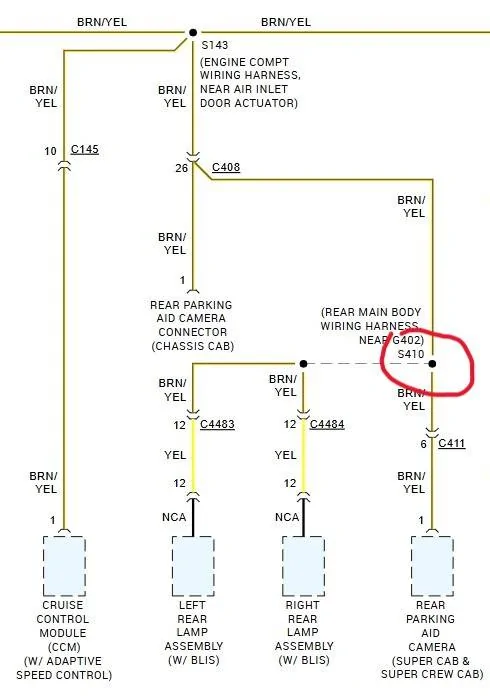
I see where the issue is: It explains all the latest voltage check results (lower and not equal with load applied) it also shows why the rear camera has (no voltage)
The Splice @ S410 is broken.

Note: For clarity (all 4 wires) are spliced together @ 1 point (ignore the dashed line)

Splice S410.jpeg


Now to find it

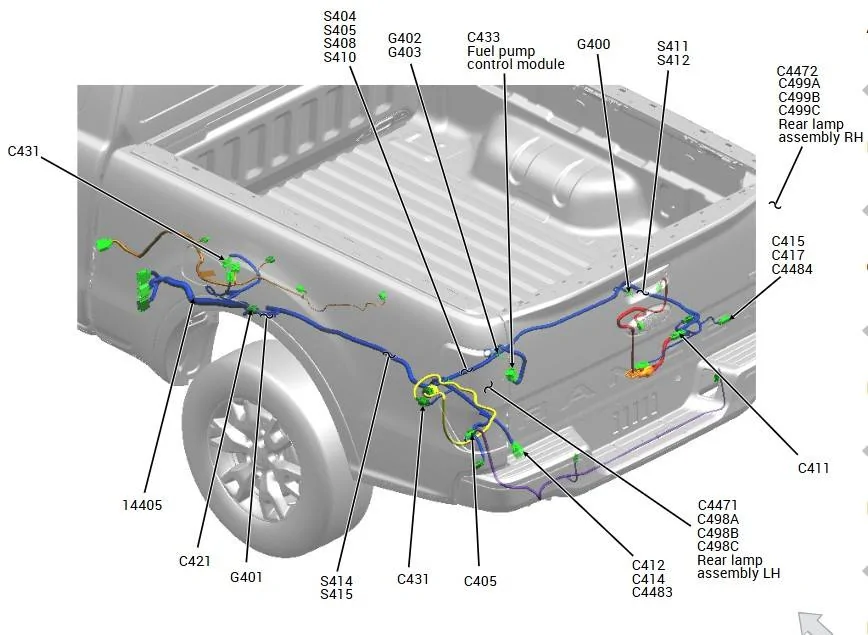
Location Description:

Rear Main Body Harness # 14405 - Near T/O (Take Off) to Ground Point G402

You will need to unwarp the harness to find it.


S410 Location.jpeg


But to confirm before you pull apart the harness let's check some thighs first.

Find & Disconnect C411 - Connector

Do a check for power at Pin 6, same as above checks, does it match the readings that you had on the camera connector.
I want to eliminate the slight possibility that the camera leg from the splice being shorted to ground.

C411 .jpeg


One last test if you want, just a secondary check for continuity

Disconnect C408 - C4483 - C4484 and C411 all at once

At C408 - (REARWARD) Connector - Jumper Pin #26 to Ground

Meter - Ohms Scale

At Connector:
C4483 - Pin #12 to Body Grd
C4484 -Pin #12 to Body Grd
C411 - Pin #6 to Body Grd

Shold be reading 3 ohms or less on all connectors, but I suspect you will get high resistance with C4483/C4484 and VERY High resistance on C411

So most likely a broken splice point but possible that between C411 and the Splice is a short to ground. My gut tells me it's the splice point. We have at least confirmed the problem lies between the rear camera connector and that splice point.
Sponsored

 
Last edited:


Top