Sponsored

Just updated to Sync 3.4 on my Ranger 2019

quangdog

Well-Known Member
First Name
Kimball
Joined
Mar 31, 2020
Threads
36
Messages
735
Reaction score
2,516
Location
Meridian, Idaho
Website
www.youtube.com
Vehicle(s)
2019 Ranger Lariat FX4
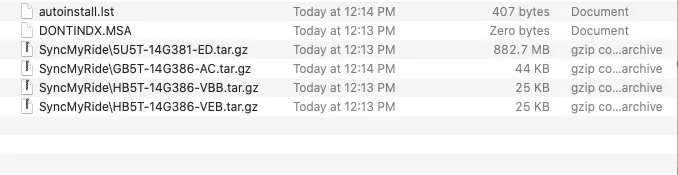
Just downloaded the update for my truck. The update .zip file is only 882.9 MB in size (seems too small to me). When I unzip it (on my mac) I get a structure that looks broken:

Screen Shot 2020-07-29 at 12.22.45 PM.webp


Note that I don't have an actual SyncMyRide directory, but rather several files that are named with SyncMyRide\ as the first part of their file name. This looks like a borked update file to me.... Do I dare try to fix the file/folder names manually and plug this into my truck?

By day I'm a software engineer, and this update file is setting off all kinds of alarm bells in my developer lizard brain.
Sponsored

 

UofMEngineer

Well-Known Member
Joined
Apr 19, 2019
Threads
1
Messages
516
Reaction score
334
Location
Michigan
Vehicle(s)
20' Escape Hybrid,18' Fusion Hybrid
Just downloaded the update for my truck. The update .zip file is only 882.9 MB in size (seems too small to me). When I unzip it (on my mac) I get a structure that looks broken:

Screen Shot 2020-07-29 at 12.22.45 PM.png


Note that I don't have an actual SyncMyRide directory, but rather several files that are named with SyncMyRide\ as the first part of their file name. This looks like a borked update file to me.... Do I dare try to fix the file/folder names manually and plug this into my truck?

By day I'm a software engineer, and this update file is setting off all kinds of alarm bells in my developer lizard brain.
Missing the voice file. They had better not actually look like this...
 

quangdog

Well-Known Member
First Name
Kimball
Joined
Mar 31, 2020
Threads
36
Messages
735
Reaction score
2,516
Location
Meridian, Idaho
Website
www.youtube.com
Vehicle(s)
2019 Ranger Lariat FX4
Missing the voice file. They had better not actually look like this...
I tried the download 3 different times, keep getting exactly the same file. I won't Install this as-is... and am happy to send you whatever other info you may need.

Incidentally if I unzip it on a Windows computer, I do get the correct directory structure, but it still seems to be missing a bunch of stuff.
 

UofMEngineer

Well-Known Member
Joined
Apr 19, 2019
Threads
1
Messages
516
Reaction score
334
Location
Michigan
Vehicle(s)
20' Escape Hybrid,18' Fusion Hybrid
I tried the download 3 different times, keep getting exactly the same file. I won't Install this as-is... and am happy to send you whatever other info you may need.

Incidentally if I unzip it on a Windows computer, I do get the correct directory structure, but it still seems to be missing a bunch of stuff.
Arg. I'll pull some sample VINs from the net and grab the updaters to check. Other than the missing voice pack, this looks OK though. Does it list the 14G391 file in the autoinstall.lst?
 

Gizmokid2005

Well-Known Member
Joined
Dec 1, 2019
Threads
13
Messages
1,279
Reaction score
1,875
Location
GA
Website
gizmokid2005.com
Vehicle(s)
2019 Ford Ranger XLT 4X4 SCrew
Occupation
SQL Developer
Vehicle Showcase
1
Just downloaded the update for my truck. The update .zip file is only 882.9 MB in size (seems too small to me). When I unzip it (on my mac) I get a structure that looks broken:

Screen Shot 2020-07-29 at 12.22.45 PM.png


Note that I don't have an actual SyncMyRide directory, but rather several files that are named with SyncMyRide\ as the first part of their file name. This looks like a borked update file to me.... Do I dare try to fix the file/folder names manually and plug this into my truck?

By day I'm a software engineer, and this update file is setting off all kinds of alarm bells in my developer lizard brain.
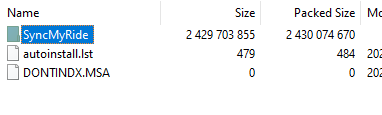
This may be your mac acting weird because they're compressed archives. The backslash is a folder indicator in the filesystem, and I've seen macs act weird when displaying compressed archives only in a folder.

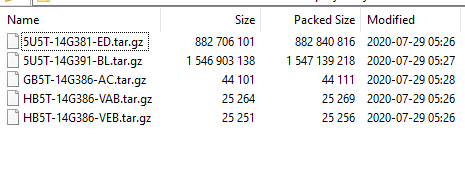
2020-07-29 11_29_49-C__Users_Michael_Downloads_5U5T-14G381-ED.zip_.png

2020-07-29 11_29_56-C__Users_Michael_Downloads_5U5T-14G381-ED.zip_SyncMyRide_.png


demothus

Member
First Name
Brandon
Joined
Jul 29, 2020
Threads
0
Messages
9
Reaction score
2
Location
Why
Vehicle(s)
2019 Ford Ranger XLT
Occupation
Product Engineer
I am now missing my climate controls as well after updating to 3.4. I have not updated with anything outside the official Ford releases, in fact I haven't even updated the system since I purchased the truck. I've tried master reset, key cycle, etc. I'm re-downloading the update and using a different flash drive, else Ford phone support told me to bring it to a dealer... :(

Also, here are the MD5's for the files:

1e47df41f70b3adcc409afa5e00124b5 *autoinstall.lst
d41d8cd98f00b204e9800998ecf8427e *DONTINDX.MSA
aa845bc753565f9397b7181ac0d0c9c1 *SyncMyRide\5U5T-14G381-ED.tar.gz
798779317f7533da0f754b3a3e08daf2 *SyncMyRide\5U5T-14G391-BL.tar.gz
1d8a92f839324c96c7a9ad95a2afc39e *SyncMyRide\GB5T-14G386-AC.tar.gz
579f44a05176bb57ea39296a2b129b57 *SyncMyRide\HB5T-14G386-VAB.tar.gz
18bfe667379907a53667c4182e254ef0 *SyncMyRide\HB5T-14G386-VEB.tar.gz
 

quangdog

Well-Known Member
First Name
Kimball
Joined
Mar 31, 2020
Threads
36
Messages
735
Reaction score
2,516
Location
Meridian, Idaho
Website
www.youtube.com
Vehicle(s)
2019 Ranger Lariat FX4
This may be your mac acting weird because they're compressed archives. The backslash is a folder indicator in the filesystem, and I've seen macs act weird when displaying compressed archives only in a folder.

2020-07-29 11_29_49-C__Users_Michael_Downloads_5U5T-14G381-ED.zip_.png

2020-07-29 11_29_56-C__Users_Michael_Downloads_5U5T-14G381-ED.zip_SyncMyRide_.png
It's much more likely that the .zip file was not compressed correctly in the first place. "\" is the path separator, yes, but I've *never* had the built-in zip library in Finder unzip something and not respect the folder paths. Something hinky going on.
 

TylerV76

Well-Known Member
First Name
Tyler
Joined
Dec 5, 2019
Threads
4
Messages
306
Reaction score
395
Location
Oxford, Michigan
Vehicle(s)
2019 Ranger FX4
Occupation
Emissions testing supplier
I tried the download 3 different times, keep getting exactly the same file. I won't Install this as-is... and am happy to send you whatever other info you may need.

Incidentally if I unzip it on a Windows computer, I do get the correct directory structure, but it still seems to be missing a bunch of stuff.
Dont use the built in mac unarchiver to unzip it. You need to use a 3rd party app. Also, dont let mac auto-unzip after download.
 

Gizmokid2005

Well-Known Member
Joined
Dec 1, 2019
Threads
13
Messages
1,279
Reaction score
1,875
Location
GA
Website
gizmokid2005.com
Vehicle(s)
2019 Ford Ranger XLT 4X4 SCrew
Occupation
SQL Developer
Vehicle Showcase
1
:headbang: Can you PM me your VIN if you're cool with that. I just want to pull a non-nav download to check and all the used 19' Rangers I'm finding are nav equipped.

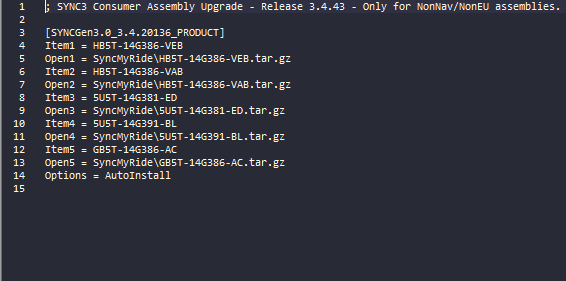
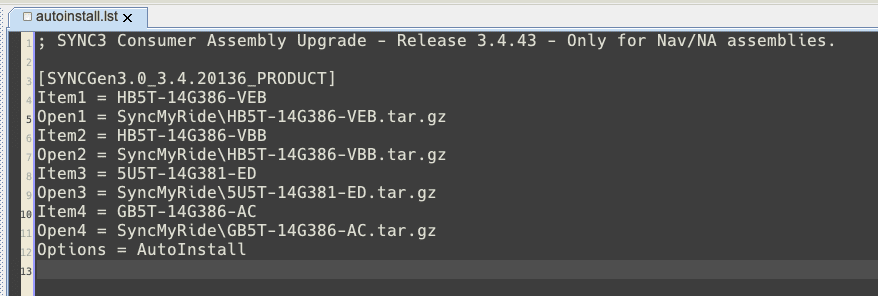
Here's my non-nav:

2020-07-29 11_35_23-C__Users_Michael_AppData_Local_Temp_7zO0A456E28_autoinstall.lst - Notepad++.png
 

quangdog

Well-Known Member
First Name
Kimball
Joined
Mar 31, 2020
Threads
36
Messages
735
Reaction score
2,516
Location
Meridian, Idaho
Website
www.youtube.com
Vehicle(s)
2019 Ranger Lariat FX4
Dont use the built in mac unarchiver to unzip it. You need to use a 3rd party app.
If the built-in unarchiver does not unzip it correctly, there is a problem with the original .zip file. This isn't my first rodeo... OS X should not have any problem unzipping this archive if it is well-formatted.
 

TylerV76

Well-Known Member
First Name
Tyler
Joined
Dec 5, 2019
Threads
4
Messages
306
Reaction score
395
Location
Oxford, Michigan
Vehicle(s)
2019 Ranger FX4
Occupation
Emissions testing supplier
If the built-in unarchiver does not unzip it correctly, there is a problem with the original .zip file. This isn't my first rodeo... OS X should not have any problem unzipping this archive if it is well-formatted.
It is very common that the built in unarchiver has issues with zip files. Theres a reason the 3rd party apps are as popular as they are. The built in screws up the structure consistently. You should see what it does to my sql zips. Thats also why the exact same file unzips properly on windows, as you know.

If you use “the unarchiver” it will unzip properly.
Sponsored


Top