Sponsored

Sync3 Issues

_N8_

Well-Known Member
Joined
Mar 9, 2020
Threads
2
Messages
45
Reaction score
53
Location
Lancaster, PA
Vehicle(s)
2019 Ford Ranger XLT Sport
Anyone try the master reset in the general tools? not sure what all you would lose.
Yes - early on when I had the symptoms but this thread didn't exist yet. Does not fix the problem.

Side note, this week I realized I can not add another BT phone and get it to stick for the next time the truck is started. Reinforces the full cache theory. Might go the cyanlabs route soon if Ford doesn't fix.
Sponsored
 

Dgc333

Well-Known Member
First Name
Dave
Joined
Aug 24, 2021
Threads
17
Messages
1,742
Reaction score
4,112
Location
Massachusetts
Vehicle(s)
21 Ranger Lariat
Occupation
Engineer
Looks like my thumb drive is just a maps update (NA2.21).
my truck sync version is V3.4, Build 22251.

Anyone try the master reset in the general tools? not sure what all you would lose.
I do a master reset after every up date as a matter of course. It only takes a few minutes to pair your phone and enter any presets.

I just used Cyanlabs to update from 3.4.22251 to 3.4.23088, it has fixed an issue I was having with Sync not communicating with my new phone.
 

OregonRanger

Active Member
First Name
Bob
Joined
Dec 29, 2019
Threads
5
Messages
43
Reaction score
74
Location
Oregon
Vehicle(s)
2019 Ford Ranger Lariat FX4
Occupation
MAK Grills
First need a windows PC and an empty USB stick. 8GB to 32GB depending on region and if you have navigation.

Take photos of your Rangers version screen in the Sync app in the truck. If by chance anything did go wrong you can get the version you have now and just reload it.

Their website is cayanlabs.net. They’re pretty clear on the instructions and the process. Just read through it and start the process. Takes about 30 to 45 minutes from downloading and then making a USB update system.

I want up one version, after a restart and key on again seems to be a little better for boot up speed and navigation of the screen. Time will tell for me ?
thank you!
 

JoedOH

Well-Known Member
First Name
joe
Joined
Apr 21, 2019
Threads
13
Messages
152
Reaction score
178
Location
ohio
Vehicle(s)
2019 Ranger
Ford dealer took my truck this morning and just returned it. They replaced the APIM and everything is working great now. We shall see if it continues to work correctly but it now stays on the radio source after restarting. I'll know better tomorrow once I give it a good workout.


samsd

Well-Known Member
First Name
Dan
Joined
May 2, 2019
Threads
0
Messages
351
Reaction score
1,499
Location
62401
Vehicle(s)
2019 Ranger Lariat 4x4 HPR, 2016 Town and Country, 2004 Road King Custom
Occupation
Retired
I do a master reset after every up date as a matter of course. It only takes a few minutes to pair your phone and enter any presets.

I just used Cyanlabs to update from 3.4.22251 to 3.4.23088, it has fixed an issue I was having with Sync not communicating with my new phone.
Correct me if I am wrong, but the issues seem to have started with the 22251 update? Did the 23088 update let you change and keep night mode, keep the XM station on startup instaed of reverting back to the last AM or FM sation you were listening to?
 

Dgc333

Well-Known Member
First Name
Dave
Joined
Aug 24, 2021
Threads
17
Messages
1,742
Reaction score
4,112
Location
Massachusetts
Vehicle(s)
21 Ranger Lariat
Occupation
Engineer
Correct me if I am wrong, but the issues seem to have started with the 22251 update? Did the 23088 update let you change and keep night mode, keep the XM station on startup instaed of reverting back to the last AM or FM sation you were listening to?
Never had an issue with keeping night mode on any release back to 2.x.xxxxx that came on my 17 Mustang including 3.4.22251. Never used satellite radio on any of the vehicles that came with it so I can't comment there.
 

OregonRanger

Active Member
First Name
Bob
Joined
Dec 29, 2019
Threads
5
Messages
43
Reaction score
74
Location
Oregon
Vehicle(s)
2019 Ford Ranger Lariat FX4
Occupation
MAK Grills
Ford dealer took my truck this morning and just returned it. They replaced the APIM and everything is working great now. We shall see if it continues to work correctly but it now stays on the radio source after restarting. I'll know better tomorrow once I give it a good workout.
What firmware and build version does your new APIM show?
 

JoedOH

Well-Known Member
First Name
joe
Joined
Apr 21, 2019
Threads
13
Messages
152
Reaction score
178
Location
ohio
Vehicle(s)
2019 Ranger
I know it's probably hopeless but can I shut off updates or will they still sneak some in?
 

OregonRanger

Active Member
First Name
Bob
Joined
Dec 29, 2019
Threads
5
Messages
43
Reaction score
74
Location
Oregon
Vehicle(s)
2019 Ford Ranger Lariat FX4
Occupation
MAK Grills
You'd have to tell me how to look that up. I haven't done that in months and don't remember where it is.
Settings, general, about sync
 

jss81258

Well-Known Member
First Name
James
Joined
Jul 5, 2020
Threads
1
Messages
169
Reaction score
253
Location
Texas
Vehicle(s)
2020 Ford Ranger Lariat 4x4, 2004 Chevrolet Corvette Z06
Occupation
Fixed equipment inspector
2020 Ranger Lariat w/ nav. Issues were not saving certain settings at power off and started when on a long trip so put up with it until I got back. Spent 2 days trying to fix it. Finally read through some of the forums on Cyanlabs site and gave this a try.

Downloaded their app from their website. Chose a previous Sync version that I recognized and knew worked for me. I chose to keep my maps and selected "Apps" in options and deselected everything else. Then I did a master reset twice in a row. The first reset took a long time. The second reset was much shorter. Then used the USB created from the app.

Now everything seems to work as it did before the "upgrade".

Apparently there is a r/w folder that can get full, then previous states and settings can't be saved. It it also hinder installs. I guess the 2 master resets in a row clears this folder and let's the desired update to work.

Anyway, this is what worked for me.
 

jss81258

Well-Known Member
First Name
James
Joined
Jul 5, 2020
Threads
1
Messages
169
Reaction score
253
Location
Texas
Vehicle(s)
2020 Ford Ranger Lariat 4x4, 2004 Chevrolet Corvette Z06
Occupation
Fixed equipment inspector
Followup: So as noted, I downgraded from 22251 to 21265 after 2 consecutive master resets. Everything worked fine after the downgrade. So I went ahead and upgraded to 23088 and it installed without errors. So far, it seems to be working fine.

This suggests that I may have been able to simply upgrade to 23088 from 22251 after 2 consecutive master resets to clear the r/w folder.

I'm not going to try to reinstall 22251 to test this, but I believe I would do 2 consecutive master resets and then try to upgrade to 23088.
 

_N8_

Well-Known Member
Joined
Mar 9, 2020
Threads
2
Messages
45
Reaction score
53
Location
Lancaster, PA
Vehicle(s)
2019 Ford Ranger XLT Sport
2020 Ranger Lariat w/ nav. Issues were not saving certain settings at power off and started when on a long trip so put up with it until I got back. Spent 2 days trying to fix it. Finally read through some of the forums on Cyanlabs site and gave this a try.

Downloaded their app from their website. Chose a previous Sync version that I recognized and knew worked for me. I chose to keep my maps and selected "Apps" in options and deselected everything else. Then I did a master reset twice in a row. The first reset took a long time. The second reset was much shorter. Then used the USB created from the app.

Now everything seems to work as it did before the "upgrade".

Apparently there is a r/w folder that can get full, then previous states and settings can't be saved. It it also hinder installs. I guess the 2 master resets in a row clears this folder and let's the desired update to work.

Anyway, this is what worked for me.
Followup: So as noted, I downgraded from 22251 to 21265 after 2 consecutive master resets. Everything worked fine after the downgrade. So I went ahead and upgraded to 23088 and it installed without errors. So far, it seems to be working fine.

This suggests that I may have been able to simply upgrade to 23088 from 22251 after 2 consecutive master resets to clear the r/w folder.

I'm not going to try to reinstall 22251 to test this, but I believe I would do 2 consecutive master resets and then try to upgrade to 23088.
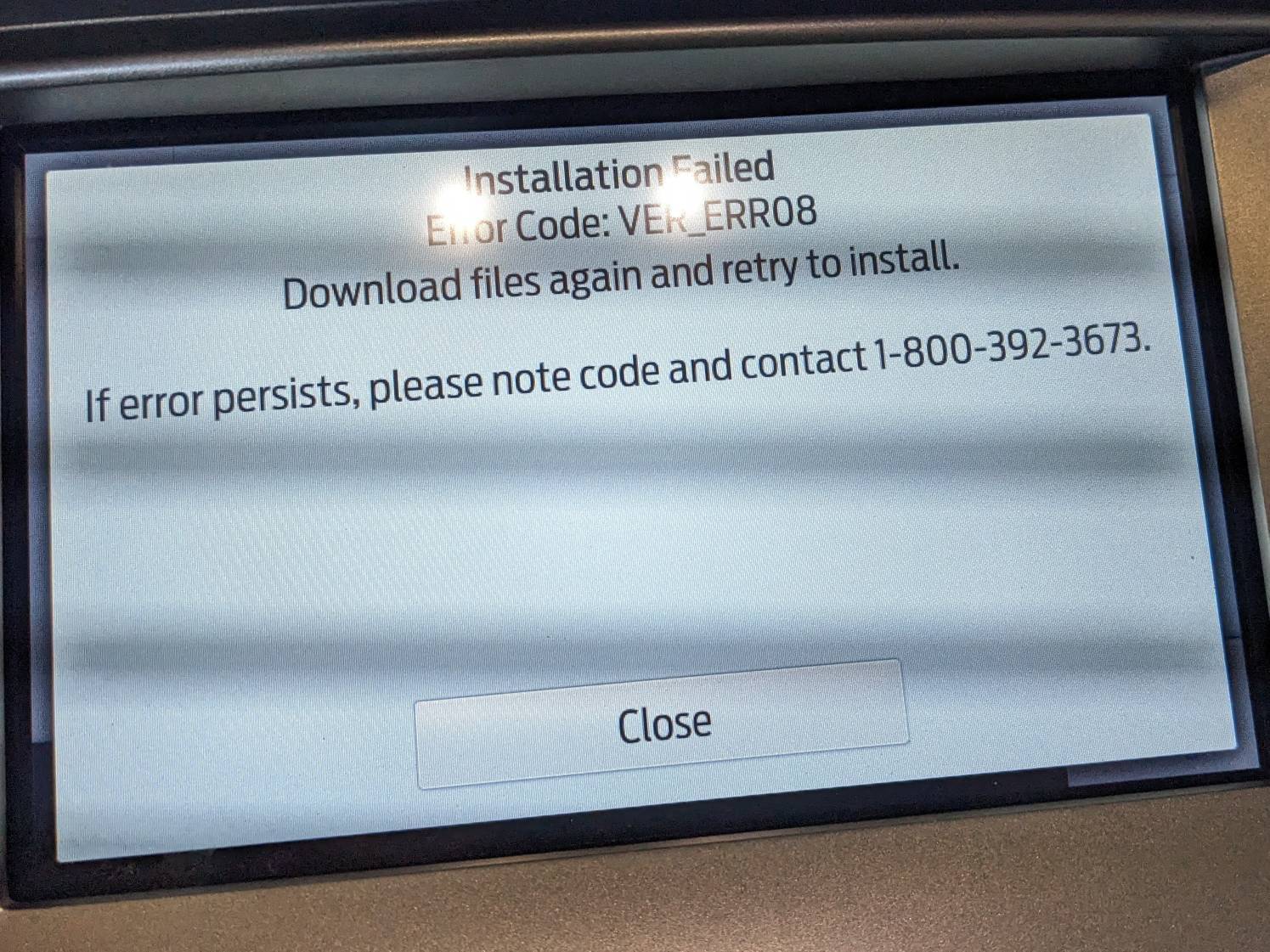
Gonna have to try this because I tried 3.4.23088 last night and then 3.4.22200 this morning and both times got this:

fd099a7e1d3d1f8e9374d423dbddb021a435d2cc-1.jpg
 

jss81258

Well-Known Member
First Name
James
Joined
Jul 5, 2020
Threads
1
Messages
169
Reaction score
253
Location
Texas
Vehicle(s)
2020 Ford Ranger Lariat 4x4, 2004 Chevrolet Corvette Z06
Occupation
Fixed equipment inspector
I think that's the same error I was getting. The part where it says to download and try again is why I fought it for 2 days. I thought it was a problem with the files on the USB, or a problem with the USB itself. So many downloads and several different USB devices later, I finally read Cyanlabs forums. Hope it works for you.
Sponsored


Top