Sponsored

Latest (5/11) forScan has new features

Arron

Well-Known Member
First Name
Arron
Joined
Dec 3, 2018
Threads
10
Messages
64
Reaction score
98
Location
Seattle, WA
Vehicle(s)
2019 Ranger SuperCab Lariat FX4 Sport Magnetic
Occupation
Software developer
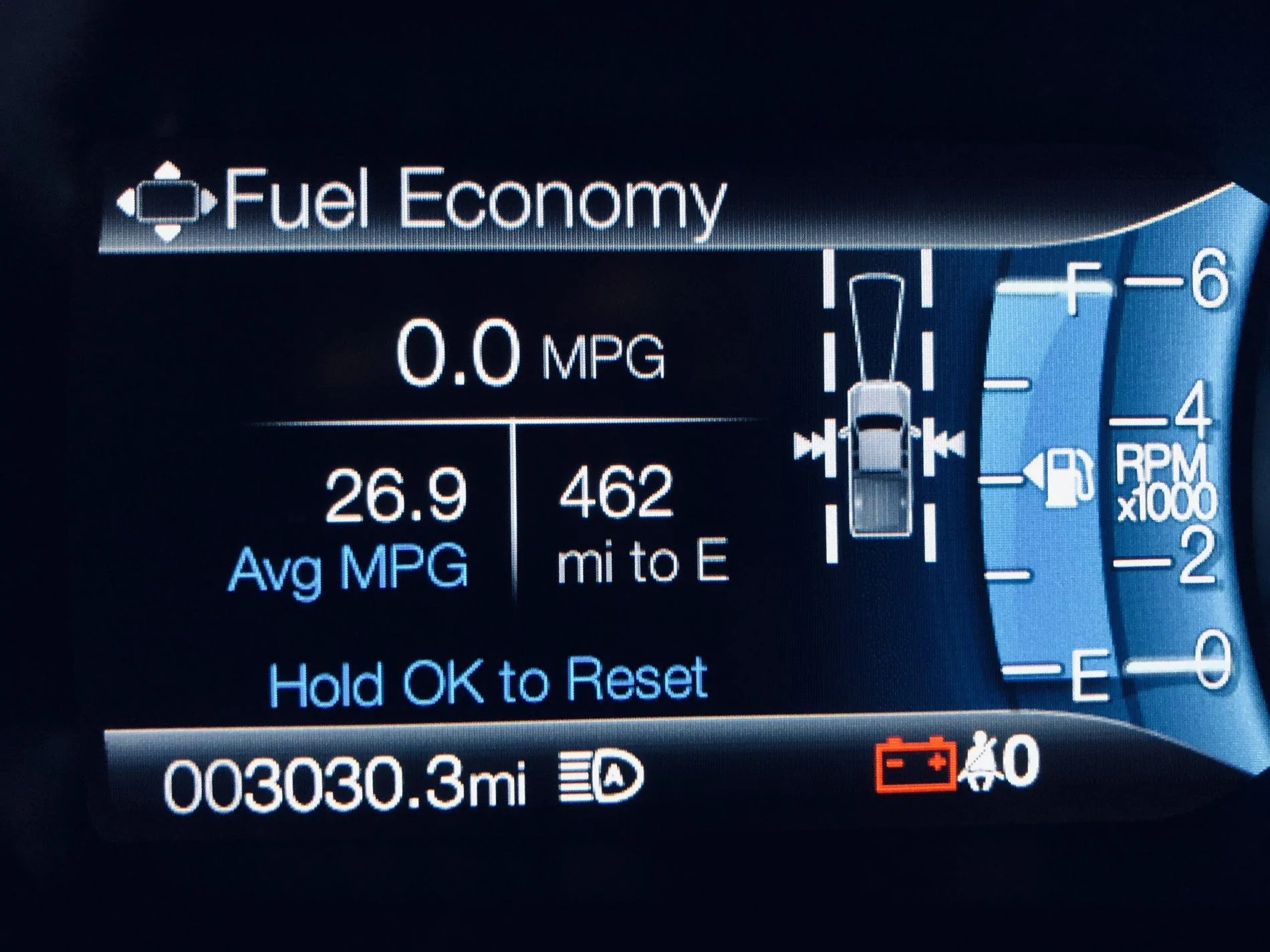
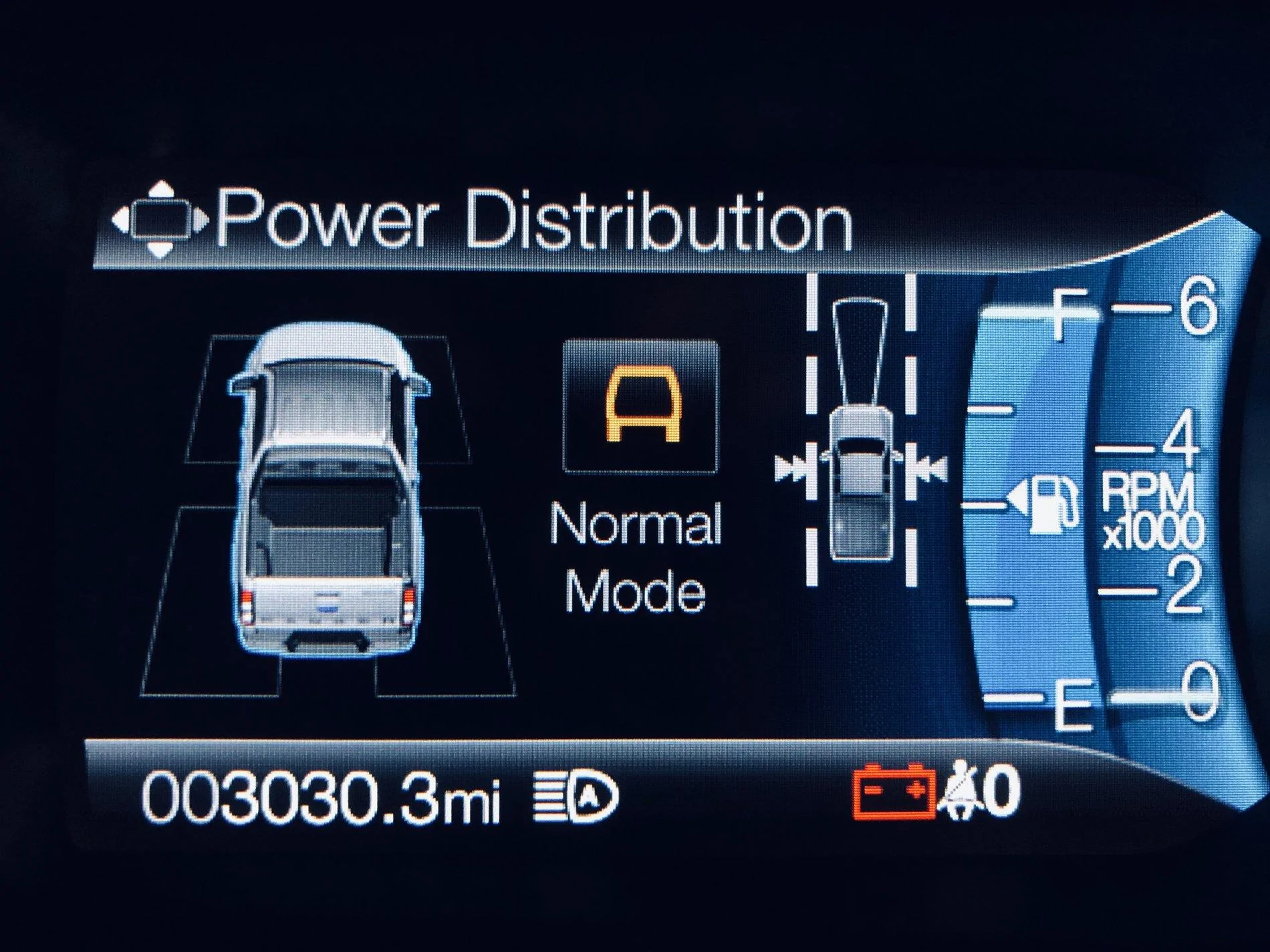
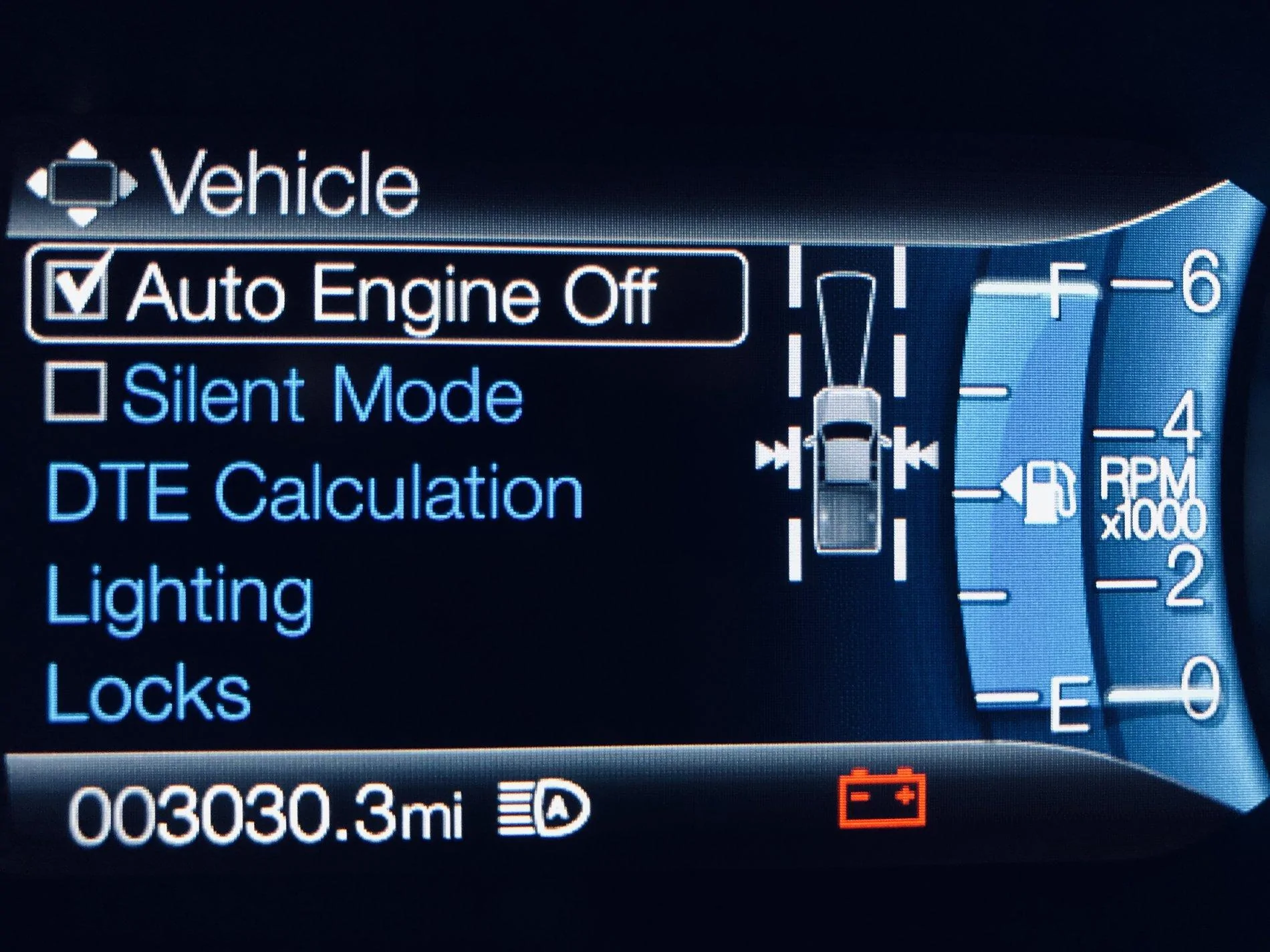
Just used the latest version of forScan to add these new options. There are easier to use module programming options now for many modules.

Instant fuel economy digital readout instead of horizontal bar
upload_2019-5-11_15-18-44.webp


Power distribution for trail mode
upload_2019-5-11_15-19-3.webp


Silent mode (Dark car) menu control
upload_2019-5-11_15-19-31.webp
Sponsored


t4thfavor

Well-Known Member
First Name
Chance
Joined
Feb 5, 2019
Threads
32
Messages
2,607
Reaction score
2,357
Location
Michigan
Vehicle(s)
2019 Ranger XLT FX4 Fox 2.0, 2011 Ford Edge Sport
OMG I need it, that power distribution one is really cool in the wife's edge. I have an XLT, I wonder if it works on my truck. (guess I'll have to try it.)
 

RedlandRanger

Moderator
First Name
Rob
Joined
Nov 14, 2018
Threads
42
Messages
5,111
Reaction score
11,103
Location
Oregon
Vehicle(s)
2019 Ford Ranger Lariat FX4, 1973 Mercury Capri
Vehicle Showcase
1
How did you add these? I didn't see any significant difference in the interface with the latest beta.
 

RCMUSTANG

Well-Known Member
First Name
Ray
Joined
Jan 22, 2019
Threads
22
Messages
1,867
Reaction score
2,191
Location
Los Angeles
Vehicle(s)
2017 Fusion 1995 Ranger
Please post the as built changes in the main forscan thread.
 
OP
OP
Arron

Arron

Well-Known Member
First Name
Arron
Joined
Dec 3, 2018
Threads
10
Messages
64
Reaction score
98
Location
Seattle, WA
Vehicle(s)
2019 Ranger SuperCab Lariat FX4 Sport Magnetic
Occupation
Software developer
Ray I don't know what the as built data is. I just changed the options using the real text that's in the latest version of the forScan app.

upload_2019-5-13_20-34-10.png


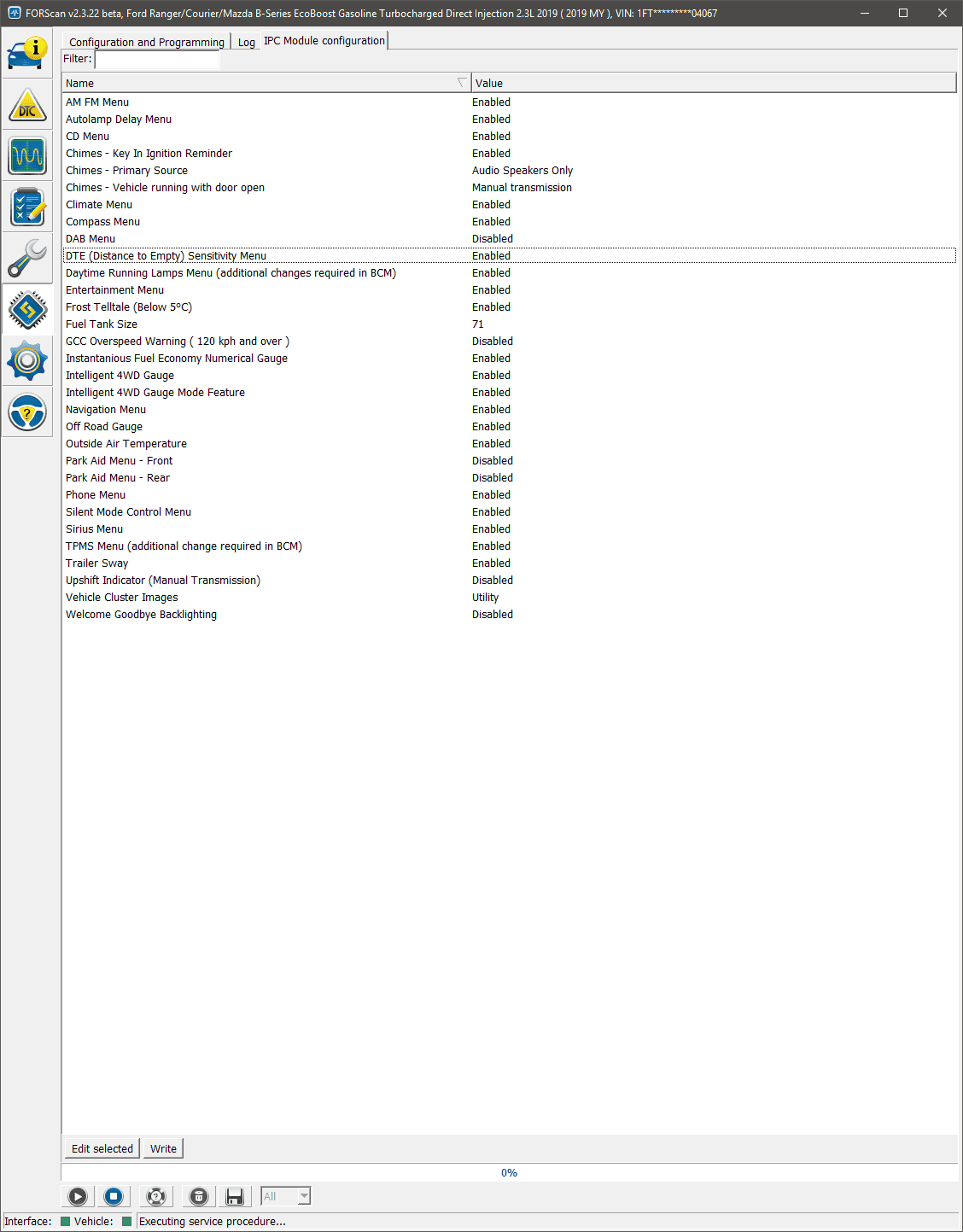
Instantaneous Fuel Economy Numerical Gauge (Enabled)
Intelligent 4WD Gauge (Enabled)
Intelligent 4WD Gauge Mode Feature (Enabled)
Silent Mode Control Menu (Enabled)
DTE (Distance to Empty) Sensitivity Menu (Enabled)

I'll do some digging and see if i can get all the numbers though and I will post it in the wiki then.


RedlandRanger

Moderator
First Name
Rob
Joined
Nov 14, 2018
Threads
42
Messages
5,111
Reaction score
11,103
Location
Oregon
Vehicle(s)
2019 Ford Ranger Lariat FX4, 1973 Mercury Capri
Vehicle Showcase
1
Ray I don't know what the as built data is. I just changed the options using the real text that's in the latest version of the forScan app.

upload_2019-5-13_20-34-10.png


Instantaneous Fuel Economy Numerical Gauge (Enabled)
Intelligent 4WD Gauge (Enabled)
Intelligent 4WD Gauge Mode Feature (Enabled)
Silent Mode Control Menu (Enabled)
DTE (Distance to Empty) Sensitivity Menu (Enabled)

I'll do some digging and see if i can get all the numbers though and I will post it in the wiki then.
I did not see that tab when I hooked it up tonight. I'll have to look at it again tomorrow.
 
OP
OP
Arron

Arron

Well-Known Member
First Name
Arron
Joined
Dec 3, 2018
Threads
10
Messages
64
Reaction score
98
Location
Seattle, WA
Vehicle(s)
2019 Ranger SuperCab Lariat FX4 Sport Magnetic
Occupation
Software developer
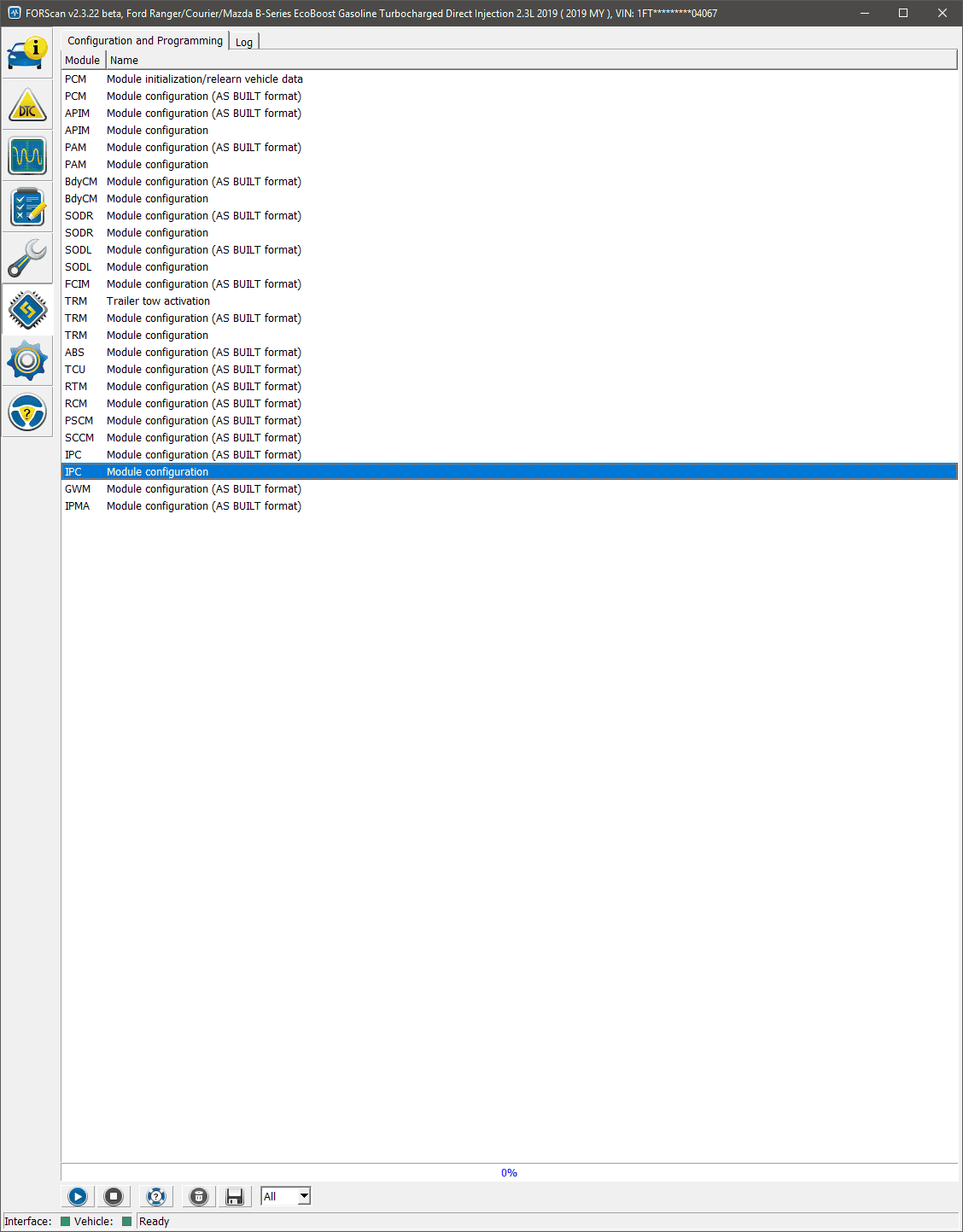
There are 2 ICP options in the list before you run the service procedure. Make sure you select the non-as-built option.

Note this extra option only started showing up in the latest version of forScan from 5/11.

upload_2019-5-13_21-49-55.png
 

t4thfavor

Well-Known Member
First Name
Chance
Joined
Feb 5, 2019
Threads
32
Messages
2,607
Reaction score
2,357
Location
Michigan
Vehicle(s)
2019 Ranger XLT FX4 Fox 2.0, 2011 Ford Edge Sport
Correct, they added the "easy mode" for the Courier and Ranger. I enabled the intelligent 4WD stuff, and it didn't work. The gauge comes on, but the icons don't show which wheels have the power!

So I promptly disabled it. That said, I only tried it in 2WD, so if someone can capture a screenshot of it working, I may try again.

I also turned on the Raptor splash screen in the APIM because I can wish...
 

VAMike

Well-Known Member
First Name
Mike
Joined
Feb 22, 2019
Threads
1
Messages
3,390
Reaction score
4,408
Location
Virginia
Vehicle(s)
2019 Ranger Lariat SuperCab
Correct, they added the "easy mode" for the Courier and Ranger. I enabled the intelligent 4WD stuff, and it didn't work. The gauge comes on, but the icons don't show which wheels have the power!

So I promptly disabled it. That said, I only tried it in 2WD, so if someone can capture a screenshot of it working, I may try again.

I also turned on the Raptor splash screen in the APIM because I can wish...
I wouldn't expect wheel power distribution to do anything on a 4wd (not awd).
 

t4thfavor

Well-Known Member
First Name
Chance
Joined
Feb 5, 2019
Threads
32
Messages
2,607
Reaction score
2,357
Location
Michigan
Vehicle(s)
2019 Ranger XLT FX4 Fox 2.0, 2011 Ford Edge Sport
I wouldn't expect wheel power distribution to do anything on a 4wd (not awd).
I just figured it would know which brakes were diverting power to which wheels (side to side). Not a big deal, but it's obviously not useful, so I turned it back off.
 

Andy

Well-Known Member
First Name
Andy
Joined
Oct 23, 2018
Threads
33
Messages
735
Reaction score
1,293
Location
Colorado
Vehicle(s)
2019 Ford Ranger Lariat / 2019 Volvo XC60 T6 Inscription
I wouldn't expect wheel power distribution to do anything on a 4wd (not awd).
Well the F150 shows power distribution in 2H,4H, and 4L. The truck does manage and alter torque at each wheel. So it should have a readout of that data.
 

t4thfavor

Well-Known Member
First Name
Chance
Joined
Feb 5, 2019
Threads
32
Messages
2,607
Reaction score
2,357
Location
Michigan
Vehicle(s)
2019 Ranger XLT FX4 Fox 2.0, 2011 Ford Edge Sport
Well the F150 shows power distribution in 2H,4H, and 4L. The truck does manage and alter torque at each wheel. So it should have a readout of that data.
It's entirely possible that after a reset on the CANBUS it might have started working then. I may play with it later, but for now I've messed with it enough.

I'm going to see if I can add the off road screen to my dads non-FX4 lariat soon too since I saw that was an option.
 

Andy

Well-Known Member
First Name
Andy
Joined
Oct 23, 2018
Threads
33
Messages
735
Reaction score
1,293
Location
Colorado
Vehicle(s)
2019 Ford Ranger Lariat / 2019 Volvo XC60 T6 Inscription
It's entirely possible that after a reset on the CANBUS it might have started working then. I may play with it later, but for now I've messed with it enough.

I'm going to see if I can add the off road screen to my dads non-FX4 lariat soon too since I saw that was an option.
I’ll test it tonight and do a battery disconnect for a few minutes as well as test out the drive modes after. I’d really like it to work so I’ll try as many different kinds of resets there are.
 

VAMike

Well-Known Member
First Name
Mike
Joined
Feb 22, 2019
Threads
1
Messages
3,390
Reaction score
4,408
Location
Virginia
Vehicle(s)
2019 Ranger Lariat SuperCab
Well the F150 shows power distribution in 2H,4H, and 4L. The truck does manage and alter torque at each wheel. So it should have a readout of that data.
As far as I know it's only really useful on an F150 with 4A (even then it's a novelty). Otherwise it's basically just telling you the status of the transfer case and diff locker.
 

djrobb

Well-Known Member
First Name
David
Joined
Nov 12, 2018
Threads
21
Messages
409
Reaction score
343
Location
Alexandria,Va
Vehicle(s)
2006 Tacoma 4dr Sport Long Bed
Vehicle Showcase
1
It's entirely possible that after a reset on the CANBUS it might have started working then. I may play with it later, but for now I've messed with it enough.

I'm going to see if I can add the off road screen to my dads non-FX4 lariat soon too since I saw that was an option.
I added the off road screen to my non fx4 and it works
Sponsored


Top