Sponsored

FORScan Modifications

Porpoise Hork

Well-Known Member
First Name
Bret
Joined
Apr 28, 2020
Threads
19
Messages
1,316
Reaction score
2,366
Location
Houston
Vehicle(s)
2022 F150 XLT Powerboost FX4 302A Oxford White
Occupation
IT
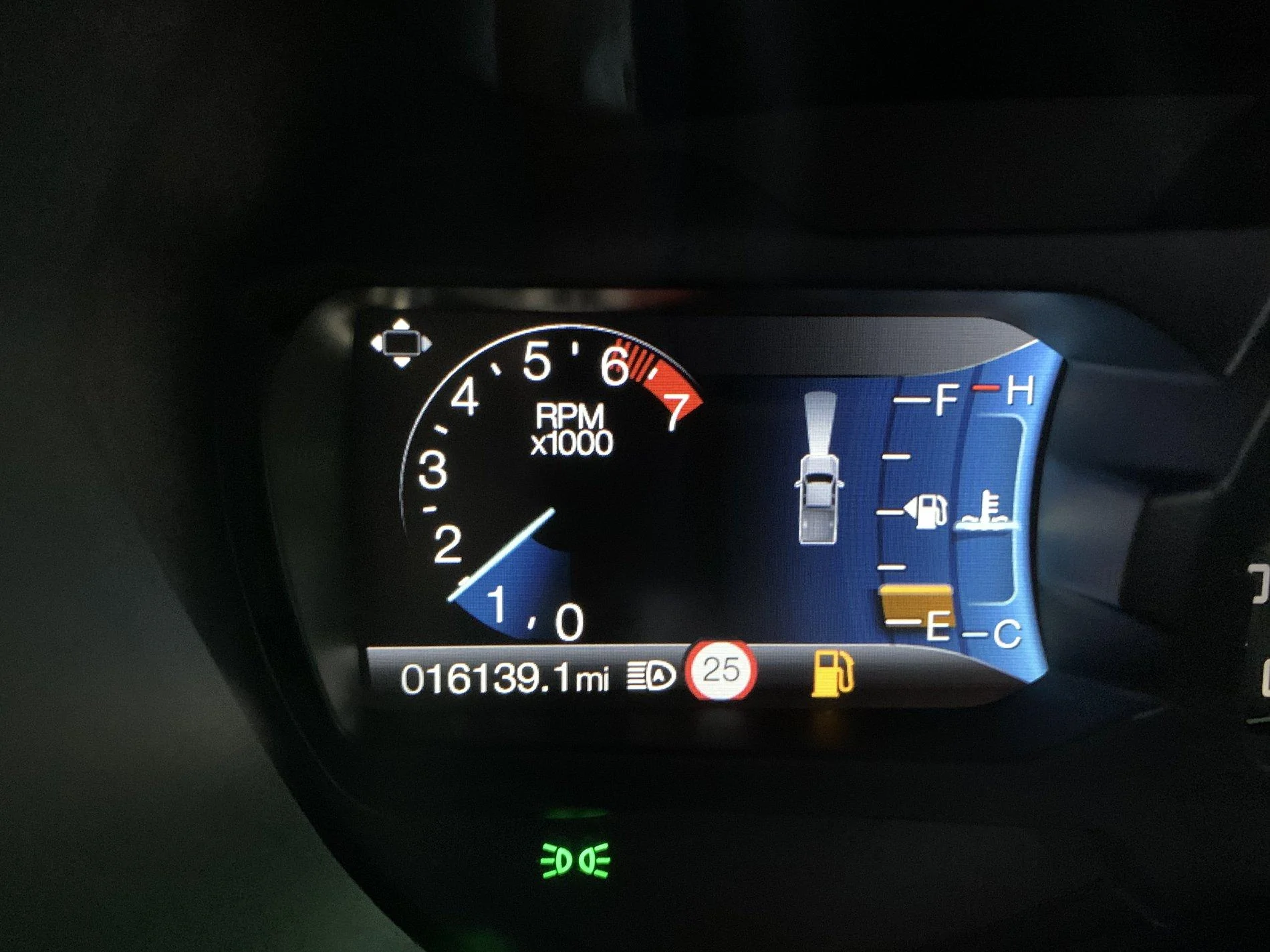
Got the speed limit sign reading to work!! Real time camera reading not map based either.
3C6389FC-D7D9-409D-BAEF-F803C6EF5605.jpeg
How did you get the round place holder for the speed limit to show up?

I have check to make sure everything is correct. I have reset everything back to stock, enabled all the listed changes including the Navigation in-Motion but I cannot get this place holder to show up. The system will read the signs and display them in this location so it is working, but they are showing in NA format so it only shows part of the sign.
Sponsored

 

Big Blue

Well-Known Member
First Name
Lee
Joined
May 5, 2020
Threads
16
Messages
3,927
Reaction score
9,352
Location
Wisconsin
Vehicle(s)
2019 Ford Ranger XLT FX4 Supercrew lighting blue
Occupation
Retired mechanical designer
The system will read the signs and display them in this location so it is working, but they are showing in NA format so it only shows part of the sign.
Please post a picture of what your seeing. Don't understand what you mean by NA format and only shows part of sign.

Also didn't have to enable Navigation in Motion on mine unless it was already enabled.
 

quangdog

Well-Known Member
First Name
Kimball
Joined
Mar 31, 2020
Threads
36
Messages
735
Reaction score
2,513
Location
Meridian, Idaho
Website
www.youtube.com
Vehicle(s)
2019 Ranger Lariat FX4
How did you get the round place holder for the speed limit to show up?

I have check to make sure everything is correct. I have reset everything back to stock, enabled all the listed changes including the Navigation in-Motion but I cannot get this place holder to show up. The system will read the signs and display them in this location so it is working, but they are showing in NA format so it only shows part of the sign.
I just did this mod today, and it worked exactly as expected. The little round area Is blank until the truck reads a sign. It's been very accurate so far.
@Porpoise Hork - do you have a picture of what is showing up on your dash?
 

Porpoise Hork

Well-Known Member
First Name
Bret
Joined
Apr 28, 2020
Threads
19
Messages
1,316
Reaction score
2,366
Location
Houston
Vehicle(s)
2022 F150 XLT Powerboost FX4 302A Oxford White
Occupation
IT
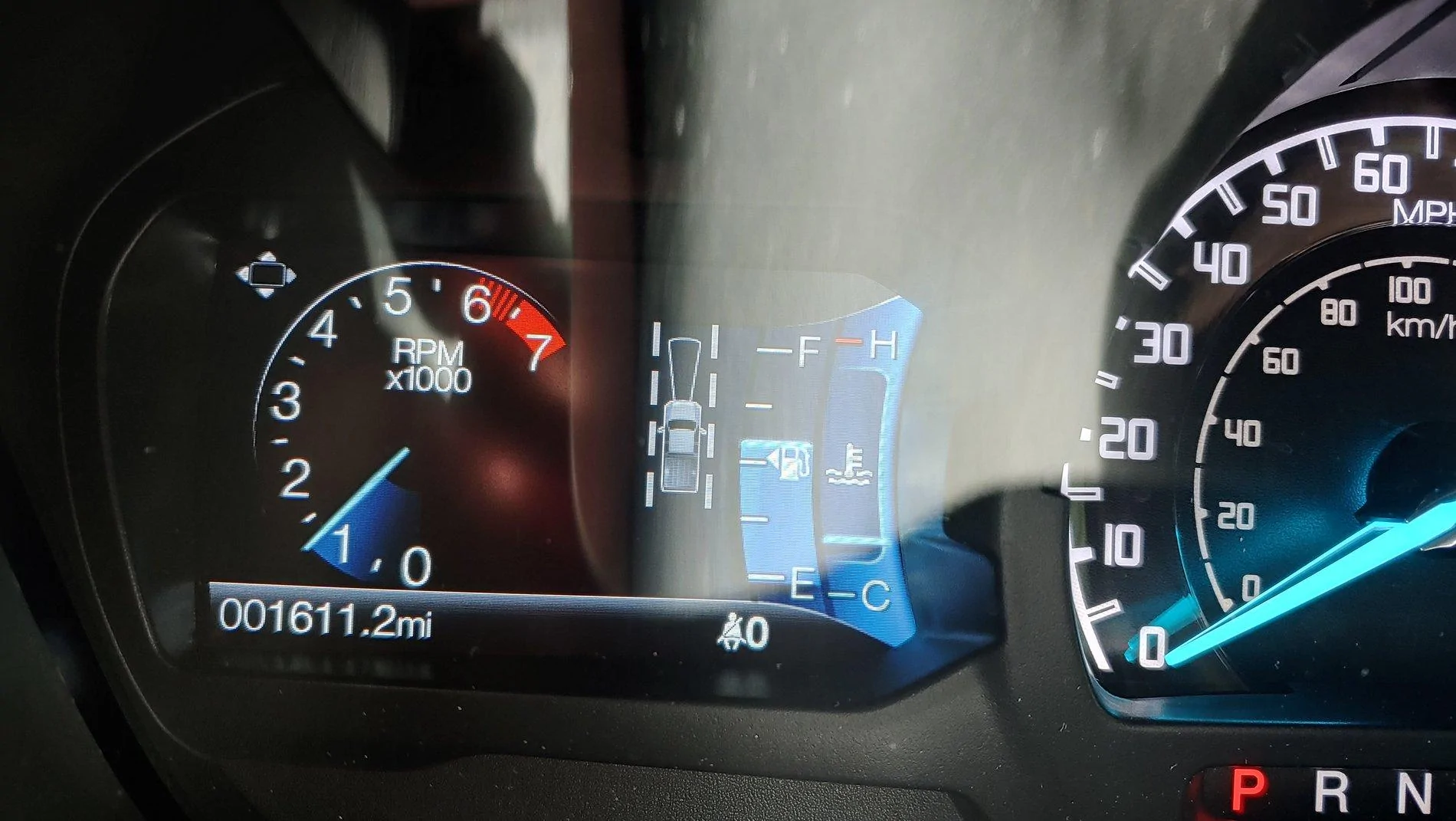
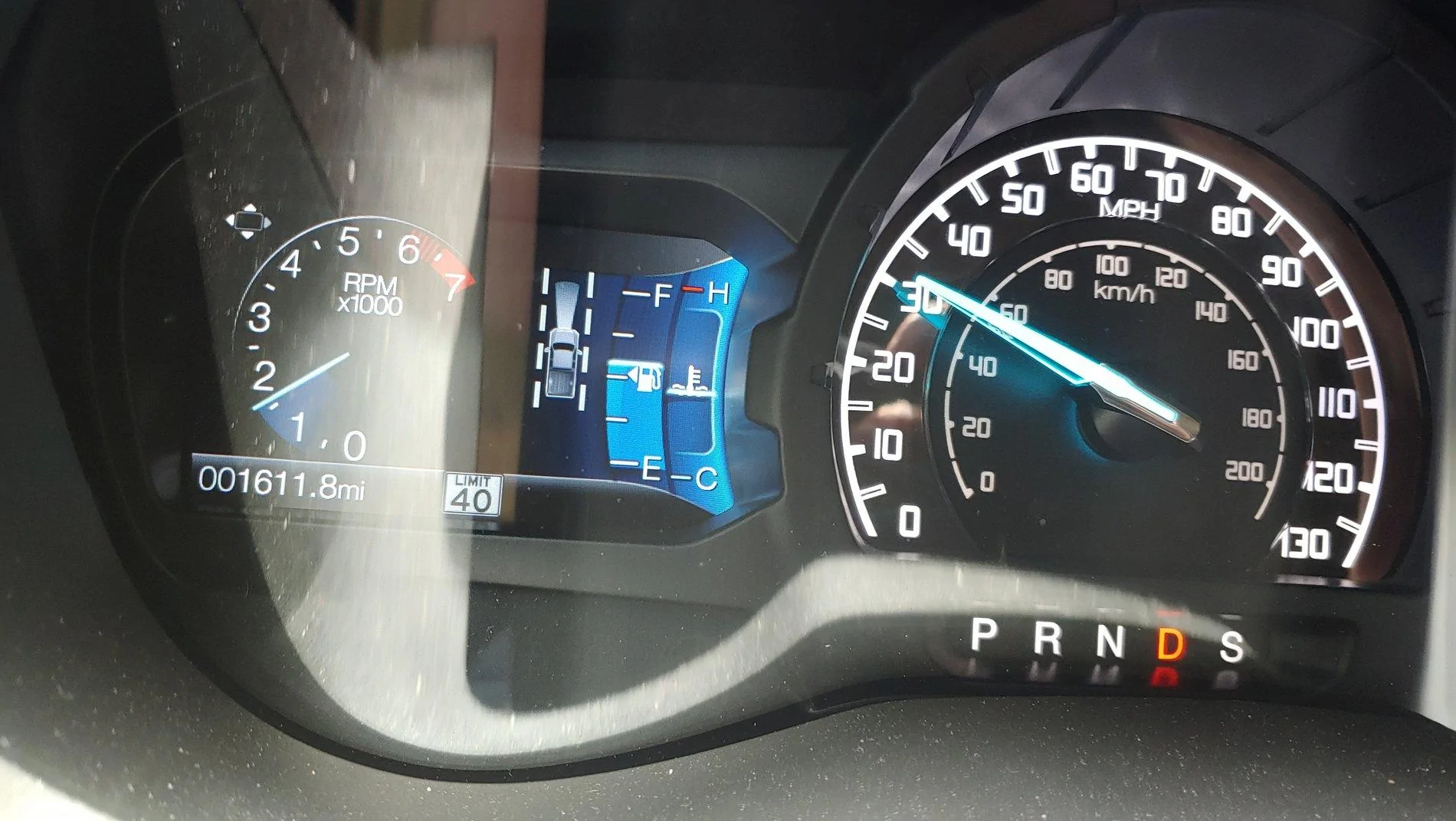
Yeah.. Sorry about that. Here you go @Big Blue @quangdog.

This is what it shows first starting up or prior to detecting a speed limit sign.
20200702_145746_HDR.webp


And this is what it shows when it detects a sign.
20200702_150004.webp
 

quangdog

Well-Known Member
First Name
Kimball
Joined
Mar 31, 2020
Threads
36
Messages
735
Reaction score
2,513
Location
Meridian, Idaho
Website
www.youtube.com
Vehicle(s)
2019 Ranger Lariat FX4
Yeah.. Sorry about that. Here you go @Big Blue @quangdog.

This is what it shows first starting up or prior to detecting a speed limit sign.
20200702_145746_HDR.jpg


And this is what it shows when it detects a sign.
20200702_150004.jpg
Whoa. That's ... odd. Yours is a 2020 Lariat? (Mine's a '19, but not sure that makes any difference at all)

I wonder if it's a) difference in system software version numbers or b) something else is gummed up in your Forscan settings.


Big Blue

Well-Known Member
First Name
Lee
Joined
May 5, 2020
Threads
16
Messages
3,927
Reaction score
9,352
Location
Wisconsin
Vehicle(s)
2019 Ford Ranger XLT FX4 Supercrew lighting blue
Occupation
Retired mechanical designer
Yeah.. Sorry about that. Here you go @Big Blue @quangdog.

This is what it shows first starting up or prior to detecting a speed limit sign.
20200702_145746_HDR.jpg


And this is what it shows when it detects a sign.
20200702_150004.jpg
Interesting, I haven't seen anyone post seeing NA signs like that! Wish I could get mine to do it. Does it flash at you if you go over your tolerance setting?
 

Porpoise Hork

Well-Known Member
First Name
Bret
Joined
Apr 28, 2020
Threads
19
Messages
1,316
Reaction score
2,366
Location
Houston
Vehicle(s)
2022 F150 XLT Powerboost FX4 302A Oxford White
Occupation
IT
Whoa. That's ... odd. Yours is a 2020 Lariat? (Mine's a '19, but not sure that makes any difference at all)

I wonder if it's a) difference in system software version numbers or b) something else is gummed up in your Forscan settings.
Lol yeah. 2020 Lariat with Sync 3.4.20136 installed (Cyanlabs) so now that I think about it, this could be why it's doing this.

Interesting, I haven't seen anyone post seeing NA signs like that! Wish I could get mine to do it. Does it flash at you if you go over your tolerance setting?
Honestly I don't know if it does. I have barely driven it since I enabled this in Forscan and have not pushed it past the speed limit. The only sign I have actually driven past is only 60+ feet once I turn out of the neighborhood. So unless I romp on it, I'm usually only going 30ish when I pass it as in the pic.

I can always try to downgrade it to 20021 or 19274 if it doesn't show the speed warning alert and see if it's something that changed with the version i currently have installed.
 

Big Blue

Well-Known Member
First Name
Lee
Joined
May 5, 2020
Threads
16
Messages
3,927
Reaction score
9,352
Location
Wisconsin
Vehicle(s)
2019 Ford Ranger XLT FX4 Supercrew lighting blue
Occupation
Retired mechanical designer
Lol yeah. 2020 Lariat with Sync 3.4.20136 installed (Cyanlabs) so now that I think about it, this could be why it's doing this.


Honestly I don't know if it does. I have barely driven it since I enabled this in Forscan and have not pushed it past the speed limit. The only sign I have actually driven past is only 60+ feet once I turn out of the neighborhood. So unless I romp on it, I'm usually only going 30ish when I pass it as in the pic.

I can always try to downgrade it to 20021 or 19274 if it doesn't show the speed warning alert and see if it's something that changed with the version i currently have installed.
I'm in a 2019 XLT with SYNC 3.4.20136. I don't think it is a SYNC issue as the settings are in IPC and IPMA. I tried changing the Navigation in Motion "Country" setting and got no change. Thinking it may be a model year thing as mentioned.
 

Porpoise Hork

Well-Known Member
First Name
Bret
Joined
Apr 28, 2020
Threads
19
Messages
1,316
Reaction score
2,366
Location
Houston
Vehicle(s)
2022 F150 XLT Powerboost FX4 302A Oxford White
Occupation
IT
I'm in a 2019 XLT with SYNC 3.4.20136. I don't think it is a SYNC issue as the settings are in IPC and IPMA. I tried changing the Navigation in Motion "Country" setting and got no change. Thinking it may be a model year thing as mentioned.
Hmm.. They branded it a 2020 but it has a build date of Nov 2019. So not sure what if anything they changed from the 2019 to 2020. Guess we'll have to wait and see how it acts if someone else with a 2020 that has a build date in Nov 19 or later enables it.

But I had not really looked closely at the icon. I thought it was a full speed limit sign like the right side screen displays but was just cut off. I hadn't realized that it was a bordered square icon. So I may disable the Nav in Motion since I'm not a big fan of how it jacks with the Sirius station icons and causes the system to speak out chosen language each time I start driving.
 
Last edited:

Big Blue

Well-Known Member
First Name
Lee
Joined
May 5, 2020
Threads
16
Messages
3,927
Reaction score
9,352
Location
Wisconsin
Vehicle(s)
2019 Ford Ranger XLT FX4 Supercrew lighting blue
Occupation
Retired mechanical designer
Hmm.. They branded it a 2020 but it has a build date of Nov 2019. So not sure what if anything they changed from the 2019 to 2020. Guess we'll have to wait and see how it acts if someone else with a 2020 that has a build date in Nov 19 or later enables it.

But I had not really looked closely at the icon. I thought it was a full speed limit sign like the right side screen displays but was just cut off. I hadn't realized that it was a bordered square icon. So I may disable the Nav in Motion since I'm not a big fan of how it jacks with the Sirius station icons and causes the system to speak out chosen language each time I start driving.
Yeah a Nov 19 build date would be a 2020 MY. They start the MY builds late the year before.

Would be interested in seeing a screen shot of your IPC as-built. I tried changing the country code to 5753 from 5553 similar to the APIM country code but no change. Just changed the US to a WS in the IPC configuration menu. Also changed the Traffic Sign Recognition mode from SLFIL to SLIOF, the other selection, with no difference. Not sure what the "O" stands for

Maybe your right and need to here from some other 2020 MY who enabled it.
 

Porpoise Hork

Well-Known Member
First Name
Bret
Joined
Apr 28, 2020
Threads
19
Messages
1,316
Reaction score
2,366
Location
Houston
Vehicle(s)
2022 F150 XLT Powerboost FX4 302A Oxford White
Occupation
IT
Interesting, I haven't seen anyone post seeing NA signs like that! Wish I could get mine to do it. Does it flash at you if you go over your tolerance setting?
Drove it over the weekend and the speed limit icon blinks if going over the tolerance setting. No color change or anything, just starts blinking as long as you are going faster than the posted speed.

Yeah a Nov 19 build date would be a 2020 MY. They start the MY builds late the year before.

Would be interested in seeing a screen shot of your IPC as-built. I tried changing the country code to 5753 from 5553 similar to the APIM country code but no change. Just changed the US to a WS in the IPC configuration menu. Also changed the Traffic Sign Recognition mode from SLFIL to SLIOF, the other selection, with no difference. Not sure what the "O" stands for

Maybe your right and need to here from some other 2020 MY who enabled it.
Next time I'm in it I'll try to remember to snag a screenshot of the IPC As-Buit to see if there's any significant difference in the 2019 vs 2020 module coding.
 

fslec

Well-Known Member
First Name
Rob
Joined
Apr 27, 2020
Threads
1
Messages
63
Reaction score
92
Location
Clarence New York
Vehicle(s)
2019 Ranger XLT Sport Livernois Tune
Installed this morning on my XLT and so far works as described.
 

Big Blue

Well-Known Member
First Name
Lee
Joined
May 5, 2020
Threads
16
Messages
3,927
Reaction score
9,352
Location
Wisconsin
Vehicle(s)
2019 Ford Ranger XLT FX4 Supercrew lighting blue
Occupation
Retired mechanical designer
Installed this morning on my XLT and so far works as described.
Are you seeing US style signs or European style circular style? If your seeing the US style square sign, I would like to see screen shots of your IPC and IPMA configurations to compare. Would love to figure out how to get the US style signs like Bret is seeing on his.
 

fslec

Well-Known Member
First Name
Rob
Joined
Apr 27, 2020
Threads
1
Messages
63
Reaction score
92
Location
Clarence New York
Vehicle(s)
2019 Ranger XLT Sport Livernois Tune
European style... I too would like the US style. Also would be nice to have the option of some more noticeable alert, maybe a tone.


Top