Sponsored

My display shrunk

enginebuzzing

Member
Joined
Jul 30, 2024
Threads
2
Messages
9
Reaction score
22
Location
California
Vehicle(s)
2020 Ford Ranger XLT 4WD
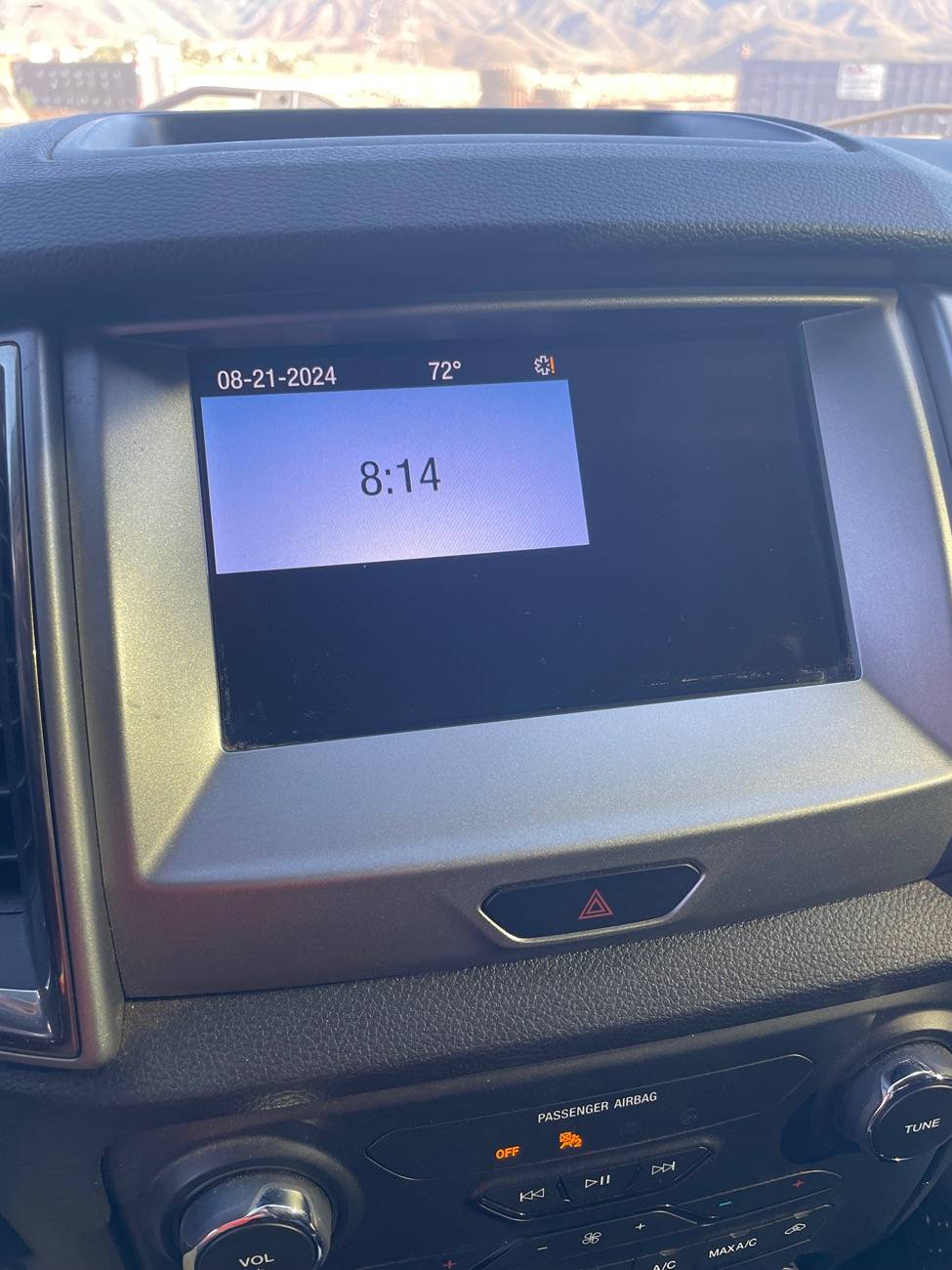
I was trying to update my Sync 3 software to see if the display reset bug has been fixed yet and when the update was finished, it turned my 8 inch display into the 4 inch display.

I've been reading about downloading the latest software onto a USB drive and then plugging that into the truck to auto-install. Should that fix the issue? Or is there a deeper problem that needs to be fixed?

IMG_6700.jpeg
Sponsored


Rinn69

Well-Known Member
First Name
Mike
Joined
Nov 25, 2018
Threads
53
Messages
1,404
Reaction score
3,559
Location
N. Central Iowa
Vehicle(s)
'19 Ranger traded for 24 F-150 XL RCSB 4x4 5.0 :-P
Occupation
Retired USAF MSgt
Vehicle Showcase
1
Did your truck just get out of the pool ?....shrinkage sucks.
 

Big Blue

Well-Known Member
First Name
Lee
Joined
May 5, 2020
Threads
16
Messages
3,927
Reaction score
9,352
Location
Wisconsin
Vehicle(s)
2019 Ford Ranger XLT FX4 Supercrew lighting blue
Occupation
Retired mechanical designer
I was trying to update my Sync 3 software to see if the display reset bug has been fixed yet and when the update was finished, it turned my 8 inch display into the 4 inch display.

I've been reading about downloading the latest software onto a USB drive and then plugging that into the truck to auto-install. Should that fix the issue? Or is there a deeper problem that needs to be fixed?
Were you downloading from the Ford site to get the update? Maybe the stick was not setup properly.

I have long since given up on the Ford updates and use the Cyan Labs SYN3Updater app. It formats the USB stick and downloads the files into the proper locations on the stick. No unzipping, or moving files. Just take the finished stick and plug it into the truck and it works. Oh and no bother with uploading a file back to Ford, Which never really worked anyway. They will figure out what version you have eventually anyway.
 

got3fords

Well-Known Member
First Name
James
Joined
Apr 12, 2021
Threads
131
Messages
5,319
Reaction score
13,808
Location
22973
Vehicle(s)
2026 Marsh Gray Ranger Raptor, 1995 Harley XLH1200
Occupation
Mom Joke Professional
Were you downloading from the Ford site to get the update? Maybe the stick was not setup properly.

I have long since given up on the Ford updates and use the Cyan Labs SYN3Updater app. It formats the USB stick and downloads the files into the proper locations on the stick. No unzipping, or moving files. Just take the finished stick and plug it into the truck and it works. Oh and no bother with uploading a file back to Ford, Which never really worked anyway. They will figure out what version you have eventually anyway.
How big of a USB stick does it need?
 
OP
OP

enginebuzzing

Member
Joined
Jul 30, 2024
Threads
2
Messages
9
Reaction score
22
Location
California
Vehicle(s)
2020 Ford Ranger XLT 4WD
Were you downloading from the Ford site to get the update? Maybe the stick was not setup properly.

I have long since given up on the Ford updates and use the Cyan Labs SYN3Updater app. It formats the USB stick and downloads the files into the proper locations on the stick. No unzipping, or moving files. Just take the finished stick and plug it into the truck and it works. Oh and no bother with uploading a file back to Ford, Which never really worked anyway. They will figure out what version you have eventually anyway.
I was actually just using automatic updates through WIFI and the screen reverted to what you see now in the middle of my commute to work this morning (no WIFI?). Maybe this fixes itself once I get home and reconnect? But I will definitely be picking up a spare thumb drive today to do the USB update anyway. Thanks for this


Big Blue

Well-Known Member
First Name
Lee
Joined
May 5, 2020
Threads
16
Messages
3,927
Reaction score
9,352
Location
Wisconsin
Vehicle(s)
2019 Ford Ranger XLT FX4 Supercrew lighting blue
Occupation
Retired mechanical designer
How big of a USB stick does it need?
It depends on whether you have NAV or not. It tells you in the app. Non-NAV requires 8GB, NA with NAV requires at least 16GB.
 

Big Blue

Well-Known Member
First Name
Lee
Joined
May 5, 2020
Threads
16
Messages
3,927
Reaction score
9,352
Location
Wisconsin
Vehicle(s)
2019 Ford Ranger XLT FX4 Supercrew lighting blue
Occupation
Retired mechanical designer
I was actually just using automatic updates through WIFI and the screen reverted to what you see now in the middle of my commute to work this morning (no WIFI?). Maybe this fixes itself once I get home and reconnect? But I will definitely be picking up a spare thumb drive today to do the USB update anyway. Thanks for this
The OTA updates have been problematic for some time, especially with the latest version.
 

RangerBill

Well-Known Member
First Name
Bob
Joined
Jun 8, 2022
Threads
3
Messages
1,601
Reaction score
2,123
Location
PA
Vehicle(s)
2019 Ford Ranger Lariat Super Crew FX4
Occupation
retired
I was trying to update my Sync 3 software to see if the display reset bug has been fixed yet and when the update was finished, it turned my 8 inch display into the 4 inch display.

I've been reading about downloading the latest software onto a USB drive and then plugging that into the truck to auto-install. Should that fix the issue? Or is there a deeper problem that needs to be fixed?

IMG_6700.jpeg
You could try a hardware reset found in the Sync menus.
 

subquark

Well-Known Member
First Name
David
Joined
Jan 28, 2022
Threads
11
Messages
4,544
Reaction score
23,071
Location
Portsmouth, NH
Website
subQuark.com
Vehicle(s)
Soupie! Race Red '22 XL 101A Scab 4X2 w/steelies
Occupation
game publisher
I was trying to update my Sync 3 software to see if the display reset bug has been fixed yet and when the update was finished, it turned my 8 inch display into the 4 inch display.

I've been reading about downloading the latest software onto a USB drive and then plugging that into the truck to auto-install. Should that fix the issue? Or is there a deeper problem that needs to be fixed?

IMG_6700.jpeg
That looks exactly like my little XL display!

Is your functionality greatly diminished in it? Like only the ability to do calls?
 

Dr_Strangelove

Well-Known Member
First Name
Adam
Joined
Oct 14, 2022
Threads
13
Messages
1,137
Reaction score
5,218
Location
Henderson, NV
Vehicle(s)
'22 XLT Supercrew 4x4
Occupation
Art, Design, Photo & Video
Sync 3 Soft Reset procedure: Press and hold the Seek Up (>>|) button while pressing and holding the Radio Power button.

Sync 3 Hard Reset procedure: Tap Settings. Choose General. Scroll down and press Master Reset.


This is per Google...

Are you able to interface with the screen at all via dash buttons? I doubt touch is enabled...

Edit:

To perform a master reset using SYNC 3 (non-touchscreen):

  1. Press the Menu button.
  2. Scroll down and select General.
  3. Scroll down and select Master Reset.
  4. This will prompt a confirmation screen to appear. Scroll down and select Continue.

If you need further assistance, contact the Ford Customer Relationship Center at 1-800-392-3673 or choose our Live Chat option.


From this link: https://www.ford.com/support/how-to.../how-do-i-perform-a-sync-masterfactory-reset/

I'm guessing the 3rd set of instructions is your best bet as your unit seems to believe it is this model for the time being... my presumption. Not a computer whiz.
 
OP
OP

enginebuzzing

Member
Joined
Jul 30, 2024
Threads
2
Messages
9
Reaction score
22
Location
California
Vehicle(s)
2020 Ford Ranger XLT 4WD
Sync 3 Soft Reset procedure: Press and hold the Seek Up (>>|) button while pressing and holding the Radio Power button.

Sync 3 Hard Reset procedure: Tap Settings. Choose General. Scroll down and press Master Reset.


This is per Google...

Are you able to interface with the screen at all via dash buttons? I doubt touch is enabled...

Edit:

To perform a master reset using SYNC 3 (non-touchscreen):

  1. Press the Menu button.
  2. Scroll down and select General.
  3. Scroll down and select Master Reset.
  4. This will prompt a confirmation screen to appear. Scroll down and select Continue.

If you need further assistance, contact the Ford Customer Relationship Center at 1-800-392-3673 or choose our Live Chat option.


From this link: https://www.ford.com/support/how-to.../how-do-i-perform-a-sync-masterfactory-reset/

I'm guessing the 3rd set of instructions is your best bet as your unit seems to believe it is this model for the time being... my presumption. Not a computer whiz.
The sync menu is inaccessible. I can get to the settings page, but I cannot access the general settings tab. No buttons work, and touch only works for scrolling. I think the buttons that I need to access general settings are only on the XL trim with the integrated 4 inch display (the one with a million buttons)
 

subquark

Well-Known Member
First Name
David
Joined
Jan 28, 2022
Threads
11
Messages
4,544
Reaction score
23,071
Location
Portsmouth, NH
Website
subQuark.com
Vehicle(s)
Soupie! Race Red '22 XL 101A Scab 4X2 w/steelies
Occupation
game publisher
It's greatly diminished. No Apple car play across.
Somehow your system was downgraded to whatever my level of Sync is called (suckie comes to mind).

Seems like the reset may do it, maybe in combo with a battery disconnect for 10 minutes?

By the way, I've done a master reset on my smaller Sync system and once I did not lose my presets but another time I did. I believe I also lost my presets with the battery disconnect but can't remember for sure (LOL, it was just a few weeks ago for the TBC install ... but my memory - also suckie!).

Keep us informed, this is the first time I've ever seen this.

It's really odd - it's like if I logged into my work computer and it was Windows XP when it had been Windows 10 before that.
Sponsored


Top