Sponsored

Ford Tech at the dealership is dumb founded - Auto Start/Stop issue

shovonmshahriar

Well-Known Member
Joined
Feb 10, 2022
Threads
11
Messages
87
Reaction score
119
Location
US
Vehicle(s)
Ford
I have a Ranger XLT Tremor (build November ‘21)
that started enabling/disabling the “Auto Start/Stop” function randomly by itself!!

Symptoms are repeated “Auto Start/Stop disabled by Switch” & “Auto Start/Stop enabled by Switch” messages in the dashboard in a loop, along with the actual auto start/stop switch light turning amber & then off & then on again with the corespondent dash message!!

My ford tech assumed that it was the actual switch that was shorted or sticky, so he replaced that but the symptoms came back right away. Before the replacement the symptoms would stop by itself after a while. Now it’s there constantly. Ford service manual says to replace the FICM as next step but he’s telling me that he doesn’t agree with that because in his opinion FICM shouldn’t have anything to do with this!

As for the truck itself, the few electrical/electronic changes that may have any relevance to this issue are mostly OEM ford parts and I’ve installed them according to Ford’s service manuals to the T. They’re as follows:
  • Ford Performance Tune (though I am using WIX air filter instead of the K&N it came with)
  • Ford trailer brake controller
  • Ford (U1000) dashcam with Ranger specific OBDll pass-through harness
  • WARN winch connected to Upfitter switch# 1
  • Ford Performance hood mounted off-road lights to Switch# 2
  • Eaton OEM electronic front locker to Switch# 3.
  • Ford touch activated bed lamps
  • Ford 12VDC bed outlet
  • Auxito LED replacement for fog & headlamps, turn signals, side markers & rear bed lights
  • Bambi mode enabled & turn signal rapid flashing disabled via FORScan

    These changes were done at least over a year/5000 miles prior to this issue and I doubt has anything to do with it but thought I should list them anyway for disclosure.

    Any suggestions or insight? Truck is still within the 30K miles/36 months bumper-to-bumper warranty.
    (Apologies for such long post and thanks for reading it)
Sponsored

 
Last edited:

LB'sTremor

Well-Known Member
First Name
Loren
Joined
Mar 17, 2022
Threads
19
Messages
552
Reaction score
1,492
Location
Tampa
Vehicle(s)
22 Iconic Lariat Tremor
Occupation
IT
Hi, sorry to derail this but I would love some specifics on this?
  • Eaton OEM electronic front locker to Switch# 3.
Thanks!
LB
 

airline tech

Well-Known Member
Joined
Aug 24, 2022
Threads
28
Messages
4,468
Reaction score
8,544
Location
Midwest - KS
Vehicle(s)
2022 Ranger Lariat-Super Crew, Cactus Gray
Occupation
Aircraft Tech
I would say, the Tech is on the right path but needs to follow through with his assessment of the switch.

Yes - The FCIM has something to do with it.

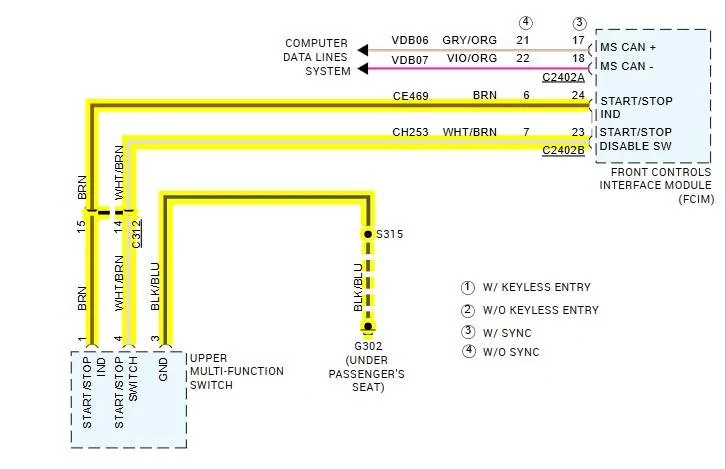
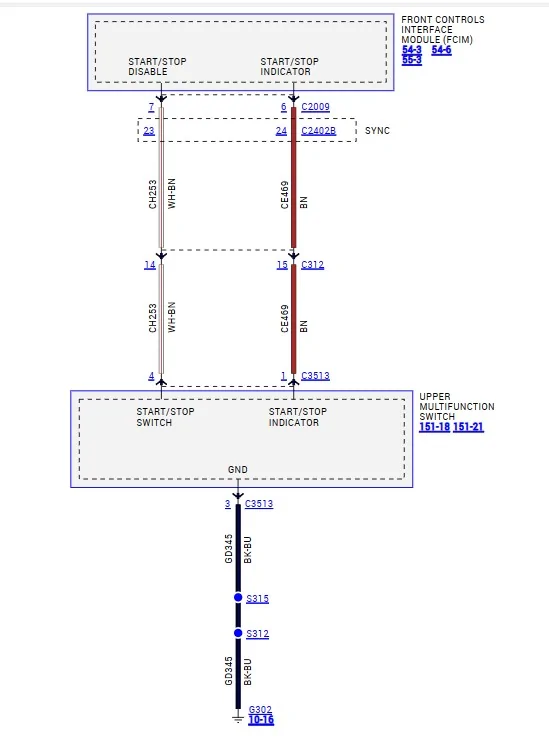
If he pulls up the wiring diagram, he will see that the switch has 3-Wires for control & indication.

Now I cannot confirm this, since there is not a full description of how it operates (Internally - FCIM)
But I believe that when you push the switch (Momentary) it tells the FCIM you are in disabled (selected-mode) and it holds that (within the FCIM) until a power cycle has been performed or you press the switch again (to enable)

The (power cycle) event (shut off truck and restart) is the reason for having to press the switch (if you HATE the ASS System) Every Time you start the truck.

So, YES the FCIM can be the issue here.

Now to focus on what's happening, the FCIM sees that the switch is being pressed - multiple times in succession. (Enable/Disable)

So, there are 3-Wires on that switch connector that control that information to the FCIM
1. Switch Input - To FCIM
2. Indicator - Light (Feedback from FCIM)

The above 2 - go into an Inline connector between the FCIM & Switch
If there is a bad connection here, it could be seeing that the switch is being pressed (Circuit Disruption)

3. Ground, this is where I would focus, I have a feeling you have a bad ground, causing the issue.

With getting the same symptoms after the switch replacement but more prevalent, then I highly suspect a bad connection in the switch connector, most likely the ground wire.
as he disturbed the connector (Removed & Reinstalled)

So, before condemning the FCIM, do some simple wiring checks as I strongly feel that is the issue here.


got3fords

Well-Known Member
First Name
James
Joined
Apr 12, 2021
Threads
131
Messages
5,324
Reaction score
13,837
Location
22973
Vehicle(s)
2026 Marsh Gray Ranger Raptor, 1995 Harley XLH1200
Occupation
Mom Joke Professional
I just have to say, I appreciate when someone posts a new issue and presents as much potentially pertinent information as possible. (not sure even I do that). But this reminds me of the time I spent as a Ford tractor mechanic, there was a plague of issues with shifting, drive, motion controls on the big new tractors and skid steer loaders. So many parts were replaced for no reason.
I was asked to take a look and after banging my head for a while, discovered that other techs were using multimeter probes that were too big in diameter and jamming them into the mulit-condutor connectors to the shift lever and control connectors, in an attempt to troubleshoot the various problems. This was enlarging the female side of the pin-socket connection, creating intermittent opens.
So that said, have any your mods you required probing connectors with a multimeter?
 
Last edited:

Murphie

Well-Known Member
First Name
Jim
Joined
Oct 18, 2018
Threads
3
Messages
331
Reaction score
572
Location
Lindale TX
Vehicle(s)
2019 Ranger Lariat 4X2, 2023 Hyundai Santa Fe
Occupation
Financial Auditor - Retired
I would say, the Tech is on the right path but needs to follow through with his assessment of the switch.

Yes - The FCIM has something to do with it.

If he pulls up the wiring diagram, he will see that the switch has 3-Wires for control & indication.

Now I cannot confirm this, since there is not a full description of how it operates (Internally - FCIM)
But I believe that when you push the switch (Momentary) it tells the FCIM you are in disabled (selected-mode) and it holds that (within the FCIM) until a power cycle has been performed or you press the switch again (to enable)

The (power cycle) event (shut off truck and restart) is the reason for having to press the switch (if you HATE the ASS System) Every Time you start the truck.

So, YES the FCIM can be the issue here.

Now to focus on what's happening, the FCIM sees that the switch is being pressed - multiple times in succession. (Enable/Disable)

So, there are 3-Wires on that switch connector that control that information to the FCIM
1. Switch Input - To FCIM
2. Indicator - Light (Feedback from FCIM)

The above 2 - go into an Inline connector between the FCIM & Switch
If there is a bad connection here, it could be seeing that the switch is being pressed (Circuit Disruption)

3. Ground, this is where I would focus, I have a feeling you have a bad ground, causing the issue.

With getting the same symptoms after the switch replacement but more prevalent, then I highly suspect a bad connection in the switch connector, most likely the ground wire.
as he disturbed the connector (Removed & Reinstalled)

So, before condemning the FCIM, do some simple wiring checks as I strongly feel that is the issue here.
There's no way I understand all of that, but I will say I'm glad you're around here. :)
 
OP
OP
shovonmshahriar

shovonmshahriar

Well-Known Member
Joined
Feb 10, 2022
Threads
11
Messages
87
Reaction score
119
Location
US
Vehicle(s)
Ford
The update on the issue: The FICM has been replaced. Now the symptoms have completely changed!!! The “Auto-Start/Stop disabled (enabled) by Switch” dashboard looped messages are gone and doesn’t happen anymore but now, ASS can’t be disabled by the ASS switch!!?! My tech is more confused than before.

According to him the “pinpoint” testing “confirmed” that the original switch module was bad as well as the original FICM. Now both has been replaced and the new switch doesn’t do anything at all, Auto-Start/Stop stays on regardless of the switch operation!
 

got3fords

Well-Known Member
First Name
James
Joined
Apr 12, 2021
Threads
131
Messages
5,324
Reaction score
13,837
Location
22973
Vehicle(s)
2026 Marsh Gray Ranger Raptor, 1995 Harley XLH1200
Occupation
Mom Joke Professional
The update on the issue: The FICM has been replaced. Now the symptoms have completely changed!!! The “Auto-Start/Stop disabled (enabled) by Switch” dashboard looped messages are gone and doesn’t happen anymore but now, ASS can’t be disabled by the ASS switch!!?! My tech is more confused than before.

According to him the “pinpoint” testing “confirmed” that the original switch module was bad as well as the original FICM. Now both has been replaced and the new switch doesn’t do anything at all, Auto-Start/Stop stays on regardless of the switch operation!
Does the light on the switch come on?
 

airline tech

Well-Known Member
Joined
Aug 24, 2022
Threads
28
Messages
4,468
Reaction score
8,544
Location
Midwest - KS
Vehicle(s)
2022 Ranger Lariat-Super Crew, Cactus Gray
Occupation
Aircraft Tech
When you press the switch, it provides a ground to the switch, when the switch is grounded it triggers the light (indication)
or opposite of above (Normally Open vs Normally Closed Switch)

Being that the harness has been disturbed (2x) and getting different results.
I suspect bad wiring between the FCIM and the switch.

1. Touching together, generating the (on/off) succession - messages, simulating the button is being pressed - (open & closed) circuit.

2. Pin #4 - Touching a ground - in the harness run

3. Bad connection in the inline connector (C312)

4. A Data Bus - Issue on the MS CAN - Network

With getting varied outcomes when the wire harness is disturbed, tells me it's a bad wire.

Disconnect the FCIM C2402B and Switch C3513

Perform resistance checks on the wires while shaking the harness.
and test the ground.


A Start.webp
 
OP
OP
shovonmshahriar

shovonmshahriar

Well-Known Member
Joined
Feb 10, 2022
Threads
11
Messages
87
Reaction score
119
Location
US
Vehicle(s)
Ford
When you press the switch, it provides a ground to the switch, when the switch is grounded it triggers the light (indication)
or opposite of above (Normally Open vs Normally Closed Switch)

Being that the harness has been disturbed (2x) and getting different results.
I suspect bad wiring between the FCIM and the switch.

1. Touching together, generating the (on/off) succession - messages, simulating the button is being pressed - (open & closed) circuit.

2. Pin #4 - Touching a ground - in the harness run

3. Bad connection in the inline connector (C312)

4. A Data Bus - Issue on the MS CAN - Network

With getting varied outcomes when the wire harness is disturbed, tells me it's a bad wire.

Disconnect the FCIM C2402B and Switch C3513

Perform resistance checks on the wires while shaking the harness.
and test the ground.


A Start.jpeg
Thank you for sharing this. I’ll pass it along. I think I’m gonna visit the dealership tomorrow and see what really is going on.
 

Bsthroop

Well-Known Member
First Name
Brian
Joined
Oct 4, 2022
Threads
6
Messages
479
Reaction score
2,263
Location
New Mexico
Vehicle(s)
2019 Lariat 4x2 Sport
Occupation
Broadband/ Microwave Engineer
When you press the switch, it provides a ground to the switch, when the switch is grounded it triggers the light (indication)
or opposite of above (Normally Open vs Normally Closed Switch)

Being that the harness has been disturbed (2x) and getting different results.
I suspect bad wiring between the FCIM and the switch.

1. Touching together, generating the (on/off) succession - messages, simulating the button is being pressed - (open & closed) circuit.

2. Pin #4 - Touching a ground - in the harness run

3. Bad connection in the inline connector (C312)

4. A Data Bus - Issue on the MS CAN - Network

With getting varied outcomes when the wire harness is disturbed, tells me it's a bad wire.

Disconnect the FCIM C2402B and Switch C3513

Perform resistance checks on the wires while shaking the harness.
and test the ground.


A Start.jpeg
Based on your description of how this works, is it possible to jump 2 of the wires to make it see constant ground (off)?
 

airline tech

Well-Known Member
Joined
Aug 24, 2022
Threads
28
Messages
4,468
Reaction score
8,544
Location
Midwest - KS
Vehicle(s)
2022 Ranger Lariat-Super Crew, Cactus Gray
Occupation
Aircraft Tech
Based on your description of how this works, is it possible to jump 2 of the wires to make it see constant ground (off)?

It depends on if it is a (Normally Closed) or (Normally Open) switch.
I don't have the ASS (Deleted) so I cannot test this.

When you press the switch, you are:
1. Breaking the ground (creating an open), generating the disabled light
or
2. Creating a ground for the switch, generating the disabled light

So that covers the switch operation, but it does not cover the logic in the FCIM for how it holds the disabled status.

This is a momentary switch, creating a circuit disruption, so a quick pull to ground and back to normal position. (If I am correct)

I believe that since this is a momentary action and resets itself after a power cycle or switch press to reactivate, we have an (UNSEEN) micro controller within the FCIM, when power is dumped - the micro controller resets.

The only way to confirm would be to see a wiring pinout for the Auto-Start Eliminators, are they just a wiring jumper? or do they have an integrated PCB with them?
To trick the FCIM that the button is pressed at every start-up.

A Start Stop.webp
Sponsored


Top