Sponsored

Maps for off-road

Cclittle72

Well-Known Member
First Name
Chris
Joined
Nov 18, 2021
Threads
14
Messages
66
Reaction score
97
Location
Michigan
Vehicle(s)
2022 Lariat Tremor
We like to drive the trails in Michigan’s upper peninsula, and had been using Google maps to do it - it’s crazy that it shows the two-tracks! The Ford nav shows them too but isn’t as fully featured. With the offline maps now in Apple Maps, I thought I’d give that a try… but we got up there this past weekend, and… no trails! Does anyone use Apple Maps, and know how to turn on trails? Or do I need to switch back to Google?

Not interested in paid apps, thanks.
Sponsored
 

_TraMor

Well-Known Member
First Name
TraMor
Joined
Aug 1, 2022
Threads
13
Messages
143
Reaction score
199
Location
Upstate NY
Vehicle(s)
22 Ranger Tremor, 17 Focus St, 97 Escort Wagon
Occupation
IT by day, shade tree Mechanic... also by day
I haven't found a better app than Onxoffroad, they have a free version. Though it seems there's not much in the North.

Us public lands and the forest service maintain mapping apps as well.
 

Frenchy

Well-Known Member
First Name
Chris
Joined
Mar 15, 2020
Threads
164
Messages
7,541
Reaction score
10,751
Location
Elizabeth, Colorado
Vehicle(s)
2012 Nissan Frontier, 1994 F150 XL, 2022 Ford Transit
Occupation
Field Service Technician
If trying to use an app for trails and cell reception isn't a problem then Gaia and OnX are probably going to be your best. If cell reception is a problem and you would like to have real time maps I would get ahold of a Garmin GPS that is built for said purpose. Mind you the apparently have one that cost way less than the Overlander that does similar stuff
 

Squatchranger

Well-Known Member
Joined
Feb 11, 2022
Threads
6
Messages
1,039
Reaction score
2,173
Location
Orlando
Vehicle(s)
19 ranger lariat
Vehicle Showcase
1
We like to drive the trails in Michigan’s upper peninsula, and had been using Google maps to do it - it’s crazy that it shows the two-tracks! The Ford nav shows them too but isn’t as fully featured. With the offline maps now in Apple Maps, I thought I’d give that a try… but we got up there this past weekend, and… no trails! Does anyone use Apple Maps, and know how to turn on trails? Or do I need to switch back to Google?

Not interested in paid apps, thanks.
Look into Gaia GPS, it is free and works with no cell service as well
 

Jhbryaniv

Well-Known Member
First Name
John
Joined
Sep 19, 2022
Threads
5
Messages
2,788
Reaction score
7,470
Location
Colorado
Vehicle(s)
2023 Ranger Tremor
Vehicle Showcase
1
I use gaia combined with trails offroad . . .

I export the tracks from trails offroad into gaia as I like the layering on gaia . . .


ylwjacket

Well-Known Member
Joined
Jan 18, 2023
Threads
13
Messages
259
Reaction score
742
Location
N. GA
Vehicle(s)
2019 XLT FX4
I use gaia combined with trails offroad . . .

I export the tracks from trails offroad into gaia as I like the layering on gaia . . .
I do this too. It works really well to be able to upload them to Gaia.

I downloaded all of the maps around me for the Google maps app, and it actually has many of the forest service roads around me in it. The Gaia map has topos on it, so that is interesting to watch as you ride.

Gaia and Google also show up on the screen through Android auto.
 

Jhbryaniv

Well-Known Member
First Name
John
Joined
Sep 19, 2022
Threads
5
Messages
2,788
Reaction score
7,470
Location
Colorado
Vehicle(s)
2023 Ranger Tremor
Vehicle Showcase
1
I do this too. It works really well to be able to upload them to Gaia.

I downloaded all of the maps around me for the Google maps app, and it actually has many of the forest service roads around me in it. The Gaia map has topos on it, so that is interesting to watch as you ride.

Gaia and Google also show up on the screen through Android auto.
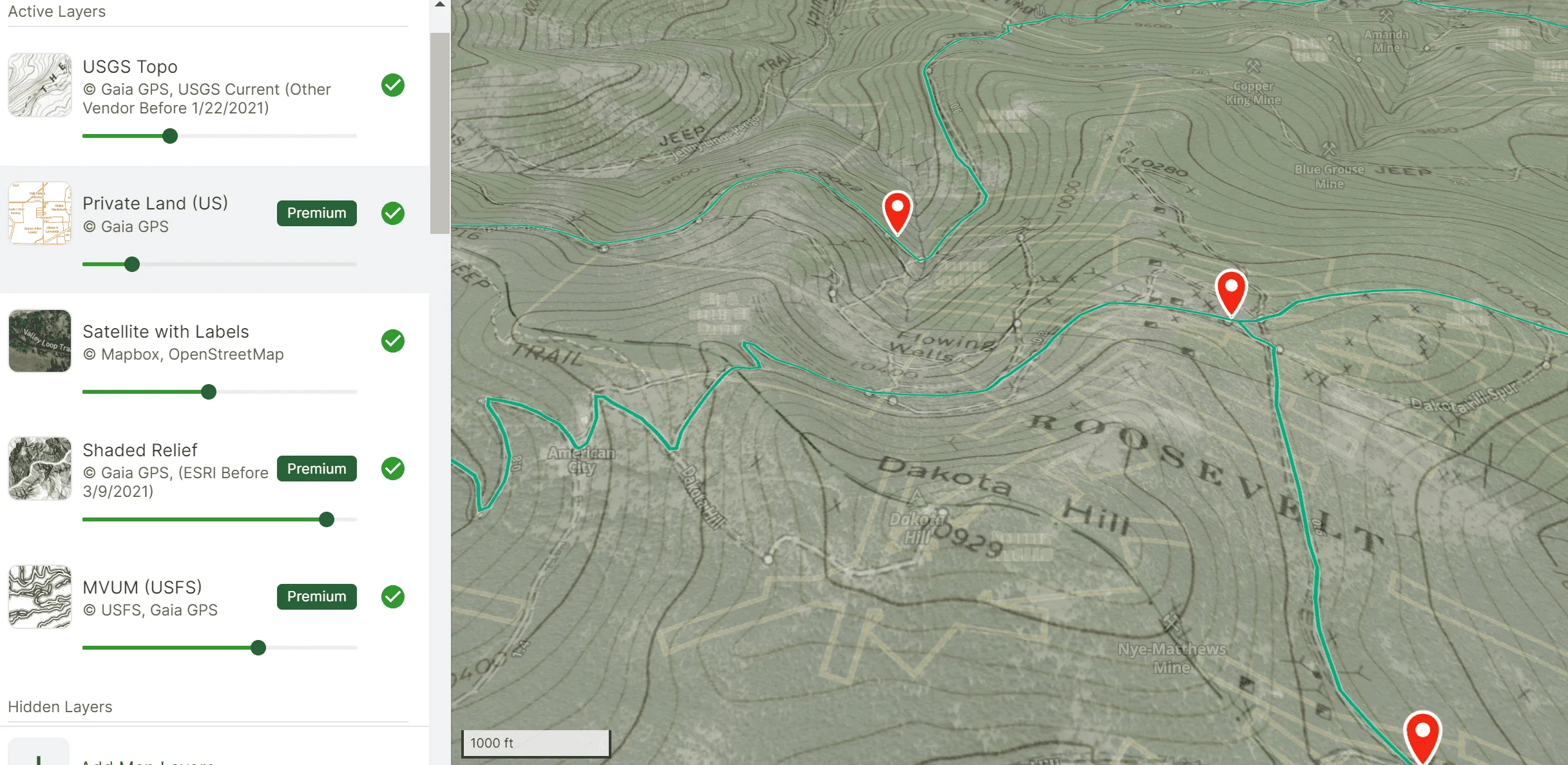
I end up with layers like these when I am checking out trails - I like knowing who owns what land (private land), what the elevation will really be like (topo, shaded and 3D), what the road/trail really is (MVUM) and what the tree cover will be like (sat, USGS Topo).

There is so much you can see with these map programs now.

One thing I wish was that when you import from Trails Offroad to Gaia it would bring with the waypoints the pictures from the trail guide.

1697384638447.webp
 

mtbikernate

Well-Known Member
Joined
Apr 13, 2020
Threads
11
Messages
1,174
Reaction score
2,636
Location
NC
Vehicle(s)
2019 Ranger XLT 4x4
I use Gaia for this most of the time. That said, I was recently at a National Forest campground in WV and Gaia didn't show the paved roads particularly well. Google showed them great, though. Navigating out of the campground and getting moving in the direction I needed was a pain in the ass, though, since navigating to a new place with either app without cell reception doesn't work so hot.

Gaia's route-finding is terrible at any point in time. I've tried using it a few times and it's really, really bad.

Google can really only backtrack to your place of origin using the same route you used to arive in the absence of cell reception when you start that navigation. It will then update based on traffic once it finally gets cell reception. I used it this way yesterday, in fact. Navigated to a trailhead for a hike that was in a dead zone. Got back into the truck a few hours later and told it to navigate home. It started me on the same route I used to get there, and then rerouted me because of leaf peeper traffic. But yeah, if your next destination is an a totally different stop you didn't navigate to before losing reception, then it won't be able to calculate a route at all until you have a data connection.

I haven't tried Onx in the truck yet.

A standalone Garmin would certainly address some of these things. But for those couple little things it can do that the offroad apps can't do well enough, or at all, it's a pretty big cost.
 

Frenchy

Well-Known Member
First Name
Chris
Joined
Mar 15, 2020
Threads
164
Messages
7,541
Reaction score
10,751
Location
Elizabeth, Colorado
Vehicle(s)
2012 Nissan Frontier, 1994 F150 XL, 2022 Ford Transit
Occupation
Field Service Technician
I use Gaia for this most of the time. That said, I was recently at a National Forest campground in WV and Gaia didn't show the paved roads particularly well. Google showed them great, though. Navigating out of the campground and getting moving in the direction I needed was a pain in the ass, though, since navigating to a new place with either app without cell reception doesn't work so hot.

Gaia's route-finding is terrible at any point in time. I've tried using it a few times and it's really, really bad.

Google can really only backtrack to your place of origin using the same route you used to arive in the absence of cell reception when you start that navigation. It will then update based on traffic once it finally gets cell reception. I used it this way yesterday, in fact. Navigated to a trailhead for a hike that was in a dead zone. Got back into the truck a few hours later and told it to navigate home. It started me on the same route I used to get there, and then rerouted me because of leaf peeper traffic. But yeah, if your next destination is an a totally different stop you didn't navigate to before losing reception, then it won't be able to calculate a route at all until you have a data connection.

I haven't tried Onx in the truck yet.

A standalone Garmin would certainly address some of these things. But for those couple little things it can do that the offroad apps can't do well enough, or at all, it's a pretty big cost.
In general there are quite a few things a Garmin GPS does better compared to a regular phone app thanks to have cell phones seem to need to be calibrated a bunch for satellite accuracy. If you don't have maps downloaded you can also have an interesting time trying to read said maps.

If you think cell service isn't an issue with where you have gone so far then star heading out west and you will see how.much you loose it even on know highways
 

Frenchy

Well-Known Member
First Name
Chris
Joined
Mar 15, 2020
Threads
164
Messages
7,541
Reaction score
10,751
Location
Elizabeth, Colorado
Vehicle(s)
2012 Nissan Frontier, 1994 F150 XL, 2022 Ford Transit
Occupation
Field Service Technician
you act like "out west" has different physics. what are you calibrating?
It has to do with something inside the phone and yes it does happen. I don't know if it's specific with the compass or what but I've had it happen with my current phone and the last four phones I have had. He could have to do something with the fact of lack of cell service in many parts of the Western United States
 

mtbikernate

Well-Known Member
Joined
Apr 13, 2020
Threads
11
Messages
1,174
Reaction score
2,636
Location
NC
Vehicle(s)
2019 Ranger XLT 4x4
It has to do with something inside the phone and yes it does happen. I don't know if it's specific with the compass or what but I've had it happen with my current phone and the last four phones I have had. He could have to do something with the fact of lack of cell service in many parts of the Western United States
ok, yeah, now we get down to it.

you're calibrating the electronic compass in your phone. any device with an electronic compass needs periodic calibration. this includes many Garmins which use that function. AFAIK, though, Garmin's vehicle receivers lack this. they determine direction-of-travel based on your movement from your last position instead. it's less precise than an electronic compass. you cannot stand in one place and have the compass show you turning around. but it does not need any calibration.

the electronic compass isn't used to determine a static position. it's used to show direction of travel and the direction you're facing. it has no bearing on positional accuracy, except that some phone apps will "snap" your position to roads based on the assumption that you are moving in a certain direction and that you are driving in a car (and are therefore on roads).
 

Frenchy

Well-Known Member
First Name
Chris
Joined
Mar 15, 2020
Threads
164
Messages
7,541
Reaction score
10,751
Location
Elizabeth, Colorado
Vehicle(s)
2012 Nissan Frontier, 1994 F150 XL, 2022 Ford Transit
Occupation
Field Service Technician
ok, yeah, now we get down to it.

you're calibrating the electronic compass in your phone. any device with an electronic compass needs periodic calibration. this includes many Garmins which use that function. AFAIK, though, Garmin's vehicle receivers lack this. they determine direction-of-travel based on your movement from your last position instead. it's less precise than an electronic compass. you cannot stand in one place and have the compass show you turning around. but it does not need any calibration.

the electronic compass isn't used to determine a static position. it's used to show direction of travel and the direction you're facing. it has no bearing on positional accuracy, except that some phone apps will "snap" your position to roads based on the assumption that you are moving in a certain direction and that you are driving in a car (and are therefore on roads).
In general you are correct. The much older GPS units were something else to say the least and went off that principle you speak of. The newer unit have definitely improved over that. After getting the Garmin Overlander(yes I know it's pricey) I was playing with it and found the compass itself to be pretty accurate. As for picking up satellite signal for position I found it to be pretty damn good(even though the maps can sometimes be off as we know).

One thing that many do not realize that with GPS Devices they ping off of at least 3 satellites at a time for position. In some cases they will ping off of 5-6 if they are available. This was something I learned back in tech school 11 years ago and it was a bit interesting to say the least.

A cellphone on the other hand primarily depends on the cell signal and does.not try to ping off of a satellite as much. Depending on the city it can also cause issues when you have poor signal for some odd reason(this happens a lot in Denver and Colorado Springs).
Sponsored


Top