Sponsored

Sync 3 v3.4.23188

Rock 25

Well-Known Member
First Name
Dave
Joined
Nov 12, 2018
Threads
1
Messages
85
Reaction score
125
Location
MO
Vehicle(s)
2019 Ford Ranger Lariat Hot Pepper Red
I have a 2019 Ranger Lariat that has had a number of bugs in the Sync 3.4 22251 the last several months. I did the 23188 update yesterday by flash drive and fingers crossed, things seem corrected. I'm getting Sirius radio again when turning the engine on. The display background is staying the same and I was able to get the Ford Pass app going again . I tried doing it with Wifi but couldn't get it to work. Might have not been doing something right. I used a flash drive to install.
Now gonna try the map install that I got in an email a couple weeks ago. Hope this was a "permanent" solution to the 22251 problem!
Sponsored
 

Loweredon33s

Well-Known Member
First Name
Mike
Joined
Dec 13, 2022
Threads
9
Messages
748
Reaction score
1,804
Location
Baltimore
Vehicle(s)
2021 Ranger
Occupation
Performance person
I have a 2019 Ranger Lariat that has had a number of bugs in the Sync 3.4 22251 the last several months. I did the 23188 update yesterday by flash drive and fingers crossed, things seem corrected. I'm getting Sirius radio again when turning the engine on. The display background is staying the same and I was able to get the Ford Pass app going again . I tried doing it with Wifi but couldn't get it to work. Might have not been doing something right. I used a flash drive to install.
Now gonna try the map install that I got in an email a couple weeks ago. Hope this was a "permanent" solution to the 22251 problem!
I did exactly that a couple days ago and so far no problems!
 

Rock 25

Well-Known Member
First Name
Dave
Joined
Nov 12, 2018
Threads
1
Messages
85
Reaction score
125
Location
MO
Vehicle(s)
2019 Ford Ranger Lariat Hot Pepper Red
Take that back, I will not be doing a map update for those prices! I did one not that many months ago for FREE so I'll be satisfied now for that. Ridiculous to me that Ford charges that kind of money
(or charges at all) for a map update.
 

SymChris

Well-Known Member
First Name
Chris
Joined
Apr 25, 2020
Threads
6
Messages
252
Reaction score
470
Location
Mississauga, ON, Canada
Vehicle(s)
2019 Ranger Lariat FX4 / 2017 Escape SE FWD
Grrrr, so I’m having nothing but problems now. I’ve done four or five upgrades in the past using the USB method with no issues, but this one might have screwed me.

Was upgrading from a bad-working version 22251.
Did a “soft” reset first.
Had the truck in Park, plugged in the USB and up came the ‘update installing’ message. Ok, so we’re off and running.
My drive was about an hour, so I thought this would be more than enough time. But, it never completed like it normally would.
I couldn’t leave the truck running any longer so I had to pull out the USB. Not sure if this messed things up or not here.

So later on I got to check and my version number was gone, so I plugged in the stick again, after another 40 minutes still no real progress.
Next day I did a Master Reset. This might have made it worse. After that reset, my Connectivity is “off”, so no wifi, no talking with Ford, so my FordPass connectivity is gone (and any associated comms with Ford servers). The problem here is, I cannot get that to come back. When I go to the FordConnect icon and try to bring up the connectivity menu, it just spins (lasted over 10 minutes, with truck running) and won’t show anything.

So, lots of text there, but yeah, this sucks now. Will keep plugging away to see if somehow it works eventually.
 

Dgc333

Well-Known Member
First Name
Dave
Joined
Aug 24, 2021
Threads
17
Messages
1,742
Reaction score
4,112
Location
Massachusetts
Vehicle(s)
21 Ranger Lariat
Occupation
Engineer
Take that back, I will not be doing a map update for those prices! I did one not that many months ago for FREE so I'll be satisfied now for that. Ridiculous to me that Ford charges that kind of money
(or charges at all) for a map update.
2019 and older Sync systems can get the latest map updates from Cyanlabs for free. Starting with the 2020 systems Ford made a change to the APIM that will not allow maps with a universal license file install making Cyanlabs not an option for maps on the newer vehicles.

FWIW, the vehicles with Sync 4, navigation requires a subscription. You get 3 months free then you pay monthly after that. Seems like Ford is trying to get out of the business of offering navigation and force you onto AA or CarPlay.


OP
OP
alcohenusa

alcohenusa

Well-Known Member
First Name
Alan
Joined
Jul 22, 2020
Threads
12
Messages
478
Reaction score
727
Location
CO
Vehicle(s)
2020 Ranger Lariat 4x4
Occupation
Retired
Grrrr, so I’m having nothing but problems now. I’ve done four or five upgrades in the past using the USB method with no issues, but this one might have screwed me.

Was upgrading from a bad-working version 22251.
Did a “soft” reset first.
Had the truck in Park, plugged in the USB and up came the ‘update installing’ message. Ok, so we’re off and running.
My drive was about an hour, so I thought this would be more than enough time. But, it never completed like it normally would.
I couldn’t leave the truck running any longer so I had to pull out the USB. Not sure if this messed things up or not here.

So later on I got to check and my version number was gone, so I plugged in the stick again, after another 40 minutes still no real progress.
Next day I did a Master Reset. This might have made it worse. After that reset, my Connectivity is “off”, so no wifi, no talking with Ford, so my FordPass connectivity is gone (and any associated comms with Ford servers). The problem here is, I cannot get that to come back. When I go to the FordConnect icon and try to bring up the connectivity menu, it just spins (lasted over 10 minutes, with truck running) and won’t show anything.

So, lots of text there, but yeah, this sucks now. Will keep plugging away to see if somehow it works eventually.
I had s similar issue on one of my vehicles where the installation never finished. The failed installation left some type of log file behind (not the xml file). Since I did not know what was really happening, I tried reformatting the USB and copying the files back. Then the install went perfectly.
 

VegasP11

Well-Known Member
First Name
Ian
Joined
Dec 20, 2019
Threads
5
Messages
241
Reaction score
717
Location
Kansas
Vehicle(s)
2019 Lariat FX4
I did the install yesterday on the way home from work. I had all the issues with the previous build not remembering the last source after shutting the truck off and connectivity issues. Install went great and so far the Sync system is working perfectly.
 

Ohwell

Well-Known Member
Joined
Jul 19, 2023
Threads
2
Messages
75
Reaction score
93
Location
Minnesota
Vehicle(s)
2023 Ford Ranger XLT FX4
Occupation
Retired
Grrrr, so I’m having nothing but problems now. I’ve done four or five upgrades in the past using the USB method with no issues, but this one might have screwed me.

Was upgrading from a bad-working version 22251.
Did a “soft” reset first.
Had the truck in Park, plugged in the USB and up came the ‘update installing’ message. Ok, so we’re off and running.
My drive was about an hour, so I thought this would be more than enough time. But, it never completed like it normally would.
I couldn’t leave the truck running any longer so I had to pull out the USB. Not sure if this messed things up or not here.

So later on I got to check and my version number was gone, so I plugged in the stick again, after another 40 minutes still no real progress.
Next day I did a Master Reset. This might have made it worse. After that reset, my Connectivity is “off”, so no wifi, no talking with Ford, so my FordPass connectivity is gone (and any associated comms with Ford servers). The problem here is, I cannot get that to come back. When I go to the FordConnect icon and try to bring up the connectivity menu, it just spins (lasted over 10 minutes, with truck running) and won’t show anything.

So, lots of text there, but yeah, this sucks now. Will keep plugging away to see if somehow it works eventually.
If worse comes to worst Cyanlabs has a utility written by Ford called rw cleaner, it's meant to delete the log files and free up space, You can install it on a USB stick without installing anything else on the stick using Cyanlab's sync 3 updater and Utility installer. It may give you enough free space to update if the lack of free space caused by 22251 is the problem. I would research it first because it would be an at-your-own-risk thing to do but if nothing else works it may be worth trying before you pay Ford for a new APIM and service install.
 
Last edited:

Geoff

Well-Known Member
Joined
Oct 17, 2018
Threads
5
Messages
705
Reaction score
497
Location
NYS
Vehicle(s)
'19 Ranger 1943 Willys Jeep
Occupation
Retired Engineer
Glad this new release is resolving issues for folks. For me, I had none before but now it doesn't talk to Ford or my Ford Pass app. Never had connectivity issues before but the Trucks Ford Pass -> Connectivity setting is a never ending spinning ball. and so if "searching for updates".
 

Scottopia

Well-Known Member
First Name
Scott
Joined
Nov 8, 2019
Threads
13
Messages
493
Reaction score
2,306
Location
Mooresville, NC area
Vehicle(s)
'19 Ranger Lariat FX4, '11 GMC Acadia, '03 HD VRod
Occupation
Grand Sovereign Monarch of Scottopia
Vehicle Showcase
1
Grrrr, so I’m having nothing but problems now. I’ve done four or five upgrades in the past using the USB method with no issues, but this one might have screwed me.

So, lots of text there, but yeah, this sucks now. Will keep plugging away to see if somehow it works eventually.
I am not having any success with this update either. :mad: ?

All prior have been simple without any issues, not so this time. When installing the properly formatted drive with the properly selected files, the update runs but does not complete. I have tried several times since Sunday with different downloads and thumb drives all with miserable failure.

Ran a Master Reset as well and have most setting's restored on the 22251 build. Issues now, WIFI is hit or miss, sometimes it works, others not. Lost the Ambient lighting, it pops on every now and then for a moment, but then gone even with trying to change out the colors and such. Ford Pass was not connecting, was not getting the accept message in the system, but that just came up so we are good now on the FP. But... many of the other issues prior with the radio, display settings, Bluetooth and other issues seem to be better, so I have that going for me, which is nice ⛳.

And now over the last day or so, when I have my phone connected it starts to run the "Updating System Software" from time to time. So I start it up to keep it going, it will update for 30 min or so then the message disappears, so I try the Key Cycle... still nothing. I have no idea WTH is up with this damn system at this point. Plan to run it through the weekend, if it does not correct I am going to have to contact the dealer, this is nonsense.

Really the first issue I have had, will settle out at some point, unnecessarily annoying for sure and says a lot about Ford's QC.
 

Radioman

Well-Known Member
First Name
Kent
Joined
Sep 18, 2019
Threads
7
Messages
1,826
Reaction score
8,904
Location
Roseville, CA
Vehicle(s)
2017 Toyota Highlander, 2020 Ranger Lariat 4x2, 2025 JL Jeep Rubicon
Occupation
Retired RF Telecommications Manager
Not on mine....clicking on menu only brings up Max a/c and Max defrost buttons. No seat heaters on Home Screen either.
Just checked mine and it is the same as yours. The only way to turn on the seat warmer is to use the switches on the dash. (I did not test whether or not I could use the voice command.)
 

Essthreetee

Well-Known Member
First Name
Jason
Joined
Dec 15, 2022
Threads
1
Messages
62
Reaction score
203
Location
California
Vehicle(s)
2019 Ford Ranger XLT Sport 4x4 Super Crew
Occupation
HS Teacher
I finally got mine to update with USB. I still don’t have Ford Pass connectivity, but we will see if the other problems are solved.
 

Essthreetee

Well-Known Member
First Name
Jason
Joined
Dec 15, 2022
Threads
1
Messages
62
Reaction score
203
Location
California
Vehicle(s)
2019 Ford Ranger XLT Sport 4x4 Super Crew
Occupation
HS Teacher
So far 2 starts and it is staying as I left it.
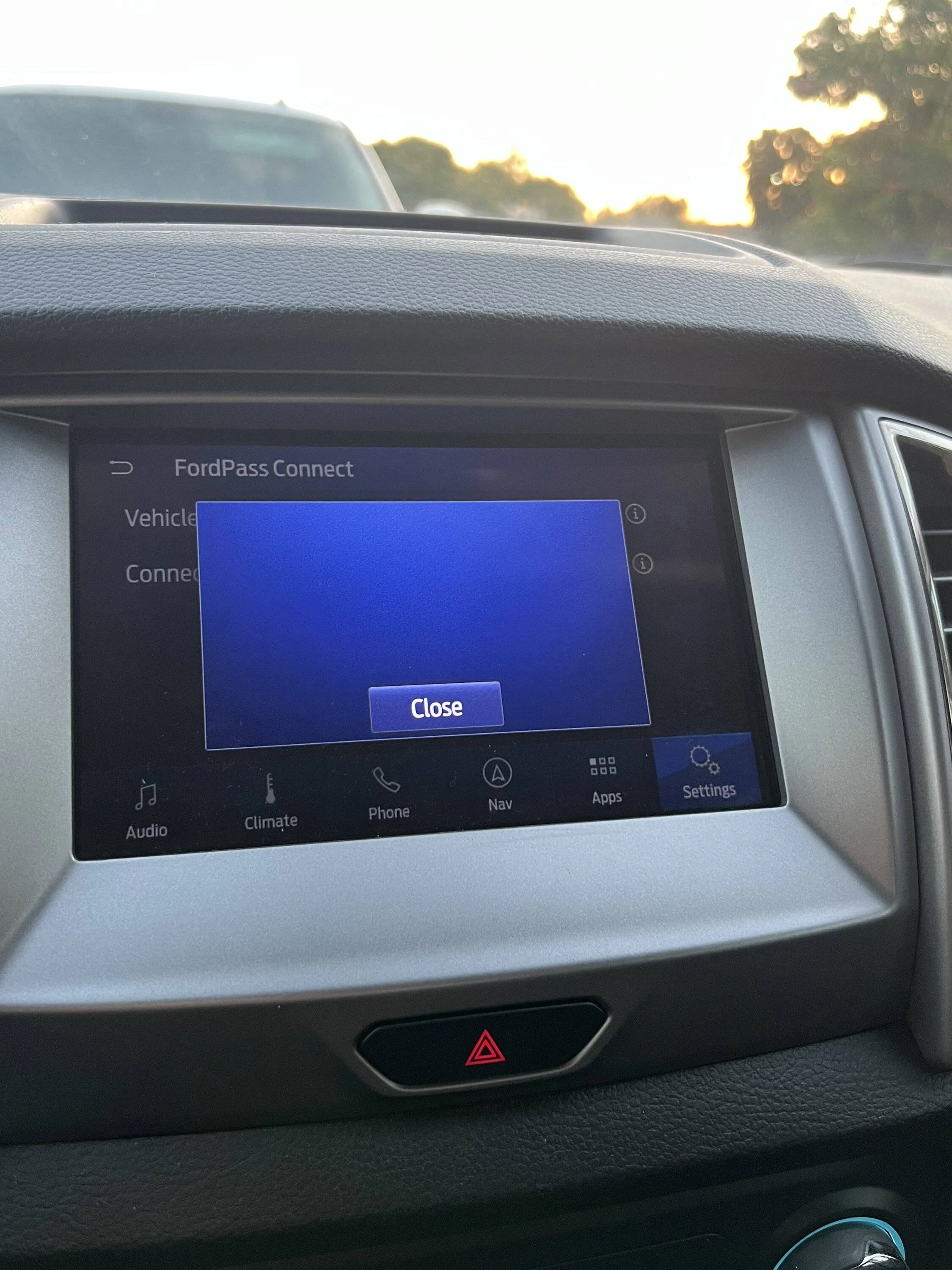
so that’s good. BUUUT…my connectivity is still no good. It spins and spins and then when it finally stops, just has a blank screen. Any ideas about this??
IMG_5217.webp
 

Geoff

Well-Known Member
Joined
Oct 17, 2018
Threads
5
Messages
705
Reaction score
497
Location
NYS
Vehicle(s)
'19 Ranger 1943 Willys Jeep
Occupation
Retired Engineer
About connectivity. I had the same spinning ball. And Ford Pass would not activate. I removed the vehicle from Ford pass and added it back. This time it activated and it turned on more connectivity choices (Location services for one) that were not present before. It takes a bit for stuff to sync up....at first the app did not recognize location services as being on but the icon on the vehicle display shows it was.
Ford Pass is now up and working again but the owners site still thinks it needs a sync update -- and checking for SW updates still results in a never ending beach ball. But progress.....
 
OP
OP
alcohenusa

alcohenusa

Well-Known Member
First Name
Alan
Joined
Jul 22, 2020
Threads
12
Messages
478
Reaction score
727
Location
CO
Vehicle(s)
2020 Ranger Lariat 4x4
Occupation
Retired
So far 2 starts and it is staying as I left it.
so that’s good. BUUUT…my connectivity is still no good. It spins and spins and then when it finally stops, just has a blank screen. Any ideas about this??
IMG_5217.webp
When you go to ‘about Sync’ does it show the modem serial number or is it blank? If it is blank then the modem is not working and is either bad or in a confused state. Some have had luck waking up the modem by pulling the appropriate fuse(s) or disconnecting the battery for a short time to get the hardware to reset.
Sponsored

 
Last edited:


Top