Sponsored

Adding Adaptive Cruise Control?

daczone

Well-Known Member
First Name
Dave
Joined
Dec 22, 2020
Threads
34
Messages
404
Reaction score
646
Location
Oregon
Vehicle(s)
2020 Ranger
Hey Dave
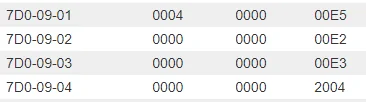
I see you added APIM to the list. While in the truck making an as built backup I noticed the GUI has an option to enable ACC and ACC menu. I changed these and and it did not change the ones you indicate- only these: 7D0-09-01 & -02
;Block 9 ACC and Menu disabled;Block 9 ACC and Menu enabled
7D0G9G12004000000057D0G9G10004000000E5CHANGE
7D0G9G20000020000E47D0G9G20000000000E2CHANGE
7D0G9G30000000000E37D0G9G30000000000E3SAME
7D0G9G40000000000E47D0G9G40000000000E4SAME
BUT - I also noticed that the GUI had some of my stock features disabled. So I am hesitant to trust the GUI options.
I think you have a typo above (Do you mean 7D0-09-01 and 7D0-09-02) ??

As built for a truck WITH ACC
1659375425740.webp


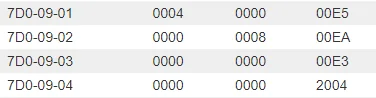
Without:
1659375459851.webp

So the truck I am looking at may already have part of that change. But the block @ 7D0-09-02 may indeed need to be changed.

My truck is going in for a new battery on Wednesday, and I have my LARIAT to XLT cluster to replace as well. So hopefully I will be working on this project soon!!! I personally have not yet done this mod myself and none of these changes are written in stone and this is just from a stare and compare of multiple optioned trucks. I do have all of the parts to make it happen, the radar unit, bracket, wiring harness and steering wheel button.
Sponsored
 

micl9

Well-Known Member
First Name
Mike
Joined
Dec 21, 2019
Threads
31
Messages
1,368
Reaction score
1,949
Location
Apex, NC
Vehicle(s)
2019 Ranger XLT Fx4 302A
Vehicle Showcase
1
I think you have a typo above (Do you mean 7D0-09-01 and 7D0-09-02) ??
Yes - 7D0-09-01 and 7D0-09-02
Sorry the table was flipped had wrong headers?‍
My w/o ACC matches what you have except for 7D0-09-02 and -04. I went back and looked at my notes in case I had changed that for something else - but to my knowledge NO.

w/ ACC;Block 9 ACC and Menu enabledw/o ACC;Block 9 ACC and Menu disabled
7D0G9G12004 0000 00057D0G9G10004 0000 00E5CHANGE
7D0G9G20000 0200 00E47D0G9G20000 0000 00E2CHANGE
7D0G9G30000 0000 00E37D0G9G30000 0000 00E3SAME
7D0G9G40000 0000 00E47D0G9G40000 0000 00E4SAME
My truck is going in for a new battery on Wednesday, and I have my LARIAT to XLT cluster to replace as well. So hopefully I will be working on this project soon!!! I personally have not yet done this mod myself and none of these changes are written in stone and this is just from a stare and compare of multiple optioned trucks. I do have all of the parts to make it happen, the radar unit, bracket, wiring harness and steering wheel button.
Yeah I think we are all hesitant to make the big install step, hoping for someone else to jump 1st!
 
Last edited:

daczone

Well-Known Member
First Name
Dave
Joined
Dec 22, 2020
Threads
34
Messages
404
Reaction score
646
Location
Oregon
Vehicle(s)
2020 Ranger
Yes - 7D0-09-01 and 7D0-09-02
Sorry the table was flipped had wrong headers?‍
My w/o ACC matches what you have except for 7D0-09-02 and -04. I went back and looked at my notes in case I had changed that for something else - but to my knowledge NO.

w/ ACC;Block 9 ACC and Menu enabledw/o ACC;Block 9 ACC and Menu disabled
7D0G9G12004 0000 00057D0G9G10004 0000 00E5CHANGE
7D0G9G20000 0200 00E47D0G9G20000 0000 00E2CHANGE
7D0G9G30000 0000 00E37D0G9G30000 0000 00E3SAME
7D0G9G40000 0000 00E47D0G9G40000 0000 00E4SAME

Yeah I think we are all hesitant to make the big install step, hoping for someone else to jump 1st!
Globally it seems to control:

Traction Control/IVD/RSC/Adaptive Cruise and Traffic Sign Recognition, And a value of 2 is indeed ACC enabled.

Similarly:
7d0-09-01 is listed as Auto Engine Idle override/ACC Menu/Adaptive headlights. and again a value of 2 seems to be ACC enabled.

Source: https://naviupgrade.com/asbuilt-programming-database/

I don't think these blocks 7d0-09-02 apply to the ranger. None if my instances have those changes. So I don't think it matters.

As of the 7D0-09-01 value of 0000 0008 00EA

This is Hill Decent Control a value of 8 enables that.
 

5G Dan-O

Well-Known Member
First Name
Dan
Joined
Nov 20, 2021
Threads
10
Messages
216
Reaction score
280
Location
Morrisville, NY
Vehicle(s)
2020 Ranger
Occupation
Ford ASSET Instructor - Program Director
I'll just come out and say it, I'll be the NA guinea pig if you can dumb the FORScan settings down for me please. I have only used the GUI dropdowns to make/save changes so changing the As-Built with the coding is all brand new to me.

I have the sensor mounted and need to sneak the wiring through the firewall to get to the A pillar and wire it up.
 

RedSetters

Active Member
First Name
Greg
Joined
Jun 26, 2022
Threads
1
Messages
30
Reaction score
73
Location
Indy
Vehicle(s)
2022 Ranger Black Lariat FX4
Occupation
Retired Contractor
That’s one reason I’m ordering a 2023 Lariat. To get all the safety features. My wife’s 15 Subaru Outback limited came with it. We love it. Just look ahead if your getting to close to the car in front of you than move into the left lane. If car in left lane in front of you is going faster when you switch lanes it won’t make me slow done. Traded a 9 yr old Highlander in for the new Outback and my insurance dropped a lot because of all the safety features.


daczone

Well-Known Member
First Name
Dave
Joined
Dec 22, 2020
Threads
34
Messages
404
Reaction score
646
Location
Oregon
Vehicle(s)
2020 Ranger
I believe this is the information on the 760-03-01 ABS block:

xxx# xx

# Values:
4 -elocker, -Acc
5 +elocker, -Acc
6 -elocker, +Acc
7 +elocker, +Acc

Acc = Adaptive Cruise, so you would need a 6 or 7 in this block depending if you have a elocker.
 

daczone

Well-Known Member
First Name
Dave
Joined
Dec 22, 2020
Threads
34
Messages
404
Reaction score
646
Location
Oregon
Vehicle(s)
2020 Ranger
I'll just come out and say it, I'll be the NA guinea pig if you can dumb the FORScan settings down for me please. I have only used the GUI dropdowns to make/save changes so changing the As-Built with the coding is all brand new to me.

I have the sensor mounted and need to sneak the wiring through the firewall to get to the A pillar and wire it up.

I was trying to make it easier by making the cheat sheet... of what exactly needed changed. But so far other than CHrisin I don't think anyone with a US model truck has done it. Chrisin's truck isn't a US model so things vary slightly in the coding. Once we have a working set of changes, Forscan can add this to their GUI as well.
 

micl9

Well-Known Member
First Name
Mike
Joined
Dec 21, 2019
Threads
31
Messages
1,368
Reaction score
1,949
Location
Apex, NC
Vehicle(s)
2019 Ranger XLT Fx4 302A
Vehicle Showcase
1
Globally it seems to control:

Traction Control/IVD/RSC/Adaptive Cruise and Traffic Sign Recognition, And a value of 2 is indeed ACC enabled.

Similarly:
7d0-09-01 is listed as Auto Engine Idle override/ACC Menu/Adaptive headlights. and again a value of 2 seems to be ACC enabled.

Source: https://naviupgrade.com/asbuilt-programming-database/

I don't think these blocks 7d0-09-02 apply to the ranger. None if my instances have those changes. So I don't think it matters.

As of the 7D0-09-01 value of 0000 0008 00EA

This is Hill Decent Control a value of 8 enables that.
Have some shade in the evening so I went thru all the modules in play and tried to modify them via the GUI (or as FORScaners apparently call it "easy mode").
The good news is that SCCM and BCM are a match to your settings!
The others dont - I am in the process of doing some file comparisons between these and my as built.
But I am assuming that the only changes via GUI are those that have adaptive cruise in the Name.

Oh and my truck did not like cycling thru these cjhnages w/o the hdw being present! all kind of warnings - camera disabled. collision avoidance not working - Seemed to all come back after I reset to as built. ?

Dinner time...

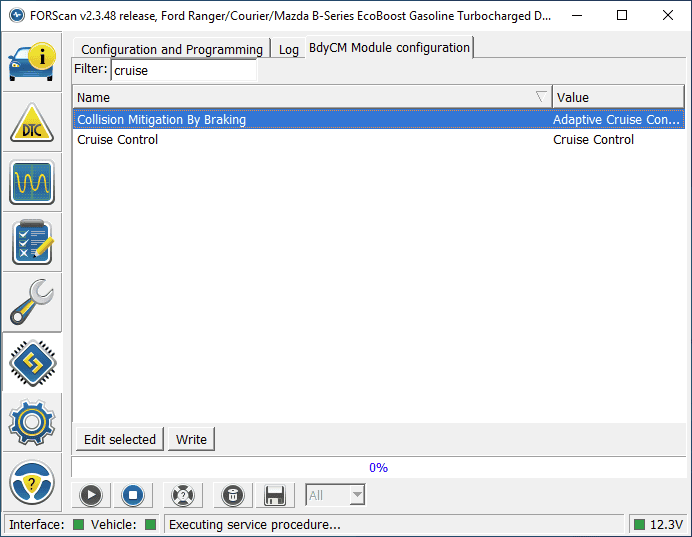
One last thing my Stock as built for BCM looked like this (filtered on "Cruise")
The top one is set to ACC, which obviously I don't have.
1659391765719.png
 
Last edited:

micl9

Well-Known Member
First Name
Mike
Joined
Dec 21, 2019
Threads
31
Messages
1,368
Reaction score
1,949
Location
Apex, NC
Vehicle(s)
2019 Ranger XLT Fx4 302A
Vehicle Showcase
1
I believe this is the information on the 760-03-01 ABS block:

xxx# xx

# Values:
4 -elocker, -Acc
5 +elocker, -Acc
6 -elocker, +Acc
7 +elocker, +Acc

Acc = Adaptive Cruise, so you would need a 6 or 7 in this block depending if you have a elocker.
Unfortunately the only item listed in the GUI for ABS is the VIN :-/

YOu might already know this Dave, but Fx4 pkg contains the eLocker, TM and TC
 

daczone

Well-Known Member
First Name
Dave
Joined
Dec 22, 2020
Threads
34
Messages
404
Reaction score
646
Location
Oregon
Vehicle(s)
2020 Ranger
Unfortunately the only item listed in the GUI for ABS is the VIN :-/

YOu might already know this Dave, but Fx4 pkg contains the eLocker, TM and TC
Yep and I have no way to separate them from the coding I am comparing. I'm not adventurous enough to try them separately. My truck is a non FX4 so I have no e-locker, but added the button for the TM and TC. TM works as noted in these forums, But TC is still a mystery. I have played with it a few times, only to get the dreaded "Service AdvanceTrac warning errors". From the coding it looks pretty straightforward. But something is missing.
 

daczone

Well-Known Member
First Name
Dave
Joined
Dec 22, 2020
Threads
34
Messages
404
Reaction score
646
Location
Oregon
Vehicle(s)
2020 Ranger
Okay here we go.... Finally getting around to doing this:

ADD ADAPTIVE CRUISE CONTROL (ACC) to a truck that didn't come with it.

Items needed:
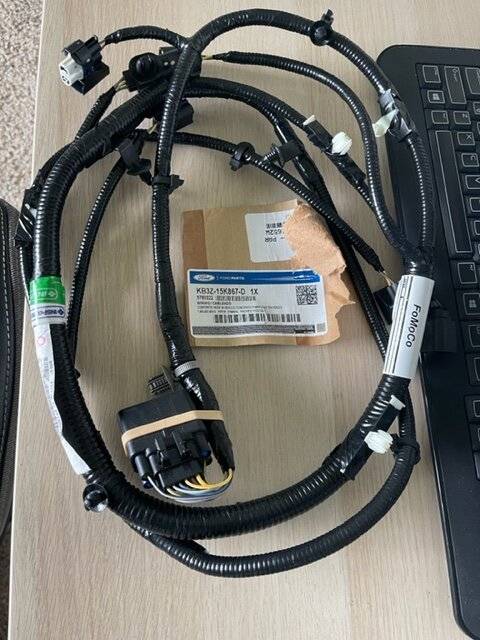
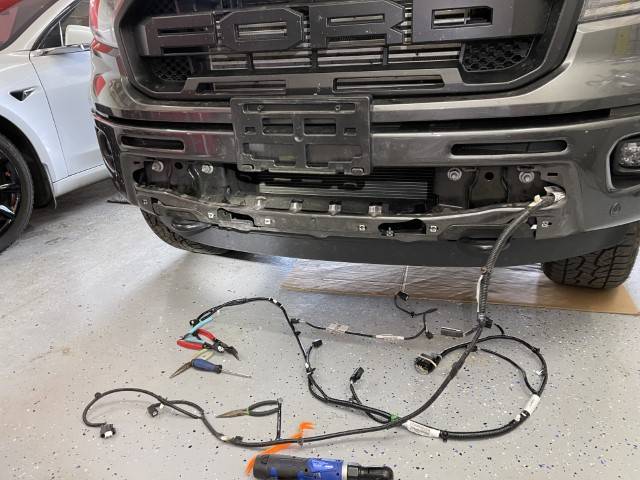
  • Factory harness to add the radar unit
    harness.jpg
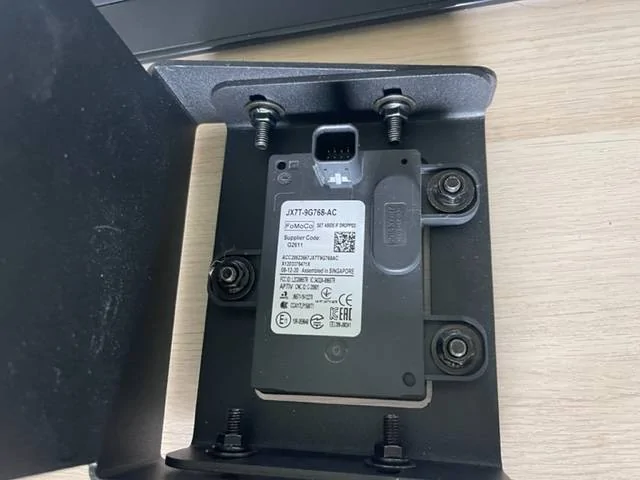
  • Radar unit (I picked this up from eBAY).
    radar.jpg
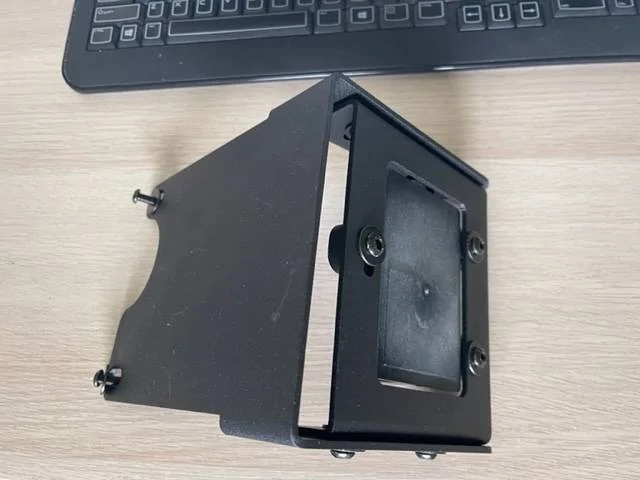
  • Radar mount
    mount.jpg
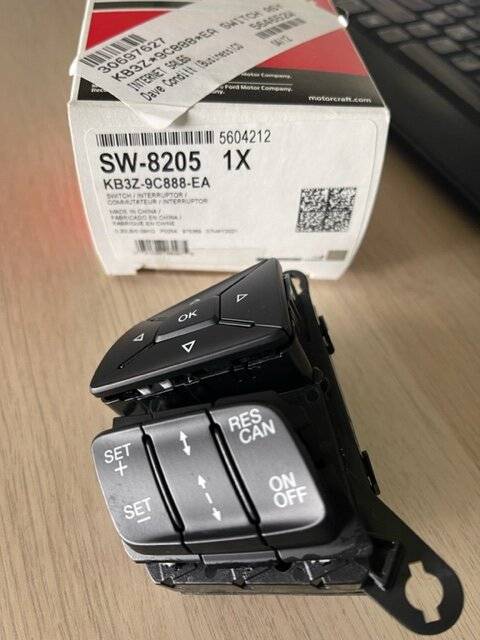
  • Steering wheel switch
  • switch.jpg
  • Forscan mods
I believe there are multiple harnesses depending if you have front parking sensors (my truck did).

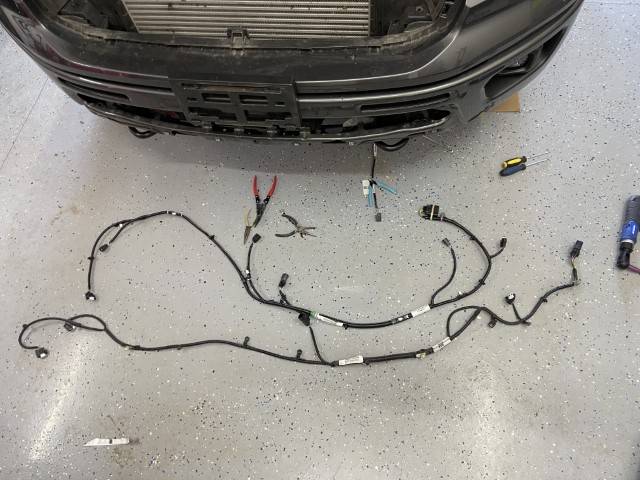
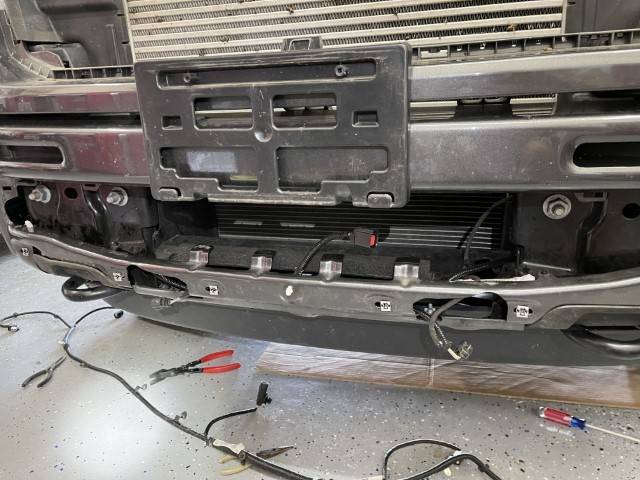
Remove the lower bumper cover to access the harness. There are 2 piece's of the harness as one smaller one contains the center 2 parking sensors. You can cut all the clips as the new harness has them.
IMG_3675 (Small).JPG


Harness comparison:
IMG_3676 (Small).JPG

New towards the top and old on the bottom. There is 1 additional connector for the radar unit.

IMG_3677 (Small).JPG

new Harness installed. Note the red radar connector plug in the center of the opening.

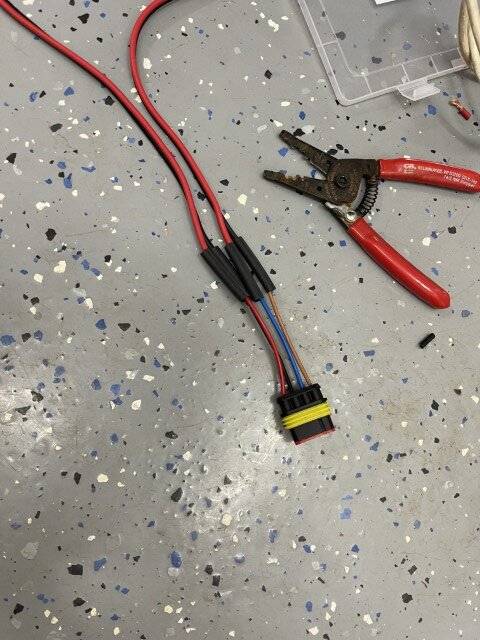
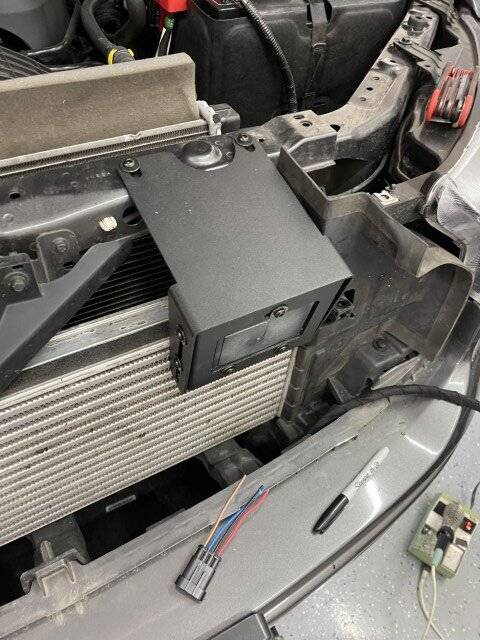
Because I am not using the OEM mount, I need to extend the radar wiring to the new location of the radar unit near the top of the radiator core support.
IMG_3679 (Small).JPG

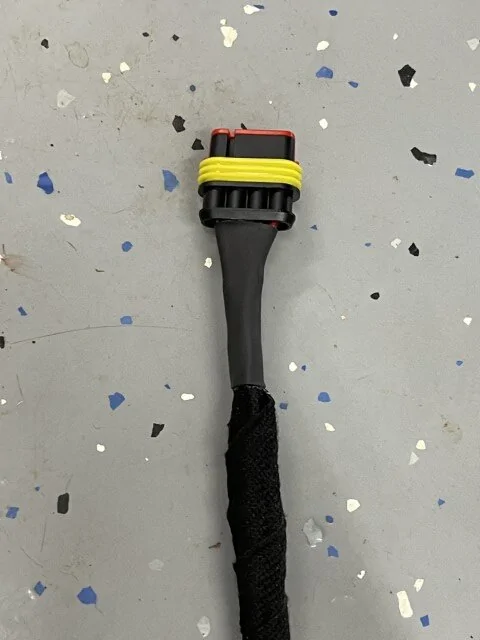
Which is pretty straight forward, 4 wires. I used a weather resistant connector. shrink wrapped and weather proofed the wires and connections

IMG_3680 (Small).JPG


IMG_3681 (Small).JPG

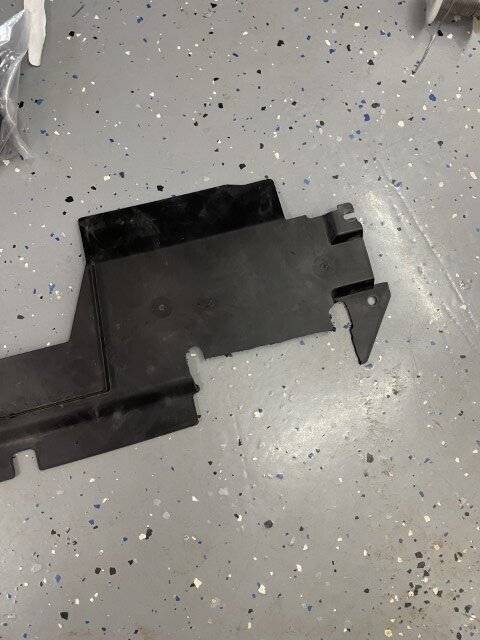
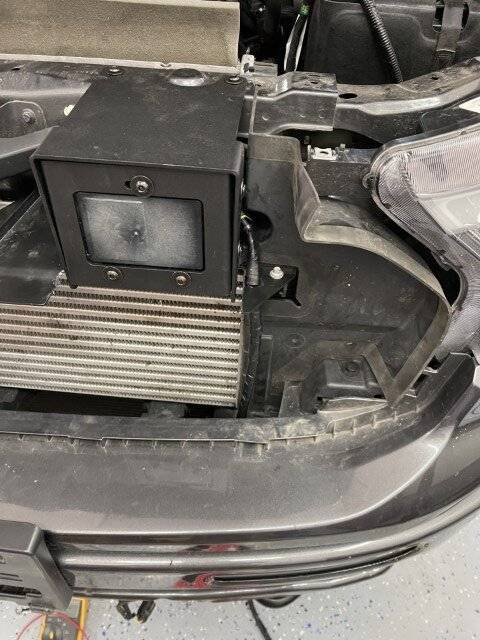
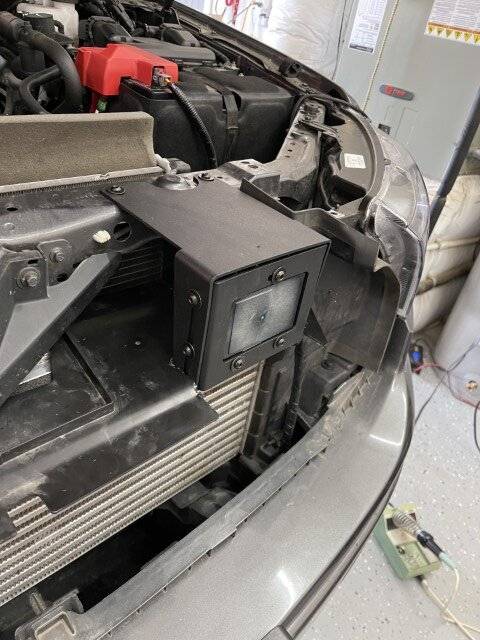
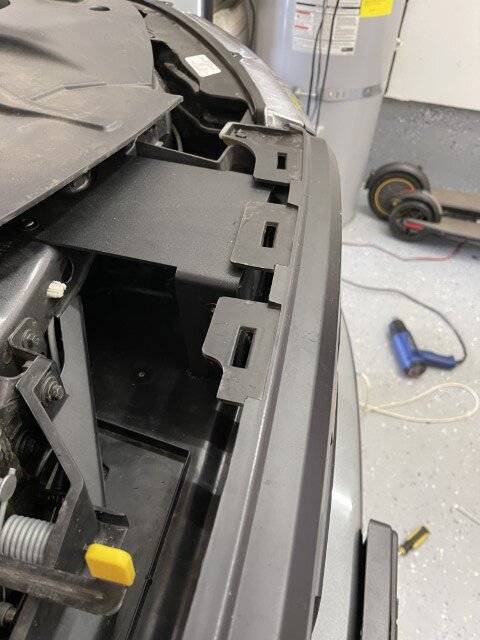
baffle had to be modified to fit the radar mount. All I had to my disposal was a rotorzip... so it's not real pretty.

IMG_3682 (Small).JPG

Radar unit in it's mount and new home.

IMG_3684 (Small).JPG

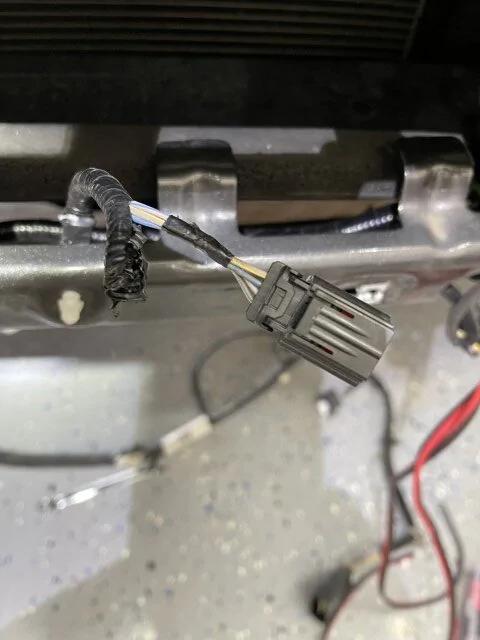
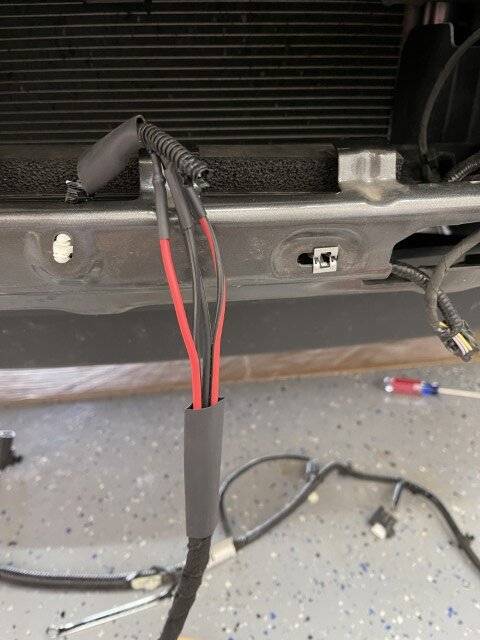
Get access to the connector to be moved. Peeled back the protection and added new harness to extend the wires. Heat shrink and wrapped everything.

IMG_3685 (Small).JPG

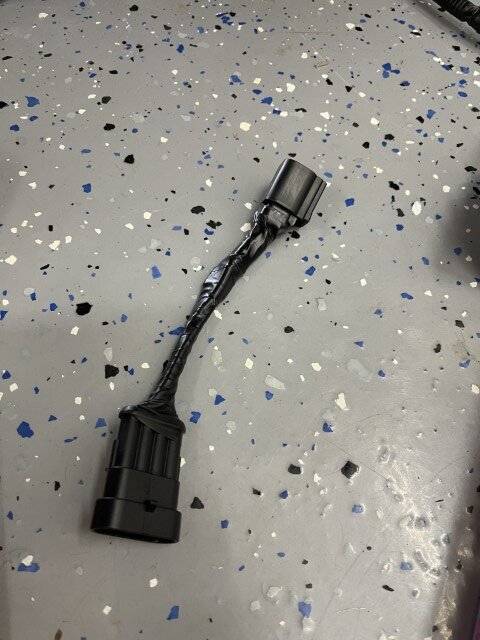
New cord looks like this. Factory, factory plug on one end.

IMG_3686 (Small).JPG

I wanted to eliminate the lower connector to keep avoid the risk of water getting into the aftermarket connector.

IMG_3687 (Small).JPG

All hooked up, wiring in place, plastic rotozipped piece back in place.

IMG_3690 (Small).JPG

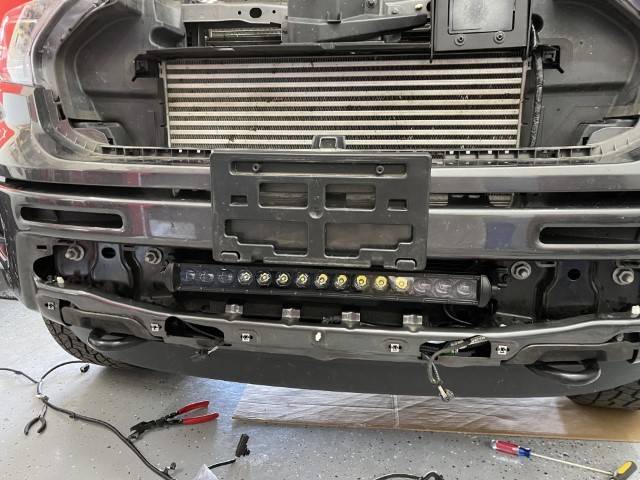
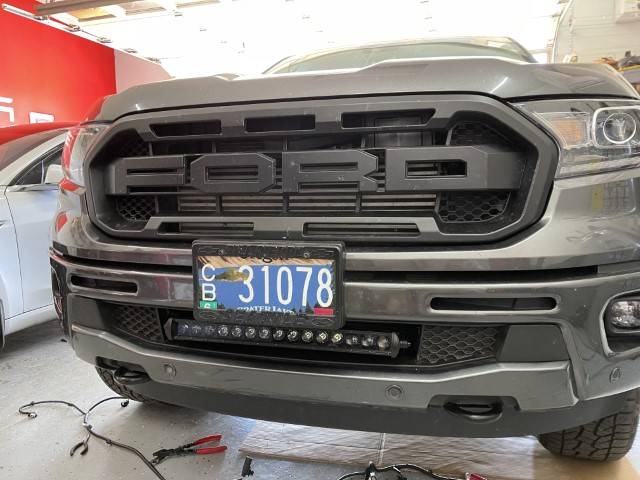
While I had access, I installed a light bar.

IMG_3692 (Small).JPG

Bottom bumper back in place.

IMG_3693 (Small).JPG

Here is what the mount looked like before the grill was installed.

IMG_3695 (Small).JPG

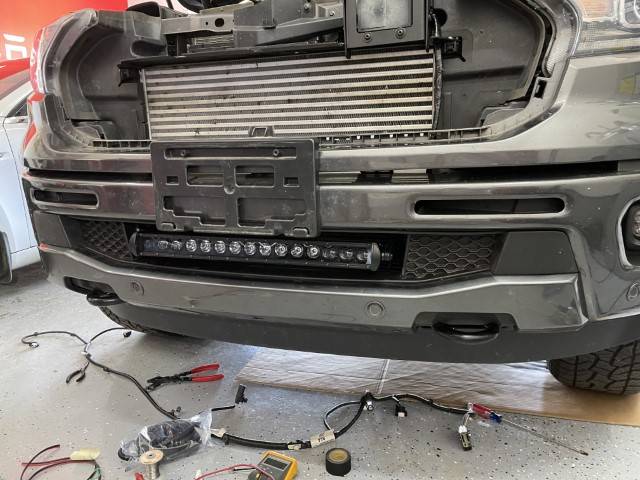
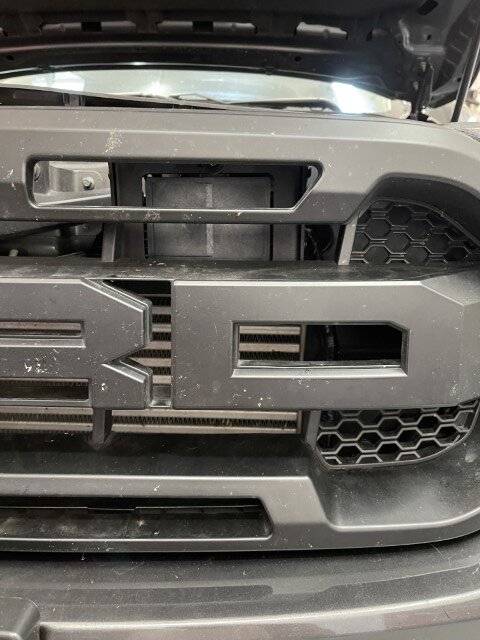
And with the grill back on.

IMG_3696 (Small).JPG

From the top.

The aftermarket radar mount was $40, compared to $280 for the factory Ford mount. Also it allows you to use a light bar in that space. The only downside is you have to extend the 4 wires to the radar unit.


IMG_3697 (Small).JPG

And all back together.

Loctite all bolts, The harness plugs in behind the left side (drivers side) headlight. It's do able without removing anything, just one handed from the front of the tire you can reach the connector and undo it. The harness snaps into all the same places the old one was removed from.

Now to Replace the steering wheel button and then Forscan and see if this works.
 

micl9

Well-Known Member
First Name
Mike
Joined
Dec 21, 2019
Threads
31
Messages
1,368
Reaction score
1,949
Location
Apex, NC
Vehicle(s)
2019 Ranger XLT Fx4 302A
Vehicle Showcase
1
Go Dave GO!!!
I hope to find time to mess with my install this weekend
 

daczone

Well-Known Member
First Name
Dave
Joined
Dec 22, 2020
Threads
34
Messages
404
Reaction score
646
Location
Oregon
Vehicle(s)
2020 Ranger
Well after much work on this front the factory wiring harness (listed previously) has no connections, Power, Ground or CAN BUS @ the connector C145. So on to plan B... Run 3 wires + ground to A pillar C913 which should have power and CANBUS signals.

But rather then chase color codes down, does anyone have the wiring diagram with the pinouts for C913 (A pillar)??

a minor setback, but I've got to run a wire to the cab for my light bar anyway.
 

micl9

Well-Known Member
First Name
Mike
Joined
Dec 21, 2019
Threads
31
Messages
1,368
Reaction score
1,949
Location
Apex, NC
Vehicle(s)
2019 Ranger XLT Fx4 302A
Vehicle Showcase
1
Dave I have that mapped out!
Let me wake up a bit and I will post.
Here is what I have so far - I ran the wires but have not made the connection at the C903/C913. The Can bus goes to 1 of the connectors and the pwr goes to the other. I made the ground connection in front of the battery. And I went thru the fire wall thru the main harness grommet under the master cylinder.
Ping me if you need more info and good luck!
 

Attachments

Last edited:

Rp930

Well-Known Member
First Name
Rick
Joined
Nov 19, 2018
Threads
20
Messages
1,794
Reaction score
3,514
Location
Denver
Vehicle(s)
‘19 Ford Ranger Lariat, ‘23 Macan,’21 Shelby GT500
Occupation
Retired
Have you guys considered a moon launch?
Sponsored


Top