Sponsored

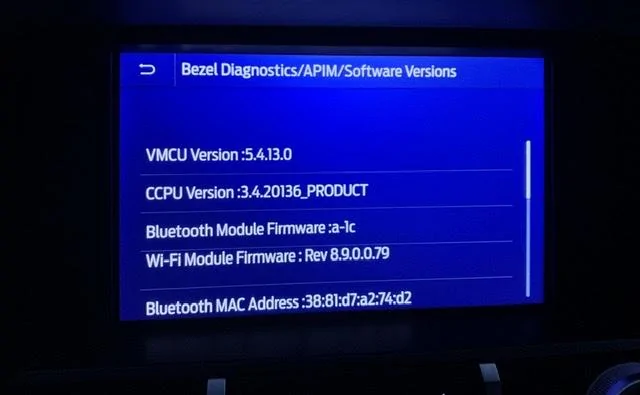
Just updated to Sync 3.4 on my Ranger 2019

UofMEngineer

Well-Known Member
Joined
Apr 19, 2019
Threads
1
Messages
516
Reaction score
334
Location
Michigan
Vehicle(s)
20' Escape Hybrid,18' Fusion Hybrid
Just did my wife's new 'stang this morning without a hitch, (went from 3.3 to latest 3.4). Did the firmware from a flashdrive downloaded from Ford. Then did her map updates. Total time, about 40 mins for both.
Somewhere between a couple a weeks ago, my ranger firmware updated to the latest over the air by itself...
No problemos. Both vehicles now have the latest updates. All climate control and stuff are intact...
40 minutes sounds low for the map update. Did you get through both auto restarts and then pull at the third install complete pop up?
Sponsored


BHunted

Well-Known Member
First Name
John
Joined
Sep 26, 2019
Threads
13
Messages
615
Reaction score
858
Location
Sumner County, TN
Vehicle(s)
2019 Ford Ranger Lariat, 2019 Ford Mustang
Occupation
Retired
Vehicle Showcase
1
40 minutes sounds low for the map update. Did you get through both auto restarts and then pull at the third install complete pop up?
Yup, my times might be off. Was streaming the news while waiting, but every update I’ve done was fast with the flash drive. It’s one of the faster ones with more than enough memory. I checked everything. Only thing I forgot to check was the diagnostic screen.
 

BHunted

Well-Known Member
First Name
John
Joined
Sep 26, 2019
Threads
13
Messages
615
Reaction score
858
Location
Sumner County, TN
Vehicle(s)
2019 Ford Ranger Lariat, 2019 Ford Mustang
Occupation
Retired
Vehicle Showcase
1
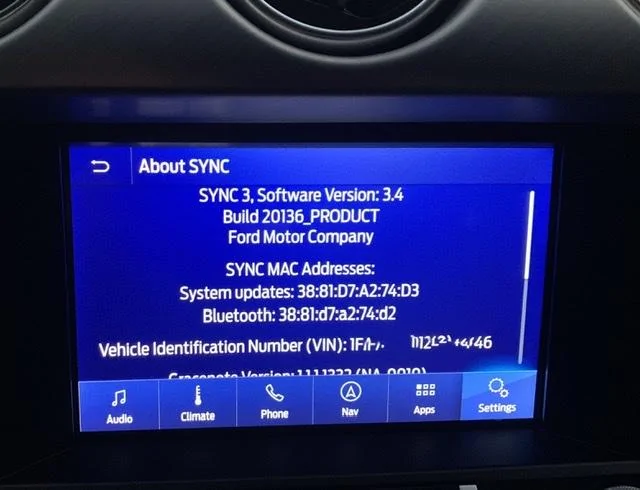
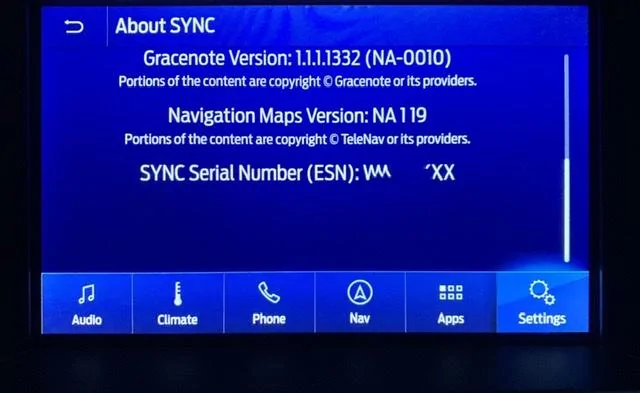
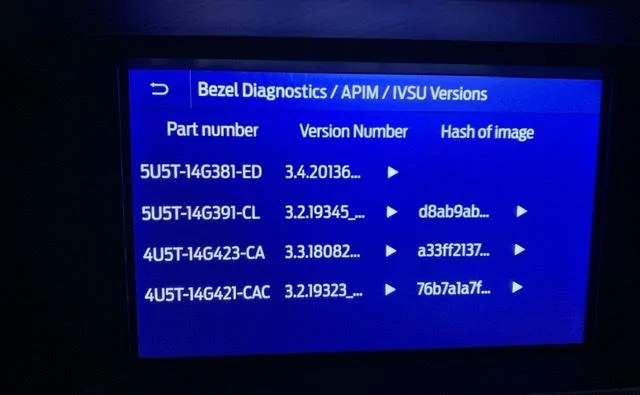
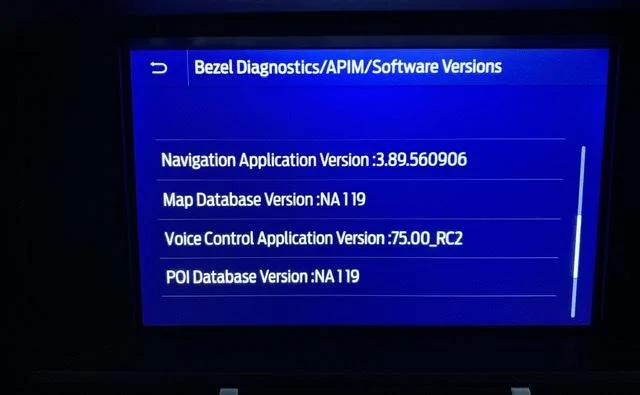
Here are shots of the stang....
EE689FBE-5BA5-488F-A476-AAB2D85A2CD7.webp
E2B688B3-71C6-4656-A280-C036A6D5D9E9.webp
95F23414-C845-40B7-A4F8-EE31993D28C3.webp
4C694953-9AF4-476C-B089-84988E5FBCEF.webp
BB61A3E4-8AA6-4D91-8D02-BCD5F06C940E.webp
 

BHunted

Well-Known Member
First Name
John
Joined
Sep 26, 2019
Threads
13
Messages
615
Reaction score
858
Location
Sumner County, TN
Vehicle(s)
2019 Ford Ranger Lariat, 2019 Ford Mustang
Occupation
Retired
Vehicle Showcase
1
Missing voice pack, pulled that one early. May just need the last section run, depends how many restarts it got through.
Which line is it missing. I removed it when told me to and it said it restart when engine starts then said updated ... what line is missing? Symptoms?


UofMEngineer

Well-Known Member
Joined
Apr 19, 2019
Threads
1
Messages
516
Reaction score
334
Location
Michigan
Vehicle(s)
20' Escape Hybrid,18' Fusion Hybrid
Which line is it missing. I removed it when told me to and it said it restart when engine starts then said updated ... what line is missing? Symptoms?
14G422-CAF. Anything nav voice won’t work. It’ll show the “Install Complete” pop-up 3 times. The first two, it’ll restart itself within a couple seconds. The last it’ll stick and that pop-up doesn’t go away if you let it sit. That’a when it has finished. How many times did it restart itself?
 

DJRPM4131

Active Member
First Name
David
Joined
May 21, 2019
Threads
0
Messages
30
Reaction score
99
Location
Eugene, Oregon
Vehicle(s)
2019 Ranger XLT, 2016 Mazda CX-5
I wish I had read this thread more closely before I downloaded and installed the Sync 3.4 upgrade. I would have held off if I had known I would lose the Climate screen. My Backup Camera seems to be the same resolution, and I have not noticed any other issues.
I have automatic updates enabled thru my WiFi Connection. Hopefully Ford will get it together and fix the issue automatically. Am I dreaming or will Ford fix the issue automatically? I don't want to go to the dealer.
 

Geoff

Well-Known Member
Joined
Oct 17, 2018
Threads
5
Messages
705
Reaction score
497
Location
NYS
Vehicle(s)
'19 Ranger 1943 Willys Jeep
Occupation
Retired Engineer
Which line is it missing. I removed it when told me to and it said it restart when engine starts then said updated ... what line is missing? Symptoms?
You're not the only one who got fooled by the on screen messages during the map update. You basically have to leave the USB stick in until a message appears that says changes take effect after an ignition cycle (or some such verbiage). That message will not go away until it's dismissed and the sync system does not automatically reboot itself. Only then is it safe to remove the USB drive.
 

TORQUERULES

Well-Known Member
Joined
May 4, 2020
Threads
31
Messages
758
Reaction score
1,142
Location
US
Vehicle(s)
Ranger
14G422-CAF. Anything nav voice won’t work. It’ll show the “Install Complete” pop-up 3 times. The first two, it’ll restart itself within a couple seconds. The last it’ll stick and that pop-up doesn’t go away if you let it sit. That’a when it has finished. How many times did it restart itself?
Can you clarify what you mean by 3 times? I believe most of us pulled the USB when prompted the first time. Unless this is just for those with Nav.

Thanks.
 

TORQUERULES

Well-Known Member
Joined
May 4, 2020
Threads
31
Messages
758
Reaction score
1,142
Location
US
Vehicle(s)
Ranger
I wish I had read this thread more closely before I downloaded and installed the Sync 3.4 upgrade. I would have held off if I had known I would lose the Climate screen. My Backup Camera seems to be the same resolution, and I have not noticed any other issues.
I have automatic updates enabled thru my WiFi Connection. Hopefully Ford will get it together and fix the issue automatically. Am I dreaming or will Ford fix the issue automatically? I don't want to go to the dealer.
My camera is fine too, I just freaked out at first as it didn't seem so. It was the lighting where I was parked.
 

Geoff

Well-Known Member
Joined
Oct 17, 2018
Threads
5
Messages
705
Reaction score
497
Location
NYS
Vehicle(s)
'19 Ranger 1943 Willys Jeep
Occupation
Retired Engineer
Can you clarify what you mean by 3 times? I believe most of us pulled the USB when prompted the first time. Unless this is just for those with Nav.

Thanks.
FYI, The 3 times refers to loading the new map version 119.
(The map load process reboots twice, automatically, but it displays a brief message before the reboot saying it is okay to remove the USB Drive when in fact it is not okay. The third reboot is not automatic and that when the USB drive should be removed).
 

BHunted

Well-Known Member
First Name
John
Joined
Sep 26, 2019
Threads
13
Messages
615
Reaction score
858
Location
Sumner County, TN
Vehicle(s)
2019 Ford Ranger Lariat, 2019 Ford Mustang
Occupation
Retired
Vehicle Showcase
1
So you are saying if that file is missing I may not have voice nav and/or climate....?
This was the latest download after their site was broke. I will check again!
 

BHunted

Well-Known Member
First Name
John
Joined
Sep 26, 2019
Threads
13
Messages
615
Reaction score
858
Location
Sumner County, TN
Vehicle(s)
2019 Ford Ranger Lariat, 2019 Ford Mustang
Occupation
Retired
Vehicle Showcase
1
OK, you're right. No voice response again like happened in my Ranger. All else is good. Gracenotes, directions, climate, etc.. all ok. Nothing missing. Argh.
 

UofMEngineer

Well-Known Member
Joined
Apr 19, 2019
Threads
1
Messages
516
Reaction score
334
Location
Michigan
Vehicle(s)
20' Escape Hybrid,18' Fusion Hybrid
Can you clarify what you mean by 3 times?
Check Step 6 in the install instruction guide. The map update is in three parts due to the size. There will be two times that it restarts itself after a section is complete. The final time, usually around or after an hour, the message will stick on screen. This is when the update is complete. Removing early will result in partial map
Install and no nav voice install.
 

BHunted

Well-Known Member
First Name
John
Joined
Sep 26, 2019
Threads
13
Messages
615
Reaction score
858
Location
Sumner County, TN
Vehicle(s)
2019 Ford Ranger Lariat, 2019 Ford Mustang
Occupation
Retired
Vehicle Showcase
1
So firmware doesn't need to be touched, just the map updates?
Sponsored


Top