awd.nv
Well-Known Member
- First Name
- Anthony
- Joined
- Apr 26, 2021
- Threads
- 30
- Messages
- 1,265
- Reaction score
- 2,397
- Location
- Las Vegas, NV
- Vehicle(s)
- '21 Ranger XLT Tremor
- Occupation
- Computers
- Thread starter
- #1
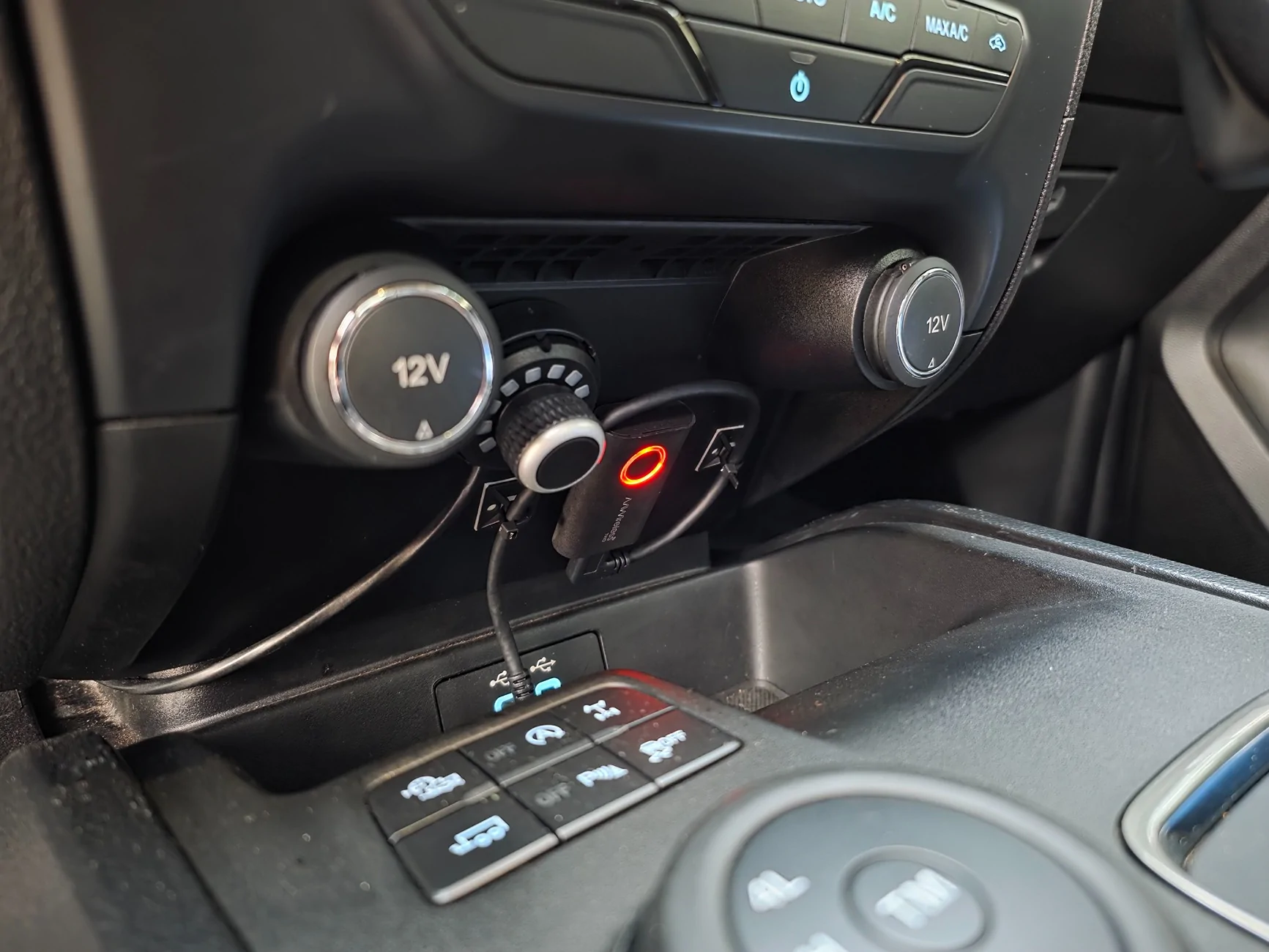
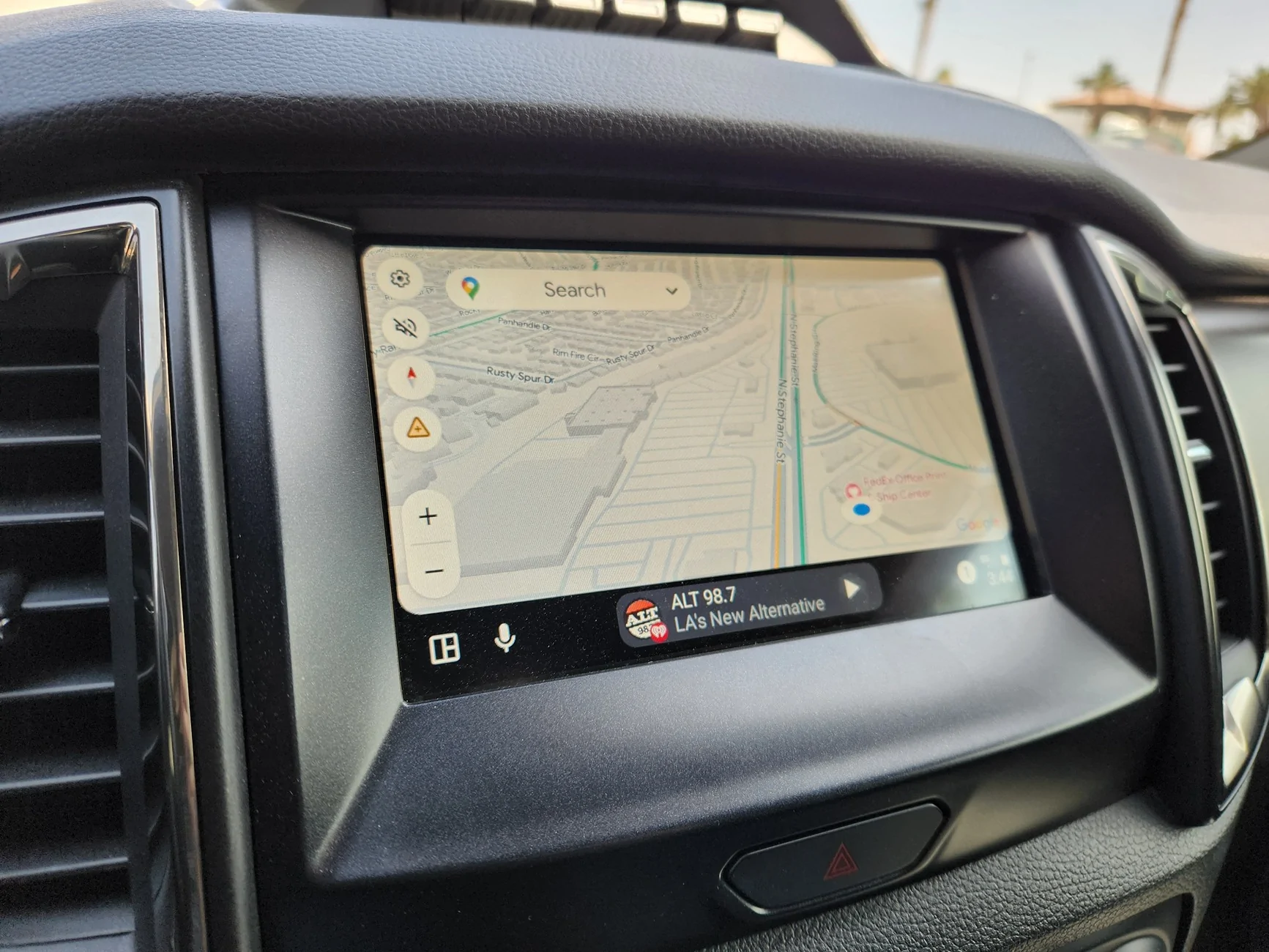
I just want to give the AAWireless Two a huge positive 5 of 5 review. It not only made Android Auto wireless possible, it allows for you to change the DPI setting which added features to Google Maps (Incident Reporting). They have a lot of custom settings to really make it work the way you want. I will elaborate below but they really thought about it all.
- Connection is fast and reliable
- Custom settings to get the experience you want
- At $55, it is a no brainer. There is a new version with Android and Carplay in one unit for more
- They actually update the app on Android as well as firmware on the device, in the 4 months of ownership it has gotten maybe 2 firmware updates and a couple phone software updates. Never had issues with any of the versions though.
- Keep in mind, wireless Android Auto is a battery hog due to using Bluetooth and your WiFi signal at the same time. Be it in Honda OEM Wireless Android Auto or Ford OEM in an F150, it just drains battery but the simple fix below is great for me.
How I use it:
- Changed DPI which added incident reporting to Google Maps
-- I generally use DPI 135-140 around town because the lower you go, it shows more on the screen but the android auto buttons and keyboard also shrink. This range still unlocks incident reporting.
-- On road trips where I wont be touching my screen much I might go down as low as 125 which shows a bit more of the map. I can still use all the features such as the keyboard fine at 125 but 135-140 is easier to live with if you plan on using the keyboard for an address or something.
- Changed connection type so it only connects after a Bluetooth connection is made with the truck (I think it was a hibernation setting in AAwireless).
--What that fixed was it prevented the phone and AAwireless module to connect when I unlocked and opened my truck door, which would power the USB ports, turn the AAwireless unit on and then establish a connection. If that doesn't bother you, leave this setting alone and it will connect even faster to your truck. It is off by default so the faster connection is made
- Changed the Large button commands so wireless android auto is not defaulted on every drive (remembers last setting)
-- This means I can leave it plugged into the truck USB but it won't try to connect to my phone if I don't want it to since android auto is a battery hog. Also, I can still use a wired Android auto connection so my wifi can be used with my Starlink and not have to worry about disconnecting the AAwireless unit. I only worry about wearing the USB ports on the truck because they look flimsy compared to laptops and such so this is nice.
-- one press: setup to connect to my specific primary phone (will also connect every time until the below option is selected)
-- two press: Disables connections so it does not try to connect to any phone. Light stays red so you know the mode it is in. (Wont try to connect on next key cycle either)
Their product page:
AAWireless TWO - Wireless Android Auto Adapter
Amazon link: $55.00
Amazon.com: AAWireless Two - Android Auto Wireless Adapter - Convert Factory Wired Android Auto to Wireless - Multifunctional Button - Easy Plug and Play Setup - Seamlessly Connect Via Bluetooth - Made in Europe : Electronics

- Connection is fast and reliable
- Custom settings to get the experience you want
- At $55, it is a no brainer. There is a new version with Android and Carplay in one unit for more
- They actually update the app on Android as well as firmware on the device, in the 4 months of ownership it has gotten maybe 2 firmware updates and a couple phone software updates. Never had issues with any of the versions though.
- Keep in mind, wireless Android Auto is a battery hog due to using Bluetooth and your WiFi signal at the same time. Be it in Honda OEM Wireless Android Auto or Ford OEM in an F150, it just drains battery but the simple fix below is great for me.
How I use it:
- Changed DPI which added incident reporting to Google Maps
-- I generally use DPI 135-140 around town because the lower you go, it shows more on the screen but the android auto buttons and keyboard also shrink. This range still unlocks incident reporting.
-- On road trips where I wont be touching my screen much I might go down as low as 125 which shows a bit more of the map. I can still use all the features such as the keyboard fine at 125 but 135-140 is easier to live with if you plan on using the keyboard for an address or something.
- Changed connection type so it only connects after a Bluetooth connection is made with the truck (I think it was a hibernation setting in AAwireless).
--What that fixed was it prevented the phone and AAwireless module to connect when I unlocked and opened my truck door, which would power the USB ports, turn the AAwireless unit on and then establish a connection. If that doesn't bother you, leave this setting alone and it will connect even faster to your truck. It is off by default so the faster connection is made
- Changed the Large button commands so wireless android auto is not defaulted on every drive (remembers last setting)
-- This means I can leave it plugged into the truck USB but it won't try to connect to my phone if I don't want it to since android auto is a battery hog. Also, I can still use a wired Android auto connection so my wifi can be used with my Starlink and not have to worry about disconnecting the AAwireless unit. I only worry about wearing the USB ports on the truck because they look flimsy compared to laptops and such so this is nice.
-- one press: setup to connect to my specific primary phone (will also connect every time until the below option is selected)
-- two press: Disables connections so it does not try to connect to any phone. Light stays red so you know the mode it is in. (Wont try to connect on next key cycle either)
Their product page:
AAWireless TWO - Wireless Android Auto Adapter
Amazon link: $55.00
Amazon.com: AAWireless Two - Android Auto Wireless Adapter - Convert Factory Wired Android Auto to Wireless - Multifunctional Button - Easy Plug and Play Setup - Seamlessly Connect Via Bluetooth - Made in Europe : Electronics
Sponsored
Last edited: