Sponsored

Restraints Indicator Lamp Warning, Radio and Climate Physical Buttons (FCIM) not working, No Outside Temperature, No Start/Stop Either

dabsher

Member
First Name
matt
Joined
Jan 7, 2025
Threads
2
Messages
14
Reaction score
16
Location
asheville
Vehicle(s)
ford ranger xlt 2019 4wd
Occupation
sales
Like the title says… followed a few guides on here and still can’t resolve the problem. So far I’ve: replaced fuse 12 in the BCM fuse panel, removed the passenger taillight and checked for any moisture/ corrosion, and checked the side panel on the passenger floorboard for loose connections. Not really sure what else to try at this point and I cannot afford a dealership diagnostic. I have a OBDlink coming tomorrow and will try forscan to see if any diagnostic codes show up to give better insight. Any additional advice would be greatly appreciated. Thank you
Sponsored

 

airline tech

Well-Known Member
Joined
Aug 24, 2022
Threads
28
Messages
4,447
Reaction score
8,496
Location
Midwest - KS
Vehicle(s)
2022 Ranger Lariat-Super Crew, Cactus Gray
Occupation
Aircraft Tech
Check the DC/DC Converter connector - in the Pass Footwell, Forward and center of the well.
This is where the Power for the FCIM comes from (feeds fuse #12)
 
OP
OP

dabsher

Member
First Name
matt
Joined
Jan 7, 2025
Threads
2
Messages
14
Reaction score
16
Location
asheville
Vehicle(s)
ford ranger xlt 2019 4wd
Occupation
sales
Check the DC/DC Converter connector - in the Pass Footwell, Forward and center of the well.
This is where the Power for the FCIM comes from (feeds fuse #12)
I tried that too. They weren’t loose and I disconnected/ reconnected them. I feel a harness somewhere along the way may have gotten loose
 
OP
OP

dabsher

Member
First Name
matt
Joined
Jan 7, 2025
Threads
2
Messages
14
Reaction score
16
Location
asheville
Vehicle(s)
ford ranger xlt 2019 4wd
Occupation
sales
I tried that too. They weren’t loose and I disconnected/ reconnected them. I feel a harness somewhere along the way may have gotten loose
For reference, this happened on the highway three days ago cruising at 70. No inclement weather and no other passengers in the car
 
OP
OP

dabsher

Member
First Name
matt
Joined
Jan 7, 2025
Threads
2
Messages
14
Reaction score
16
Location
asheville
Vehicle(s)
ford ranger xlt 2019 4wd
Occupation
sales
I tried that too. They weren’t loose and I disconnected/ reconnected them. I feel a harness somewhere along the way may have gotten loose
Hey, if you have time could you look at this and see if you have any better insight as to whats going on with my truck? Thank you
 

Attachments


airline tech

Well-Known Member
Joined
Aug 24, 2022
Threads
28
Messages
4,447
Reaction score
8,496
Location
Midwest - KS
Vehicle(s)
2022 Ranger Lariat-Super Crew, Cactus Gray
Occupation
Aircraft Tech
Ok the majority of those codes are most likely self-induced, mainly from disconnecting / reconnecting connectors. So, clear all codes and do a (Self-Test) reset the FCIM

I believe the issue lies on the MS-CAN network, Lost Comm with the SODL/SODR, so you were on the right track with looking at the rear taillamp assemblies. (Except BOTH Sides)
Disconnect (one) side at a time and see if the FCIM powers up.
This will isolate (The Rear BLIS modules), from there you will need to move forward upstream on the harness connectors (disconnecting) until you locate the connector that (Brings) power back to the FCIM.

So, I am thinking a short in the MS-CAN network is taking down the FCIM
To possibly isolate the issue: Continue each step until the FCIM regains power

1. Disconnect - 1 side at a time the Rear Tail-Lamp Assemblies, ending up with both disconnected.
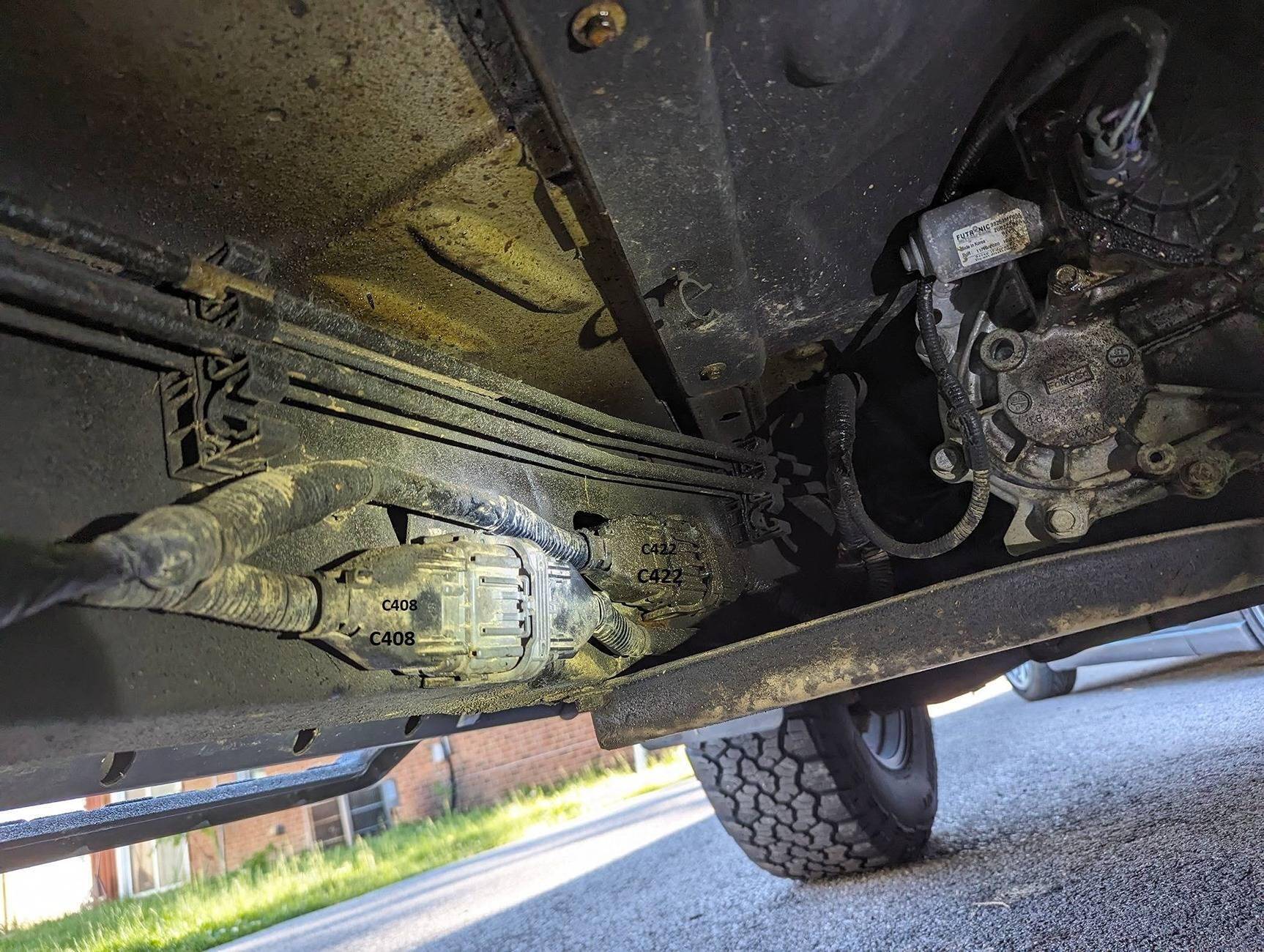
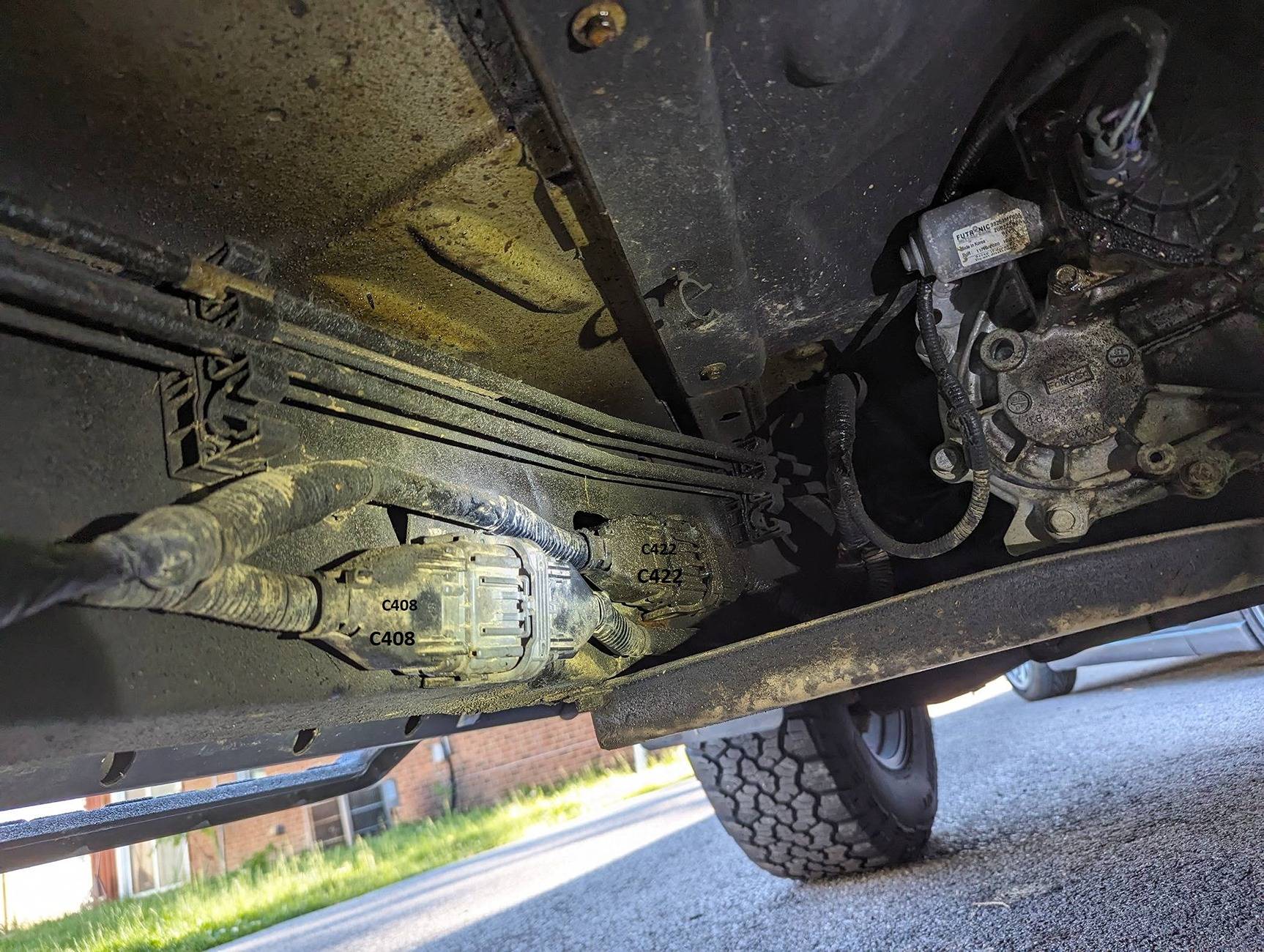
2. Move (Upstream) to C422 (Located on the Frame Rail) Left Side - Disconnect
3. Move (Upstream) to C211 (RH Pass Side - Kick Panel) - Pull & Reseat
4. Move (Upstream) to C2498B (TRM-Module) (RH Pass Side - Kick Panel) Disconnect
5. Move (Upstream) to C2402A (FCIM-Module) this will be a pull & reseat

Ref:
C422 Location

C408-C422 - Copy.jpg
 

airline tech

Well-Known Member
Joined
Aug 24, 2022
Threads
28
Messages
4,447
Reaction score
8,496
Location
Midwest - KS
Vehicle(s)
2022 Ranger Lariat-Super Crew, Cactus Gray
Occupation
Aircraft Tech
You may also try a - SODL / SODR - Self-Test (Reset), I believe they are getting power, but they are not sending data on the MS-CAN network.
 

airline tech

Well-Known Member
Joined
Aug 24, 2022
Threads
28
Messages
4,447
Reaction score
8,496
Location
Midwest - KS
Vehicle(s)
2022 Ranger Lariat-Super Crew, Cactus Gray
Occupation
Aircraft Tech
Ok, since I have not dealt with the (CAN-BUS) that much and with 2 current members posting about issues with the FCIM & No Power (perceived) on that module.
I dug into the MS-CAN bus side of this communication now I cannot confirm this yet, but I think is actually happening here, with both and (copy & paste) to both current issues.

The GWM - is a Gateway for communication for each (BUS) to communicate along with each other- so information (DATA) is transferred from bus to bus.
One important bus for the (FCIM) is the MS-CAN bus and this bus has the following modules on it:
GWM-RTM-TRM - SODL/SODR - FCIM
So, when data is sent along this bus (it is coded data) all modules on the bus will see this data and only respond if the data is meant for the receiving module.
The data bus is a resistance based (circuit) with 2ea resisters in the system and somewhere in each (Bus) will have a (2ea Terminating Modules) the resistors are incorporated into the modules for the (BUS) circuits.

For this issue (FCIM) not powering:
We will use the MS-CAN network and a very important (data message) that is being sent along that bus.

Terminating Module (GWM) - MS-CAN Network to FCIM (Terminating Module)
The RTM - TRM & SODL / SODR are just on the network, so if we think of this as a power circuit and it is feeding power to all the modules, and visualize a bad circuit, this can be any of the modules not powered, a shorted circuit causing the module to transfer that short over to the (MS-CAN) bus or simply a dirty connection somewhere in the circuit.
So, a dirty connection with the (MS-CAN) bus circuits can stop full communication on the circuit.

One key and important (Communication) on the MS-CAN bus is - Ignition Status. So, if the MS-CAN bus is down or there is an issue with the bus, the FCIM is not seeing the current Ignition Status as (On / Run) therefore wont power up.
Where I am (UNCERTAIN) is that if you were to pull the FCIM connector in this failure state and check for power at the connector - would you find power? I am thinking yes, as long as the power feed for the FCIM is good - via DC/DC converter and Fuse #12.
This may mislead a tech in replacing the FCIM and (No-Help)

I am basing this (yes) for the fact that so far, the FCIM is not triggering any messages for lost power.

I cannot confirm but I think the internal logic of the FCIM sees the - Ignition Status message and then allows the FCIM to power up.

Restraints (Tie-In), you will note the RCM is not on the MS-CAN network (Restraints Control Module)
The Restraint Impact Status (Data) is sent along the MS-CAN network which originates from the RCM and the GWM sends the info through various busses to various modules.
The FCIM receives the info via MS-CAN, so this is a misleading (message) for this issue and is just an associated message.

Blind Spot Message (Tie-In)
The rear BLIS modules can be shorting out due to a BLIS module or circuitry and this short transfers (bleeds) over to the (MS-CAN) network. Now also since these connectors are external and possibility of corrosion setting in the connectors, reseating the connectors may cure the issue (in resolving the MS-CAN) bus issue, thus allowing full communication on the bus.

Forward Collision Warning Message (Tie-In)
This is the Crash Event Status - sent along the MS-CAN bus, so an associated message

Reverse Cam (Not-Working) (Tie-In)
This is the Gear Position - data sent along the MS-CAN, this ties closely with the BLIS modules as when in reverse they serve as - Cross Traffic alerts and also the Reverse Signal triggers the camera.

So, since nobody thus far has complained about (including) issues with the TRM, as this would most likely show up (if a trailer was connected) and you had this scenario of the FCIM not powering. (To rule it out) you could simply disconnect it and see if the FCIM powers up.

also, nobody has complained about issues with the RTM - FOB or TPMS issues with the FCIM not powering.

So, with this information, the issue that appears to be causing this mysterious FCIM not powering lies within the MS-CAN network communication and mainly the - Ignition Status message that is being lost with that network down.

The FCIM itself has various PIDs that can be viewed, and the important ones to look at for this ISSUE is - Module Power & Ignition Status.
A high-end scan tool also has the capability to perform a (Network) Test, a faulted MS-CAN network would possibly show the lost communication between the SODL / SODR and the FCIM.
Another factor is that any exterior lighting (taps) for power can possibly create a short on that power circuit and back feed into the (MS-CAN) bus if they are tapped on the Rear Taillights.
This also includes the Trailer Wiring harness

Honestly, when you think of power issues, you think only (Power & Ground) and then stop, but with CAN BUS technology, it can throw a wrench into that thought process and requires a deeper look at what is on that bus (and all messages) that are sent / received along the bus.
For example, there are 59 data messages that can be sent / received on the MS-CAN bus alone.
So, normally here would be - is there power on the connector? Yes
Does the module power? No (Replace the Module)

This is where I am curious (In this scenario) on the FCIM is not powering will the FCIM PIDs show the module as powered and the Ignition Status (Off/Invalid)
As I would need to confirm my theory that although the FCIM has power to it - The FCIM internal logic still controls via (Ignition Status) to actually let the power through it.
or
Would the PIDs show (0-Voltage) for Module Power and or (Load Shed Request (Active) and possibly killing the power input.
There is a total of 76 (FCIM) data PIDs available and I would focus on the main (important) ones.
Module Power / Load Shed / Ignition Status if viewing on a scan tool as I stated already since the FCIM is not actually generating a fault (power) wise, then this directs me to travel down the MS-CAN bus is faulted.

I would need to have a - Faulted system to validate my theory.
 

airline tech

Well-Known Member
Joined
Aug 24, 2022
Threads
28
Messages
4,447
Reaction score
8,496
Location
Midwest - KS
Vehicle(s)
2022 Ranger Lariat-Super Crew, Cactus Gray
Occupation
Aircraft Tech
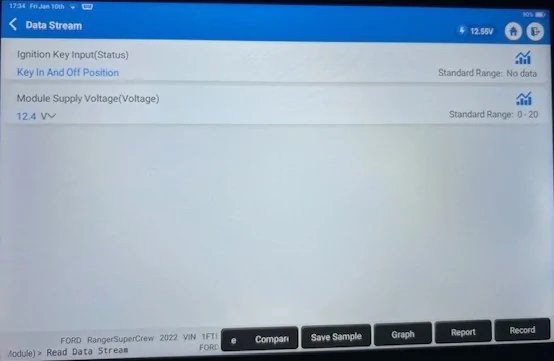
I confirmed today that yes, the module will read input voltage with key off, now the only variable here is I am hooked up with the Scan Tool and Communicating on the network.

So, with the FCIM being on a (Always Hot) circuit the module can read the input voltage at the connector. - (Module Supply - Voltage)
So, if you have a power reading here (providing) its good voltage and not below (approx 10.6) or so when load shedding comes into play.
The power feed is - GOOD

The (Ignition-Switch) status is the - Input that powers the FCIM up via the MS-CAN bus.
So, if the FCIM cannot see that message (Data) then it will not power up.

Engine Off - Door Closed, nothing powered - FCIM - Dead
FOB is nowhere near the truck - so the (KEY-IN) might be due to - I am hooked in with scan tool and communicating with the FCIM.
Not really that important - just note the (OFF)

Eng Off.webp


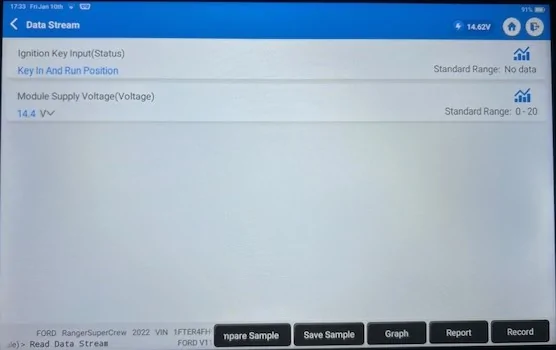
Engine Running:
Note: When you turn the key to on (PB-ON) you see the (Run) indication, when you switch to (Start) you see that Run Indication also momentarily indicate (Start) until you release the (PB) or (Ignition Switch) then it indicates (RUN)
To point of this is - This communication is from the (MS-CAN) bus as far as the FCIM
if you are viewing this PID and not seeing the (Data) switching input then the (MS-CAN) network is the cause of the FCIM not powering up.


Eng Running.webp


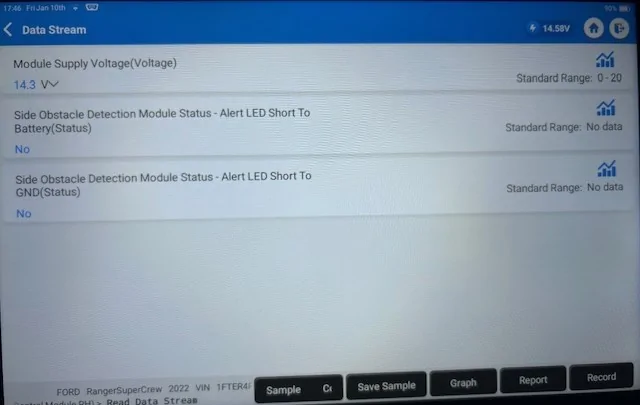
I decided to just use the SODR as a Ref PID:

Note: The SODL / SODR is switched power - so you will only see power with key-on, these are not power controlled by a Can-Bus.

I am unclear here - what specific circuit due to the wording of the PID as actually what circuit this is monitoring for (Short) - The Power or the Alert (Message) circuit.
I am thinking it's the (Power) side.
Anyway, for the Tie-In (PIDs) these are what you want to view for both SODL / SODR

So, I believe if you are having an issue with this circuit, it would show here and this short can / could cause the (MS-CAN) bus to pick up the bleed over within the (SOD) module.
Thus, taking the (MS-CAN) bus down and taking away the ability for it to see (Ignition) status.

SODR.webp


So, the (Ignition Switch) status is the Key Important PID to monitor and then determine (WHY) the FCIM is not receiving it.
 
OP
OP

dabsher

Member
First Name
matt
Joined
Jan 7, 2025
Threads
2
Messages
14
Reaction score
16
Location
asheville
Vehicle(s)
ford ranger xlt 2019 4wd
Occupation
sales
Hey man, thank you so much for your replies. In the middle of an ice storm so I’m gonna try and work on this tomorrow. I really appreciate all your help/ responses!
 

airline tech

Well-Known Member
Joined
Aug 24, 2022
Threads
28
Messages
4,447
Reaction score
8,496
Location
Midwest - KS
Vehicle(s)
2022 Ranger Lariat-Super Crew, Cactus Gray
Occupation
Aircraft Tech
Taking a deeper look at the posted failure codes:
Noting that there are 4 Modules - That are not reporting, I see related codes for them but not the actual modules: - Another clue that the MS-CAN bus is down
1. FCIM - We know that and the reason - issue with MS-CAN
2. TRM - This is powered (switched)
3. SODL - SODR - These are also powered (switched)

The RTM is on the (MS-CAN) bus, but it is reporting

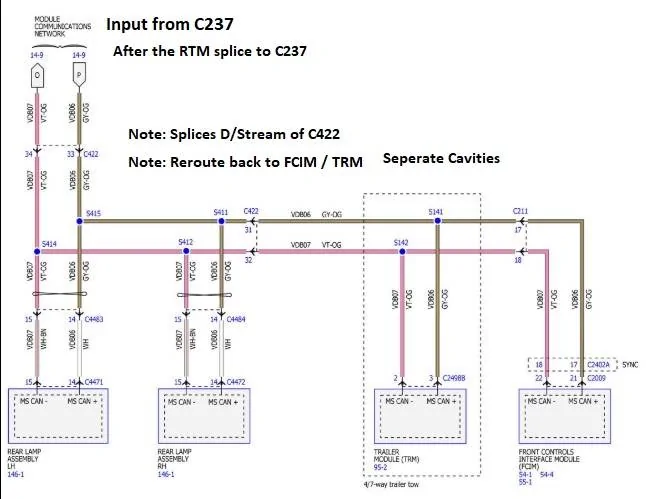
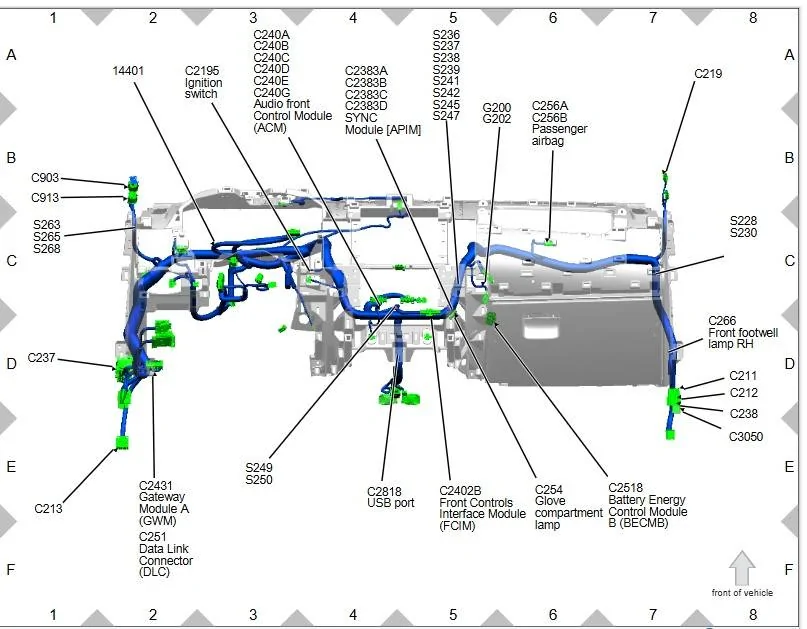
So, the issue lies within this diagram

Not shown (off diagram) is the MS-CAN bus wiring from the GWM to the RTM.
From the RTM the wiring is spliced (Via C913) and runs to C237, Wiring is (Good) as the RTM is working and communicating unless the splice at C913 is bad for the feed to C237

So, thinking that is there was an issue with anything on the network (short) it would take out the whole bus, that's not the case as the RTM is still communicating.

So, with the posted faults - I see from the PAM & BCM - Lost communication with the:
Lighting Control Module Rear - (This is the TRM) so the TRM is also down (Bus)
So, this means that the - FCIM - TRM - SODL-SODR are bus dead.

I really (Suspect) the issue is at C237 or C422. (Moreso C422)
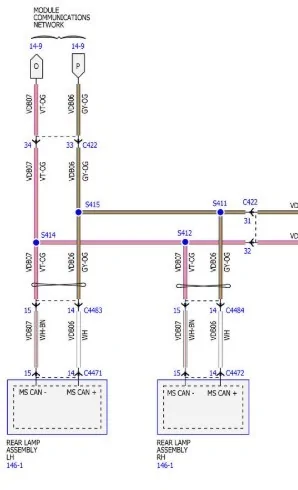
C237 is feeding C422 and Downstream of C422, the circuit is spliced for the FCIM / TRM and fed back into C422 over to a splice feeding the TRM and then over to C211 (Feeding the FCIM)

Note: C422 contains 4 (MS-CAN) wires In for the BLIS and back out for the TRM / FCIM
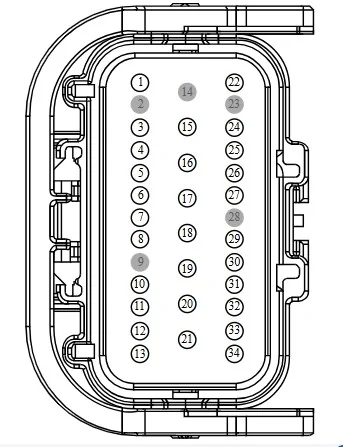
Pins: 33 & 34 ----Pins 31 & 32

So, with this knowledge -The issue lies between C237 and C422, so try reseating both connectors
The issue is with the (input) wires coming from C237 to C422 (Pins 33 & 34)
Due to the fact that the SODL / SODR are also dead.

If the connector reseats do not fix the issue, then wiring checks are needed, and also look at possible bad splices at S414 & S415

MS-CAN Bus.jpeg


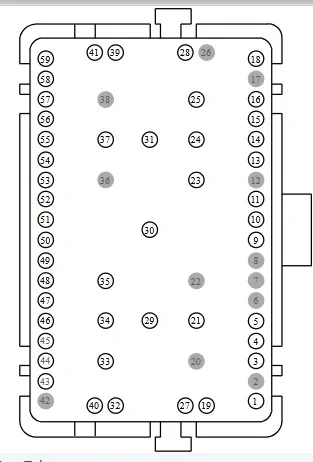
C237 is located in the Drivers Footwell:

59 Cavity Connector - so its big

C237.jpeg


And again C422


1736599256956-d2.jpg
 
Last edited:

airline tech

Well-Known Member
Joined
Aug 24, 2022
Threads
28
Messages
4,447
Reaction score
8,496
Location
Midwest - KS
Vehicle(s)
2022 Ranger Lariat-Super Crew, Cactus Gray
Occupation
Aircraft Tech
To bring this T/Shoot in full, for this specific issue:
If pulling and reseating the C237 & C422 connector does not fix the issue, then try both rear taillamp connectors before we break out the meter.

If needed let's check out the wire integrity between C422 & The Taillamps as it has been noted that the splices in this area can fail, and I have a hunch that if C422 does not fix the issue this will require this dive into finding a bad splice, unfortunately it is time consuming to tear into a harness and actually locate the splice.

Note: I make reference to checking (Resistance) readings and what they should be, but I should also add (If you get any readings) of (OL) or (-) depending on the meter = OPEN circuit and the wire is broken

Splice Check.jpg


First:
Disconnect C422 and (BOTH) Taillamp Connectors

Using the (Female) Rear C422 Connector
Jumper Pins: 33 & 34
Meter: (Ohms Scale) Pins 31 & 32
This checks the whole circuit, should read 3 Ohms or Less

If it checks (Good) then we can confirm that the wire harness is good but still may have one of the BLIS (SODL/SODR) taking out the circuit so Plug in (One) at a time each Taillamp (Assembly) and note if anything changes in repeating the check above.
If plugging in each Taillamp & Harness Checks are both Good, then C422 & Aft are GOOD and we need to move farther Upstream and (Check C237) to (C422)

See Below for that check:

Plus: Note if one of the Taillamp Assemblies does trigger a High Resistance change - try pulling the module out of the assembly and disconnecting the (SOD) Connector (internal) of the assembly then (reconnect) the taillamp without the module installed and repeat the test.
This may at least allow the truck to be driven (until a replacement) SOD can be installed. Minus (BLIS) function.
Mainly it will bring the FCIM back on-line and the Heater will function again.


If the first step shows a higher resistance than 3 Ohms or less - both without and with the taillamps hooked up, then continue with the below steps.
If one of the Taillamps (Greatly) affects the readings over the other, then the SODL/SODR is the issue.

If the Complete Circuit Test - Shows High Resistance

Then we need to isolate which (+) or (-) is the cause.
Remove the Jumper (Pins 33 & 34)
Meter Pins: 34 & 32 - Reading
Meter Pins: 33 & 31 - Reading
The one that is not within 3 Ohms or less (is the bad circuit)

Now we need to find which splice is the cause and breakdown the circuit to help isolate which side of the splice the fault lies (wire) or Confirm (Splice) issue

So, with a longer (Test Lead) wire:
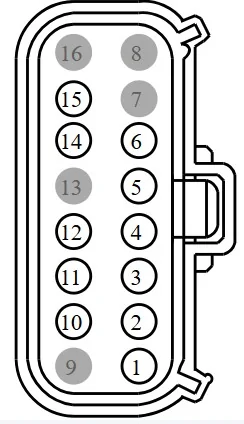
Meter Pin 34 (C422) and (Pin 15) on the Left Taillamp Connector / Repeat for Right Side
Meter Pin 33 (C422) and (Pin 14) on the Left Taillamp Connector / Repeat for Right Side

The reading with the Highest reading is the problem circuit (Splice), if Both sides give you a high reading, then it is the splice on the (Left Circuit)

Alternately: You can use C422
Meter Pin 31 and (Pin 14) on each taillamp connector
Meter Pin 32 and (Pin 15) on each taillamp connector

Basically, isolate which section of wire or (splice) is bad.

Now the fun part Locate the Splice:

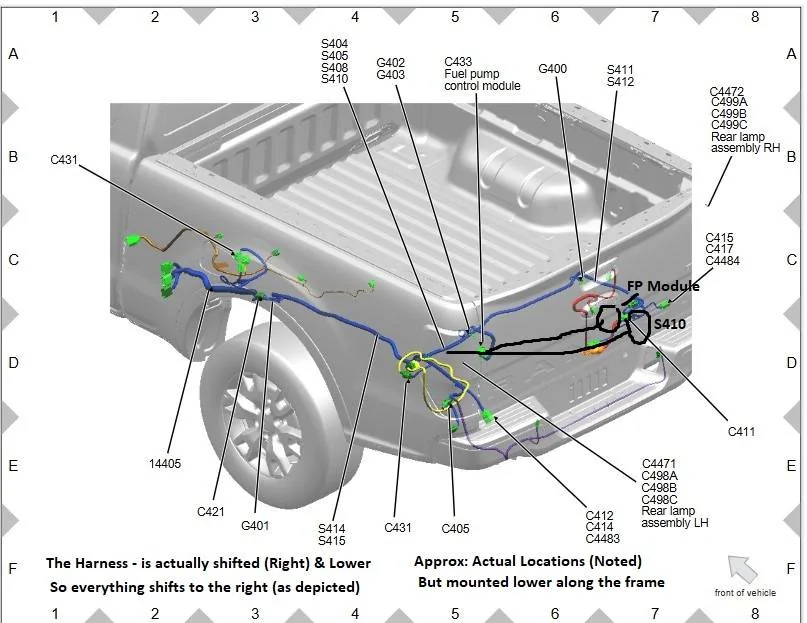
We need to find Splices (S414 & S415) and (S411 & S412)

This is where a circuit test tool comes in handy - applies power to the circuit and then go down the harness with a tester to find where the high resistance is located - alternatively you can use a tone generator- without this tool as a guide you are searching for a needle in a haystack with a general location - the tool will pinpoint exact location.
Saving time and less harness open up required.

Rear Frame Harness - Splices - Copy.jpeg


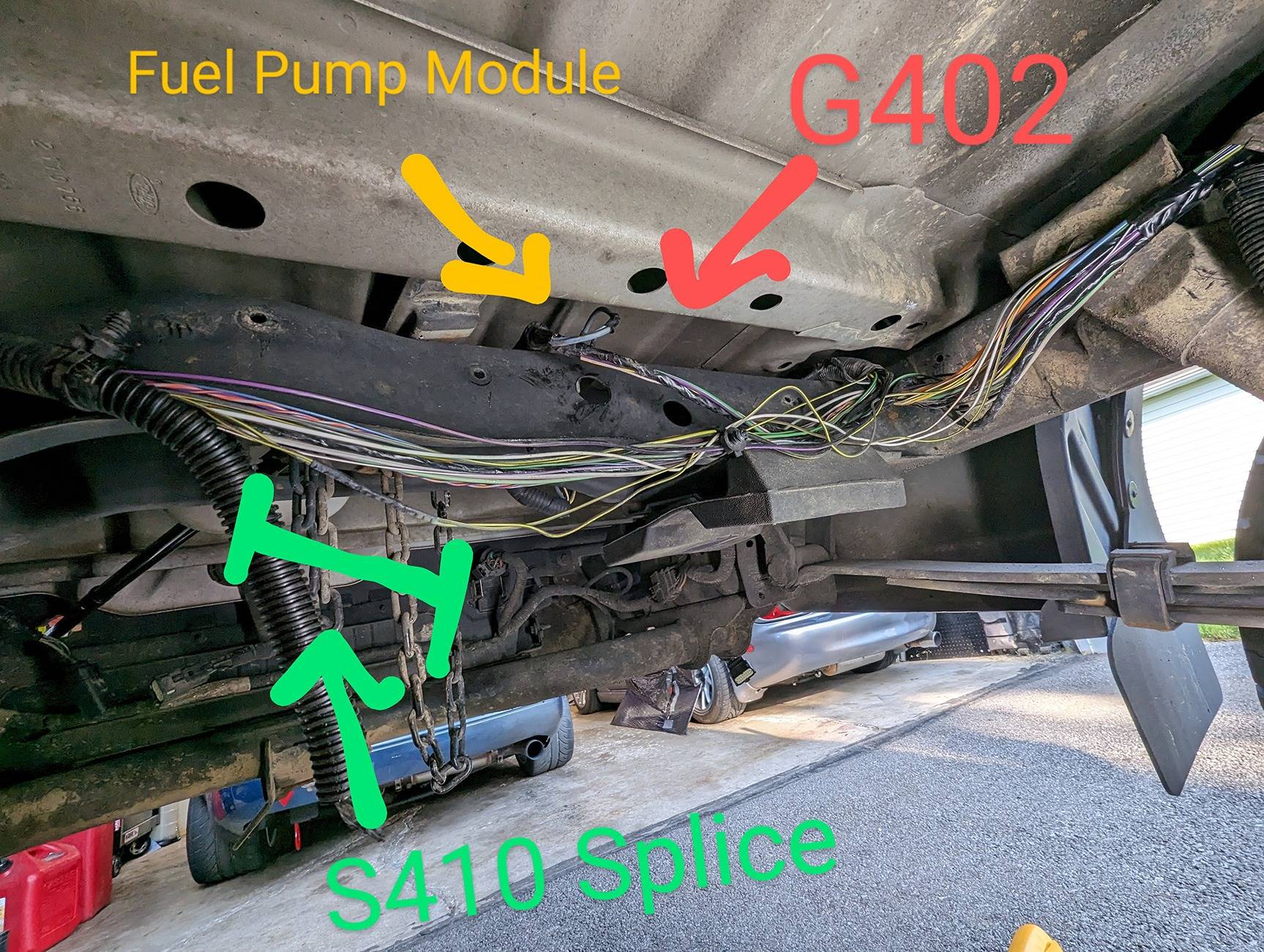
Borrowed Pic: Ref for actual location of S410 as a reference (guideline) variance to the above diagram. To help in locating the other splices in the harness.


View LOOKING AFT:

So best approximate for S414 & S415 is going to be near where the harness tucks up near the truck bed (Drivers Side)
and S411 and S412 are going to be close to the R-Rear Taillamp Assembly
So, it's a needle in the haystack here - hopefully if needed to access the harness this will help

S410 Location 2.jpg


C422: Pinout

C422.jpeg


C4471 LH Taillamp - Right = Same (Pinout)

C4471 LH.jpeg


If required and if the C422 aft checks good.
We need to check C237 to C422
Note: With C237 having a great amount of Hi-Current wiring that is always hot.
You NEED to disconnect the battery before disconnecting this connector.

To check the wiring between C237 & C422
Jumper: Pins 40 & 32 on C237 (Female) running aft or downwards (Opposite) direction of the harness coming in from the firewall.
and then go back to C422 and Meter the (Male) Most Forward connector
Pins: 34 & 33
Should Be the same as above 3 Ohms or less

If it is more then - Wire or Connector Pin - Issue
If it is good- we will need to pull the headliner down to get access to the RTM connector.
and meter between that connector and C237.

Note: C422 posted pinout is for the female half, use that ref for orientation of the pins for the male half (Forward) Facing connector.


C237 Pinout (Dr. Side - Footwell) Area around the brake pedal coming in from the firewall

C237 Pinout.jpeg
 
Last edited:
OP
OP

dabsher

Member
First Name
matt
Joined
Jan 7, 2025
Threads
2
Messages
14
Reaction score
16
Location
asheville
Vehicle(s)
ford ranger xlt 2019 4wd
Occupation
sales
Check the DC/DC Converter connector - in the Pass Footwell, Forward and center of the well.
This is where the Power for the FCIM comes from (feeds fuse #12)
So, it turns out a gateway module is bad. Ford has been diagnosing it the last two days
 

airline tech

Well-Known Member
Joined
Aug 24, 2022
Threads
28
Messages
4,447
Reaction score
8,496
Location
Midwest - KS
Vehicle(s)
2022 Ranger Lariat-Super Crew, Cactus Gray
Occupation
Aircraft Tech
So have they actually replaced it and it’s working?
 

airline tech

Well-Known Member
Joined
Aug 24, 2022
Threads
28
Messages
4,447
Reaction score
8,496
Location
Midwest - KS
Vehicle(s)
2022 Ranger Lariat-Super Crew, Cactus Gray
Occupation
Aircraft Tech
I ask - though I could be wrong, I am not 100% in agreement on that diagnosis due to the fact that the GWM can still com with the RTM, from the posted code pull.
But I am office chair with a diagram vs hands on with a scan tool and a meter in hand.
The GWM however is one end of the Termination point with the FCIM at the other - there is a resistor on each end of the circuit.
Curious how deep they went in the T-Shoot.
Sponsored


Top