
Sponsored

RedlandRanger
Moderator
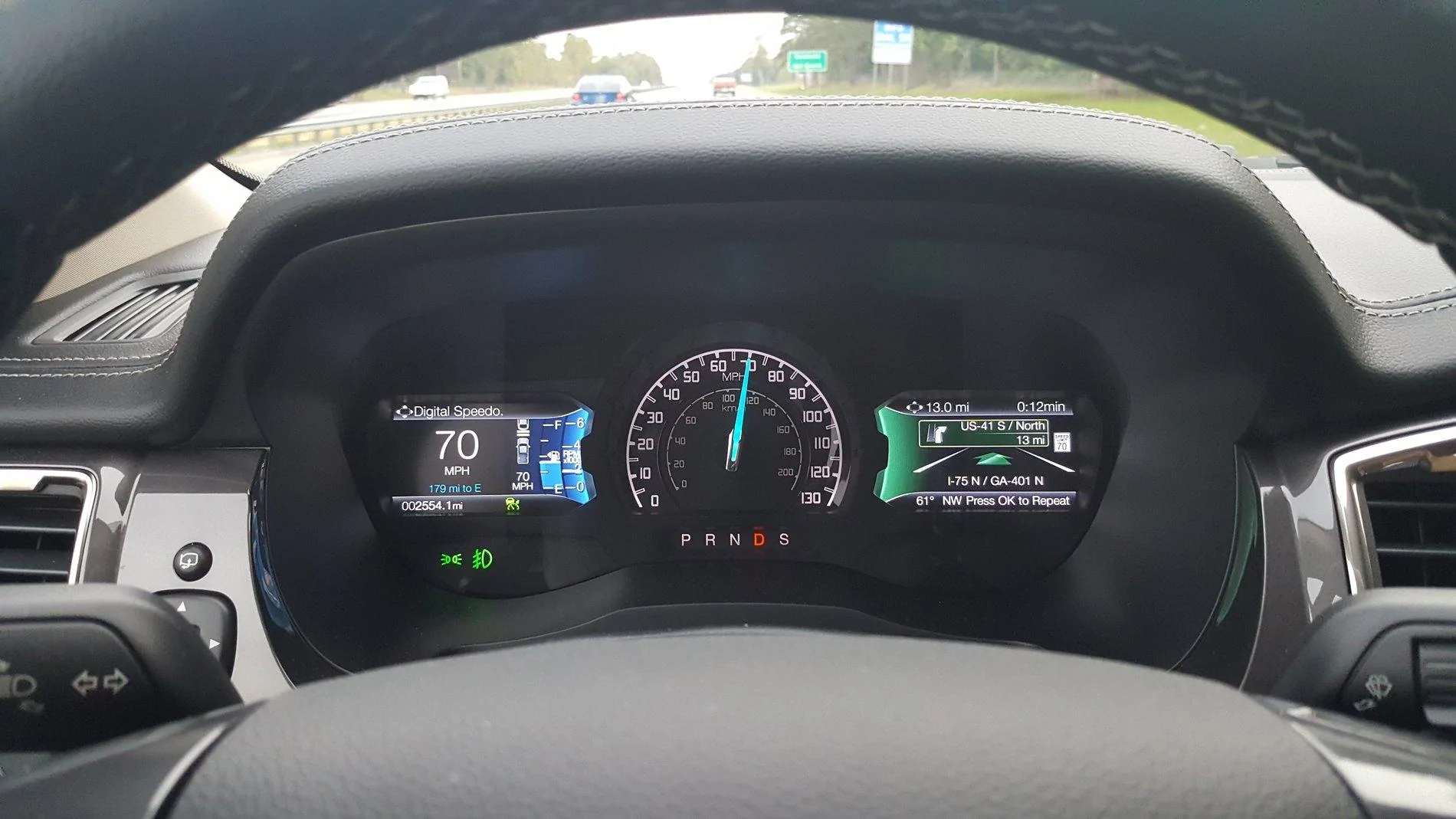
I believe you can choose navigation but it only shows the compass unless you have a navigation destination currently - then it will display the navigational instructions as well, but I'm doing this from memory.Could swear I've seen a post that showed the Navigation displayed in the Right side Dash Display on a lariat. Is this possible? if so, how? All I can get to display there is the Radio settings!
OP
OP
chasvs
Well-Known Member
- Thread starter
- #3
Thanks, I think I tried putting a destination in but didn't get a display. Guess I need to do more digging. Owners Manual was no help.I believe you can choose navigation but it only shows the compass unless you have a navigation destination currently - then it will display the navigational instructions as well, but I'm doing this from memory.
RedlandRanger
Moderator
I've found that the best way to figure all this stuff out is just to experiment a bit. There are a LOT of options in those menus.Thanks, I think I tried putting a destination in but didn't get a display. Guess I need to do more digging. Owners Manual was no help.

VAMike
Well-Known Member
if you're looking at audio, left arrow should take you to the menu of what to displayCould swear I've seen a post that showed the Navigation displayed in the Right side Dash Display on a lariat. Is this possible? if so, how? All I can get to display there is the Radio settings!
djrobb
Well-Known Member
- First Name
- David
- Joined
- Nov 12, 2018
- Threads
- 21
- Messages
- 409
- Reaction score
- 343
- Location
- Alexandria,Va
- Vehicle(s)
- 2006 Tacoma 4dr Sport Long Bed
- Vehicle Showcase
- 1
If I am using the factory navigation system for directions then the directions are displayed there (presuming I am on that screen). At all other times, including if I am using CarPlay like Waze, Apple Maps, Google Maps, it's the compass and speed limit (if known).Thanks, I think I tried putting a destination in but didn't get a display. Guess I need to do more digging. Owners Manual was no help.
OP
OP
chasvs
Well-Known Member
- Thread starter
- #8
Yeah, sounds like I need to figure out which button to push to get to that screen when navigating! Seems it's the Left Button as mentioned in a previous response. will be checking that out on the way home from work today!If I am using the factory navigation system for directions then the directions are displayed there (presuming I am on that screen). At all other times, including if I am using CarPlay like Waze, Apple Maps, Google Maps, it's the compass and speed limit (if known).
OP
OP
chasvs
Well-Known Member
- Thread starter
- #9
Bazinga! That’s the ticket! Yup, got the Navigation option using the Left arrow button on the upper Right side selection buttons. Don’t know how I missed that. But now know where to find the Radio, Navigation and Phone screen Menu!if you're looking at audio, left arrow should take you to the menu of what to display
Last edited:
SRAces
Well-Known Member
- First Name
- Steve
- Joined
- Oct 17, 2018
- Threads
- 4
- Messages
- 329
- Reaction score
- 630
- Location
- Lake Park, GA
- Vehicle(s)
- 2019 Ford Ranger, 2015 Mercedes-Benz GLA, 2004 Mercedes-Benz SLK 230 Special Edition
- Occupation
- USAF (retired)
- Vehicle Showcase
- 1
It shows up in the right screen on my Lariat when you program a destination in the navigation system. Otherwise you just get the compass.

OP
OP
chasvs
Well-Known Member
- Thread starter
- #11
Yeah, got it now. I didn't know it was the LEFT Button on the Upper Right Selection buttons that had the Menu that allows you to select the Navigation view.It shows up in the right screen on my Lariat when you program a destination in the navigation system. Otherwise you just get the compass.
Murphie
Well-Known Member
- First Name
- Jim
- Joined
- Oct 18, 2018
- Threads
- 3
- Messages
- 332
- Reaction score
- 575
- Location
- Lindale TX
- Vehicle(s)
- 2019 Ranger Lariat 4X2, 2023 Hyundai Santa Fe
- Occupation
- Financial Auditor - Retired
I have a related navigation question. I was poking around my Lariat, and did not find any evidence of an SD slot. So I got to wondering, how are maps updated? I checked the owner's manual, and there's not much there other than to say updates are periodically available, and directs owners to their dealer of to www.navigation.com/sync. I went there, and no information was available for the Ranger. Any idea how maps would get updated? Maybe via USB??
MT19RANGER
Well-Known Member
- First Name
- JERRY
- Joined
- Nov 10, 2018
- Threads
- 2
- Messages
- 778
- Reaction score
- 586
- Location
- SIDNEY, MT
- Vehicle(s)
- 2019 Ranger Lariat
- Occupation
- Oilfield Service Company Area Supervisor
- Vehicle Showcase
- 1
For my 2015 Explorer, they sent me an offer for the new version on the SD card. I looked in my Lariat but can't find an SD slot. Where is yours at?I have a related navigation question. I was poking around my Lariat, and did not find any evidence of an SD slot. So I got to wondering, how are maps updated? I checked the owner's manual, and there's not much there other than to say updates are periodically available, and directs owners to their dealer of to www.navigation.com/sync. I went there, and no information was available for the Ranger. Any idea how maps would get updated? Maybe via USB??
Murphie
Well-Known Member
- First Name
- Jim
- Joined
- Oct 18, 2018
- Threads
- 3
- Messages
- 332
- Reaction score
- 575
- Location
- Lindale TX
- Vehicle(s)
- 2019 Ranger Lariat 4X2, 2023 Hyundai Santa Fe
- Occupation
- Financial Auditor - Retired
That's just it, I don't have one either.For my 2015 Explorer, they sent me an offer for the new version on the SD card. I looked in my Lariat but can't find an SD slot. Where is yours at?
Sponsored
Similar threads

- Replies
- 10
- Views
- 18,581

- Replies
- 16
- Views
- 12,139


