Sponsored

Center Console USB not working

DrdPrtRlf

Active Member
Joined
Apr 24, 2020
Threads
5
Messages
25
Reaction score
10
Location
South Carolina
Vehicle(s)
2019 Ranger XLT 4x4
Vehicle Showcase
1
USB ports on the rear of my center console stopped working. The 110 outlet works so I'm guessing they're wired/fused separately. Checked the fuse chart, couldn't really figure out which was for the real console USBs. Fuse #5 is: Auxiliary power point 3 - console rear, #29 is: USB charge port. I pulled #29 to check if the USB up front was still working and it was. So I'm thinking #29 is for the console rear USBs. Replaced the fuse but still not working.

I recently had my AC fixed at the dealership, they had to remove the whole dash to get to it, not sure if this could be connected but the USBs haven't been working since.

Anyone have some experience with this? I'm in 2019 XLT
Sponsored
 

Colo_Ranger

Well-Known Member
Joined
Apr 19, 2021
Threads
49
Messages
3,790
Reaction score
12,848
Location
Colorado
Vehicle(s)
2021 Ford Ranger XLT FX4
Vehicle Showcase
1
USB ports on the rear of my center console stopped working. The 110 outlet works so I'm guessing they're wired/fused separately. Checked the fuse chart, couldn't really figure out which was for the real console USBs. Fuse #5 is: Auxiliary power point 3 - console rear, #29 is: USB charge port. I pulled #29 to check if the USB up front was still working and it was. So I'm thinking #29 is for the console rear USBs. Replaced the fuse but still not working.

I recently had my AC fixed at the dealership, they had to remove the whole dash to get to it, not sure if this could be connected but the USBs haven't been working since.

Anyone have some experience with this? I'm in 2019 XLT

Have you pulled the rear face off to see if they're plugged in? I would check all the fuses too, just... you know... to start.
 

airline tech

Well-Known Member
Joined
Aug 24, 2022
Threads
28
Messages
4,447
Reaction score
8,498
Location
Midwest - KS
Vehicle(s)
2022 Ranger Lariat-Super Crew, Cactus Gray
Occupation
Aircraft Tech
The Front USB Ports are powered from the FCIM
The Front Power Points (Fuse 10 -Left) - (Fuse 16-Right) and are powered from the Power Point Relay #1

The Rear is somewhat confusing (The Term - POWERPOINT) and USB Charging Port. But it shows Fuse 5 - Power Point and Fuse 29 USB Charge Port
They both power off of Power Point Relay #2
Separate harness runs from the BJB back to the rear console, so I do not this that they missed a connector, however they may have missed (as mentioned) connecting them up at the rear console mounting points.

If you have a scanner or Forscan, check the BCM for any fault codes, as a fault code can possibly be triggered that has (disabled power output) on the Power Point Relay #2. This would be for circuit protection. (reset the code) and then check for operation.
If it continues to trip the code, then the wire harness is shorting somewhere.
 
OP
OP
DrdPrtRlf

DrdPrtRlf

Active Member
Joined
Apr 24, 2020
Threads
5
Messages
25
Reaction score
10
Location
South Carolina
Vehicle(s)
2019 Ranger XLT 4x4
Vehicle Showcase
1
Checked the connections they are good.

No fault in BCM but there is PCM fault:

Code: U0422 - Invalid Data Received From Body Control Module

Status (-2F):
- DTC Present at Time of Request
- Malfunction Indicator Lamp is Off for this DTC

Module: Powertrain Control Module.

Going to clear it and see what happens
 
OP
OP
DrdPrtRlf

DrdPrtRlf

Active Member
Joined
Apr 24, 2020
Threads
5
Messages
25
Reaction score
10
Location
South Carolina
Vehicle(s)
2019 Ranger XLT 4x4
Vehicle Showcase
1
Upon further research:

"

In your Ford Ranger, a U0422 fault code indicates "Invalid Data Received From Body Control Module," meaning the PCM/ECM is receiving incorrect data from the BCM, potentially due to a wiring issue, faulty BCM, or other module problem, requiring further diagnosis.

Here's a more detailed explanation:
  • What the Code Means:
    The U0422 code signifies a communication failure between the Powertrain Control Module (PCM) or Engine Control Module (ECM) and the Body Control Module (BCM).

  • Possible Causes:
    • Wiring Issues: Faulty wiring or connectors between the BCM and other modules can cause data transmission problems.

    • Faulty BCM: The BCM itself might be malfunctioning and sending incorrect data.

    • Other Module Issues: A problem with another module on the CAN bus (e.g., ABS, instrument cluster) could also lead to this code.


  • Symptoms:
    Besides the check engine light, you might experience other issues depending on the specific BCM functions affected, such as:
    • Immobilizer problems.

    • Central locking issues.

    • Power window or mirror problems.

    • Air conditioning problems.


OP
OP
DrdPrtRlf

DrdPrtRlf

Active Member
Joined
Apr 24, 2020
Threads
5
Messages
25
Reaction score
10
Location
South Carolina
Vehicle(s)
2019 Ranger XLT 4x4
Vehicle Showcase
1
This is leading me to believe theres something wrong with wire harness in the dash. As much as I hate to say it, probably going back to the dealership
 

airline tech

Well-Known Member
Joined
Aug 24, 2022
Threads
28
Messages
4,447
Reaction score
8,498
Location
Midwest - KS
Vehicle(s)
2022 Ranger Lariat-Super Crew, Cactus Gray
Occupation
Aircraft Tech
Do you have (Oversized) Tires than the Factory Tires?
That code will show due to mismatch in Wheel Speed sensors (rotational) speed vs what is programmed into the PCM on what it should be, it is a common code for those that have altered the tire size. BCM Reporting (Invalid) data that is has received from the ABS Module and does not match what the PCM is programmed for.
Some have also got this code to show with a Tune Installed.

I do not think its related to your current issue and if you have confirmed the fuses being good then it needs a wiring check to find the reason.
 

airline tech

Well-Known Member
Joined
Aug 24, 2022
Threads
28
Messages
4,447
Reaction score
8,498
Location
Midwest - KS
Vehicle(s)
2022 Ranger Lariat-Super Crew, Cactus Gray
Occupation
Aircraft Tech
Ok, I dug and found that Fuse #29 is feeding both of those USB Ports on the rear of the console.

The wire diagrams are misleading and lead you to believe that there are (2) separate ports
However, this is ONLY TRUE IF you have (1) Power Point that is the same as the front ones. That is not the case.
You have a single power source (Fuse #29) feeding both of the rear USB charge ports.

The harness run 14A005 splits into 3 ways of routing - down the floor (sides) and down the center floor console.
So, I cannot be sure of how that specific power wire is being fed, not clear enough of a diagram.

So, with the engine running, check for power across Fuse #29 with a meter or test light.
The fuse is (After) the relay, if no power here, then the relay is not closing.
You can try a (BCM-Self Test) Reset or Disconnect the Battery for 5-Minutes.
Plus - also ensure the fuse is good - check with a meter - don't assume it's good juts by a visual this can and will (MISLEAD) as visually its looks good (BUT) it's actually bad.

If you have power across the fuse, then there is (1) connector that would have been disconnected for the HVAC work. (Up-Front) and then all the connectors at the Rear of the console.
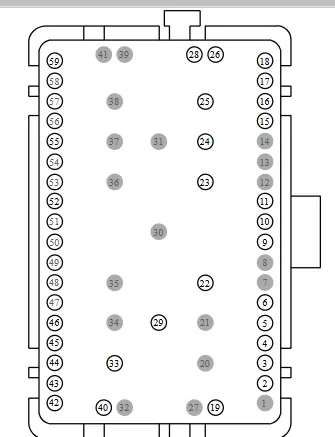
And that is C1147
This is a 59-Cavity connector - located by the Brake Pedal - it is the biggest connector (In-View)
Either Pull & Reseat it or Pull and Check for Power at Pin #40.
If you have power here, then the issue is between here and the rear console, if a pull and reseat does not fix the issue.

The harness runs - no other connectors (for this power) down the left side of the floor and then over to the rear console. (I Think) it's hard to tell for sure but it may run down the middle of the console.

So, you would need to also check for power on the connector going to the USB Ports

It's only 2 wires - C3522
Grey/Red = Power
Black/Blue = Ground

Check for power across both pins and then check for power from the (+) to body ground.
If you only get power when (+) to body ground, then the ground wire is broken as it routes to a shared multi-ground point so if that was left disconnected, you would have lost more systems.

Since you only stated, the connections were good - Did you Pull & Reset the Connector? at the rear console.

C1147 Female Side - Pin #40 = USB Power from Fuse #29 (Most Forward) Connector runs to the Fuse Box. Located right beside the Brake Pedal (If I recall) correctly.


C1147 Pinout.jpg
 

acsnowrider

Well-Known Member
First Name
JOHN
Joined
Jan 14, 2020
Threads
1
Messages
158
Reaction score
311
Location
FL
Vehicle(s)
2019 RANGER XLT
Occupation
RETIRED FORD ELECTRONIC/DRIVEABILITY TECH
Vehicle Showcase
1
O/P states-USB ports on the rear of my center console stopped working.

I get confused in my old age, so I have to ask,-- Is this failure specifically, for "loss of communication, at rear consol port/ports, or is it for loss of "charging" capability, or both items.

Have to ask, because my 2019 owners manual says on page 129, -Some of the USB ports may not have data transfer capabilities. Not sure on my truck, if it does/does not, but the ports are there. (2 of them)
Other item is that my consol has a symbol above each port, saying that you can NOT, charge a device using these ports. Honestly, I have never used the ports, but do remember conversations years ago, about not being able to charge off these consol/rear ports.
 
OP
OP
DrdPrtRlf

DrdPrtRlf

Active Member
Joined
Apr 24, 2020
Threads
5
Messages
25
Reaction score
10
Location
South Carolina
Vehicle(s)
2019 Ranger XLT 4x4
Vehicle Showcase
1
Do you have (Oversized) Tires than the Factory Tires?
That code will show due to mismatch in Wheel Speed sensors (rotational) speed vs what is programmed into the PCM on what it should be, it is a common code for those that have altered the tire size. BCM Reporting (Invalid) data that is has received from the ABS Module and does not match what the PCM is programmed for.
Some have also got this code to show with a Tune Installed.

I do not think its related to your current issue and if you have confirmed the fuses being good then it needs a wiring check to find the reason.
Yeah I do have oversized tires. Put them on 4 years ago and that was the first time I messed with forscan getting them dialed in. Starting to remember that's where that fault comes from
 
OP
OP
DrdPrtRlf

DrdPrtRlf

Active Member
Joined
Apr 24, 2020
Threads
5
Messages
25
Reaction score
10
Location
South Carolina
Vehicle(s)
2019 Ranger XLT 4x4
Vehicle Showcase
1
O/P states-USB ports on the rear of my center console stopped working.

I get confused in my old age, so I have to ask,-- Is this failure specifically, for "loss of communication, at rear consol port/ports, or is it for loss of "charging" capability, or both items.

Have to ask, because my 2019 owners manual says on page 129, -Some of the USB ports may not have data transfer capabilities. Not sure on my truck, if it does/does not, but the ports are there. (2 of them)
Other item is that my consol has a symbol above each port, saying that you can NOT, charge a device using these ports. Honestly, I have never used the ports, but do remember conversations years ago, about not being able to charge off these consol/rear ports.
As far as I know only the forward USB port is for data connectivity and the two rear USBs are just for charging. I've always used the rear USBs for charging because the forward one does not charge well, if at all
 
OP
OP
DrdPrtRlf

DrdPrtRlf

Active Member
Joined
Apr 24, 2020
Threads
5
Messages
25
Reaction score
10
Location
South Carolina
Vehicle(s)
2019 Ranger XLT 4x4
Vehicle Showcase
1
Ok, I dug and found that Fuse #29 is feeding both of those USB Ports on the rear of the console.

The wire diagrams are misleading and lead you to believe that there are (2) separate ports
However, this is ONLY TRUE IF you have (1) Power Point that is the same as the front ones. That is not the case.
You have a single power source (Fuse #29) feeding both of the rear USB charge ports.

The harness run 14A005 splits into 3 ways of routing - down the floor (sides) and down the center floor console.
So, I cannot be sure of how that specific power wire is being fed, not clear enough of a diagram.

So, with the engine running, check for power across Fuse #29 with a meter or test light.
The fuse is (After) the relay, if no power here, then the relay is not closing.
You can try a (BCM-Self Test) Reset or Disconnect the Battery for 5-Minutes.
Plus - also ensure the fuse is good - check with a meter - don't assume it's good juts by a visual this can and will (MISLEAD) as visually its looks good (BUT) it's actually bad.

If you have power across the fuse, then there is (1) connector that would have been disconnected for the HVAC work. (Up-Front) and then all the connectors at the Rear of the console.
And that is C1147
This is a 59-Cavity connector - located by the Brake Pedal - it is the biggest connector (In-View)
Either Pull & Reseat it or Pull and Check for Power at Pin #40.
If you have power here, then the issue is between here and the rear console, if a pull and reseat does not fix the issue.

The harness runs - no other connectors (for this power) down the left side of the floor and then over to the rear console. (I Think) it's hard to tell for sure but it may run down the middle of the console.

So, you would need to also check for power on the connector going to the USB Ports

It's only 2 wires - C3522
Grey/Red = Power
Black/Blue = Ground

Check for power across both pins and then check for power from the (+) to body ground.
If you only get power when (+) to body ground, then the ground wire is broken as it routes to a shared multi-ground point so if that was left disconnected, you would have lost more systems.

Since you only stated, the connections were good - Did you Pull & Reset the Connector? at the rear console.

C1147 Female Side - Pin #40 = USB Power from Fuse #29 (Most Forward) Connector runs to the Fuse Box. Located right beside the Brake Pedal (If I recall) correctly.


C1147 Pinout.jpg
This is more research than I ever did in college
 

My12SecRanger

Well-Known Member
First Name
Patrick
Joined
Dec 27, 2022
Threads
66
Messages
1,025
Reaction score
2,382
Location
Las Vegas
Vehicle(s)
21 XLT Ranger 2wd
Occupation
Ford Tech
replace the usb port we have a lot of issues with them here at my ford dealership
Sponsored


Top