
Sponsored
Android Auto update - "Coolwalk"
- Thread starter mtbikernate
- Start date
- Watchers 9
Dr_Strangelove
Well-Known Member
- First Name
- Adam
- Joined
- Oct 14, 2022
- Threads
- 12
- Messages
- 1,136
- Reaction score
- 5,218
- Location
- Henderson, NV
- Vehicle(s)
- '22 XLT Supercrew 4x4
- Occupation
- Art, Design, Photo & Video
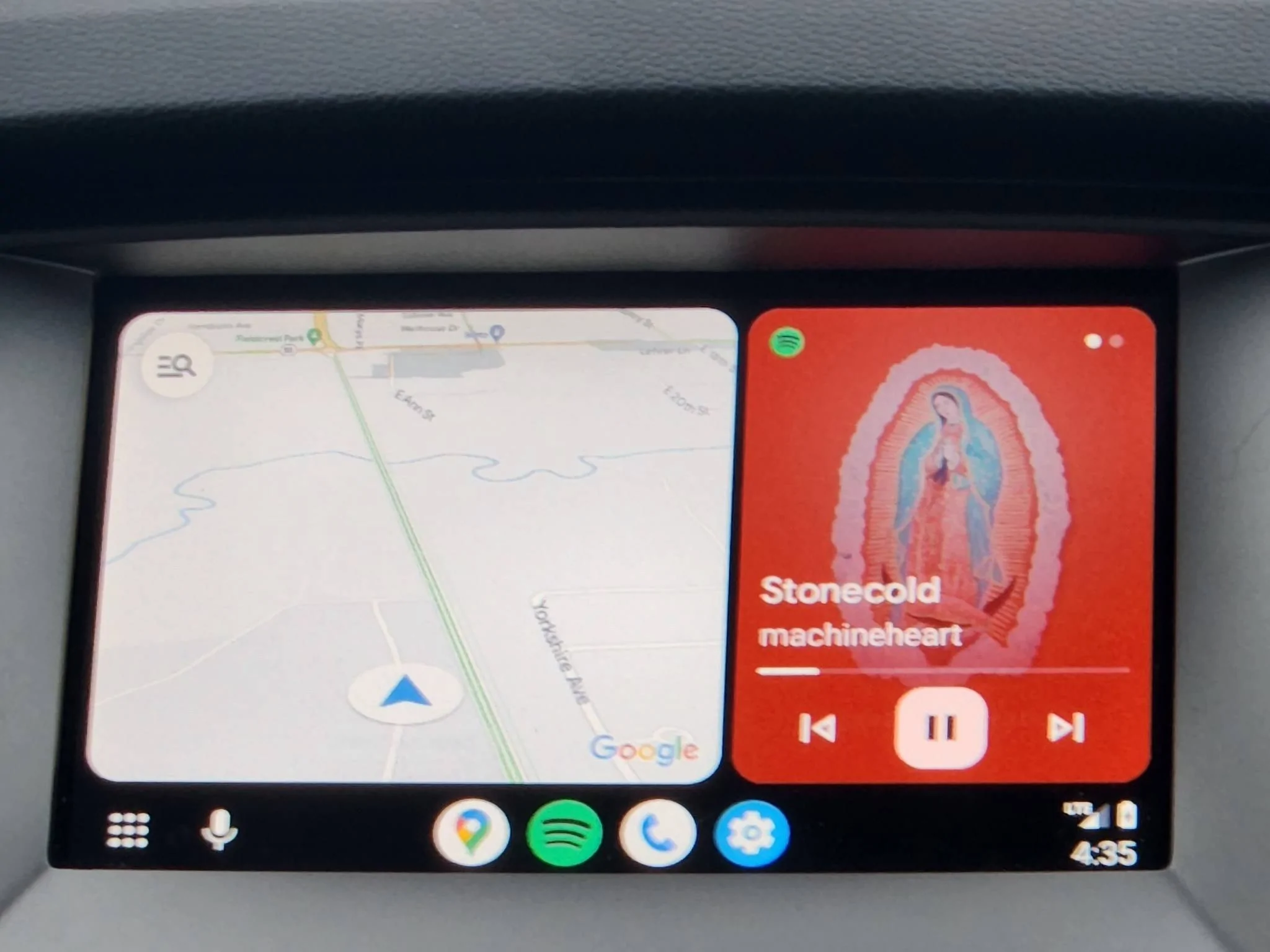
@TXRangerTim - The best way to tell if Coolwalk has installed / switched over is the clock location moves to the lower right hand corner of the screen. (See photo in post #18.) If you've got the new clock layout and the app icons are lining the bottom of the screen, but you don't have split screen, then the icon to switch back to split screen is in the lower left hand corner - and looks like this (But black and white)


TXRangerTim
Well-Known Member
My clock is now on the bottom right corner and I have the new icons. I don't have the icon for the split screen though. Lower left corner is just the settings.@TXRangerTim - The best way to tell if Coolwalk has installed / switched over is the clock location moves to the lower right hand corner of the screen. (See photo in post #18.) If you've got the new clock layout and the app icons are lining the bottom of the screen, but you don't have split screen, then the icon to switch back to split screen is in the lower left hand corner - and looks like this (But black and white)
Dr_Strangelove
Well-Known Member
- First Name
- Adam
- Joined
- Oct 14, 2022
- Threads
- 12
- Messages
- 1,136
- Reaction score
- 5,218
- Location
- Henderson, NV
- Vehicle(s)
- '22 XLT Supercrew 4x4
- Occupation
- Art, Design, Photo & Video
Interesting.. Do you think there's a chance you are using apps that will not dual-boot or don't have enough apps installed? By default it seems to choose Google Maps and then a music app. Mine is Spotify.
I found a troubleshooting thread where people were complaining about Waze not working in split screen if it is not fully updated. Are you using Waze by chance? It seems like all apps need to be fully updated to play nice with Coolwalk in AA.
I found a troubleshooting thread where people were complaining about Waze not working in split screen if it is not fully updated. Are you using Waze by chance? It seems like all apps need to be fully updated to play nice with Coolwalk in AA.
TXRangerTim
Well-Known Member
I use google maps and waze. For music, either amazon music or spotify.
Dr_Strangelove
Well-Known Member
- First Name
- Adam
- Joined
- Oct 14, 2022
- Threads
- 12
- Messages
- 1,136
- Reaction score
- 5,218
- Location
- Henderson, NV
- Vehicle(s)
- '22 XLT Supercrew 4x4
- Occupation
- Art, Design, Photo & Video
Maybe double-check to be sure they're all fully updated in the play store. You can still manually update apps if you tap on your user icon and then click "Manage apps & devices".
TXRangerTim
Well-Known Member
I'll update Waze and try it out. Google maps is up to date.
TXRangerTim
Well-Known Member
Updated the apps. Seems Waze was/is the problem. Sync defaults to Waze on startup. No split screen option. Switched to GM and there is the split screen option now. Switched back to Waze, single screen only again.
Jqueen
Active Member
- Joined
- Mar 2, 2021
- Threads
- 0
- Messages
- 31
- Reaction score
- 60
- Location
- Denton, Texas
- Vehicle(s)
- 2021 Ford Ranger Supercrew XLT 2wd
Did everybody's temperature disappear with cool walk? Anybody know how to get it back?
TXRangerTim
Well-Known Member
If you mean the weather temp, then mine is not on the sync screen now but is still on the driver's info screen.Did everybody's temperature disappear with cool walk? Anybody know how to get it back?
Jqueen
Active Member
- Joined
- Mar 2, 2021
- Threads
- 0
- Messages
- 31
- Reaction score
- 60
- Location
- Denton, Texas
- Vehicle(s)
- 2021 Ford Ranger Supercrew XLT 2wd
You have a lariat? I have an xlt and I don't think it shows anywhere, but I could be wrong. But I meant the temp from android auto. It used to show in the top right next to the time, but with coolwalk it disappeared.If you mean the weather temp, then mine is not on the sync screen now but is still on the driver's info screen.
TXRangerTim
Well-Known Member
XLT Tremor. Look on your driver's screen between the compass heading and the mileage right above D.You have a lariat? I have an xlt and I don't think it shows anywhere, but I could be wrong. But I meant the temp from android auto. It used to show in the top right next to the time, but with coolwalk it disappeared.
TXRangerTim
Well-Known Member
I'll let you continue reading the posts.you don't make it work. it's something Android Auto enables server side. when they do for you, it will just appear.

Zaph
Well-Known Member
The update Just appeared for me today after a phone update. I like it. I like when a 3rd window appears for a text or something and I'm done with it, I can just slide it off like a tile and it's gone. pretty slick.

Those of you still using Android Auto with a USB plug, see my old post about this "just right" cable I found.
Those of you still using Android Auto with a USB plug, see my old post about this "just right" cable I found.
- Banned
- #45
After using it a bit I found that it's just an update for the sake of updating.
Some software engineer needed to justify his job, so here. "Doesn't this look pretty?" Meanwhile there is no real benefit to the end user other than being able to see album art and a map at the same time. Which nobody wanted or asked for.
Some software engineer needed to justify his job, so here. "Doesn't this look pretty?" Meanwhile there is no real benefit to the end user other than being able to see album art and a map at the same time. Which nobody wanted or asked for.
Sponsored


