Sponsored

Just updated to Sync 3.4 on my Ranger 2019

TylerV76

Well-Known Member
First Name
Tyler
Joined
Dec 5, 2019
Threads
4
Messages
306
Reaction score
395
Location
Oxford, Michigan
Vehicle(s)
2019 Ranger FX4
Occupation
Emissions testing supplier
There is a consistent pattern when one loses the "Climate controls" on the display after an update, the only way to restore them is using FORScan and a OBD II adapter.

Your vehicle info claims a "BMW" rather than a Ford vehicle, so not exactly sure what data or history of prior "Ford Sync app" updates occurred where the Climate controls were removed from the display screen.

This forum needs more information from your previous attempts to upgrade your Ford Sync app software to provide any useful suggestions
The update to 20021 also removed my climate controls. According to everyone I’ve seen do the update, it’s more common than not.
Sponsored


Dennis Esler

Active Member
First Name
Dennis
Joined
Oct 18, 2019
Threads
8
Messages
43
Reaction score
20
Location
Smyrna, GA
Vehicle(s)
2019 Ford Ranger, Lariat
Occupation
Retired
There is a consistent pattern when one loses the "Climate controls" on the display after an update, the only way to restore them is using FORScan and a OBD II adapter.

Your vehicle info claims a "BMW" rather than a Ford vehicle, so not exactly sure what data or history of prior "Ford Sync app" updates occurred where the Climate controls were removed from the display screen.

This forum needs more information from your previous attempts to upgrade your Ford Sync app software to provide any useful suggestions
Oops, It is a 2019 Ranger, I upgraded from 3.3 to 3.4 (20021) the other day. Climate control was lost. Today when I tried to install 20136, that' when the error message occurred.
 

Texas Scout

Well-Known Member
First Name
Pablo
Joined
Oct 22, 2019
Threads
0
Messages
48
Reaction score
44
Location
Merritt Island
Vehicle(s)
2019 Ford Ranger Lariat, White Platinum
The update to 20021 also removed my climate controls. According to everyone I’ve seen do the update, it’s more common than not.
Thanks for sharing, I lost my Climate controls doing an earlier Sync version update, but once restored via the FORScan and OBD II adapter subsequent updates did not remove them.

Based on your experience I am back to thinking it is the use of the reformat tool (when used for the first time) to update one's Sync app that removes the Climate controls...

So, if this Sync app update was your "first" update, that would explain the loss of the Climate controls because it appears to be the first time using the reformat tool is what causes the "loss" of the Climate controls from the screen, NOT the Build version

Perhaps folks should pause/wait until we get more info on this in the forum
 

Texas Scout

Well-Known Member
First Name
Pablo
Joined
Oct 22, 2019
Threads
0
Messages
48
Reaction score
44
Location
Merritt Island
Vehicle(s)
2019 Ford Ranger Lariat, White Platinum
Oops, It is a 2019 Ranger, I upgraded from 3.3 to 3.4 (20021) the other day. Climate control was lost. Today when I tried to install 20136, that' when the error message occurred.
Since you upgraded
The update to 20021 also removed my climate controls. According to everyone I’ve seen do the update, it’s more common than not.
Question: Was this the "first" time you has attempted to upgrade your Ford Sync app?
 

TylerV76

Well-Known Member
First Name
Tyler
Joined
Dec 5, 2019
Threads
4
Messages
306
Reaction score
395
Location
Oxford, Michigan
Vehicle(s)
2019 Ranger FX4
Occupation
Emissions testing supplier
Thanks for sharing, I lost my Climate controls doing an earlier Sync version update, but once restored via the FORScan and OBD II adapter subsequent updates did not remove them.

Based on your experience I am back to thinking it is the use of the reformat tool (when used for the first time) to update one's Sync app that removes the Climate controls...

So, if this Sync app update was your "first" update, that would explain the loss of the Climate controls because it appears to be the first time using the reformat tool is what causes the "loss" of the Climate controls from the screen, NOT the Build version

Perhaps folks should pause/wait until we get more info on this in the forum
I think they stuck for you because you programmed them in Forscan And it’s overriding the update. Probably the same reason the splash screens aren’t getting reset after an update.


TylerV76

Well-Known Member
First Name
Tyler
Joined
Dec 5, 2019
Threads
4
Messages
306
Reaction score
395
Location
Oxford, Michigan
Vehicle(s)
2019 Ranger FX4
Occupation
Emissions testing supplier
Question: Was this the "first" time you has attempted to upgrade your Ford Sync app?
[/QUOTE]

Yep
 

Rick - Saber

Well-Known Member
First Name
Rick
Joined
Apr 18, 2019
Threads
4
Messages
303
Reaction score
377
Location
NC
Vehicle(s)
Sport Ranger 4x4
A big Thank You to @CyanLabs for their updater program and making it so easy to upgrade Sync 3 software! Not sure if the install / update could have gone any easier than it just did. Thanks for all your hard work on this. Cheers. :beer: :like:
 

Big Blue

Well-Known Member
First Name
Lee
Joined
May 5, 2020
Threads
16
Messages
3,927
Reaction score
9,352
Location
Wisconsin
Vehicle(s)
2019 Ford Ranger XLT FX4 Supercrew lighting blue
Occupation
Retired mechanical designer
I just installed 20021 using Cyanlad the other day . Everything went fine except that Climate Control doesn't show. I just downloaded 20136. When I tried to install it I get an error LS0008. I downloaded the files again and tried to install it and got the same error.
The reason you are getting the error is you need to downgrade your SYNC version before you can upgrade. I ran into the same issue going from 20021 to 20136. Once I did the downgrade then the upgrade went with out issue. I too had lost my climate screen from an earlier upgrade and restored it using Forscan. Since then it has stayed.
 

Big Blue

Well-Known Member
First Name
Lee
Joined
May 5, 2020
Threads
16
Messages
3,927
Reaction score
9,352
Location
Wisconsin
Vehicle(s)
2019 Ford Ranger XLT FX4 Supercrew lighting blue
Occupation
Retired mechanical designer
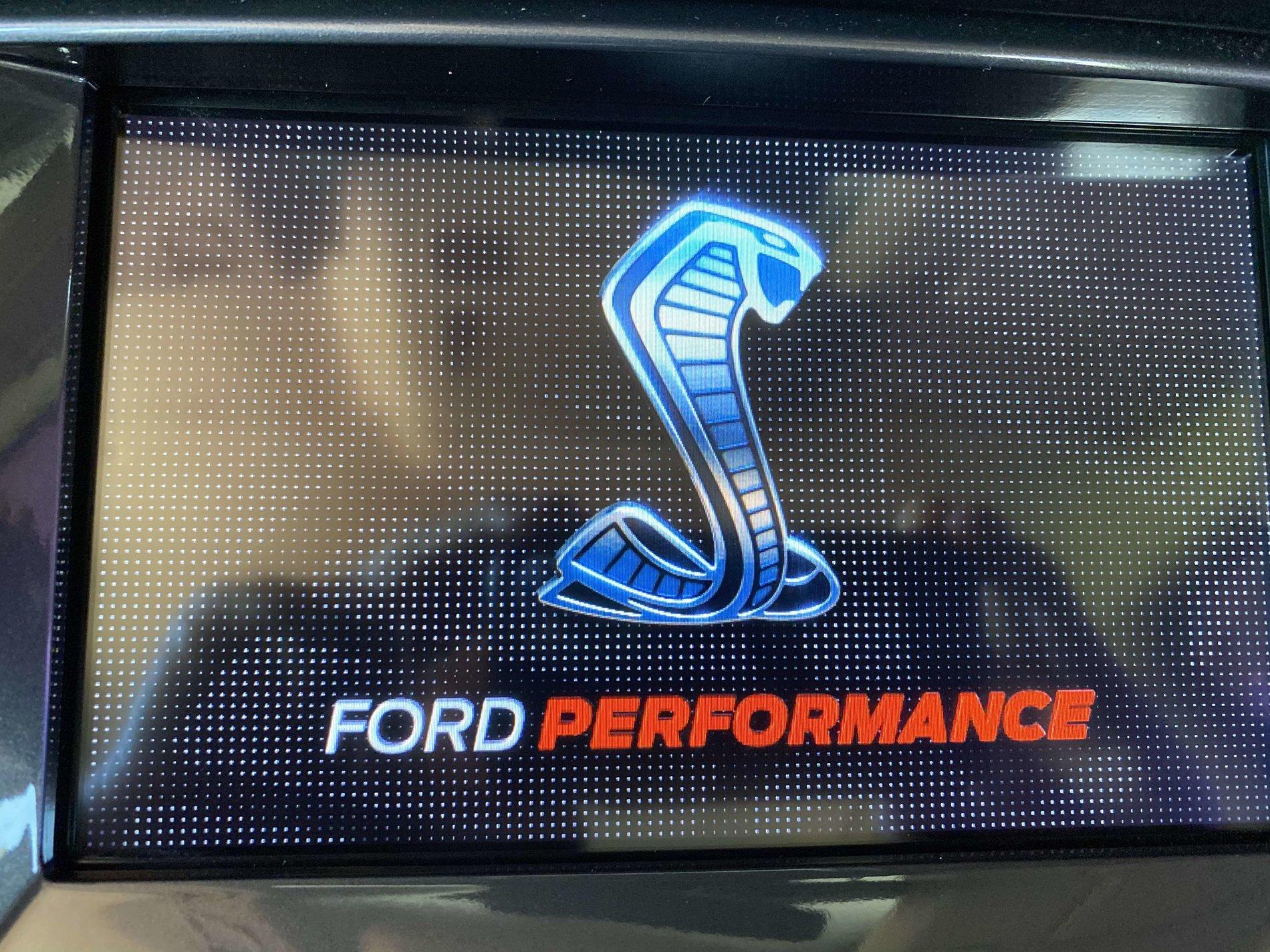
I found this splash screen back in March when I used FORScan and my OBD II adapter to restore my Climate controls.
I had watched Ford v Ferrari for the first time a few weeks before, and I liked this one because of the "EcoBEAST" in "S" when you floor it. Just makes me smile while I am enjoying the Ford Performance.
Cobra Splash.jpg
That is my second choice for a splash screen after the Raptor one. The Bronco and Explorer screens are a bit too movie like for my taste and I didn't want a Mustang or a Lincoln in my truck. Now if they will give us an actual Ranger screen, that would be great. Maybe someone can come up with a cobra emblem to replace the blue oval on the grille.
 

Nick Barber

Well-Known Member
First Name
Nick
Joined
Jun 29, 2019
Threads
5
Messages
116
Reaction score
130
Location
Richland, WA
Vehicle(s)
2019 Lariat, FX4, White Platinum, Chrome, Tow
Occupation
Program Manager
Vehicle Showcase
1
Regarding the XM station icons missing: I downgraded from 20021 then re-upgraded to 20136 today and a most of the station icons were there but a few were missing again. I went on about a 30-minute drive and the missing ones eventually showed up. My guess is that they eventually download over the XM signal.

Anyway all is good and hopefully this is the last USB style update since now we have automatic updates.
 
Last edited:

Dennis Esler

Active Member
First Name
Dennis
Joined
Oct 18, 2019
Threads
8
Messages
43
Reaction score
20
Location
Smyrna, GA
Vehicle(s)
2019 Ford Ranger, Lariat
Occupation
Retired
Question: Was this the "first" time you has attempted to upgrade your Ford Sync app?
Yep
[/QUOTE]
I upgraded from 3.3 to 3.4 on Thursday. This afternoon I tried to go to the new 3.4 build
 

TylerV76

Well-Known Member
First Name
Tyler
Joined
Dec 5, 2019
Threads
4
Messages
306
Reaction score
395
Location
Oxford, Michigan
Vehicle(s)
2019 Ranger FX4
Occupation
Emissions testing supplier
Just went from 20021 to 19101 to begin the update to 20136. While on 19101 I tested the CarPlay mic volume since I’ve had major issues with it. On 19101 the mic volume was perfect so I went to 20136 hoping it would be better than 20021. Unfortunately it’s even worse on 20136.

I’m now in the process of going back to 19200, which is the official release on my wife’s F-150 that works perfectly. If the mic is fine there then I’m disabling auto updates and staying on 19200.

Ford needs to do something about this. There’s a problem in the software that doesn’t affect everyone but is affecting a ton of us. I know it’s not just Ford but it’s been this way for a long time now.
 

TylerV76

Well-Known Member
First Name
Tyler
Joined
Dec 5, 2019
Threads
4
Messages
306
Reaction score
395
Location
Oxford, Michigan
Vehicle(s)
2019 Ranger FX4
Occupation
Emissions testing supplier
Well the mic is horrible on 19200 as well.

Edit: The mic on 19101 is perfect so I’m staying on that version. I’m not even going to try 19274 considering the 2 versions surrounding it don’t work.

I’ll do the official update next month and see if anything’s changes. Otherwise I’ll downgrade back to 19101.
 
Last edited:

Dennis Esler

Active Member
First Name
Dennis
Joined
Oct 18, 2019
Threads
8
Messages
43
Reaction score
20
Location
Smyrna, GA
Vehicle(s)
2019 Ford Ranger, Lariat
Occupation
Retired
Thanks for sharing, I lost my Climate controls doing an earlier Sync version update, but once restored via the FORScan and OBD II adapter subsequent updates did not remove them.

Based on your experience I am back to thinking it is the use of the reformat tool (when used for the first time) to update one's Sync app that removes the Climate controls...

So, if this Sync app update was your "first" update, that would explain the loss of the Climate controls because it appears to be the first time using the reformat tool is what causes the "loss" of the Climate controls from the screen, NOT the Build version

Perhaps folks should pause/wait until we get more info on this in the forum
Is their a way to restore the climate control without using FORScan? Or do I need to invest in a OBD II Adapter? If so, which one?
 

Porpoise Hork

Well-Known Member
First Name
Bret
Joined
Apr 28, 2020
Threads
19
Messages
1,316
Reaction score
2,366
Location
Houston
Vehicle(s)
2022 F150 XLT Powerboost FX4 302A Oxford White
Occupation
IT
Is their a way to restore the climate control without using FORScan? Or do I need to invest in a OBD II Adapter? If so, which one?
I do not believe that there is. As for the cable, I got this one and it has worked flawlessly. No switch to have to remember to flip or anything. Just plug it in fire up Forscan and away I go.
Sponsored


Top