Sponsored

Problem linking Ford app to Ranger?

rang19ca

Well-Known Member
First Name
Chuck
Joined
Apr 29, 2019
Threads
11
Messages
2,095
Reaction score
7,590
Location
Carpinteria Ca
Vehicle(s)
2019 Ranger XLT 4X4 2024 Lincoln Corsair
Occupation
Retired Diesel Mechanic
It's too bad they can't get this right. I just gave up.
Sponsored
 

ScarzRanger21(2.0)

Well-Known Member
First Name
Eric
Joined
Dec 9, 2025
Threads
9
Messages
203
Reaction score
700
Location
Auberry, CA
Vehicle(s)
2021 Ranger 4x4, 2019 Ranger Fx4
Occupation
Electrician
Is the problem with the app itself or your phone? I was having trouble getting my new phone to link and finally figured out a setting had been changed. I did a software reset on my phone and it worked after that. Worth a shot.
 

Racket

Well-Known Member
First Name
John
Joined
Jan 21, 2020
Threads
22
Messages
2,203
Reaction score
3,402
Location
Here and There
Vehicle(s)
2019 Lariat Supercrew 2WD
Occupation
Transient
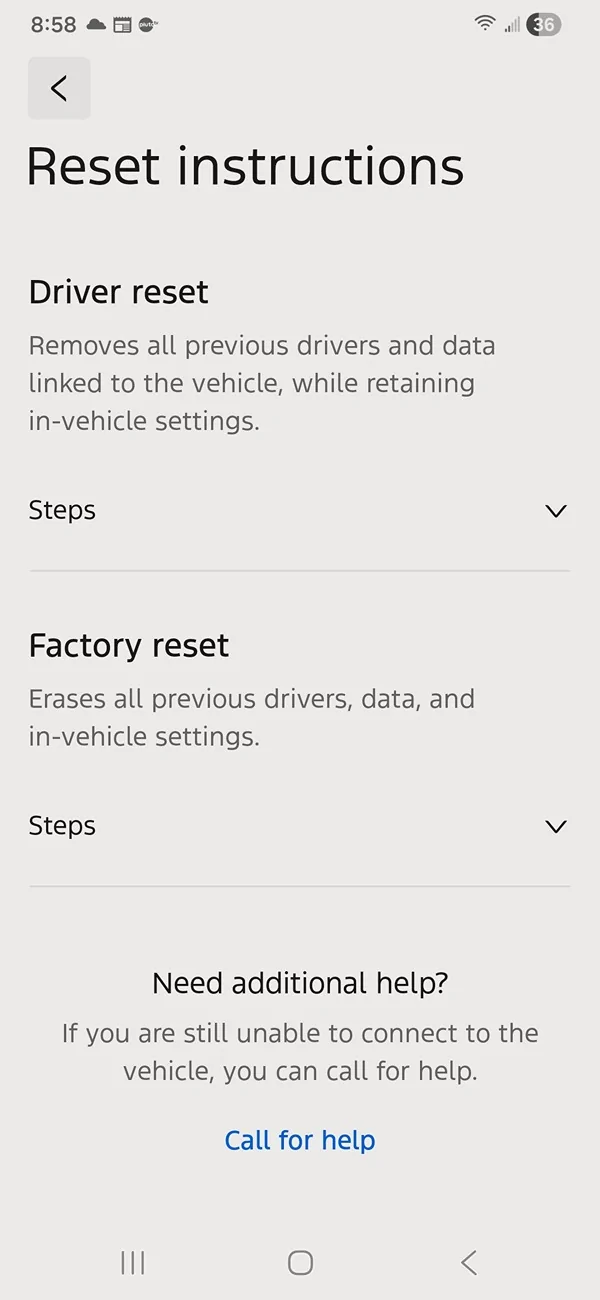
Screenshot_20260317_205834_Ford.webp

Mine also has the delete driver screen ...
That might only be available to previously registered owners in the app. Otherwise a malicious person would unregistered everyone from their Fords.
 
OP
OP
GreedyMonkey

GreedyMonkey

Member
First Name
Kelly (Mr.)
Joined
Feb 28, 2026
Threads
4
Messages
13
Reaction score
22
Location
Maple Valley, WA
Vehicle(s)
2022 Ford Ranger XLT
For those interested, I got the issue resolved, though it took a little time.

I called Ford and they told me Sync was not up to date, though Sync told me she was. I've had Auto Update on since buying the truck and it's never done that, so I elected to manually install the update via USB.

I copied the update to USB and attempted the install. Sync didn't start the update. I started the whole process again and finally responded and updated. When the update was done, I performed another Master Reset. Lo and behold, it worked. I am now connected and all is well.

Thanks to all who responded.
 

ScarzRanger21(2.0)

Well-Known Member
First Name
Eric
Joined
Dec 9, 2025
Threads
9
Messages
203
Reaction score
700
Location
Auberry, CA
Vehicle(s)
2021 Ranger 4x4, 2019 Ranger Fx4
Occupation
Electrician
I hate how these new vehicles are basically just computers with wheels. The more technology you put in something, the more potential for glitches and problems.


fusseli

Well-Known Member
Joined
Aug 11, 2019
Threads
23
Messages
624
Reaction score
966
Location
Colorado
Vehicle(s)
2019 Lariat FX4 White Platinum Tri-Coat
Occupation
EE
Vehicle Showcase
1
For those interested, I got the issue resolved, though it took a little time.

I called Ford and they told me Sync was not up to date, though Sync told me she was. I've had Auto Update on since buying the truck and it's never done that, so I elected to manually install the update via USB.

I copied the update to USB and attempted the install. Sync didn't start the update. I started the whole process again and finally responded and updated. When the update was done, I performed another Master Reset. Lo and behold, it worked. I am now connected and all is well.

Thanks to all who responded.
What sync version did you update to?

My 2019 lost its connectivity to the Ford Pass app a few months ago after they udpated the app again. It had worked seamlessly since 2019, before that.
 
OP
OP
GreedyMonkey

GreedyMonkey

Member
First Name
Kelly (Mr.)
Joined
Feb 28, 2026
Threads
4
Messages
13
Reaction score
22
Location
Maple Valley, WA
Vehicle(s)
2022 Ford Ranger XLT
What sync version did you update to?

My 2019 lost its connectivity to the Ford Pass app a few months ago after they udpated the app again. It had worked seamlessly since 2019, before that.
The Sync version remains Sync 3.4. It was the build that was out dated. I upgraded to Build 23188
Sponsored


Top