Sponsored

P2610 code after changing battery

paquete305

Active Member
Joined
Jan 24, 2020
Threads
3
Messages
44
Reaction score
84
Location
Earth
Vehicle(s)
2019 XLT
Resolved :)

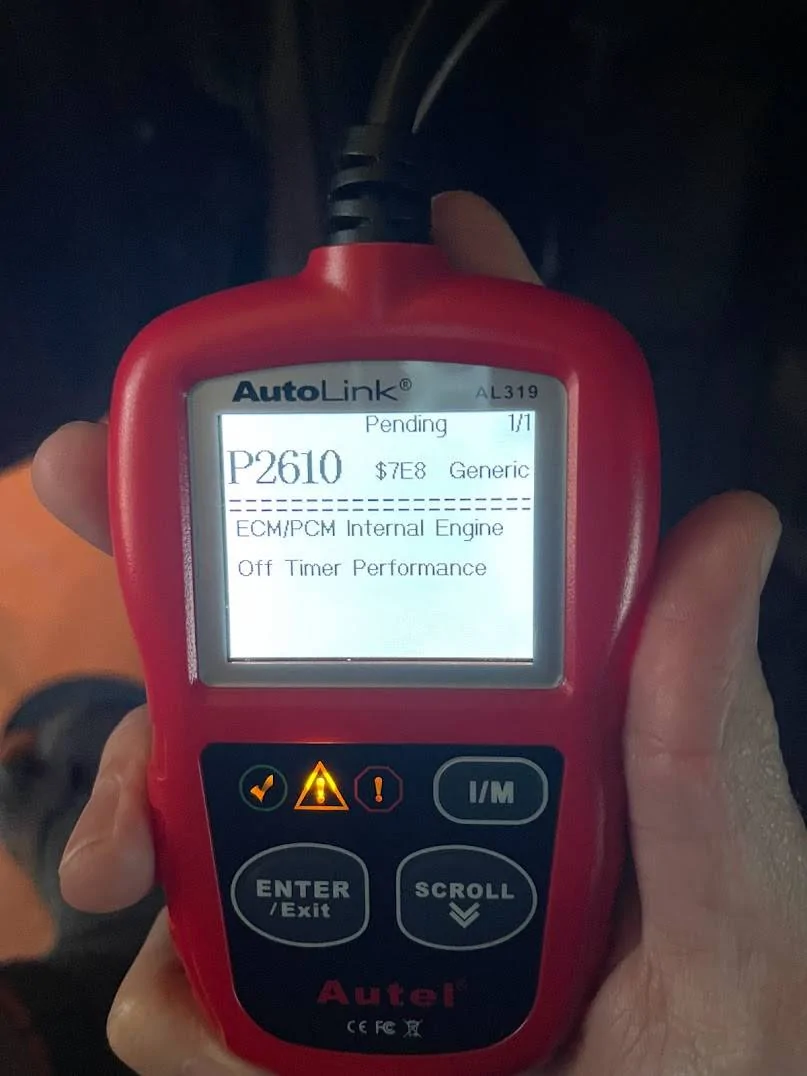
Just swapped out my battery to an Odyssey ( ODYODP-AGM48H6L3 ) battery and I am getting a p2610 message on my Ultragauge digital OBD scanner.

I also got this code with another code reader I have - just be sure that it isn't something specific to the Ultragauge (a device that lets me see boost, engine temp, etc. in real-time).

IMG_3586.jpg


I didn't see anything about this specific code aside from a thread about adding cruise control via Forscan - which I have not done and thought it would be helpful to post about this here just in case anyone else runs into this issue. Searching on other Ford forums did not return any specific results about this either (aside from generic info, and not specific to this vehicle), though it seems as if there is a malfunction with being able to identify the state of my engine (which turns on without issue). I have no check engine light either, and wouldn't even know that I had this code if it weren't for the OBD reader I have hooked up.

Is this safe to clear, or is it possible that I somehow messed something up in the process of changing my battery?

I hope that it's nothing to worry about...
Sponsored

 
Last edited:

JDowns

Well-Known Member
First Name
Jeff
Joined
Dec 3, 2021
Threads
18
Messages
448
Reaction score
1,658
Location
Coeur D'Alene
Vehicle(s)
2021 Ranger XLT Tremor
Hard to say. Only concerns would be if the new battery matches the OEM specifications. There is a warning in the manual about auto start stop and battery replacement. Also to not disconnect the battery during power hold.
 
OP
OP

paquete305

Active Member
Joined
Jan 24, 2020
Threads
3
Messages
44
Reaction score
84
Location
Earth
Vehicle(s)
2019 XLT
Hard to say. Only concerns would be if the new battery matches the OEM specifications. There is a warning in the manual about auto start stop and battery replacement. Also to not disconnect the battery during power hold.
Thank you. It seems like the battery is as good as or better than OEM spec, so I do not think it would be that unless my battery is defective. I also followed the owner's manual process for changing the battery - being especially careful to wait at least 2 minutes for the car to do its thing with storing diagnostic info.

I just put the battery to charge with a battery tender and will see what happens after it is fully charged... I'll keep everyone posted.
 

JDowns

Well-Known Member
First Name
Jeff
Joined
Dec 3, 2021
Threads
18
Messages
448
Reaction score
1,658
Location
Coeur D'Alene
Vehicle(s)
2021 Ranger XLT Tremor
Quick search shows what you described. The time difference between the CPU and the PCM/ECM is greater than the allowed value and a complete engine off cycle cannot be determined. So basically the timer is not functioning properly or the timer never got reset.

You could try disconnecting the battery. Holding the positive and negative together for about 5 minutes to drain any residual current in capacitors in the system. This will force a system reset. This use to also clear any and all codes. Not sure if this is still the preferred method on newer vehicles. Maybe if we have a tech here they can chime in.

Don't disconnect the battery until the power hold has finished.
 

Marpater

Well-Known Member
First Name
Mark
Joined
Dec 6, 2021
Threads
6
Messages
226
Reaction score
720
Location
Michigan
Vehicle(s)
2021 Ford Ranger
Occupation
Consulting
Last edited:


JDowns

Well-Known Member
First Name
Jeff
Joined
Dec 3, 2021
Threads
18
Messages
448
Reaction score
1,658
Location
Coeur D'Alene
Vehicle(s)
2021 Ranger XLT Tremor
Thank you. It seems like the battery is as good as or better than OEM spec, so I do not think it would be that unless my battery is defective. I also followed the owner's manual process for changing the battery - being especially careful to wait at least 2 minutes for the car to do its thing with storing diagnostic info.

I just put the battery to charge with a battery tender and will see what happens after it is fully charged... I'll keep everyone posted.
My speculation would be this. I would assume the system is hardened against any scenario a simple battery change would endure. Most likely there is a CPU that controls a system wide clock. The ECM/PCM has a timer to check "Engine Off" timing against a central clock to regulate cold start and fast start scenarios, and likely other vehicle tasks. The ECM/PCM would periodically compare its time with CPU time. If the time difference between the CPU clock and ECM timer is greater than a set value a DTC is triggered. My guess would be there was enough residual current in the system to maintain the CPU clock time and not enough in the ECM to perform its periodic comparison (or vice versa), creating the time gap.

Otherwise if a simple battery change fried the ECM/PCM timer that would be extremely unfortunate and I certainly hope that is not the case.
 
OP
OP

paquete305

Active Member
Joined
Jan 24, 2020
Threads
3
Messages
44
Reaction score
84
Location
Earth
Vehicle(s)
2019 XLT
My speculation would be this. I would assume the system is hardened against any scenario a simple battery change would endure. Most likely there is a CPU that controls a system wide clock. The ECM/PCM has a timer to check "Engine Off" timing against a central clock to regulate cold start and fast start scenarios, and likely other vehicle tasks. The ECM/PCM would periodically compare its time with CPU time. If the time difference between the CPU clock and ECM timer is greater than a set value a DTC is triggered. My guess would be there was enough residual current in the system to maintain the CPU clock time and not enough in the ECM to perform its periodic comparison (or vice versa), creating the time gap.

Otherwise if a simple battery change fried the ECM/PCM timer that would be extremely unfortunate and I certainly hope that is not the case.

OK so I come with good news. I cleared the code with my OBD reader, and all is well now (at least it seems that way). I wanted to try this before doing a full reset as you had described, as I suspected that the DTC was not as serious as my initial panic made me believe it was :).

Thank you for the additional insight into what may have been the root cause.

FYI to others with non-working auto-start stop
Unrelated to the code issue, though I also want to note that the auto-start stop now works again. When it had stopped working, I suspected that the battery was on its way out, and it seems like that may have been the case as I no longer have a "Battery charging" message in the gauge cluster for the auto-start stop info.

I also did not use Forscan to reset the battery monitor system, and instead, I turned the ignition on (with the engine off) and flashed my high beams 5 times, and then pushed my brake pedal 5 times. After doing this, and a few seconds later, my battery icon blinked 4 times. I was skeptical of doing this as I had just found a random video on YouTube describing this procedure for a ROTW Ranger, but it seems to have worked as my ECM voltage isn't constantly in the mid 14 range anymore - it drops down to 13v (which I think means it isn't trying to charge the battery anymore), and the auto-start stop only started working after I did this reset procedure.
 
Last edited:

Kawffin

Well-Known Member
First Name
Marlow
Joined
Aug 21, 2019
Threads
12
Messages
140
Reaction score
148
Location
Palm springs, CA
Vehicle(s)
2019 Ford Ranger XLT
Occupation
Cultivation technician II
Vehicle Showcase
1
OK so I come with good news. I cleared the code with my OBD reader, and all is well now (at least it seems that way). I wanted to try this before doing a full reset as you had described, as I suspected that the DTC was not as serious as my initial panic made me believe it was :).

Thank you for the additional insight into what may have been the root cause.

FYI to others with non-working auto-start stop
Unrelated to the code issue, though I also want to note that the auto-start stop now works again. When it had stopped working, I suspected that the battery was on its way out, and it seems like that may have been the case as I no longer have a "Battery charging" message in the gauge cluster for the auto-start stop info.

I also did not use Forscan to reset the battery monitor system, and instead, I turned the ignition on (with the engine off) and flashed my high beams 5 times, and then pushed my brake pedal 5 times. After doing this, and a few seconds later, my battery icon blinked 4 times. I was skeptical of doing this as I had just found a random video on YouTube describing this procedure for a ROTW Ranger, but it seems to have worked as my ECM voltage isn't constantly in the mid 14 range anymore - it drops down to 13v (which I think means it isn't trying to charge the battery anymore), and the auto-start stop only started working after I did this reset procedure.
This was a tremendous help, thank you. After replacing my battery I continued to get the "vehicle charging" message and was worried something was off and the battery wasn't getting charged. I didn't see my battery icon flash but the reset worked and auto start/stop is back with no vehicle charging message.My dealership is full of dickheads and I try to avoid it at all costs. Thank you for saving me a frustrating trip.
 

RangerRick15

Active Member
First Name
Rick
Joined
Dec 29, 2021
Threads
4
Messages
30
Reaction score
31
Location
Northern Virginia
Vehicle(s)
2020 Ranger XLT FX4 SuperCrew
Occupation
Operations
flashed my high beams 5 times, and then pushed my brake pedal 5 times. After doing this, and a few seconds later, my battery icon blinked 4 times
I'm having a handful of electrical system issues and have another post going. I thought it was isolated to the antenna, but @RANGER PRIDE suggested battery.

They just replaced my battery, it was reading 11.7V and tested bad (though never had a start or run problem). The trucked worked flawlessly for two days. Then the A/S/S and my key fob began working very intermittently, again. I began reading battery related posts on here after getting my truck back with the new battery. I also purchased a battery monitor and have been watching that with curiosity. Several things to note:

1) The positive terminal is... complicated, yet cheap. If I simply wiggle it with two fingers, it pops right off - and it doesn't matter how tight I make the terminal - in fact, tighter makes it pop off on its' own. I hooked up the battery monitor

2) The manual states the BMS may have issues with other accessories attached directly to the negative terminal - which it also states you must attach alternate accessories directly to the negative terminal. (sounds unrefined and under-engineered if it cannot compensate, but that could just be the lawyer office getting in the manual for the peasants, when it's trying to say the BMS can only account for the known systems, and shut them down as necessary to "prolong battery life").

3) "Those electrical accessories affected include the rear defrost, heated/cooled seats, climate control fan, heated steering wheel, audio and navigation system"

It was disappointing to read this - as I was hoping it would explain why the Key Fobs, TCM, FordPass capability, and TPM all intermittently come off-line. Not one of them mentioned in the list of systems shut off by the BMS. They "believe the TCM is bad" and have put one on order - though I don't expect it any month soon... FordPass has been completely inop since October. (The truck is 1 year old as of OCT, and 11000 miles). Side note - they also reset the transmission - that sucker sure is rough sometimes, until it's warm.

4) The truck seems to be designed to pro-long the battery, but it also seems it's killing a lot of batteries out there. Bad batches are possible. Other issues are possible. It seems there's some sort of parasite drain in my system. I may look around for rodent damage, as I did kill 6 mice in my garage last summer (can't park the truck in there, the ceiling is only 6', less opener assembly, but I park in front of it).

5) Monitoring my voltage:

After install the battery monitor (ANCEL Battery monitor), since the terminals wiggled off, I let it sit for 12 hours.

It drained 12.70 V to 12.42V in 24 hours. It idles at 13.64V. While moving, it's constantly charging at 14.7-14.86V. I attempted the 5 flashes, 5 brakes, and noted the 4 battery icon flashes. It did not change the charging level of the battery. Note - the A/S/S, key fob, and TPM worked the entire time. I did this with both nothing on (nav..), and on the second drive with heated seats (setting 1), running lights, a/c (64 on a 40 deg F day), radio, nav. With everything on it could hold A/S/S for nearly 2.5 mins, draining slowly from 12.4V to 12V, dipping below as it fired back up and began charging at 14.8V again.

6) Question: has anyone had any issues with hooking up an second battery through an isolator? That was my plan - after the warranty addresses the other system issues.

Opinion page: it's a complicated battery system, but I believe we're all figuring it out. Yes, it's going to cause problems. But, I love everything else about the truck and I'm willing to stick it out (as frustrating as it is), and continue to figure this thing out. And I have complete dealer support, and they're 3 miles and minutes away. They just take weeks to get an appointment a week to do anything once I drop it off... but, I can get a free loaner, and all work has been warranty and free.
 

bubbabudd

New Member
First Name
Bob
Joined
Feb 18, 2022
Threads
0
Messages
2
Reaction score
14
Location
Tonopah AZ
Vehicle(s)
2019 Ranger XLT super cab 4x4
Occupation
Retired OTR driver
I'm having a handful of electrical system issues and have another post going. I thought it was isolated to the antenna, but @RANGER PRIDE suggested battery.

They just replaced my battery, it was reading 11.7V and tested bad (though never had a start or run problem). The trucked worked flawlessly for two days. Then the A/S/S and my key fob began working very intermittently, again. I began reading battery related posts on here after getting my truck back with the new battery. I also purchased a battery monitor and have been watching that with curiosity. Several things to note:

1) The positive terminal is... complicated, yet cheap. If I simply wiggle it with two fingers, it pops right off - and it doesn't matter how tight I make the terminal - in fact, tighter makes it pop off on its' own. I hooked up the battery monitor

2) The manual states the BMS may have issues with other accessories attached directly to the negative terminal - which it also states you must attach alternate accessories directly to the negative terminal. (sounds unrefined and under-engineered if it cannot compensate, but that could just be the lawyer office getting in the manual for the peasants, when it's trying to say the BMS can only account for the known systems, and shut them down as necessary to "prolong battery life").

3) "Those electrical accessories affected include the rear defrost, heated/cooled seats, climate control fan, heated steering wheel, audio and navigation system"

It was disappointing to read this - as I was hoping it would explain why the Key Fobs, TCM, FordPass capability, and TPM all intermittently come off-line. Not one of them mentioned in the list of systems shut off by the BMS. They "believe the TCM is bad" and have put one on order - though I don't expect it any month soon... FordPass has been completely inop since October. (The truck is 1 year old as of OCT, and 11000 miles). Side note - they also reset the transmission - that sucker sure is rough sometimes, until it's warm.

4) The truck seems to be designed to pro-long the battery, but it also seems it's killing a lot of batteries out there. Bad batches are possible. Other issues are possible. It seems there's some sort of parasite drain in my system. I may look around for rodent damage, as I did kill 6 mice in my garage last summer (can't park the truck in there, the ceiling is only 6', less opener assembly, but I park in front of it).

5) Monitoring my voltage:

After install the battery monitor (ANCEL Battery monitor), since the terminals wiggled off, I let it sit for 12 hours.

It drained 12.70 V to 12.42V in 24 hours. It idles at 13.64V. While moving, it's constantly charging at 14.7-14.86V. I attempted the 5 flashes, 5 brakes, and noted the 4 battery icon flashes. It did not change the charging level of the battery. Note - the A/S/S, key fob, and TPM worked the entire time. I did this with both nothing on (nav..), and on the second drive with heated seats (setting 1), running lights, a/c (64 on a 40 deg F day), radio, nav. With everything on it could hold A/S/S for nearly 2.5 mins, draining slowly from 12.4V to 12V, dipping below as it fired back up and began charging at 14.8V again.

6) Question: has anyone had any issues with hooking up an second battery through an isolator? That was my plan - after the warranty addresses the other system issues.

Opinion page: it's a complicated battery system, but I believe we're all figuring it out. Yes, it's going to cause problems. But, I love everything else about the truck and I'm willing to stick it out (as frustrating as it is), and continue to figure this thing out. And I have complete dealer support, and they're 3 miles and minutes away. They just take weeks to get an appointment a week to do anything once I drop it off... but, I can get a free loaner, and all work has been warranty and free.
Hi new member to forum long time F150 member. JFGI I had my battery changed at Auto Zone store Im 82 and unable to lift over fender, Long story short the kid at Auto zone dropped the small sensor wire that plugs into - cable down along side battery and failed to plug it back in and Lost several functions as you described above. Dealer said new BCM $$$ and 3 weeks to get in shop. I declined, went home did detailed exam of battery install, discovered plug, reconnected. and all problems solved. Oh how I miss the days when I could just do it myself
Sponsored


Top