Sponsored

Factory Nav vs Google Maps

pa-fatboy

Well-Known Member
First Name
Rich
Joined
Apr 8, 2019
Threads
18
Messages
194
Reaction score
256
Location
Reading, PA
Vehicle(s)
2019 Ford Ranger, 2016 Mustang GT Premium, 1966 Mustang Convertible C Code, 2019 Ford Fusion, 2005 Ford Focus ST
Vehicle Showcase
1
How is the Ford factory nav? I am considering doing an APIM swap to add factory Nav, but was wondering how those of you with it like it. In my Jeep, I always used phone based Google Maps because the maps in the Jeep were old, and the directions always seemed off. Didn't consider traffic either like the phone does.

How do you find its directions, accuracy, and ease of use?
My wife’s 2018 Fusion has the Ford Nav system. It works just fine. Gets us where we need to go.

I use Waze in my Ranger and actually prefer it. I like the social part of Waze warning for road hazards.
Sponsored


 

JACKSMYDOG

Well-Known Member
First Name
Jay
Joined
May 8, 2021
Threads
36
Messages
2,012
Reaction score
6,194
Location
Ontario
Vehicle(s)
2020 Ranger Lariat FX4 Black
Occupation
Retired
Too many posts to read, so I'm just posting blindly.

I rarely use any nav system, but on occasion if I am going to an unfamiliar place I will. When I do, I always use Apple maps, because it is faster and easier than the Ford system. That maybe because I have been using it for many years and I am more familiar with it, but also I can set it up from home before I even get in the truck. I get in, click go and I'm off. No need to sit in the driveway, or pull over on the side of the road to load/find destinations and set routes.

I also do not use Alexa, or similar external web based voice/audio monitoring systems. I don't even like using Siri, but unfortunately it has to be activated to use Apple car play in the Ranger. Admittedly, voice to text is very convenient with Siri turned on in the Ranger.

Until I got the Ranger Siri was turned off on my phone.
 

ControlNode

Well-Known Member
First Name
John
Joined
Nov 29, 2021
Threads
16
Messages
1,709
Reaction score
3,642
Location
Eastern NC
Vehicle(s)
84 Civic "2000S"/16 Focus RS/21 Ranger XLT
Occupation
Computers
IMO, the best options are in the following order when you have a system that supports CarPlay or Android Auto:
  1. Waze (iPhone/Android): Unless you get in an area with no local editors (or editors with bad habits) Waze will have the most up-to-date maps, turn restrictions and construction indicators. And there are the other user reports that can be of great use (pothole notice, objects on road, and event police notices). Biggest con is you must have internet to start your trip as all routing is done at the server.
  2. Google Maps (Android): Not always as up-to-date as Waze, but some of the user reports from Waze get ported over to Google maps also. Can download offline maps for areas in advance of trip to areas where you know the cell coverage is poor, allowing you to start and navigate without internet.
  3. Apple Maps (iPhone): I don't really know much about Apple maps since I have an Android, but I would still rate it above factory nav.
  4. Built in Nav: I would never pay the extra for factory nav in a vehicle that supports CarPlay/Android Auto. If you happen to be getting other packages you wanted and Nav is just bundled with those, that is ok I guess, but I still put no value for Nav in when determining if the cost of those packages are worth their price.
 
Last edited:

ControlNode

Well-Known Member
First Name
John
Joined
Nov 29, 2021
Threads
16
Messages
1,709
Reaction score
3,642
Location
Eastern NC
Vehicle(s)
84 Civic "2000S"/16 Focus RS/21 Ranger XLT
Occupation
Computers
I will take the factory nav over Google Maps, Waze or Apple Maps any day.

The biggest argument for phone based nav is "they are always up to date". That is a fallacy, while they may be updated on a regular schedule it still takes up to a one and a half years for a new road to show up. That has been the case with the new roads that have gone in in the past 5 years in my area.
Try Waze. Updates get pushed almost daily with a day or two delay. Sometimes there is a week that updates don't push for some reason. But normally no more than a few days out of date from when an editor last saved updates.

You can see the status here: Waze Status As of right now the last update was Feb 8th 2023 at 11:21 and updated the map to the saved data from editors as of Feb 7th at 20:00. (times in UTC)
 

mtbikernate

Well-Known Member
Joined
Apr 13, 2020
Threads
11
Messages
1,174
Reaction score
2,636
Location
NC
Vehicle(s)
2019 Ranger XLT 4x4
IMO, the best options are in the following order when you have a system that supports CarPlay or Android Auto:
  1. Waze (iPhone/Android): Unless you get in an area with no local editors (or editors with bad habits) Waze will have the most up-to-date maps, turn restrictions and construction indicators. And there are the other user reports that can be of great use (pothole notice, objects on road, and event police notices). Biggest con is you must have internet to start your trip as all routing is done at the server.
  2. Google Maps (Android): Not always as up-to-date as Waze, but does feed some of the user reports from Waze get ported over to Google maps also. Can download offline maps for areas in advance of trip to areas where you know the cell coverage is poor, allowing you to start and navigate without internet.
  3. Apple Maps (iPhone): I don't really know much about Apple maps since I have an Android, but I would still rate it above factory nav.
  4. Built in Nav: I would never pay the extra for factory nav in a vehicle that supports CarPlay/Android Auto. If you happen to be getting other packages you wanted and Nav is just bundled with those, that is ok I guess, but I still put no value for Nav in when determining if the cost of those packages are worth their price.
Gaia is a really handy option. Maps and routing are also downloadable. Better topo and forest maps than all the other choices, so it's my preferred choice when I'm going out into nearby national forest areas and I'm trying to find a particular trailhead (which around here might be easy to breeze right past if you don't know exactly where it is). Outdoor recreation POI database is a bit more complete and accurate than Google/Waze options, also. Google and Waze often have those POI locations MILES away from actual. Waze frustrates me because when there's no cell signal, I can't note/submit map updates or edits (it won't save them for later submission, for example) and with Google edit submissions being pc-only (afaik), I usually forget to make the submissions.

I can only imagine how iffy the outdoor recreation POIs for the factory nav system could be.

The cluttered topo basemaps on Gaia are less desirable for highway driving, IMO.

I really like with Google Maps on AA that I can search for a place on my PC or my phone (all logged in with the same Google account) and when I get into the truck, that destination comes up as a suggested one on the map search. So yeah, don't have to waste time asking the truck to find a spot that the voice recognition might not ID correctly, or sit there typing on the screen when that happens.


ControlNode

Well-Known Member
First Name
John
Joined
Nov 29, 2021
Threads
16
Messages
1,709
Reaction score
3,642
Location
Eastern NC
Vehicle(s)
84 Civic "2000S"/16 Focus RS/21 Ranger XLT
Occupation
Computers
Gaia is a really handy option. Maps and routing are also downloadable. Better topo and forest maps than all the other choices, so it's my preferred choice when I'm going out into nearby national forest areas and I'm trying to find a particular trailhead (which around here might be easy to breeze right past if you don't know exactly where it is). Outdoor recreation POI database is a bit more complete and accurate than Google/Waze options, also. Google and Waze often have those POI locations MILES away from actual. Waze frustrates me because when there's no cell signal, I can't note/submit map updates or edits (it won't save them for later submission, for example) and with Google edit submissions being pc-only (afaik), I usually forget to make the submissions.

I can only imagine how iffy the outdoor recreation POIs for the factory nav system could be.

The cluttered topo basemaps on Gaia are less desirable for highway driving, IMO.

I really like with Google Maps on AA that I can search for a place on my PC or my phone (all logged in with the same Google account) and when I get into the truck, that destination comes up as a suggested one on the map search. So yeah, don't have to waste time asking the truck to find a spot that the voice recognition might not ID correctly, or sit there typing on the screen when that happens.
Yes, for offroad there are other options, several get into the paid service sector though and since the OE Ranger Nav doesn't have any real offroad options to it that I've seen I didn't feel those options were a direct comparison, more of a subgroup of navigation for overlanding and offroad users.
 

mtbikernate

Well-Known Member
Joined
Apr 13, 2020
Threads
11
Messages
1,174
Reaction score
2,636
Location
NC
Vehicle(s)
2019 Ranger XLT 4x4
Yes, for offroad there are other options, several get into the paid service sector though and since the OE Ranger Nav doesn't have any real offroad options to it that I've seen I didn't feel those options were a direct comparison, more of a subgroup of navigation for overlanding and offroad users.
Sure, I've used Gaia offroad, but the benefits come up for me even before I leave pavement. Just the fact that trailheads campgrounds and recreation areas and whatnot show up more accurately on the map and are more complete in the POI database mean that even if the topo maps are cluttered for highway driving, I might still use them. Sometimes what I do is use Google or Waze for a long highway drive, but then switch to Gaia when I make a gas stop nearer to my ultimate destination.

And there is a free level for Gaia, even though there's a paid version that gives you more. Still, I think it's the only one that works through AA to display on the Ranger's head unit. The other options I know require you to use your phone as an actual display for that app unless that's changed in the past year (roughly how long Gaia has been available on AA).
 

ControlNode

Well-Known Member
First Name
John
Joined
Nov 29, 2021
Threads
16
Messages
1,709
Reaction score
3,642
Location
Eastern NC
Vehicle(s)
84 Civic "2000S"/16 Focus RS/21 Ranger XLT
Occupation
Computers
Sure, I've used Gaia offroad, but the benefits come up for me even before I leave pavement. Just the fact that trailheads campgrounds and recreation areas and whatnot show up more accurately on the map and are more complete in the POI database mean that even if the topo maps are cluttered for highway driving, I might still use them. Sometimes what I do is use Google or Waze for a long highway drive, but then switch to Gaia when I make a gas stop nearer to my ultimate destination.

And there is a free level for Gaia, even though there's a paid version that gives you more. Still, I think it's the only one that works through AA to display on the Ranger's head unit. The other options I know require you to use your phone as an actual display for that app unless that's changed in the past year (roughly how long Gaia has been available on AA).
I know OnX Offroad advertises AA support too. If Waze ever directs to the wrong area for parking, look into editing the map yourself or reaching out to local area maps editors that may not be aware of the issue to get it fixed. I know a lot of editors are busy adding lane guidance now that Waze started implementing that, but they will most likely be willing to fix existing issues as those have more impact on users than lane guidance.

I've used Waze for Brown's Creek, Blue Clay, Flanner's Beach and it has given me a good stopping point where I could park.
 

mtbikernate

Well-Known Member
Joined
Apr 13, 2020
Threads
11
Messages
1,174
Reaction score
2,636
Location
NC
Vehicle(s)
2019 Ranger XLT 4x4
I know OnX Offroad advertises AA support too. If Waze ever directs to the wrong area for parking, look into editing the map yourself or reaching out to local area maps editors that may not be aware of the issue to get it fixed. I know a lot of editors are busy adding lane guidance now that Waze started implementing that, but they will most likely be willing to fix existing issues as those have more impact on users than lane guidance.
If OnX is doing AA support now, then that's relatively new.

Honestly, Waze is my lowest preference nav option for going outside of cellular service. Everything runs up until I get to my destination. But after I'm done and I start the truck back up, Waze has forgotten everything and has to redownload maps and everything else, so it's useless until I get back into cell service. So I don't even care that Waze doesn't have the POIs very accurate because it's just not worth using in those places anyway.
 

Motorpsychology

Well-Known Member
First Name
Chris
Joined
Nov 13, 2019
Threads
21
Messages
3,295
Reaction score
11,511
Location
Prescott, WI
Vehicle(s)
2021 Ranger STX SuperCab 4X4 Carbonized grey; 2025 Mazda CX-90 Platinum Quartz
Occupation
Vagabond
Gaia is a really handy option. Maps and routing are also downloadable. Better topo and forest maps than all the other choices, so it's my preferred choice when I'm going out into nearby national forest areas and I'm trying to find a particular trailhead (which around here might be easy to breeze right past if you don't know exactly where it is). Outdoor recreation POI database is a bit more complete and accurate than Google/Waze options, also. Google and Waze often have those POI locations MILES away from actual. Waze frustrates me because when there's no cell signal, I can't note/submit map updates or edits (it won't save them for later submission, for example) and with Google edit submissions being pc-only (afaik), I usually forget to make the submissions.

I can only imagine how iffy the outdoor recreation POIs for the factory nav system could be.

The cluttered topo basemaps on Gaia are less desirable for highway driving, IMO.

I really like with Google Maps on AA that I can search for a place on my PC or my phone (all logged in with the same Google account) and when I get into the truck, that destination comes up as a suggested one on the map search. So yeah, don't have to waste time asking the truck to find a spot that the voice recognition might not ID correctly, or sit there typing on the screen when that happens.
Apple Maps works the same way. The only drawback is if you map a custom (e.g. more scenic) route online in Google, and then upload it to a phone, the directions and map view will default to your presets: faster route, shortest route, avoids, etc. On Google,Maps, you can upload custom routes to a GPS device as .gpx files or other formats and they transfer as created.
I had factory nav in my 2015 Flex. It worked fine, was fairly intuitive, but for my use the drawbacks outweighed the pluses:
  • At the time, annual map updates were $149!
  • "What's entered in to the nav, stays in the nav-couldn't upload or download to the iPhone or anywhere else.
  • Tedious entry for multiple unsaved destinations, voice entry was a joke at the time, difficult and dangerous on the go.
I guess/hope these drawbacks have been solved mostly. Both phone and factory nav have greatly improved over time. Both my phone and Garmin can can be used in any of my vehicles, as well as on the couch.
 

D Fresh

Banned
Banned
First Name
Doug
Joined
Dec 10, 2020
Threads
20
Messages
6,272
Reaction score
13,570
Location
Colorado
Vehicle(s)
'20 Lariat FX4, '17 FiST, '16 CX-5, '95 YJ
Occupation
Milkman
All the talk about offroad mapping reminded me to suggest checking with your state for offroad mapping.

I've trialed OnX and Gaia before.
They're alright. But Colorado's free trail map app is much better.
 

Msfitoy

Well-Known Member
First Name
Sid
Joined
Mar 5, 2019
Threads
67
Messages
9,192
Reaction score
28,363
Location
North Carolina
Vehicle(s)
2019 Ranger, 2003 MINI Cooper S, 2021 Honda CT125
Occupation
NWO Robot Polisher
Vehicle Showcase
1
My wife’s 2018 Fusion has the Ford Nav system. It works just fine. Gets us where we need to go.

I use Waze in my Ranger and actually prefer it. I like the social part of Waze warning for road hazards.
And it's the best at automatically re-routing around heavy traffic...also better than a radar detector...
 

TXRangerTim

Well-Known Member
First Name
Tim
Joined
Feb 2, 2023
Threads
3
Messages
636
Reaction score
2,891
Location
TX
Vehicle(s)
2021 XLT Tremor
Occupation
Retired
For offroad fun (driving, biking, hiking etc), there are better options. But they will not display on the truck screen.

MotionX is good but only works with iphones.

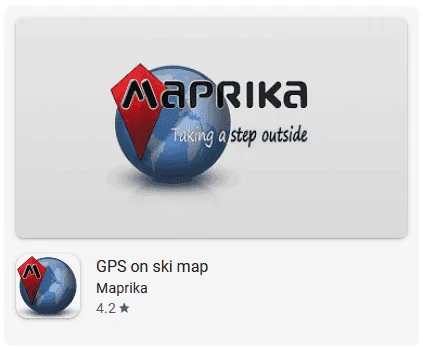
Maprika is another good option that available for both andriod and iphone users. I have used it extensivly when I was working. It can track your path along with speed and elevation. You can send your tracks & location to others in your friend group.

1675885439259.webp


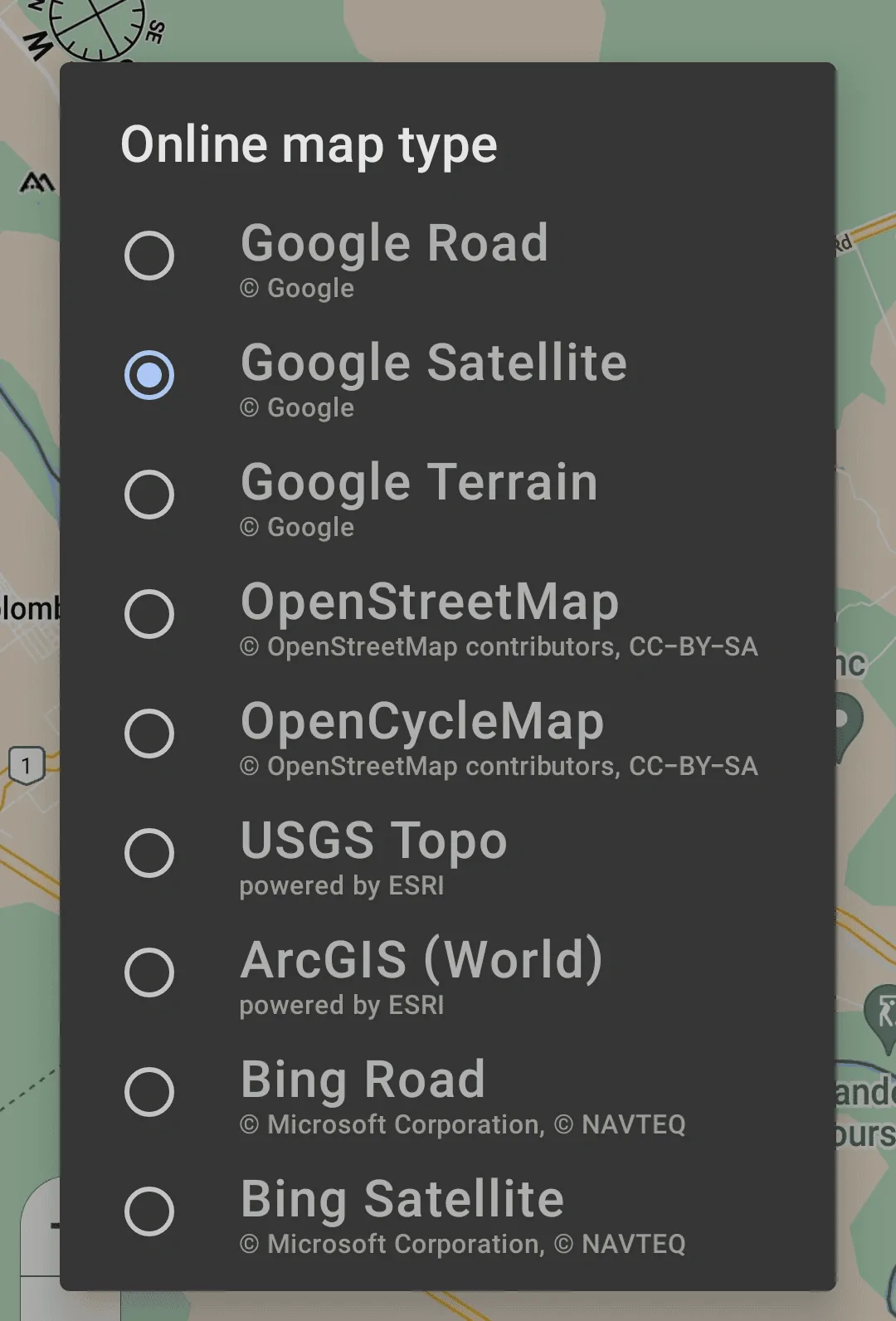
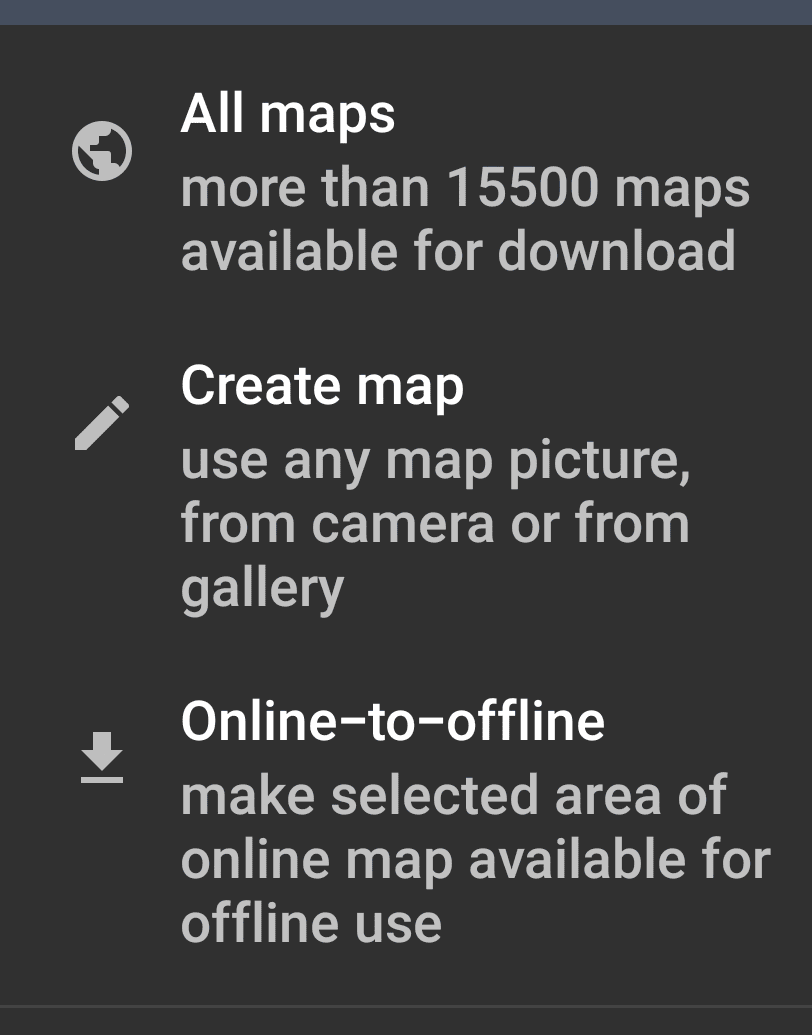
It can use a variety of map sources that the user selects. Maps can be downloaded for an area also. You can even upload your own map.

Here's the neat feature of Maprika, you take a picture of a map (even a hand drawn map) and upload that. Parks used to have large maps at the entrances. Take a picture of that (if the park has one) and then you align the picture with another map source. Now you can use the picture as your map. You can swap back and forth anytime as needed. This is helpful for parks, ranches etc that google satellite does not show all the trails but a picture or drawn map does show them.

1675885654660.webp

1675885674058.png
 

Msfitoy

Well-Known Member
First Name
Sid
Joined
Mar 5, 2019
Threads
67
Messages
9,192
Reaction score
28,363
Location
North Carolina
Vehicle(s)
2019 Ranger, 2003 MINI Cooper S, 2021 Honda CT125
Occupation
NWO Robot Polisher
Vehicle Showcase
1
For offroad fun (driving, biking, hiking etc), there are better options. But they will not display on the truck screen.

MotionX is good but only works with iphones.

Maprika is another good option that available for both andriod and iphone users. I have used it extensivly when I was working. It can track your path along with speed and elevation. You can send your tracks & location to others in your friend group.

1675885439259.png


It can use a variety of map sources that the user selects. Maps can be downloaded for an area also. You can even upload your own map.

Here's the neat feature of Maprika, you take a picture of a map (even a hand drawn map) and upload that. Parks used to have large maps at the entrances. Take a picture of that (if the park has one) and then you align the picture with another map source. Now you can use the picture as your map. You can swap back and forth anytime as needed. This is helpful for parks, ranches etc that google satellite does not show all the trails but a picture or drawn map does show them.

1675885654660.png

1675885674058.png
I can only find their ski app...hmmm


Top