Sponsored

Backup Camera Malfunction

JasonT1273

Active Member
First Name
Jason
Joined
Aug 30, 2023
Threads
3
Messages
33
Reaction score
28
Location
Ohio, USA
Vehicle(s)
2019 Ford Ranger XLT SuperCrew
Occupation
Premier Service Consultant
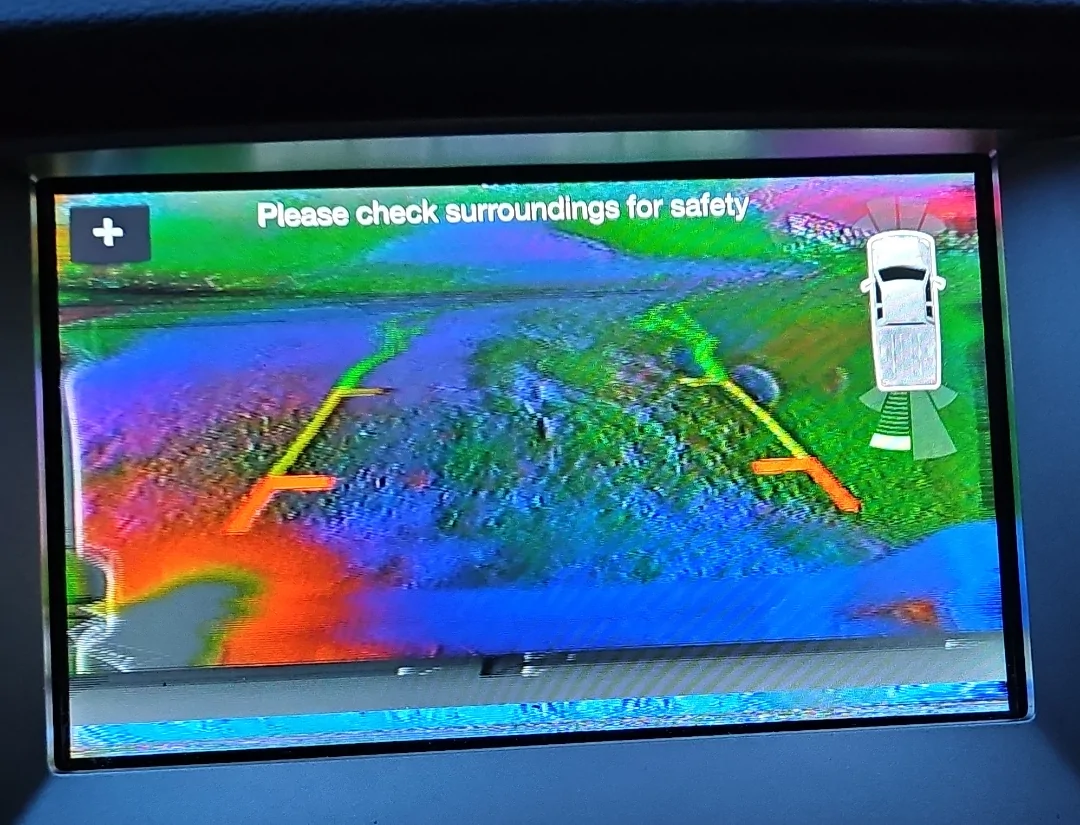
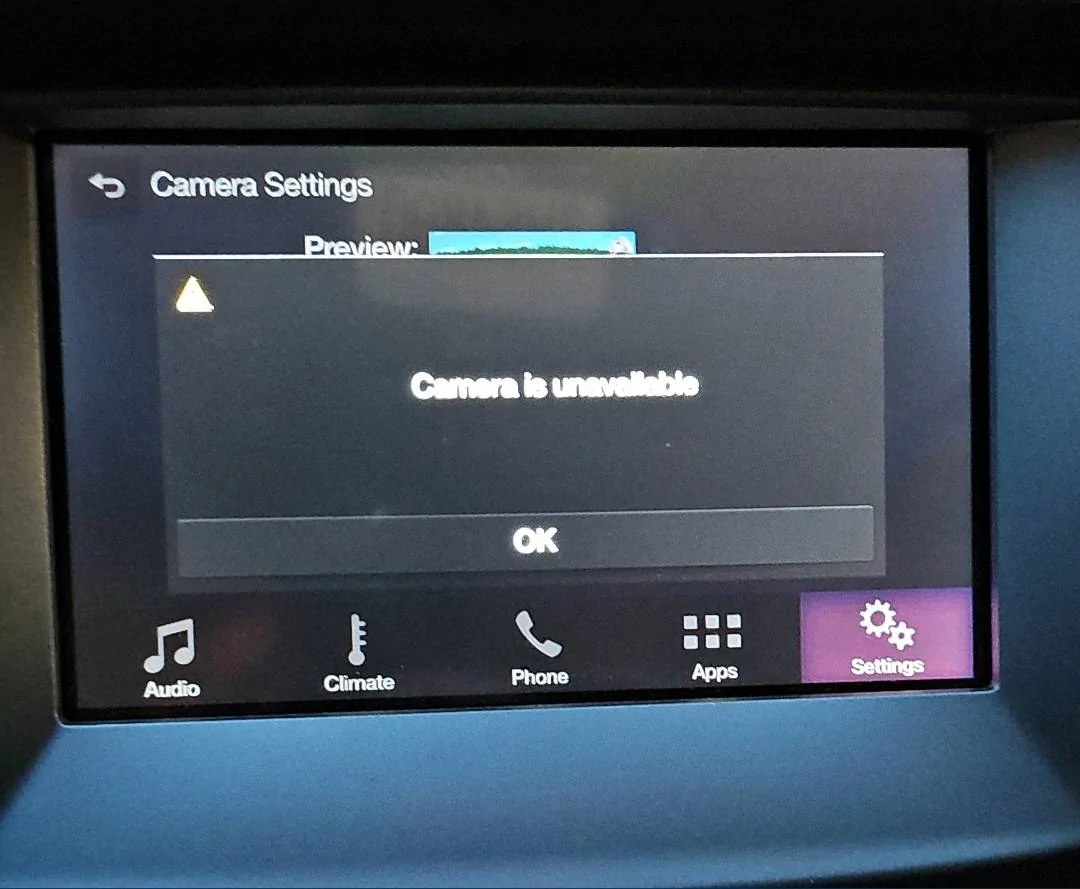
I just bought a used 2019 XLT SuperCrew. My backup camera looks like trying to watch a scrambled cable channel back in the 80s then pops up the ever-popular Camera Is Unavailable message. I've tried a replacement camera unit to no avail. Has anyone seen this and successfully fixed the issue?
RDT_20230821_2022007546377665911368593.png
RDT_20230830_2255148986657773126138424.jpg
Sponsored

 
OP
OP

JasonT1273

Active Member
First Name
Jason
Joined
Aug 30, 2023
Threads
3
Messages
33
Reaction score
28
Location
Ohio, USA
Vehicle(s)
2019 Ford Ranger XLT SuperCrew
Occupation
Premier Service Consultant
Yes. No visible corrosion in the connector going into the camera. I should have mentioned that I checked that before the replacement camera attempt.
 

airline tech

Well-Known Member
Joined
Aug 24, 2022
Threads
28
Messages
4,456
Reaction score
8,519
Location
Midwest - KS
Vehicle(s)
2022 Ranger Lariat-Super Crew, Cactus Gray
Occupation
Aircraft Tech
You will need to hook up scanner and pull any (B) Body or (C) Communication codes to pinpoint it down.
You might try running system self-test on the BCM, IPM, and APIM, running the test mainly on the IPM will initialize the rear camera.
Try those first, then post the code if no help.

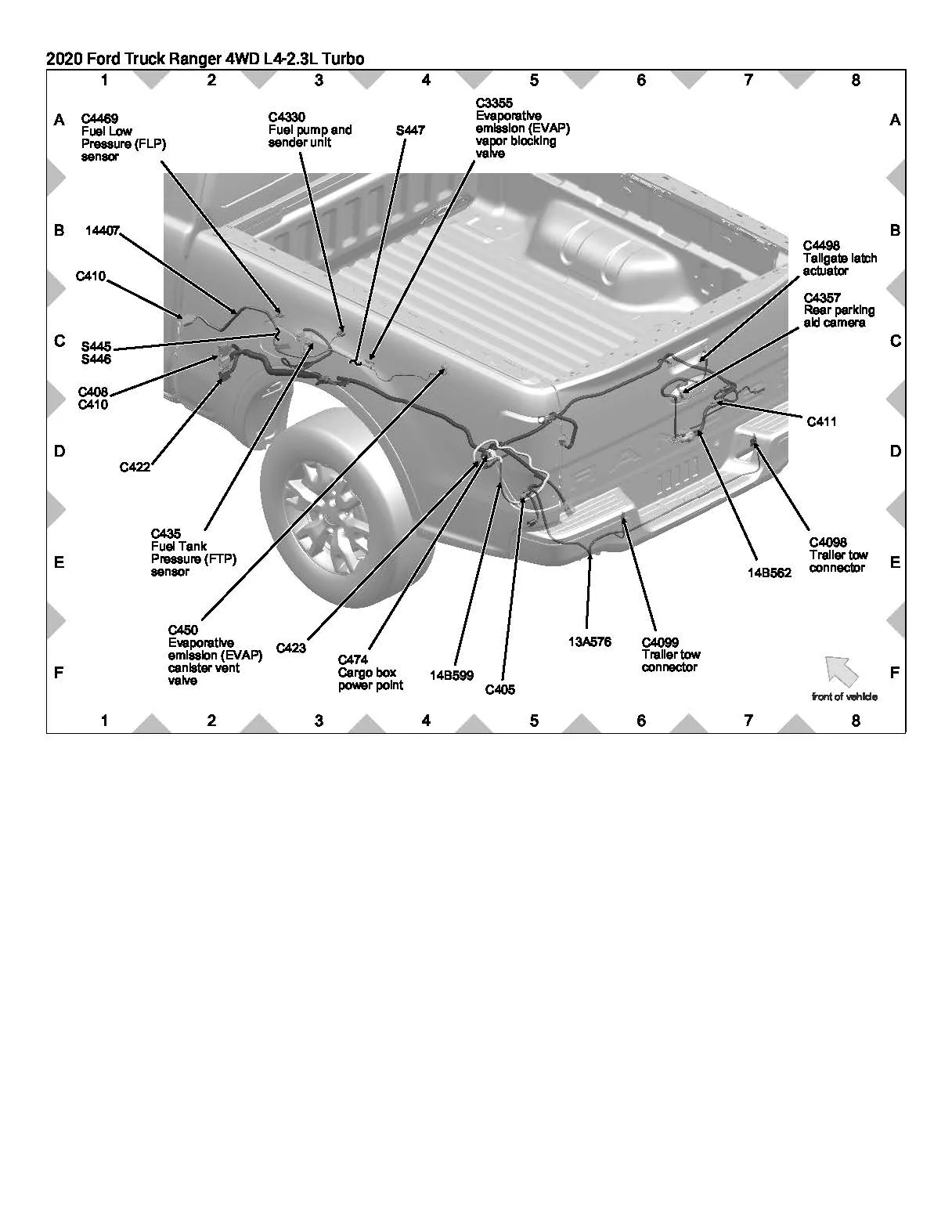
Note: There are 2 other (exterior) inline connectors that feed the camera

C411
C422

Rear Camera Inline .webp
 
OP
OP

JasonT1273

Active Member
First Name
Jason
Joined
Aug 30, 2023
Threads
3
Messages
33
Reaction score
28
Location
Ohio, USA
Vehicle(s)
2019 Ford Ranger XLT SuperCrew
Occupation
Premier Service Consultant
These are two additional points that may have corrosion or other connection issues then I take it? And as far as a code scanner goes, is that something I can do with Forscan or would I have to take it to a dealer?


airline tech

Well-Known Member
Joined
Aug 24, 2022
Threads
28
Messages
4,456
Reaction score
8,519
Location
Midwest - KS
Vehicle(s)
2022 Ranger Lariat-Super Crew, Cactus Gray
Occupation
Aircraft Tech
Forscan will do the same
 

vanapagan

Active Member
First Name
Gregory
Joined
Jun 30, 2021
Threads
1
Messages
30
Reaction score
79
Location
Long Island, NY
Website
vanapagan.com
Vehicle(s)
2021 Ford Ranger XLT Super Crew
Occupation
Cloud Computing Engineer
FordTechMakuLoco had a similar issue he posted on YouTube () where he had a Platinum F-150 that had a CanBus issue with a module that had water intrusion and he had to replace the taillights and the wiring harness to the tune of $5600 to the customer.

Symptoms were the radio started going screwy and then the whole system failed and the owner had a dead truck that had to be towed in.

I'm not sayin this is your problem but if you have the time go watch the video. Great insight into how to debug these vehicles and what to look for.

It may not be the camera or the connector but something totally unrelated to it that shares that wiring harness. Start disconnecting things on the harness until the problem stop or you run out of things to disconnect.
 

Jason B

Well-Known Member
First Name
Jason
Joined
May 19, 2021
Threads
9
Messages
3,013
Reaction score
8,329
Location
Louisiana
Vehicle(s)
2021 XL STX SE 4x2
Occupation
machinist
My guess is that either Big Foot or a UFO/Alien was behind your truck, hence the blurry image.
 

airline tech

Well-Known Member
Joined
Aug 24, 2022
Threads
28
Messages
4,456
Reaction score
8,519
Location
Midwest - KS
Vehicle(s)
2022 Ranger Lariat-Super Crew, Cactus Gray
Occupation
Aircraft Tech
The image display from the camera comes from the data bus - which is a shielded wire run- shield protects the run from interference from outside interference (of the run) itself
So the image can be distorted from a poor connection or the camera needs a calibration to initialize it.
When a system scan is done - it should generate a code - this code will pinpoint down what to check for the cause of camera distortion.
The scan and clearing of any codes might bring it back to normal.
If it does not then dig deeper into the cause, which is most likely a poor connection in the circuit
 
OP
OP

JasonT1273

Active Member
First Name
Jason
Joined
Aug 30, 2023
Threads
3
Messages
33
Reaction score
28
Location
Ohio, USA
Vehicle(s)
2019 Ford Ranger XLT SuperCrew
Occupation
Premier Service Consultant
You will need to hook up scanner and pull any (B) Body or (C) Communication codes to pinpoint it down.
You might try running system self-test on the BCM, IPM, and APIM, running the test mainly on the IPM will initialize the rear camera.
Try those first, then post the code if no help.

Note: There are 2 other (exterior) inline connectors that feed the camera

C411
C422

Rear Camera Inline .webp
I didn't see a C411 at that position. The pigtails of the tailgate lock and camera are simply loomed together and exit the bottom of the tailgate. Would it be underneath the vehicle instead of inside the tailgate itself?

As for the C422 I didn't locate any inline connectors fore of the driver's side rear wheel well until much further up toward the transmission. I did locate a large connector aft of the wheel and it was intact and without corrosion.

I am going to install the latest version of Forscan on my laptop and get the license so can I pull the codes, if any. Hopefully they will prove more enlightening. I will post back when I have those codes. Probably won't get to it until the weekend.
 

airline tech

Well-Known Member
Joined
Aug 24, 2022
Threads
28
Messages
4,456
Reaction score
8,519
Location
Midwest - KS
Vehicle(s)
2022 Ranger Lariat-Super Crew, Cactus Gray
Occupation
Aircraft Tech
C411 is located underneath the truck, as you look up the connector is clearly seen as it is the first connector on the harness as it exits the bottom of the tailgate.

The location diagrams are general area and not the most exact and can be misleading.

C422 should be near the location shown - Manual states (Inside Left Frame Rail), so may not be easily accessible.
C422 is a big connector 34 Pin
 
OP
OP

JasonT1273

Active Member
First Name
Jason
Joined
Aug 30, 2023
Threads
3
Messages
33
Reaction score
28
Location
Ohio, USA
Vehicle(s)
2019 Ford Ranger XLT SuperCrew
Occupation
Premier Service Consultant
C411 is located underneath the truck, as you look up the connector is clearly seen as it is the first connector on the harness as it exits the bottom of the tailgate.

The location diagrams are general area and not the most exact and can be misleading.

C422 should be near the location shown - Manual states (Inside Left Frame Rail), so may not be easily accessible.
C422 is a big connector 34 Pin
Thanks for that clarification. I think C422 Is the one I saw and checked then because I looked down the frame rail from the rear and it was the only one I saw. I will look again this weekend to be sure. Short of any visible corrosion or disconnect is there a cleaner you recommend using on the connectors?
 

airline tech

Well-Known Member
Joined
Aug 24, 2022
Threads
28
Messages
4,456
Reaction score
8,519
Location
Midwest - KS
Vehicle(s)
2022 Ranger Lariat-Super Crew, Cactus Gray
Occupation
Aircraft Tech
Any electronics cleaner will do that has alcohol base, fast drying.
Such as CRC
 

Tom_C

Well-Known Member
First Name
Tom
Joined
Apr 17, 2021
Threads
35
Messages
1,972
Reaction score
4,389
Location
Virginia, USA
Vehicle(s)
2020 Ranger Lariat SuperCab FX4
Occupation
System Admin, Retired
I have no idea, but I would guess the camera is digital. If that is true, then it's more likely a camera issue. Total WAG.

Edit: OP tried a new cam.
 
Last edited:

airline tech

Well-Known Member
Joined
Aug 24, 2022
Threads
28
Messages
4,456
Reaction score
8,519
Location
Midwest - KS
Vehicle(s)
2022 Ranger Lariat-Super Crew, Cactus Gray
Occupation
Aircraft Tech
Just wanted to give you some other options for a possible fix, just in case the system needs a reset / reboot.

Disconnect Battery for 5 minutes or so
or
Hard Reset the Sync Module: But you may lose programmed presets (IDK)
Somewhere in the settings on the display is a reset option, I just don't know exactly how to get to it without physically doing it myself.
or
The system incorporates a few modules for the Rear Camera

Try Pulling and Reseating some fuses.

SYNC / APIM - Fuse 31 -- BCM (By your left knee) - Display Screen

DC/DC Convertor - Fuse 23 --- BJB (Engine Bay) - Powers the Rear Camera

BCM - (Lin 4) Communication to the Rear Camera, I think this is the input (switch) to power the camera when you go to reverse. (?) (Fuse 34) - BCM (by your left knee)

I'm out of options now without a code, hopefully one of these options will help.
Sponsored


Top