Sponsored

How to get the fog lights to work with the DRLs

Msfitoy

Well-Known Member
First Name
Sid
Joined
Mar 5, 2019
Threads
67
Messages
9,197
Reaction score
28,376
Location
North Carolina
Vehicle(s)
2019 Ranger, 2003 MINI Cooper S, 2021 Honda CT125
Occupation
NWO Robot Polisher
Vehicle Showcase
1
maybe a low tec solution is to simply cover the sensor on the dash and make it think it's nightime all the time
I use my low tech hand and hit the switch...very hard to do but worth it once you've reached the button...
Sponsored


awd.nv

Well-Known Member
First Name
Anthony
Joined
Apr 26, 2021
Threads
30
Messages
1,257
Reaction score
2,365
Location
Las Vegas, NV
Vehicle(s)
'21 Ranger XLT Tremor
Occupation
Computers
Not quite sure exactly what your question is, but in order to set your fog lights as DRLs, you need to make a couple changes in the BCM.

First, you must change the Allowed DRL Settings menu item to "All Options". This allows you to change what lights are used as DRLs.

Second, you must change the DRL Configuration menu option to "Fog Lamps".

Thirdly, if you want, you can change the Day Time Running Lights Includes Parking Lamps menu option to "Enable". This will include your front parking lamps, side markers and taillights with your DRLs. This is how mine is set up. I have switchbacks in my XLTs turn indicaters, so I have white parking lights and fog lights as my DRLs instead of my low beams.

Hope this answers your question. All this is done in the BCM configuration menu, no need to edit AsBuilt.

PS: This works on XLs and XLTs not sure with Lariat lights.
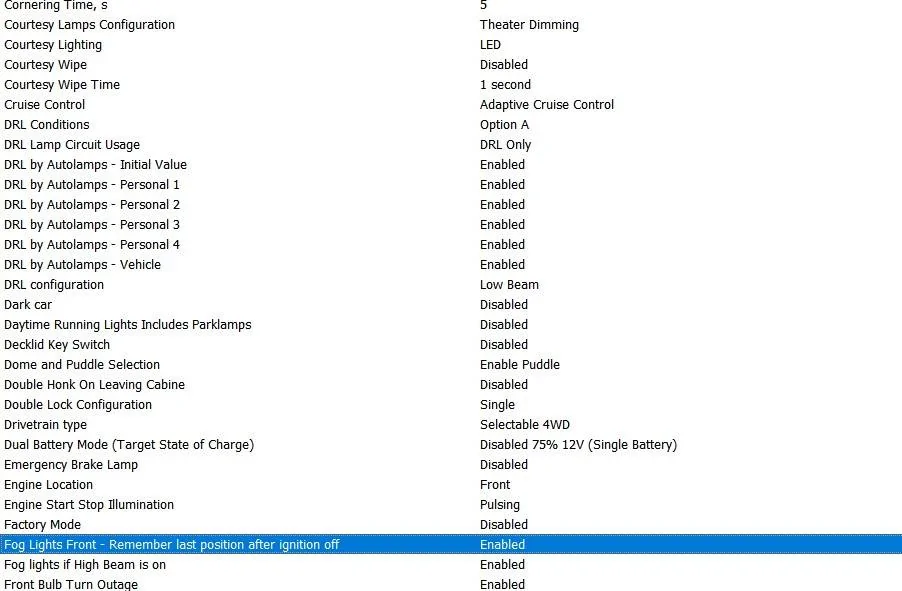
I just tried to set my fogs as DRL but got an invalid entry warning so it didnt stick. I did not see the BCM setting for All lights though. Triple checking but here is what my menu looks like. XLT Tremor if it matters.

I changed Low Beam to Fog. I also tried enabling the park lamps option then went back and switched to fogs but still had that error. In the image I set it back to stock basically.

I generally drive with DRL because of my halogens, fogs would be perfect though.

DRL.webp
 

Big Blue

Well-Known Member
First Name
Lee
Joined
May 5, 2020
Threads
16
Messages
3,927
Reaction score
9,352
Location
Wisconsin
Vehicle(s)
2019 Ford Ranger XLT FX4 Supercrew lighting blue
Occupation
Retired mechanical designer
I just tried to set my fogs as DRL but got an invalid entry warning so it didnt stick. I did not see the BCM setting for All lights though. Triple checking but here is what my menu looks like. XLT Tremor if it matters.

I changed Low Beam to Fog. I also tried enabling the park lamps option then went back and switched to fogs but still had that error. In the image I set it back to stock basically.

I generally drive with DRL because of my halogens, fogs would be perfect though.

DRL.jpg
What is the menu option set to for the "Allowed DRL Options" item? It is in the beginning of the BCM menus. It needs to be set to "All Options". Otherwise Low Beams is the only selection it will accept.
 

awd.nv

Well-Known Member
First Name
Anthony
Joined
Apr 26, 2021
Threads
30
Messages
1,257
Reaction score
2,365
Location
Las Vegas, NV
Vehicle(s)
'21 Ranger XLT Tremor
Occupation
Computers
What is the menu option set to for the "Allowed DRL Options" item? It is in the beginning of the BCM menus. It needs to be set to "All Options". Otherwise Low Beams is the only selection it will accept.
Man, thanks. I swear I looked up and down in that area but you literally were right. Was like the 3rd thing listed. That allowed me to retain the fog light setting. That should be added to the Forscan wiki page. Gonna link your post.
 

JohnnyO

Well-Known Member
First Name
Jon
Joined
Apr 8, 2021
Threads
23
Messages
1,969
Reaction score
6,144
Location
Pittsburgh, PA
Vehicle(s)
2020 Ranger STX 4x4
Occupation
Asst. Greenskeeper, Bushwood Country Club
What steps did you take to get this accomplished? I want my parking lights to be my DRL only.
I don't think you can do that. That's not the idea of daytime running lights.
All you can do is set the parking lights to come on with the DRL's. I haven't gotten around to doing that yet but it would be so everyone can see my Raptor grille lights all the time, not just at night. :like:
 

Big Blue

Well-Known Member
First Name
Lee
Joined
May 5, 2020
Threads
16
Messages
3,927
Reaction score
9,352
Location
Wisconsin
Vehicle(s)
2019 Ford Ranger XLT FX4 Supercrew lighting blue
Occupation
Retired mechanical designer
I don't think you can do that. That's not the idea of daytime running lights.
All you can do is set the parking lights to come on with the DRL's. I haven't gotten around to doing that yet but it would be so everyone can see my Raptor grille lights all the time, not just at night. :like:
Not sure about this either, but one of the menu items for "DRL Configuration" is "Not Defined". This along with including Parklamps might do what you want.
Sponsored


Top