Sponsored

Use Alexa to Start Your Ranger & More

Tom_C

Well-Known Member
First Name
Tom
Joined
Apr 17, 2021
Threads
35
Messages
1,972
Reaction score
4,390
Location
Virginia, USA
Vehicle(s)
2020 Ranger Lariat SuperCab FX4
Occupation
System Admin, Retired
Yeah, I've found whisper mode. Have you done "meow"? :)
Sponsored


mtbikernate

Well-Known Member
Joined
Apr 13, 2020
Threads
11
Messages
1,174
Reaction score
2,636
Location
NC
Vehicle(s)
2019 Ranger XLT 4x4
This sounds great and all… but do you also get Alexa: “By the way, your fuel gauge is low, would you like me to suggest a place to fill up? I can also tell you the statistics of dying in traffic accidents as well as how bad your sports team sucks! Also, Toyota stock is through the roof. If you would like to enable this feature …..”

? I have an echo dot and I’m apparently not social enough for it most days lol
I think you can turn off that stuff... but it takes a while to find all the stupid settings in the alexa app.
I'm pretty sure I know where all those settings are (though I don't guarantee it) and this is the thing that irritates me the most about the stupid thing. The stupid yapping suggestions about automations or whatever when all I want is to turn off the lights. I use it to control some lights at my house, manage grocery shopping lists, and occasionally play music from Pandora (usually when I'm doing something like washing the dishes). That's about it. I've known about the Alexa integration with FordPass (and even have the FordPass skill installed) but don't really use it. Partly because I just don't remember it's an option, but I usually remote start from the fob when it's cold out and I want to warm up the interior.

Have been thinking about moving to an open source locally-hosted voice assistant.
Mycroft – The Open Source Privacy-Focused Voice Assistant - Mycroft
Assist - Talking to Home Assistant - Home Assistant (home-assistant.io)

The main thing holding me back would be that neither is really a turnkey solution and would require some work to set up. And no guarantee that it'd do all the things I want it to do.
 

Tom_C

Well-Known Member
First Name
Tom
Joined
Apr 17, 2021
Threads
35
Messages
1,972
Reaction score
4,390
Location
Virginia, USA
Vehicle(s)
2020 Ranger Lariat SuperCab FX4
Occupation
System Admin, Retired
The main thing holding me back would be that neither is really a turnkey solution and would require some work to set up. And no guarantee that it'd do all the things I want it to do.
Copy that. When I started researching, and watching all the youtube stuff, I decided to pick one flavor and stick with that. There are the big 3, and who knows how many subvariants of automation stuff. Ain't nobody got time for 'dat! We already had a fireTV, so Amazon won. Jeff needs another Yacht anyway.

I think 'they' are attempting to standardize a lot of the devices (switches, thermostats, etc) but don't know where that is.
 

Tremorky

Well-Known Member
First Name
Scott
Joined
Jan 8, 2023
Threads
1
Messages
118
Reaction score
295
Location
Kentucky
Vehicle(s)
2021 Lariat Tremor
Occupation
CAD Designer
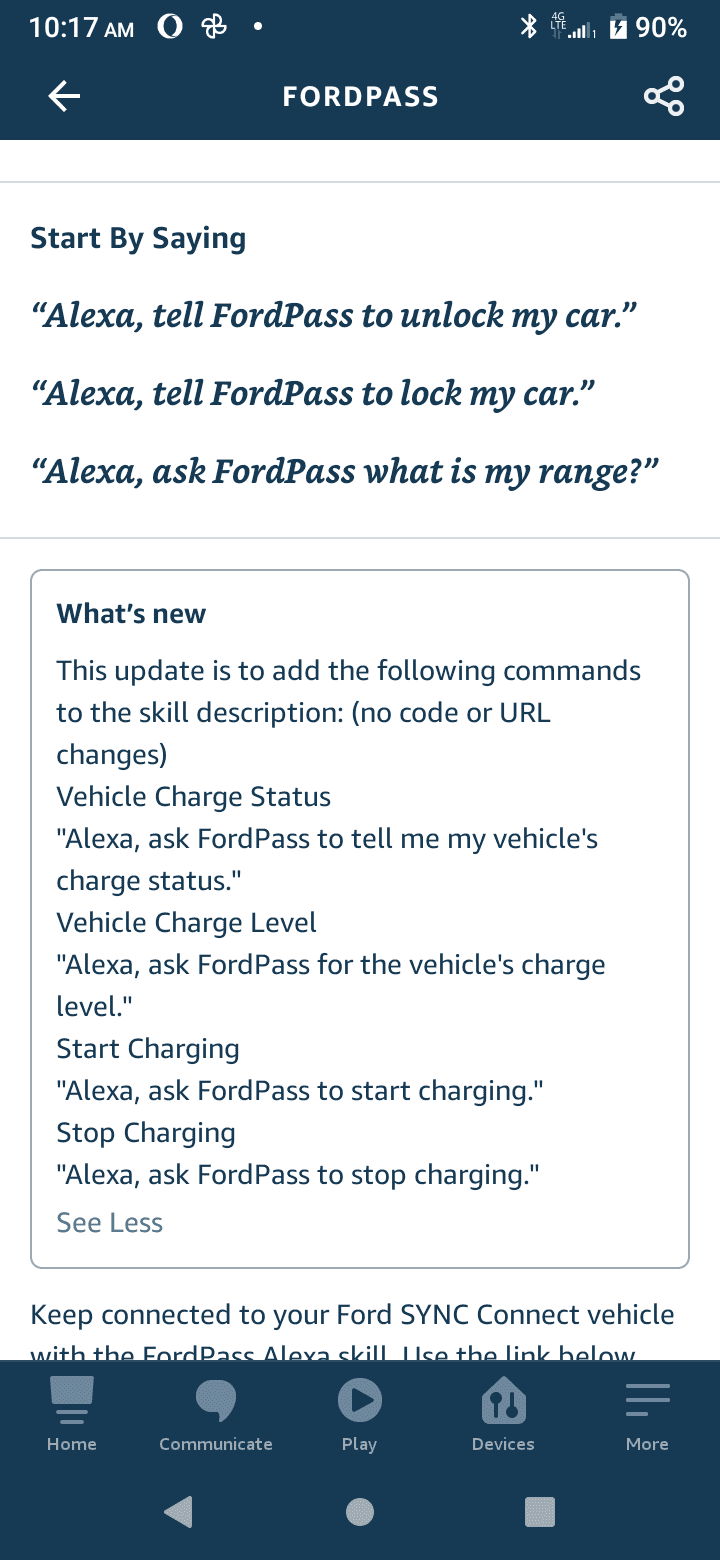
I recently tried to connect my 2021 Ford Ranger to my android phone so I could use Google voice to turn it on and more, unfortunately Google had disabled this capability. I thought and researched about many other ways and thought I should look into Alexa instead. I can now start my car every morning by just talking to my Alexa devices throughout my home!!!!! "Alexa start car" and done. I've been using it daily. I have Alexa devices throughout my home so either if I am in the kitchen, bedroom, bathroom, or even around my Ecobee thermostat I can just say it, and Alexa makes it happen. You can also say things like "Alexa, Use Ford Pass to Unlock Car" etc and the command is also received.

What you can do:

Start Engine

“Alexa, ask FordPass to start my car with PIN 1234.”

Stop Engine
“Alexa, tell FordPass to stop the engine.”

Lock Vehicle
“Alexa, ask FordPass to lock my vehicle.”

Unlock Vehicle
“Alexa, tell FordPass to unlock my car.”

Last Command Status (used after lock/unlock and start/stop commands)
“Alexa, what is the status of my last command using FordPass?”

Vehicle Mileage
“Alexa, ask FordPass the odometer reading.”

Vehicle Range
“Alexa, ask FordPass what is my range?”

Tire Pressure
“Alexa, ask FordPass is my tire pressure low?”

Selected Vehicle
“Alexa, ask FordPass what is my primary vehicle?”

List Vehicles
“Alexa, tell FordPass to list all cars on the account.”

Switch Selected Vehicle
“Alexa, switch my primary vehicle using FordPass.”

Start Charging (only available for compatible electric vehicles)
"Alexa, ask FordPass to start charging my car."

Stop Charging (only available for compatible electric vehicles)
"Alexa, ask FordPass to stop charging my car."

Vehicle Charge Level (only available for compatible electric vehicles)
"Alexa, ask FordPass for my vehicle's charge level."

Vehicle Charge Status (only available for compatible electric vehicles)
"Alexa, ask FordPass to tell me my vehicle's charge status."

Some details to help you set it up if interested:

Must have:
- Phone
- Amazon Account (Free, no membership required)
- Ford Pass App on Phone with vehicle already registered
Apple: https://apps.apple.com/us/app/fordpass/id1095418609
Android: https://play.google.com/store/apps/details?id=com.ford.fordpass&hl=en&gl=US
- FordPass Alexa Skill (LINK: https://www.amazon.com/Ford-Motor-Company-FordPass/dp/B077Y1FK9D)

To use this skill:
· Enable the FordPass skill
· Log in to your FordPass account within the Alexa mobile app using your FordPass username and password
· Set a PIN to help protect access to certain features when using the skill
· Select your vehicle that you want to interact with
· To get help at any time, just say “Alexa, ask FordPass for help.”

DONE

Additional Tips:


To shorten the command into something simple like "Start Car" you can use the Alexa "Routine" section of the app, you can state the phrase you would like to say, and then write out the longer command from the list above such as "Alexa, ask FordPass to start my car with PIN 1234.” This way its shorter and just happens, can make a routine for every one of the commands if you like. You can name the command anything "Alexa, Start Batmobile" or "Alexa, Let's Ride" haha

To create routine:
Open the Alexa app .
Open More and select Routines.
Select Plus
Select When this happens, and follow the steps in the app to choose what starts your routine.
Select Add action, and follow the steps in the app to choose the action of your routine.
You can select multiple actions for the same routine.
Select Save.

PS: Tips, if any issues recognizing commands about the app vs the phone, if you have a phone contact that's called "Ford" it may try to call them instead, I removed them and abbreviated as Frd. Also, for me, I am limited to 2 uses per day with the start car action, based on the agreement of Alexa with Ford I believe.

Good Luck and Enjoy! I love it!

Ford Pass.png
Very good write up with necessities listed. Didn’t mean to hijack a useful thread! Making our vehicles more useful is what makes the forums great. Thanks !

edit: someday I’ll get in the habit of proofreading my grammatically challenged concoctions.
 
Last edited:


mtbikernate

Well-Known Member
Joined
Apr 13, 2020
Threads
11
Messages
1,174
Reaction score
2,636
Location
NC
Vehicle(s)
2019 Ranger XLT 4x4
Copy that. When I started researching, and watching all the youtube stuff, I decided to pick one flavor and stick with that. There are the big 3, and who knows how many subvariants of automation stuff. Ain't nobody got time for 'dat! We already had a fireTV, so Amazon won. Jeff needs another Yacht anyway.

I think 'they' are attempting to standardize a lot of the devices (switches, thermostats, etc) but don't know where that is.
You may be referring to the Matter standard? That process is chugging along. I have a mix of devices and some are compatible with that (mostly through upgrades) and some are not. The stuff not compatible with matter right now mostly doesn't have a compatible solution available.

Aside from the Echo that controls most of it, most of my Matter-compatible devices run on the Philips Hue system. My Hue bridge is pretty old, but Philips has either upgraded it already or will be soon to Matter compatibility. I'm not entirely sure on timing, but I know that's a definite.

I have a couple of lights from Govee (TV bias lights and christmas tree lights) that are not Matter compatible and won't get the upgrade, though one of them I think has a Matter-compatible replacement in the pipeline. Not sure if I'll switch it out or not. My TV is a Roku TV that has some command compatibility with most voice assistants. But it also has its own voice command system through its own remote (have to push the mic button to activate it) that's more thorough.

The annoying suggestions are actually a secondary reason for considering one of the systems I linked above. Cloud hosted systems have one big drawback, and that is that they send commands out of the house before sending them back. So a lot of what I have breaks if the internet goes down. The Philips Hue lights still work because its bridge handles local hosting, but I have to change the way I access it. I bought a physical remote control I can use with it for those occasions. Or for times like when I have people over when it's just too noisy for a voice assistant to be worth a damn.
 

Tom_C

Well-Known Member
First Name
Tom
Joined
Apr 17, 2021
Threads
35
Messages
1,972
Reaction score
4,390
Location
Virginia, USA
Vehicle(s)
2020 Ranger Lariat SuperCab FX4
Occupation
System Admin, Retired
Cloud hosted systems have one big drawback, and that is that they send commands out of the house before sending them back.
Yep, and as Tremorky said, sorry to hijack, and I'll stop now... but for those reading, my recommendation is to have a guest or 2nd wifi network and use that for all this stuff. All my 'automation' stuff is on a guest network without connection to my home network.
 
Last edited:

Tremorky

Well-Known Member
First Name
Scott
Joined
Jan 8, 2023
Threads
1
Messages
118
Reaction score
295
Location
Kentucky
Vehicle(s)
2021 Lariat Tremor
Occupation
CAD Designer
Copy that. When I started researching, and watching all the youtube stuff, I decided to pick one flavor and stick with that. There are the big 3, and who knows how many subvariants of automation stuff. Ain't nobody got time for 'dat! We already had a fireTV, so Amazon won. Jeff needs another Yacht anyway.

I think 'they' are attempting to standardize a lot of the devices (switches, thermostats, etc) but don't know where that is.
Yep, and as Tremorky said, sorry to hijack, and I'll stop now... but for those reading, my recommendation is to have a guest of 2nd wifi network and use that for all this stuff. All my 'automation' stuff is on a guest network without connection to my home network.
That’s using your head ! I never thought of that even tho I’m big on using a guest account instead of admin on Windows machines. ?‍♂?‍♂?
 

mtbikernate

Well-Known Member
Joined
Apr 13, 2020
Threads
11
Messages
1,174
Reaction score
2,636
Location
NC
Vehicle(s)
2019 Ranger XLT 4x4
Yep, and as Tremorky said, sorry to hijack, and I'll stop now... but for those reading, my recommendation is to have a guest or 2nd wifi network and use that for all this stuff. All my 'automation' stuff is on a guest network without connection to my home network.
I fail to see what that does to improve anything. unless you have an entirely separate internet connection to said network, it's still "connected" to your home network.
 

Tom_C

Well-Known Member
First Name
Tom
Joined
Apr 17, 2021
Threads
35
Messages
1,972
Reaction score
4,390
Location
Virginia, USA
Vehicle(s)
2020 Ranger Lariat SuperCab FX4
Occupation
System Admin, Retired
it's still "connected" to your home network.
No, it's not. Is it using your internet connection? Yes. Is it connected to your home network. No.

ETA: To be clear, if the router is decent (most newer models are, but obviously not all) then it's created a separate route for the guest network, so guest and home networks are isolated.
 
Last edited:

mtbikernate

Well-Known Member
Joined
Apr 13, 2020
Threads
11
Messages
1,174
Reaction score
2,636
Location
NC
Vehicle(s)
2019 Ranger XLT 4x4
No, it's not. Is it using your internet connection? Yes. Is it connected to your home network. No.

ETA: To be clear, if the router is decent (most newer models are, but obviously not all) then it's created a separate route for the guest network, so guest and home networks are isolated.
not physically, though. if it's just a software "separation", then it's breakable if that's what you're concerned with.
 

Tom_C

Well-Known Member
First Name
Tom
Joined
Apr 17, 2021
Threads
35
Messages
1,972
Reaction score
4,390
Location
Virginia, USA
Vehicle(s)
2020 Ranger Lariat SuperCab FX4
Occupation
System Admin, Retired
not physically, though. if it's just a software "separation", then it's breakable if that's what you're concerned with.
It's really more complicated than that, but OK.
 

JesseS

Well-Known Member
First Name
Jesse
Joined
May 26, 2021
Threads
19
Messages
1,755
Reaction score
4,824
Location
NorCal (Roseville)
Vehicle(s)
2021 Ranger XLT FX4, Jayco 26' Class A
Occupation
Retired, work is a four letter word.
I have been using my Apple Watch to lock/unlock, and start the truck for over a year, works well and actually comes in handy once in a while. It will also report fuel level and allow for warming up the interior on cold mornings. Best is there are no range limitations like with the fob. Now if I can figure how to get Siri to pop the tailgate when my hands are full. :LOL:
 

Jmarler

Well-Known Member
First Name
Jimmy
Joined
Jul 12, 2021
Threads
41
Messages
486
Reaction score
1,565
Location
San Antonio
Vehicle(s)
2021 ranger
Occupation
Certified Hacker. Retired Veteran
I have a smart lock on my garage entrance door, and when I lock it, it locks my truck too. I stopped using it though when my truck battery started giving out.
 

mtbikernate

Well-Known Member
Joined
Apr 13, 2020
Threads
11
Messages
1,174
Reaction score
2,636
Location
NC
Vehicle(s)
2019 Ranger XLT 4x4
It's really more complicated than that, but OK.
sure it is. but what's the objective of putting various smart devices on a "different" network? afraid that hackers will get into your network through a compromised smart device? to do what exactly?

this might well not be possible if you have certain types of devices, anyway. for example, I've already mentioned having a Hue Bridge. That device requires a wired connection to my router. And AFAIK, your smart devices need to be on the SAME network in order to work together. So for my voice assistant to control anything connected to the Hue Bridge, they've gotta be on the same network to communicate with each other. My Arlo security cameras function similarly. They have their own base station that has a wired connection to my router. While that doesn't need to have any association with other devices, I do have some automations set up which change some settings based on geofencing settings.
Sponsored


Top