Sponsored

Ford Sync Changed - Update?

fortywater12

Well-Known Member
First Name
Evan
Joined
May 17, 2021
Threads
16
Messages
249
Reaction score
441
Location
Sacramento, CA
Vehicle(s)
2019 Ranger XLT FX4
Occupation
Engineer
Hey all! I was driving into work this morning when my ford sync and touchscreen completely shut off. It rebooted while I was driving and a "system updated" icon appeared in the top right. When everything booted back up, the display was entirely different as far as colors and font etc; I absolutely hate it.

Did Ford release an update that changed layout? Is there a way I can revert back or change my layout? I messed around in the settings and couldn't find anything. I miss my old layout/appearance!

Thanks for the help in advance. Here is a picture of the new layout/color scheme. I tried a master reset and its the same.

IMG-7387.webp
Sponsored


Chris M

Well-Known Member
First Name
Chris
Joined
Jun 11, 2020
Threads
20
Messages
4,496
Reaction score
19,784
Location
Surprise, AZ
Vehicle(s)
2021 Ranger XLT Sport 4X4
Occupation
Security Supervisor
Hey all! I was driving into work this morning when my ford sync and touchscreen completely shut off. It rebooted while I was driving and a "system updated" icon appeared in the top right. When everything booted back up, the display was entirely different as far as colors and font etc; I absolutely hate it.

Did Ford release an update that changed layout? Is there a way I can revert back or change my layout? I messed around in the settings and couldn't find anything. I miss my old layout/appearance!

Thanks for the help in advance. Here is a picture of the new layout/color scheme. I tried a master reset and its the same.
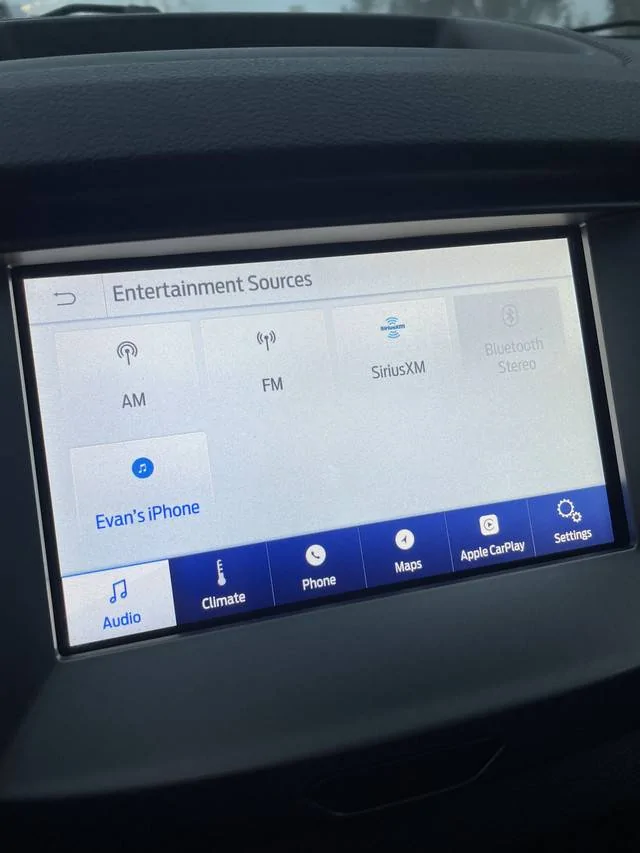
IMG-7387.jpg
Mine updated a couple weeks ago to the same screen.
Like you, I don't like my new screen nearly as much as the old...but it grows on you.
 
OP
OP
fortywater12

fortywater12

Well-Known Member
First Name
Evan
Joined
May 17, 2021
Threads
16
Messages
249
Reaction score
441
Location
Sacramento, CA
Vehicle(s)
2019 Ranger XLT FX4
Occupation
Engineer
Mine updated a couple weeks ago to the same screen.
Like you, I don't like my new screen nearly as much as the old...but it grows on you.
1636124013098.webp


Dang. Yeah, I will get used to it like you said. Just seems like a step back - color schemes makes it seem "older" in my opinion. Oh well.
 

Chris M

Well-Known Member
First Name
Chris
Joined
Jun 11, 2020
Threads
20
Messages
4,496
Reaction score
19,784
Location
Surprise, AZ
Vehicle(s)
2021 Ranger XLT Sport 4X4
Occupation
Security Supervisor


OP
OP
fortywater12

fortywater12

Well-Known Member
First Name
Evan
Joined
May 17, 2021
Threads
16
Messages
249
Reaction score
441
Location
Sacramento, CA
Vehicle(s)
2019 Ranger XLT FX4
Occupation
Engineer

Dgc333

Well-Known Member
First Name
Dave
Joined
Aug 24, 2021
Threads
17
Messages
1,742
Reaction score
4,112
Location
Massachusetts
Vehicle(s)
21 Ranger Lariat
Occupation
Engineer
The icons on the tabs across the bottom are different than mine and I have Sync3 ver. 3.4.21194. My icons have been the same since I went to version 3 in my 17 Mustang.

I would be interested to know what version you have. You can find it under settings/general about Sync.
 

Fawnbuster

Well-Known Member
First Name
Mike
Joined
Jul 14, 2019
Threads
62
Messages
2,416
Reaction score
8,970
Location
Indiana
Vehicle(s)
2019 Ranger
Occupation
Retired 34 years as LEO
Vehicle Showcase
1
Hey all! I was driving into work this morning when my ford sync and touchscreen completely shut off. It rebooted while I was driving and a "system updated" icon appeared in the top right. When everything booted back up, the display was entirely different as far as colors and font etc; I absolutely hate it.

Did Ford release an update that changed layout? Is there a way I can revert back or change my layout? I messed around in the settings and couldn't find anything. I miss my old layout/appearance!

Thanks for the help in advance. Here is a picture of the new layout/color scheme. I tried a master reset and its the same.

IMG-7387.jpg
I didn't like it either so I keep night mode on all the time, that dims it down


Top