Sponsored

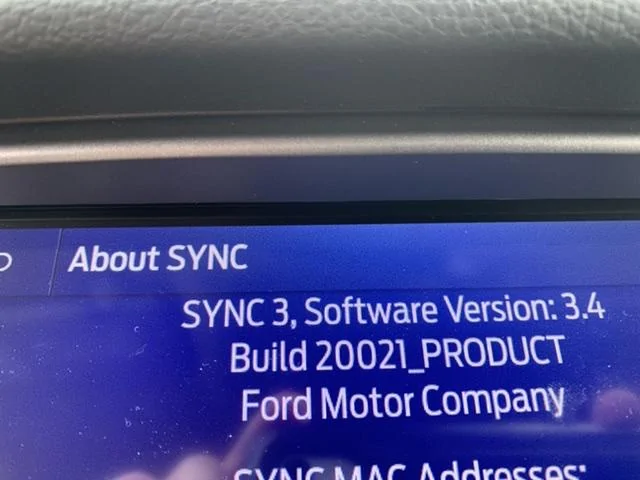
Just updated to Sync 3.4 on my Ranger 2019

UofMEngineer

Well-Known Member
Joined
Apr 19, 2019
Threads
1
Messages
516
Reaction score
334
Location
Michigan
Vehicle(s)
20' Escape Hybrid,18' Fusion Hybrid
It would be nice if Ford put out update documentation to explain what’s in each update.. or if they do I haven’t found it yet.
The only things I've seen are smaller lists blasted out to dealers on occasion relating to specific field issues. Personally I wish we put the "big picture" changes at least on the update notification on screen, but that's just me.

For the voice users...

(19200):
- Fix for USB media commands not being created on occasion.
- Fix for getting stuck when building commands for a connected media device.
- Fix in various screens where "next page" command would not work the first try.
- Fix for USB media artist/album pronunciations being incorrect at times.
- Fix for browsing SXM channel categories not working.
- Fixes for various UI issues on all themes like column alignment, line spacers, etc.
- Fix for some street name TTS being incorrect. (Also fixed in v3.3).
- Fix for follow up screen not displaying if an item was selected from certain lists by touch.
- General stability improvements.

- Climate temp commands now confirm temperature selection less often.
- Updated voice nav data to allow a city, state to be spoken when changing the search area.
- Removed the initial "Please say a command" prompt, and cut down on error prompting throughout the system.
- Added capability to request a sports game broadcast by team name from the main menu.
- Added support for "browse <X>" similar to how "play <X>" works for USB media.
- Misc. command updates.

(19274):
- Fix for some prompts getting cut off, usually the final set destination prompt.

(20021):
- Fix for a rare issue where SXM channel number commands would not work.
- Fix for nav notifying voice of default location at boot for address searches. It'll no longer default to Michigan initially.
- Fix for incorrect text display in AM/FM selection lists (92 point 7, one_oh_one point 3).
- Fix for "switch to bluetooth" command failing.
- Fix for getting pushed to a POI category list too soon in POI searches.
- Fix for rare issue of an empty list in an intersection search.
- Fix for select commands not working in audio submenu.
- Fix for a prompt saying "capital I" in it when a contact has multiple numbers for a phone type.
- General stability improvements.
- Misc. prompt changes, like address search being given more explicit instructions on how to say the address.
- Misc. command updates based on failed commands sent in from diagnostics.

Again, this requires both updated packages, and is generally only bugs not new features. I haven't seen links to the matching voice packs yet though. I'll see if I can toss something together for the other releases, at least for my feature.
Sponsored

 
Last edited:

Sabasigh

Well-Known Member
Joined
Aug 17, 2019
Threads
4
Messages
136
Reaction score
95
Location
Belleville il
Vehicle(s)
2019 Ranger Lariat FX4; 2016 Corvette Stingray
I never could get to 3.4.20021...just sat there over 90 mins at Updating system software.
 

Snorebaby

Well-Known Member
First Name
Doug
Joined
Mar 25, 2019
Threads
9
Messages
526
Reaction score
1,063
Location
Augusta, GA
Vehicle(s)
2019 Ranger XLT FX4 SuperCrew, 1996 Ranger XLT Supercab, 2013 XLT F150 (Wife's), 1990 Honda Goldwing, 2015 Honda Goldwing
Vehicle Showcase
1
Is that the complete file to do a fresh from scratch upgrade? Or is there more? There are so many files and differences on this thread that I have gotten "computer-fused". Isn't there an official version supposed to roll out soon?


UofMEngineer

Well-Known Member
Joined
Apr 19, 2019
Threads
1
Messages
516
Reaction score
334
Location
Michigan
Vehicle(s)
20' Escape Hybrid,18' Fusion Hybrid
Is that the complete file to do a fresh from scratch upgrade? Or is there more? There are so many files and differences on this thread that I have gotten "computer-fused". Isn't there an official version supposed to roll out soon?
That's the latest voice package that's paired with the latest build. It's possible this release ends up being the one to go out as a user update. I think that's still TBD. These new build files always pop-up early on forums as links to new files tend to pop up on various foreign forums once they hit this FoMoCo server.
 

BroMarduk

Member
First Name
Dan
Joined
Feb 29, 2020
Threads
0
Messages
5
Reaction score
4
Location
Vermont
Vehicle(s)
2019 Lincoln MKZ Reserve II Hybrid
Occupation
CTO
This is the supposed Sync 3.4.20021 / NA 19 Q1 file list. It was compiled by a user on another site.

APPS = 5U5T-14G381-EB.TAR.GZ <---- Sync 3.4.20021
VOICE = 5U5T-14G391-CL.TAR.GZ <---- Voice Command File for Sync 3.4.20021
VOICE_NAV = 4U5T-14G422-CAF.TAR.GZ <---- Voice Navigation File 1 for 19 Q1 Maps
VOICE_NAV = 4U5T-14G422-CBF.TAR.GZ <---- Voice Navigation File 2 for 19 Q1 Maps
VOICE_NAV = 4U5T-14G422-CCF.TAR.GZ <---- Voice Navigation File 3 for 19 Q1 Maps
GRACENOTES = 4U5T-14G423-CA.TAR.GZ <---- Latest File for Gracenote song database
MAP_LICENSE = 4U5T-14G424-CC.TAR.GZ <---- License File for 19 Q1 Maps
MAP = 4U5T-14G421-CAC.TAR.GZ <---- File 1 of 19 Q1 Maps
MAP = 4U5T-14G421-CBC.TAR.GZ <---- File 2 of 19 Q1 Maps
MAP = 4U5T-14G421-CCC.TAR.GZ <---- File 3 of 19 Q1 Maps
MAP = 4U5T-14G421-CDC.TAR.GZ <---- File 4 of 19 Q1 Maps
MAP = 4U5T-14G421-CEC.TAR.GZ <---- File 5 of 19 Q1 Maps
MAP = 4U5T-14G421-CFC.TAR.GZ <---- File 6 of 19 Q1 Maps
MAP = 4U5T-14G421-CGC.TAR.GZ <---- File 7 of 19 Q1 Maps
MAP = 4U5T-14G421-CHC.TAR.GZ <---- File 8 of 19 Q1 Maps
MAP = 4U5T-14G421-CJC.TAR.GZ <---- File 9 of 19 Q1 Maps (There is no "CIC" - too close to a 1 in a file name)
 

UofMEngineer

Well-Known Member
Joined
Apr 19, 2019
Threads
1
Messages
516
Reaction score
334
Location
Michigan
Vehicle(s)
20' Escape Hybrid,18' Fusion Hybrid
I've done the map update from Ford.
so, now do I just need the
-Sync Reformat tool (for step 1)
-the base system install that includes voice files (Sync_3.4.19101_NA_Base_WithNav_CYANLABS.zip )
-and the newest upgrade file (Sync_3.4.X_To_Sync_3.4.20021_CYANLABS.zip )

No other voice files/map files?
There's no need to reformat on 3.2+. You'd just run an installer with the latest apps (381) and voice (391) to update, or wait for the official updater which will do the same thing. People will reformat to either run v3.4 on an unsupported module (meant for v3.0 and earlier only) or to install a newer map update prior to it being available for download.
 

kjbeggs

Well-Known Member
Joined
Mar 11, 2019
Threads
0
Messages
100
Reaction score
125
Location
Arlington, TX
Vehicle(s)
Ranger Lariat FX4
There's no need to reformat on 3.2+. You'd just run an installer with the latest apps (381) and voice (391) to update, or wait for the official updater which will do the same thing. People will reformat to either run v3.4 on an unsupported module (meant for v3.0 and earlier only) or to install a newer map update prior to it being available for download.
So, all I really need to do is run the 19101 update, then the 20021 update afterwards?
all the comments about adding the correct voice/map updates separately made this seem overly complicated.
 

UofMEngineer

Well-Known Member
Joined
Apr 19, 2019
Threads
1
Messages
516
Reaction score
334
Location
Michigan
Vehicle(s)
20' Escape Hybrid,18' Fusion Hybrid
So, all I really need to do is run the 19101 update, then the 20021 update afterwards?
all the comments about adding the correct voice/map updates separately made this seem overly complicated.
Those Cyan ones usually don’t have the voice pack. I have not checked their latest one though. All you would need are the latest two packages. You don’t need to install 19101 first.
 

kjbeggs

Well-Known Member
Joined
Mar 11, 2019
Threads
0
Messages
100
Reaction score
125
Location
Arlington, TX
Vehicle(s)
Ranger Lariat FX4
Those Cyan ones usually don’t have the voice pack. I have not checked their latest one though. All you would need are the latest two packages. You don’t need to install 19101 first.
Thanks,
I'm even more confused now, sadly.
So, i need to download the 318 and 319 files somewhere else first?
And then I copy them somewhere on the flash drive to include them in the install?
Or Do I need another way to install them separately ?
I assumed I needed to install 19101 first because the 20021 file say it's a 3.4.xxx to 20021 file.
Didn't think i could go from 3.3 to that one

I assumed I didn't need voice packs because the Cyan site says:
"This step is not required for NA navigation, NA navigation is included in the Sync_3.4.19101_NA_Base_WithNav_CYANLABS.zip file. "
 
Last edited:

outdoorphotog

Well-Known Member
First Name
Ian
Joined
Dec 15, 2019
Threads
21
Messages
814
Reaction score
2,585
Location
Healdsburg, CA
Vehicle(s)
2019 Lincoln Navigator L
Occupation
Limo Driver
The voice packs I am guessing are only for the NAV models? My sync in non-nav and I didn’t need the voicepack, haven’t encountered any issue yet.
 

Jerry Caldwell

Well-Known Member
First Name
Jerry
Joined
May 18, 2019
Threads
5
Messages
227
Reaction score
244
Location
Granbury, TX
Vehicle(s)
Ranger Lariat
Occupation
Retired Architect
I was just on FordPass and there was a message talking about the new Sync update and where you could get it. It said this new version would incorporate Seri as well as Waze. Pretty cool sounding, but I just went through the Map update nightmare and it will take a while for me to jump into another one. Took me 3 months to get the map update completed.

Anyone having major issues getting this update installed?
 

BroMarduk

Member
First Name
Dan
Joined
Feb 29, 2020
Threads
0
Messages
5
Reaction score
4
Location
Vermont
Vehicle(s)
2019 Lincoln MKZ Reserve II Hybrid
Occupation
CTO
The voice packs I am guessing are only for the NAV models? My sync in non-nav and I didn’t need the voicepack, haven’t encountered any issue yet.
I'm not sure that's the case. I think the 5U5T-14G391-CL voice pack covers all the voice commands for that version sync, not just navigation.
Sponsored


Top