Sponsored

New HU and backup camera issue

Muffin1

Well-Known Member
First Name
Rob
Joined
Sep 24, 2019
Threads
37
Messages
673
Reaction score
1,258
Location
NJ
Vehicle(s)
2019 Silver STX 4X4 SC / 2024 XLT 4X4 Cactus Gray
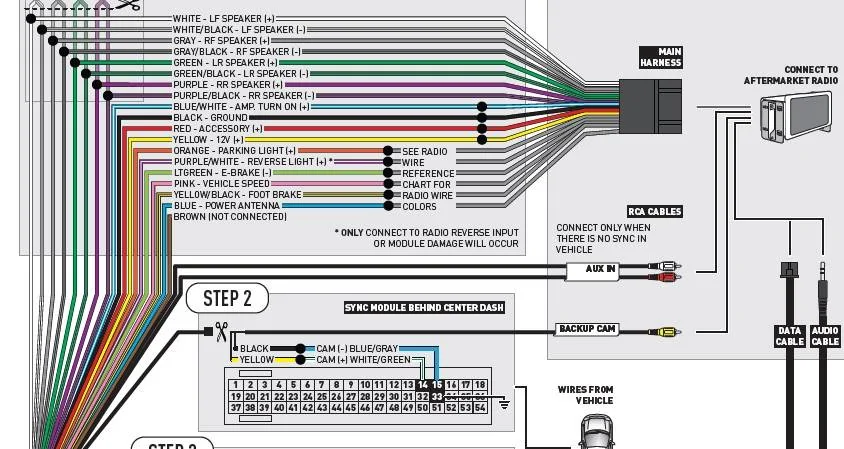
I'm almost finished up installing a Kenwood HU with the supplied harnesses' from idatalink, Maestro Rr interface,
HR/FO2 and Ken2, before i permanently reinstall i checked out what was working and what was not.
The BU camera is not coming on in Reverse, i have the yellow RCA plug into the HU and that is part of the Maestro harness, everything was plug/play no splicing.
Anyone who went from the 4.2 to the larger HU have any issues?
How did you wire up the BU camera?
Thanks,
Rob.
Sponsored

 
Last edited:
ranger7424

Well-Known Member
First Name
Allen
Joined
Dec 16, 2021
Threads
0
Messages
73
Reaction score
213
Location
Arizona
Vehicle(s)
2021 Ford Ranger XLT Sport 4x4
On my 2012 F150, I had to tap a power wire for the camera into the Reverse lights so that when they came on, they would power the camera.
 

airline tech

Well-Known Member
Joined
Aug 24, 2022
Threads
28
Messages
4,447
Reaction score
8,497
Location
Midwest - KS
Vehicle(s)
2022 Ranger Lariat-Super Crew, Cactus Gray
Occupation
Aircraft Tech
I'm almost finished up installing a Kenwood HU with the supplied harnesses' from idatalink, Maestro Rr interface,
HR/FO2 and Ken2, before i permanently reinstall i checked out what was working and what was not.
The BU camera is not coming on in Reverse, i have the yellow RCA plug into the HU and that is part of the Maestro harness, everything was plug/play no splicing.
Anyone who went from the 4.2 to the larger HU have any issues?
How did you wire up the BU camera?
Thanks,
Rob.
Just curious, where was the factory Rear Cam displayed?
On the 4.2 Screen or the Rear View Mirror?
 
OP
OP
Muffin1

Muffin1

Well-Known Member
First Name
Rob
Joined
Sep 24, 2019
Threads
37
Messages
673
Reaction score
1,258
Location
NJ
Vehicle(s)
2019 Silver STX 4X4 SC / 2024 XLT 4X4 Cactus Gray
On my 2012 F150, I had to tap a power wire for the camera into the Reverse lights so that when they came on, they would power the camera.
Hey thanks the the reply, i don't think i should have to do that since i'm using the Maestro interface module, but at this point IDK, The camera works when i change the settings but nothing while in reverse.
I'm going to call idatalink tech line tomm and see what they say.
 
OP
OP
Muffin1

Muffin1

Well-Known Member
First Name
Rob
Joined
Sep 24, 2019
Threads
37
Messages
673
Reaction score
1,258
Location
NJ
Vehicle(s)
2019 Silver STX 4X4 SC / 2024 XLT 4X4 Cactus Gray


airline tech

Well-Known Member
Joined
Aug 24, 2022
Threads
28
Messages
4,447
Reaction score
8,497
Location
Midwest - KS
Vehicle(s)
2022 Ranger Lariat-Super Crew, Cactus Gray
Occupation
Aircraft Tech
I would look at the APIM Connector C2385A
You will see Pin 53 and Pin 54, has wires those ports.
Does the Adaptor Harness connector have wires on the other side of those, or are they empty?

Pin 53 = HS1 Can + (Blue) Wire
Pin 54 = HS1 Can - (White) Wire

A brief note:
The Rear Cam is always powered, and when it receives (Input) via the HS1 Can that the truck is in Reverse- The Rear Cam, opens the Video Feed for display on the Sync Screen.
It receives this (Input) from the BCM and an internal microcontroller (relay) closes and opens the feed.

So, if you can get the Camera display to work, when not in reverse (which you cannot do on the OEM, then you have the inputs for display but you're missing the (Reverse-Signal) Trigger from those 2 pins (53 & 54) to turn on when you are in reverse.

Note: I am not done this, but the Website mentions something about programing the Masestro Module before install.


1710713117781-21.webp
 

airline tech

Well-Known Member
Joined
Aug 24, 2022
Threads
28
Messages
4,447
Reaction score
8,497
Location
Midwest - KS
Vehicle(s)
2022 Ranger Lariat-Super Crew, Cactus Gray
Occupation
Aircraft Tech
It is possible that there may be a code locked into the APIM or BCM.
Look for any codes and clear them (Forscan) and then do Self-Test on both.
 
OP
OP
Muffin1

Muffin1

Well-Known Member
First Name
Rob
Joined
Sep 24, 2019
Threads
37
Messages
673
Reaction score
1,258
Location
NJ
Vehicle(s)
2019 Silver STX 4X4 SC / 2024 XLT 4X4 Cactus Gray
Ok thanks for that info will try tomorrow.?
 
OP
OP
Muffin1

Muffin1

Well-Known Member
First Name
Rob
Joined
Sep 24, 2019
Threads
37
Messages
673
Reaction score
1,258
Location
NJ
Vehicle(s)
2019 Silver STX 4X4 SC / 2024 XLT 4X4 Cactus Gray
I would look at the APIM Connector C2385A
You will see Pin 53 and Pin 54, has wires those ports.
Does the Adaptor Harness connector have wires on the other side of those, or are they empty?

Pin 53 = HS1 Can + (Blue) Wire
Pin 54 = HS1 Can - (White) Wire

A brief note:
The Rear Cam is always powered, and when it receives (Input) via the HS1 Can that the truck is in Reverse- The Rear Cam, opens the Video Feed for display on the Sync Screen.
It receives this (Input) from the BCM and an internal microcontroller (relay) closes and opens the feed.

So, if you can get the Camera display to work, when not in reverse (which you cannot do on the OEM, then you have the inputs for display but you're missing the (Reverse-Signal) Trigger from those 2 pins (53 & 54) to turn on when you are in reverse.

Note: I am not done this, but the Website mentions something about programing the Masestro Module before install.


1710713117781-21.webp
Yes i had previously flashed the Maestro Rr module so that's ok,
The tech i talked to today had me check my connections and use my multimeter and found that by checking for voltage between the purple/white wire from the Maestro's connecter that connects to the 54pin and goes into the interface then comes out on a different plug to the purple/white to the radio HU
Touching the ground probe to the black wire that goes into the interface should have voltage at the purple/white (where io was contacting with the red probe) and it didn't, that's what energizes the reverse image, those two wires were connected together by me during installation.
So he believes the interface is defective and i contacted Crutchfield for a replacement which they are sending out and should have tomm.
 

airline tech

Well-Known Member
Joined
Aug 24, 2022
Threads
28
Messages
4,447
Reaction score
8,497
Location
Midwest - KS
Vehicle(s)
2022 Ranger Lariat-Super Crew, Cactus Gray
Occupation
Aircraft Tech
The manuals are not very detailed on what Pin # actually is the Reverse Trigger, to open the Video Feed for display.

So, I am thinking that when the APIM, receives the message over the HS-Can 3 the APIM applies the Ground on Pin #33 which opens the video feed.

Which I believe they are somewhat pointing out here:

Reverse Signal.webp


Vehicles Equipped With Audio System Display

NOTE:
The tailgate must remain closed for correct operation of the parking aid camera system.

The rear parking aid camera image is displayed by the audio system display when reverse gear is selected. To determine the selector lever position and enable the camera display, the PCM sends the gear position message to the GWM on the HS-CAN1 . The GWM then sends the message to the APIM via the HS-CAN3 .

The camera is on any time it receives voltage (when the ignition is ON), but a video signal is only generated under certain conditions. When reverse gear is selected, the camera continuously generates a video signal. When any gear except reverse is selected, the camera turns the video signal off when the vehicle speed reaches 10 mph (16 km/h) and turns the video signal on when vehicle speed falls below 5 mph (8 km/h). If the camera is not configured properly, some features may be inoperative. The camera sends the video signal on shielded twisted pair wires to the APIM , which displays the image on the audio system display.


It makes it confusing when you do not have a Clear input wire for the SYNC connector as to what is the reverse input signal trigger.
I am THINKING it is pin #33, when HS-CAN 3, comminates to the APIM that it is in Reverse, Internally the APIM applies the Ground on Pin #33 which opens the video feed from Pins 14 & 15.

This is where I am CONFUSED on the Purple & White wire, in the Maestro's wiring diagram, I am assuming it is tying into Pin #33 on the APIM connector.

Sorry, trying to help as best I can, but not fully clear on what wire is the actual trigger without testing it myself and I cannot see a pinout for the Maestro to APIM connector.
Wire to Wire (Match)


C2383A - Pinout

Pin
Circuit
Gauge
Circuit Function
Qualifier
Terminal Part Number
1​
SBP31 (WH-RD)​
14​
FUSE - 31 OR CIRCUIT BREAKER​
9U5T-14474-EA​
2​
*​
*​
Not Used​
N/A​
3​
VME80 (VT-GN)​
22​
CTRL MOD. - MULTIMEDIA GATEWAY MODULE # ALERT 1 (+)​
9U5T-14474-DA​
4​
RME80 (BU-GY)​
22​
CTRL MOD. - MULTIMEDIA GATEWAY MODULE # ALERT 1 (-)​
9U5T-14474-DA​
5​
*​
*​
Not Used​
N/A​
6​
*​
*​
Not Used​
N/A​
7​
*​
*​
Not Used​
N/A​
8​
LME89 (YE-BU)​
22​
CTRL MOD. - MEDIA CONNECTIVITY POWER​
9U5T-14474-DA​
9​
*​
*​
Not Used​
N/A​
10​
*​
*​
Not Used​
N/A​
11​
*​
*​
Not Used​
N/A​
12​
VMM23 (GY-BN)​
22​
CTRL MOD. - BLUETOOTH/MULTIMEDIA GATEWAY MODULE # MICROPHONE PHONE/VOICE CONTROL +​
9U5T-14474-DA​
13​
RMM23 (WH-GN)​
22​
CTRL MOD. - BLUETOOTH/MULTIMEDIA GATEWAY MODULE # MICROPHONE PHONE/VOICE CONTROL -​
9U5T-14474-DA​
14​
VMP19 (WH-GN)​
22​
CAMERA - PARKING AID REAR VIDEO +​
9U5T-14474-DA​
15​
RMP19 (BU-GY)​
22​
CAMERA - PARKING AID REAR VIDEO -​
9U5T-14474-DA​
16​
*​
*​
Not Used​
N/A​
17​
*​
*​
Not Used​
N/A​
18​
*​
*​
Not Used​
N/A​
19​
VDB29 (GN-BU)​
22​
CONNECTOR - DIAGNOSTIC # CAN BUS HIGH SPEED 3 (LOWER) HIGH​
9U5T-14474-DA​
20​
VDB30 (WH-GN)​
22​
CONNECTOR - DIAGNOSTIC # CAN BUS HIGH SPEED 3 (LOWER) LOW​
9U5T-14474-DA​
21​
DME80 (*)​
22​
CTRL MOD. - MULTIMEDIA GATEWAY MODULE # ALERT 1 D​
9U5T-14474-DA​
22​
DME52 (*)​
22​
CTRL MOD. - BLUETOOTH/MULTIMEDIA GATEWAY MODULE # AUDIO [SATELLITE DIGITAL RADIO] D​
9U5T-14474-DA​
23​
VME52 (BU)​
22​
CTRL MOD. - BLUETOOTH/MULTIMEDIA GATEWAY MODULE # AUDIO [SATELLITE DIGITAL RADIO] LEFT +​
9U5T-14474-DA​
24​
RME52 (GY-OG)​
22​
CTRL MOD. - BLUETOOTH/MULTIMEDIA GATEWAY MODULE # AUDIO [SATELLITE DIGITAL RADIO] LEFT -​
9U5T-14474-DA​
25​
VME53 (VT-GN)​
22​
CTRL MOD. - BLUETOOTH/MULTIMEDIA GATEWAY MODULE # AUDIO [SATELLITE DIGITAL RADIO] RIGHT +​
9U5T-14474-DA​
26​
RME53 (BN-WH)​
22​
CTRL MOD. - BLUETOOTH/MULTIMEDIA GATEWAY MODULE # AUDIO [SATELLITE DIGITAL RADIO] RIGHT -​
9U5T-14474-DA​
27​
VMEG1 (GY-VT)​
22​
CTRL MOD. - BLUETOOTH MOD DATA LINK +​
FU5T-14474-LB​
28​
VMEG2 (YE-OG)​
22​
CTRL MOD. - BLUETOOTH MOD DATA LINK -​
FU5T-14474-LB​
29​
*​
*​
Not Used​
N/A​
30​
*​
*​
Not Used​
N/A​
31​
DMM23 (*)​
22​
CTRL MOD. - BLUETOOTH/MULTIMEDIA GATEWAY MODULE # MICROPHONE PHONE/VOICE CONTROL D​
9U5T-14474-DA​
32​
*​
*​
Not Used​
N/A​
33​
DMP19 (*)​
22​
CAMERA - PARKING AID REAR VIDEO D​
9U5T-14474-DA​
34​
*​
*​
Not Used​
N/A​
35​
*​
*​
Not Used​
N/A​
36​
*​
*​
Not Used​
N/A​
37​
GD216 (BK-VT)​
18​
GROUND - INSTRUMENT PANEL STRUCTURE # 3RD POINT​
9U5T-14474-DA​
38​
RME89 (WH-BU)​
22​
CTRL MOD. - MEDIA CONNECTIVITY GROUND​
9U5T-14474-DA​
39​
*​
*​
Not Used​
N/A​
40​
*​
*​
Not Used​
N/A​
41​
VDB31 (BU-GN)​
22​
CONNECTOR - DIAGNOSTIC # CAN BUS HIGH SPEED 4 HIGH​
FU5T-14474-LB​
42​
VDB32 (VT-WH)​
22​
CONNECTOR - DIAGNOSTIC # CAN BUS HIGH SPEED 4 LOW​
FU5T-14474-LB​
43​
*​
*​
Not Used​
N/A​
44​
*​
*​
Not Used​
N/A​
45​
*​
*​
Not Used​
N/A​
46​
*​
*​
Not Used​
N/A​
47​
*​
*​
Not Used​
N/A​
48​
*​
*​
Not Used​
N/A​
49​
*​
*​
Not Used​
N/A​
50​
*​
*​
Not Used​
N/A​
51​
VMEF7 (BN-BU)​
22​
CTRL MOD. - SATELLITE DIGITAL RADIO DATA LINK +​
FU5T-14474-LB​
52​
VMEF8 (BU-GY)​
22​
CTRL MOD. - SATELLITE DIGITAL RADIO DATA LINK -​
FU5T-14474-LB​
53​
VDB04 (BU)​
22​
CONNECTOR - DIAGNOSTIC # CAN BUS HIGH SPEED HIGH​
9U5T-14474-DA​
54​
VDB05 (WH)​
22​
CONNECTOR - DIAGNOSTIC # CAN BUS HIGH SPEED LOW​
9U5T-14474-DA​
 
OP
OP
Muffin1

Muffin1

Well-Known Member
First Name
Rob
Joined
Sep 24, 2019
Threads
37
Messages
673
Reaction score
1,258
Location
NJ
Vehicle(s)
2019 Silver STX 4X4 SC / 2024 XLT 4X4 Cactus Gray
Hey airline tech thanks for the wire schematic and printout, i actually had the wiring part but not the C2383A/Pinout i was thinking while waiting for the new interface that if it didn't work then there had to be a bad connection or bent pin at the harness connection.
Well i received the new part and flashed it got all the plugs back in and Wala reverse image is there working properly so no need to trace any further, i can now get this finished up .:whew: .
Sponsored


Top