Sponsored

Issues With FordPass

BlueJay

Member
First Name
James
Joined
Aug 17, 2023
Threads
3
Messages
7
Reaction score
7
Location
29745
Vehicle(s)
2019 Ford Ranger XLT
I'm looking for another perspective on this issue before I go back to the dealership and waste my time and theirs. So I had the TCU replaced in my '19 XLT to "fix" an issue with FordPass where it would work intermittently, now it has stopped working altogether after the TCU was replaced. The connectivity settings menu in the truck won't open, it just says ensure ignition is on, please try again later. The app fails to activate the vehicle stating that the authorization rights cant be changed. Forscan reads a B156D code in the TCU that just says customer connectivity not synchronized with the HMI. I have been back to the dealership and they reprogrammed the TCU and basically said they have no idea what to do; FordPass customer service can only tell me that the truck hasn't talked to them since the TCU was replaced and refers me back to the dealership. I have pulled the fuse, done several soft and master resets, forced reboot the TCU, removed the truck from the app, uninstalled the app and tried re-adding the vehicle. Nothing has worked so far and I'm tired of dealing with the dealership, but by no means am I giving up. Any other ideas? I suspect the modem is the issue here but wanted to check here for last minute ideas before the dealership once again.
Sponsored

 

MKC1911

Member
First Name
Mike
Joined
Mar 18, 2024
Threads
0
Messages
24
Reaction score
52
Location
Virginia
Vehicle(s)
2021 Ranger Tremor
Occupation
Retired
I wouldn't be so sure that it's a dealer issue. I gave up on FORDPASS (good name for it). I haven't been able to get into their website for a while & just gave up.

Hope you get it straightened out!
 

alcohenusa

Well-Known Member
First Name
Alan
Joined
Jul 22, 2020
Threads
12
Messages
478
Reaction score
727
Location
CO
Vehicle(s)
2020 Ranger Lariat 4x4
Occupation
Retired
I'm looking for another perspective on this issue before I go back to the dealership and waste my time and theirs. So I had the TCU replaced in my '19 XLT to "fix" an issue with FordPass where it would work intermittently, now it has stopped working altogether after the TCU was replaced. The connectivity settings menu in the truck won't open, it just says ensure ignition is on, please try again later. The app fails to activate the vehicle stating that the authorization rights cant be changed. Forscan reads a B156D code in the TCU that just says customer connectivity not synchronized with the HMI. I have been back to the dealership and they reprogrammed the TCU and basically said they have no idea what to do; FordPass customer service can only tell me that the truck hasn't talked to them since the TCU was replaced and refers me back to the dealership. I have pulled the fuse, done several soft and master resets, forced reboot the TCU, removed the truck from the app, uninstalled the app and tried re-adding the vehicle. Nothing has worked so far and I'm tired of dealing with the dealership, but by no means am I giving up. Any other ideas? I suspect the modem is the issue here but wanted to check here for last minute ideas before the dealership once again.
Here’s what I would check and do if I was having this issue:

-Does the modem serial number/ESN show up in Sync3 settings or is it blank? If blank, then the modem is either dead or confused. You can reset it by disconnecting the battery or pulling the Telematics fuse. Though you did say you pulled fuses but did not mention which ones and you also rebooted the TCU.

-Is Sync 3.4 up to date? The latest build is 23188. If not up to date then get it updated.

-Are the Connectivity settings in Sync3 turned on? If yes, and still not working, then either go visit the dealer Service Manager and/or General Manager and get them to escalate to Ford for assistance. And, get a free loaner while they have your vehicle since they have been so clueless.

-Find another dealer or escalate yourself to Ford Customer Service. I have had success escalating by contacting Ford via X (twitter). They seem to be much more responsive that way.
 

Grandaccess

Well-Known Member
First Name
Robert
Joined
Jul 8, 2023
Threads
5
Messages
1,095
Reaction score
2,459
Location
Binghamton, N.Y
Vehicle(s)
2021 Ford Ranger XLT FX4
Occupation
Computer Consultant
something not entered right, the new box it probably reporting it self as something different on the canbus and dont match what it thinks it should be against the VIN
 

airline tech

Well-Known Member
Joined
Aug 24, 2022
Threads
28
Messages
4,448
Reaction score
8,499
Location
Midwest - KS
Vehicle(s)
2022 Ranger Lariat-Super Crew, Cactus Gray
Occupation
Aircraft Tech
Here’s what I would check and do if I was having this issue:

-Does the modem serial number/ESN show up in Sync3 settings or is it blank? If blank, then the modem is either dead or confused. You can reset it by disconnecting the battery or pulling the Telematics fuse. Though you did say you pulled fuses but did not mention which ones and you also rebooted the TCU.

-Is Sync 3.4 up to date? The latest build is 23188. If not up to date then get it updated.

-Are the Connectivity settings in Sync3 turned on? If yes, and still not working, then either go visit the dealer Service Manager and/or General Manager and get them to escalate to Ford for assistance. And, get a free loaner while they have your vehicle since they have been so clueless.

-Find another dealer or escalate yourself to Ford Customer Service. I have had success escalating by contacting Ford via X (twitter). They seem to be much more responsive that way.
Slight add to this - Pull Fuse 9 in the Interior Fuse Box - For 5-Minutes, to reset the TCU
Check to see if the ESN is now displayed, if the ESN is not displaying then the TCU is not broadcasting a signal to connect to Fordpass


OP
OP

BlueJay

Member
First Name
James
Joined
Aug 17, 2023
Threads
3
Messages
7
Reaction score
7
Location
29745
Vehicle(s)
2019 Ford Ranger XLT
Here’s what I would check and do if I was having this issue:

-Does the modem serial number/ESN show up in Sync3 settings or is it blank? If blank, then the modem is either dead or confused. You can reset it by disconnecting the battery or pulling the Telematics fuse. Though you did say you pulled fuses but did not mention which ones and you also rebooted the TCU.

-Is Sync 3.4 up to date? The latest build is 23188. If not up to date then get it updated.

-Are the Connectivity settings in Sync3 turned on? If yes, and still not working, then either go visit the dealer Service Manager and/or General Manager and get them to escalate to Ford for assistance. And, get a free loaner while they have your vehicle since they have been so clueless.

-Find another dealer or escalate yourself to Ford Customer Service. I have had success escalating by contacting Ford via X (twitter). They seem to be much more responsive that way.
It does have the ESN number displayed. I pulled the telematics fuse and left it out for around 10 minutes to no avail. I'm going back to the dealership soon and talking to the general manager as they're a family friend. Hopefully I get somewhere this route.
 

airline tech

Well-Known Member
Joined
Aug 24, 2022
Threads
28
Messages
4,448
Reaction score
8,499
Location
Midwest - KS
Vehicle(s)
2022 Ranger Lariat-Super Crew, Cactus Gray
Occupation
Aircraft Tech
From the Web:

READY TO CONNECT? HERE’S HOW:
Download FordPassd from the App Store® or Google Play™ and follow the prompts to set up your account.

  1. Make sure your vehicle is turned off, then select Add to add your vehicle.
  2. Scan or type in your VIN.
  3. Name your vehicle.
  4. Select Activate Vehicle.
  5. Start your vehicle and select Allow on the in-vehicle pop-up. If you’re having trouble activating, FordGuides are here to help: (800) 392-3673.
I am assuming you are not getting past step #4
You stated the ESN is showing, but is the Sync Version at vs 23188, if not this may be the issue


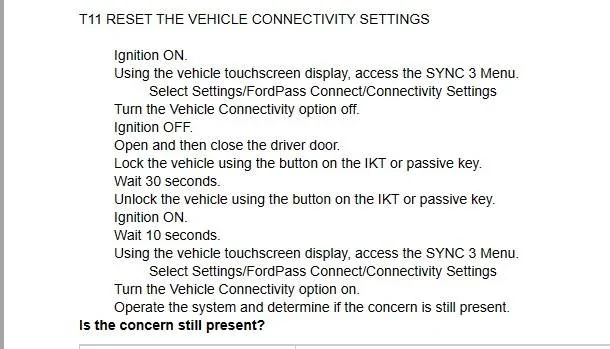
Give this a try, from the service manual, May help or may not IDK

Ford Connect Reset.webp
Sponsored


Top