airline tech
Well-Known Member
- Joined
- Aug 24, 2022
- Threads
- 28
- Messages
- 4,448
- Reaction score
- 8,504
- Location
- Midwest - KS
- Vehicle(s)
- 2022 Ranger Lariat-Super Crew, Cactus Gray
- Occupation
- Aircraft Tech
- Thread starter
- #1
Attention: If you are having issues with A/Start, Deep Sleep, Low Battery Voltages Etc., Please read through my post, I have put together an informative description of the system
Hello, All
When I got my new 22 Ranger Lariat, I decided to dig into how the charging and BMS operates, thinking it should be an easy task by just doing a quick google search and reading the service manual. Boy, I was dead wrong. I was highly frustrated that at this point in our advanced technology there was not any full descriptions of the charging systems we have today.
I have spent a great amount of time pouring through the different Ford forums, which I noted, no one knows exactly how this system operates, just theories with nothing proven by testing. I also researched things related to the AGM battery and how it must be charged to maintain health.
I then took what I learned through the forums and compared that information to all the documents that Ford has released on the operation of the system, these include Service Manuals, Body & Equipment Mounting Manual, and General Service Bulletin’s, compared the various explanations and complied the facts.
I learned, without a doubt, that the Ford Manuals are basic and very poorly written for anyone that is looking for specific information and due to this fact, it has led to a mass amount of confusion on how this system works, across the whole, Internet. It should have taken me a matter of a few hours to research the information I wanted. But that was sadly not the case.
I found a very frustrating issue when I looked at the service manual for the Ranger, I noted in the description of the system 80% is mentioned, but no documentation of 75%, which if you view the Battery Target SOC 75% via Forscan, I have found that this is the percentage that the manual for the Ranger should show 75%, not 80%. Now some owners have reported that this number is 70% for them, and if this is correct then I believe this would only be on the 2019’s and is possibly related to the battery size difference from the Lariats to the lower trims.
I did an As-Built, comparison, and it appears that the 2019’s might be the difference, if you look at these (2) As-Built Files for an XLT for 2019 and 2020, and if you do the Battery Target change in Forscan the Easy Way, these (2) files change in the BCM.
These files do not match: Possibly the reason owners report a different (%) and then Ford, possibly raised the percentage for the 2020 and Up Rangers. So I cannot confirm without further research, but in my opinion, this could be a possible compare (point) if the 2019’s have more issues than others.
When Ford puts together a manual for release, they generally use a previous platform as a guide and then configure it to the specific model, well I determined that this number 80%, is on other platforms like the F-150, and this specific spec got missed and was not changed for the Ranger, in documentation.
So, for the sole purpose of helping myself and others, wanted to pass along what I have learned from all the research and also include real world test and monitor results. I will be providing facts and my observation opinions. There is a ton of information on this system all over the internet and I found most of it to be misleading and confusing.
So, for the first time ever published, I am posting a full in-depth description of the charging system and all aspects. This is a long post, so get comfortable and enjoy the read.
Basic Operation:
I have proven with my testing that the system will actually charge to 100%, but not full time, it strives to maintain a minimum SOC of 75% at all times and charging voltages will vary depending on battery age, battery temp and driving conditions (driving at night-under heavy load) – (driving at daylight – under light load) Note: I said minimum 75%, as this is one of the biggest misconceptions of this system.
AGM Battery Facts: For the Ranger
The BMS Sensor:
BMS Sensor: While Driving:
At engine start-up, the BCM takes the (Refreshed SOC) it received from the Sleep Mode and sets an initial charging voltage based on that reading, now remember that an AGM battery requires at higher charging voltage below 75%, so after start-up the system will charge in the 14’s until it is at 75% SOC and then lower the charging voltage down to drive cycle voltage and during the drive cycle the sensor is constantly monitoring the amp draw on the system and it adjusts the charging voltage required to maintain the battery around 75%, so if the system can hold at 75% it will stay at 75% SOC. (more on this latter)
BMS Sensor: While in Sleep Mode:
Trigger Voltages: During Sleep Mode
Note: I cannot confirm these to be exact but these came from General Service Bulletin’s released by Ford and is the only documented specific voltages I can find. So, at least we have a general voltage reference that triggers the most common complaints about the truck
A/Start System: (Vehicle Charging) On IPC – (See GSB for A/Start Attached)
Now for this trigger voltage, it is not specifically stated in the GSB, if this voltage is a trigger while in sleep mode, it does state however that the voltage must be above 11.3 volts for the system to enable (during drive cycle), so based on that information and the information obtained from the description on the (Calibration-Refresh) I have concluded that this is a valid trigger voltage.
There are a few noted triggers for this message and one that I had to piece together using the – Load Shed-While Driving – Trigger Voltage.
Some have reported issues with either remote start not working via FOB or Ford Pass, or issues with the Passive Entry not unlocking the doors, well I don’t have it in writing what that trigger voltage is, but I feel it is the same trigger voltage as Load Shed – While Driving
Smart Alternators and Regenerative Braking - YouTube
And here is a post referencing the material covered in the video
What exactly are ‘smart alternators’?
Well they are not really smart. They do what they have always done and that is convert mechanical energy into electrical energy. What is smart now is a central control unit (ECU, EMS) which controls them.
In order for vehicle manufacturers to produce more efficient engines with more power and fewer emissions they looked at ways of reducing other loads on the engine and one way is to control the alternator. When you put your foot down for acceleration, the Control unit senses this and reduces the field coil voltage and hence the mechanical load the alternator puts on the engine to maximise power available. Like wise when cruising along to reduce emissions the load on the alternator is reduced. However to make up for all this the energy to charge the vehicle battery has to be found from somewhere and its done by using something called regenerative braking. When you take you foot off the accelerator and start to brake, the control units senses this and ramps up the field voltage to get the maximum output from the alternator using the excess energy from the braking action of the engine being driven by the road wheels.
---------------------------------------------------------------------------------------
So, with this I believe it is both the OAD Pulley, free spinning providing a small burst and then the ramp up provided the the PCM which is the control for the regulator.
and here is another video of explaining the charging duty cycle (Charging Control)
Here is a great video that explains the charging duty cycle, however, is does not specifically mention Regenerative Charging, but is does show the higher duty cycle will produce a higher charging voltage of 15.1
Understanding and Diagnosing Ford Smart Charging System - YouTube
I have read numerous theories on how the system works and what the 75% means with this system, well I have compiled the information from various sources and performed some on truck tests and actually observed what the system was doing, now I have noted that some factors come into play in determining what the charge voltage will be during the drive cycle, and they include day or night driving and temperature.
Daytime Driving: around 45d and above (Mode 1)
I have tried to get an exact description on how this factor's into how the battery is charged, some say increase and others say decrease in voltage but the facts are as follows.
Known Facts:
My thought is option 1 is correct, as it makes the most sense.
How to do it without Scan Tool or Forscan:
Battery Target SOC: Change with Forscan
If you note the service manual in the description of the system you will see a reference to 80% SOC, well with the Ranger that number was modified to 75%, now some owners have reported that their Ranger is set to 70%, now since the service manual is mainly compiled from previous platforms, this manual was simply copied and tweaked for the Ranger platform. However, this specific spec was missed and did not get changed in the documentation.
What is the 75% Setting For? (For Some Owners 70%)
Unloaded: All Exterior / Interior Lights and HVAC – OFF
PowerPoint - Voltmeter or Other Aftermarket Meter
I wanted to help myself and others learn in how the charging system actually performs in the real world and see if I could make sense out of all the various descriptions of the system, and separate Fact from Fiction, now when I first started my test, I did not have all the info I needed to get accurate results. Meaning that I was unaware of Smart Regenerative Charging, found by a what the heck moment during my first test phase, actually was looked at voltage meter when I let off the gas and was caught off-guard seeing a voltage spike plus how (OAT) temp plays a huge roll on the charging voltage being applied, more precisely the battery temp reading from the BMS sensor. So, this forced me to perform the test again and factor in all parameters.
My Testing Goals: (Current)
Voltage Ref Table: From Ford Documents

Sample Chart: For Battery Under Load (As a Reference)

Plug In Voltmeter - (Note Borrowed Pic)

Amazon.com: Zeltauto LED Digital Car Voltmeter 12V/24V Vehicle Voltage Gauge Monitor for Auto Car Truck : Automotive
Autel: (MS906TS Scanner)
Basic View of Available PIDs (Charging) - Note: Battery SOC (%) not available

Forscan: Basic Viewable PID's, Battery SOC (%) not an available PID with Forscan on the Ranger

TopDon: (BT200) Battery Tester, First Time Using This Tool

My Test Results:


After Test Findings – Noted Highlights
My average voltage drops as noted on my voltmeter, dropped down to around 10.5 volts as the lowest reading from the 11.9 Wake-Up voltage, but however the PowerPoints are in transition, at this point in the starting process. So, I won't get an accurate reading, this way.
Factory 75% SOC
Battery Target 80% SOC
75 vs 80 Percent – With both settings, I noted that although I was seeing a good slightly higher shut-down voltage at 80%, after the lights timed out, the voltages still maintained 12.6 volts. Now, the only main noted difference is that slight increase in battery voltage at shutdown.
Battery Target SOC 90%
Now, I only did this temporally with a few drives, just to note what the default charge voltage would be.
Note: If you reference any of the Ford manuals for description on the operation of the charging system, please note that these manuals can and will be confusing and that is the reason for this post, to break it down how it truly works.
1. Aux Batt Charging - Smart System - 12v Planet
https://www.ranger5g.com/forum/atta...167315/?hash=e1da65d8c6c722b1079b219da661341a
2. Ford: General Service Bulletin: Battery Charging
https://www.ranger5g.com/forum/atta...167316/?hash=e1da65d8c6c722b1079b219da661341a
3. Ford: General Service Bulletin: A/Start System
https://www.ranger5g.com/forum/atta...167317/?hash=e1da65d8c6c722b1079b219da661341a
https://www.ranger5g.com/forum/atta...167318/?hash=e1da65d8c6c722b1079b219da661341a
5. Ford: Smart Charge Explained - Taken from a Ford Transit - Body & Equip Mounting Manual
https://www.ranger5g.com/forum/atta...167319/?hash=e1da65d8c6c722b1079b219da661341a
6. Ford Ranger Service Manual: Charging System Operation
https://www.ranger5g.com/forum/atta...167320/?hash=e1da65d8c6c722b1079b219da661341a
7. Ranger Battery Specs:
https://www.ranger5g.com/forum/atta...167322/?hash=e1da65d8c6c722b1079b219da661341a
8. Smart Charge System: Motor Magazine
https://www.ranger5g.com/forum/atta...167323/?hash=e1da65d8c6c722b1079b219da661341a
9. Smart Alternators and Regenerative Braking - Good Read
https://www.ranger5g.com/forum/atta...167324/?hash=e1da65d8c6c722b1079b219da661341a
10. Ford Transit - Full Body & Equip Manual - This covers a lot of things that the Rangers Manual, Leave Out.
https://www.ranger5g.com/forum/atta...167325/?hash=e1da65d8c6c722b1079b219da661341a
In closing:
Well, I hope you have found this post helpful, and I hope you have gained some understanding of the system operation as it is more complex than the old school systems, I have satisfied my quest in knowledge of the system and only have one thing left and that is how the system actually reacts to charging the battery as it ages.
I am providing my results for others to see what effect the changes will have on the truck. I recommend you possibly do your own testing and make the determination on what you think is the best option. For me it’s the 75% factory if you are not having issues and 80% if you are. But 90% or disconnecting the BMS is not an option for me due to the battery being overcharged by my observations.
Enjoy
Edit: Adding Some Further Test Results
Test Performed At Idle- Monitoring Battery Temp and Amperage
Ran Each Mode 5 Minutes
Noted: The Disable A/Start BCM 726-48-02, does in fact disable BMS function along with A/Start, as this was unclear to me if just the input required for A/Start or the complete system was disabled.
At Factory 75% - Idle, Lights Off

At Factory 75% - Idle Lights on

BMS - Disabled using BCM 726-48-02 Hex Change - Lights off

BMS - Disabled using BCM 726-48-02 Hex Change - Lights on

Battery Target SOC-Change to 90% - Idle- Lights Off

Battery Target SOC-Change to 90% - Idle- Lights on

BMS Sensor-Disconnected - Idle Lights off

BMS Sensor Disconnected - Idle - Lights on

Will need to do some actual driving for good numbers on the battery temp, I don't know why I was getting a temp reading with the sensor disconnected, might be default value.
Noted nothing major and no off gassing of the battery during this test run. Outside Air Temp was 48 deg
So, this at least gives a basic indication of the different charging modes:
Main PIDs are Batt BCM = Battery Charging Voltage
GENVDSD = Generator Desired Voltage
Bat Temp
Gen B Plus Corr = Gen Output Amperage
I think for the next tests, I will just focus on Battery Target SOC of 80% and 90%, and complete some drive cycles, then hook up and see what battery temp is reading after a drive.
Edit : Great Video on the BMS Reset - From a Ford Tech
My Thoughts on this Video and BMS Reset
In my testing and reference the GSB for Deep Sleep, there is a reference to performing A BMS reset.
This BMS reset, resets Time Installed, so this process will tell the truck a new battery is installed and change the charging algorithm to a new battery.
However, all other service manuals and service bulletins, state to only perform the reset when replacing the battery.
So to sum it up, there are only (2) references to perform the BMS reset without replacing the battery. The above video (from a Ford Tech) and the GSB for Deep Sleep issues.
So, with this video and the GSB as reference, then I feel it would not hurt to just make this reset preventive maintenance. (Say, every other oil change or every oil change)
The only downside is the dealer may not warranty the battery as they will see the time since installed being newer than the battery age actually is. I have not found a way to reset back to original date, once reset you are stuck on that date, and it is the date you performed the reset.
Best case - You will possibly eliminate most of the battery issues we have and possibly extend the life of the battery.
Worst Case - It helps some or not at all, and you are out of pocket for new battery (if dealer wants to be difficult)
As this is one area of my research, I did not find a clear and precise answer as to how the BMS handles a aging battery. (Increase or Decrease Charging Voltage) as the battery ages due to increase in internal resistance at the battery.
EDIT: UPDATE: Nov 22, 2025
Overtime I have gained some extra knowledge on the charging system, note still never found a full (This is how the Ranger system works)
Let's Start with this:
I was not having any charging issues but every time I plugged in my scanner, I noted that my Estimated SOC PID was always reading 86% or 87%, despite my raising my SOC to 90% then recently to 95%.
Decided I would perform a BMS Reset - and see if that corrected the issue - so it did
Since I did a new reset (even with the OE Battery - 3 yrs old)
So, compare readings from a newly reset BMS Connected & The BMS Disconnected

Although I did not perform this test - Long Term it gave me some indication on what the system actually does with the BMS Sensor Disconnected.
The BMS Sensor: Measures
(Current Flow) In & Out of the battery
Indicated by example (3) = 3 Amps Charge or (-10) = Discharge
Estimated Battery Temperature:
I also CONFIRMED the BMS sensor includes a Temp Sensor, although it's not a direct reading sensor - I hit the sensor with a heat gun, no immediate response with the Estimated Battery Temperature Sensor (PID) after a couple of quick passes I was able to get a change in the temp reading.
Note: It held that reading for quite some time before it began dropping back down
Battery Voltage:
The Battery Voltage is picked up from the (+) wire that runs to the sensor.
This is where the BMS system calculates the Battery SOC, based on all parameters
This information is (Confirmed)
I figured out the reason for the statement in the manuals regarding the BMS (Recalibration) cycle
during SLEEP cycles -6 to 8 Hours of sleep to accurately determine the battery SOC.
It's a combination of 2 things:
1. Allow all modules to enter sleep
2. Allow the BMS Sensor to Reach (At Rest) temperatures without being influenced by Engine Running Temp & Electrical Influence from charging. - This is the main reason for the Time Length.
From my testing with the Heat Gun (Influence)
3. The BMS Sensor samples Battery Voltage after all modules are asleep and factors in (resting) sensor temp - To calculate the ESTIMATED BATTERY SOC and at next engine start this data table is used by the PCM to determine charging rate. (Desired Generator Output) Voltage via the Duty Cycle.
Information from the BMS Sensor is sent to the BCM, The BCM sends this data to the PCM via HS-CAN 1 data and this data is used by the PCM in partial factor of how it controls the Generator Output - Sets the Generator Voltage Desired & PWM Duty Cycle
Now, this is where the manuals leave you hanging and the following will be noted as confirmed or not confirmed
The PCM uses various data inputs to determine Generator output:
The PCM uses the (IAT) Intake Air Temp as a ref to perceived battery temp (Not Confirmed)
The PCM uses Throttle Position / Eng RPM / Vech Speed / Engine Load (Confirmed)
The PCM uses the BCM (input Data from the BMS Sensor) (Confirmed)
The Generator Regulator (has its own temp sensor) reports OH condition PID (Confirmed)
The PCM uses feedback (LIN) data to read the Generator -output current (Load) (Confimed)
The PCM has various MODES of operation:
Start-Up Mode: (Confirmed)
This mode turns off the gen output power, and it defaults to:
0% Duty Cycle and a Gen Voltage Desired of 10.6 Volts, I have noted with my voltmeter plugged into the Power Point - When you Crank the engine - the voltage reading drops to around this voltage. (This explains why)
This takes the load off of the crankshaft, faster starts
The system (if needed) ramps up (boosts) the Gen Desired Voltage up to 14.5 Volts, just after start to replenish voltage lost for engine start (approx. 30-Seconds) if battery was full charge.
Then drops the voltage back down to (normal charge mode)
Charge Mode: (Confirmed)
Activates when SOC is low, now if you have set the SOC to a higher SOC than the factory, it will spend most of its time in this mode.
Charge voltage still fluctuates depending on the PCM parameters it is seeing.
It also activates when there is a high load
Fuel Economy Mode / Voltage Reduction Mode: (Confirmed)
(This is mainly for the factory low SOC)
This is the PCM control to set the Desired Voltage Setpoint to a lower value, as low as 12.2 Volts (Float Charge)
This reduces load on the crankshaft and improves fuel economy - (PERCIEVED Statement)
This lets the generator turn off the charge voltage and the system relies on battery voltage.
More noted @ low RPM /idle settings, alternator not seeing RPM increase.
Since this Mode is not always seen (as I have raised my SOC) I never see it anymore.
Some D&O's State mode activates (IF) - (Not-Confirmed)
AMB Temp - above 32 Deg F
Caliculated Battery Current is less than 15 Amps and Greater Than (-8) Amps
Battery SOC is Greater Than 75%
Boost Charging: (Confirmed)
This is more noted if you have the factory SOC set.
This mode triggers during deceleration and uses the Alternator (OAD) pulley to achieve this
this will create the momentary boost charge using kinetic energy - More noted on a downhill coast.
Maintenance Refresh Mode: (Confirmed)
This is the mode that covers battery sulfation, and the manuals state that if the battery has been holding at 75% for extended periods of time it boosts the charge voltage up to 15.2 volts.
Another D&O - states if battery voltage is less than 13.2 Volts for 45-Minutes it sets a target charge voltage between 13.9 and 15.2 Volts for 5-Minutes.
I think this is where those that monitor the voltage with a meter are seeing some charging voltage variations.
Its intended function is to get the SOC to advance up out of the 75% setting.
The System Off to Save Battery Message: (Not Confirmed)
We know that the BMS Sensor (what it is reading) triggers this message, but I believe it's not really about the actual battery voltage reading, it's what the BMS Sensor is registering as the SOC reading.
This would explain why you have a good battery voltage test (12.2 Volts or Greater) but if you get this message (Check what the BCM is showing for the Estimated Battery SOC) this calculated reading comes from the BMS Sensor- it periodically updates the sensor while driving and performs a (True & Accurate) reading during sleep (rest)
Note: I think what is happening over time this sensor builds a (Drift Error) and reports false readings - throwing off the charging system and minimum error parameters that trigger the message.
Be it a - Sidetrack of the manuals and perform a BMS Reset, although there is only one Ford Document (GSB) that calls for a BMS Reset for System Error (T-Shoot) most of the document's state only with Battery Replacement
or
Replace as a precautionary maintenance item - depending on what your PID data is showing.
Something I have noticed but never really paid attention to:
All the BMS Sensor and Charging Targets - Relate to the SOC, in my mind it always went to battery voltage:
BUT if you actually think about it and with the BMS (Calibration) it references it being used to get an ACCURATE SOC - Hmm - What if the SOC is off, then then charging system will follow that SOC Calculation, no matter what the actual voltage is.
This would be the SOC Drift - Which is supposed to correct itself on the (Sleep Calibration)
So, a more accurate reading to correct the drift
During (Engine Running) it is measuring the in & Out Current as well as voltage & Temp so the SOC may drift while driving
PCM Control of the Generator (Note all PID data = Generator)
This is a single wire (LIN) circuit than takes place of the old (Gen-Com) & (Gen-Mon) & Sense Wire
LIN (Local Interconnect Network) - PWM with a Ground
PCM: (Master Node)
The PCM sets a Desired Generator Voltage (Setpoint) to the Regulator (PWM) 125 Hz Frequency
This is determined by the PCM From:
Set operation Mode: From Above
Engine Parameters -Such as: Throttle Position, RPM, VSS, Engine Load.
IAT (Intake Air Temp) (Perceived Battery Temp) outside of the BMS Sensor Reading
BCM - Input of Battery Condition (BMS Sensor Input)
Feedback from Generator (Current) Load
The Generator is also sending feedback of Generator Temp (Internal) as there is a PID for Gen Overtempt being reported (True/False) - so this would only be a DTC code monitor along with any other failure code DTCs that the PCM is monitoring for the LIN circuit.
Regulator (Slave-Node)
The Regulator in turn from the received data pulses the signal to ground rapidly producing a square wave signal (Duty Cycle) - The field current is being pulsed to ground this in turn controls the output voltage. (Based on the PCM Desired Voltage Setpoint)
The Duty Cycle is measured as a percent (On-Time)
The Duty Cycle (is what controls the voltage output) of the Generator, this is the current (Amps) reading.
The Higher the Duty Cycle - The Higher the output voltage will be.
So, on a PID data list you will see the Duty Cycle and Gen Current PIDs fluctuating.
Every 5-Seconds the Desired Generator Output Voltage is pulsed for change, if no change is required it will not change
To truly see the PWM (Duty Cycle Signals) it needs to be viewed on a Lab Scope
Here is a Ref Data Chart for Duty Cycle T-Shooting - Semi Accurate as a REF Only Guide
Note this is from the old style 3 Wire Control, but works for the LIN Control

This is me playing:
Wanted to see the BCM PIDs -
Sensor Disconnected Defaults and Sensor Disconnected & a BMS Reset Defaults
Sorry I did not realize I did not have matching PID data for the pics
But before disconnecting:
Bat Volt was 14.1 Volts
SOC 91%
Batt Temp 55 Deg
I was curious if (even though) it's not updating the BCM for data, is this data being transmitted to the PCM for charging data - or is is not being sent due to the fault code that is generated with it disconnected.
As Noted, The BCM still has it powered (ON) by its LIN Bus - so the LIN is still powering the connector for data (dead end connection)
I was questioning how long this default data remained and wanted to know if any of this default data was being transmitted to the PCM. IDK for sure but I believe the fault code blocks the data from being used and the PCM uses IAT as the back-up for battery temp
BMS - Disconnected BMS - Disconnected & Then BMS Reset

Hello, All
When I got my new 22 Ranger Lariat, I decided to dig into how the charging and BMS operates, thinking it should be an easy task by just doing a quick google search and reading the service manual. Boy, I was dead wrong. I was highly frustrated that at this point in our advanced technology there was not any full descriptions of the charging systems we have today.
I have spent a great amount of time pouring through the different Ford forums, which I noted, no one knows exactly how this system operates, just theories with nothing proven by testing. I also researched things related to the AGM battery and how it must be charged to maintain health.
I then took what I learned through the forums and compared that information to all the documents that Ford has released on the operation of the system, these include Service Manuals, Body & Equipment Mounting Manual, and General Service Bulletin’s, compared the various explanations and complied the facts.
I learned, without a doubt, that the Ford Manuals are basic and very poorly written for anyone that is looking for specific information and due to this fact, it has led to a mass amount of confusion on how this system works, across the whole, Internet. It should have taken me a matter of a few hours to research the information I wanted. But that was sadly not the case.
I found a very frustrating issue when I looked at the service manual for the Ranger, I noted in the description of the system 80% is mentioned, but no documentation of 75%, which if you view the Battery Target SOC 75% via Forscan, I have found that this is the percentage that the manual for the Ranger should show 75%, not 80%. Now some owners have reported that this number is 70% for them, and if this is correct then I believe this would only be on the 2019’s and is possibly related to the battery size difference from the Lariats to the lower trims.
I did an As-Built, comparison, and it appears that the 2019’s might be the difference, if you look at these (2) As-Built Files for an XLT for 2019 and 2020, and if you do the Battery Target change in Forscan the Easy Way, these (2) files change in the BCM.
These files do not match: Possibly the reason owners report a different (%) and then Ford, possibly raised the percentage for the 2020 and Up Rangers. So I cannot confirm without further research, but in my opinion, this could be a possible compare (point) if the 2019’s have more issues than others.
2019 (XLT) @ 70% (Possibly) 2020 (XLT) @ 75% (Confirmed)
726-07-01 – (0101-0000-0037) ---------------------- (0000-1388-04D4)
726-07-02 – (0000-0000-0036) ----------------------- (B000-000A-8C7C)
When Ford puts together a manual for release, they generally use a previous platform as a guide and then configure it to the specific model, well I determined that this number 80%, is on other platforms like the F-150, and this specific spec got missed and was not changed for the Ranger, in documentation.
So, for the sole purpose of helping myself and others, wanted to pass along what I have learned from all the research and also include real world test and monitor results. I will be providing facts and my observation opinions. There is a ton of information on this system all over the internet and I found most of it to be misleading and confusing.
So, for the first time ever published, I am posting a full in-depth description of the charging system and all aspects. This is a long post, so get comfortable and enjoy the read.
Basic Operation:
I have proven with my testing that the system will actually charge to 100%, but not full time, it strives to maintain a minimum SOC of 75% at all times and charging voltages will vary depending on battery age, battery temp and driving conditions (driving at night-under heavy load) – (driving at daylight – under light load) Note: I said minimum 75%, as this is one of the biggest misconceptions of this system.
AGM Battery Facts: For the Ranger
Likes to be charged to 100% SOC
Charging voltage below 75% SOC (Absorption Charge) – 14’s
Requires a special charge (Lower) rate above 75 % SOC (Float Charge) 13’s
Battery 100% SOC – for the Ranger Lariat = 12.89 Volts and XL/XLT = 12.76 Volts, as programmed into the BCM for a state of health monitor the (Ref Point-Voltage)
Can lose as much as 20% SOC, if left sitting for 30 days without driving it
Very susceptible to heat damage, sensitive to over-charging.
Susceptible to reduced charge capacity over time.
Battery Temp: charge rate deciding factor is around 45 deg (Approx)
Keep in mind that the recommended charging voltages published are for a battery that is being charged on the bench, not while it is in use on the vehicle, so you have to factor that in the charging voltage readings.
Aging battery, as the battery ages the internal resistance increases, thus harder to charge and creates a higher voltage drop when starting, resulting in a slower cranking speed.
A good AGM battery should recover quickly, from discharge, like just after start-up, a charge rate of 14.4 volts is applied to get battery voltage above 75% SOC, should take about 1 to 2 minutes.
Average noted by owner’s battery life expectancy is between 3 to 5 years but varies and I believe hotter climate states appear to be mostly affected.
The BMS Sensor:
When the truck is built and the BCM is programmed, it is programmed with the battery specs – Size, CCA and Amp Hours, so it knows how a new battery performs by that programming and it is saved in the memory of the BCM.
The BMS sensor monitors in real time- Voltage, Amp Draw and Battery Temperature as a ref for calculating the charge voltage to be applied.
The BMS Sensor, monitors voltage drop across the battery at every engine start and compares it to (day of install) battery specs, to monitor the health of the battery. So, basically it is measuring the internal resistance.
The BCM requires a recalibration every day when the truck is in sleep mode, a period between 3 to 8 hours (untouched) and the BCM uses the BMS sensor to perform this task, and this recalibration is monitoring the State of Charge (SOC) and also State of Health (SOH) of the battery. The reason to perform a daily recalibration is to prevent error creep, so even a small percentage error off, after 7 days would be a bigger percentage, this is why after 7 days if a recalibration has not completed, the BCM will disable features like A/Start, until the recalibration has completed.
EDIT: - Added after Posting
I forgot to include a small piece of info, the BMS recalibration, requires less than 300ma amp draw on the system, so any device left plugged into the power-points and or USB's will draw power until they time out, and those that have installed the nightlight, in the rear seat plug, this plug is powered off at engine shutdown and key off, if the power draw off of that plug is greater than 10 amps the A/Start system will not enable with the engine running.
With all the above information the BCM determines the state of health of the battery and sets into play an aging battery charging algorithm, by adjusting the charging voltage as needed to match the current health of the battery.
The BMS sensor is an Amp Based sensor, it is monitoring full time and it monitors the battery voltage, amp draw and temperature of the battery. It functions differently while driving than it does while the truck is in sleep mode and this little thing on the negative battery posts is the main component in the system that controls the charging voltage output, plus it monitors what the battery voltage is during sleep mode (this is not DEEP Sleep) but it does tie into that.
The below paragraph is very important, as it requires the system to be in sleep mode (UNTOUCHED), well untouched means just that, so this includes any and all battery service, such as charging.
So, if you are one of those who put the battery on a maintainer and wonder why the A/start is not working, even though you just charged it, this is most likely the reason, plus there is another factor and that is the trigger voltage for disabling the system. (See Trigger Voltages-Below)
The system requires a refresh of the current SOC, and it performs this every time the truck is shut down, now from what I have read on this, it requires a minimum of 3 hours, but to get an accurate reading can take as much as 8 hours untouched. And if a recalibration is not performed in a 7 day period, some systems will be shut down, such as A/Start, note anything plugged into the power-point and or the power plug will stop this refresh from happening, plus heavy parasitic draws will also stop it.
BMS Sensor: While Driving:
At engine start-up, the BCM takes the (Refreshed SOC) it received from the Sleep Mode and sets an initial charging voltage based on that reading, now remember that an AGM battery requires at higher charging voltage below 75%, so after start-up the system will charge in the 14’s until it is at 75% SOC and then lower the charging voltage down to drive cycle voltage and during the drive cycle the sensor is constantly monitoring the amp draw on the system and it adjusts the charging voltage required to maintain the battery around 75%, so if the system can hold at 75% it will stay at 75% SOC. (more on this latter)
BMS Sensor: While in Sleep Mode:
Once the truck enters sleep mode, it starts it’s recalibration process, this gives the system a chance to alter the charging voltage if needed, as it is checking this parameter (current SOC) vs when the battery was new, so it a nutshell it is monitoring current to battery health as new.
The BCM has the reference points for this, when the battery is new, the BCM is programmed with specific information on the battery, size, CCA, amp hours etc. plus it also includes a battery time in service date, so the BCM knows via programmed data how old the battery is and what the new battery specs are.
During the Refresh- Calibration, the BCM is calculating the (SOH) State Of Health of the battery, and then it factors in the aging battery algorithm which alters how the battery is charged based on new vs current battery health. (see aging battery below)
The system is also monitoring voltage levels while it sits idle in sleep mode and it takes action to allow the system to maintain a high enough voltage to start the truck, by triggering some systems off and disabling them, if a trigger voltage is sensed by a lower than normal at rest battery voltage.
Trigger Voltages: During Sleep Mode
Note: I cannot confirm these to be exact but these came from General Service Bulletin’s released by Ford and is the only documented specific voltages I can find. So, at least we have a general voltage reference that triggers the most common complaints about the truck
A/Start System: (Vehicle Charging) On IPC – (See GSB for A/Start Attached)
Now for this trigger voltage, it is not specifically stated in the GSB, if this voltage is a trigger while in sleep mode, it does state however that the voltage must be above 11.3 volts for the system to enable (during drive cycle), so based on that information and the information obtained from the description on the (Calibration-Refresh) I have concluded that this is a valid trigger voltage.
11.3 Volts, at any time during sleep mode if the BMS senses a voltage lower than 11.3 volts, it will trigger the A/Start system to be disabled, and this is important, because remember above about the sleep mode recalibration, it occurs every time the truck enters sleep mode, and the system will never enable as long as it keeps seeing 11.3 volts during this phase. So, I have deduced that this is a primary reason as to why there are so many issues with A/Start not working and repeating itself for days on end, and in order for the system to enable, it will have to see a voltage higher than 11.3 volts (during sleep mode) as after starting the truck, with the generator working correctly (charging wise) you will always see a voltage higher than 11.3 volts, this and this alone is what I am basing my theory on.
Just to highlight and refresh here, if you place the battery on a charger to rectify this issue, remember you may not see immediate results, as the system needs to be (UNTOUCHED) for a proper recalibration, and adding a charger to the system takes it out of that requirement, remember above that the BMS sensor is amp Based, it is sensing the amp flow, while on the charger. Sure, you are charging the battery and the system sees it, but it is not performing the recalibration that is required, while being charged. This is the way I see the system operation, some have reported immediate results, but I think due to the many complaints of putting it on a charger and not fixing the issue, I feel I am correct.
In the manual, it states, that if a recalibration process cannot be completed in 7 days, the system will disable features such as A/Start, so if you have something that is preventing this process, the system will flag this and disable the system until a recalibration can be completed
There is another huge factor and I do not know for sure, since my truck has the A/Start delete from the factory and one factor for the system to enable is the battery temp must be above 41 degrees , and when looking at the manuals I do not see any specific IPC message for Battery Temp being too low, the only one I see is –Vehicle Charging, so I believe that this message covers both, since a cold battery does not charge well and the system disables when the battery temp is below 41 degrees and only providing the driver with the –Vehicle Charging Message, being a very misleading message, thinking you have charging system issue, when in reality it is a designed programmed disable due to the battery temperature. (Note: This is Battery Temp at the BMS sensor, not Engine Coolant Temp, but should be close to the (OAT) Outside Air Temp)
During drive cycle, if system is working normally (Engine-Off), if the BMS triggers battery voltage is at or below 11.3 Volts, then the engine will auto-start without you taking your foot off of the brake, to allow the battery to charge and the battery temp plays into this as well, it will disable the system while driving if it falls below 41 degrees.
Deep Sleep: Ford-Pass Notification - (See GSB for Deep Sleep Mode-Attached)There are a few noted triggers for this message and one that I had to piece together using the – Load Shed-While Driving – Trigger Voltage.
Truck has not been started for 14 days and or battery voltage has dropped below 9.5 volts.
BCM is reporting that Battery SOC has dropped below 50%, well this voltage equals 12.3 volts, this makes no sense and I believe the correct number is 11.5 volts, since this is the voltage that will trigger Load Shed, systems off messages while driving, so the voltage of 11.5 makes more sense due to the fact that my normal wake up voltage, before I make my first start, I check the battery voltage and it normally sits around 11.9 to 12.0 volts, so based on my testing I feel the trigger of 11.5 volts would be a valid voltage.
If the Sync system is doing an (OTA) Over the Air update, Ford Pass will lose communication with the (TCU) Telematics Control Unit while it reboots, this will generate a Deep Sleep Message in Ford Pass, due to this loss of communication, so I will call this one a glitch in the system programming and Ford Pass reacting with a generic message because it lost the ability to monitor.
A little side note here, I have noticed if I am working around the truck in the garage with both the FOB and Cell Phone on me, every once in a while the truck performs a communication wake up of some kind, note I am not touching the door handles when this happens. I plan on being more attentive to it when it does it again, to get specific details on what is actually happening, as I have got so used to the fuel pump prime sound, I don’t even notice it much anymore. But, I feel it is the proximity of the FOB being near the truck and it is anticipating an entry (Door Opening) The reason I am pointing this out is due to the only time I received a Deep Sleep Message, was during this time period I was next to the truck and the communication wake up event had just occurred about 3 times. If I would have had my voltmeter at that time, I would have a definite trigger voltage to provide.
Remote Start / Passive Entry Issues:Some have reported issues with either remote start not working via FOB or Ford Pass, or issues with the Passive Entry not unlocking the doors, well I don’t have it in writing what that trigger voltage is, but I feel it is the same trigger voltage as Load Shed – While Driving
11.5 Volts or close to it, if the BMS senses that the battery voltage has dropped below 11.5 volts, it may be disabling these functions, so this is just a reference voltage that you could possibly check and use as a reference for troubleshooting for these issues.
Trigger Voltages: While Driving11.3 Volts, if the system sees voltage above 11.3 volts A/Start will enable, if below 11.3 volts (while A/Start is active) the engine will A/Start regardless of if foot is on the brake. ((See GSB for A/Start Attached)
11.5 Volts, if the system sees voltage below 11.5 volts, you will see something like system off to save power, mainly the Sync Screen will shut down along with climate control, if the voltage recovers above 11.5 volts, the systems will come back on without a restart of the truck, so it will automatically reset itself.
Smart Regenerative Charging: (How it works- basic operation)The Ranger has a Variable Voltage Generator, and it is more complex than the old school alternators, its voltage output is controlled by the PCM by the information it receives from the BCM which gets its input from the BMS sensor.
Variable voltage output depending on a few factors, driving at night or daytime and battery temperature, and amp draw on the battery.
Output is also determined by engine efficiency: Under heavy load, towing, accelerating or decelerating.
Generator – Has the ability to Couple and Decouple from the drive pulley by using a (OAD) Overrunning Alternator Decoupler pulley, the pulley can lock (couple) during acceleration and unlock (decouple) during deceleration, thus allowing the alternator to coast or freewheel and still provide a charging voltage, this freewheel (inertia) spinning is enhanced by the forward moving speed of the vehicle and the engine rotational speed is now being provided by the drivetrain, this is known as engine braking and it is using the engine braking process to help slow the vehicle but it is also providing the momentum needed by the generator to produce the high boost charge into the battery, so the faster you are moving the more coasting momentum you will have and also produce a longer boost charge.
During acceleration the generator-will couple with the drive pulley and produce regulated voltage to keep the battery charged to a minimum 75% SOC and the reason is to allow the Regenerative Charge it will receive during deceleration, so it allows a buffer zone of around 25%.
During deceleration, the generator will decouple from the drive pulley and allow the generator to free spin from the drive pulley and now depending on how fast (MPH) you were traveling when you let off the gas pedal will dictate how much boost voltage is produced, this extra boost will be enhanced by engine braking and is highly noticeable if coasting down a hill with your foot off the gas pedal and by the time you are stopped and not moving the boost charge has finished and it drops back to the normal charge target it was at prior to decelerating.
Edit: I did some further research, and it appears there is more to the Regenerative Charging than the OAD Pulley (During Deceleration) Sorry but finding exact information on this system is difficult and plan on digging deeper to find out more details as I have not found any Ford Manuals to explain the system in detail on its operation.
So, when the pulley decouples the alternator is now free spinning, this takes the load off of the drive belt thus reducing and or eliminating wear on the belt and belt driven components, this also reduces vibration on the belt system.
From what I have learned so far, the PCM is the controlling module for the charging voltage output and it knows when the truck is in deceleration mode from the inputs of the Vech Speed and Crank Sensors, the PCM increases the field voltage to maximize the alternator output.
Ref the following video I found and his written post about the information in the video.
Smart Alternators and Regenerative Braking - YouTube
And here is a post referencing the material covered in the video
What exactly are ‘smart alternators’?
Well they are not really smart. They do what they have always done and that is convert mechanical energy into electrical energy. What is smart now is a central control unit (ECU, EMS) which controls them.
In order for vehicle manufacturers to produce more efficient engines with more power and fewer emissions they looked at ways of reducing other loads on the engine and one way is to control the alternator. When you put your foot down for acceleration, the Control unit senses this and reduces the field coil voltage and hence the mechanical load the alternator puts on the engine to maximise power available. Like wise when cruising along to reduce emissions the load on the alternator is reduced. However to make up for all this the energy to charge the vehicle battery has to be found from somewhere and its done by using something called regenerative braking. When you take you foot off the accelerator and start to brake, the control units senses this and ramps up the field voltage to get the maximum output from the alternator using the excess energy from the braking action of the engine being driven by the road wheels.
---------------------------------------------------------------------------------------
So, with this I believe it is both the OAD Pulley, free spinning providing a small burst and then the ramp up provided the the PCM which is the control for the regulator.
and here is another video of explaining the charging duty cycle (Charging Control)
Here is a great video that explains the charging duty cycle, however, is does not specifically mention Regenerative Charging, but is does show the higher duty cycle will produce a higher charging voltage of 15.1
Understanding and Diagnosing Ford Smart Charging System - YouTube
How the Charging System Works:I have read numerous theories on how the system works and what the 75% means with this system, well I have compiled the information from various sources and performed some on truck tests and actually observed what the system was doing, now I have noted that some factors come into play in determining what the charge voltage will be during the drive cycle, and they include day or night driving and temperature.
Below 75% SOC -Active for all drives mode: You may see an initial charge voltage in the 14.s when you first start the truck, this is the charging voltage being applied if the battery SOC is blow 75%, once it reaches 75% the charge voltage will lower to the normal set target voltage the system needs for the drive cycle mode you are in, now depending what drive mode you are in, you may not see this voltage swap over if a higher charge voltage is already being applied.
Above 75% SOC -Charging voltages will vary slightly within the charging mode that is active, the BMS sensor is reading in real time at the battery what the Temp, amp draw, and battery voltage is, and determines what the charging voltage needs to be to keep the battery at or above 75% SOC through the following different charging strategies. Now the following strategies are the ones that I noted by observation, I know that temperature plays a role, and from my observations it was around 45 deg plus the charging system factor, unloaded (Day) and loaded (Night) driving.
The 4 Charging Modes: Charging Strategies (As Noted by Testing)Daytime Driving: around 45d and above (Mode 1)
This daytime driving, charge phase means all normal driver settings as you would drive it, headlight switch in auto and using DRL’s, HVAC and Radio –ON, so a normal driver with no extra power-hungry things pulling amps away from the battery.
During daytime driving, the system is geared to be the most energy efficient than any of the other charging modes and you will note the voltage gauge readings are more accurately read. You can see more clearly how the system operates and this is where the smart charge system shows how smart it actually is, but it also highlights the weakness in the system in the ability to maintain the battery above 75% SOC, if you are only driving short trips on a regular basis.
During Acceleration:Normal driving (accelerating) voltages can be between 12.2 and 12.8 volts, the generator is applying a minimum charge voltage required to maintain the battery near 75% SOC, the system is designed to let the battery maintain itself around 75%, and depending on the amp draw, the system will determine the charging voltage that needs to be applied, this lowered charging voltage is intended to allow room in the battery for the boost charge it will receive during deceleration. Now keep in mind that the voltage you see in this driving phase also has an amp draw on it, so it may not be the exact battery voltage, but it is notably lower than an old school charging system.
The system is geared to maintain the lowest possible charging voltage to support the battery and keep it between 12.2 and 12.8 volts with 12.65 volts being the bullseye target (75%-SOC) voltage, I hope this makes sense for all who read this, now comes the reason for this charging strategy, and that is to make room for the boost charge.
During Deceleration: (Boost Charge)During deceleration, when you take your foot of the gas, the generator will provide a boost charge voltage of 13.4 to 15.2 volts, this boost charge will push the battery SOC from around 75% back up to or near 100% via the generator pulley decouple and with the help of engine braking, if you are coasting down a hill, you will get a longer boost charge via the engine braking effect, so this event takes care of refreshing the battery that has been holding around 75%, thus addressing the sulfation issues in the battery. (Note: There is another description of this refresh phase, and it makes reference to 15.2 volts – see charging system highlights below)
My little observation note on this: this boost voltage goes against the AGM battery charging protocol since this voltage does not appear to be controlled, it crams the boost charge in quickly and this extra boost does provide a voltage boost in the battery, but I question if the battery likes it, even though the boost charge is short lived, it is still a lot of charge being applied to a battery in a short amount of time. (Just an observation)
At Idle: Stop-Lights, Etc.You have just came to a stop and the battery just received a boost charge through Regenerative Charging, so the battery is now charged at or near 100%, now you will see a lowered charge voltage being applied and the system minimum is 12.2 volts, the system lets the battery burn off the boost charge voltage it just received, and lets the battery do most of the work. The system will adjust as needed to provide a charge voltage high enough to support the amp draw from it. My average is about 12.4 volts at idle. So, now the light turns (Green) and you hit the gas, and the whole process repeats itself.
Attention: Short Trip Only Owners, Who Mainly Make Daytime DrivesNote, from the above description, if you only drive short trips and are mainly a stop-light to stop-light city driver, the above charging cycle is most likely causing charging issues, more notable with constant low speed driving around 30 MPH. Although, I cannot prove that this is causing the issues, I am only noting my observation of the system and highlighting the possible downsides for the owners that fall under this category. I would need to have a test truck that is driven to match this category, to prove it.
The notable issue is the Smart Regenerative Charge, this boost charge is more effective at higher speeds, the faster the engine is turning when you let you your foot off of the gas pedal, determines the amount of boost charge the battery gets, as well as vehicle speed, for the engine braking enhanced boost.
So, with the above scenarios being consistently in play, the battery will never be able to be fully charged on a regular basis, and then add A/Start into the mix that is adding more of a load on a weak battery and or hitting the trigger off voltage of 11.3 volts and disabling the A/Start system just enhances the issue. I am thinking the issue would be more pronounced in a city with lots of stoplights and most of your driving time from point (a) to point (b) is spent idling at stoplights or stop and go traffic versus actually moving at constant speed. The system will always maintain around 75% SOC and rarely see anything more. Now, this is just my observation on the system, but a lot of owners are having issues, and this appears to be a huge factor and design downside of the system and how it operates.
If you are in this group of owners, it would be recommended to get a cheap voltmeter, like I used for testing and monitor how the system charges according to your personal driving routine and this monitor test will prove or disprove that your current normal driving habits and the truck are not playing nice together.
Possible Solutions:One, possible quick and easy solution is to place the headlight switch in headlight position, this will force a higher constant charge rate of 13.5 volts, however you just have to get into the habit of turning them off or back to auto before you leave the truck, the reason this may work is, if the headlights are on, you are forcing a larger draw on the battery and the system will change the charge voltage to around 13.5 volts constant. Again, this is just a possible solution to obtain an end result of getting close to 12.8 volts or 100% SOC at engine shut-down vs the 12.2 to 12.6 volts you are most likely getting at engine shut-down and thus triggering the deep sleep, a/start issues more often because of it. So, technically by placing the headlights to on, you are actually driving in (Mode 3)
Battery Maintainer – Hook up periodically and charge the battery to 100%
Adjust the Battery Target SOC with Forscan (Ref: My Test Results)
Daytime Driving: around 44d and below (Mode 2)You will see a constant voltage (Edit: between 13.5-14.4 volts) and steady with no drop in voltage at stop-lights, and the charge boost during deceleration is minimal-if any at all. Note at start up you will see an initial charge voltage in the 14’s until the battery is above 75% SOC.
Nighttime Driving: around 45d and above (Mode 3)You will see charging voltage around 13.5 volts and steady, with no drop in voltage at stoplights, and the charge boost during deceleration is minimal -if any at all. Note at start up you will see an initial charging voltage in the 14’s until the battery is above 75% SOC.
Nighttime Driving: around 44d and below (Mode 4)You will see a charging voltage around 14.4 volts, with no drop in voltage at stoplights, and the charge boost during deceleration is minimal – if any at all.
Charging System: Hi-LightsAt Idle you may see voltage readings as low as 12.2 volts at idle, mine averages 12.4 volts, the voltage you are seeing is a lowered charge voltage being applied to allow the battery to discharge the Regenerative Charge boost it received while decelerating, thus making room for the next boost charge. This process allows the engine load to be reduced, thus a smoother idle.
Wake-Up Voltage for mine is usually around 11.9 / 12.0 Volts @ 75% factory setting, and after starting the voltage climbs to the 14’s for a brief period. Remember that the AGM battery needs a higher charge voltage below (80%) per AGM specs, but the Ranger is set to 75%, so anything below 75% SOC the system will charge at a higher rate and then when the SOC climbs above 75% SOC the voltage will adjust to match the charging mode that in effect.
Using the above as a reference point, since my truck is new, this is a good reference point for health of the battery, remember that a good AGM battery recovers quickly from the AGM Battery Facts above, this is a good test and reference point to note, how long does it take for the battery to charge from (wake-up-voltage of 11.9 volts) to (12.6 Volts @ 75% SOC)
Mine on average is about 1 to 2 minutes, so if yours takes longer it indicates that either your sleep mode voltage is dropping lower than 11.9 volts or the battery has increased internal resistance and is taking longer to recover its lost voltage, note a cold battery may take longer.
My truck at shut-down voltage readings average, 12.7 to 12.8 volts, then after exiting the truck, doors shut and interior/exterior lights time out, the voltage reading average is 12.6 volts and constant.
My wake up voltage readings average at 11.9 to 12.0 volts, I do not know what other owners are seeing, but these are mine and stay constant, I will note that I keep my headlights in (Auto) and noted that if I turn the headlight switch to off, before I start it, the voltage will read 12.1 to 12.2, but due to wanting to have accurate readings for comparison, I am documenting results with switch in (Auto), so it is reading the amp draw from the DRL’s and or Headlights kicking on before starting the truck.
If you note, in the service manual there is a small reference to 15.2 volts, with no real explanation, other than a reference to refresh phase required if 80% (Ranger 75%) for long periods of time, Well in the Ford-Transit Body & Equipment Mounting Manual, it states that this refresh phase is for a battery than has been sitting for more than 30 days without being charged, and the higher than normal charging voltage is required. So, this is a simple example of what makes getting clear answers on this system nearly impossible. 2 separate reasons for it, so I have deduced that the normal highest voltage for regenerative charging is 15.2 volts, and if in a deep discharge state after sitting for more than 30 days instead of the normal 14.4 to 14.5 volts below 75%, you will see a (Bulk) charging voltage as high as 15.2 volts to get the battery back to 75% SOC faster.
The AGM Battery installed in the Ranger: the programed voltages for 100% SOC in the BCM are:
Lariat – 800 CCA -100% SOC = 12.89v
XL / XLT - 720 CCA 100% SOC = 12.76v
Just a side note, relating to the generator, at engine start up (cranking) the generator is turned off, to reduce engine cranking load, once the truck is running the generator comes back on-line, as if you pay attention at start up with the volt-meter, you will see a small delay when the meter starts showing a voltage increase (No, big issue but just wanted to pass this info along for a FYI.
Aging Battery Algorithm:I have tried to get an exact description on how this factor's into how the battery is charged, some say increase and others say decrease in voltage but the facts are as follows.
Known Facts:
When the truck is at the factory and being programed the BCM is programmed with specific information relating to the battery, mainly battery size, CCA and AMP hour rating and with that information the BCM knows exactly what specs a new battery has as far as health and this is saved in memory (keep alive memory), so even with a battery disconnect the information is still there, so it knows what is considered a healthy battery and uses this information to compare, and as the battery ages its internal resistance increases and a result of this increase hampers the battery being able to be effectively charged to 100% SOC, which results with an outcome of a change of what is considered 100% SOC within the battery (Example 80% SOC now becomes the new 100% SOC)
At every engine start, the BCM is recording voltage drop across the battery, it is monitoring how far the voltage dropped when the starter engaged, so measuring internal resistance.
At every engine shut-down and the truck enters sleep mode, during the recalibration process, the BCM is comparing the current battery specs to the previous recalibration from the last sleep period and to the battery specs it has held in memory (new battery) in addition it is using how well the battery supported itself during the drive cycle, remember I said the BMS sensor was an AMP Based sensor, due to this capability the sensor can read the internal resistance of the battery and determine its state of health from that recalibration, remember it has something to compare to and that is the new battery specs, plus it knows how old the battery age is by the time since installed date, that is registered by the BCM at the time of install. So the BCM knows exactly how old the battery is and how healthy it is at all times.
You can view, various parameters (PIDS) with Forscan, including time since install of the battery (battery age) but the one PID that the Ranger does not support is (SOC) , you have to use the AGM Battery SOC chart and see what the SOC is by using voltage reading, now possibly dealer level scan tools will display this info, but I have a $1500 Autel scanner and Forscan and neither one will display the SOC, this happens sometimes with scan tools and it boils down to what PIDS are programmed into the trucks system to be viewed without having enhanced software, the F-150 in the BMS video has it displayed, keep the point in mind, that was an F-150 not a Ranger, so programmed differently in PIDS that are allowed to be viewed.
If you replace the battery it is very important to perform a BMS reset, due to the Aging Battery Algorithm, because the new battery will not be charged like a new battery, it will be charged the same way the old battery was being charged when you pulled it out, now this is a separate procedure that requires a human action via Scan Tool, Forsacn and even a magical sequence with high beams and brake pedal, as this procedure will reset all of the saved data relating to the old battery, and also set a new time since installed for the battery- (see below for further info)
If you upgrade the battery to the Lariat battery, you will need to change battery type in Forscan, as you need to tell the BCM that you have a bigger battery installed and it needs to change how the battery is charged, otherwise you will be charging an upgraded battery at the smaller battery charging rate, so do this along with a BMS reset for good measure, a BMS reset alone will not work, as the BCM is holding the memory for the original battery specs, and it gets this information from the battery type selection, this selection auto-populates the required information the BCM needs. By the way, as I played with this in my testing to see if this setting automatically adjusted the battery target SOC, well it does not. But it will set a new time installed date and there is no turning back, so I had an oh crap moment and now have a 90 day old battery that the system thinks is new. So, just be aware of this when playing around with the Battery Type setting in Forscan, but at least it proves that the battery type selecting will set a new time installed date, along with the selection.
BMS Reset Vs BMS Recalibration, a recalibration takes place every time the truck is in sleep mode (for a period of 8 hours) for an accurate reading, this process is automatic, and requires no human action, the BMS Reset is performed at battery replacement to tell the BCM that you are installing a new battery and to erase all of the old parameters tied to it.
Now for the unknown facts, it works in one of two ways, and I cannot say which one of the two is correct.My thought is option 1 is correct, as it makes the most sense.
Option 1: As the battery ages the internal resistance increases, and the system counteracts that resistance by increasing the charging voltage to overcome it, so overtime the system is fighting hard to charge the battery but it still is monitoring the battery temp while charging thus backing off charge voltage as the battery will get hotter due to the increased internal resistance. So if this option is true, when you replace the battery without performing the BMS reset, then you will be overcharging the battery because the Algorithm has been set to charge it that way.
Option 2: As the battery ages its internal resistance increases, and the system reacts by lowering the charging system voltage to reduce the increased heat generated by that resistance, this option would show itself more in an aging battery as the system is programmed by the Algorithm to lower the charging voltage and then the battery will not be able to charge to 100% SOC. So, if this option is true, when you replace the battery without performing the BMS reset you will be undercharging the new battery because the Algorithm has been set to charge it that way.
So, one of two options is correct, I just don’t know which one, but I do know that the algorithm is in the system and it is important to do the reset to properly charge the new battery or you will possibly have charging issues sooner than expected, I am most certain this step is missed a lot and most likely will account for the early battery failures owners are experiencing after replacement. (See more info below, about BMS Resets)
Update: 8/31/23
From another poster stating his charging voltage lowered after a new battery and BMS reset was performed. It appears the answer to this is Option #1.
BMS Reset: How and When to Do It
BMS Reset – After Battery ReplacementIf you reference all the service manuals and General Service Bulletin’s they state more than once, to only perform the reset if you are replacing the battery, due to the fact that the charging voltages will change, and they do not want an aging battery to be charged as a new battery.
BMS Reset – For Troubleshoot However, in the General Service Bulletin for Deep Sleep, it mentions performing the reset without replacing the battery, to eliminate Deep Sleep notification issues, so if you are at a point where it looks like you have a bad battery rearing its ugly head, then I don’t see any reason that you cannot at least try the reset to see if it resolves your current low battery issues, it will force the system to treat the battery as new and attempt to charge it as new, now if the battery is actually going bad, then the system will see it and alter the charging voltage anyway. Plus, my true ponder (thought) is how accurate the BMS sensor actually is, over time. I see DTC’s for if it has failed but none for (hey I’m not precisely accurate, I need fixed) so only long term monitoring will tell, my true feeling is if you are out of warranty on the battery and paying out of pocket anyway and are experiencing charging issues, make it routine maintenance with every oil change and perform a reset, but again this is just a thought of possible resolution to the pronounced charging issues with the ranger.
BUT, if battery is still under warranty and this is in bold for a reason, the dealer may deny warranty if they know you changed how the battery is being charged, altered it, I just wanted to point out the risk in getting the dealer to honor the warranty as it can be a very daunting task these days to get anything covered under warranty.
How to Do It with Scanner or Forscan: Easy just hook up and locate the BMS reset.
How to do it without Scan Tool or Forscan:
1. Put Ignition Switch In (ASSY) & Complete Steps 2 & 3 Within (10 Seconds)
2. Flash the Hi-Beams (5) Times, ending with the Hi-Beams –(Off)
3. Press and Release the Brake Pedal (3) Times
4. The Battery Warning Light – Will Flash (3) Times to confirm the Reset is successful.
Note: This is not the verified way, in any Ford Document, the documents push using a Scan Tool, and the reason is, with the Scan Tool you will have a verified confirmed result of a BMS Reset – Complete, vs the bypass way of just having a blinking battery light go away, also with Scan Tool you can view the time since installed date of the battery be change to zero days as another verification the reset was successful.Battery Target SOC: Change with Forscan
If you note the service manual in the description of the system you will see a reference to 80% SOC, well with the Ranger that number was modified to 75%, now some owners have reported that their Ranger is set to 70%, now since the service manual is mainly compiled from previous platforms, this manual was simply copied and tweaked for the Ranger platform. However, this specific spec was missed and did not get changed in the documentation.
What is the 75% Setting For? (For Some Owners 70%)
If you use the AGM Battery charging specifications and note that higher charging voltage is required below 80% and a lower charging voltage above 80%, Ford altered those specifications for the Ranger to 75%.
The Ranger uses that charging specification to determine what charging voltage to apply, both below and above 75%
The Ranger also uses that 75% as a minimum voltage setting to always maintain near it under normal driving conditions and normal operation of the charging system.
When you make changes with Forscan to the Battery Target SOC from (75%) to 80 or 90%, you are moving that target up, so any change above 80% you are going against the AGM battery charging specifications, so keep that in mind if you make any changes.
Battery Charging Notes: With External ChargerDon’t connect directly on the negative terminal, connect off to the side of it, or better yet connect to a good ground point on the frame or engine (Ref the BMS Video on this Forum)
If you are charging due to A/Start issues, remember that the BCM will not perform the BMS sensor recalibration as long as it senses the volt/amp input into the battery as it has to allow between 3 to 8 hours of (Untouched) truck to perform the recalibration, so you may not see immediate results after the charge, you may need to wait until the next shut-down and wait another 3 to 8 hours, to finally see results, Note: I have not confirmed this in testing, it’s just a possibility for wait process.
Testing: From the Service Manual (Generator Test)Unloaded: All Exterior / Interior Lights and HVAC – OFF
Ignition OFF – Read Base Voltage @ Battery – (Your Current Reading)
Start Engine and raise RPM to 1500 – Battery Voltage – 14.1 to 15.1 Volts
Loaded: Headlights with Hi-Beams and HVAC – ON with Blower on HighRaise Engine RPM to 2,000 – Battery Voltage (Minimum) (0.5 Volt above the base voltage reading that you obtained above, so if the battery is fully charged you should see about 13.4 Volts or more.
Note: If there is a failure within the generator charging circuit, then it will produce a fail-safe (limp-home) charging voltage of 13.5 volts, so if you see a constant voltage of 13.5, you will most likely have a charging message and a battery indicator light (red glow) staring at you.
Ways to View Battery Voltage While Driving:PowerPoint - Voltmeter or Other Aftermarket Meter
I bought this little volt meter and it is dead on accurate, it plugs into the power-point, I will note (one) little thing with it though, and that is the design, there is no way to tell what is top and bottom, so I just placed a piece of painters tape on it to identify the top, I got annoyed having to pull it out and turn it to view the voltage reading right side up., note do not buy the volt meters that offer the extra USB ports with them, the ones I tried were either not accurate or they were limited in the voltage output 12.6 volts max, due to the USB charge ports.
One thing to note with using the Power-Points, these time out after 75 minutes or so after the truck is shut off, so to get my Wake-Up voltage readings I had to put the truck in (ASSY) before I started it to see what the voltage was, and then instead of leaving the volt meter in the Power-Point drawing power for 75 minutes after I shut down the truck, I just pulled it out and installed it when I got back in the truck for the Wake-Up voltage check, I wanted accurate results.
Left IPC, Display - (Using Engineering Mode)
Another way to view the voltage is by using the Engineering Mode in the IPC. – Note: You will be using the Left Screen, so its normal display is not viewable
Not much in here, just a bunch of program codes, but there are a few key parameters that are nice to see and they are, Digital Readings for Engine Coolant, Tachometer and Battery Voltage, there is also a setting that can be changed and that is AFE (Avg Fuel Economy) Bias, this setting can be adjusted if you are having a huge difference in your MPG calculations, Truck vs Hand Calculations. I don’t know any specifics on this, on how to change it. As, I have not researched that deep into it. I just know it’s there.
To Enter Engineering Mode:1. Get in Truck and Close the Doors
2. Press and (HOLD) the left steering wheel (OK) button for 5 seconds.
3. Put Truck in (ASSY) mode.
4. Release the left (OK) button.
5. The Engineering Mode: Is displayed.
6. Press (Brake Pedal) and start truck and using the left steering wheel up and down buttons to scroll through the display.
7. To Exit: Just shut off truck and restart, you are now in normal mode.
Real World Testing: (On Truck)I wanted to help myself and others learn in how the charging system actually performs in the real world and see if I could make sense out of all the various descriptions of the system, and separate Fact from Fiction, now when I first started my test, I did not have all the info I needed to get accurate results. Meaning that I was unaware of Smart Regenerative Charging, found by a what the heck moment during my first test phase, actually was looked at voltage meter when I let off the gas and was caught off-guard seeing a voltage spike plus how (OAT) temp plays a huge roll on the charging voltage being applied, more precisely the battery temp reading from the BMS sensor. So, this forced me to perform the test again and factor in all parameters.
My Testing Goals: (Current)
Test how the system charges @ Factory 75% Target SOC
Test how the system charges @ 80% Target SOC
Test how the system charges @ 90% Target SOC
Test how the system charges with the BMS Sensor Disconnected
Take all of the above tests and compare, I mainly will be focusing on what is the final voltage at truck shut-down and after the lights time out when I exit the truck, as these voltage readings dictate a beginning wake up voltage.
Calculate what the Voltage Drop is on a new truck, and use that data to help monitor for abnormal draws, if I am having issues down the road.
To obtain the data required for a comparison new battery vs old and failing battery, and have a comparison reference for the battery and or charging system issues.
To prove or disprove that the 75% target is flawed for some owners.
Long Term Goals:Periodic monitor of charging voltages to see if they trend up or down, for the answer to the Aging Battery Algorithm.
Periodic monitor of battery voltage at battery to compare how accurate the BMS sensor voltage is, actual battery voltage vs what the BMS is telling the BCM it is. (Note: all of the voltage readings that the truck sees come from that sensor)
Possibly add a permanent voltmeter on the dash, somewhere vs the cigarette socket style I am currently using for this testing.
My Tools: Used for Testing:Voltage Ref Table: From Ford Documents

Sample Chart: For Battery Under Load (As a Reference)
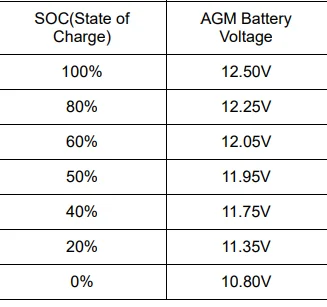
Plug In Voltmeter - (Note Borrowed Pic)
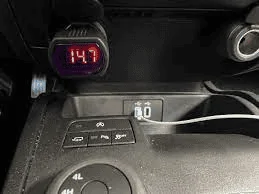
Amazon.com: Zeltauto LED Digital Car Voltmeter 12V/24V Vehicle Voltage Gauge Monitor for Auto Car Truck : Automotive
Autel: (MS906TS Scanner)
Basic View of Available PIDs (Charging) - Note: Battery SOC (%) not available
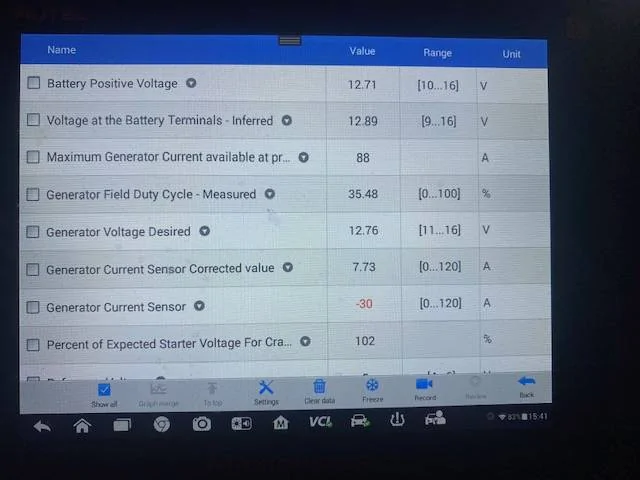
Forscan: Basic Viewable PID's, Battery SOC (%) not an available PID with Forscan on the Ranger
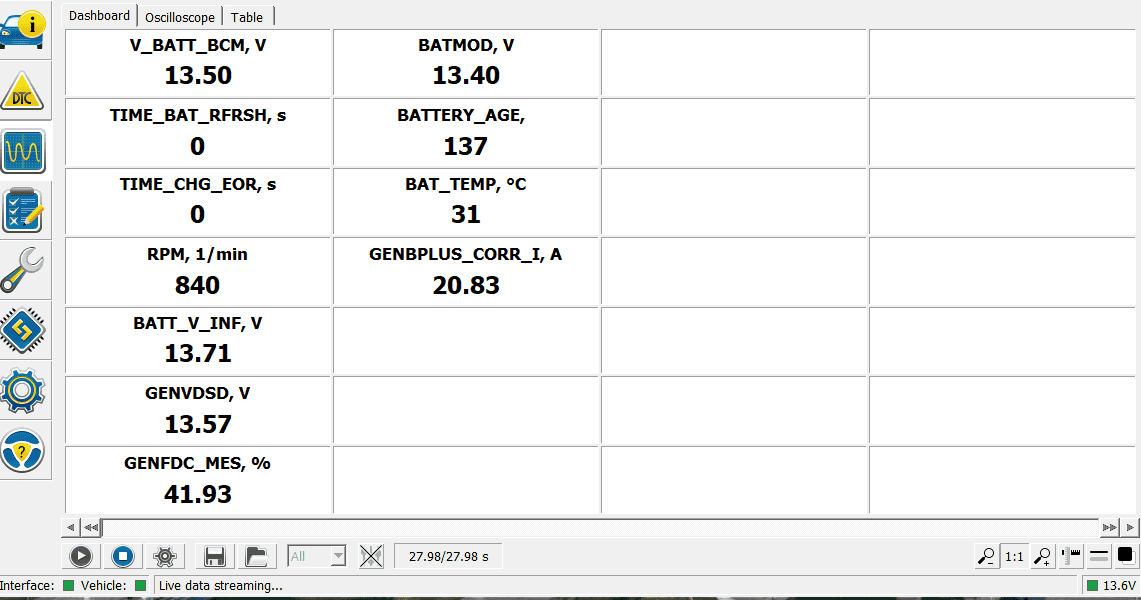
TopDon: (BT200) Battery Tester, First Time Using This Tool
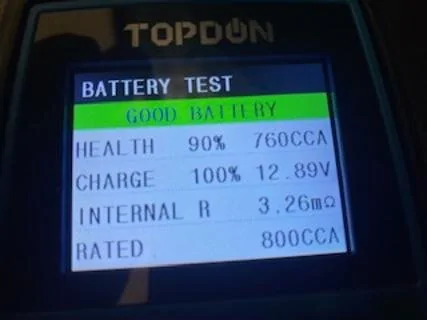
My Test Results:
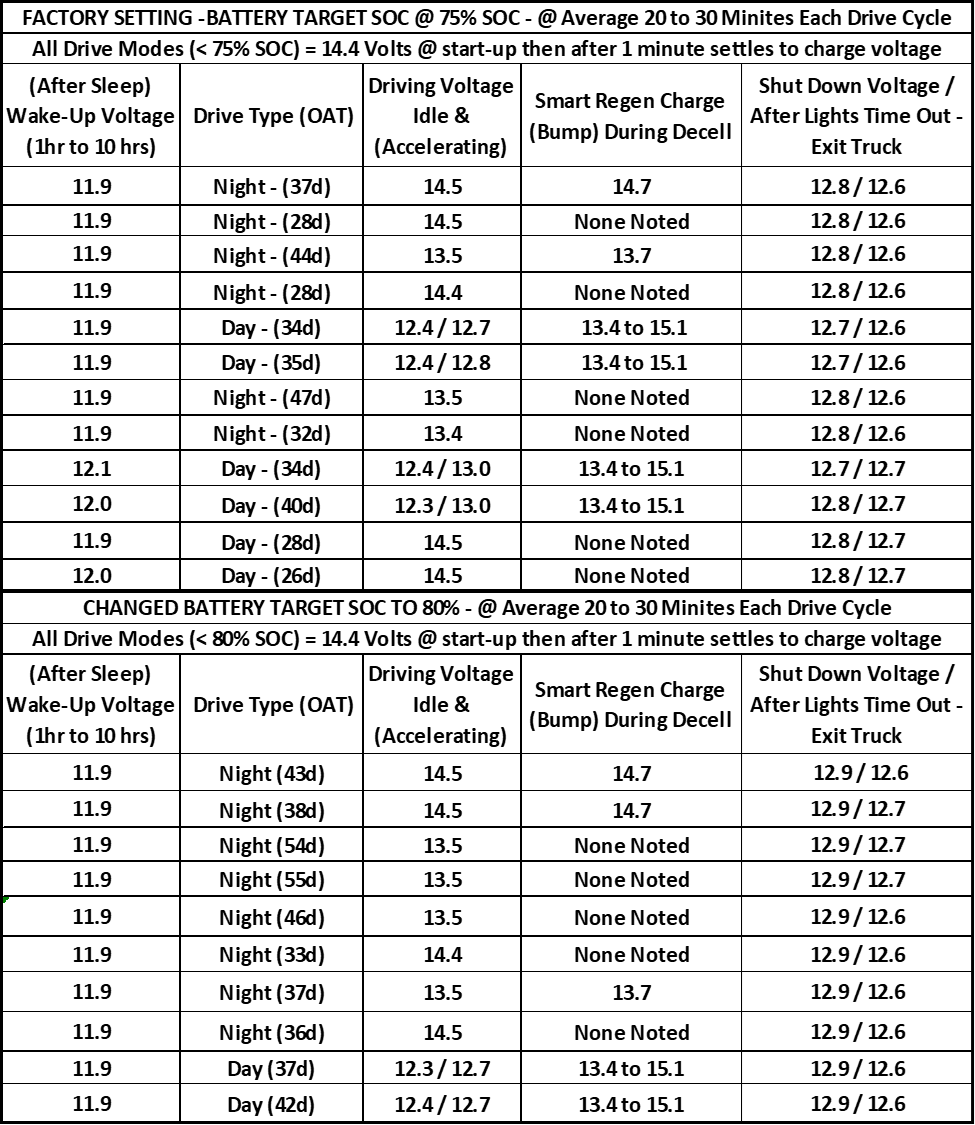
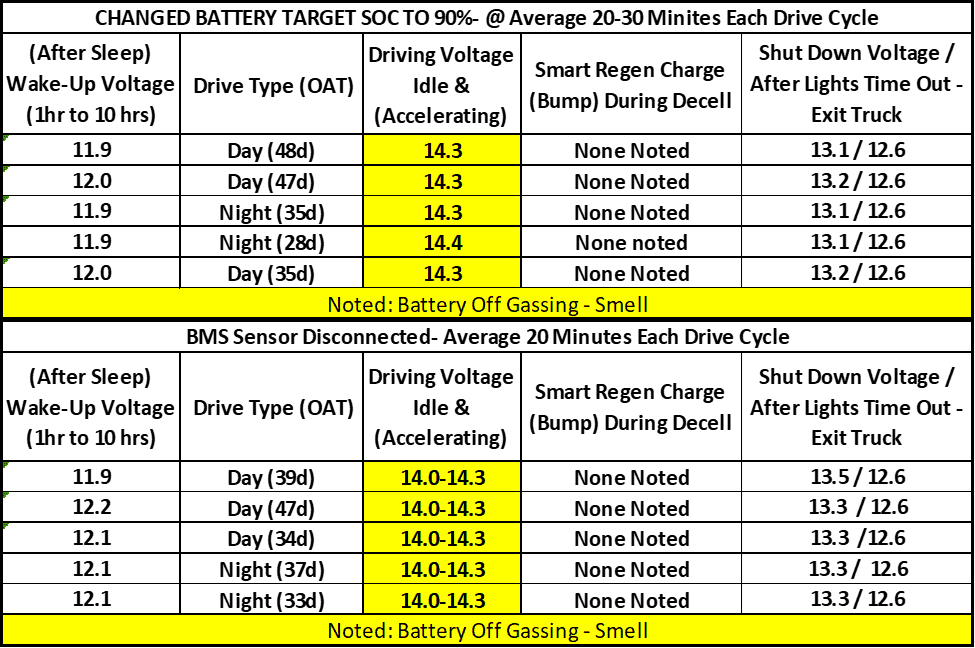
After Test Findings – Noted Highlights
My average voltage drops as noted on my voltmeter, dropped down to around 10.5 volts as the lowest reading from the 11.9 Wake-Up voltage, but however the PowerPoints are in transition, at this point in the starting process. So, I won't get an accurate reading, this way.
Factory 75% SOC
For my truck testing and my driving habits, I report zero issues, however owners who make consistent short trips may experience charging issues, more notably with only daytime driving, although. I would prefer to see a higher shutdown voltage.
Battery Target 80% SOC
The only noted differences were at start up the 14.4 charging voltage possibly lasted 30 seconds or so longer which is expected since I raised the percentage change over from 75 to 80 percent. So, it sets in the higher voltage range longer to reach the extra 5% that I added to it. The truck shut-down voltages raised just a tad on average, so this tells me that the battery has surface charge on it, just above 100%. So, in my opinion if you were to make any changes to the battery target, this setting would be the best as it closely mirrors the AGM battery charging specifications, and you are just a small percentage over the factory setting. The Smart Charge, still functions as well, and since you have bumped the SOC, short trip drivers may benefit from this setting. This is just my observation.
75 vs 80 Percent – With both settings, I noted that although I was seeing a good slightly higher shut-down voltage at 80%, after the lights timed out, the voltages still maintained 12.6 volts. Now, the only main noted difference is that slight increase in battery voltage at shutdown.
Battery Target SOC 90%
Big difference in charging but noted that the battery did not like it, off gassing smell highly noted.
Change to 90% - Charge voltage stay constant at 14.3 and 14.4 no matter what driving mode I was in, no smart charge boost noted. I did obtain a higher shut-down voltage, however this proved to be surface charge as after lights timed out, still seeing 12.6 volts. Did note a rotten egg smell, so the battery is clearly being overcharged, in my opinion.
BMS – DisconnectedNow, I only did this temporally with a few drives, just to note what the default charge voltage would be.
The charge voltage fluctuated 14.0 to 14.3, no change over voltage swap, no smart charge boost.
Rotten egg smell highly noted and seemed to be worse than the 90% setting.
Shut-Down voltages climbed way up, but again it just the surface charge sitting at the battery as after lights timed out, still see 12.6 volts.
Reference Materials:
I am attaching some reference documentation as follows.Note: If you reference any of the Ford manuals for description on the operation of the charging system, please note that these manuals can and will be confusing and that is the reason for this post, to break it down how it truly works.
1. Aux Batt Charging - Smart System - 12v Planet
https://www.ranger5g.com/forum/atta...167315/?hash=e1da65d8c6c722b1079b219da661341a
2. Ford: General Service Bulletin: Battery Charging
https://www.ranger5g.com/forum/atta...167316/?hash=e1da65d8c6c722b1079b219da661341a
3. Ford: General Service Bulletin: A/Start System
https://www.ranger5g.com/forum/atta...167317/?hash=e1da65d8c6c722b1079b219da661341a
4. Ford: General Service Bulletin - Deep Sleephttps://www.ranger5g.com/forum/atta...167318/?hash=e1da65d8c6c722b1079b219da661341a
5. Ford: Smart Charge Explained - Taken from a Ford Transit - Body & Equip Mounting Manual
https://www.ranger5g.com/forum/atta...167319/?hash=e1da65d8c6c722b1079b219da661341a
6. Ford Ranger Service Manual: Charging System Operation
https://www.ranger5g.com/forum/atta...167320/?hash=e1da65d8c6c722b1079b219da661341a
7. Ranger Battery Specs:
https://www.ranger5g.com/forum/atta...167322/?hash=e1da65d8c6c722b1079b219da661341a
8. Smart Charge System: Motor Magazine
https://www.ranger5g.com/forum/atta...167323/?hash=e1da65d8c6c722b1079b219da661341a
9. Smart Alternators and Regenerative Braking - Good Read
https://www.ranger5g.com/forum/atta...167324/?hash=e1da65d8c6c722b1079b219da661341a
10. Ford Transit - Full Body & Equip Manual - This covers a lot of things that the Rangers Manual, Leave Out.
https://www.ranger5g.com/forum/atta...167325/?hash=e1da65d8c6c722b1079b219da661341a
In closing:
Well, I hope you have found this post helpful, and I hope you have gained some understanding of the system operation as it is more complex than the old school systems, I have satisfied my quest in knowledge of the system and only have one thing left and that is how the system actually reacts to charging the battery as it ages.
I am providing my results for others to see what effect the changes will have on the truck. I recommend you possibly do your own testing and make the determination on what you think is the best option. For me it’s the 75% factory if you are not having issues and 80% if you are. But 90% or disconnecting the BMS is not an option for me due to the battery being overcharged by my observations.
Enjoy
Edit: Adding Some Further Test Results
Test Performed At Idle- Monitoring Battery Temp and Amperage
Ran Each Mode 5 Minutes
Noted: The Disable A/Start BCM 726-48-02, does in fact disable BMS function along with A/Start, as this was unclear to me if just the input required for A/Start or the complete system was disabled.
At Factory 75% - Idle, Lights Off
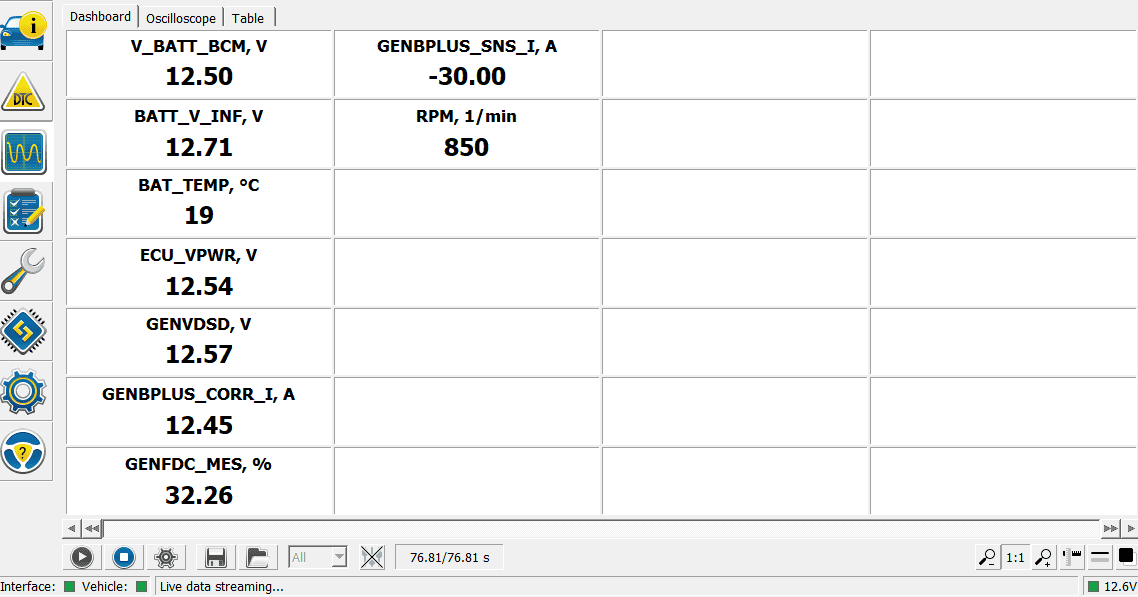
At Factory 75% - Idle Lights on
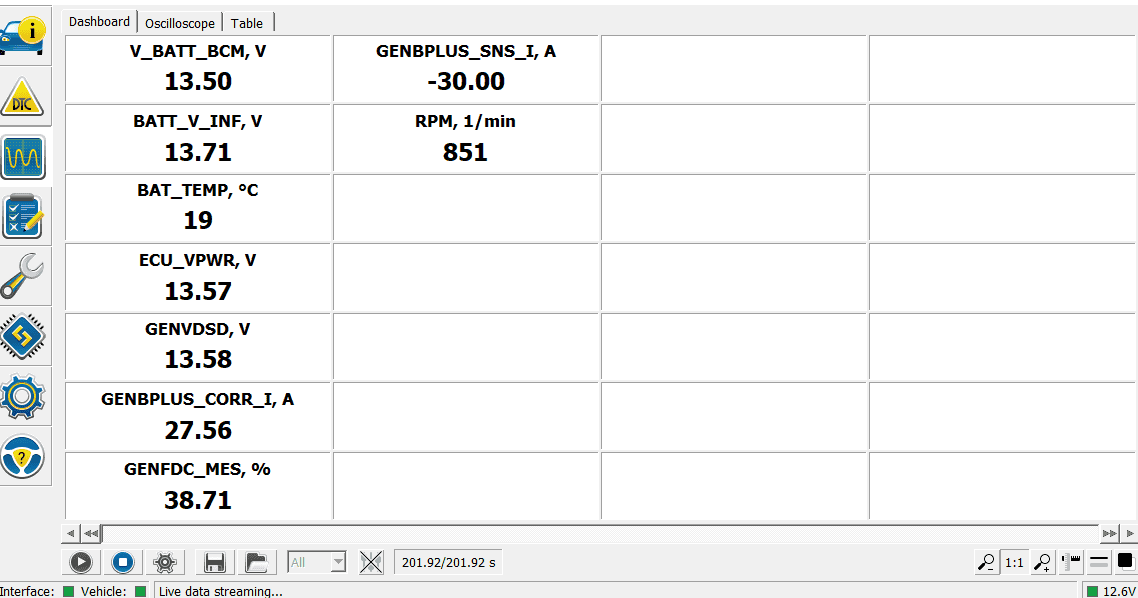
BMS - Disabled using BCM 726-48-02 Hex Change - Lights off
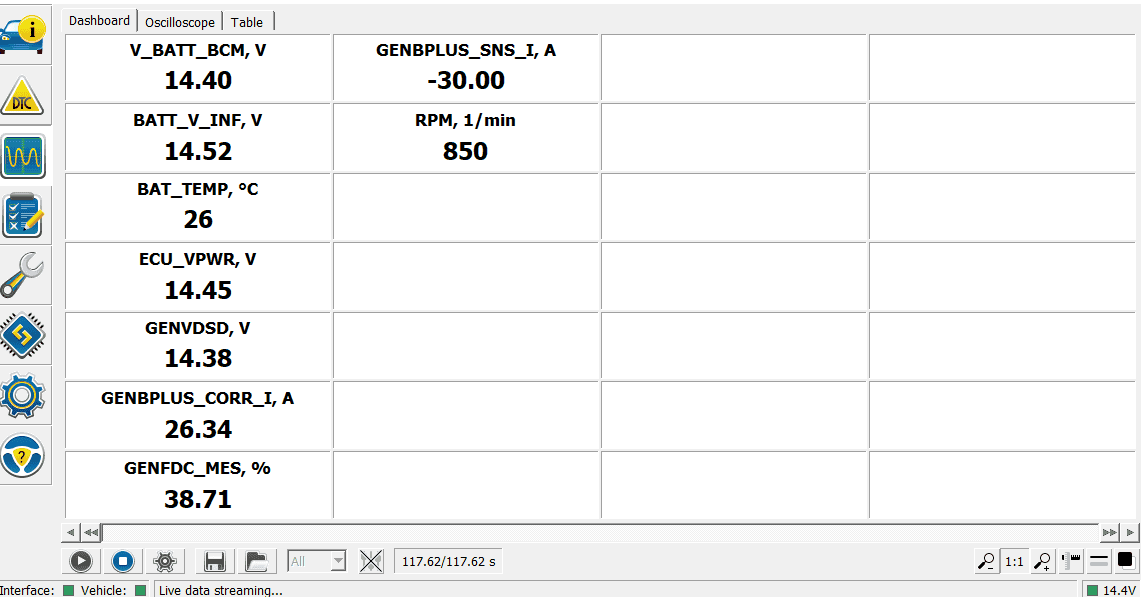
BMS - Disabled using BCM 726-48-02 Hex Change - Lights on
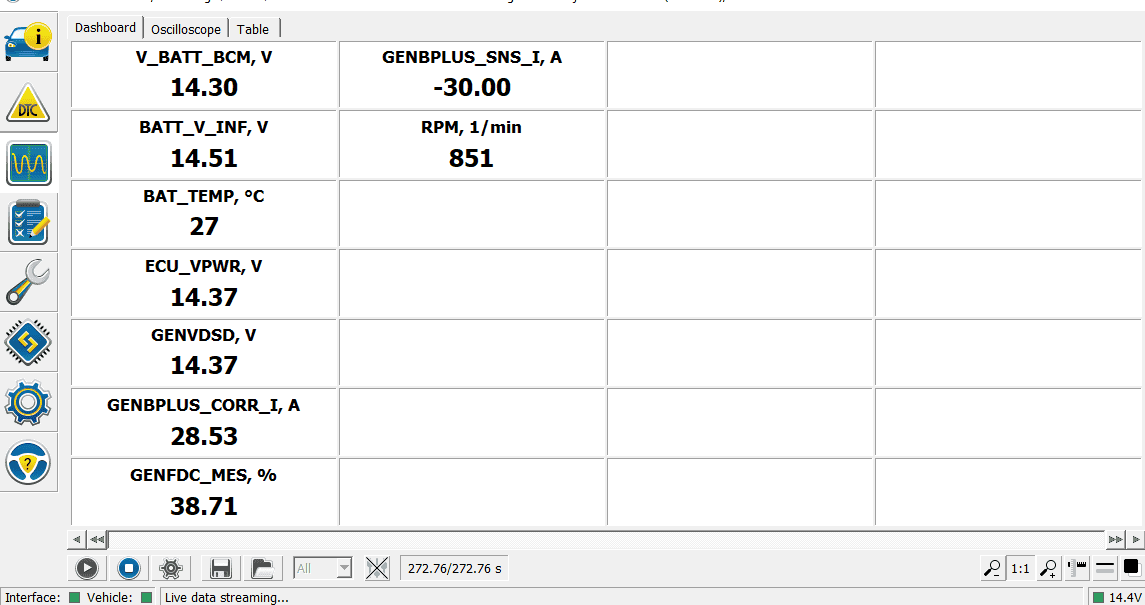
Battery Target SOC-Change to 90% - Idle- Lights Off
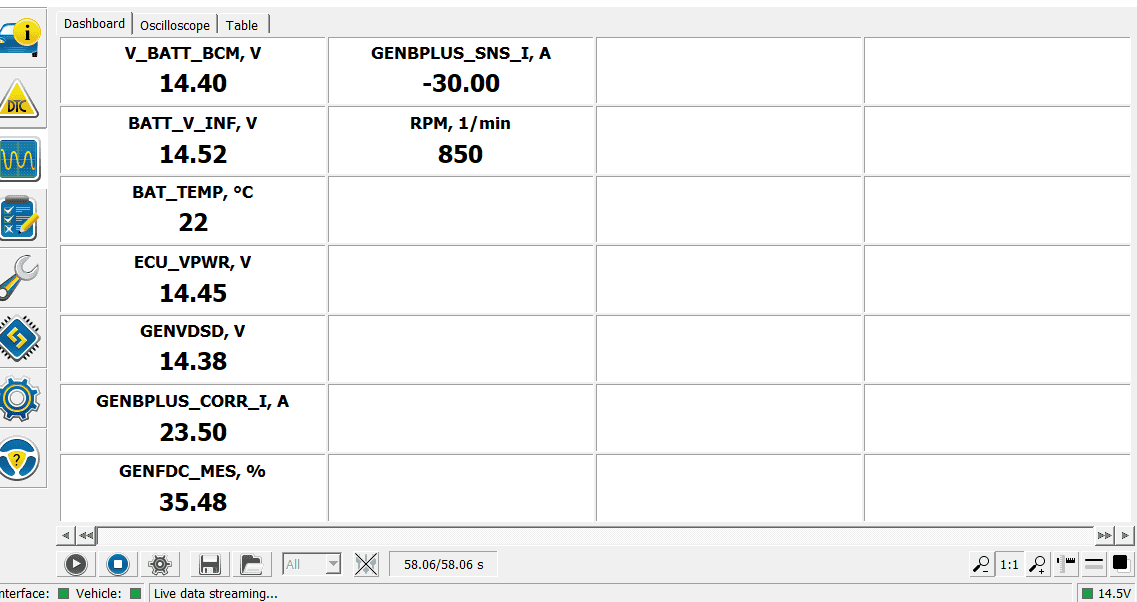
Battery Target SOC-Change to 90% - Idle- Lights on
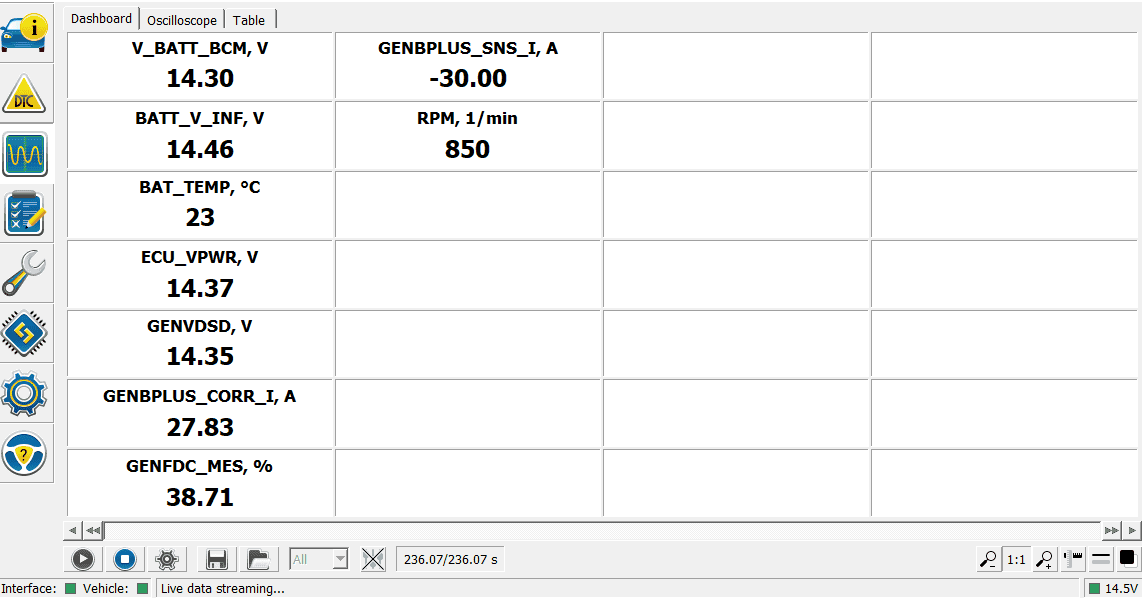
BMS Sensor-Disconnected - Idle Lights off
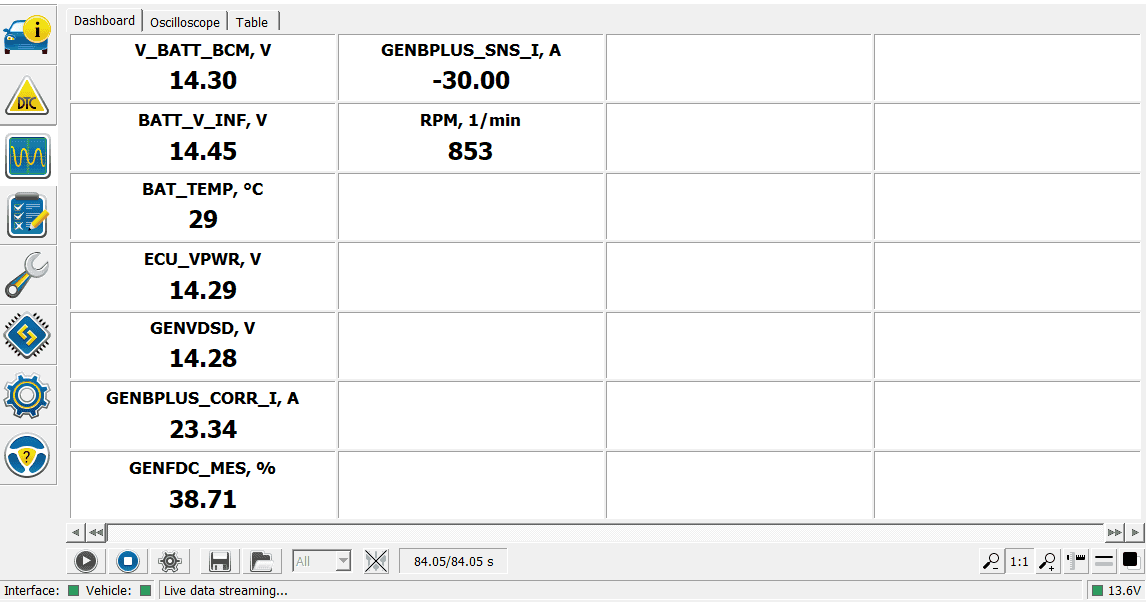
BMS Sensor Disconnected - Idle - Lights on
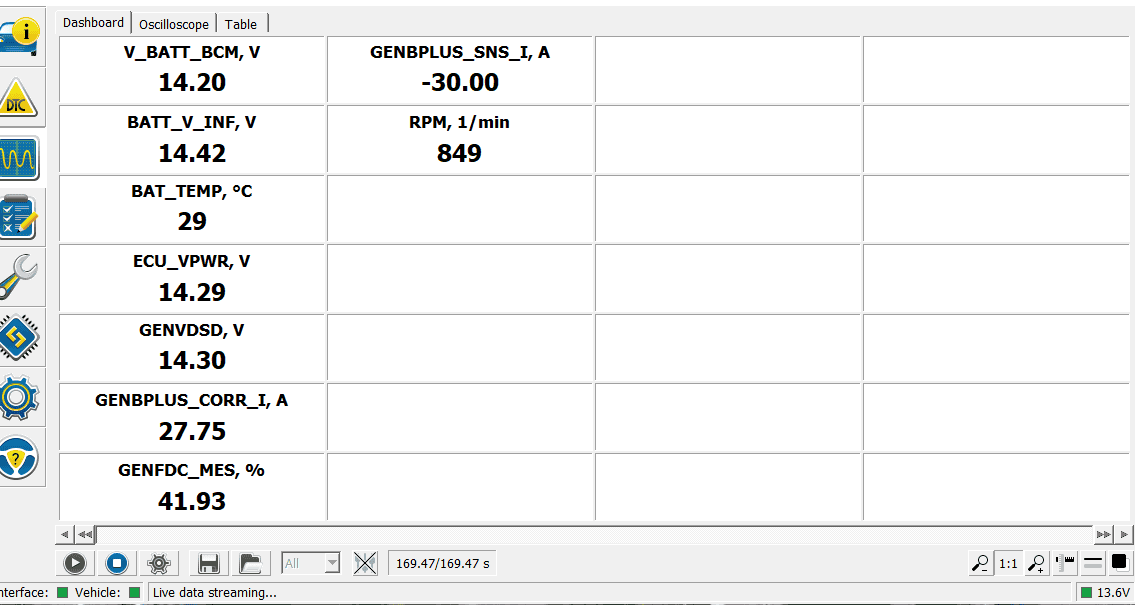
Will need to do some actual driving for good numbers on the battery temp, I don't know why I was getting a temp reading with the sensor disconnected, might be default value.
Noted nothing major and no off gassing of the battery during this test run. Outside Air Temp was 48 deg
So, this at least gives a basic indication of the different charging modes:
Main PIDs are Batt BCM = Battery Charging Voltage
GENVDSD = Generator Desired Voltage
Bat Temp
Gen B Plus Corr = Gen Output Amperage
I think for the next tests, I will just focus on Battery Target SOC of 80% and 90%, and complete some drive cycles, then hook up and see what battery temp is reading after a drive.
Edit : Great Video on the BMS Reset - From a Ford Tech
My Thoughts on this Video and BMS Reset
In my testing and reference the GSB for Deep Sleep, there is a reference to performing A BMS reset.
This BMS reset, resets Time Installed, so this process will tell the truck a new battery is installed and change the charging algorithm to a new battery.
However, all other service manuals and service bulletins, state to only perform the reset when replacing the battery.
So to sum it up, there are only (2) references to perform the BMS reset without replacing the battery. The above video (from a Ford Tech) and the GSB for Deep Sleep issues.
So, with this video and the GSB as reference, then I feel it would not hurt to just make this reset preventive maintenance. (Say, every other oil change or every oil change)
The only downside is the dealer may not warranty the battery as they will see the time since installed being newer than the battery age actually is. I have not found a way to reset back to original date, once reset you are stuck on that date, and it is the date you performed the reset.
Best case - You will possibly eliminate most of the battery issues we have and possibly extend the life of the battery.
Worst Case - It helps some or not at all, and you are out of pocket for new battery (if dealer wants to be difficult)
As this is one area of my research, I did not find a clear and precise answer as to how the BMS handles a aging battery. (Increase or Decrease Charging Voltage) as the battery ages due to increase in internal resistance at the battery.
EDIT: UPDATE: Nov 22, 2025
Overtime I have gained some extra knowledge on the charging system, note still never found a full (This is how the Ranger system works)
Let's Start with this:
I was not having any charging issues but every time I plugged in my scanner, I noted that my Estimated SOC PID was always reading 86% or 87%, despite my raising my SOC to 90% then recently to 95%.
Decided I would perform a BMS Reset - and see if that corrected the issue - so it did
Since I did a new reset (even with the OE Battery - 3 yrs old)
So, compare readings from a newly reset BMS Connected & The BMS Disconnected
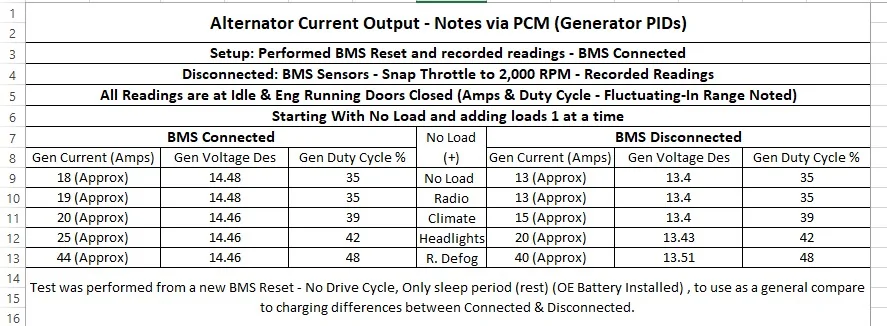
Although I did not perform this test - Long Term it gave me some indication on what the system actually does with the BMS Sensor Disconnected.
The BMS Sensor: Measures
(Current Flow) In & Out of the battery
Indicated by example (3) = 3 Amps Charge or (-10) = Discharge
Estimated Battery Temperature:
I also CONFIRMED the BMS sensor includes a Temp Sensor, although it's not a direct reading sensor - I hit the sensor with a heat gun, no immediate response with the Estimated Battery Temperature Sensor (PID) after a couple of quick passes I was able to get a change in the temp reading.
Note: It held that reading for quite some time before it began dropping back down
Battery Voltage:
The Battery Voltage is picked up from the (+) wire that runs to the sensor.
This is where the BMS system calculates the Battery SOC, based on all parameters
This information is (Confirmed)
I figured out the reason for the statement in the manuals regarding the BMS (Recalibration) cycle
during SLEEP cycles -6 to 8 Hours of sleep to accurately determine the battery SOC.
It's a combination of 2 things:
1. Allow all modules to enter sleep
2. Allow the BMS Sensor to Reach (At Rest) temperatures without being influenced by Engine Running Temp & Electrical Influence from charging. - This is the main reason for the Time Length.
From my testing with the Heat Gun (Influence)
3. The BMS Sensor samples Battery Voltage after all modules are asleep and factors in (resting) sensor temp - To calculate the ESTIMATED BATTERY SOC and at next engine start this data table is used by the PCM to determine charging rate. (Desired Generator Output) Voltage via the Duty Cycle.
Information from the BMS Sensor is sent to the BCM, The BCM sends this data to the PCM via HS-CAN 1 data and this data is used by the PCM in partial factor of how it controls the Generator Output - Sets the Generator Voltage Desired & PWM Duty Cycle
Now, this is where the manuals leave you hanging and the following will be noted as confirmed or not confirmed
The PCM uses various data inputs to determine Generator output:
The PCM uses the (IAT) Intake Air Temp as a ref to perceived battery temp (Not Confirmed)
The PCM uses Throttle Position / Eng RPM / Vech Speed / Engine Load (Confirmed)
The PCM uses the BCM (input Data from the BMS Sensor) (Confirmed)
The Generator Regulator (has its own temp sensor) reports OH condition PID (Confirmed)
The PCM uses feedback (LIN) data to read the Generator -output current (Load) (Confimed)
The PCM has various MODES of operation:
Start-Up Mode: (Confirmed)
This mode turns off the gen output power, and it defaults to:
0% Duty Cycle and a Gen Voltage Desired of 10.6 Volts, I have noted with my voltmeter plugged into the Power Point - When you Crank the engine - the voltage reading drops to around this voltage. (This explains why)
This takes the load off of the crankshaft, faster starts
The system (if needed) ramps up (boosts) the Gen Desired Voltage up to 14.5 Volts, just after start to replenish voltage lost for engine start (approx. 30-Seconds) if battery was full charge.
Then drops the voltage back down to (normal charge mode)
Charge Mode: (Confirmed)
Activates when SOC is low, now if you have set the SOC to a higher SOC than the factory, it will spend most of its time in this mode.
Charge voltage still fluctuates depending on the PCM parameters it is seeing.
It also activates when there is a high load
Fuel Economy Mode / Voltage Reduction Mode: (Confirmed)
(This is mainly for the factory low SOC)
This is the PCM control to set the Desired Voltage Setpoint to a lower value, as low as 12.2 Volts (Float Charge)
This reduces load on the crankshaft and improves fuel economy - (PERCIEVED Statement)
This lets the generator turn off the charge voltage and the system relies on battery voltage.
More noted @ low RPM /idle settings, alternator not seeing RPM increase.
Since this Mode is not always seen (as I have raised my SOC) I never see it anymore.
Some D&O's State mode activates (IF) - (Not-Confirmed)
AMB Temp - above 32 Deg F
Caliculated Battery Current is less than 15 Amps and Greater Than (-8) Amps
Battery SOC is Greater Than 75%
Boost Charging: (Confirmed)
This is more noted if you have the factory SOC set.
This mode triggers during deceleration and uses the Alternator (OAD) pulley to achieve this
this will create the momentary boost charge using kinetic energy - More noted on a downhill coast.
Maintenance Refresh Mode: (Confirmed)
This is the mode that covers battery sulfation, and the manuals state that if the battery has been holding at 75% for extended periods of time it boosts the charge voltage up to 15.2 volts.
Another D&O - states if battery voltage is less than 13.2 Volts for 45-Minutes it sets a target charge voltage between 13.9 and 15.2 Volts for 5-Minutes.
I think this is where those that monitor the voltage with a meter are seeing some charging voltage variations.
Its intended function is to get the SOC to advance up out of the 75% setting.
The System Off to Save Battery Message: (Not Confirmed)
We know that the BMS Sensor (what it is reading) triggers this message, but I believe it's not really about the actual battery voltage reading, it's what the BMS Sensor is registering as the SOC reading.
This would explain why you have a good battery voltage test (12.2 Volts or Greater) but if you get this message (Check what the BCM is showing for the Estimated Battery SOC) this calculated reading comes from the BMS Sensor- it periodically updates the sensor while driving and performs a (True & Accurate) reading during sleep (rest)
Note: I think what is happening over time this sensor builds a (Drift Error) and reports false readings - throwing off the charging system and minimum error parameters that trigger the message.
Be it a - Sidetrack of the manuals and perform a BMS Reset, although there is only one Ford Document (GSB) that calls for a BMS Reset for System Error (T-Shoot) most of the document's state only with Battery Replacement
or
Replace as a precautionary maintenance item - depending on what your PID data is showing.
Something I have noticed but never really paid attention to:
All the BMS Sensor and Charging Targets - Relate to the SOC, in my mind it always went to battery voltage:
BUT if you actually think about it and with the BMS (Calibration) it references it being used to get an ACCURATE SOC - Hmm - What if the SOC is off, then then charging system will follow that SOC Calculation, no matter what the actual voltage is.
This would be the SOC Drift - Which is supposed to correct itself on the (Sleep Calibration)
So, a more accurate reading to correct the drift
During (Engine Running) it is measuring the in & Out Current as well as voltage & Temp so the SOC may drift while driving
PCM Control of the Generator (Note all PID data = Generator)
This is a single wire (LIN) circuit than takes place of the old (Gen-Com) & (Gen-Mon) & Sense Wire
LIN (Local Interconnect Network) - PWM with a Ground
PCM: (Master Node)
The PCM sets a Desired Generator Voltage (Setpoint) to the Regulator (PWM) 125 Hz Frequency
This is determined by the PCM From:
Set operation Mode: From Above
Engine Parameters -Such as: Throttle Position, RPM, VSS, Engine Load.
IAT (Intake Air Temp) (Perceived Battery Temp) outside of the BMS Sensor Reading
BCM - Input of Battery Condition (BMS Sensor Input)
Feedback from Generator (Current) Load
The Generator is also sending feedback of Generator Temp (Internal) as there is a PID for Gen Overtempt being reported (True/False) - so this would only be a DTC code monitor along with any other failure code DTCs that the PCM is monitoring for the LIN circuit.
Regulator (Slave-Node)
The Regulator in turn from the received data pulses the signal to ground rapidly producing a square wave signal (Duty Cycle) - The field current is being pulsed to ground this in turn controls the output voltage. (Based on the PCM Desired Voltage Setpoint)
The Duty Cycle is measured as a percent (On-Time)
The Duty Cycle (is what controls the voltage output) of the Generator, this is the current (Amps) reading.
The Higher the Duty Cycle - The Higher the output voltage will be.
So, on a PID data list you will see the Duty Cycle and Gen Current PIDs fluctuating.
Every 5-Seconds the Desired Generator Output Voltage is pulsed for change, if no change is required it will not change
To truly see the PWM (Duty Cycle Signals) it needs to be viewed on a Lab Scope
Here is a Ref Data Chart for Duty Cycle T-Shooting - Semi Accurate as a REF Only Guide
Note this is from the old style 3 Wire Control, but works for the LIN Control
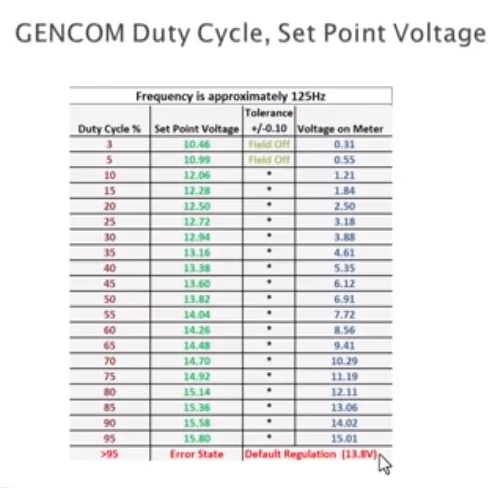
This is me playing:
Wanted to see the BCM PIDs -
Sensor Disconnected Defaults and Sensor Disconnected & a BMS Reset Defaults
Sorry I did not realize I did not have matching PID data for the pics
But before disconnecting:
Bat Volt was 14.1 Volts
SOC 91%
Batt Temp 55 Deg
I was curious if (even though) it's not updating the BCM for data, is this data being transmitted to the PCM for charging data - or is is not being sent due to the fault code that is generated with it disconnected.
As Noted, The BCM still has it powered (ON) by its LIN Bus - so the LIN is still powering the connector for data (dead end connection)
I was questioning how long this default data remained and wanted to know if any of this default data was being transmitted to the PCM. IDK for sure but I believe the fault code blocks the data from being used and the PCM uses IAT as the back-up for battery temp
BMS - Disconnected BMS - Disconnected & Then BMS Reset
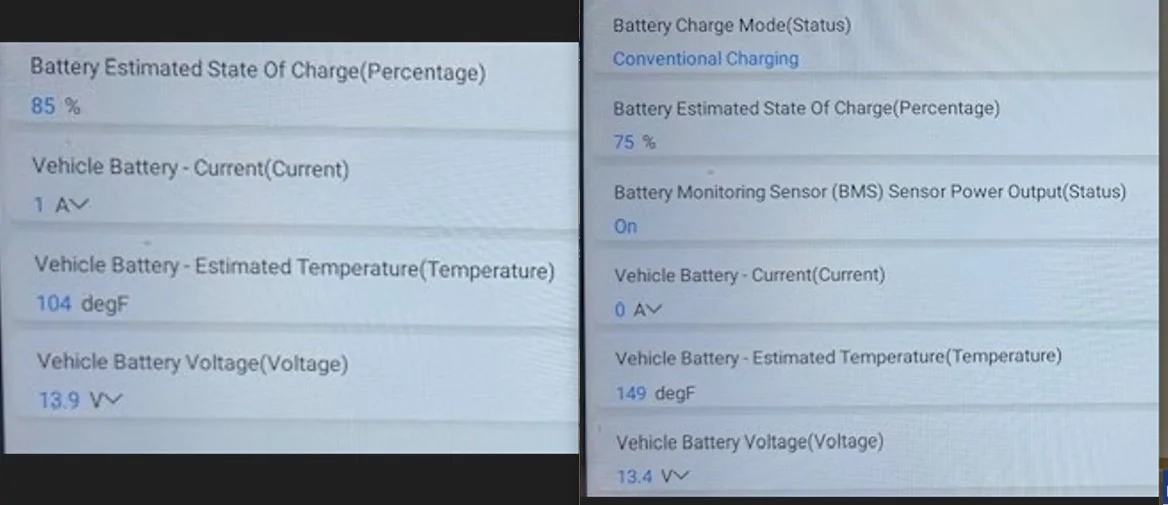
Sponsored
Attachments
-
307.6 KB Views: 414
-
970.3 KB Views: 572
-
339.1 KB Views: 786
-
98.7 KB Views: 398
-
120.4 KB Views: 1,086
-
414.6 KB Views: 348
-
73.7 KB Views: 261
-
253.9 KB Views: 514
-
613.4 KB Views: 403
-
9.7 MB Views: 337
Last edited: