Sponsored

Bluetooth Disconnects when CarPlay is Connected

jh13

Active Member
Joined
Dec 23, 2018
Threads
5
Messages
26
Reaction score
12
Location
Vancouver, WA
Vehicle(s)
Ranger Lariat
My iPhone is paired to my truck via Bluetooth. I've noticed though that when I plug in my phone to use CarPlay, I get this pop-up every single time: "Location and vehicle data sharing is enabled. Press the data sharing icon in the status bar to view Connectivity Settings. Pair a device to disable this prompt." I have to clear it to access the CarPlay features. Anyone know what this is? It seems like the problem is caused because when I connect my phone via CarPlay it disconnects from Bluetooth (when I disconnect CarPlay I have to manually reconnect the BT). And of course when I go to that Connectivity Settings it references and I click on it, it just sits there and spins saying "Loading".

Gotta say, I've been incredibly happy with my truck, but the Sync3 has been nothing short of crap. Between the issues with the update errors and issues with CarPlay, it has not lived up to any reasonable standard.

IMG_2994.webp
Sponsored

 
OP
OP

jh13

Active Member
Joined
Dec 23, 2018
Threads
5
Messages
26
Reaction score
12
Location
Vancouver, WA
Vehicle(s)
Ranger Lariat
My iPhone is paired to my truck via Bluetooth. I've noticed though that when I plug in my phone to use CarPlay, I get this pop-up every single time: "Location and vehicle data sharing is enabled. Press the data sharing icon in the status bar to view Connectivity Settings. Pair a device to disable this prompt." I have to clear it to access the CarPlay features. Anyone know what this is? It seems like the problem is caused because when I connect my phone via CarPlay it disconnects from Bluetooth (when I disconnect CarPlay I have to manually reconnect the BT). And of course when I go to that Connectivity Settings it references and I click on it, it just sits there and spins saying "Loading".

Gotta say, I've been incredibly happy with my truck, but the Sync3 has been nothing short of crap. Between the issues with the update errors and issues with CarPlay, it has not lived up to any reasonable standard.
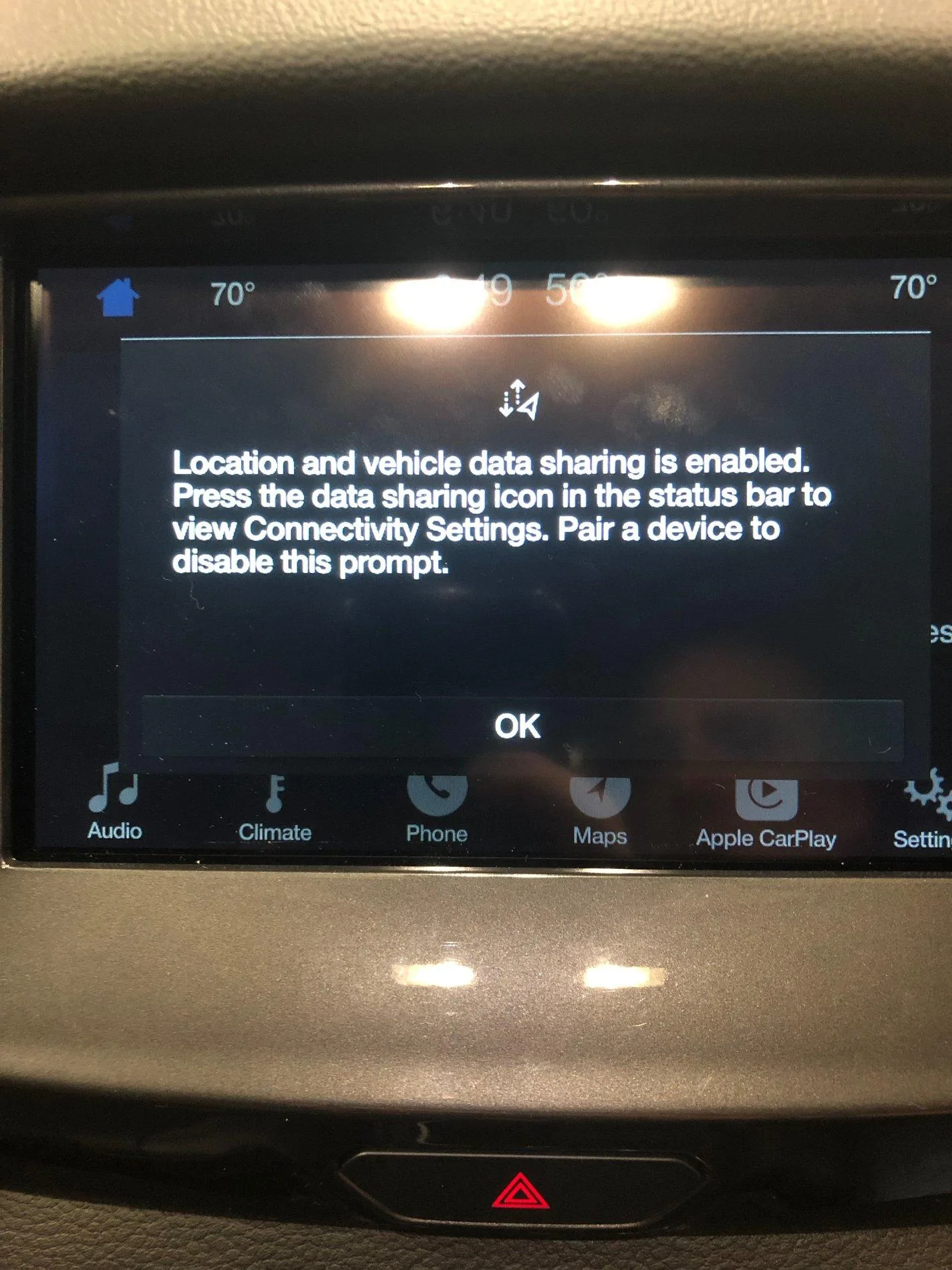
IMG_2994.webp
Expanding a little with new findings. The settings it references are basically the FordPass settings, so it seems to suggest the only way to avoid this pop up is to turn off FordPass. I obviously don’t want to do this. Thoughts from anyone? Or maybe this is an Apple problem and not a Ford one?
 

rangerdanger

Well-Known Member
Joined
Oct 9, 2018
Threads
194
Messages
3,487
Reaction score
2,659
Location
SF Bay Area
Vehicle(s)
2019 Ford Ranger SuperCrew XLT FX4
Vehicle Showcase
1
Expanding a little with new findings. The settings it references are basically the FordPass settings, so it seems to suggest the only way to avoid this pop up is to turn off FordPass. I obviously don’t want to do this. Thoughts from anyone? Or maybe this is an Apple problem and not a Ford one?
That message is a Ford problem. It happens once per engine startup, but since like you I want to use FordPass features, I've had to live with it daily.
 

Geoff

Well-Known Member
Joined
Oct 17, 2018
Threads
5
Messages
705
Reaction score
497
Location
NYS
Vehicle(s)
'19 Ranger 1943 Willys Jeep
Occupation
Retired Engineer
I really wanted a vehicle with Carplay - until I tried it. I'm not keen on Carplay taking over and not allowing you to use Ford Navigation, or the Radio. So, I'm back to just using Bluetooth (if I want to use Apple Maps I'll turn on Carplay, but it's now normally off).
 

rangerdanger

Well-Known Member
Joined
Oct 9, 2018
Threads
194
Messages
3,487
Reaction score
2,659
Location
SF Bay Area
Vehicle(s)
2019 Ford Ranger SuperCrew XLT FX4
Vehicle Showcase
1
I really wanted a vehicle with Carplay - until I tried it. I'm not keen on Carplay taking over and not allowing you to use Ford Navigation, or the Radio. So, I'm back to just using Bluetooth (if I want to use Apple Maps I'll turn on Carplay, but it's now normally off).
You can use Carplay with the Radio, it's pretty seamless.


Geoff

Well-Known Member
Joined
Oct 17, 2018
Threads
5
Messages
705
Reaction score
497
Location
NYS
Vehicle(s)
'19 Ranger 1943 Willys Jeep
Occupation
Retired Engineer

FX4Greg

Well-Known Member
First Name
Greg
Joined
Apr 2, 2019
Threads
3
Messages
85
Reaction score
31
Location
Independence, MO
Vehicle(s)
2018 Jeep Wrangler JL Unlimited Rubicon, 2019 Ford Ranger Screw cab Lariot FX4
That message is a Ford problem. It happens once per engine startup, but since like you I want to use FordPass features, I've had to live with it daily.
There was a Sync3 software update released Tuesday that fixes that issue. The quickest way to get the update is to go to the Ford owners website and download it to a USB drive then plug the USB drive into one of the front USB in the truck and it will update itself. Follow the instructions on the Ford owners website.
 

Fjsteven

Well-Known Member
First Name
Steven
Joined
Apr 3, 2019
Threads
9
Messages
160
Reaction score
175
Location
Gilbert, Arizona
Vehicle(s)
2019 Ranger Lariat 4x4 Sport
I still get that message after the update. Kinda irritating.

If I connect via Bluetooth, and plug my phone in, I won’t get CarPlay. If I don’t have Bluetooth on, car play works but I get that message. I just have to acknowledge the message, but come on. My phone can use both at the same time, why not sync3?
 

NVHoonigan

Well-Known Member
First Name
Drew
Joined
May 30, 2019
Threads
2
Messages
148
Reaction score
406
Location
Northern Nevada
Vehicle(s)
2019 Ranger XLT Sport 4x4
I have this problem currently. Took delivery on 6/5 and have the most recent update for Sync 3. I have found it helps to let the phone pair by bluetooth first and then connect for carplay but it still happens from time to time. Is anyone else still having this issue?

Searched for the error message and this was the only thread I could find. If there is another thread with a resolution just let me know but I couldn't find one.
 

Murphie

Well-Known Member
First Name
Jim
Joined
Oct 18, 2018
Threads
3
Messages
331
Reaction score
572
Location
Lindale TX
Vehicle(s)
2019 Ranger Lariat 4X2, 2023 Hyundai Santa Fe
Occupation
Financial Auditor - Retired
I have this problem currently. Took delivery on 6/5 and have the most recent update for Sync 3. I have found it helps to let the phone pair by bluetooth first and then connect for carplay but it still happens from time to time. Is anyone else still having this issue?

Searched for the error message and this was the only thread I could find. If there is another thread with a resolution just let me know but I couldn't find one.
I have the same issue with mine. I just tap the screen and it goes away without any issue, but it's damn annoying. This was also being discussed to a lesser degree in the Sync 3.3 topic.
 

kadettje

Member
Joined
Mar 22, 2019
Threads
2
Messages
24
Reaction score
17
Location
Minneapolis, MN
Vehicle(s)
2019 Ford Ranger
I just updated to the latest sync 3 over usb and the problem is still there. Those that said the update fixes this, is there a setting I need to change. This issue is beyond annoying.
 

Black Beauty

New Member
First Name
David
Joined
May 6, 2019
Threads
0
Messages
4
Reaction score
1
Location
Southwest Fl.
Vehicle(s)
2019 XLT Ranger 2010 Ford Escape XLT
I just updated to the latest sync 3 over usb and the problem is still there. Those that said the update fixes this, is there a setting I need to change. This issue is beyond annoying.
I dropped my truck at the dealer Friday for the rough shifting and this message on sync. I was told Saturday that they can’t figure out the sync message so far.
 

Dan Kobler

Well-Known Member
First Name
Dan
Joined
Dec 17, 2018
Threads
5
Messages
65
Reaction score
66
Location
Minneapolis
Vehicle(s)
XLT SuperCrew 302A 4x4
Same here. I'm updated to the latest version, have paired and unpaired my iPhone. I'm on the latest IOS. I think it's a ford issues. And like others have mentioned Its just an irritating bug I deal with on a daily basis.
 

UofMEngineer

Well-Known Member
Joined
Apr 19, 2019
Threads
1
Messages
516
Reaction score
334
Location
Michigan
Vehicle(s)
20' Escape Hybrid,18' Fusion Hybrid
My guess is that since CarPlay disconnects from Bluetooth, if it's trying to start up prior to the connective services software then it'll throw that error pop-up as no phone is technically connected via Bluetooth when it goes to check. I saw they've been working on this pop-up and when it shows up in 3.4, so perhaps once that rolls out for v3.2+ updates, this will be addressed. Waiting a minute may be the best workaround, though that may be just as annoying.
Sponsored


Top