Sponsored

Location not updating. Fordpass not doing its thing.

Jedadiah

Well-Known Member
First Name
Jed
Joined
Jun 10, 2021
Threads
10
Messages
366
Reaction score
964
Location
Central Kentucky
Vehicle(s)
Former '21 SuperCab Owner
I don't check really often, but I noticed today that the Fordpass app hasn't updated my location in two weeks, nor has my current mileage. If I check the map in the app, it shows my truck about 40 miles from where it's currently sitting. If I check the Fordpass setting in the infotainment menus, it just loads and goes nowhere.

I'm sure others have had similar issues I guess I'll try unhooking the battery tomorrow to make the modem reboot, but I guess if it doesn't then it might be dead? I can't lock/unlock or start the truck with Fordpass app right now. It's be nice if it would just tell you it can't connect instead of just spinning until you get tired of it and stop the app.

If anyone else has seen this, what was the solution?
Sponsored

 

MountainGoat

Well-Known Member
Joined
Dec 5, 2020
Threads
43
Messages
2,346
Reaction score
7,065
Location
Missouri
Vehicle(s)
2020 Ranger XLT Sport 4x4
Well that's what mine did when I pulled the telematics fuse. Maybe yours blew? It should blow before the modem fries. #9 on the panel iirc.
 
OP
OP
Jedadiah

Jedadiah

Well-Known Member
First Name
Jed
Joined
Jun 10, 2021
Threads
10
Messages
366
Reaction score
964
Location
Central Kentucky
Vehicle(s)
Former '21 SuperCab Owner
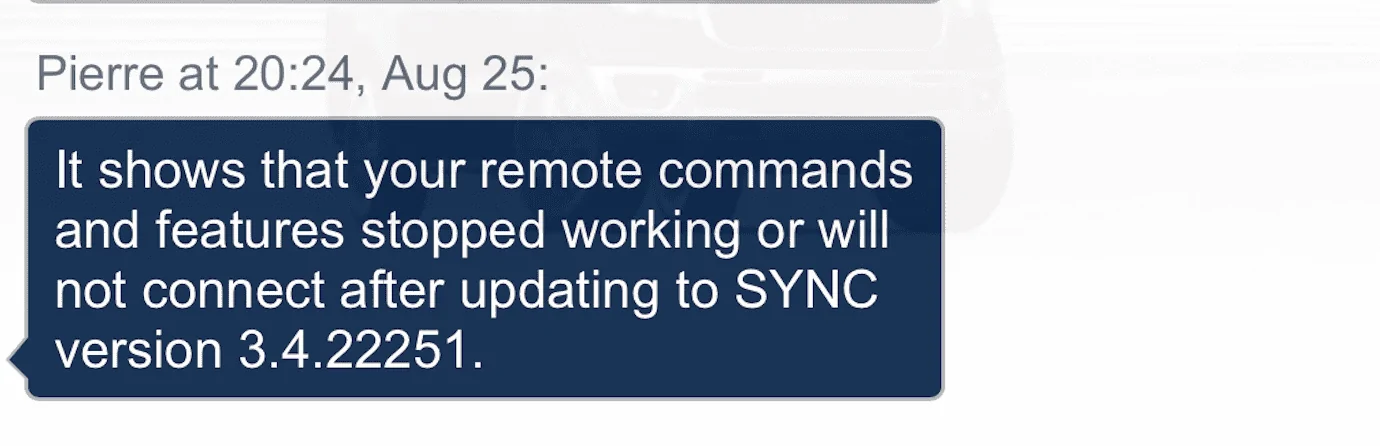
I chatted with Pierre on the Ford Pass app and he let me know that apparently updating to Sync 3.422251 will actually break all the connectivity features. I thought I had auto update off since the last time (and only other time) my truck updated itself the infotainment acted whack for a while. Pierre gave me a number to contact Ford and they verified that the update is a known problem. So don't update if you can avoid it. Ford is promising a fix in September. Why push an update if it's known to cause problems?
Screenshot 2023-08-25 at 21.10.45.png

Yesterday morning my infotainment screen was totally blank on my drive to work. I guess this is because it updated.
 

wetidlerjr

Well-Known Member
First Name
Bill
Joined
Feb 6, 2021
Threads
13
Messages
296
Reaction score
981
Location
...near a cornfield in Indiana
Vehicle(s)
21 Ranger XLT, SCrew, FX4, Shadow Blk, Blk App Pkg
Occupation
Retired Railroad Construction Signalman
I chatted with Pierre on the Ford Pass app and he let me know that apparently updating to Sync 3.422251 will actually break all the connectivity features. I thought I had auto update off since the last time (and only other time) my truck updated itself the infotainment acted whack for a while. Pierre gave me a number to contact Ford and they verified that the update is a known problem. So don't update if you can avoid it. Ford is promising a fix in September. Why push an update if it's known to cause problems?
Screenshot 2023-08-25 at 21.10.45.png

Yesterday morning my infotainment screen was totally blank on my drive to work. I guess this is because it updated.
I can still use the app to start my Ranger with that SYNC version. Also, it shows the correct mileage. etc. The app, however, always shows my vehicle in Warren. MI and always has despite numerous attempts to change it.


alcohenusa

Well-Known Member
First Name
Alan
Joined
Jul 22, 2020
Threads
12
Messages
478
Reaction score
727
Location
CO
Vehicle(s)
2020 Ranger Lariat 4x4
Occupation
Retired
I can still use the app to start my Ranger with that SYNC version. Also, it shows the correct mileage. etc. The app, however, always shows my vehicle in Warren. MI and always has despite numerous attempts to change it.
Most likely showing Michigan due to the location services in the Sync settings being turned off.
 

Grandaccess

Well-Known Member
First Name
Robert
Joined
Jul 8, 2023
Threads
5
Messages
1,095
Reaction score
2,459
Location
Binghamton, N.Y
Vehicle(s)
2021 Ford Ranger XLT FX4
Occupation
Computer Consultant
when I open the app it says to refresh by swiping down and a lot of times it will update the data yet sometimes it will update somethings like miles yet still say unable to locate your vehicle, the truck Start didnt work yesterday morning but it worked later that day, thank god the doors unlocked still worked I thought I left my keys inside, LOL good thing I didnt leave my phone in there too!
 

canyonslicker

Well-Known Member
First Name
Andy
Joined
Jun 13, 2021
Threads
43
Messages
1,437
Reaction score
5,294
Location
California
Vehicle(s)
2021 Ranger Lariat
Occupation
65 YO Juvenile Delinquent
I had the issue and called ford. I went through a reset process with them and it worked. I don’t remember what the process is exactly otherwise I would share.
Just call Ford.
 
OP
OP
Jedadiah

Jedadiah

Well-Known Member
First Name
Jed
Joined
Jun 10, 2021
Threads
10
Messages
366
Reaction score
964
Location
Central Kentucky
Vehicle(s)
Former '21 SuperCab Owner
I had the issue and called ford. I went through a reset process with them and it worked. I don’t remember what the process is exactly otherwise I would share.
Just call Ford.
There are two reset methods (not including the master reset in the infotainment menu.)

1. Hold the power button and the fast forward button for 5 secs.

2. Get outside the truck. Lock the door with the key fob. Unlock the door with the fob and open it. With the door open ,lock it again with the key fob. Shut the door and wait for the radio to power off before you get back in.

I've tried both and they don't fix anything.
 

canyonslicker

Well-Known Member
First Name
Andy
Joined
Jun 13, 2021
Threads
43
Messages
1,437
Reaction score
5,294
Location
California
Vehicle(s)
2021 Ranger Lariat
Occupation
65 YO Juvenile Delinquent
There are two reset methods (not including the master reset in the infotainment menu.)

1. Hold the power button and the fast forward button for 5 secs.

2. Get outside the truck. Lock the door with the key fob. Unlock the door with the fob and open it. With the door open ,lock it again with the key fob. Shut the door and wait for the radio to power off before you get back in.

I've tried both and they don't fix anything.
I used number 2 at the end but there was a couple of other steps I went through that I don’t remember.
 
OP
OP
Jedadiah

Jedadiah

Well-Known Member
First Name
Jed
Joined
Jun 10, 2021
Threads
10
Messages
366
Reaction score
964
Location
Central Kentucky
Vehicle(s)
Former '21 SuperCab Owner
I used number 2 at the end but there was a couple of other steps I went through that I don’t remember.
The lady I spoke with at Ford walked me through that one. I may have forgotten a step or two.
 

VAMike

Well-Known Member
First Name
Mike
Joined
Feb 22, 2019
Threads
1
Messages
3,390
Reaction score
4,408
Location
Virginia
Vehicle(s)
2019 Ranger Lariat SuperCab
I've had 3.4 22251 since it first came out, connectivity features are fine.
 

wetidlerjr

Well-Known Member
First Name
Bill
Joined
Feb 6, 2021
Threads
13
Messages
296
Reaction score
981
Location
...near a cornfield in Indiana
Vehicle(s)
21 Ranger XLT, SCrew, FX4, Shadow Blk, Blk App Pkg
Occupation
Retired Railroad Construction Signalman
Most likely showing Michigan due to the location services in the Sync settings being turned off.
Thanks! That was it. Works now! Off must be a default setting. :like:
 
OP
OP
Jedadiah

Jedadiah

Well-Known Member
First Name
Jed
Joined
Jun 10, 2021
Threads
10
Messages
366
Reaction score
964
Location
Central Kentucky
Vehicle(s)
Former '21 SuperCab Owner
Downloaded and and installed the latest Sync update (3.4.23188) and all of my location and FordPass issues are resolved. Glad it didn't take Ford too long to get an update out.
Sponsored


Top