Sponsored

Weird rear traffic alert issue.

veedubtuner

Well-Known Member
First Name
Morgan
Joined
Sep 8, 2021
Threads
80
Messages
1,258
Reaction score
5,498
Location
Tulsa, OK
Vehicle(s)
2004 VW R32/2023 CG XLT Scab FX4 Ranger
Occupation
VW Parts
Vehicle Showcase
1
Probably a user error lol.

So, normally when I get in my truck after a start, when I put it in reverse, I get the notification regarding rear traffic alert, and I arrow down for off and hit ok. Then when I reverse out, IF there is something relatively close as I was backing out, or, reversing into a parking stall I would still get a "close proximity alert". Been doing that since day 1 of ownership.

Yesterday however, I noticed when backing into a stall at work, no "close proximity" alert for either the truck behind me or the light pole to the side. Didn't think much of it. Today though, I parked in the back (due to concrete work in out parking lot) and while backing up towards the wall, I wasn't getting any close proximity warning again, which is weird cause this has not been the norm since owning the truck. I fiddled with the settings briefly, but didn't see any "smoking gun" that jumped out at me.

Anything I need to specifically look for/look at in the menu settings? Gonna bust out the owners manual and fiddle with it when I get home, but any "look here" advise would be appreciated.

Gonna be the first to call myself out when the issue is resolved lol

gazoo-one.gif
Sponsored


AzScorpion

Moderator
First Name
Dave
Joined
Jul 25, 2019
Threads
335
Messages
26,292
Reaction score
132,424
Location
Back Home In AZ!
Vehicle(s)
2023 Ford Ranger Tremor
Occupation
Retired...Full Time Slacker
This is a first...You put this in the right sub-forum. 🙌🙌🤣
 

airline tech

Well-Known Member
Joined
Aug 24, 2022
Threads
28
Messages
4,462
Reaction score
8,531
Location
Midwest - KS
Vehicle(s)
2022 Ranger Lariat-Super Crew, Cactus Gray
Occupation
Aircraft Tech
I am not understanding (Rear Traffic Alert) Message and arrow down (Off)
Every time you put in reverse (W/O) Cross Traffic - you're getting this message?
 
OP
OP
veedubtuner

veedubtuner

Well-Known Member
First Name
Morgan
Joined
Sep 8, 2021
Threads
80
Messages
1,258
Reaction score
5,498
Location
Tulsa, OK
Vehicle(s)
2004 VW R32/2023 CG XLT Scab FX4 Ranger
Occupation
VW Parts
Vehicle Showcase
1
I am not understanding (Rear Traffic Alert) Message and arrow down (Off)
Every time you put in reverse (W/O) Cross Traffic - you're getting this message?
Yea, a message pops up on the cluster when I put it in reverse. I'll snap a pic later and post it.


OP
OP
veedubtuner

veedubtuner

Well-Known Member
First Name
Morgan
Joined
Sep 8, 2021
Threads
80
Messages
1,258
Reaction score
5,498
Location
Tulsa, OK
Vehicle(s)
2004 VW R32/2023 CG XLT Scab FX4 Ranger
Occupation
VW Parts
Vehicle Showcase
1
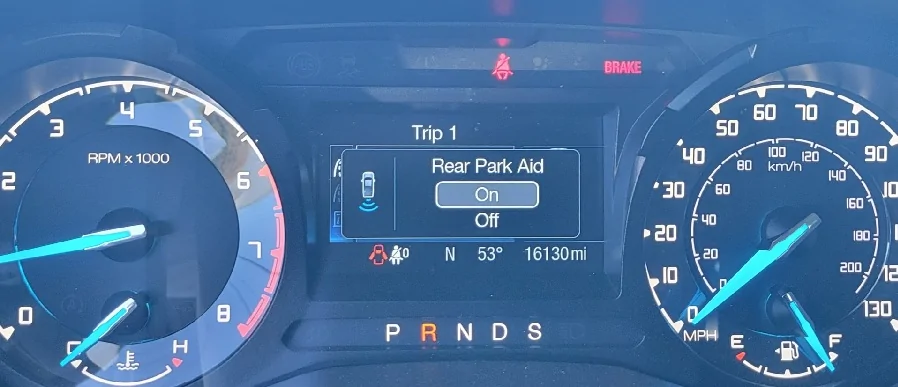
@airline tech this is the notification I was referring to. I put the truck in reverse, that pops up, I arrow down to off, then hit ok. then go on my merry way. I would still get warnings for really close proximity stuff though, like when backing into stall with objects in the vicinity.

thumbnail_20251112_100519.webp


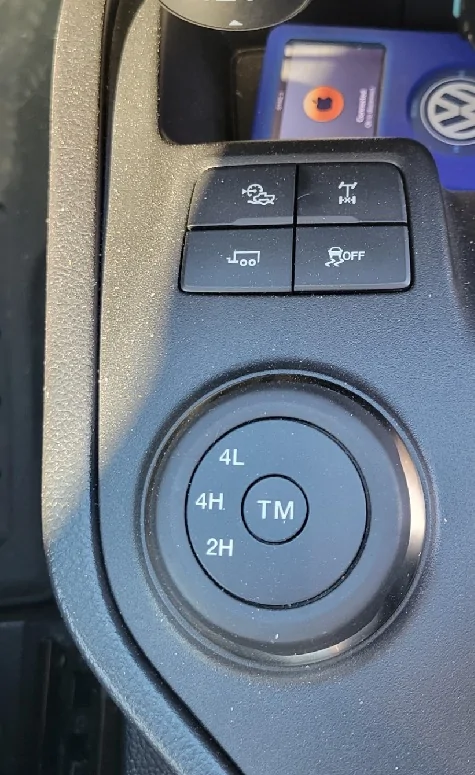
Also, I don't have a Park Aid switch on my center console. 🤷‍♂️

thumbnail_20251112_134459.webp
 
Last edited:

RangerBill

Well-Known Member
First Name
Bob
Joined
Jun 8, 2022
Threads
3
Messages
1,610
Reaction score
2,134
Location
PA
Vehicle(s)
2019 Ford Ranger Lariat Super Crew FX4
Occupation
retired
@airline tech this is the notification I was referring to. I put the truck in reverse, that pops up, I arrow down to off, then hit ok. then go on my merry way. I would still get warning for really close proximity stuff though, like when backing into stall with objects in the vicinity.

thumbnail_20251112_100519.webp
What happens if you click ok on the Rear Park Aid ON? Does the message still come up when going into reverse the next time?
 
OP
OP
veedubtuner

veedubtuner

Well-Known Member
First Name
Morgan
Joined
Sep 8, 2021
Threads
80
Messages
1,258
Reaction score
5,498
Location
Tulsa, OK
Vehicle(s)
2004 VW R32/2023 CG XLT Scab FX4 Ranger
Occupation
VW Parts
Vehicle Showcase
1
What happens if you click ok on the Rear Park Aid ON? Does the message still come up when going into reverse the next time?
Don't know, never selected on before lol.
 

Dr_Strangelove

Well-Known Member
First Name
Adam
Joined
Oct 14, 2022
Threads
13
Messages
1,138
Reaction score
5,227
Location
Henderson, NV
Vehicle(s)
'22 XLT Supercrew 4x4
Occupation
Art, Design, Photo & Video
Morgan I know you say you turn it off every time and still usually get alerts but it seems to me as if you're simply turning the system off and that's why you're not getting alerts.

I never even interact with this menu as it turns itself off when I put the truck back in Drive. I would definitely experiment with selecting "on" to see if this solves your issue.
 
OP
OP
veedubtuner

veedubtuner

Well-Known Member
First Name
Morgan
Joined
Sep 8, 2021
Threads
80
Messages
1,258
Reaction score
5,498
Location
Tulsa, OK
Vehicle(s)
2004 VW R32/2023 CG XLT Scab FX4 Ranger
Occupation
VW Parts
Vehicle Showcase
1
Morgan I know you say you turn it off every time and still usually get alerts but it seems to me as if you're simply turning the system off and that's why you're not getting alerts.
That's the thing though, since day 1 I have always selected off, and would ALWAYS still get close proximity alerts, but as of Mon or Tues, they stopped. But I'll fiddle with it more with the OM and report back lol.
 

airline tech

Well-Known Member
Joined
Aug 24, 2022
Threads
28
Messages
4,462
Reaction score
8,531
Location
Midwest - KS
Vehicle(s)
2022 Ranger Lariat-Super Crew, Cactus Gray
Occupation
Aircraft Tech
So, which Rear Camera Display do you have.
Rear View Mirror / 4-In Sync Display / 8-in Sync Display

Since you do not have the Front Park Aid, I think what is happening due to the fact that even when disabled (off) it is still operational.
This is why you do not have the Center Console Switch (I Believe)
I have a hunch by your statement that even with it selected (OFF) -You were still getting (RED) alerts for close proximity, with it (ON) you will get the progressive alert Green/Yellow/Red, and the chime will increase in speed to closer you get to the object eventually locking in to a solid tone (RED)
I was under the impression that the system would disable ALL alerts (when off) even though it's always active when the ignition is on.
So just maybe it will still display a (RED) alert even when off - as that is a critical alert level as this is the way you have been using the system - until now it was working, the manuals do not show this operation (if this is the case) but I can confirm that the sensors are always active and transmitting when the vehicle speed is under 3 MPH in (Reverse) for the Front (Drive) its 5-MPH above these speeds they disable and the driver selection and or switch only turns off the Indication & Alerts.
But it appears there is another part of the operation I did not know and if this is the case, I will make a note of it - Even when off it will still function for (High - RED) Alerts.
I will test mine and see as I use the park aid daily for my home garage and work parking garage.

Rear Park Aid = The 4 Parking Sensors
Rear Camera = The BLIS Modules provide the Cross Traffic Alerts / Grid Lines come from the PSCM sensors (Steering Angle)
 

airline tech

Well-Known Member
Joined
Aug 24, 2022
Threads
28
Messages
4,462
Reaction score
8,531
Location
Midwest - KS
Vehicle(s)
2022 Ranger Lariat-Super Crew, Cactus Gray
Occupation
Aircraft Tech
Ok confirmed with 8 in screen and park aid switch - switch (off) no parking warning indicating at all even when it should be Red , with the center console switch there is no other IPC menu setting like you have, so the IPC selection takes place of the physical switch.
So with the center switch operation- if you select it off , it operates the same as the ASS switch it’s only good for that ignition cycle - resets to (on-enabled) on next cycle.
So I suspect if you set it to on - it will stay on and you won’t have to select it every time you put it into reverse.
That would be annoying - that is what threw me off about your post, it should not be that way.
Sponsored


Top