
Sponsored
Loading

AzScorpion
Moderator
- First Name
- Dave
- Joined
- Jul 25, 2019
- Threads
- 342
- Messages
- 27,112
- Reaction score
- 137,225
- Location
- Back Home In AZ!
- Vehicle(s)
- 2023 Ford Ranger Tremor
- Occupation
- Retired...Full Time Slacker
If you have a Lariat on the main screen go to:
-Settings
-Clock
-Settings
-Clock

Big Blue
Well-Known Member
Beat me to it. Not sure on the lower level non-SYNC3 radios.If you have a Lariat on the main screen go to:
-Settings
-Clock
AzScorpion
Moderator
- First Name
- Dave
- Joined
- Jul 25, 2019
- Threads
- 342
- Messages
- 27,112
- Reaction score
- 137,225
- Location
- Back Home In AZ!
- Vehicle(s)
- 2023 Ford Ranger Tremor
- Occupation
- Retired...Full Time Slacker
It didn't say in his profile which model he had. I've never played around with a non Lariat but I'm sure it's in the owners manual. But if he's like me he's never read it either. lol ?Beat me to it. Not sure on the lower level non-SYNC3 radios.
David @subquark has a n XL so maybe he could help with the settings. Once he's back from the dump!
DukeCanBuildit
Well-Known Member
He might be a while - you know how he gets talkin’
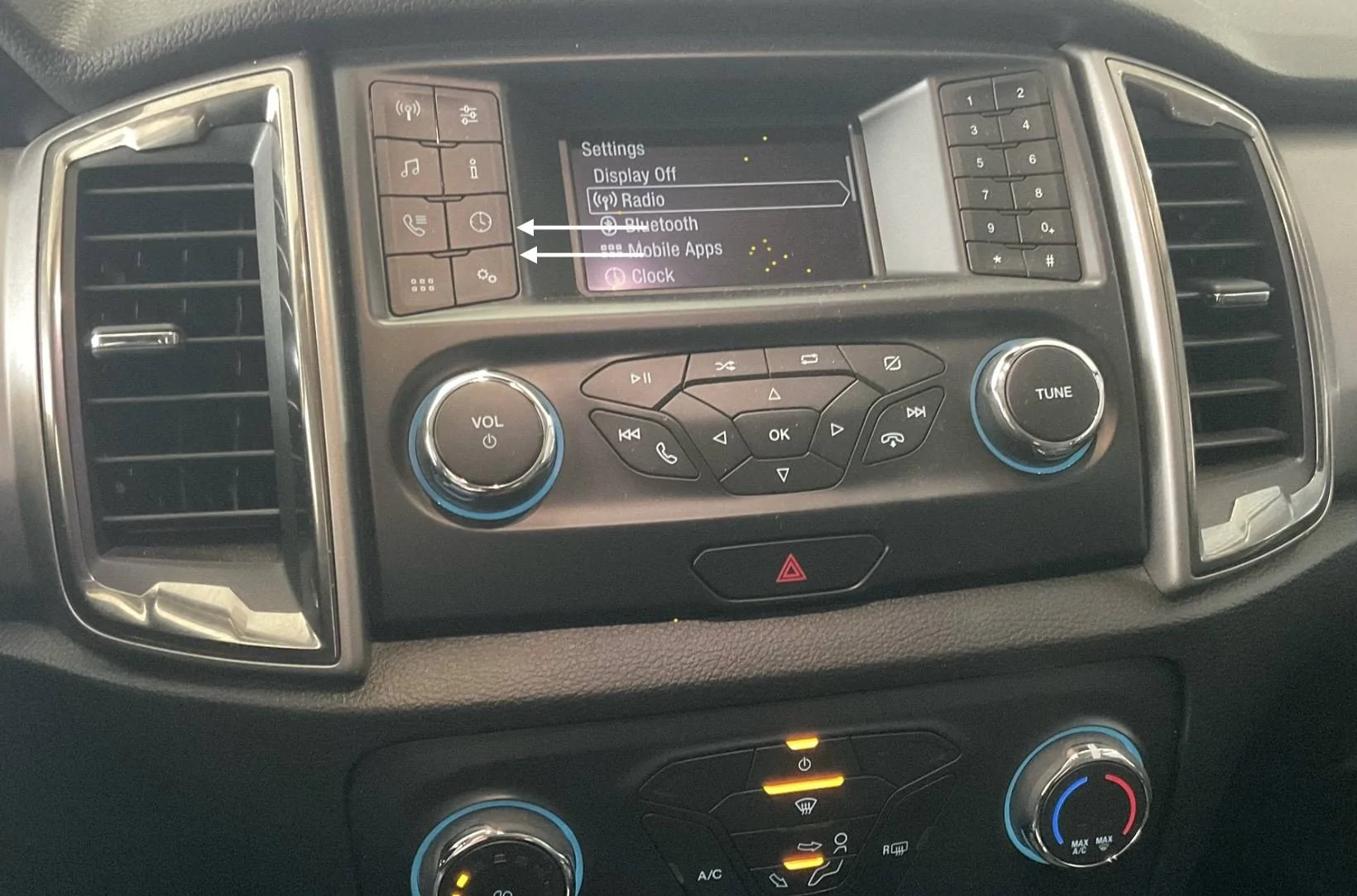
It’s a bit obvious on non-touchscreen models.
Either of the two buttons shown below will take care of it.

It’s a bit obvious on non-touchscreen models.
Either of the two buttons shown below will take care of it.

subquark
Well-Known Member
- First Name
- David
- Joined
- Jan 28, 2022
- Threads
- 11
- Messages
- 4,566
- Reaction score
- 23,252
- Location
- Portsmouth, NH
- Website
- subQuark.com
- Vehicle(s)
- Soupie! Race Red '22 XL 101A Scab 4X2 w/steelies
- Occupation
- game publisher
@tonsethIt didn't say in his profile which model he had. I've never played around with a non Lariat but I'm sure it's in the owners manual. But if he's like me he's never read it either. lol ?
David @subquark has a n XL so maybe he could help with the settings. Once he's back from the dump!
Oh great, since AzScorpion has me brainwashed, I just went out (in my down booties after returning from Mexican food) in breezy 31° weather! =p
So let's do it - easy peasy! =)
And yes, like @DukeCanBuildit says, I can get talkative at the dump. That and signing body parts of the dump babes that are attracted to Soupie the Babe Magnet! =D
Note: you can't set the date in the XL, it does it automatically through the Wi-Fi or bluetooth with your phone.
turn on the radio with the volume button
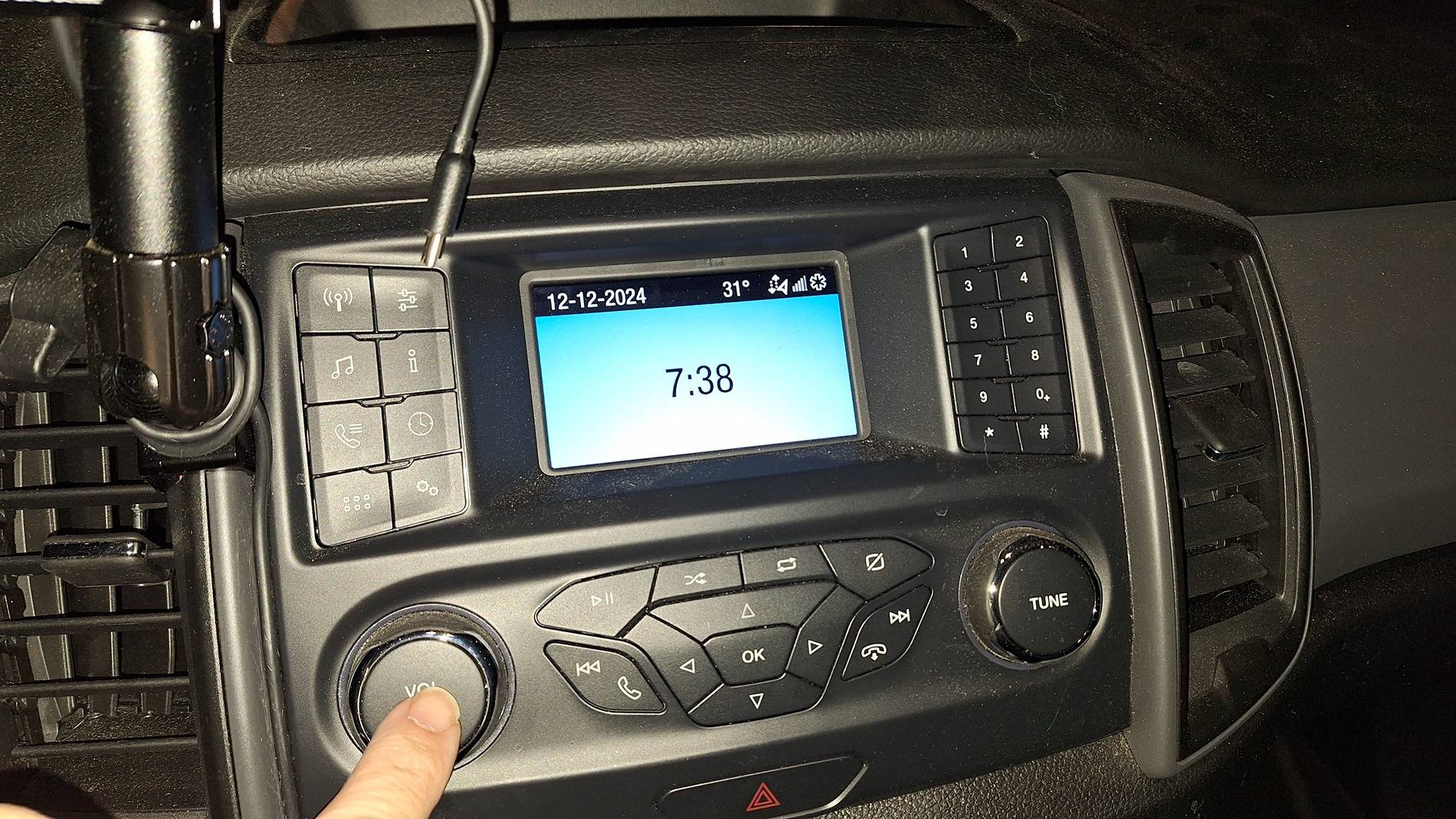
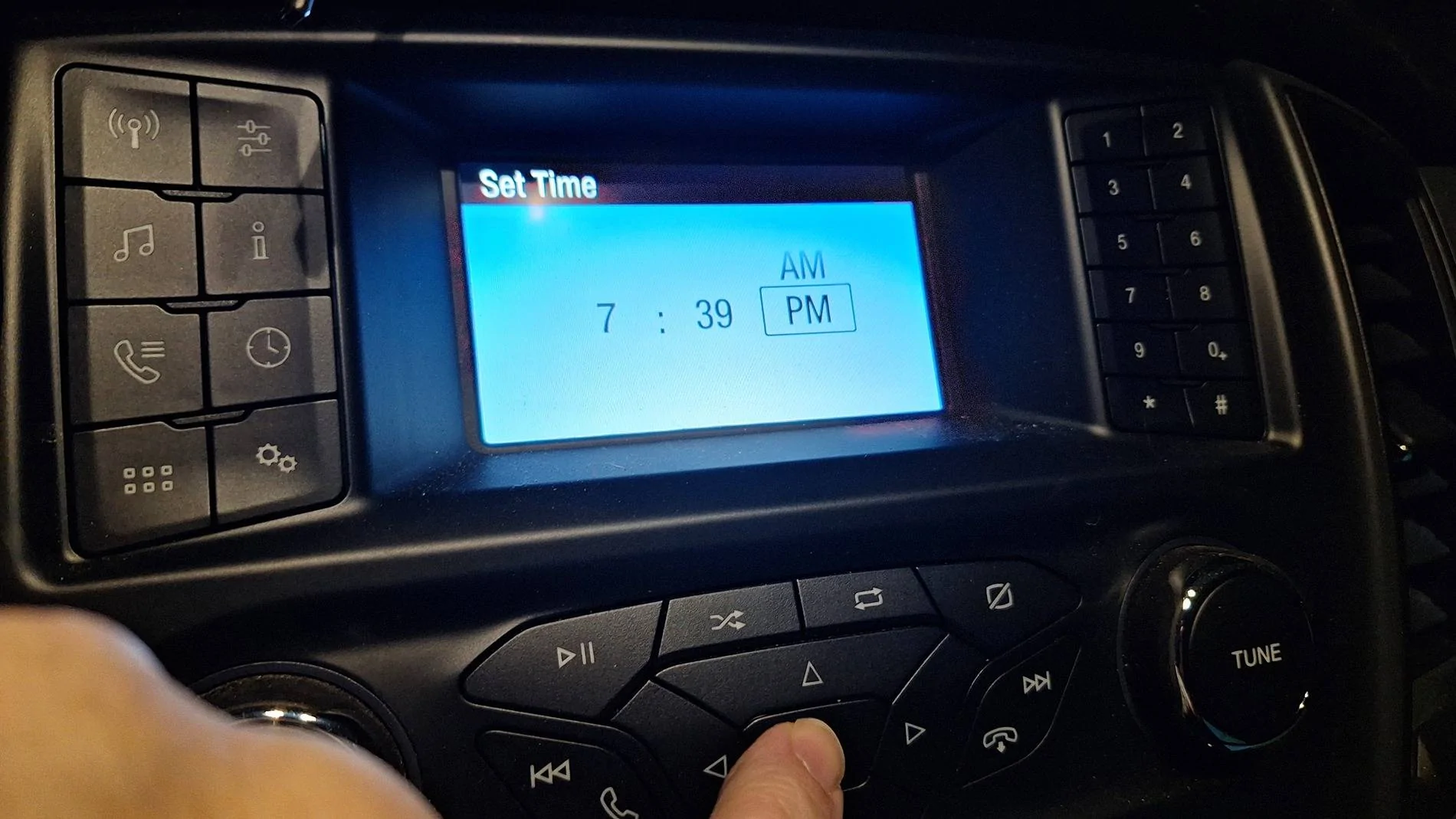
select the clock button (or setting cogs can get you there too)
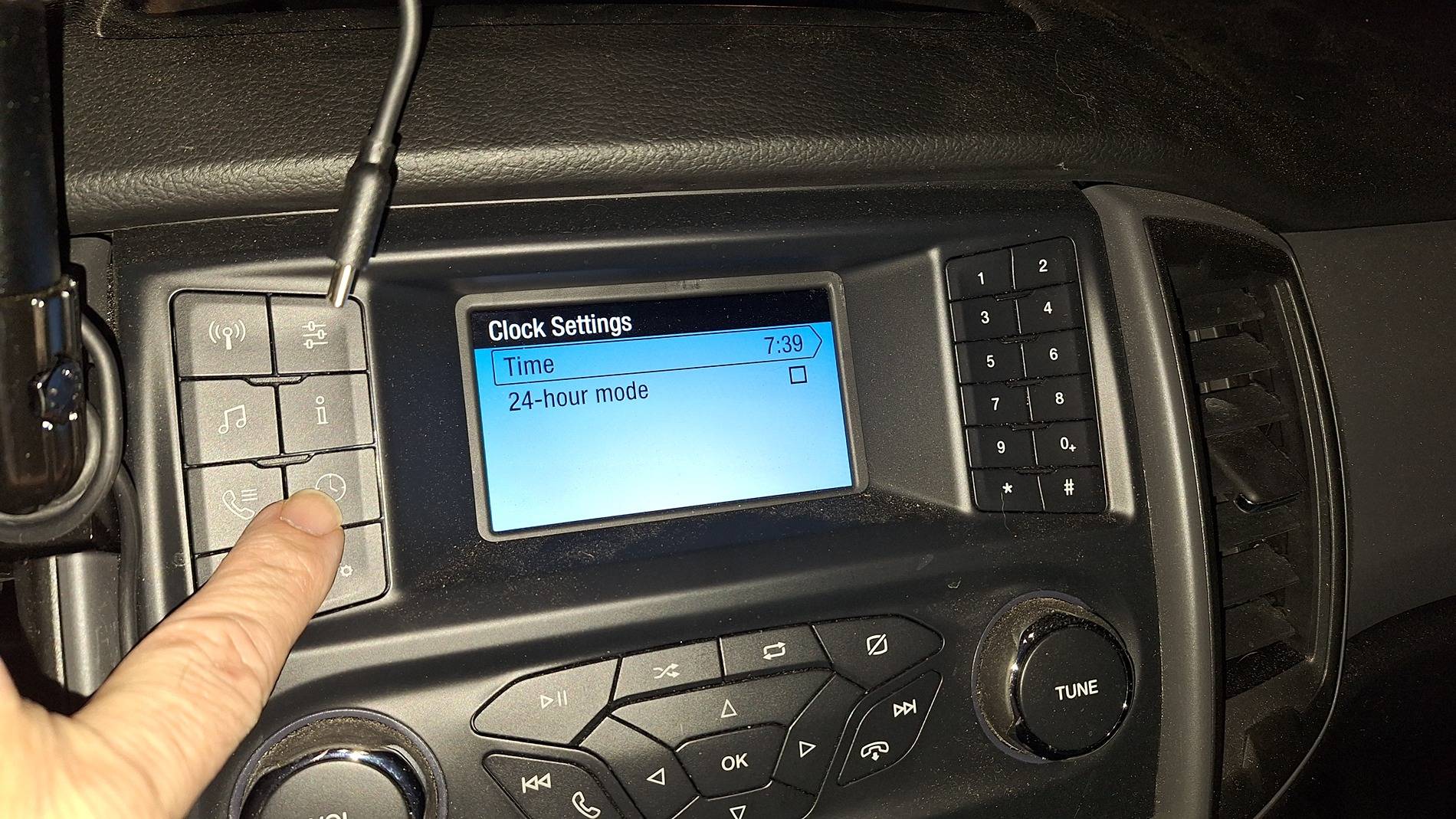
the top is selected by default, hit OK
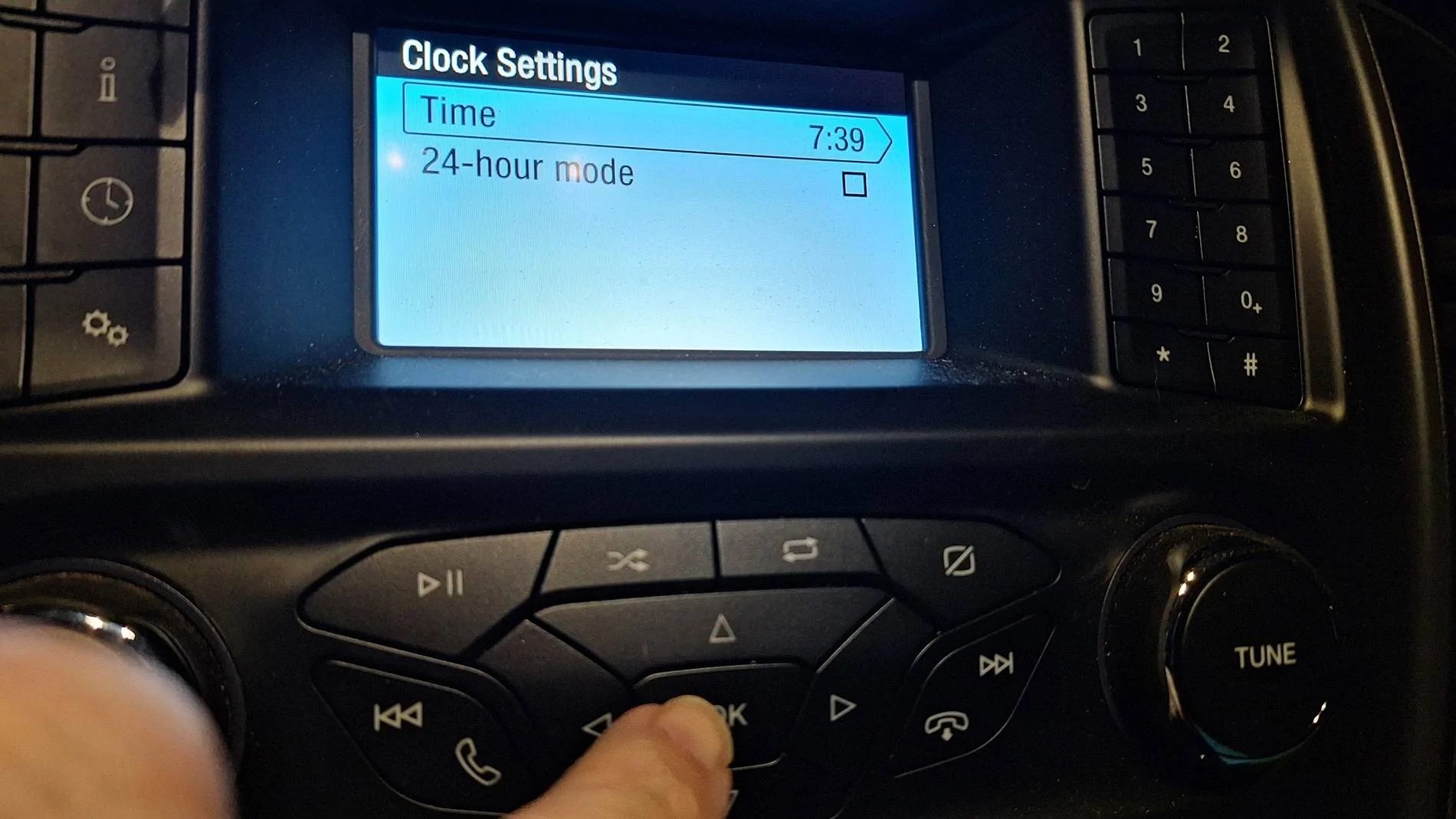
the Set Time screen opens
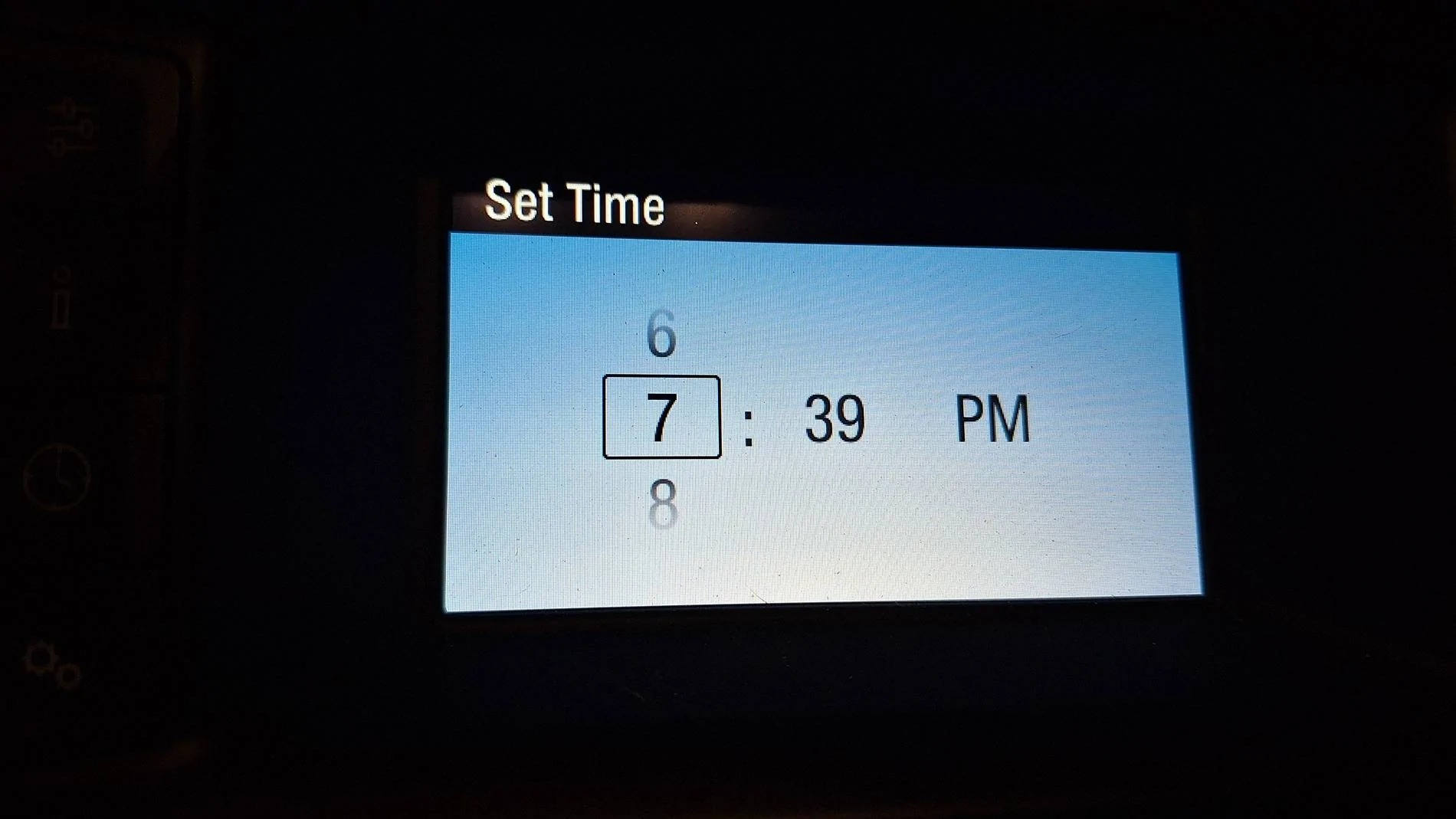
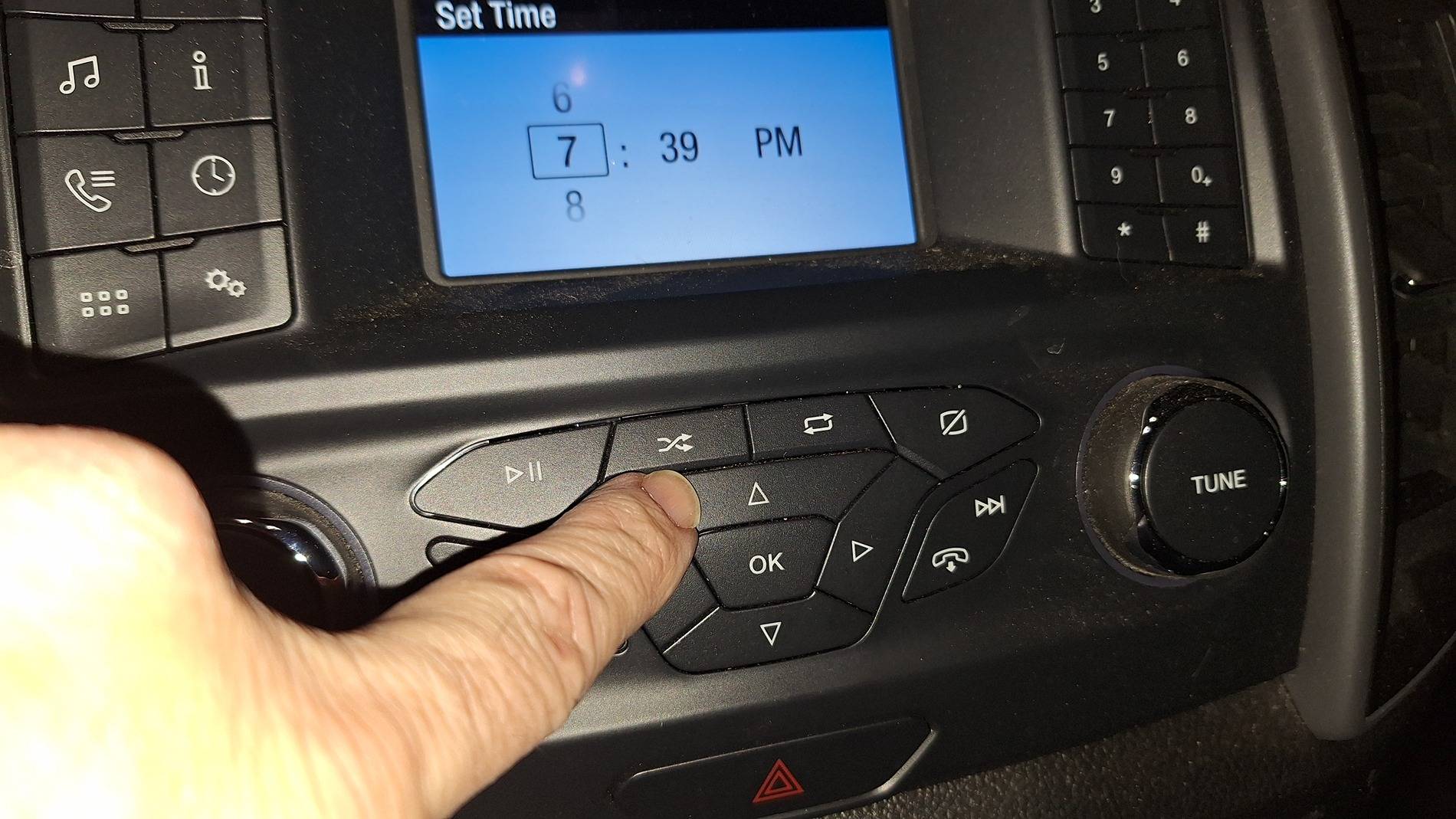
use the up and down arrows to set hours
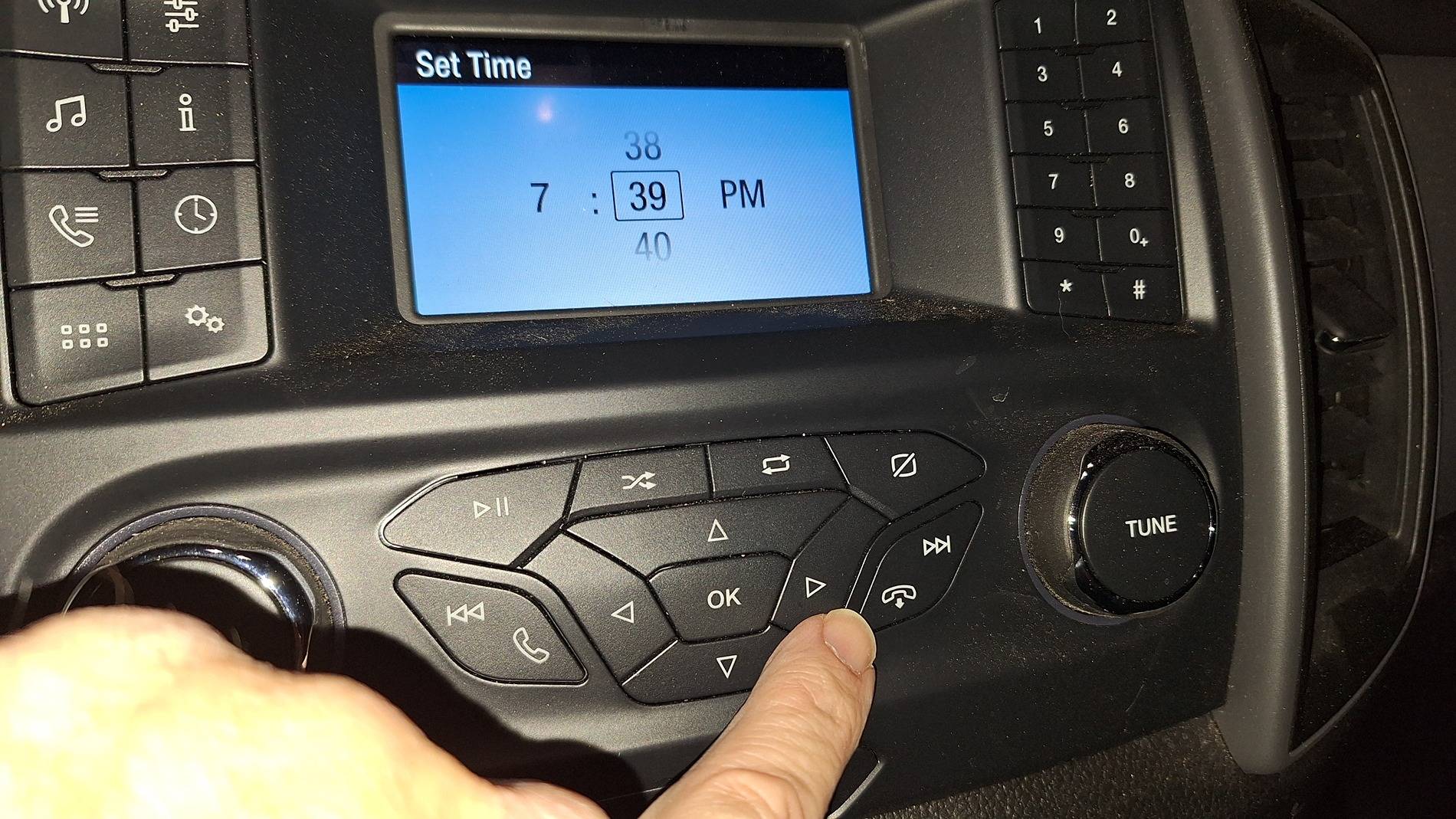
then side button to set minutes
then either the side button or Ok will pop you to AM/PM - hit OK when set
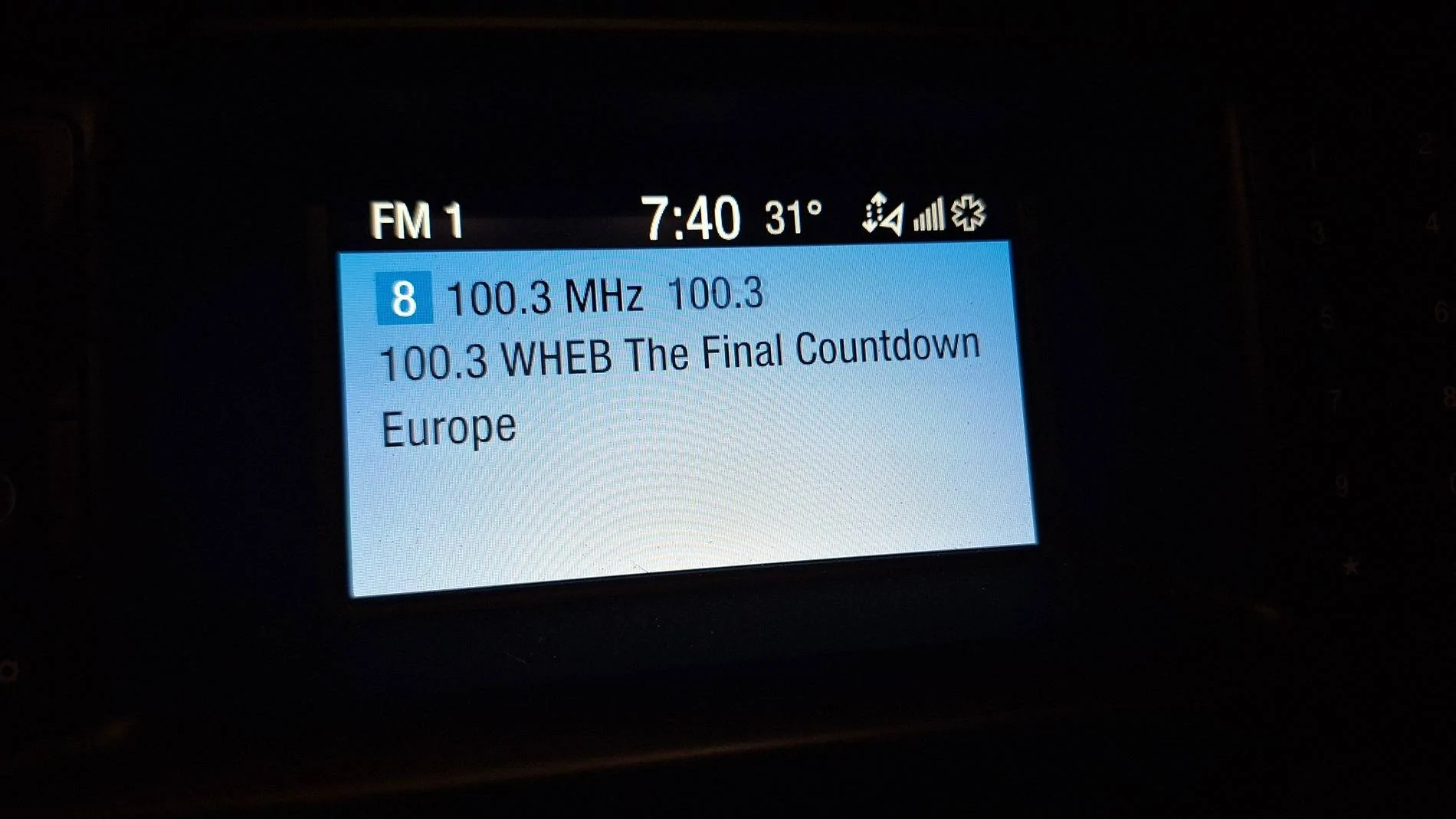
click the radio button to get back to your awesome luvin' and groovin music
DukeCanBuildit
Well-Known Member
Great post - just enough pictures for me.@tonseth
Oh great, since AzScorpion has me brainwashed, I just went out (in my down booties after returning from Mexican food) in breezy 31° weather! =p
So let's do it - easy peasy! =)
And yes, like @DukeCanBuildit says, I can get talkative at the dump. That and signing body parts of the dump babes that are attracted to Soupie the Babe Magnet! =D
Note: you can't set the date in the XL, it does it automatically through the Wi-Fi or bluetooth with your phone.
turn on the radio with the volume button

select the clock button (or setting cogs can get you there too)
the top is selected by default, hit OK
the Set Time screen opens
use the up and down arrows to set hours
then side button to set minutes
then either the side button or Ok will pop you to AM/PM - hit OK when set
click the radio button to get back to your awesome luvin' and groovin music
Bonus points for that great song on the radio - now, it’s in my head.
????We’re heading to Venus???

Big Blue
Well-Known Member
31° that's a heat wave! We were down to a -5° last night with-24° wind chills, same for tonight. I don't think we got out of single digits or above 0° wind chills today, it was sunny though. Went out shopping with the wife@tonseth
Oh great, since AzScorpion has me brainwashed, I just went out (in my down booties after returning from Mexican food) in breezy 31°

twk
Well-Known Member
We plug our phones into our Rangers.
Most of us have our Rangers on their home wifi.
The thing knows our songs, our address book, and who knows what else.
Why can't the truck's clock get auto set through one of those connections?
Most of us have our Rangers on their home wifi.
The thing knows our songs, our address book, and who knows what else.
Why can't the truck's clock get auto set through one of those connections?

ControlNode
Well-Known Member
- First Name
- John
- Joined
- Nov 29, 2021
- Threads
- 17
- Messages
- 1,748
- Reaction score
- 3,778
- Location
- Eastern NC
- Vehicle(s)
- 84 Civic "2000S"/16 Focus RS/21 Ranger XLT
- Occupation
- Computers
I don't see why they don't just use GPS datetime to keep the it up-to-date. Don't all the Rangers support current location in the app? Would that mean that they all have a GPS antenna, even if no navigation app? All you should have to adjust is the timezone and if in standard or daylight savings time currently if it doesn't use geofencing+ST/DST calendar data to do it automatically.We plug our phones into our Rangers.
Most of us have our Rangers on their home wifi.
The thing knows our songs, our address book, and who knows what else.
Why can't the truck's clock get auto set through one of those connections?
Chris M
Well-Known Member
- First Name
- Chris
- Joined
- Jun 11, 2020
- Threads
- 22
- Messages
- 4,688
- Reaction score
- 20,707
- Location
- Surprise, AZ
- Vehicle(s)
- 2021 Ranger XLT Sport 4X4
- Occupation
- Security Supervisor
Mine does.We plug our phones into our Rangers.
Most of us have our Rangers on their home wifi.
The thing knows our songs, our address book, and who knows what else.
Why can't the truck's clock get auto set through one of those connections?
subquark
Well-Known Member
- First Name
- David
- Joined
- Jan 28, 2022
- Threads
- 11
- Messages
- 4,566
- Reaction score
- 23,252
- Location
- Portsmouth, NH
- Website
- subQuark.com
- Vehicle(s)
- Soupie! Race Red '22 XL 101A Scab 4X2 w/steelies
- Occupation
- game publisher
I agree!We plug our phones into our Rangers.
Most of us have our Rangers on their home wifi.
The thing knows our songs, our address book, and who knows what else.
Why can't the truck's clock get auto set through one of those connections?
Last year, the date was one day off and I tried disconnecting the battery, reconnecting to Wi-Fi but it didn't update for about a month!
But, as you said, they sure know where we've been and how long we've been there and, undoubtedly, they sell that info.
Even my work, a multi-billion Euro a year company, sells our employee data!
Bah!

DukeCanBuildit
Well-Known Member

Grandaccess
Well-Known Member
- First Name
- Robert
- Joined
- Jul 8, 2023
- Threads
- 8
- Messages
- 1,191
- Reaction score
- 2,774
- Location
- Binghamton, N.Y
- Vehicle(s)
- 2021 Ford Ranger XLT FX4
- Occupation
- Computer Consultant
takes the guess work out of it, step by step with pictures, better than the manual@tonseth
Oh great, since AzScorpion has me brainwashed, I just went out (in my down booties after returning from Mexican food) in breezy 31° weather! =p
So let's do it - easy peasy! =)
And yes, like @DukeCanBuildit says, I can get talkative at the dump. That and signing body parts of the dump babes that are attracted to Soupie the Babe Magnet! =D
Note: you can't set the date in the XL, it does it automatically through the Wi-Fi or bluetooth with your phone.
turn on the radio with the volume button
select the clock button (or setting cogs can get you there too)
the top is selected by default, hit OK
the Set Time screen opens
use the up and down arrows to set hours
then side button to set minutes
then either the side button or Ok will pop you to AM/PM - hit OK when set
click the radio button to get back to your awesome luvin' and groovin music

Sponsored


