Sponsored

LED TURNS IN HEADLIGHTS

veedubtuner

Well-Known Member
First Name
Morgan
Joined
Sep 8, 2021
Threads
80
Messages
1,260
Reaction score
5,501
Location
Tulsa, OK
Vehicle(s)
2004 VW R32/2023 CG XLT Scab FX4 Ranger
Occupation
VW Parts
Vehicle Showcase
1
So I bought some Lariat LED headlights off ebay to replace the factory halogens with (whenever I get my truck ? lol) as I like OEM+ upgrades. My question is, one of the lights I received has (what looks like) a Diode Dynamics LED in the turn signal. Looking at their website it looks to be the switchback version. After some reading on here, it seems that the bulb in that location is a dual filament bulb for both the LED and halogen version lights. Halogen LED turn signal version (switchback) gives you the option to have a white running light and an amber turn. In the Lariat LED, the running light is the white strip and a separate bulb for turn.

My question, to anyone with the Lariat LED's, if you have swapped out your turn signals for LED's, did you use the switchbacks or did you just use the amber ones? If you did go with the switchbacks what are the advantages over the amber ones? I'm confused as to why a switchback would be needed in that location for single use function. Also, on Diodes website is has the option to add resistors to combat "speedy flash", is this common issue on these trucks? I'm still very new to Ford and I did quite a bit of research before asking, but could find exactly what I was looking for. TIA.
Sponsored
 

Figarou

Well-Known Member
Joined
Mar 22, 2019
Threads
25
Messages
2,408
Reaction score
13,793
Location
Texas
Vehicle(s)
2022 Ford Edge ST, 2019 Ford Ranger Lariat
So I bought some Lariat LED headlights off ebay to replace the factory halogens with (whenever I get my truck ? lol) as I like OEM+ upgrades. My question is, one of the lights I received has (what looks like) a Diode Dynamics LED in the turn signal. Looking at their website it looks to be the switchback version. After some reading on here, it seems that the bulb in that location is a dual filament bulb for both the LED and halogen version lights. Halogen LED turn signal version (switchback) gives you the option to have a white running light and an amber turn. In the Lariat LED, the running light is the white strip and a separate bulb for turn.

My question, to anyone with the Lariat LED's, if you have swapped out your turn signals for LED's, did you use the switchbacks or did you just use the amber ones? If you did go with the switchbacks what are the advantages over the amber ones? I'm confused as to why a switchback would be needed in that location for single use function. Also, on Diodes website is has the option to add resistors to combat "speedy flash", is this common issue on these trucks? I'm still very new to Ford and I did quite a bit of research before asking, but could find exactly what I was looking for. TIA.

For the Lariat headlights, you don't need switchbacks for the turn signal. It has a separate daytime running light.
 
OP
OP
veedubtuner

veedubtuner

Well-Known Member
First Name
Morgan
Joined
Sep 8, 2021
Threads
80
Messages
1,260
Reaction score
5,501
Location
Tulsa, OK
Vehicle(s)
2004 VW R32/2023 CG XLT Scab FX4 Ranger
Occupation
VW Parts
Vehicle Showcase
1
For the Lariat headlights, you don't need switchbacks for the turn signal. It has a separate daytime running light.
That's what I assumed, not sure why the previous guy used the switchbacks, but I did reach out and hopefully he will reply.
 

Trigganometry

Well-Known Member
First Name
Rick
Joined
Dec 4, 2020
Threads
153
Messages
5,833
Reaction score
25,359
Location
Massachusetts
Vehicle(s)
20 XLT scab 301A/tow 4X4 magnetic w/sport blackout
Occupation
Engineering
I got a set of Lariat LED lights from a member on here. Pretty sure there is a thread on here about just this too. But from my recollection only the turn signal is wired in a Lariat setup. There is no wiring for DRL function of that bulb (4 wires to socket)
 
OP
OP
veedubtuner

veedubtuner

Well-Known Member
First Name
Morgan
Joined
Sep 8, 2021
Threads
80
Messages
1,260
Reaction score
5,501
Location
Tulsa, OK
Vehicle(s)
2004 VW R32/2023 CG XLT Scab FX4 Ranger
Occupation
VW Parts
Vehicle Showcase
1
The seller replied and said at the time, the switchbacks were the only option for that location. So one question answered. He also said there will be "hyper flash" and that it could be fixed by changing the blinker sensor dwell to 0. He mentioned using a Snapon scanner, I assume this can also be done in Forscan?
 

airline tech

Well-Known Member
Joined
Aug 24, 2022
Threads
28
Messages
4,465
Reaction score
8,542
Location
Midwest - KS
Vehicle(s)
2022 Ranger Lariat-Super Crew, Cactus Gray
Occupation
Aircraft Tech
You are correct, the LED Headlamp Assembly, still has Incandescent bulb, same as Halogen Assembly, (Dual Filament) - but only is wired for Turn Signals Only, no park light function.
I bought the bulb listed below, it's super bright when using, not overly overwhelming though.

Copied from my posting below:

These are NOT Switchbacks and I have confirmed they work, no hyperlink, been installed for about a month as of today (11/25/22)

I used Oxilam 7440 Yellow LEDs from Amazon that others have used and recommended - Man they are BRIGHT
No - Hyper-Blink (at Turn Signals or Dash Indicators)


I am pasting my very detailed post of swap below to get you set up, as the post's on here make it very confusing

If you search, there is a video posted on install from another member


airline tech said:
Note: These are the ForScan Settings (My Findings) for those of you who are Upgrading from Factory Halo's to Factory (LED's) and Possibly (After Market LED)

I purchased a Complete Set of Factory Headlamps / Foglamps from Ford Dealer ($2700.00)
It would have cost me more to walk away from As Ordered truck that I waited 7 months to get than a Dealer Ordered Lariat (That Had Them)
I did not want (Ebay) broken tabs on a Brand New Truck

I have a 2022 Lariat - That was Downgraded to Halogen Headlamp / Foglamp at Factory

The Foglamps are on Back-Order, so those are not installed yet

So, I Corrected Ford's deletion of my LED Headlight Assemblies for a piddly $500 Credit.

Here is My Install Notes and Configuration Settings for ForScan:

1. This is on a 22 Lariat that had the misfortune of getting the LED Head/Fog deleted at factory, so it arrived with Halo's

2. In the Install video posted on here, the guy does a quick shot of the Bumper Skirting (outer bolts)
These are located with the head facing forward - if you look up (just in front of the tires) towards the front bumper (you will see them) - Took me a bit to find them

3. The video is correct; the Fender Skirts and Grille are very much a PITA to get loose without patience and finesse

4. Took about 5 hours to get them installed (not including ForScan & Allignment)

4. Now comes ForScan Settings to Make the Lariat LED's Work Correctly, I did some playing with some settings, due to CONFLICTING info on here, that's why I am bringing this to light on my findings to help others on this (upgrade)

I researched 3 Separate Lariat Trim Models - Using As-Built Data to Compare to My Lariat with Halo's

Here They Are:

My As-Built Data (Related to Headlight/DRL Settings - Lariat with Halo's Installed from Factory

BCM
726-26-02 - 0000-0002-0057
726-45-01 - 0A01-0200-0080
726-50-01 - 0280

Lariat As-Built Compare (From 3 Trucks) (All Match these settings) (With Factory LED's)

BCM
726-26-02 - 0000-0001-0056
726-45-01 - 0A01-1000-008E
726-50-01 - 108E

So, I used the 2 recommended GUI Settings at First and this is what I got

In BCM

Allowed DRL Options to (+ Dedicated DRL)
DRL Configuration to (Dedicated DRL)

DRL - Configuration - Changed To (Dedicated DRL) this automatically changes 2 of the Line Codes in the As-Built File Folder (BCM)

726-26-02 - 0000-0001-0056 (Matches my Lariat compare search-As-Built)
726-50-01 - 108E (Matches my Lariat compare search - As-Built)

Now for Allowed DRL Options in GUI, this GUI only adjusts one As-Built File and that is 726-45-01
I had set it to (+Dedicated DRL) but I double checked the (As Built) file and its Hex-Code Read

726-45-01 - 0A01-1F00-009D

So, the Allowed DRL Options (+Dedicated DRL) setting within the GUI, does not change the As-Built File to the correct Hex-Code according to my 3 Lariat comparison trucks.

So, I played with all of the options in GUI, and this is the outcome of each, I will note the changes
on the second set of numbers:

None: 0100
All Options: 7F00
Low Beam: 0300
Hi-Beam: 3F00
Ft Fog: 0700
Ft Turn: 0F00
Dedicated DRL: 1F00
**Incorect Value or Not Configured - 1000 (see below)

Noted: None of These Options gave me my Original as Built (0200), might be due to that I had the other DRL Configuration set to (Dedicated DRL) IDK

If you change the As Built file manually to the (Lariat Compare -Code)
726-45-01 -to - 0A01-1000-008E then look in the GUI (Easy Way) it's listed in a current status of:
Incorrect Value or Not Configured

I may go back in ForScan and Play with the GUI (Options) for DRL Configuration, and see if I can get the GUI format to read correctly (1000) instead of the Incorrect Value or Not Configured
(It's a Curiosity Thing) and I tend to be thorough and meticulous. I'm new to ForScan and Learning

So, I checked Headlight / DRL Operation with both 726-45-01 (1FOO) & ((1000) Hex-Codes
The Headlight's / DRL's work as they should: using both of these Hex-Codes
I decided to manually change and leave this Line Code at (1000) to match my compare trucks

I do not know what the difference between the (2) are (1F00) & (1000) but they both appear to work.

Any ForScan (Guru's) know the answer?

Operational Check:

1. LED Strip - On and Bright
a. With Headlight switch in Auto (Daylight) - So DRL Mode

2. LED Strip - On and Dim
a. Headlight switch in (Headlight) and (Auto - Nighttime)
b. Headlight Switch in Park Lights
c. Activation of Entry / Exit Lights along with Park Lights, Bed Lights, Puddle Lights, Door Locks Activation Etc.

With all that, I also upgraded the Turn Signals to LED as well, while I had it apart. I used the Oxilam 7440 Yellow LEDs from Amazon that others have used and recommended - Man they are BRIGHT
No - Hyper-Blink (at Turn Signals or Dash Indicators)

Before I started my swap, I set up truck at 25' from Garage Door, placed tape across the Top of the projected light source, this way I had a Ref: Line to Adjust them Too, made it so much easier.

Did some other ForScan Mods plus Map Update today as well, so it's been a long day

Sorry, for the LONG Post, but after spending a couple of hours researching the proper Forscan settings and getting conflicting info, I wanted to help others in clarifying the correct settings for swapping their headlights to LED (Factory)

I'm going to post my findings in the Forscan Wiki as well, as they are hidden all over this Forum.
Is it possible to get a Sticky on these settings

headlights-pic-jpg-jpg.jpg

EDIT: To Original Post

In BCM (Module) - Easy Way

I went back in and played with the DRL Configuration in GUI (Easy Way)
I attempted to change each of the selections, and it flagged me - not supported

Those Options Are:

0-Not Defined
2-Lo Beam
4- Fog Lamp
8-Turn Lamp
10-Dedicated DRL (The Only Selection That Worked)
32-High Beam
64-Low Beam and Dedicated

So, I'm leaving it alone and deduced it's a ForScan Programming Glitch. It works and that was the end game wanted outcome
I am wandering that since my Fog's is still Halo's has anything to do with it, though. We shall see after the LED Fog's get installed

Thanks
UPDATE
I figured it out and this ONLY applies to Factory LED or Aftermarkets that have a dedicated DRL and that is all you will be using.

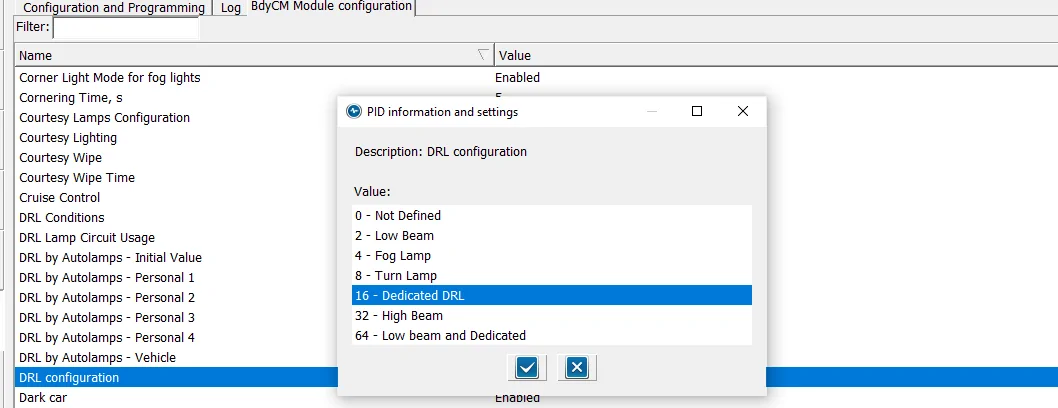
DRL Configuration to (Dedicated DRL)
drl-config-2-png.webp


Set this option to (16) Dedicated DRL - this will automatically set 2-Lines of Hex Code for you.
NOTE: the (16) is a Binary code that is converted to HEX (Inside of the As-Built) Files

Here are the 2-Lines of Codes it sets

BCM
726-26-02 - 0000-0001-0056 (Matches my Lariat compare search-As-Built)
726-50-01 - 108E (Matches my Lariat compare search - As-Built)

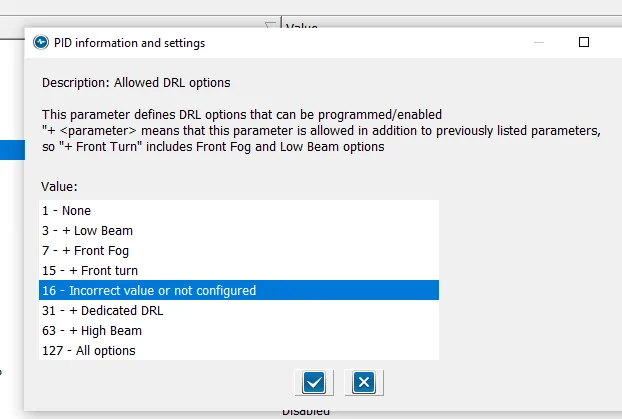
Now set Allowed DRL Options:

alowed-drl-options-png.webp

NOTE: The Paragraph at the top
If you have only (1) option for DRL, such as Factory LED Headlights, this will show due to the fact that it matches the (16) Binary code you set in DRL Configuration PLUS
This option ONLY modifies (In addition) (Plus) the standard factory DRL.
So, this normal - As I have not added any special (extra) DRL options to the configuration

So, with this selected, here is the last Hex Line of code that is changed (Automatically)

726-45-01 - 0A01-1000-008E

If you do not see this option (highlighted) then go into the As-Built File and manually change it, then when you go back to the (Module) Easy way, this will be shown

I know there have been quite a few posts on this subject and I wanted to pass along my findings
to clear it up
These are the confirmed settings for the Lariat Factory LED Upgrade, now it should also clear it up for those who have installed the (aftermarket) options. With the attached pics, you can see it more clearly and visualize what changes you want to make

Hope this helps

22 Ranger Lariat Screw Cactus Gray
Sponsored


Top