Sponsored

Ford Ranger interior lighting delay feature

paval3

Well-Known Member
First Name
Val
Joined
Apr 30, 2021
Threads
35
Messages
701
Reaction score
1,519
Location
Pennsylvania
Vehicle(s)
2021 Ranger XLT Crewcab & 2003 Mountaineer Premier
Don't know if I'm using the correct terminology.... but what I'm trying to find out, and I've used the Search feature here on the forum and Googled, without success...
when I get in the truck, the interior courtesy/dome light comes on, but as soon as I start the truck, interior overhead light goes off. I wanted to know if there is a way to set the lighting to stay on for maybe another 25 seconds or so. I can't seem to find a way in Settings. Why one may ask... well I don't know if it's just me, but it takes me a few more seconds to get situated before driving off... put the seat belt on, grab my glasses out of its case I use while driving, maybe put some chap stick on, situate my pocket book on the passenger seat so it doesn't topple over spilling contents, etc. I guess girlie stuff.
Sponsored

 

airline tech

Well-Known Member
Joined
Aug 24, 2022
Threads
28
Messages
4,447
Reaction score
8,498
Location
Midwest - KS
Vehicle(s)
2022 Ranger Lariat-Super Crew, Cactus Gray
Occupation
Aircraft Tech
Hmm

I am not sure of the - Terminology on what this actually does.

But there are some -As-Built Data files that appear to tie into what you want.
Note: This will affect exit ramp down time as well, I think - (when you get out and close the door)

Requires: Forscan to do this

BCM:

726-32-02 - Is set at (0011-0007-0079)

Now the first set of code - (0011) is Courtesy Lamp Ramp Down Duration (in seconds converted to hex)

Second set of code (0007) is Courtesy Lamp Ramp Up Duration (in seconds converted to hex)

So, if I am correct (Not Sure) you want to change the Ramp Down Duration as I THINK this is the time in seconds before it starts to (dim)

So, if we take the factory (hex) (0011 - converted to Decimal = 17 Seconds) Factory

so, an example would be to double it - (34 Seconds - change 0011 to 0022)
another would be an even 30-Seconds change 0011 to 001E

Again, IDK if Forscan has anything in the (Quick Menu) settings to make it easier, but I am thinking this is the setting you are looking for.
This will be Trial & Error and see what is does, I would be worried about setting the duration up as if I am correct this will also change the exit time as well. I could be wrong though.

Figure out a (Time Duration) in seconds you want and then use a Decimal to Hex (Convertor) to find the (correct hex code)

Since I am not certain which set of code actually is the (TIME - ON) duration you may have to play with one or the other and test function.

Note: the last (2) hex codes on any line = the Check Sum of the line, it will automatically change if anything on the line changes and if it is valid code (check sum) it will allow the write of change.
So (0079) will change automatically if you alter anything on the line.

You always have the option to just turn the Courtesy Light On (either by the Rocker Switch) or the integrated switch light itself. But that requires physical interaction and not automatic.
 
Last edited:

Chris M

Well-Known Member
First Name
Chris
Joined
Jun 11, 2020
Threads
20
Messages
4,491
Reaction score
19,740
Location
Surprise, AZ
Vehicle(s)
2021 Ranger XLT Sport 4X4
Occupation
Security Supervisor
Don't know if I'm using the correct terminology.... but what I'm trying to find out, and I've used the Search feature here on the forum and Googled, without success...
when I get in the truck, the interior courtesy/dome light comes on, but as soon as I start the truck, interior overhead light goes off. I wanted to know if there is a way to set the lighting to stay on for maybe another 25 seconds or so. I can't seem to find a way in Settings. Why one may ask... well I don't know if it's just me, but it takes me a few more seconds to get situated before driving off... put the seat belt on, grab my glasses out of its case I use while driving, maybe put some chap stick on, situate my pocket book on the passenger seat so it doesn't topple over spilling contents, etc. I guess girlie stuff.
Wouldn't something like that kind of timing be covered in the owners manual? I would start looking there, maybe?
 

subquark

Well-Known Member
First Name
David
Joined
Jan 28, 2022
Threads
11
Messages
4,544
Reaction score
23,071
Location
Portsmouth, NH
Website
subQuark.com
Vehicle(s)
Soupie! Race Red '22 XL 101A Scab 4X2 w/steelies
Occupation
game publisher
Hmm

I am not sure of the - Terminology on what this actually does.

But there are some -As-Built Data files that appear to tie into what you want.
Note: This will affect exit ramp down time as well, I think - (when you get out and close the door)

Requires: Forscan to do this

BCM:

726-32-02 - Is set at (0011-0007-0079)

Now the first set of code - (0011) is Courtesy Lamp Ramp Down Duration (in seconds converted to hex)

Second set of code (0007) is Courtesy Lamp Ramp Up Duration (in seconds converted to hex)

So, if I am correct (Not Sure) you want to change the Ramp Down Duration as I THINK this is the time in seconds before it starts to (dim)

So, if we take the factory (hex) (0011 - converted to Decimal = 17 Seconds) Factory

so, an example would be to double it - (34 Seconds - change 0011 to 0022)
another would be an even 30-Seconds change 0011 to 001E

Again, IDK if Forscan has anything in the (Quick Menu) settings to make it easier, but I am thinking this is the setting you are looking for.
This will be Trial & Error and see what is does, I would be worried about setting the duration up as if I am correct this will also change the exit time as well. I could be wrong though.

Figure out a (Time Duration) in seconds you want and then use a Decimal to Hex (Convertor) to find the (correct hex code)

Since I am not certain which set of code actually is the (TIME - ON) duration you may have to play with one or the other and test function.

Note: the last (2) hex codes on any line = the Check Sum of the line, it will automatically change if anything on the line changes and if it is valid code (check sum) it will allow the write of change.
So (0079) will change automatically if you alter anything on the line.

You always have the option to just turn the Courtesy Light On (either by the Rocker Switch) or the integrated switch light itself. But that requires physical interaction and not automatic.
Thanks for the great explanation. This may finally be my motivation to try Forscan.

I'd actually like to shorten that time. I get in at night to pull it off the street and typically have remote started it for 10 minutes. Once in, I want to back up right away. I'd actually like them to turn off right away with me pushing them on if I need them.

As always, thank you for your tremendous expertise! =)
 
OP
OP
paval3

paval3

Well-Known Member
First Name
Val
Joined
Apr 30, 2021
Threads
35
Messages
701
Reaction score
1,519
Location
Pennsylvania
Vehicle(s)
2021 Ranger XLT Crewcab & 2003 Mountaineer Premier
Hmm

I am not sure of the - Terminology on what this actually does.

But there are some -As-Built Data files that appear to tie into what you want.
Note: This will affect exit ramp down time as well, I think - (when you get out and close the door)

Requires: Forscan to do this

BCM:

726-32-02 - Is set at (0011-0007-0079)

Now the first set of code - (0011) is Courtesy Lamp Ramp Down Duration (in seconds converted to hex)

Second set of code (0007) is Courtesy Lamp Ramp Up Duration (in seconds converted to hex)

So, if I am correct (Not Sure) you want to change the Ramp Down Duration as I THINK this is the time in seconds before it starts to (dim)

So, if we take the factory (hex) (0011 - converted to Decimal = 17 Seconds) Factory

so, an example would be to double it - (34 Seconds - change 0011 to 0022)
another would be an even 30-Seconds change 0011 to 001E

Again, IDK if Forscan has anything in the (Quick Menu) settings to make it easier, but I am thinking this is the setting you are looking for.
This will be Trial & Error and see what is does, I would be worried about setting the duration up as if I am correct this will also change the exit time as well. I could be wrong though.

Figure out a (Time Duration) in seconds you want and then use a Decimal to Hex (Convertor) to find the (correct hex code)

Since I am not certain which set of code actually is the (TIME - ON) duration you may have to play with one or the other and test function.

Note: the last (2) hex codes on any line = the Check Sum of the line, it will automatically change if anything on the line changes and if it is valid code (check sum) it will allow the write of change.
So (0079) will change automatically if you alter anything on the line.

You always have the option to just turn the Courtesy Light On (either by the Rocker Switch) or the integrated switch light itself. But that requires physical interaction and not automatic.
Thank you for that detailed info! I Do have Forscan but only used it once for the "brake squishy fix" and I was so afraid of messing something up. Kinda leery to play with it again.

I guess I will just have to manually turn light back on with the overhead switch. No big deal, but was hoping I was missing something in the Settings that I could adjust. I will delve into the owner's manual deeper, but don't have much hope.


Big Blue

Well-Known Member
First Name
Lee
Joined
May 5, 2020
Threads
16
Messages
3,927
Reaction score
9,352
Location
Wisconsin
Vehicle(s)
2019 Ford Ranger XLT FX4 Supercrew lighting blue
Occupation
Retired mechanical designer
Thank you for that detailed info! I Do have Forscan but only used it once for the "brake squishy fix" and I was so afraid of messing something up. Kinda leery to play with it again.

I guess I will just have to manually turn light back on with the overhead switch. No big deal, but was hoping I was missing something in the Settings that I could adjust. I will delve into the owner's manual deeper, but don't have much hope.
I went out and played with mine. If I get in and do not immediately start the truck, my dome lights will stay on about 26 seconds from closing the door before they time out. They stay on as long as the door is open.

So, it looks like your options are do not start the truck immediately, and use the 25 seconds to do your stuff. Or, start the truck and leave the door slightly open until you have completed your ritual. You will get a door ajar warning on the dash to close the door before driving off.
 

NotBudule2

Well-Known Member
First Name
Robert
Joined
Jul 8, 2024
Threads
9
Messages
1,024
Reaction score
4,285
Location
WV
Vehicle(s)
21 Ranger
Occupation
Retired
You could make use of the 110v outlet and add some kind of timed nitelite, or a small gooseneck... which now sounds like something ? I may want now that I've said it...
 

subquark

Well-Known Member
First Name
David
Joined
Jan 28, 2022
Threads
11
Messages
4,544
Reaction score
23,071
Location
Portsmouth, NH
Website
subQuark.com
Vehicle(s)
Soupie! Race Red '22 XL 101A Scab 4X2 w/steelies
Occupation
game publisher
I went out and played with mine. If I get in and do not immediately start the truck, my dome lights will stay on about 26 seconds from closing the door before they time out. They stay on as long as the door is open.

So, it looks like your options are do not start the truck immediately, and use the 25 seconds to do your stuff. Or, start the truck and leave the door slightly open until you have completed your ritual. You will get a door ajar warning on the dash to close the door before driving off.
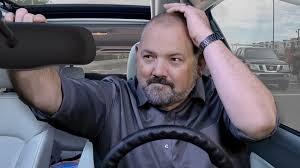
LOL, when you wrote: "... to do your stuff", all I can picture is:

1727370866396-9p.jpg


But to the OP, I bet airline tech is correct and you've done the squishy brake Forscan thing, so to me, you're a pro at it!

Let us know how it goes, I'm so close to doing Forscan but I'm a giant weenie about it ...

me and a couple of friends
1727371096026-2z.jpg
 

Big Blue

Well-Known Member
First Name
Lee
Joined
May 5, 2020
Threads
16
Messages
3,927
Reaction score
9,352
Location
Wisconsin
Vehicle(s)
2019 Ford Ranger XLT FX4 Supercrew lighting blue
Occupation
Retired mechanical designer
LOL, when you wrote: "... to do your stuff", all I can picture is:

1727370866396-9p.jpg


But to the OP, I bet airline tech is correct and you've done the squishy brake Forscan thing, so to me, you're a pro at it!

Let us know how it goes, I'm so close to doing Forscan but I'm a giant weenie about it ...

me and a couple of friends
1727371096026-2z.jpg
Just trying to give her options to try without using Forscan. The "Easy Menus" in the configuration files are one thing, but actually going into the as-built files and editing the HEX codes is a little different.

I have to go in and see if any additions have been made to the configuration menus since I documented then for my files. The have been several updates to Forscan from when I last did that.
 
OP
OP
paval3

paval3

Well-Known Member
First Name
Val
Joined
Apr 30, 2021
Threads
35
Messages
701
Reaction score
1,519
Location
Pennsylvania
Vehicle(s)
2021 Ranger XLT Crewcab & 2003 Mountaineer Premier
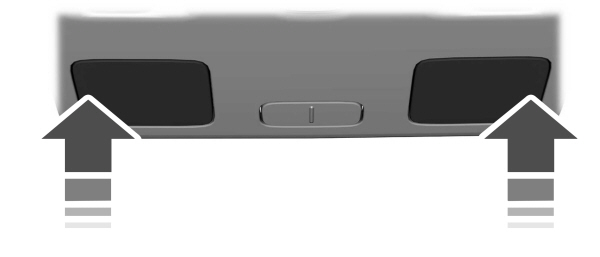
I didn't know about this. This might just be all I need. Going to try it when I get out to the truck. I only knew about the switch, didn't know you could touch the lamp lens edge to turn on the reading lamp.
From the owner's manual:


Reading Lamps
Interior Lamp

Press the edge of the lamp lens to switch on and off.
If you switch the ignition off, the reading lamps turn off after a short time.
Note: This is to prevent the vehicle battery from losing charge.
Sponsored


Top