Sponsored

Fix for ranger in vehicle hotspot not working.

cornpop

New Member
First Name
Brian
Joined
Jul 9, 2023
Threads
1
Messages
2
Reaction score
6
Location
Florida, USA
Vehicle(s)
2019 Ford Ranger XLT
I was able to easily resolve this issue, and did not find any info about it here so I figured I would share to help out anyone else that has this problem.

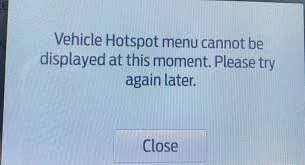
I noticed the issue because my dashcam was no longer connected to the cloud, I went to the FordPass connect setting, and when I clicked vehicle hotspot, I was greeted with the following message:

Vehicle Hotspot menu cannot be displayed at this moment. Please try again later.

The fix goes as follows:

1)power off truck and remove key

2)pop down the cover for the interior fuse box under the steering wheel

3)locate fuse #9 for Telematics, it's a red 3 pole 10 amp

4)remove the fuse, wait 6 minutes, then reinstall it.

5) power on the truck and the issue is fixed, you do not need to re-register anything, all passwords and settings are retained, everything should begin to work as intended immediately.

IMG_0667.webp
Sponsored


Mobius97

Well-Known Member
Joined
Aug 2, 2019
Threads
5
Messages
253
Reaction score
517
Location
Seattle
Vehicle(s)
Ranger Lariat Fx4-Lotus Evora-Lotus Elise-BMW X7 M
This is the way!

Old post but bumping this one. My truck doesn't get much love until summertime comes around. That's when I have to start driving my truck for hauling water toys.

Wife wanted to get some work done on our 3hr drive to lake, noticed the trucks wifi wasn't working. It said it was on but nope....no SSID broadcasting. When trying to turn off and on, was greeted with the message cornpop showed. I then noticed the Ford Pass app wasn't working either for starting/locking.

The advice above did the trick, had everything up and running in less than 10mins. Thanks!
 

AJF22

Member
First Name
Jay
Joined
Nov 30, 2020
Threads
3
Messages
8
Reaction score
10
Location
Los Angeles
Vehicle(s)
2019 Ford Ranger
Vehicle Showcase
1
Bumping this again since it's better then Tylenol to cure the Ford Pass hotspot headache.

This same thing happened to me, hotspot wasn't working, and it's been a huge issue for the last week. Ford's customer service and the apps customer service was about as useful as tits on a pelican.

I ended up wasting time reading a bunch of BS online and then this magically popped up and it worked perfectly! Thank you!
 

tnewcomb6370

Well-Known Member
First Name
Tim
Joined
Dec 29, 2019
Threads
1
Messages
59
Reaction score
104
Location
Connecticut
Vehicle(s)
2019 Ford Ranger
Had this problem today while on a trip. Was working fine the day before but would not hook to internet. Fordpass was working fine. Pulled fuse and waiting 10 minutes now working again.
 

Voltune

Well-Known Member
Joined
Sep 12, 2019
Threads
7
Messages
48
Reaction score
25
Location
Washington State USA
Vehicle(s)
Ranger 2019 XLT 4x4 Supercab (302A)
Just wanted to say thanks! My 2019 Ranger stopped communicating with the Ford App. I was no longer able to remote start/stop, lock/unlock doors, see current vehicle status, etc. The Onboard Modem Serial Number (ESN) was blank. I could not access FordPass Connect Connectivity Settings or Vehicle Hotspot menu. The dealer wanted $450 to diagnose the issue and vehicle would have to stay overnight or longer. I found this post and ended up pulling out the #9 fuse and reinserted it. Everything is working again and the modem ESN reappeared. Thanks again.
 

fob63

Well-Known Member
First Name
bill
Joined
Jun 27, 2020
Threads
28
Messages
385
Reaction score
856
Location
Springdale Arkansas
Vehicle(s)
2019 ranger
Occupation
retired
Just wanted to say thanks! My 2019 Ranger stopped communicating with the Ford App. I was no longer able to remote start/stop, lock/unlock doors, see current vehicle status, etc. The Onboard Modem Serial Number (ESN) was blank. I could not access FordPass Connect Connectivity Settings or Vehicle Hotspot menu. The dealer wanted $450 to diagnose the issue and vehicle would have to stay overnight or longer. I found this post and ended up pulling out the #9 fuse and reinserted it. Everything is working again and the modem ESN reappeared. Thanks again.
This site a wealth of information. I also believe we some of the best troubleshooters in the Ford Ranger forums or many of the other Ford forums, that I have been on!
Sponsored


Top