cornpop
New Member
- First Name
- Brian
- Joined
- Jul 9, 2023
- Threads
- 1
- Messages
- 2
- Reaction score
- 6
- Location
- Florida, USA
- Vehicle(s)
- 2019 Ford Ranger XLT
- Thread starter
- #1
I was able to easily resolve this issue, and did not find any info about it here so I figured I would share to help out anyone else that has this problem.
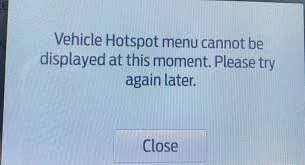
I noticed the issue because my dashcam was no longer connected to the cloud, I went to the FordPass connect setting, and when I clicked vehicle hotspot, I was greeted with the following message:
Vehicle Hotspot menu cannot be displayed at this moment. Please try again later.
The fix goes as follows:
1)power off truck and remove key
2)pop down the cover for the interior fuse box under the steering wheel
3)locate fuse #9 for Telematics, it's a red 3 pole 10 amp
4)remove the fuse, wait 6 minutes, then reinstall it.
5) power on the truck and the issue is fixed, you do not need to re-register anything, all passwords and settings are retained, everything should begin to work as intended immediately.

I noticed the issue because my dashcam was no longer connected to the cloud, I went to the FordPass connect setting, and when I clicked vehicle hotspot, I was greeted with the following message:
Vehicle Hotspot menu cannot be displayed at this moment. Please try again later.
The fix goes as follows:
1)power off truck and remove key
2)pop down the cover for the interior fuse box under the steering wheel
3)locate fuse #9 for Telematics, it's a red 3 pole 10 amp
4)remove the fuse, wait 6 minutes, then reinstall it.
5) power on the truck and the issue is fixed, you do not need to re-register anything, all passwords and settings are retained, everything should begin to work as intended immediately.
Sponsored